
An email drip campaign keeps working after you stop watching it, and few email programs do that. You write the messages once and set the rules. The system then sends each person the right email at the right moment, for weeks or months. That is the appeal, and it is also the risk.
A drip that nobody is watching will keep emailing people who already bought, replied or unsubscribed. It will also keep emailing addresses that no longer exist, and the bounces and complaints that follow hurt your reputation with inbox providers. None of that is a copywriting problem. It is a design problem, and you settle it before the first email is sent.
The fix is to design the rules before you write the emails. You can do that even if you have only ever sent one-off emails. By the end, you will know how a drip works and be able to build one you trust enough to stop watching. It will stop when it should and avoid emailing the wrong person. You will also have a one-page sheet to check any drip against, whether you built it today or months ago.
Only a few guides cover what should stop a drip, or what the list behind it is doing while it runs but we go further. The length and spacing ranges guides quote rarely come with data behind them, so you will test your own numbers instead. It starts with one question: what is this series for?
TL;DR
- An email drip campaign means a set of emails written once and sent automatically after an event or date, like a welcome series.
- The terms drip, nurture, sequence and autoresponder overlap, so classify a series by whether it reacts to behavior, who sends it and why.
- Every email drip campaign needs three rule sets written before launch: who may enter, how it paces its sends and what ends a run.
- A purchase, reply, unsubscribe, hard bounce or spam complaint should each end a run, and overlapping drips need a priority order.
- Addresses valid at entry can fail while a drip runs, so MailCleanup recommends verifying a list before enrolling it and enrolling in batches.
- Published length ranges for drips disagree and rarely cite data, so set length by the number of jobs and read vendor benchmarks as direction.
What Is an Email Drip Campaign?
An email drip campaign means a series of emails you write once and a system sends for you over days or weeks. Something a person does, or a date on the calendar, starts the series. Each person then moves through it on their own schedule.
So what is an email drip campaign, and how is it different from the emails you already send? The email drip campaign meaning is in the name. The drip is the pacing: messages arrive one at a time, not all together. The campaign is the purpose: each email has a single job. An email marketing drip campaign might be a cart reminder, a welcome series, a renewal notice or a short email course.
A drip campaign is one pattern inside email automation. Email automation means sending an email because something happened or a date arrived, not because you pressed send. A welcome email, a cart reminder and a birthday note are all automation, and so is a drip. Each one needs three things. They are a tool that sends on its own, an event or date that starts it, and data you can trust about each person. If you want the wider picture, email automation covers the triggers (the events that start an email) and the other workflow types in detail. To see what a drip adds, compare it with the one-time email most people already send, the broadcast.
| Question | Broadcast | Drip |
|---|---|---|
| Who receives it? | Everyone on the list | Each person who qualifies |
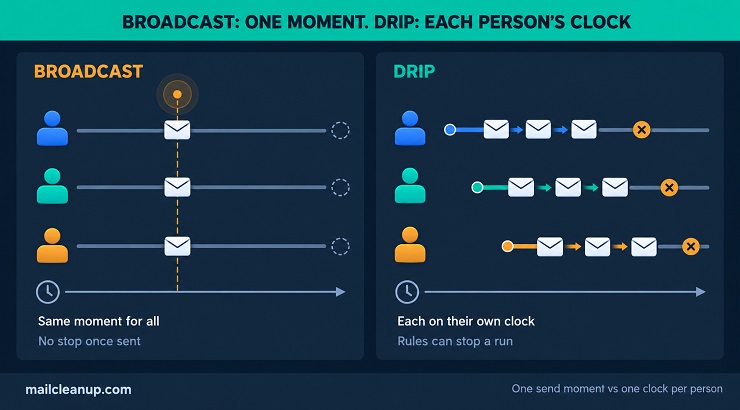
| When does it go out? | One moment, the same for everyone | A different moment for each person |
| What starts it? | You, when you send it | An event or a date |
| What can stop it? | Nothing, once it is sent | Rules you set in advance |
The last row matters most. A broadcast is finished once it sends, but a drip is still running next month. That is why a drip needs rules a broadcast never does: who may enter, what paces the sends and what stops the run.
Drip Campaign vs Nurture Campaign, Email Sequence and Autoresponder
The wider category is the email drip campaign: a paced series of emails you write in advance. Nurture says why it is sent, a sales sequence says who sends it, and an autoresponder is its simplest form.
Guides use these words differently, and some even swap them. One says a drip is a fixed schedule and a nurture campaign reacts to what people do. Another says it is the drip that reacts to what people do. So if one article seems to contradict another, that is why. Here is the simple key we use.
- Drip campaign: any series of emails written in advance and sent automatically over time.
- Nurture campaign: a drip with a goal, such as moving a new lead toward a first purchase.
- Sales sequence: a series sent from a salesperson’s own address that stops when the lead replies.
- Autoresponder: a single automatic reply, or the simplest series that sends everyone the same thing.
- Flow or journey: what many email tools call any automated series you build.
- Broadcast: a one-time email you send to a whole list.
Whatever a series is called, you can sort it with three questions. Does it change what it sends based on what your subscriber does? Who sends it? What is it for? Tools add their own words too, and two of them matter most: flow and broadcast.
A flow reacts to one person, so it can go stale. If you leave it running, it may still promise an offer that has ended. A broadcast speaks to everyone at once, so it can land at the wrong time for most of them. Use a broadcast for news that is true for everyone today, and a flow for anything that depends on what one person did. Email flows versus email broadcasts compares the two in more depth.
Drip Campaign vs Nurture Campaign
A drip campaign is how you send emails, and a nurture campaign is why you send them. So one series can be both. Take a welcome series sent on fixed days to everyone who joins. That is a drip. Add one rule so that people who click get a different second email. It is still a drip, now with a branch, a separate path for people who acted differently. Give it the goal of turning new subscribers into first-time buyers, and you can call it a nurture campaign too.
What is an email drip campaign, then, once it reacts to what people do? The email drip campaign meaning does not change. It is the same thing with more rules to look after, because every branch is more emails to write and keep up to date. Say the goal when you plan a series and how it works when you build it.
Drip Campaign vs Email Sequence and Autoresponder
A sales sequence is sent from a salesperson’s own address and stops when the lead replies. An autoresponder is the simplest case, the same automatic message for everyone. The drip campaign is the wider category that holds both.
The sender is the clearest way to tell them apart. If a series reads like a personal note from one person, a reply from the lead should stop it. Otherwise your next automated email cuts into a real conversation. An email marketing drip campaign sends from a brand address and is judged on clicks and purchases. That is how it differs from a sales sequence.
Guides use “sequence” and “autoresponder” loosely, so check what a tool means before you rely on the label. In your own plans, keep “email drip campaign” for the wider category and use the other two words only for these narrower jobs.
How a Drip Email Campaign Workflow Runs
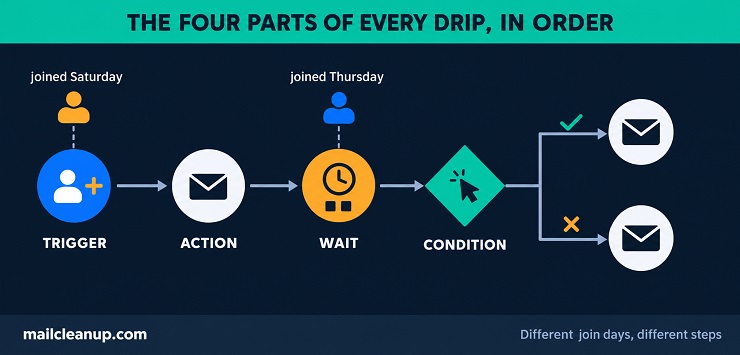
A drip email campaign workflow has four parts: a trigger, a wait, a condition (a yes-or-no check) and an action. Almost every drip campaign is some mix of those four, and knowing them makes any tool you use easier to follow.
- Trigger: what puts a person into the series and starts their own schedule, such as signing up or buying.
- Wait: the pause before the next step, such as two days.
- Condition: a check on the person, such as “did they click?” It sends people down different paths.
- Action: what the system does at that step, usually sending an email.
Drip marketing automation is the software that runs these four parts for you. Read them in order and you have an email drip campaign: something happens, the system waits, it checks, and it sends. For example, someone joins and gets email one straight away. Two days on, a check asks whether they clicked. Clickers get email two, and everyone else gets a short reminder. Each person runs on their own schedule, so people who join on Thursday and Saturday are at different steps on the same day.
What Starts a Drip: Triggers and Enrollment
A trigger is what puts a person into the series. That moment is called enrollment, and it starts their own schedule, not yours. Triggers fall into four types, and the strongest are things a person did on purpose.
- Events: something the person did, such as signing up, buying or leaving a cart behind.
- Dates: a day you already store, such as a renewal date or a birthday.
- Segment joins: the person matches a rule you set, such as “bought twice this year”. That puts them in a segment, which is just a group defined by the rule.
- Tag or field changes: a label (a tag) is added to a contact, or a stored detail (a field) changes.
Pick one trigger for each email drip campaign where you can. Two triggers feeding one series make it harder for you to say who is in it and why. Each trigger works per person, not per list, so every sign-up starts its own run. You will find the rest, including the ecommerce triggers, in email automation triggers.
Waits, Conditions and Branches in a Drip Campaign
A wait is the pause between two steps. A condition is a yes-or-no check, and a branch is one of the paths it creates. Each one changes which email your subscribers get, and when.
Start with the wait. You can count the pause from the last email, or count to a set time on the calendar. Say someone joins on Friday at 4:40 p.m. and gets email one at once. Three ways of writing the wait before email two give three different results.
| How the wait is written | When email two lands | What it does |
|---|---|---|
| Two days after email one | Sunday, 4:40 p.m. | Follows the person’s own pace and lands on a weekend |
| The next morning at 9:00 a.m. | Saturday, 9:00 a.m. | Hits a set hour, but still on a weekend |
| The next weekday at 9:00 a.m. | Monday, 9:00 a.m. | Hits working hours, after a gap of nearly three days |
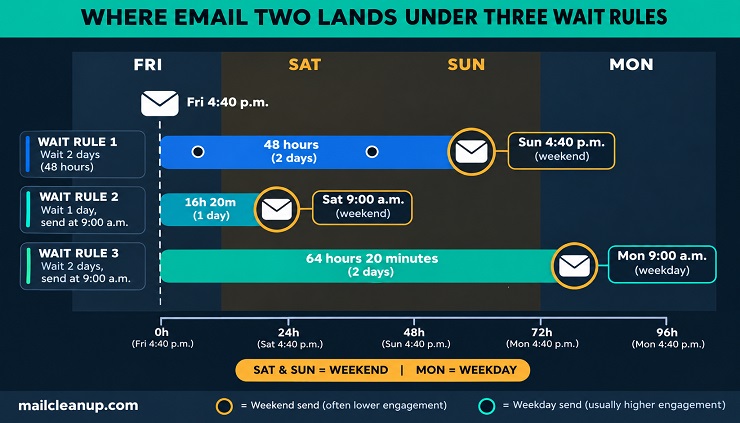
The same plan to email again in a couple of days can land on a Saturday, a Sunday or a Monday. It depends on how you write the wait. If your audience reads email at work, only the third rule keeps you on a weekday. It also adds about sixteen hours to the gap. A send window works the same way: if a wait ends outside the hours you allow, the email waits until the window opens. Also decide whose clock the time uses, yours or the subscriber’s, and settle that once for every wait.
Each answer to a condition opens a branch, and each branch is more emails for you to write and keep up to date. Add one only when the next email should really differ. Trust actions that need a person, such as a reply, a purchase or a click on a link that appears only in that email.
Be careful with opens, the record that your email was opened. Apple’s Mail Privacy Protection is a setting in the Mail app, and Apple’s privacy page now calls it Protect Mail Activity. When it is on, it downloads the email’s images and other content from the sender’s servers in the background. It does this as soon as the message arrives, even if the person never reads it. Senders learn about opens through those downloads, so an open can be logged for an email nobody read. Treat an open as a hint, never as a gate, in any email drip campaign.
Why Use an Email Drip Campaign
An email drip campaign handles the follow-up for you. Each person gets the next email based on what they did or when they joined, and nobody has to send it by hand. The benefits are real, and so are the limits of the numbers quoted for them.
What a Drip Campaign Does That a Broadcast Cannot
A broadcast reaches everyone at the same moment, whether or not that moment suits your readers. A drip campaign does three things a broadcast cannot:
- It follows each person’s timing: in an email drip campaign, the series starts when someone signs up, buys or reaches a date. Email one then arrives while the reason is fresh.
- It covers the stages after signup: a welcome, a first-purchase follow-up and a renewal reminder can all run on their own. You do not have to remember to send them. These are the drip marketing examples you will meet most often.
- It saves repeat work: you write each email once. The system then sends it to everyone who qualifies, for as long as the series runs.
The catch is that a series nobody checks keeps running. The time you save writing it comes back as upkeep. So every drip needs rules for who enters, how it paces its sends and what stops it.
What the Published Drip Campaign Numbers Do and Don’t Show
Published numbers say automated emails beat one-time sends, and the two vendor reports we traced agree. Neither measures an email drip campaign on its own, and both come from companies that sell email tools.
Both reports compare automated series, which they call flows or automations, with one-time sends, which they call campaigns. Both also report what their own customers did.
| Finding | Source | What it covers |
|---|---|---|
| Click rate of 5.58% for flows against 1.69% for campaigns. About 41% of email revenue from 5.3% of sends | Klaviyo’s 2026 benchmarks, from over 183,000 of its customers | All automated flows in ecommerce stores, against one-time campaigns |
| Automations were 2% of sends but 30% of email revenue. They brought in $2.87 per send against $0.18 | Omnisend’s 2026 report, from 150,000 brands, using 2025 data | All automations in ecommerce stores, against scheduled campaigns |
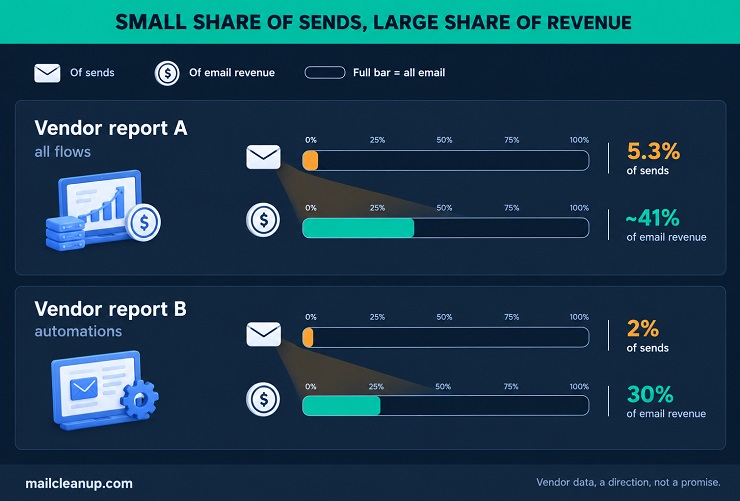
You should read them as a direction, not a promise. They show automated email earning far more per send than broadcasts. They do not show how a drip campaign performs alone, because welcome series, cart reminders and every other automation sit in the same totals. Both are ecommerce numbers from the vendors that sell the tools, so you should treat them as vendor data, not independent tests.
Other figures need more care before you rely on them. A claim that automated emails lift conversions for consumer brands by up to 50% appears in several guides. One guide credits a vendor’s help article, and that article links the figure only to a company’s homepage, not to a study. Even one vendor’s own numbers move. Its 2024 data listed a 48.57% open rate for automated flows, and its 2026 benchmarks list 32.2%. Open rates are shaky anyway, because Apple’s Mail Privacy Protection can log an open for an email nobody read.
Email Drip Campaign Examples by Job
An email marketing drip campaign usually does one job, and the job decides what starts it, how long it runs and what ends it. These email drip campaign examples are grouped by that job. Starting from the job is also how to create email drip campaign sequences that stay short and useful.
| Job | Starts when | Ends when |
|---|---|---|
| Welcome | Someone signs up | The last welcome email goes out, or they buy |
| Abandoned cart | Someone leaves items in a cart | They check out, or the last reminder goes out |
| Browse abandonment | Someone views products but adds none | They buy, or the last email goes out |
| Post-purchase | Someone buys | The last email goes out, or the order is returned |
| Re-engagement | Someone goes quiet for a long time | They respond, or you remove them |
| Education course | Someone joins the course | They finish it, or they unsubscribe |
| Webinar or event | Someone registers | The follow-up ends, or they book or buy |
| Trial or sales follow-up | A trial or demo starts | They upgrade, book or reply, or the trial ends |
| Renewal or date-based | A stored date gets close | They renew, or the date passes |
Two patterns stand out. Jobs that start with something a person does end when that person acts, so their exit rules matter most. Jobs that start on a date are the easiest to plan, because you know when they begin.
Online stores run most of the first five jobs, often for the same shopper within a few weeks. You might send one shopper a welcome series, then a cart reminder, then a post-purchase series. What holds them together is the hand-off. Each series ends when the next one’s trigger fires, so a purchase ends the cart reminders and starts the post-purchase emails. A broader look at ecommerce email marketing shows how the full set fits together. Here is the short version of each job, with where to read more:
- Welcome: a short series that starts at signup. It usually has four stages. Send the first email right away, while the signup is fresh, to welcome the person and deliver what you promised. Then tell your brand story, show the product’s value and make an offer. Let a first purchase end it. The full build is in our guide to the welcome email series.
- Abandoned cart: a reminder series that starts when someone leaves items behind and stops the moment they buy. A common starting point is two or three emails. Send a plain reminder within hours. Answer doubts such as shipping or returns the next day, then send a last note a couple of days after that. Hold any discount for the last email, if you use one. Abandoned cart email shows you the timing and the offers.
- Browse abandonment: starts when someone looks at products without adding one to the cart. Keep it lighter than a cart reminder, because your visitor has shown less intent. Send one or two emails that show the item they viewed and a few similar ones, with no discount at first. It ends when they buy or the last email goes out. The full approach is in [browse abandonment email].
- Post-purchase: starts at checkout. Your store sends the order confirmation. The series that follows helps the customer use the product, asks for a review once it arrives, and only then suggests more. Keep selling out of the first emails, so they read as service, not sales. It ends when the series finishes or the order is returned. The details are in [post-purchase email flow].
- Re-engagement: starts when someone has not clicked or bought for a long time. Decide what “a long time” means for your list. Then send a few emails that ask whether they still want your emails, or that offer something worth opening. It ends when they respond or you remove them. Removing the people who never respond is list scrubbing, the routine of retiring contacts who stay silent. Email list scrubbing covers the thresholds, and the win-back series itself is in [re-engagement email campaign].
Education Series: A Course Sent as Emails
An email course teaches one idea per email until your reader finishes. It works as an email drip campaign because each lesson waits for the last one, and signing up for the course starts it. Here is one way you can build it:
- Day 0: a welcome note and lesson one, plus what the course will cover.
- Day 2: lesson two.
- Day 4: lesson three.
- Day 6: lesson four.
- Day 8: the final lesson, plus one clear next step you want readers to take, such as a trial or a call.
The series ends when the person finishes lesson five, takes the next step or unsubscribes.
Webinar and Event Drips
An email drip campaign for your event has two halves: getting people to show up, then following up. Registering starts it, and attending or missing the event decides the second half. A simple version runs like this:
- At registration: a confirmation with the date, the join link and a calendar link.
- The day before: a reminder that says what the person will learn.
- One hour before: a short “starting soon” note with the join link.
- After the event, for people who attended: a thank-you, the recording and the next step you hope they will take.
- After the event, for people who did not: a “sorry we missed you” note with the recording.
If your webinar tool passes attendance to your email tool, you can send the last two emails to the right people. If it does not, send everyone the same follow-up. The series ends after the follow-up, or sooner if the person books or buys.
Trial and Sales Follow-Up Drips
A trial or demo drip helps someone who has already shown interest decide, and it ends when they act or reply. Who sends it changes the exit rules you need. A brand sends the same series to many people, so a booking or an upgrade ends it. A salesperson sends from their own address, so a reply ends it too, and that makes it a sales sequence. One way you can build a brand-sent version:
- Day 0, when the trial starts: how to get the first useful result.
- Day 2: the one feature that matters most to new users.
- Day 5: an answer to the question new users ask most.
- The day before the trial ends: a reminder of what they set up, and an easy way to upgrade or ask you for help.
The email drip campaign ends when the person upgrades, books a call or replies, or after email four if nothing happens.
Renewal and Date-Based Drips
A date-based email drip campaign counts down from a date you already store, such as a renewal, a birthday or an anniversary. The date itself is the trigger, so you control the timing in advance and can test the whole series before it starts. For a renewal, you could build it this way:
- 30 days before: a heads-up with the renewal date and the price.
- 7 days before: a reminder with a simple way to renew.
- The day it renews or expires: a confirmation, or a last notice.
- 3 days after, only if it lapsed: a short note about how to come back.
The series ends the moment the person renews, so you should check payment status before each send. Birthday and anniversary emails are the lightest drip marketing examples, because they are usually one message on the day. Add a second email only if the offer you attach expires.
How Many Emails a Drip Campaign Needs, and How Far Apart
An email drip campaign needs as many emails as it has jobs, spaced by how fast your reader decides. Published guides give ranges for both, and none of the ranges comes with data.
Guides give very different answers, so here are the main ones and what each rests on.
| What a guide says | What it rests on |
|---|---|
| 4 to 11 emails, 4 to 14 days apart | A link to another guide’s article, which says 4 to 10 emails |
| 4 to 7 emails, 2 to 4 days apart, for B2B sales | Sales advice with no source |
| 2 to 3 emails for simple products, 5 to 7 for complex ones | A rule of thumb with no source |
| 3 to 6 emails for a welcome series | A category list with no source |
| 2 to 5 days between emails | Offered as a starting point, with no source |
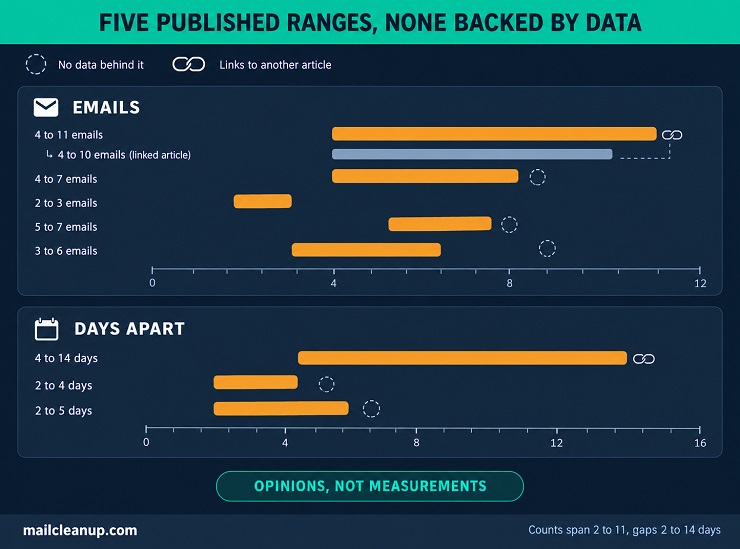
Counts run from 2 to 11 emails and gaps from 2 to 14 days. Only one of these figures points to another article, and that article says something different. You should read them as opinions, not measurements, and build your own rule from what the series has to do.
How Many Emails: One Job per Email
Send only as many emails as the series has jobs. A job is one thing your reader needs next, such as meeting you, seeing proof or making a decision.
Count the jobs before you write anything. A four-email welcome series might introduce your brand, show the product in use, answer the usual doubt and make the offer. A cart reminder might need only three: a reminder, an answer to a doubt and a last chance.
Then test each email against three rules:
- If two emails do the same job, merge them.
- If one email does two jobs, split it.
- If no new job is left, stop the series.
Start short and add to your email drip campaign only when you can name the new email’s job. Then watch where people stop clicking or start unsubscribing, and cut back to the last email that earned its place.
How Far Apart: Match the Gap to the Decision
Space the emails by how fast your reader decides: short gaps for quick choices, longer gaps for big ones. Treat any number as a starting point to test, because none of the guides we read backs its range with data.
- If the choice is quick, like an abandoned cart, use short gaps, from a few hours to a day or two.
- If the choice is ordinary, like a welcome series, start with two or three days between emails.
- If the choice is big or slow, like a business demo, leave a week or more.
Each email drip campaign should leave your reader time to act before the next email lands. Pair the gap with a send window, so an email that falls due at night waits for morning. Then set one weekly limit across every drip campaign a person is in, so two series never double up. Frequency is how many emails a person gets from you in total, drips and broadcasts together. No single number suits every list, so start with a cadence you can keep and watch unsubscribes and complaints after each change. If they rise, send less before you change anything else. How often to email your whole list is a wider question, and [email frequency] answers it.
Who Should Enter an Email Drip Campaign
Only people who agreed to hear from you, who fit the series and who have a working address should enter an email drip campaign. Few guides cover the third rule.
Eligibility Rules: Consent, Segment and Re-Entry
Three questions decide who can enter an email drip campaign. Did this person agree to this kind of email? Does the series fit them? Should they be able to go through it again?
- Consent: enroll only people who agreed to receive this kind of email from you. With single opt-in, a person joins the moment they submit the form. With double opt-in, they join only after clicking the confirmation link in a first email. The list then grows more slowly, but you know the address works and its owner asked to join. If you use double opt-in, enroll only those who have confirmed. If you are choosing between the two, double opt-in versus single opt-in weighs them.
- Segment: enroll only the group the series was written for. A series for first-time buyers should not start for people who have bought five times. Segmenting means grouping people by what you know about them. That covers what they told you, such as their role, and what they did, such as what they bought. Start with one split that changes what you would say, and add more only when each group gets its own message. Email segmentation walks through the main ways to do it.
- Re-entry: decide whether the same person can enter again. A welcome series should usually run once, and a renewal series should run at every renewal. Re-entry sends the person through every email again, so allow it only where that makes sense. Some tools let a person enter only once unless you switch re-entry on, so check what yours does for your trigger.
Address Quality Before Anyone Enters a Drip Campaign
Check every address before it enters an email drip campaign. A bad address wastes the series you wrote for that person and adds a bounce to your record. There are two places to check.
- At the form: a real-time check tests the address as people type it. It looks at the format, the domain and, where it can, the mailbox, so typos and fake addresses are caught before they join. When a check fails, ask the person to retype the address, because a typo is an honest mistake they can fix on the spot. No check can confirm every mailbox, so it narrows the problem without ending it. Real-time email verification breaks down each step of the check.
- Before an import: check any existing group before you add it. Export the group as a file and run it through a bulk check. Remove the addresses that fail, decide what to do with the risky ones, then import. Importing can start a series by accident. In at least one platform, importing profiles to a list starts any series tied to that list. Existing subscribers can then get your welcome series again. Turn off such series before you import. For a file you already hold, our bulk email verification service takes it and returns it cleaned, with no account needed.
Then decide what each result means for entry:
- If the address is valid, let it in.
- If it is invalid, keep it out for good.
- If it is accept-all, the receiving server says yes to every address, so a check cannot confirm the mailbox. If it is unknown, the check got no clear answer. Test both before you commit: enroll a small batch, keep it separate and watch the bounces. For what tools can and cannot tell you about these addresses, catch-all email addresses is the place to look.
Checking at entry is only the first step. List hygiene is the routine that keeps a list clean after people join. Remove hard bounces, unsubscribes and complaints at once. Retire long-silent contacts on a schedule, and check old addresses again before a big send. Email list hygiene explains how to run that routine.
What an Aging List Does to a Running Drip Campaign
A list that was clean on day one does not stay clean. We re-verified one client’s list every month for 12 months, from September 2025 to August 2026. By the end, 23.79% of the addresses that had passed as deliverable at the start no longer did.
The loss was not steady. The share lost each quarter rose from 2.79% in the first quarter to 11.91% in the last, more than four times faster. Most of the failures were permanent:
| Why the address failed | Share of failed addresses |
|---|---|
| Mailbox deleted | 55.31% |
| Mailbox disabled | 14.97% |
| Became accept-all | 12.65% |
| Domain expired | 10.56% |
| Unclear reply from the mail server | 6.51% |
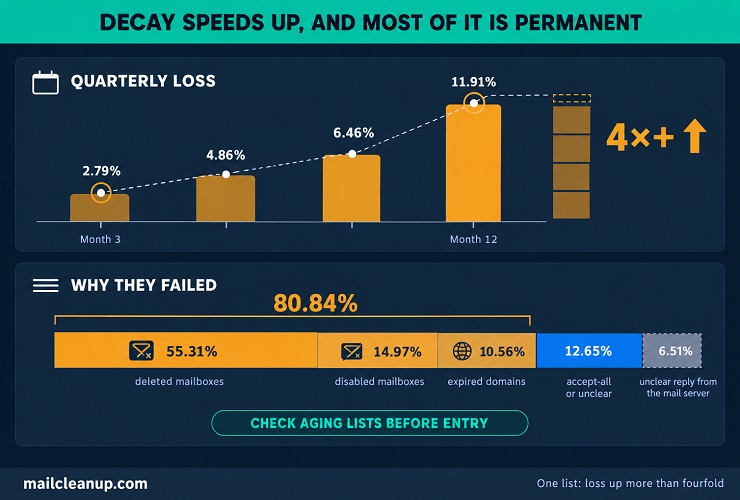
A deleted or disabled mailbox, or an expired domain, accounted for 80.84% of the failures. For a drip, that means an address that passed at entry can still bounce at email three. So check an old list before it enters an email drip campaign, and check again a list that has sat for months. This is one client’s list, so treat the pattern as a warning, not a forecast. The full numbers are in email list decay.
What Should Stop an Email Drip Campaign
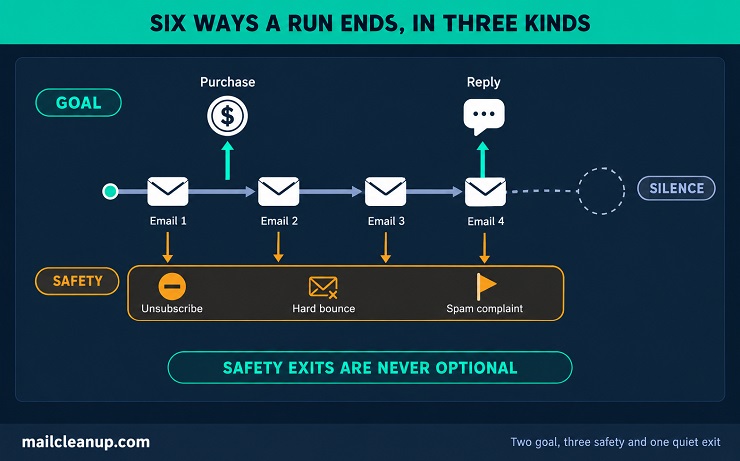
Five events should end a person’s time in an email drip campaign. They are a purchase, a reply, an unsubscribe, a hard bounce and a spam complaint. A sixth case, silence, ends the run quietly after the last email has gone out.
Write all six down for every email marketing drip campaign before launch, then check that your tool handles each one.
| Event | Why the run should end | Kind of exit |
|---|---|---|
| Purchase | The goal is met, so more “buy now” emails would be wrong | Goal |
| Reply | A person is now talking to you, and an automated email would cut in | Goal |
| Unsubscribe | The person asked you to stop | Safety |
| Hard bounce | The address can no longer receive email | Safety |
| Spam complaint | The person marked your email as spam | Safety |
| Silence | Nobody responded to the last email | Silence |
Goal exits keep the series relevant. Safety exits protect the person and your sender reputation, so they are never optional. A silence exit is a choice about what happens next, and you should make it before you launch.
Goal Exits: Purchase, Booking and Reply
A goal exit ends the series because it worked. Once a person buys, books or replies, your next email stops being helpful.
Say an email marketing drip campaign exists to get trial users to upgrade. If a customer upgrades on day three and email four still says “upgrade now”, the series has shown them it is not paying attention.
Pick one goal per email drip campaign, and one signal that proves it was met:
- If your goal is a sale, end the series on a purchase.
- If it is a meeting, end it on a booking.
- If it is a conversation, end it on a reply.
Then test it: complete the goal yourself and confirm the next email does not send. Replies need one more step. In a brand-sent series, replies usually land in a shared inbox, so decide who watches it. A real reply should end the series, so an automated email never cuts into the conversation. An automatic out-of-office reply should not count.
Safety Exits: Unsubscribe, Hard Bounce and Spam Complaint
A safety exit ends an email drip campaign because carrying on would be wrong. Three events always qualify, and none of them can wait for the next scheduled email.
- Unsubscribe: the person asked you to stop, so the next email must not go out. Many mail apps can show their own unsubscribe button. When an email carries the right technical signal, one click on that button unsubscribes the person with no confirmation page. When leaving is hard, people press the spam button instead, as the standard behind it, RFC 8058, points out. To offer it, your sending tool must add that signal and sign the email with a valid DKIM signature. That signature shows the email came from your domain. Ask your tool’s support whether it does both. A dedicated guide to one-click unsubscribe sets out what the standard asks of senders.
- Hard bounce: the address can no longer receive email, for example after the mailbox was deleted. Sending again only bounces again, and a run of bounces hurts your reputation with inbox providers. Remove the address at the first hard bounce. A soft bounce is a temporary failure, such as a full mailbox, so it does not end the run on its own. If an address keeps soft bouncing across several sends, treat it like a hard bounce and remove it. Soft bounce versus hard bounce explains how to tell them apart.
- Spam complaint: the person marked your email as spam. Treat it like an unsubscribe and stop at once, because more emails invite more complaints.
Then check that your tool ends the drip campaign on all three, and that it does so before the next send.
Silence Exits and What Follows the Last Email
A silence exit ends the email drip campaign after the last email, even when the person has not responded. What happens next is a choice, and you should make it before you launch.
- If they clicked or bought, move them to the next series or to your regular emails.
- If they stayed silent, keep them on your regular list or move them to a re-engagement series.
- If they stay silent for a long time after that, remove them.
A sunset policy is the rule that does this last step. It retires contacts after a fixed number of emails or months without a response. To set one, pick the signal that counts as a response, such as a click or a reply. Then pick how long you will wait. Send one last email that asks if they still want your emails, then remove the people who stay silent. Email list scrubbing works through where to set that line.
Some people leave because of how often you send, not what you send. A preference center is a page where they choose which emails they get and how often, and sometimes pause them instead of leaving. A basic one offers a choice of topics, a choice of how often and a pause, next to a clear unsubscribe. Whatever someone picks must be honored at the next send, so test each choice with a spare contact. Whether it keeps people is uncertain, so treat it as a test. If you decide to build one, email preference center covers the design and the setup behind the page.
Running More Than One Email Drip Campaign at a Time
When one person qualifies for two email drip campaigns at once, decide in advance which one goes first. Without a rule, they get both, and your two good series become one crowded inbox.
These four collisions are the ones you are most likely to meet, with a way to settle each.
| What happens | A way to settle it |
|---|---|
| Someone buys while still in a cart series | Let the purchase end the cart series and start the post-purchase one |
| A new subscriber also joins an email course | Run the welcome series first, then start the course |
| A customer is in a renewal and a re-engagement series | Keep the renewal series and hold the other |
| A person sits in three series at once | Apply one weekly limit across every series |
The pattern is the same each time: one series has a more urgent job than the other. Decide each clash with three rules:
- If one series protects the relationship, such as orders and renewals, it goes first.
- If two series have clashing goals, such as thanking a buyer and selling to them, end the selling one.
- If two series are equal, let the newer one wait until the older one ends.
To find collisions before your readers do, list every series with what starts it. Then look for starts that can hit the same person in the same week. Then pick three real contacts and write down every email each one got last month. Gaps and pile-ups show up fast.
Write the order down as a short list for your team. Put safety exits first, then care (orders and renewals), then sales series, then general nurture series. A written order also saves arguments, because anyone adding a new drip campaign can see where it fits. Hold promotional series for a few days after a purchase or a support request, so nobody is sold to while they wait for help.
How to Set Up an Email Drip Campaign
To set up an email drip campaign, write its rules first, then its emails, and build and test the series before anyone enters it. Here is how to set up an email drip campaign, in order:
- Pick one goal and the one event that starts the series.
- Fill in the rules sheet: who enters, how the series paces its sends and what ends a run.
- List the jobs, then write one email for each job.
- Build the drip email campaign workflow in your tool: the trigger, the waits and the exits.
- Test it with your own address, then run a spare contact through every exit.
- Launch the email marketing drip campaign to a small group, check the results, then widen it.
Before step one, an email marketing drip campaign needs three foundations. You need people who agreed to hear from you, which means they signed up for this kind of email. You need a tool that runs automated series, with triggers, waits and exits you can set. And you need one clear goal, such as a first sale or a booked demo. Email marketing guide walks through all three.
How to Create Email Drip Campaign Sequences From One-Job Emails
Here is how to create email drip campaign sequences without padding: assign one job to each email, then count the jobs.
Start by writing your series’ jobs as short lines in order. For a trial, the jobs might be to set up the account, reach a first result, see what the paid plan adds and decide. Each line becomes one email, with a wait before it. Map the series on one page, one row per email: its job, its wait and the one action it asks for.
Then write each email around its job. Write a subject line that promises that job in a few plain words. Use the first line to tell your reader why they are getting the email. Give one idea with one piece of proof, and end with one action. Cut any sentence that does not serve the job you gave the email. If you want help with the wording itself, email copywriting guide works through proven formulas and templates.
The One-Page Drip Rules Sheet
Every email drip campaign needs one page that holds its three rule sets: entry, pacing and exit. Copy the table, fill in each answer and keep the page with your series.
| Rule set | Question to answer | Example: a welcome series |
|---|---|---|
| Entry | What starts the series? | A signup through the welcome form |
| Entry | Who qualifies? | New subscribers who confirmed |
| Entry | How is the address checked? | A real-time check at the form |
| Entry | Can a person enter again? | No, once per person |
| Pacing | How many emails, and what are their jobs? | Four, one job each |
| Pacing | How long between emails? | Two to three days |
| Pacing | When may it send? | Weekday mornings |
| Pacing | What is the weekly limit across all series? | Three emails a week |
| Exit | What counts as the goal? | A first purchase |
| Exit | What always ends a run? | Unsubscribe, hard bounce, spam complaint |
| Exit | What happens after the last email? | Move to the regular newsletter |
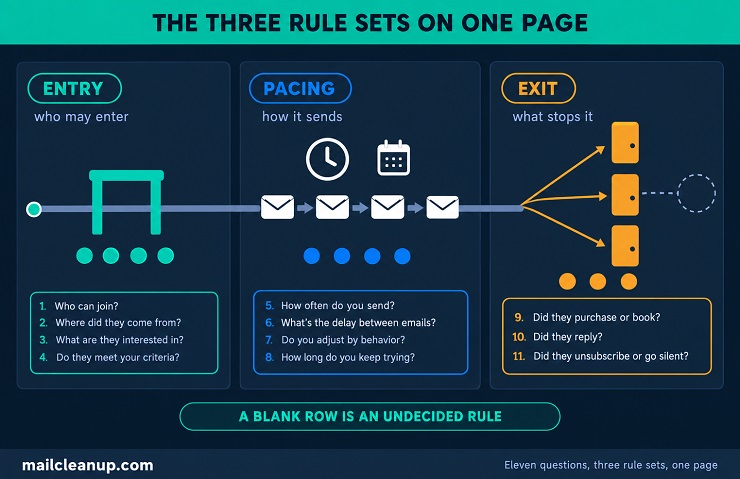
A blank row is a rule nobody has decided yet. Keep the sheet with your series, so anyone who changes it or adds another drip can see where the two might collide.
Test the Drip Before You Launch It
Test every email drip campaign with a spare contact before anyone real enters it. Run four passes: tokens, timing, every exit and a small first group.
- Tokens: a token is a placeholder that fills in a name or a product. Send the series to a test contact with every field filled in, then with each field blank, and confirm nothing reads “Hi ,”.
- Timing: check each wait and the send window against your sheet. The third email should leave exactly when the sheet says it should.
- Exits: put the test contact through each exit you can: complete the goal, unsubscribe, and send once to an address that does not exist. Confirm the series stops each time before the next send. For spam complaints, read how your tool handles them.
- First group: launch the drip campaign to a small slice of the list first. Watch bounces, unsubscribes and complaints for a few days before you widen it.
Email Drip Campaign Best Practices
Three practices matter most for your email drip campaign, because a drip campaign runs over time. Each email should stand on its own, each should bring a new angle, and the first email should be tested first. These email drip campaign best practices apply to every series, whatever its job.
Write Each Email to Stand on Its Own
Write every email in an email drip campaign so it makes sense if it is the only email a person reads. Someone may open email three first, skip email two or come back to the series after a week away.
- Name your brand and say why the person is getting the email, in one line.
- Skip lines that lean on another email, such as “as I said last time”, because your reader may not have seen it.
- Put the one action in the email itself, with a link your reader can click.
- Repeat key facts, such as the price or the deadline, instead of pointing back.
Vary the Angle From Email to Email
Give each email its own angle: a different reason to act, not the same message in new words. If two of your emails share one job and one angle, they are really one email.
Here are two short email drip campaign examples, one a repeat and one a new angle:
- A repeat: email three says again that the product saves time.
- A new angle: email three shows how a customer saved time with it.
A new angle can also be a different detail about the person, such as the product they viewed or the course they joined. Personalization means using what you know about a person to change the message. It runs from a first name to a whole email built around what the person did. It only helps when that data is correct, because a wrong name or product can do more harm than good. Start with one detail you trust, and give every field a fallback for when it is blank. To use more of what you know about each person, email personalization guide explains what each level needs.
Test the First Email First
Test email one before any other email in an email drip campaign. It reaches everyone who enters. The other emails reach only the people still in the series, so a test on email one gathers results fastest.
An A/B test sends an email in two variants, each to a random half of the audience, and compares one result, such as purchases. Change a single element per test, such as your subject line or your call to action. Decide in advance which result picks the winner. Let the test run until both versions have reached enough people to show a clear gap, not the moment one pulls ahead. Judge the test on actions, not opens, because Apple’s Mail Privacy Protection can log opens nobody made. Email A/B testing shows what to test first and what can corrupt a result.
How to Measure an Email Marketing Drip Campaign
Measure an email marketing drip campaign at two levels: each email, and the whole run. Per-email numbers show which step needs work, and the run-level goal shows whether the email drip campaign did its job.
Step-Level Metrics and Sequence-Level Goals
Read each email’s numbers against its own job, and read the run against its goal. That is also how you check that your email drip campaign best practices are working. These are the numbers to watch at each level, and how to read each one with care:
| Level | Metric | What it tells you | Read it with care |
|---|---|---|---|
| Bounce rate | Whether the addresses work | A high rate at email one points at entry quality | |
| Click rate | Whether the action is clear | Compare emails within one series, not across lists | |
| Unsubscribe rate | Whether the email or its timing annoys | A spike points at that email’s gap or content | |
| Complaint rate | Whether people reject the email | It warns first, so read it with the bounce rate | |
| Open rate | A rough hint of interest | Apple’s Mail Privacy Protection can log opens nobody made | |
| Run | Goal rate | Entrants who reached the goal | The main number for the whole series |
| Run | Exit mix | Why people left | A growing unsubscribe share points at pacing |
| Run | Revenue per recipient | Revenue divided by entrants | Compare only series with similar audiences |
A KPI is a number tied to a goal, and each one needs a written definition. For example, your unsubscribe rate is unsubscribes divided by delivered emails. Keep each formula the same across your series. For a drip, read the goal rate first. Then check the unsubscribe and complaint rates as guardrails, because a series that meets its goal while those climb is costing you subscribers. Email marketing KPIs defines the full set and what each one signals.
Reading Opens After Mail Privacy Protection
After Apple’s Mail Privacy Protection, an open is a weak signal, so do not build your email drip campaign on it. An open-based branch in an email marketing drip campaign can send people down the “opened” path who never read the email.
A branch is a fork where the series sends different people different emails. Say you set one fork to “send email 2B to people who opened email 1”. Apple Mail users whose app loaded the images in the background can land on the wrong path. The same goes for an exit that stops a drip campaign for people who did not open.
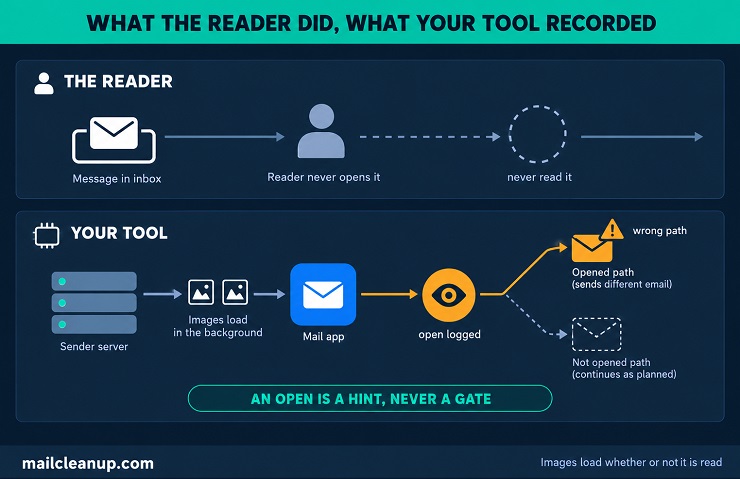
Use signals that need a real person instead: a purchase, a reply or a booking. Keep opens as a rough hint, and judge them only against the same series over time.
Bounces and Complaints as Early Warnings
Bounces and complaints warn you before sales numbers do, so compare them email by email in every email drip campaign. Where they rise tells you what broke.
- If bounces are high at email one, bad addresses are entering. Fix the entry check, whether it is the form, an import or an old list.
- If bounces climb by email four after a low start, addresses are going bad mid-run or your mail is being refused. Read the reason on each bounce: an address that does not exist points at the list, and a refusal points at your sending.
- If complaints jump at one email, look at that email’s content, gap and audience first.
Complaints matter most. A complaint is a person marking your email as spam. The complaint rate is spam reports divided by a count of emails. Dashboards can disagree because they count different totals, so pick one source and one formula. When many recipients report a sender’s mail as junk, that sender’s deliverability tends to suffer, as RFC 8058 notes. If the rate rises, pause the series at that email and review who receives it and what it says. Spam complaint rate shows how the rate is worked out and where the thresholds sit.
Drip Marketing Automation: Deliverability and Compliance Checks
Drip marketing automation has to pass two outside checks: the sender rules that mailbox providers enforce and the laws on consent and opting out. A third check is how you start an email drip campaign on a list you already have. That launch is where the first two get tested.
The table puts the named rules side by side, with the figure each rule-maker publishes.
| Rule | What it asks of a drip | Published by |
|---|---|---|
| Gmail rules for bulk senders | SPF, DKIM and DMARC; spam rate under 0.10% and never 0.30%; one-click unsubscribe on marketing mail | |
| Yahoo rules for bulk senders | SPF, DKIM and DMARC; spam rate under 0.3%; an unsubscribe header, ideally one-click; unsubscribes honored within 2 days | Yahoo |
| CAN-SPAM, United States | Honest headers and subject lines, an ad label, a postal address and opt-outs processed within 10 business days | FTC |
| CASL, Canada | Consent before sending, the sender named, unsubscribes handled within 10 business days | Government of Canada |
| GDPR consent, European Union | Consent that is freely given, specific, informed and unambiguous, and as easy to withdraw as to give | EDPB |
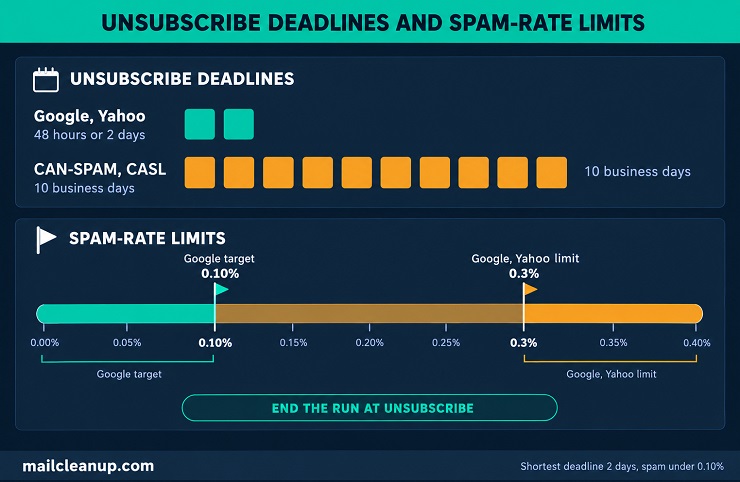
Google and Yahoo have the shortest unsubscribe deadlines, 48 hours and 2 days, and Google has the lowest spam-rate target, 0.10%. A drip that ends a run the moment someone unsubscribes meets every deadline in the table.
Sender Requirements for Automated Series
Mailbox providers judge an email marketing drip campaign by who sent it, how many people complain and how easily people can leave. Google and Yahoo turn those three tests into rules for bulk senders. Google counts you as a bulk sender once you send roughly 5,000 messages a day to personal Gmail accounts. The status never expires.
- Authentication: SPF lists the servers allowed to send for your domain. DKIM signs each email so receivers can check who sent it and that nobody changed it on the way. DMARC tells receivers what to do when those checks fail. Google and Yahoo ask bulk senders for all three.
- Spam rate: both providers watch the share of your mail that people report as spam. Google asks for under 0.10% and says never reach 0.30%. Yahoo asks for under 0.3%.
- Unsubscribe: Google requires one-click unsubscribe on marketing mail, which includes every drip, and Yahoo strongly recommends it. Both also want an easy-to-see unsubscribe link inside the email. Receipts and other mail that confirms something the person did are exempt. Honor requests within 48 hours at Google and within 2 days at Yahoo.
If you send an email drip campaign through an email tool, ask whether it signs your mail with DKIM for your own domain. Then check that your domain’s SPF record lists the tool. Watch your spam rate in Google Postmaster Tools, Google’s dashboard for senders. Enroll in Yahoo’s complaint feedback loop, which sends you a copy of each spam report. Gmail has been ramping up enforcement since November 2025, with temporary and permanent rejections for mail that breaks the rules. A dedicated guide to Google and Yahoo bulk sender requirements compares the two providers rule by rule.
Consent, Opt-Out Timing and Records
Consent rules differ by country, so an email marketing drip campaign that reaches several countries should follow the strictest one. Three sets of rules come up most: CAN-SPAM in the United States, CASL in Canada and the GDPR in Europe.
- United States (CAN-SPAM): the law sets rules for how you email and gives people the right to make you stop. Every commercial email needs honest headers and subject lines, a label saying it is an ad and your postal address. It also needs a clear way to opt out, and you have 10 business days to act on a request. It applies to emails sent to businesses as well.
- Canada (CASL): consent comes first. Express consent means the person agreed in words or in writing, with no time limit unless they withdraw. Implied consent covers only limited cases and expires, after up to 2 years for a purchase and 6 months for an inquiry. Each email must name you and offer a free unsubscribe, and you have 10 business days to act on a request.
- European Union (GDPR): where you rely on consent, it must be freely given, specific, informed and unambiguous. Consent cannot come from silence or from a box that was already ticked. Withdrawing has to be as simple as agreeing was, and you need to be ready to show the person agreed.
Keep a record for each contact of when and how they agreed, what they agreed to and which form they used. Store it as a field on the contact so your entry rule can check it. Then treat the shortest deadline as your own. End the run the moment someone unsubscribes from the email drip campaign, and you meet the 48-hour, 2-day and 10-business-day deadlines together. This is a plain summary, not legal advice, and email compliance compares the four main laws, including what each one can cost you.
Launching a Drip Into an Existing List
Part of how to set up an email drip campaign safely is to launch it in batches, not all at once. Start with your most engaged contacts, then widen as the results stay healthy.
Mailbox providers learn how much mail you normally send. Google advises raising volume slowly, starting with engaged people and sending at a steady rate. It warns against sudden jumps, such as doubling your volume at once. A drip makes the jump sharper, because everyone you enroll in an email marketing drip campaign gets email one within the same days.
- Check the list first, so bounces do not spoil the first batch.
- Enroll the people who clicked or bought recently.
- Watch bounces, unsubscribes and complaints for a few days.
- Add the next batch only if those numbers look normal.
- If bounces or deferrals rise, pause enrollment, then restart more slowly.
- Keep your list’s promise: do not send daily to people who joined a weekly or monthly list.
Warming up means raising your volume in steps, so mailbox providers see steady, wanted mail. These batches are a simple version of it, applied to one list. Warming up also applies to a brand-new sending domain or address, which has no sending history yet. Email warmup gives a week-by-week schedule and the signals to watch.
Your Next Step: Audit Your Email Drip Campaign
Pick one email drip campaign you already run, or the one you plan to build, and audit it against its own rules. Open the one-page rules sheet and fill in every row, from entry to exit. Use what the series does today, not what you meant it to do.
Then look for the gap that could do the most harm. Check three things. Anyone who unsubscribes, bounces or complains should leave before the next send. Nobody should enter without consent and a working address. A purchase or reply should end the run. Test each exit with a spare contact before you change anything else.
If the list has sat unused for months, check its addresses before the next enrollment, and enroll in batches. Fix the biggest gap first, then run the audit again after your next change to the series.
FAQs on Email Drip Campaign
How many emails should an email drip campaign have?
There is no proven number. Guides give ranges from 2 to 11 emails, and none backs its range with data. In an email drip campaign, assign one job to each email and stop when no job is left. A cart reminder might need three emails, a course one per lesson. Start short, then add an email only when you can name its job.
How long should an email drip campaign run?
An email drip campaign should run as long as the reader needs to decide. A cart reminder usually ends within a few days, and a welcome series within one to two weeks. A course or a long sales cycle can run for weeks. Treat these as starting points to test, not measured norms. End every series with an exit and a next step.
What is the difference between a drip campaign and a nurture campaign?
A drip campaign is how you send: a set of emails written in advance and released automatically over time. A nurture campaign is why you send: to bring a lead closer to a first purchase. One welcome series can be both. Guides swap these words, so judge any series by what it does, who sends it and what it is for.
What is the difference between a drip campaign and a newsletter?
A newsletter goes out to every subscriber at once, with fresh content in each issue. A drip campaign is written once and starts for each person when something happens, such as a signup. Two people can be on different emails on the same day. A newsletter is built around what is new, and a drip campaign around one goal.
What is the difference between a drip campaign and an email sequence?
The two terms usually mean the same thing. Guides use them loosely for any series of emails written in advance. We call that wider category an email drip campaign. A sales sequence is a narrower case: it is sent from a salesperson’s own address and stops when the lead replies. An autoresponder is the simplest case: one automatic message for everyone.
Do drip campaigns work?
Automated email brings in far more revenue per message than one-time email, but no published number isolates a drip campaign. One 2026 vendor report shows a 5.58% click rate for flows against 1.69% for campaigns. Another shows automations at 2% of sends but 30% of email revenue. Both come from ecommerce vendors’ own customers, so read them as direction.
What metrics show whether an email drip campaign is working?
For an email drip campaign, start with the goal rate: the share of people who enter and then buy, book or reply. Then watch unsubscribe, bounce and complaint rates as guardrails, and keep complaints under Google’s 0.10% target. Treat opens as a hint only, because Apple’s Mail Privacy Protection can log opens nobody made.
Can an email drip campaign hurt deliverability?
Yes. A drip campaign sends several emails to everyone who enters, so bad addresses, missing exits and poor targeting add bounces and spam reports fast. Google asks bulk senders to keep spam reports under 0.10% and never reach 0.30%. Verify addresses before enrolling, end a run on unsubscribe, bounce or complaint, and launch in batches.