
Catch-all email addresses get a different prevalence number in nearly every piece written about them. One source says 7%. Another says 15 to 25%. A third puts the figure near two-thirds of all business domains. Every one of these numbers comes from real, disclosed research, not a guess. None of them agree with each other, and almost nothing written on the topic explains why.
That gap matters more than it looks. If you are deciding how cautious to be with a list, or picking a verification tool, the number you anchor to matters. It changes the decision you actually make. A guide that hands you one confident percentage without saying what it is counting is handing you a number you cannot actually use.
This guide covers what catch-all email addresses actually are. It explains why the stats genuinely disagree instead of one source simply being wrong. It also covers what real testing and honest tool comparisons show about handling them, ground most guides on this topic skip entirely. We will also look at where MailCleanup’s own verification data fits into that picture. It is one honest data point, not the number that settles the question.
TL;DR
- A catch-all email address is a mailbox setup that accepts mail for any name at a domain, even names that don’t exist there.
- Published catch-all rates range from about 7% to over 60%, and the spread comes from what’s being measured, not a wrong source.
- No verification method can fully confirm a specific mailbox behind a catch-all domain from the outside, since detecting and resolving catch-all are different problems.
- Rankings claiming one verification tool resolves catch-all better than another often come from companies selling a competing product, not neutral testing.
- MailCleanup flags catch-all addresses as Accept-All rather than claiming to resolve them into a confirmed valid or invalid result.
- Verifying at signup, avoiding purchased lists, and adjusting for the type of send all reduce real risk from catch-all addresses.
What Are Catch-All Emails?
A catch-all email address belongs to a domain set up to accept mail sent to any name at that domain. Type what are catch-all emails into any search bar and you’ll get a dozen slightly different definitions, most of them technically correct. It doesn’t matter whether a real inbox actually exists for that name. Say a company configures example.com as catch-all. An email to a real employee and an email to a made-up name both get accepted by the server. Neither one bounces back, and from the outside, you cannot tell the two apart.
This setup goes by more than one name in practice. You will see catch-all email addresses and accept-all emails used interchangeably across the industry, and they mean exactly the same thing. Some tools default to one term, some to the other. MailCleanup’s own verification results use “Accept-All” as the category label, so it is worth recognizing both terms rather than assuming only one is correct.
The practical problem catch-all email addresses create shows up the moment you try to check a list against one. Standard email verification works by asking a receiving server one direct question: does this specific mailbox exist? On most domains, the server gives a real yes or no. A catch-all domain answers yes to everything, which breaks that check at its root. It is one of several address categories a full verification pass has to account for. A detailed study on how the whole verification process actually works, category by category, has been discussed in the dedicated post on email verification.
How Catch-All Emails Actually Work at the Server Level
Every mail server follows the same basic script when it receives an incoming message. It checks whether the named mailbox exists, then either accepts the message or rejects it. That check happens through a real, standardized exchange between mail servers, defined in the internet’s own SMTP specification, RFC 5321. Your own list checks depend on this exact exchange.
On a normal domain, that exchange gives you a genuine answer. A message to a real mailbox gets a 250 OK response, the server’s way of saying it accepted the message for a real recipient. A message to a name nobody set up gets a 550 error instead, a direct rejection. That second response is exactly what a verification tool relies on to mark an address invalid, the clean signal you actually want.
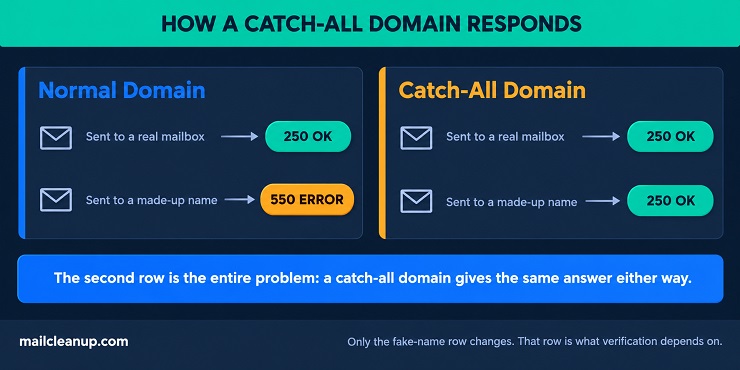
A catch-all domain removes that second option entirely. Every address, real or invented, gets the same 250 OK. The table below shows the difference in plain terms.
| Address sent to | Normal domain | Catch-all domain |
|---|---|---|
| A real, active mailbox | Accepted, 250 OK | Accepted, 250 OK |
| A name nobody set up | Rejected, 550 error | Accepted, 250 OK |
That single row on the right, a made-up name still getting accepted, is the entire source of the problem. A verification check built around getting a real answer has nothing left to work with once every answer comes back the same. This is not a flaw in any particular verification tool. It is a structural fact about how the receiving server itself is configured. That holds true no matter which tool you use to check catch-all email addresses.
Why Do Businesses Use Catch-All Email Addresses?
Running a catch-all domain is a deliberate choice, not an oversight. Most companies that set one up are trying to solve a real, specific problem, and the reasons repeat across industries.
- Typo protection: a message sent to a misspelled address still gets through instead of bouncing, which can save a real lead.
- Departing employees: an old employee’s address does not need constant deletion, since anything sent there still lands somewhere.
- Flexible aliasing: sales and support teams can hand out address variations without registering each one on the server.
- Legacy configuration: some domains were set to catch-all years ago by default, and nobody has revisited it since.
- Spam and abuse triage: some organizations route everything into one inbox on purpose, to review it for spam and phishing patterns.
- Company transitions: during a merger or rebrand, nobody knows every address still in use, so catch-all keeps mail flowing until things settle.
- Testing and staging: a development domain often runs catch-all so any address used during testing works without someone setting it up first.
None of these reasons make a catch-all domain reckless from the business’s own point of view. A company running one is usually protecting itself against lost mail, not ignoring a best practice. The risk sits entirely on the sending side. Anyone trying to build or clean a list of catch-all email addresses has to figure out which ones are actually worth emailing.
How Common Are Catch-All Email Addresses, Really?
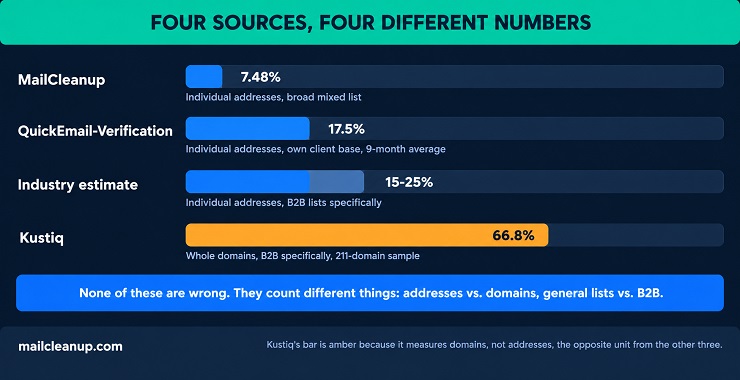
The intro mentioned four different numbers for how common catch-all email addresses are. None of them are wrong. They are each counting a different thing. Once you see what each one actually measured, the disagreement stops looking like confusion and starts making sense.
| Source | What it actually measured | Catch-all rate |
|---|---|---|
| MailCleanup’s own verification data | Individual email addresses, across a broad, mixed list | 7.48% |
| QuickEmailVerification’s own client data | Individual email addresses, averaged across nine months | 17.5% |
| A commonly cited industry estimate | Individual email addresses, specifically from B2B lists | 15% to 25% |
| Kustiq’s own study of 211 domains | Whole company domains, specifically B2B, a small sample | 66.8% |
Three real differences explain almost all of that spread.
- What’s actually being counted: counting individual email addresses is a different question from counting whole company domains. A single catch-all domain can easily hand you dozens or hundreds of catch-all addresses if it shows up often enough in your list. The two counts will never land on the same number, even from the exact same data.
- Which addresses made it into the sample: catch-all setups are far more common at business domains than at ordinary consumer email providers. A number pulled only from B2B lists will always run higher than one pulled from a general, mixed list that includes personal inboxes too. Personal email providers almost never run catch-all.
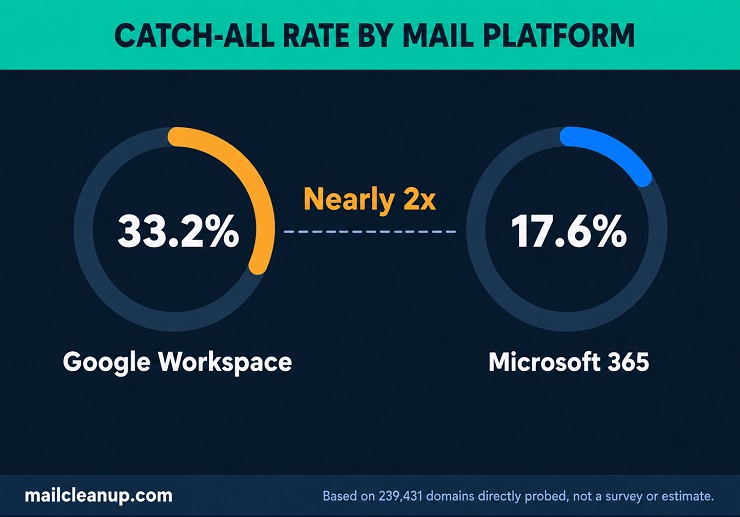
- Which email system sits in front of the domain: BounceZero’s own research found real differences here directly, across 239,431 domains tested. Domains running on Google Workspace turned out catch-all 33.2% of the time. Domains running on Microsoft 365 turned out catch-all only 17.6% of the time, roughly half as often. Same kind of domain, same test, a very different result depending on what mail platform sits in front of the inbox.
MailCleanup’s own 7.48% figure sits inside this same picture. It comes from a broad, mixed list of individual addresses, corrected and verified as of late July 2026. It isn’t a B2B-only sample, and it isn’t counting domains instead of addresses. That is not a reason to trust this figure more than the other numbers above. It is one honestly labeled data point, measured a specific way, at a specific time, the same as every number in the table.
The real lesson isn’t which number is correct. It’s that a catch-all percentage means nothing on its own. Before comparing any published rate to your own list, or to a number a tool hands you, check what it actually counted. A rate measuring B2B domains will never match a rate measuring a general list, and neither one is wrong for being different. Catch-all email verification, in the end, is only as good as knowing which population a given number describes.
Can Verification Tools Actually Resolve Catch-All Email Addresses?
Every verification tool can detect a catch-all email address. That part is easy: send a test message to a name that shouldn’t exist, and if it gets accepted anyway, the domain is catch-all. Detecting it is not the same problem as resolving it, actually figuring out whether one specific address behind that catch-all setup is real. That second question is what every tool in this space is really being judged on. Catch-all email verification is exactly this kind of judgment call, not a clean yes-or-no. If you’ve searched how to verify catch-all emails hoping for one definitive method, none of the approaches below fully gets there.
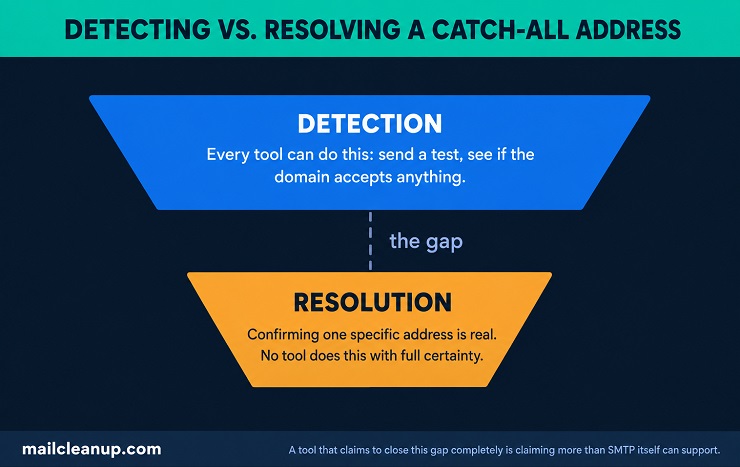
A few different approaches show up across the industry, and none of them fully solve the problem on their own.
- Waiting longer for a real answer: some catch-all domains eventually bounce a message for a fake address, just slower than a normal domain does. A tool that waits longer catches some of these delayed bounces that a faster check would miss entirely.
- Looking at patterns across the list: a repeated pattern, first initial plus last name, for example, lets a tool guess accordingly. A name matching that pattern is treated as more likely to be real, though this is a probability, not a confirmation.
- Checking for activity elsewhere: some tools check whether an address has ever shown real engagement anywhere, an open, a click, a reply. Activity is a reasonable signal. Its complete absence is not proof the address is fake.
Every one of these narrows the odds. None of them turns a genuine unknown into a genuine yes or no. The underlying limit is not a gap in any one tool’s engineering. It is what the receiving server itself will and won’t tell you, the same structural fact covered earlier in this guide.
This matters because of how the results get marketed. Search for a comparison of which verification tool handles catch-all email addresses best, and you will find rankings that look independent. Some of them aren’t. A comparison published by a sales outreach platform, or by a company selling its own competing verification tool, is that company’s own marketing. That’s true even when it’s formatted like neutral research, and even when a direct rival is the one being compared against. That doesn’t make every number in a comparison like that false. It means the comparison deserves the same question you’d ask of any other vendor claim: who published this, and what do they sell?
Email itself doesn’t give any tool a way around this. The uncertainty comes from a limitation in what the receiving server will tell anyone. It isn’t a gap in one company’s engineering that a better competitor has already closed. When a tool’s own marketing promises a definite yes behind a catch-all domain, that promise claims more than the test can support. The more trustworthy companies in this space say so plainly instead of papering over it.
Where MailCleanup Stands
MailCleanup flags catch-all email addresses as Accept-All. It does not claim to resolve them into a confirmed valid or invalid result. Given everything above, that is worth reading as the more honest answer, not a missing feature. A tool that tells you plainly “this one is genuinely uncertain” is giving you real information you can act on. A tool that hands you a confident yes when the underlying test cannot actually support one is giving you false confidence instead. False confidence is the more expensive mistake of the two.
A detailed study on how a verification tool’s full feature set fits together has been discussed in the dedicated post on email verification features. That includes catch-all handling specifically.
If a specific tool’s own catch-all track record matters more to you than the general picture above, each gets its own detailed, tool-by-tool breakdown:
- If you’re on ZeroBounce, its own catch-all handling gets compared directly against the alternatives worth considering.
- NeverBounce’s own resolution track record gets the same treatment in a dedicated NeverBounce alternatives comparison.
- Bouncer’s approach to this exact question has its own comparison post.
- Email List Verify’s catch-all handling is broken down the same way.
- MyEmailVerifier, including its separate paid catch-all add-on, gets a dedicated comparison too.
Keeping Catch-All Email Addresses Out of Your List in the First Place
Catch-all is a setting on the receiving domain, not something a sender controls. Nothing on your side can stop a domain from being configured as catch-all. What you can actually control is how many catch-all email addresses end up on your list, and how early you find out about them. Catching it early means before a campaign, not after.
Verify Catch-All Emails at the Point of Capture
The single strongest lever here is checking an address the moment someone submits it, not weeks later during a list cleanup. This is what catch-all email verification at signup actually buys you: a decision made before the address becomes part of any campaign. Real-time verification at signup catches catch-all email addresses, and outright invalid ones, before they ever become part of an active campaign. A full breakdown of how real-time verification actually works has been discussed in the dedicated post on real-time email verification.
Why Purchased Lists Skew Toward Catch-All Emails
Buying, renting, or scraping a list is one of the fastest ways to load it with catch-all email addresses. These lists are built by guessing likely address patterns or pulling addresses from public pages, not by anyone actually opting in. Nobody along the way ever confirmed a real inbox exists behind any of them.
A few signs point to this kind of list rather than a genuinely opted-in one:
- No signup date or source recorded for where an address came from.
- Addresses that all follow the same guessed pattern, first initial plus last name, rather than ones people actually typed themselves.
- A list older than a few months that has never been re-checked.
Building a list the other way, from real signups, is a different approach entirely. That’s been discussed in the dedicated post on how to build an email list.
Double Opt-In as a Filter for Catch-All Email Addresses
Double opt-in doesn’t change whether a domain is catch-all. What it changes is whether a fake or mistyped address ever gets treated as real on your list. A single opt-in form only needs someone to type an address and hit submit, no confirmation required. A catch-all domain will accept that address instantly regardless of whether it’s genuine. A typo or a bot-submitted entry looks identical to a real signup at that point.
Requiring a confirmation click before an address becomes active filters out most of both. Nobody clicks a link sent to an address they never actually typed. The full comparison between double opt-in and single opt-in is its own topic. It’s been discussed in the dedicated post on double opt-in.
Asking for one more field at signup, a company name or job title alongside the email, adds another small check. Bots and careless typing are less likely to fill out a second field convincingly than a single email box.
Handling Catch-All Email Addresses by What You’re Sending
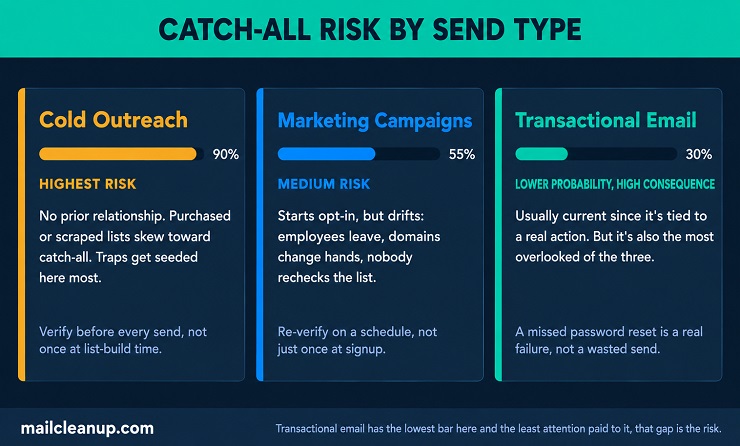
Catch-all risk isn’t the same for every kind of email. A catch-all address sitting in a cold outreach list is a different problem than the same address sitting in a transactional queue. Treating every catch-all email address with one universal rule misses real differences in how much each situation can actually tolerate.
Cold Outreach and Catch-All Email Addresses
Cold outreach carries the highest risk of the three. There’s no existing relationship to fall back on, no prior engagement signal, and often no verified opt-in behind the address at all. This guide already covered why purchased or scraped lists skew toward catch-all email addresses. Cold outreach lists are exactly the kind most likely to be built that way.
The stakes are also higher here for a specific reason: cold sending is where spam traps get seeded most often. A trap address left dormant for years looks, from a sending server’s perspective, exactly like an ordinary catch-all result. Mailing a catch-all address in a cold list carries the added risk of quietly hitting a trap, not just a bounce. Catch-all email verification at this stage is about managing exposure, not eliminating it.
Two adjustments matter most:
- Verify before every send: not just once when the list was built. A cold list can sit unused for months before a campaign actually goes out.
- Route catch-all results separately: a slower, smaller test batch instead of the main send catches real bounces or spam complaints cheaply. The same problem inside a full-volume blast is far more expensive to discover.
A full breakdown of cold outreach deliverability has been discussed in the dedicated post on cold email deliverability. Catch-all handling is one part of it.
Marketing Campaigns and Catch-All Emails
Marketing lists start from a better position than cold ones, since most are built from some form of opt-in. That doesn’t make them catch-all free. An address that was genuinely real at signup can end up behind a catch-all setup later. An employee leaves, a company changes mail providers, a domain gets reconfigured, all without that subscriber ever doing anything wrong.
This is a timing problem more than a sourcing problem. A list verified once at capture, then mailed for the next two years without a second look, will accumulate exactly this kind of drift. The fix is re-verification on a schedule, not a single pass. A subscriber who was Deliverable a year ago and is Accept-All today didn’t lie to you at signup. Their domain’s situation changed underneath them.
A second, complementary check is watching activity over time. A catch-all-flagged address that shows real signs of being read, opened, clicked, replied to, is behaving like a live subscriber. That holds regardless of what the domain-level check says. One that shows nothing at all across several consecutive sends is a stronger candidate for suppression than the catch-all flag alone would suggest. Neither signal alone tells the whole story about catch-all email addresses, but the combination usually does.
Transactional Email and Accept-All Emails
Transactional email gets treated differently from the other two categories, and for a reason that sounds sensible but doesn’t fully hold up. A password reset or an order confirmation is triggered by something the recipient just did. The address behind it is assumed to be current and real. Most of the time, that assumption is fair. It’s also the reason this category gets the least ongoing attention of the three. Nobody wants to add friction to a receipt or a login flow.
The gap this creates is real, and it applies just as much to catch-all email addresses in a transactional flow as anywhere else. An old shared inbox, or an address never touched again after onboarding, can sit behind a catch-all setup for a long time. Nobody notices, because transactional mail keeps going out regardless, campaign or no campaign. A failed password reset or a missed order confirmation is a genuine customer-experience failure, not a wasted marketing send. It deserves the same seriousness.
Verifying at the point of account creation, the same practice already covered earlier in this guide, still applies here. It catches most of the problem before it ever becomes transactional traffic. For addresses that slip through anyway, a repeated pattern still matters. Soft bounces or catch-all results showing up again and again on the same account are worth flagging to support or account teams directly. That’s a better outcome than letting the system keep quietly resending into the same uncertain address indefinitely.
Checking Your Own List for Catch-All Email Addresses
Every number in this guide, MailCleanup’s own included, describes someone else’s list, not yours. The actual figure that matters is what your own list looks like right now, today. Not a percentage borrowed from a report built on a completely different set of addresses.
Getting that number takes one real step: run your current list through verification and see how many catch-all email addresses come back. The result sorts addresses into Deliverable, Undeliverable, and Accept-All, among others, and that Accept-All slice is the one this whole guide has been about. Once you can see it, you can act on what actually matters. That includes which sends are risky enough to segment, and whether your signup process needs tightening. It also includes whether a tool claiming to resolve catch-all for you is making a promise it can actually keep.
None of that is possible from a percentage in someone else’s report. It’s only possible from your own list, checked. A list checked once and never touched again drifts back toward the same uncertainty over time, addresses decay, domains change hands, employees leave. A detailed study on how that decay actually plays out, and how fast, has been discussed in the dedicated report on email list decay.
FAQs on Catch-All Email Addresses
What is a catch-all email address?
People searching what are catch-all emails are usually trying to figure out why an address never bounces. A catch-all email address comes from a domain accepting mail for any name, even ones that don’t exist. Nothing bounces. Catch-all email addresses are also called accept-all emails, and they’re one of the harder categories for any verification check to sort out.
Is a catch-all email the same as an accept-all email?
Yes. Catch-all emails and accept-all emails describe the exact same setup: a domain accepting mail for any address, real or not. Different tools and guides default to different terms, but nothing about the underlying behavior changes. MailCleanup’s own reporting uses Accept-All as the category label.
How common are catch-all email addresses?
It depends entirely on what’s being measured. MailCleanup’s own data puts catch-all email addresses at 7.48% of a broad, mixed list. Other published figures run as high as two-thirds when the count is business domains, not individual addresses. Both numbers are accurate for what they’re actually counting.
Can email verification tools actually confirm a catch-all address is real?
Anyone searching how to verify catch-all emails eventually runs into the same wall. Not with full certainty, no. Every tool can detect catch-all email addresses. Confirming one specific address behind it is a genuine, structural limit, not a gap any one company’s engineering has closed. Tools that claim otherwise deserve real scrutiny before you trust the claim.
Why do companies use catch-all email addresses?
Mostly to avoid losing mail. Catch-all email addresses happen because a misspelled address, an old employee’s inbox, or an unregistered sales alias still gets delivered instead of bouncing. Some domains were just configured this way years ago by default and nobody has revisited it since.
Should I remove catch-all addresses from my list?
Not automatically. Removing catch-all email addresses outright throws away real contacts along with the fake ones. Segmenting them into a separate, more cautious sending group works better. Watching how they actually behave gets more value than deleting the whole category on sight.
Do catch-all email addresses hurt deliverability?
They can, but not automatically. Catch-all email addresses give no confirmation the mailbox is real. Mailing one blind carries real risk: a delayed bounce, a spam complaint, or worse, a spam trap. The risk comes from sending blind, not from the catch-all label itself.