
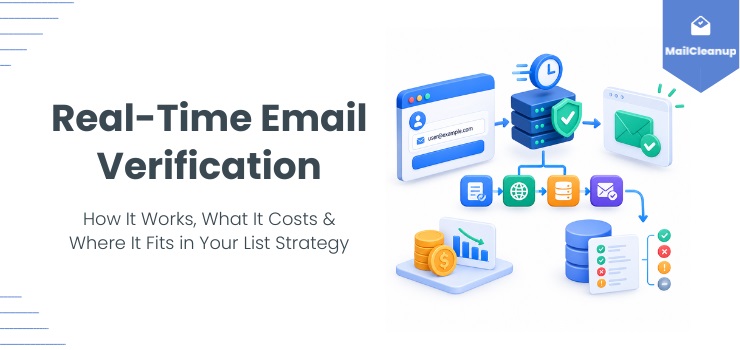
Type an email address into your signup form, and something happens before that address ever reaches your database. A request goes out, a handful of checks run against it, and a decision comes back: let it through, flag it, or reject it. That whole exchange usually takes less than a second. It’s the reason a growing share of online forms no longer accept the obviously fake addresses they used to.
Most explanations of real-time email verification stop at one of two places. Some walk you through the mechanism – syntax check, domain lookup, mailbox ping – without covering what it can’t catch as reliably as a slower alternative. Others compare real-time against bulk list cleaning in the abstract, without real evidence behind the claim that you’ll eventually need both.
You’ll get the full mechanism here: what actually happens during a real-time check, and where that method’s own accuracy genuinely tops out. You’ll also see what it costs to run. And you’ll see what happens after an address clears that first check: a list that passed real-time verification once doesn’t necessarily stay clean.
TL;DR
- Real-time email verification checks an address the instant it’s entered, typically returning a result in under a second.
- The process runs several checks in sequence: syntax, domain and mail server existence, then a mailbox check that’s the slowest and most variable step.
- Real-time verification has genuine accuracy limits: catch-all domains, servers that accept an address and bounce it later, and greylisting delays. Periodic bulk verification catches all three more reliably.
- A single spam trap hit is a more serious problem than an ordinary bounce. Google and Yahoo enforce a spam-rate ceiling of 0.3% before blocking a bulk sender outright.
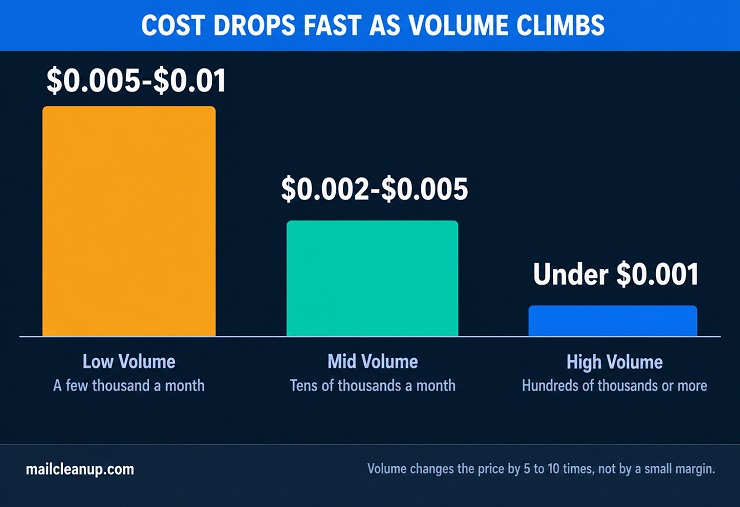
- Real-time verification is typically priced from the same per-verification credit pool as bulk checks. Rates run from roughly $0.005 to $0.01 per check at low volume, dropping under $0.001 at high volume.
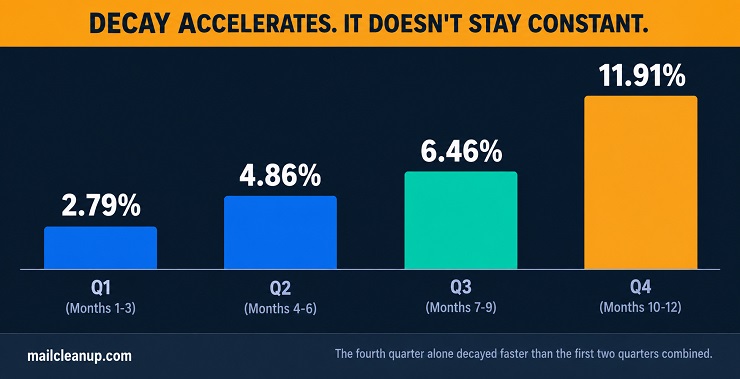
- A verified list doesn’t stay verified: MailCleanup’s own tracked data found 23.79% of a cleaned list decayed within 12 months.
- That decay accelerates too, from 2.79% in the first quarter to 11.91% in the last, more than four times faster.
- Most mature email programs run real-time verification at signup and bulk verification on the existing list together, since each covers the other’s blind spot.
What Is Real-Time Email Verification?
Real-time email verification checks an address the moment someone enters it into your form, before it’s stored anywhere. It’s one of the two verification methods our guide to email verification covers at a high level. The other is bulk verification, the kind that processes a list you already have all at once. Instead of collecting a batch of addresses and checking them later, real-time verification happens inline, as part of the form submission itself. The result comes back in time to still change what happens next: accept the submission, prompt for a correction, or block it outright.
This is different from the kind of verification most people picture when they think about cleaning a list. Bulk or batch verification takes addresses you already have and processes the whole set together as one upload. That usually takes minutes, not milliseconds. Real-time verification never works from a stored list at all. It only ever sees one address, at the exact moment your form receives it.
The practical effect for you is that the real-time email verification process acts as a gate, not a cleanup pass. Bad addresses get caught before they ever reach your database, rather than found and removed afterward.
The Real-Time Email Verification Process
The real-time email verification process your form triggers runs through the same general sequence, though not every provider implements every step. How fast each step returns varies a lot by what it’s actually checking.
Real-Time Email Verification API Basics
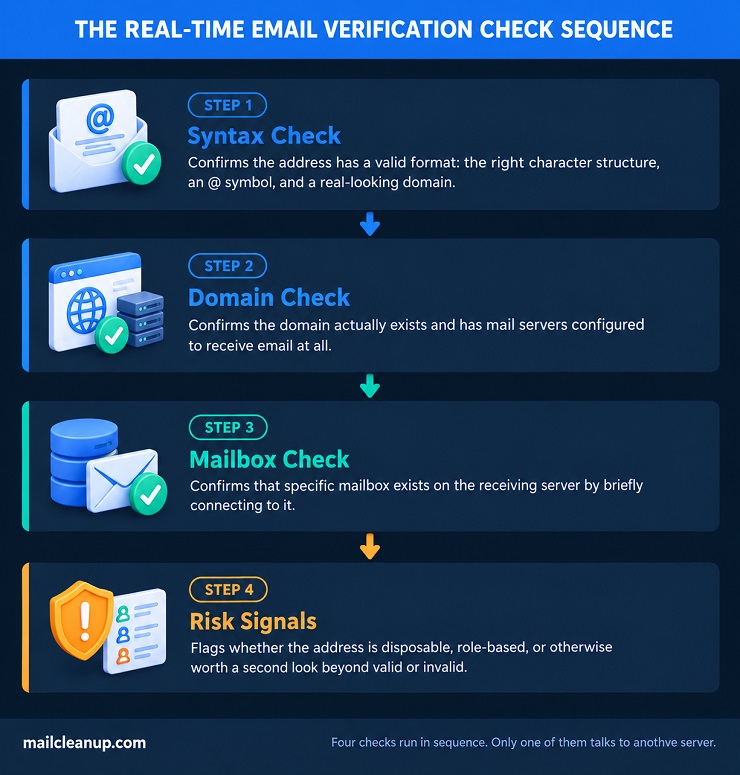
When your form calls a real-time email verification API, it runs the address through several checks in order, each answering a slightly different question:
- Syntax check: does the address follow a valid format, the right structure of characters, an @ symbol, and a real-looking domain?
- Domain check: does the domain actually exist, and does it have mail servers configured to receive email at all?
- Mailbox check: does that specific mailbox exist on the receiving server, confirmed by briefly connecting to it?
- Risk signals: is the address disposable, role-based (info@, support@), or otherwise worth flagging separately from a flat valid or invalid?
If you want the full breakdown of all eight result categories, what each verification check actually finds covers it.
Each real-time email verification API check runs as its own request-response exchange behind the scenes. Your form submits the address, and the verification service returns a structured result, typically labeled something like valid, invalid, risky, or unknown. Your application decides what to do with that result before the form actually goes through.
Real-Time Email Verification Response Times
Speed is what makes real-time email verification usable inside a live form, but not every check in the sequence runs at the same speed. The slower ones are the reason a well-built integration doesn’t just wait indefinitely for a perfect answer.
| Check | Typical response time |
|---|---|
| Syntax | Instant, no network call needed |
| Domain / MX lookup | Under 100ms |
| Mailbox (SMTP) check | 200ms to a few seconds |
| Overall real-time email verification result | Under 1 second in most cases |
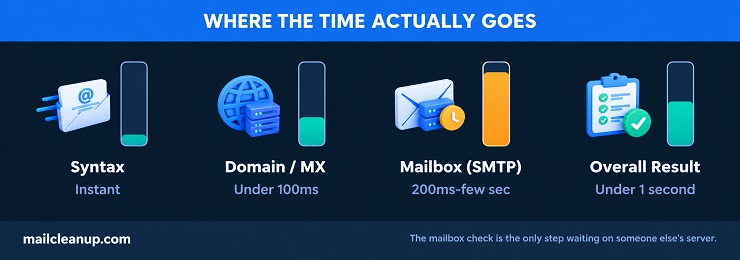
The mailbox check is the one that varies most, because it depends on how quickly the receiving mail server responds. Some servers deliberately delay a response to unfamiliar connections, a behavior called greylisting. A well-built integration won’t hold your form open indefinitely waiting for a definitive answer from a slow server. It returns a fast result when one’s available. Anything still uncertain gets its own category instead, flagged for a second look rather than blocked or blindly allowed through.
Where Real-Time Email Verification Has Real Limits
No verification method catches everything, and this real-time email verification guide wouldn’t be complete without covering where it genuinely falls short.
- Catch-all domains: these accept mail for any address, so a check can’t always confirm that specific mailbox exists too. Bulk verification can sometimes cross-reference patterns across a whole list; a single real-time check rarely has that luxury.
- Servers that accept, then bounce: some servers accept every address during the check, then bounce it once you actually send to that address. This is a different problem from a catch-all domain, which is an intentional, known policy. Here, the server is quietly failing to tell you the truth at the one moment you’re asking.
- Greylisting: some mail servers deliberately stall an unfamiliar connection to filter out bots that don’t retry. Your real-time check either waits and risks slowing the form, or marks the result unknown, even though the address might be valid.
- New disposable domains: detection relies on databases of known temporary-inbox providers. A brand-new disposable service can pass as a normal domain for a while, simply because nothing has flagged it yet.
- Role-based and free-provider signals aren’t certainties: a check can flag that “sales@” looks role-based, or that a domain is a free consumer provider. It can’t tell you whether that inbox is a real person managing a two-person startup’s mail. Block on these signals too aggressively and you lose real signups along with the noise.
- Volume can degrade accuracy: check many addresses against one domain in a short window, like a launch day or a campaign opening signups. Some mail servers respond by throttling or temporarily blocking the checks themselves. That shows up as a wave of unknown or timed-out results at exactly the moment you’re leaning on the check hardest.
None of these limits make real-time verification unreliable. They’re the reason a periodic pass over your existing list still catches things a point-of-entry check structurally can’t.
What Real-Time Email Verification Actually Prevents
This real-time email verification guide has covered the mechanism. Every check in the sequence exists to prevent a specific, concrete problem downstream, not just to satisfy a compliance checkbox on your signup form.
- Typos and formatting mistakes: someone types gmial.com instead of gmail.com. Real-time email verification catches it before the form submits, prompting a correction while they’re still there. Bulk verification only finds that same typo after the fact, once the lead or the order confirmation has already gone nowhere.
- Disposable signups, and what they corrupt: a temporary inbox blocked at the door never sits in your database. It never inflates a lead count nobody can follow up with either. Left unchecked, throwaway signups distort the metrics a growing team actually watches, trial-to-paid conversion and activation rate especially. They inflate how many “qualified leads” a sales team thinks it’s chasing too.
- Spam trap hits cost more than a bounce: a single spam trap in your list is a different category of problem entirely. What actually makes an address one is worth understanding on its own. Bounces hurt your reputation gradually. A spam trap hit can trigger outright blocklisting. Google and Yahoo both enforce a hard spam-rate ceiling before that happens: 0.3%, per their own published bulk-sender rules.
- Downstream bounces and reputation damage: every address blocked at entry is one that never gets the chance to bounce later. Every hard bounce you avoid is one less hit against your own email deliverability.
Common Real-Time Email Verification Use Cases
Some providers call this real-time email validation instead of verification; the two terms describe the same thing. Either way, real-time email verification shows up at the same recurring points, wherever a form is the first place an address enters your system.
Real-Time Email Verification on Signup Forms
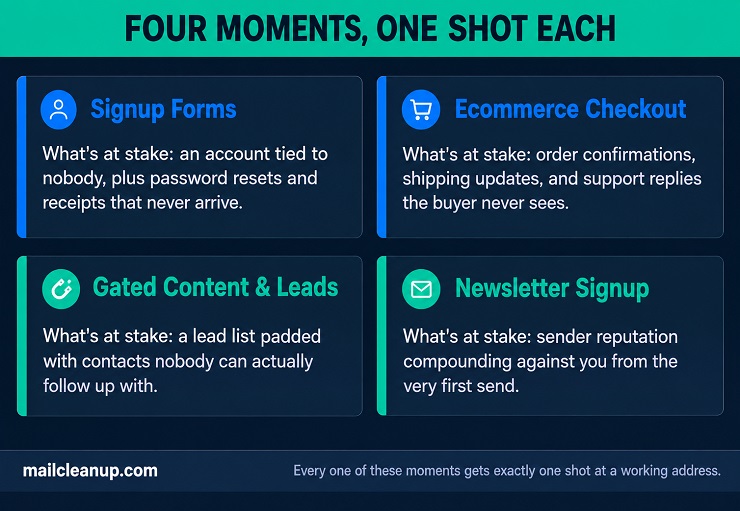
Real-time email verification on your signup form solves the plainest case there is: an account created around an address nobody can actually reach. Password resets, receipts, and any notification your new user needs later all depend on that address being real. A broken signup flow surfaces the problem only once someone’s locked out, asking why a reset email never showed up.
Where it fires matters: trigger the check when someone leaves the email field, not only when they hit submit. That way verification runs quietly while they’re still filling out the rest of your form. It doesn’t add a visible delay right when they’re trying to finish.
Real-Time Email Verification at Ecommerce Checkout
Real-time email verification matters even more at your checkout than at signup, because by then a real transaction already happened. The order confirmation, the shipping update, the payment notice: none of it reaches a buyer whose address bounced, even after they’ve already paid you.
Guest checkout raises the stakes: many sites let people buy without an account, so the email is the only contact detail you have. There’s no login for you to fall back on if that address is wrong, and no account page to update it later. It’s just an order with nobody reachable on the other end.
Real-Time Email Verification for Gated Content and Lead Forms
A whitepaper download or webinar registration on your site exists to start a conversation. Real-time email verification protects that conversation before it’s ever supposed to begin. Someone fills out your form, gets the content, and your sales or marketing team follows up on the address they left behind.
A fake address here doesn’t just skew a report: a real follow-up gets built around a contact your team can never actually reach. That’s a wasted touch on your team’s side, not just a wrong number in a dashboard.
Real-Time Email Verification on Newsletter Signups
A newsletter list doesn’t carry the immediate transactional weight your checkout does. Real-time email verification still matters here for a different reason: sender reputation starts building from the very first send you make. It starts on day one, not once your list has already grown large.
An address that bounces on your first campaign counts against you the same as one that bounces on your hundredth. Starting clean means that early reputation signal works in your favor from day one, instead of quietly working against it.
One nuance worth building into the rules themselves: the same block doesn’t belong on every form you run. A newsletter signup on your site can reasonably accept a free Gmail or Yahoo address. A B2B demo request or enterprise trial usually shouldn’t. A personal inbox on that specific form is a weaker-lead signal, not a formatting problem.
How Real-Time Email Verification Fits With Periodic Bulk Cleaning
Everything so far has been about real-time email verification catching a bad address the moment it arrives on your form. That’s only half the picture. An address that was genuinely good when someone typed it in doesn’t necessarily stay that way.
Real-Time Email Verification Doesn’t Make an Address Permanent
Real-time email verification confirms an address is good at one specific moment: when it’s entered on your form. It says nothing about whether that same address is still good six months later.
MailCleanup’s own tracked data puts a real number on this for lists like yours. Across a single list, verified monthly for a full year, 23.79% of addresses decayed from Deliverable to non-deliverable. The full year-long breakdown, including what causes the decay and how the pace changes, lives in a dedicated post.
That pace is the part worth sitting with. Decay didn’t happen at a steady rate across the year. It accelerated, starting at 2.79% in the first quarter and reaching 11.91% by the last, more than four times faster. An address that clears real-time verification on your form today isn’t just going to look different in a year. The rate at which it degrades speeds up the longer it goes unchecked.
Running Real-Time Email Verification and Bulk Cleaning Together
The two methods solve different problems, so most mature email programs run both rather than picking one. Real-time email verification handles the door: it stops a bad address from ever getting in. Periodic bulk verification handles everything that’s already inside, catching the accounts that were good once and have since gone stale.
This is exactly the kind of periodic cleaning MailCleanup handles. Upload your existing list, and it comes back checked against the same categories a real-time check uses, no account or subscription required. Run it on a schedule; quarterly is a reasonable starting point, given how much faster decay moves later in the year. The two methods cover each other’s blind spot.
What Real-Time Email Verification Costs
Cost is one of the more misunderstood parts of setting up real-time email verification. It’s worth knowing how pricing actually works before you evaluate any specific provider.
How Real-Time Email Verification Is Priced
Most providers don’t charge extra for real-time email verification API access. The same credit or per-verification rate that applies to a bulk upload applies to a live real-time email validation API call. You’re drawing from one pool either way, not paying a separate premium for speed.
Pricing scales down as volume goes up, and the range is wide depending on where you land:
| Volume | Typical per-verification cost |
|---|---|
| Low volume (a few thousand a month) | Around $0.005 to $0.01 |
| Mid volume (tens of thousands a month) | Around $0.002 to $0.005 |
| High volume (hundreds of thousands or more) | Under $0.001 |
The jump from low to high volume is real, sometimes a five- to ten-fold difference per verification. That matters most if you’re running checks on a high-traffic site rather than a modest signup form.
What to Look for in Real-Time Email Verification Beyond Price
Price alone doesn’t tell you whether a real-time email verification provider is actually a good fit. A few other things matter just as much:
- Response time under load: a provider that’s fast in a demo can slow down noticeably once you’re sending real signup volume through it.
- What happens on a timeout: does an uncertain result count as invalid, or does your form fail open and let it through? The wrong default in either direction costs you, either blocking real customers or letting bad ones in.
- Accuracy on checks that matter to your form: a provider strong on syntax but weak on catch-all resolution might suit a newsletter fine. That same gap gets genuinely costly at checkout.
Building Real-Time Email Verification Into Your Signup Flow
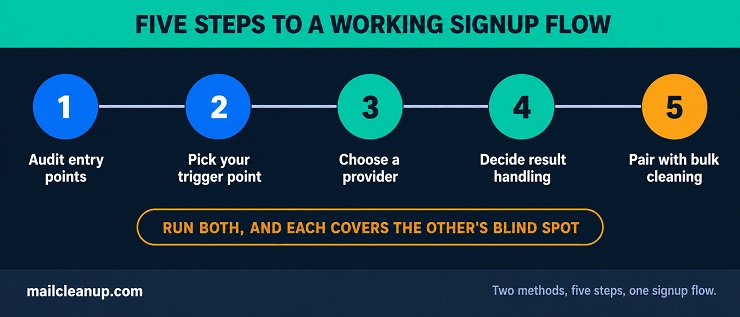
Everything above is the background of this real-time email verification guide. Here’s how to actually put real-time email verification to work. Start by auditing where addresses currently enter your systems, signup, checkout, lead forms, newsletter, and note which ones have no verification in place today. From there, pick your trigger point. Verify when someone leaves the email field, not just on final submit, so the check runs invisibly alongside the rest of the form.
Choosing a provider means weighing more than marketed accuracy. Timeout handling and pricing at your actual volume matter just as much as the headline number. Decide upfront what happens on each result, too: block invalid outright, and prompt for a correction on likely typos. Avoid auto-blocking on unknown or catch-all results without a second look first.
Pair all of this with a periodic bulk cleaning cadence for the list you already have. Quarterly is a reasonable starting point. Run both together, and the two methods end up covering each other’s blind spots.
FAQs on Real-Time Email Verification
Real-time email verification comes with a lot of natural questions. This real-time email verification guide wouldn’t be complete without answering the most common ones directly.
What is real-time email verification?
Real-time email verification checks an email address the instant someone enters it, before it’s stored anywhere. A request goes to a verification API, which runs syntax, domain, and mailbox checks. It returns a result in under a second, in time to still catch a bad entry before your form submits.
How accurate is real-time email verification?
Accuracy varies by provider and by check type for real-time email verification. Independently tested figures for reputable providers commonly fall in the 95-99% range, though marketed numbers you’ll see often run higher. Syntax and domain checks are close to perfectly reliable; mailbox and catch-all checks are where the real variation shows up.
Does real-time email verification slow down my signup form?
Barely, if it’s implemented well. Syntax and domain checks in a real-time email verification API return almost instantly. The mailbox check is the slowest step, typically 200ms to a few seconds. Triggering verification when someone leaves the email field, rather than only on final submit, keeps that delay from ever being visible on your form.
What’s the difference between real-time email verification and email validation?
Real-time email verification and real-time email validation are mostly used interchangeably, and both usually run the same syntax, domain, and mailbox checks. Where a distinction gets drawn, validation sometimes refers to format checks only, and verification to the fuller process that confirms the mailbox itself. The line isn’t consistent across providers, so don’t assume you know which one a specific tool means without checking.
Is real-time email verification GDPR compliant?
Real-time email verification can be GDPR compliant, but that depends on the provider, not the method itself. Look for a stated legal basis for processing, a clear data retention policy, and EU-based data handling if that matters for your business. Providers vary widely on all three, so check before assuming compliance.
Can real-time email verification guarantee a completely clean list?
No single check is perfect. Catch-all domains, brand-new disposable services, and greylisted servers can all slip past even a well-configured check on your form. That’s not a flaw specific to any one provider; it’s a structural limit of checking one address at one moment. That’s exactly why periodic bulk cleaning still matters even with real-time verification in place.
Do I still need to clean my existing list if I already use real-time email verification?
Yes. Real-time email verification only checks addresses going forward; it does nothing for ones already in your database. MailCleanup’s own tracked data found that 23.79% of a verified list decayed within 12 months. That’s exactly what periodic bulk cleaning catches, and real-time verification structurally can’t.
What does real-time email verification cost?
Most providers price real-time email verification, sometimes marketed as a real-time email validation API, from the same credit pool as bulk checks. You’re not paying a separate premium tier just for speed. Typical rates run from roughly $0.005 to $0.01 per check at low volume, dropping under $0.001 at high volume. Your cost scales down significantly as usage grows.