
A sale ends at checkout, but the buyer’s experience of your store does not. The emails that follow the order are the part of that experience you control. A store can stop at the receipt, or it can switch on a few emails once and never look at what they send.
Both choices cost something. A buyer who hears nothing after the receipt has little reason to think of your store again. A buyer who gets the wrong email at the wrong moment, such as a review request for a returned order, may leave. An email sent to a mistyped address never reaches the buyer. These failures are quiet, so they can run for a long time before anyone notices.
The answer is a post-purchase email flow that knows what has just happened to each order. Lists of emails are easy to find. The harder parts are when each email stops, which ones need permission and whether the address is real. You will get five starter emails with a template for each, and a plain rule for every one of those harder parts. That adds up to a flow built to earn a second order without sending the wrong email. Start with the email you already send, the receipt, because the address it goes to decides whether the other emails arrive.
TL;DR
- A post-purchase email flow is the emails a store sends after an order plus the events, delays and stop rules that run them.
- A new store can start with five emails: a confirmation, a shipping notice, a delivery check-in, a review request and a next-order suggestion.
- Consent is decided per email: receipts need no marketing consent, while follow-ups and any thank-you carrying a discount code follow the marketing rules.
- Stop rules keep the flow from contradicting the order: a return or refund ends the three follow-ups, and an open support issue pauses them.
- A wrong address typed once at checkout silences every email in the flow, and checking the buyer list protects the marketing emails that follow.
- Five numbers show whether the flow works, among them repeat purchases within a window fixed in advance and support contacts per order.
What Is Post-Purchase Email?
Post-purchase email is any email a store sends after someone buys. It covers the receipt and everything that follows it. That includes a shipping update, a how-to, a review request and an offer for a second order. So what is post-purchase email in practice? It is the run of messages that picks up where your checkout page ends.
When you set those emails up to send themselves, each one fired by an order event, the setup is called a post-purchase email flow. An order event is something that happens to the order, such as it being paid, shipped or delivered.
Post-Purchase Email vs Transactional Email
Yes, your order receipt is a post-purchase email, and it is also a transactional email. A transactional email is about one transaction, meaning one purchase the customer has just made. The order confirmation, the shipping notice and the delivery notice are the usual three. A post-purchase email is the wider group, because it means any email sent after the purchase.
Two quick tests tell you which kind you are looking at. Would the buyer be surprised not to get it? If so, it is transactional. Does it exist only to tell the buyer something about their order? If so, it is transactional too. A review request or a reorder reminder fails both tests, so it sits on the marketing side. Mixed emails need more care, because adding a promotion to a receipt can change which kind it is.
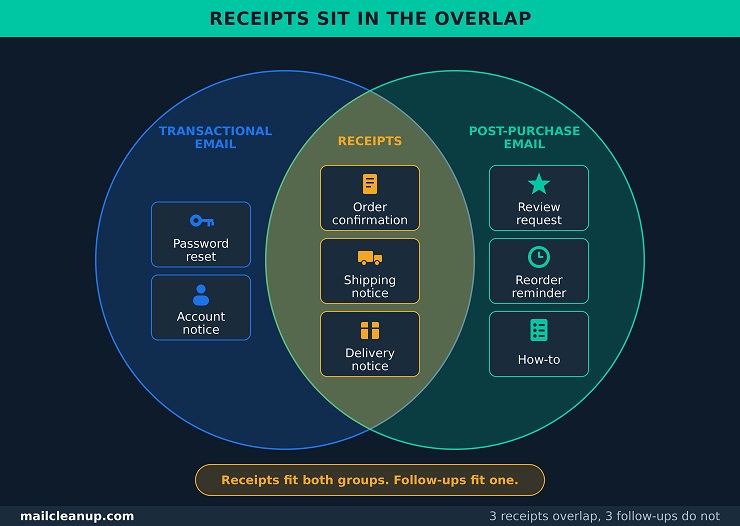
A post-purchase email flow usually mixes the two kinds, so you will find them easier to compare side by side. The table uses the emails a store sends most often.
| Question | Transactional email | Marketing follow-up email |
|---|---|---|
| What does it do? | Confirms or updates the order | Teaches the buyer to use the product, requests a review or suggests another purchase |
| Which emails are examples? | Order confirmation, shipping notice, delivery notice | How-to, review request, offer for a matching product, reorder reminder |
| What starts it? | A change to the order, such as payment or shipping | A set number of days after the order, shipping or delivery |
| What happens if it is missing? | The buyer wonders whether the order worked | The buyer notices nothing, and you lose a chance to help or sell |
The last row explains a common pattern. Receipts get built because a missing one is noticed at once. Follow-ups get skipped because your buyer never sees the one that is missing. A store that sends only receipts never gets the chance to help or sell after the order. Depending on your setup, receipts may come from your store platform’s own settings, while follow-ups may come from a separate email tool.
Transactional email is also a wider subject than orders. It covers anything a system sends because of something a person did, such as a password reset or an account notice. Each type has its own sending rules, and the wider subject is set out in the dedicated post on [transactional email]. For your post-purchase email flow, the only question is where a receipt ends and a marketing follow-up begins.
Post-Purchase Email Flow, Sequence and Campaign
In our use, a flow is the whole automated setup, a sequence is the emails inside it and a campaign is a one-time send. Here is each word in full.
- Flow: the whole automated setup, meaning the emails plus the rules that start them, delay them and stop them. An order starts a post-purchase email flow, and it then runs on its own for each buyer.
- Sequence: the emails in the flow, in the order they are sent. A post-purchase email sequence is the part you write, so a flow is the sequence plus the rules around it.
- Campaign: a one-time send that you write and schedule yourself, to a whole list or a chosen group. Some tools call this a broadcast.
You will see these words used loosely. Some sources use flow and sequence for the same thing, and one tool’s campaign is another tool’s broadcast. In a sales setting, sequence can also mean a salesperson’s own series, which a reply from the lead stops. For our purposes, it only ever means the post-purchase emails in order.
The practical difference is who sets the clock. Take one buyer who orders on Monday and another who orders on Friday. In a flow, each gets the shipping notice when their own order ships, so the two sit on different emails on the same day. A sale announcement that you send on Saturday morning reaches both at the same moment, whatever each of them did that week.
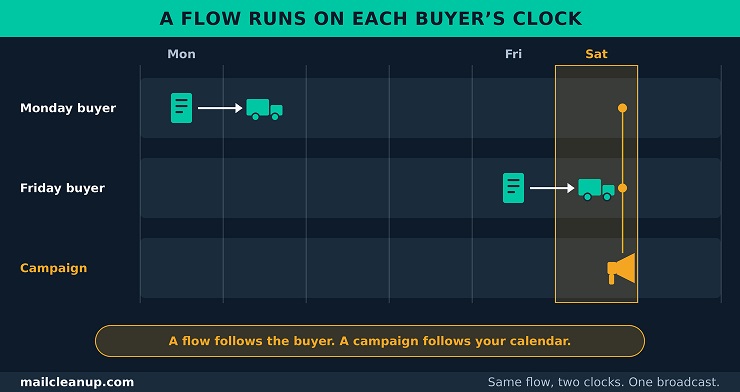
A post-purchase email flow also belongs to a wider family. In our guide to the email drip campaign, a drip campaign is any set of emails written ahead of time and sent automatically. A post-purchase flow is one drip with one job: the weeks after an order. Email flows versus email broadcasts compares a flow with a one-time send and shows how each one breaks.
Why a Post-Purchase Email Flow Matters
A post-purchase email flow matters because the sale is not finished when the buyer pays. The buyer is now waiting for the product, and what you send during that wait shapes whether they trust you enough to order again. Three reasons stand behind that, and each one is about the days between checkout and a second order.
- Buyers wait without information: once someone has paid, they cannot see where the order is unless you tell them. They can wait and worry, or they can write to you. A shipping notice is a post-purchase email that answers the question before it is asked, and a confirmation settles whether the payment worked.
- The second order pays back the first: many stores pay to win a new buyer. The first order may not cover that cost.
- Fewer questions reach you: every question the flow answers is one you do not answer by hand. A buyer who knows the order has shipped has less reason to ask about it.
The second reason is arithmetic, so here it is with example numbers. Take a store that pays $30 in advertising to win one new buyer. That figure is the acquisition cost, meaning what it takes to win one customer. A rough way to find your own is a month’s ad spend divided by that month’s first-time buyers. The average order is $50, and the store keeps 40% of it after product and shipping costs. That kept share is the margin. If you give a first-order discount, count it once, either in the acquisition cost or in the margin.
- Each order earns $20, which is 40% of $50.
- After the first order, the store has earned $20 against the $30 it spent, so it is $10 down.
- After a second order, it has earned $40 against the $30 spent, so it is $10 ahead.
On average, then, half of new buyers need to order once more just for the store to break even. At a 25% reorder rate the store still loses $5 on each new buyer, and at 75% it makes $5.
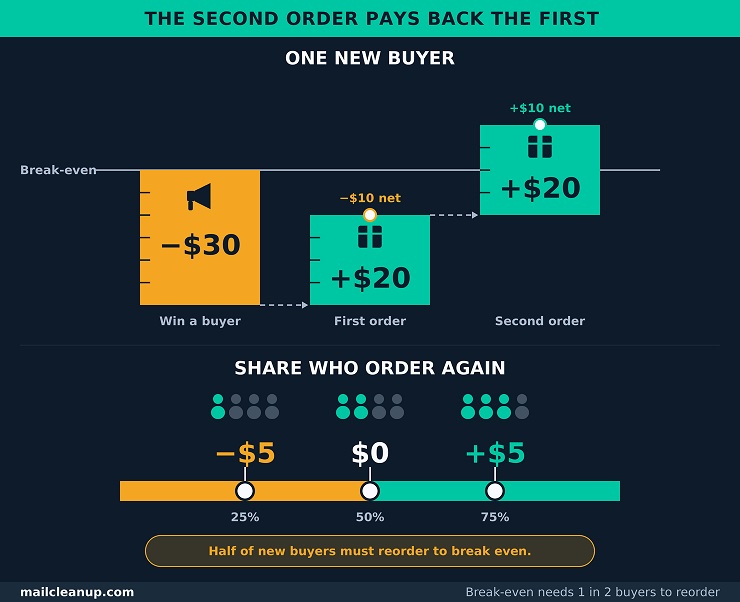
These numbers are an example, not a benchmark. Swap in your own three: what a new buyer costs, what an order is worth and what you keep. The point holds whatever the figures are. When the first order only breaks even or loses money, the later orders decide whether the store profits. The emails after checkout are where you start to earn them. That is the work of a post-purchase email flow: it makes a second order more likely.
Post-Purchase Email Sequence: A Starter Flow in Five Emails
Start with five emails: an order confirmation, a shipping notice, a delivery check-in, a review request and one email that suggests the next order. That post-purchase email sequence gives you a working base, because each email answers a question your buyer already has. Did my order go through? Where is it? Has it arrived? Was it any good? What should I buy next?
Each of the five also appears in at least 16 of the 18 guides we read, so the guides agree on this part. These are the post-purchase email examples to copy first. A post-purchase email flow with only these five is complete enough to launch, and everything else can wait.
The Five Starter Post-Purchase Emails, Their Triggers and Timing
The five emails fire on three events: payment, shipping and delivery. The first two are receipts, and the last three are follow-ups that wait until the buyer has the product. That split keeps a post-purchase email flow from selling to someone who is still waiting for a parcel.
Post-purchase email automation works by event, so the table pairs each email with the event that sends it and the window it falls in. Treat the windows as starting points to test. The guides we read disagree on them, and your own shipping times will change what suits you.
| What sends it | When it goes out | Its job | Kind | |
|---|---|---|---|---|
| 1. Order confirmation | Payment | Within minutes | Confirms the order | Transactional |
| 2. Shipping notice | Shipping | When the carrier has it | Gives tracking and an arrival estimate | Transactional |
| 3. Delivery check-in | Delivery | 1 to 3 days after delivery | Checks it arrived and teaches use | Marketing follow-up |
| 4. Review request | Delivery | 7 to 14 days after delivery | Asks how it turned out | Marketing follow-up |
| 5. Cross-sell or replenishment | Delivery | 14 to 21 days after delivery, or before it runs out | Suggests a matching product or a reorder | Marketing follow-up |
Treat the last column as a working label for planning. Whether an email needs permission depends on what it contains and on where your buyer lives. Read down the second column and the logic is clear. Payment and shipping each send an email at once, and delivery starts the clock for the other three. No marketing follow-up goes out before the parcel arrives.
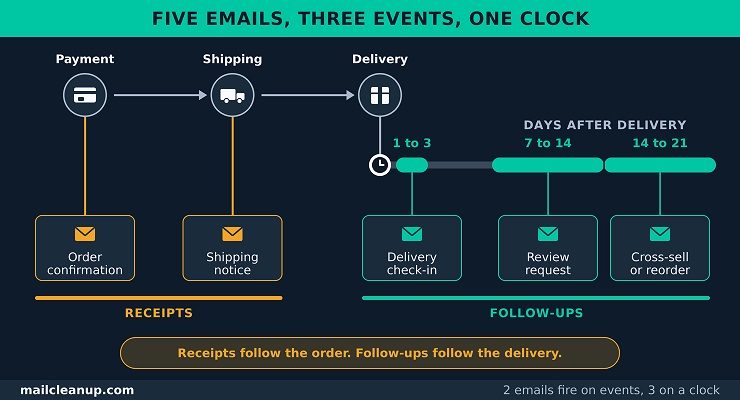
- Follow-ups wait for the product: the delivery check-in, the review request and the cross-sell each count as a post-purchase follow up email. Each one needs your buyer to have the product first. The fifth is the post-purchase cross sell email, an offer for something that goes with the order. If you sell a product that gets used up, it becomes a replenishment reminder, which asks for a reorder before the supply runs out.
- The job column is a brief: it tells you what post-purchase email subject lines have to name. That could be the shipment or the review ask. It also tells you what post-purchase email design should put first, such as the tracking link in a shipping notice.
Some guides, ours on ecommerce email marketing included, list transactional and post-purchase emails as two of nine campaign types, both started by an order. A post-purchase email flow joins them, because the buyer receives them as one run of emails and judges them as one. One set of timing rules then covers all five.
How Many Post-Purchase Emails and How Far Apart
Start with the five, and add an email only when you can name a job none of them does. Time every follow-up from delivery, and wait until the buyer can act on it.
Published guidance will not settle this for you. The guides we read that spell out a full set give six or seven emails. Two of them also state a range, from four to seven and from five to eight. Review requests land anywhere from 4 to 30 days after delivery. One guide waits longest for consumables, meaning products the buyer uses up. Another asks for them sooner than for durable goods, the products that last. We found no data behind any of their counts or windows.
Our own shorter version has three emails: a confirmation with a thank-you, a usage tip, and either a review request or a cross-sell. Treat it as the floor. Four rules settle the count and the spacing for a post-purchase email flow:
- Name the job before you add an email: a sixth email needs a job the first five do not do. If its job matches one of theirs, fold it into that email instead.
- Count follow-ups from delivery, not from the order: shipping time varies. An email timed from the order can arrive before your buyer has the product. Say your post-purchase email template asks for a review ten days after the order. A parcel that takes three days gives the buyer seven days with the product, and one that takes nine gives one day.
- Match the delay to the product, and leave room to act: a phone case can be judged in a few days. A mattress takes weeks. Give your buyer time to act on one follow-up before the next arrives, and never put two asks on the same day.
- Set one weekly cap across every flow a buyer is in: a buyer who has just ordered may also be in other flows. A welcome or cart flow may still be running. Three marketing emails in a day is a quick way to lose them. Count the post-purchase follow-ups against the same cap as every other flow. How that cap is set across all your sending, flows and campaigns together, is worked through in [email frequency].
Add the next emails only after the first five are running and trusted. Add them one at a time, each with a job and a wait of its own.
- A separate post-purchase thank you email: the confirmation already thanks your buyer. A second one earns its place only when it carries something the confirmation cannot. A short note from the founder is enough. If you have nothing to add, leave it out.
- A separate product education email: the delivery check-in already links a how-to. Add a standalone one when your product takes several steps to set up. The guides that give a day put it two to seven days after delivery.
- A loyalty or referral invitation: ask once your buyer has used the product and been happy with it. That is weeks after delivery and not days. Asked too early, the buyer has nothing yet to recommend.
- A win-back handoff: a win-back series is a short run of emails that tries to bring back a buyer who has gone quiet. When the flow ends and a buyer has not ordered again or clicked anything, you hand them to that series. Without the handoff, the buyer either sits unmailed or keeps getting more of the same emails. The handoff is a rule at the end of the flow. The series itself is a separate build, the subject of [re-engagement email campaign].
Post-Purchase Email Examples: One Store, Day by Day
For a store that sells coffee beans, the five emails go out on days 0, 1, 6, 11 and 17. These post-purchase email examples use a single product so you can follow the days.
Say the store sells a 250 g bag and the buyer uses 12.5 g a day, so a bag lasts 20 days. The order is paid on day 0 and ships on day 1. Transit takes three days, so the bag is delivered on day 4 and runs out on day 24. A reorder needs one day to ship, three days in transit and three days of buffer. That puts the reminder seven days before run-out, on day 17. These are example numbers, not a benchmark, so swap in your own.
| Day | What happens | |
|---|---|---|
| 0 | Payment goes through | Order confirmation |
| 1 | The order ships | Shipping notice |
| 4 | The parcel is delivered | None |
| 6 | Two days after delivery | Delivery check-in |
| 11 | Seven days after delivery | Review request |
| 17 | Seven days before the bag runs out | Replenishment reminder |
Delivery on day 4 sends nothing, but it starts the clock for the three follow-ups. Your buyer gets a check-in with a brewing guide, a review request about the coffee and a reorder reminder. That is four emails by day 11, and only the first two arrive before the parcel does. The gaps run 1, 5, 5 and 6 days, so no two emails land together. Your buyer has room to act on each one.
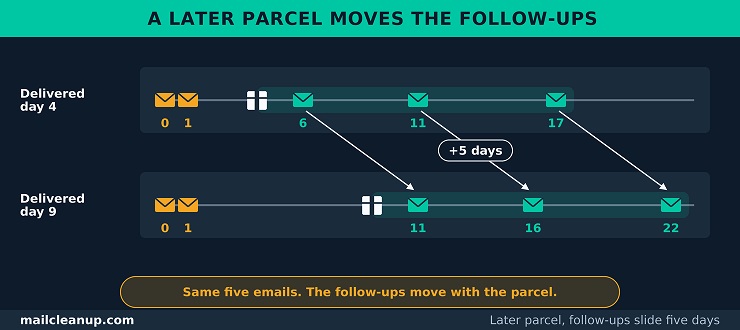
You write each of these once as a post-purchase email template. The post-purchase email flow then sends it to every buyer on that buyer’s own days. A buyer whose parcel arrives on day 9 gets the same five emails, with the three follow-ups moved five days later. Swap in a product that never runs out, and the last email becomes a cross-sell 14 to 21 days after delivery instead.
A Post-Purchase Email Template for Each Starter Email
Each of the five emails gets one post-purchase email template. It has a subject line, a preheader and a short body with placeholders you fill from the order. A preheader is the preview line that shows next to the subject in the inbox. You write each template once, and the post-purchase email flow sends it to every buyer. They also work as post-purchase email examples you can copy and edit.
Every template follows three post-purchase email best practices: one job per email, one action per email and the thing the buyer wants first. Those habits cost nothing to adopt. They also keep a short email from turning into a crowded one.
Order Confirmation Email
A confirmation has to tell your buyer two things: that the order went through, and exactly what was ordered. It is the first email in a post-purchase email flow. A buyer who does not get it within minutes may start to wonder whether the payment worked. The table sorts what goes into your confirmation from what stays out.
| Part of the email | In or out | Why |
|---|---|---|
| Order number, date and items | In | A reference for later questions |
| Total, payment method and address | In | What was charged and where it goes |
| Delivery estimate and a support route | In | Sets expectations and offers a way out |
| Discount code or large promotion | Out | Pushes the order down and can change the kind of email |
| Review request or survey | Out | Nothing to review yet |
Look at what the last two rows share. Each one asks the buyer to do something before the buyer has been told the order is safe. A post-purchase email that sells before it confirms puts the receipt second. If you add a product suggestion at all, keep it small and after the order summary. The thank-you belongs in the confirmation as one line, so you do not need a separate post-purchase thank you email to say it. Send it from a name your buyer recognizes, and keep the reply address one a person reads.
Subject: Order [Order number] confirmed
Preheader: Thanks, [First name]. Here is what you ordered and when to expect it.
Hi [First name],
Thank you for your order. We have it, and we are getting it ready.
- Order [Order number], placed on [Date]
- [Item name], quantity [Quantity], [Price]
- Total paid: [Total]
- Shipping to: [Address]
- Estimated delivery: [Date range]
Something wrong? Reply to this email and a person will fix it.
[Store name]
Shipping Notification Email
A shipping notice has to put the tracking link and the delivery estimate first, because that is what the buyer came for. It is the second email in the post-purchase email flow. It goes out when the carrier has the parcel, not when the label is printed. A tracking link sent too early may show nothing yet, and a link that shows nothing looks like a mistake. Put the parts in this order:
- The tracking link: give your buyer one button or link, ahead of everything else.
- The carrier and the tracking number: some buyers would rather paste the number into the carrier’s own page.
- The delivery estimate: call it an estimate, because the carrier controls the date, and give a window instead of a single day.
- What is in the shipment: names and quantities, so your buyer can check the parcel against the order.
- Where it is going: the address, so a wrong one is caught while it may still be fixed.
- A way to reach you: say what can still be changed and how to ask.
Subject: Your order [Order number] has shipped
Preheader: Track it here. Estimated delivery: [Date range].
Hi [First name],
Your order is on its way.
[Track your parcel]
- Carrier: [Carrier name]
- Tracking number: [Tracking number]
- Estimated delivery: [Date range]
- In this shipment: [Item name], quantity [Quantity]
- Shipping to: [Address]
If the address looks wrong or anything else seems off, reply to this email as soon as you can.
[Store name]
Post-Purchase Follow Up Email: The Delivery Check-In
The delivery check-in has two jobs: confirm the parcel arrived in good shape and help the buyer get started. It is the first post-purchase follow up email, and it earns its place by being useful before it asks for anything.
Send it one to three days after delivery, counted from the day the parcel arrives. That is early enough to fix a problem while it is still fixable, and late enough for your buyer to have opened the box. If your tools cannot tell you when a parcel is delivered, count from the shipping date and add the carrier’s estimated transit time.
Keep it to one how-to link and one way to reach you. Replies usually land in a shared inbox, so decide who watches it before the post-purchase email flow goes live. A check-in that invites a reply and then leaves it unread can do more harm than no check-in at all.
Subject: Did your [Product name] arrive OK?
Preheader: One tip to get started, and a way to reach us if anything is wrong.
Hi [First name],
Your [Product name] should have arrived by now. If it did, here is the first thing to try: [One-step how-to].
[Link to the full guide or video]
If anything is damaged, missing or not what you expected, reply to this email and a person will help.
[Store name]
Review Request Email
Ask for a review when your buyer has used the product enough to judge it, and make the ask one question with one click. Seven to 14 days after delivery is the starting window, and the product moves it.
Set the delay to the time your buyer needs to use the product once. A bag of coffee can be judged within a week, but a coat or a pair of boots may need weeks of wear. The later window costs you a few days and saves you from asking a buyer who has nothing to say yet.
Keep the ask to four lines: say why you are writing, ask one question, give one button and say thank you. The craft of wording a short ask like this, from the first line to the button, is taken further in email copywriting guide. Place it where your buyer can judge the product in the post-purchase email flow, not where the calendar is convenient.
Subject: How is your [Product name]?
Preheader: One click is enough.
Hi [First name],
You have had your [Product name] for a little while now, and we would like to know how it is going.
[Star rating buttons, 1 to 5]
Thank you. Your answer helps us and the next buyer.
[Store name]
Post-Purchase Cross Sell Email or Replenishment Reminder
The last email in the post-purchase email flow suggests the next order. It only works when the suggestion fits what the buyer already bought. For a product that gets used up, send your buyer a replenishment reminder timed from the supply. For anything else, send a post-purchase cross sell email. Three rules keep the suggestion relevant:
- Match the order, and check it first: suggest something that goes with what was bought, such as filters for a coffee maker. Skip anything the same checkout already included. A bestseller list tells the buyer nothing about why you wrote.
- Make one suggestion with one button: two choices read as a catalog, and a catalog is a different email. Lead with why it fits, and hold any discount back unless you know the buyer needs one.
- Use the data you actually have: recommending by purchase needs the product, its category and the other items in the order. Your email tool has to hold them. Without them the suggestion is a guess, and a wrong guess reads as a mass email. The data each level of recommendation needs is mapped in email personalization guide.
For a replenishment reminder, work backward from the day the supply runs out. You send it on the number of supply days minus the days a reorder needs to arrive. A 3 kg bag of dog food at 150 g a day lasts 20 days. A reorder needs one day to ship, four days in transit and three days of buffer, so eight days in all. The reminder then goes out 12 days after delivery. These are example numbers, so swap in your own.
Subject: Running low on [Product name]?
Preheader: Reorder now and the next one arrives before you run out.
Hi [First name],
Your [Product name] should be getting low by now. Reorder today and the next one arrives before you run out.
[Reorder button]
Want a different size? Reply to this email and we will sort it out.
[Store name]
For a cross-sell, swap the subject and the opening line. Use “A good match for your [Product name]” as the subject. Open with “[Matching product] goes well with your [Product name] because [One-line reason].”
Post-Purchase Email Subject Lines for the Starter Emails
Post-purchase email subject lines have one job: tell the buyer what is inside, in words the buyer would use. Each of the five emails has its own pattern, and you do not need a trick for any of them.
| Pattern | Example | |
|---|---|---|
| Order confirmation | Name the order | Order [Order number] confirmed |
| Shipping notice | Say it has shipped | Your order [Order number] has shipped |
| Delivery check-in | Ask the question it answers | Did your [Product name] arrive OK? |
| Review request | Ask for the one thing | How is your [Product name]? |
| Cross-sell or replenishment | Name the timing or the fit | Running low on [Product name]? |
Read down the pattern column and each subject line names the job of its email. Your preheader finishes the thought. It adds the one fact the buyer wants next. That is the delivery estimate in a confirmation and the tracking link in a shipping notice. In a check-in it is the first tip, in a review request the one-click promise and in a reminder the arrival promise. Give every email in a post-purchase email flow both lines, and make both match what is inside. A buyer who feels tricked by a post-purchase email stops trusting your next one.
Judge your subject lines by what your buyer does next, such as tracking the parcel or leaving a review. Opens are a weak test, because Apple’s Mail Privacy Protection can log an open for an email nobody read. Testing which subject line wins, and what really affects inbox placement, is the territory of email subject line best practices.
Post-Purchase Email Design in Five Rules
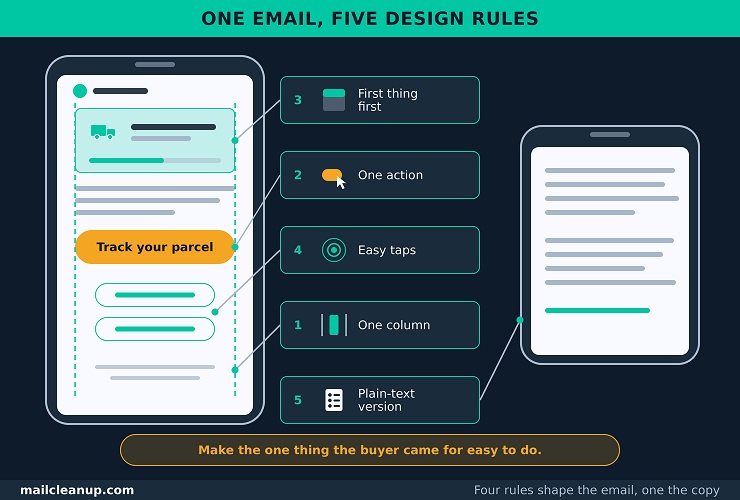
Post-purchase email design comes down to five rules. Each one makes a post-purchase email easier to act on, and all five apply to every template in the post-purchase email flow.
- Use a single column: one column reads the same on a phone and a desktop. You do not depend on a layout surviving a small screen.
- Give each email one call to action: a call to action is the one thing you ask the reader to do. That could be to track the parcel or leave a rating. Two competing buttons make your buyer choose.
- Put what the buyer came for first: the order summary leads the confirmation and the tracking link leads the shipping notice. Everything else comes after it.
- Make links easy to tap: give each button room and keep two links apart, so a thumb hits the one you meant.
- Send a plain-text version too: a plain-text version is the same email without design, shown by apps that do not display the designed one. Check that your email tool sends one alongside the designed version.
Two things sit outside these rules. Dark mode is a phone setting that flips light backgrounds to dark, and some email apps change your colors when it is on. Screen readers read an email aloud, and they depend on alt text, a short written description of each picture. Both are a topic of their own, taken up in [email accessibility].
Post-Purchase Email Automation: Triggers, Timing and Stop Rules
A post-purchase email flow runs by itself when each email has three things. It needs an event that starts it, a delay that times it and a stop rule that ends it. The post-purchase email sequence is the part you write. Post-purchase email automation is the part that sends it on time and holds it back when it no longer fits. Each post-purchase email template waits for its own event, so two buyers never share a schedule.
Post-Purchase Trigger Events and Delays
You can run the whole post-purchase email flow on six order events. The order is paid, shipped, delivered, returned, refunded or followed by a second order. The first three start emails, and the last three end or redirect them.
Your store records the paid and shipped events itself. The delivered event usually comes from carrier tracking, and the return and refund events from your returns and payment records.
| Event | What it does to the flow |
|---|---|
| Order paid | Starts the flow and sends the confirmation |
| Order shipped | Sends the shipping notice |
| Order delivered | Starts the clock for the three follow-ups |
| Return started | Ends the three follow-ups and sends a return receipt |
| Refund issued | Ends the three follow-ups and sends a refund receipt |
| Second order placed | Ends the next-order email and starts a new run |
Read down the last column and the pattern is plain. Every delay counts from the event that owns it, never from the order date. That is why a late delivery moves your follow-ups and leaves your receipts alone.
One more rule covers the time of day. Receipts go out the moment their event fires, even at three in the morning, because your buyer is waiting for them. Marketing follow-ups wait for a daytime window instead, so a delay that ends overnight sends in the morning.
An order event is the clearest trigger a store has, because the transaction already happened and nobody has to guess the buyer’s intent. Sign-ups, clicks and birthdays work differently, and the logic behind every trigger type, from conditions to actions, is the focus of email automation.
Branches and Stop Rules for Post-Purchase Emails
Branches decide which version of the post-purchase email flow a buyer gets, and stop rules decide when an email must not go out. Both protect your buyer from an email that no longer fits what just happened. They are the post-purchase email best practices that nobody notices until they are missing.
The simplest branch splits first-time buyers from repeat buyers. A first-time buyer gets the full five. A repeat buyer already knows your store. Drop what they have seen: skip the how-to when they bought the same product before, and keep the receipts and the review request. Other ways to group buyers, such as by purchase history or order value, are broken down in email segmentation.
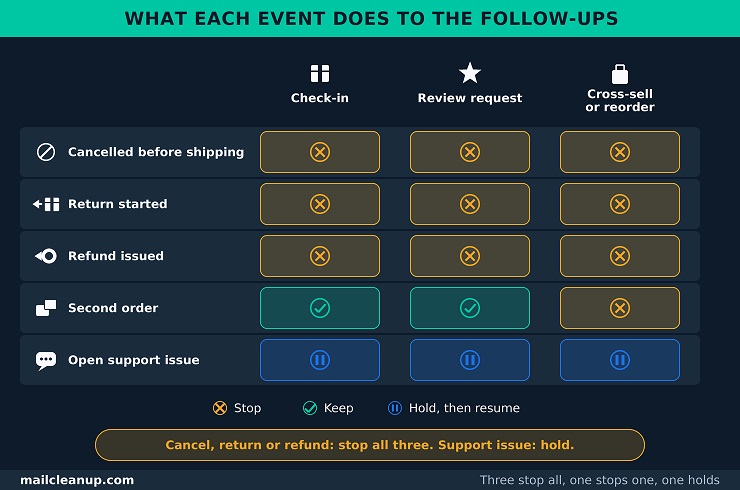
The matrix shows what each event does to your three follow-ups. Stop ends an email for that order. Hold pauses it and resumes when the issue closes.
| Event | Check-in | Review request | Cross-sell or reorder |
|---|---|---|---|
| Order cancelled before shipping | Stop | Stop | Stop |
| Return started | Stop | Stop | Stop |
| Refund issued | Stop | Stop | Stop |
| Second order placed | Keep | Keep | Stop |
| Open support issue | Hold | Hold | Hold |
Three events stop all three follow-ups, one stops only the next-order email and one only pauses them. A return, for example, stops the post-purchase cross sell email as well as the review request. Asking someone who is sending a product back to buy more reads as tone-deaf. Return and refund confirmations are receipts of their own, so your tool should send them as normal.
A buyer can also sit in other flows when the order lands, and the order wins. Three flows end the moment your buyer pays:
- Abandoned cart: the reminder’s job is done once the buyer checks out. The cart flow ends on payment and this flow takes over. Check that your tool ends the reminders on the payment event, not on a timer. Otherwise a buyer can get “you left something behind” for an order already placed. The cart flow itself, which abandoned cart email builds step by step, ends on that same event.
- Browse abandonment: a buyer who looked at products and then bought has no need for a reminder about them. This lighter flow should end on purchase too, so you never ask a buyer to come back for something they already own. Its one soft reminder has nothing left to say once an order exists. It has its own build in [browse abandonment email].
- Welcome series: a first purchase ends the welcome series, because its first-order offer no longer applies. The confirmation is now the email your buyer wants. A first-time buyer should never get both side by side. Two flows talking at once feel like noise to someone who has just paid. The welcome flow’s full structure sits in welcome email series.
When a buyer is in several flows at once, the order of priority matters more than any single rule. Receipts come first, then post-purchase follow-ups, then anything that sells. Promotional campaigns hold for a few days after an order or a support request. Write the order down once and every new flow you add can slot into it. The full priority list is spelled out in email drip campaign.
Post-Purchase Email Flow Consent: Which Emails Need Permission
You decide permission one email at a time, not once for the whole post-purchase email flow. A receipt that only confirms or updates an order follows the lighter rules for transactional messages. A follow-up that promotes something or asks for something follows the marketing rules. In some places that means the buyer must agree first, and in others it means the buyer must be able to say stop.
Classify Every Post-Purchase Email as Transactional or Marketing
An email that only confirms or updates the order is transactional. Anything else in your post-purchase email flow, including the check-in, the review request and every offer, is treated as marketing. The usual post-purchase email examples fall on one side or the other.
| Kind | Why | |
|---|---|---|
| Order confirmation | Transactional | Confirms a transaction the buyer agreed to |
| Shipping notice | Transactional | Updates the buyer on an ongoing transaction |
| Delivery check-in | Marketing | A how-to is not delivery or confirmation |
| Review request | Marketing | Asks the buyer for something and is not on the narrow list |
| Cross-sell or replenishment | Marketing | Promotes a product |
| Thank-you with a discount code | Marketing | The code is a promotion |
| Loyalty or referral invitation | Marketing | Promotes the store |
The sorting follows the FTC’s own list. A US email counts as transactional only when it fits one of five narrow categories. Confirming a transaction the buyer already agreed to is one. The FTC also counts content that keeps a buyer informed about an order still in progress. It reads the categories narrowly, which is why the check-in sits on the marketing side. When an email sits on the line, plan for it as marketing and you will never be caught out. Four regions set the rules most stores meet:
- United States: CAN-SPAM covers commercial email, meaning email whose main purpose is to promote a product or service. It does not require consent before you send. Every marketing email needs an opt-out, a way for the buyer to stop future marketing email. You must honor it within 10 business days.
- European Union: the ePrivacy Directive allows marketing email only to people who gave prior consent, meaning they agreed before the first message. One exception covers your own similar products. It applies to customers whose details you took in a sale. They must have been given a free, easy way to object, at collection and in every message.
- United Kingdom: PECR regulation 22 has the same shape for emails to individuals. It asks for prior consent. The exception covers your similar products, with a simple, free way to refuse at collection and in each message.
- Canada: CASL, Canada’s anti-spam law, asks you for consent before a commercial electronic message. It also needs a clear sender identity and a free unsubscribe that is honored within 10 business days.
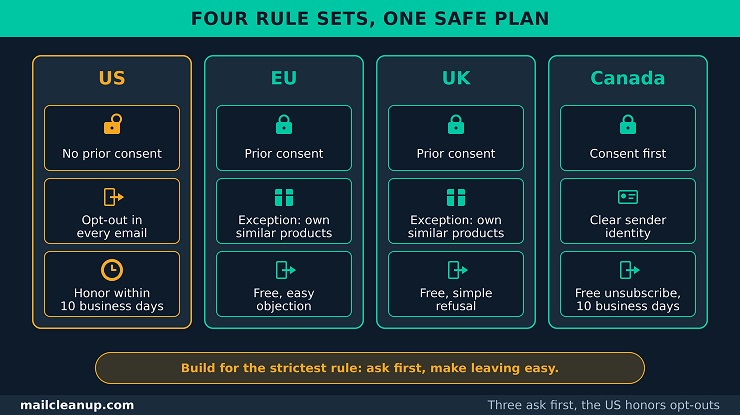
These four notes are a planning summary, not legal advice. The laws differ on whether your buyer must agree first and on how fast an opt-out must work. The safe plan is to build for the strictest rule. These laws line up side by side, with California’s privacy law added, in email compliance.
A Post-Purchase Thank You Email With a Discount Code
A post-purchase thank you email that carries a discount code is a marketing email, so plan for it to follow the marketing rules. The cleaner choice is to keep the thank-you inside the confirmation and send any code as its own marketing email.
In the US the FTC looks at two things. First, would a reader of the subject line take the email for an ad? Second, does the order information come at the beginning, with any promotion brief and at the end? An email that fails either test counts as commercial. A receipt with an honest subject line and a brief code at the end can still read as transactional. A stand-alone thank-you with the offer in its subject line fails the first test.
Outside the US, plan on marketing. The EU and UK rules apply to marketing email, and a discount code is a promotion. Three steps keep your post-purchase email flow on the safe side:
- Keep the thank-you as one line in the confirmation: it needs no code to do its job.
- Send any code as a separate email: give it the marketing basics. That means an honest subject, your postal address and a clear way to opt out.
- If the code must sit in the receipt: change the post-purchase email template as little as possible. Use one brief line at the very end, under an honest subject.
When a Buyer Unsubscribes Partway Through a Post-Purchase Flow
An unsubscribe partway through the post-purchase email flow stops marketing email, not receipts. If a buyer unsubscribes after the shipping notice, the remaining emails in the post-purchase email sequence stop, apart from the receipts for that order.
In the US, an opt-out covers marketing messages, and an email that only confirms or updates an order sits outside it. That is why a shipping notice can still arrive after someone unsubscribes, while the check-in cannot. Three habits make the rule work in a flow:
- Check status before each marketing send: a flow that checks only at the start misses an unsubscribe that arrives on day three. Check your buyer’s marketing status before the check-in, the review request and the next-order email. The US allows up to 10 business days to process an opt-out, but a flow that checks before every send never needs them.
- Make leaving one step: a buyer who has decided to stop should not have to hunt for the link or log in. The FTC lets you ask a buyer to do no more than reply to an email or visit one web page to opt out. So one click or one page is the target. How a one-click button works behind the scenes is handled in one-click unsubscribe.
- Offer fewer, not none: a buyer who wants fewer emails should be able to say so. The FTC allows a menu of choices as long as one option stops all marketing from you. Letting a buyer choose fewer emails instead of none is the job of an email preference center.
Post-Purchase Email Deliverability: Check the Address First
Every email in your post-purchase email flow goes to one address, and the buyer usually typed it once, at checkout. If that address is wrong, no email in the flow arrives. Check the address before anything else, because no other step can make up for a wrong one.
How a Mistyped Checkout Address Breaks the First Emails
One typo at checkout sends the first post-purchase email, the order confirmation, to the wrong place. Every email after it in the post-purchase email flow goes to the same place, so a buyer who has just paid hears nothing.
An address fails at checkout in five common ways:
- Guest checkout: the buyer types an address once, with no account behind it and no password reset to expose a typo. Nothing tests the address or asks the buyer to type it a second time. Your cart reminder runs on the same untested address, as abandoned cart email traces for guest checkout.
- Mobile and autofill slips: a thumb on a small keyboard drops or swaps a letter. Autofill, the browser feature that fills in saved details, can also offer your buyer an old address that they no longer read.
- Mistyped domains: a domain typed wrong, such as gmial.com for gmail.com, often has no mail server behind it, so the email bounces. A bounce means the email came back undelivered.
- A wrong name on a real domain: a name typed one letter off at a real provider can reach a stranger. No bounce comes back to warn you, and your buyer’s name and order details sit in someone else’s inbox.
- Throwaway and shared addresses: a buyer may give a disposable address that expires within days, or a shared one such as info@. No single person owns a shared address. Both work today and can fail your flow within weeks.
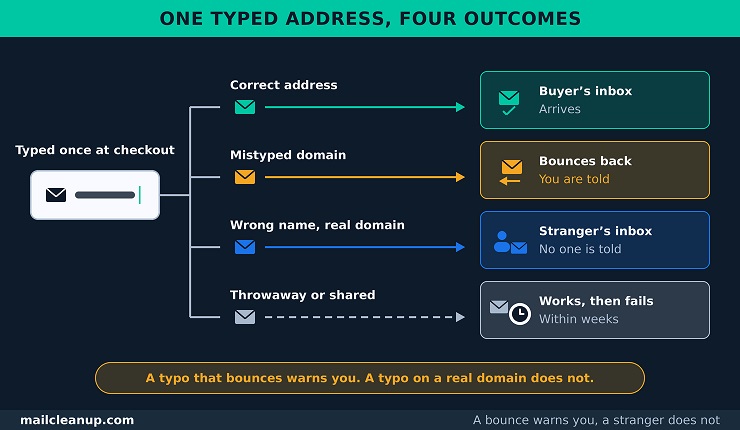
We found no sourced rate for how many checkout addresses are wrong, so we give none.
A failed first email costs more than one email. The buyer cannot tell whether the order went through, so some will write to support or question the charge. Each bounce also counts against your sending reputation, because mailbox providers watch how often your mail bounces. What that costs, in numbers, is priced out in cost of email bounces.
Four steps help at capture. A confirm-email field catches random slips, but it adds a field to your checkout and fails when a buyer pastes the same typo twice. A domain suggestion, such as “Did you mean gmail.com?”, catches the common domain slip while the buyer is still on the page. Printing “We sent your receipt to” and the address on the order page lets a buyer spot a typo at once. A link to correct it fixes the address before the flow starts. A real-time check goes further and confirms the mailbox exists before the order is placed. Its checks, limits and pricing go deeper in real-time email verification.
Checking the Customer List Before the Marketing Emails Start
A list check protects the marketing emails in your post-purchase email flow, not the receipts. Receipts go to an address typed seconds ago. The marketing emails go out days, weeks or months later, and to older buyers when you first switch the flow on. Addresses go stale whether you send to them or not. Check your buyer list once, before those marketing emails first go to existing buyers.
A bulk check tests a whole list of addresses at once and sorts each one into one of four results. Each result has a plain next move. Deliverable addresses stay in your flow. Undeliverable addresses leave your marketing emails, and their order records stay. Accept-all addresses, on domains that take any address, go in a small first batch. So do Unknown ones, where the check got no clear answer. Check how that batch bounces before you send the rest. Disposable addresses, which expire within days, stay out of the marketing emails, and every buyer still gets a receipt. How each check works is defined in what is email verification.
MailCleanup’s bulk email verification service takes a CSV file, a plain spreadsheet export of your buyers’ addresses, and needs no account to set up. It sends back the cleaned list, with notes on every address it flagged or removed. It sets accept-all addresses, also called catch-all, apart so you can decide what to do with them. Repeat the check before a large send to older buyers. The schedule for each kind of list is laid out in email list hygiene.
How to Measure a Post-Purchase Email Flow
Judge a post-purchase email flow by what buyers do after the emails arrive. Five numbers show whether it works: repeat purchases, time to a second purchase, support contacts, first-email bounces and unsubscribes. You read all five over one window, a set number of days, that you fix before you look at any result. The aim of the post-purchase email sequence is a second order, fewer worried questions and an address list that stays reachable.
The table defines each number and names the trap that misreads it.
| Metric | How to calculate it | The trap |
|---|---|---|
| Repeat purchase rate in a window | Buyers who order again in the window, divided by first-time buyers in the group | A window still open makes the rate look low |
| Time to second purchase | Days from the first order to the second | Late reorders skew an average, so read the middle value |
| Support contacts per order | Contacts about orders, divided by orders | A slow carrier can raise it, with no fault in the flow |
| First-email bounce rate | Confirmation emails that bounced, divided by those sent | A wrong name on a real domain never bounces, so the rate hides it |
| Unsubscribe rate per email | Unsubscribes divided by delivered emails, for each email | An average across the flow hides the one email buyers leave on |
Fix the window before you look: pick one that fits how often your buyers reorder. Use 60 days for a product that runs out in a month, and a year for a mattress or a laptop. Group buyers by the month of their first order, and judge each group only after its window has closed. Use the same window for every group so the results compare. For example, say 400 first-time buyers ordered in March and 52 of them ordered again within 60 days. The rate is 52 / 400 = 13%.
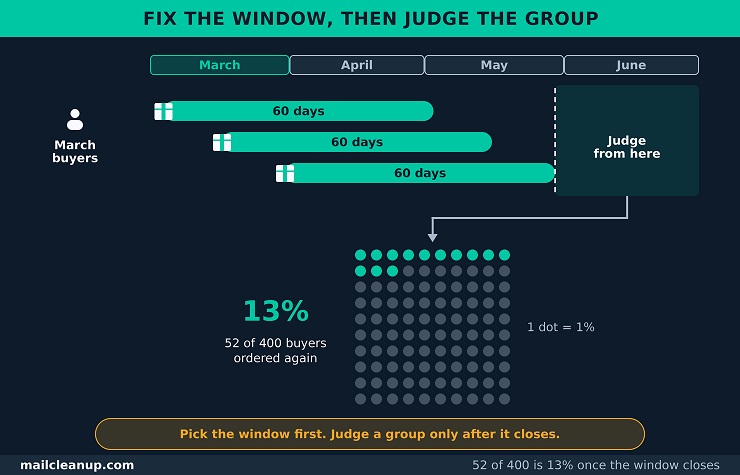
Read the five together: your store holds the orders. Your support inbox holds the contacts. Your email platform holds the bounces and unsubscribes, so the five need three exports. If repeat purchases rise while unsubscribes also rise, the later emails may be selling too hard. If support contacts rise while first-email bounces rise, some buyers may not be receiving their confirmations. A rising first-email bounce rate points back to the address checks. A rising unsubscribe rate on one email points to that email’s offer or timing.
Leave open rate out: open rate is not one of your five. Apple’s Mail Privacy Protection loads emails ahead of time, so reported opens run high and say little about who read the email. Treat open rate as a rough direction at most.
Change one thing at a time: send each version of a changed email to a share of your new buyers from the start. Compare the two on the same measure. Two changes at once leave you unable to say which one moved the number. Do not judge a change before the window for its first buyers has closed. The method, including how many buyers each version needs, is run through in email A/B testing.
Compare against yourself: we could not trace the popular post-purchase statistics to a source we could rely on, so we quote none. Measure your first window with the five numbers, keep the result as a baseline, and compare each later window with it.
None of the five replaces the measures your email platform already reports, such as complaint rate and revenue per email. Each of the five also feeds one of those wider measures: bounces feed deliverability, and repeat purchases feed revenue. Keep the five on one page and refresh them when each window closes. The wider set of email measures, from deliverability to revenue, is explained in email marketing KPIs.
Your Next Step: Test Your Post-Purchase Email Flow With a Real Order
Place three real orders before you switch your post-purchase email flow on for every buyer, and read every email each one sends. A preview shows you the wording, but it does not run the events, the delays or the stop rules. Use a low-priced item and three different addresses you can read, since an unsubscribe applies to an address.
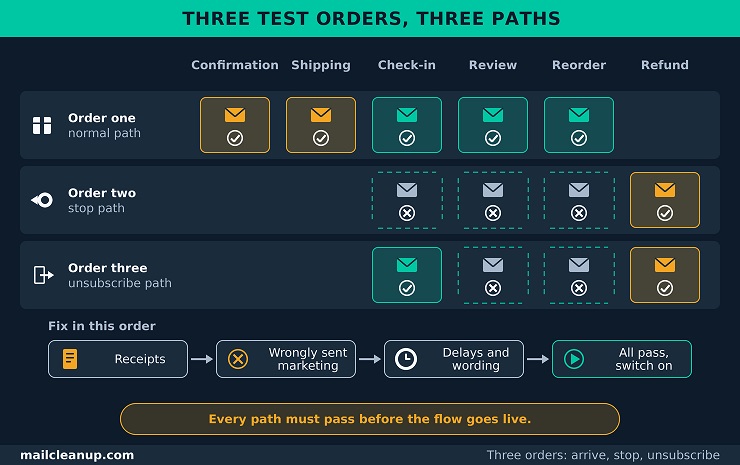
Order one, the normal path: check out as a guest and type the address by hand, then let the order run to delivery. The confirmation should arrive within minutes, and the shipping notice when the order ships. The check-in, the review request and the reorder email should follow on your own delays, counted from delivery. Each marketing email should carry an unsubscribe link and your postal address.
Order two, the stop path: place the order, and refund it as soon as your store shows it as delivered. The refund receipt should reach you. The check-in, the review request and the reorder email should not.
Order three, the unsubscribe path: place the order, and unsubscribe from the check-in when it reaches you. The review request and the reorder email should never come. Then refund the order, and the refund receipt should still reach you, because an unsubscribe stops marketing email and not receipts.
Fix in this order: fix anything that stopped a receipt first. Then fix any marketing email that went out when it should have stopped, and last your delays and your wording. After each fix, place the failing order again. When all three pass, switch the flow on for everyone and start your first measuring window.
FAQs on Post-Purchase Email Flow
What is post-purchase email?
It is any email your store sends after someone buys. It covers the receipt and everything after it: a shipping notice, a delivery check-in, a review request and an offer for a second order. Some are receipts that tell the buyer about the order, and others are marketing follow-ups.
What are the first post-purchase emails a new store should send?
Start your post-purchase email sequence with five emails. They are an order confirmation, a shipping notice, a delivery check-in, a review request and one email that suggests the next order. The three follow-ups wait for delivery, at 1 to 3 days, 7 to 14 days and 14 to 21 days. The last can follow your product’s supply instead.
When should a review request go out after an order?
Start 7 to 14 days after delivery, and let the product move that window. Coffee can be judged within a week, while a coat or boots may need weeks of wear. A review request is a post-purchase follow up email, so count its days from delivery, not from the order. Make your ask one question with one click.
Is an order confirmation a post-purchase email?
Yes. An order confirmation is the first post-purchase email, and it is also a transactional email, because it only tells the buyer about one order. Your buyer would be surprised not to get it. Most of the later emails are marketing follow-ups, so the flow mixes both kinds.
Do post-purchase emails need marketing consent?
Receipts that confirm or update an order need no marketing consent. Any other post-purchase email depends on where your buyer lives. The EU, UK and Canada ask for consent first, with a narrow exception for a seller’s own similar products in the EU and UK. The US asks for a way to opt out, honored within 10 business days. This is not legal advice.
Should a thank-you email be separate from the order confirmation?
Keep the thank-you inside the confirmation. A plain thank-you line needs no code to do its job, and it keeps the receipt a transactional email. A post-purchase thank you email that carries a discount code is marketing, so send the code as its own email.
What should happen to the flow when a customer returns an order?
Your flow should stop the three follow-ups for that order: the delivery check-in, the review request and the post-purchase cross sell email. Asking a buyer who is returning a product to buy more would read as tone-deaf. The return and refund receipts still send, because they are receipts of their own. A refund ends the same three follow-ups.
Should promotional emails pause after an order?
Yes, for a few days. Your promotional campaigns should hold after an order or a support request. A buyer should not be sold to while waiting for the parcel or for help. In a post-purchase email flow, receipts go first, then the follow-ups, then anything that sells.