
A subscriber joins your list at two in the morning, and a welcome email is already in their inbox nine minutes later. That’s long before you’ve even opened your laptop the next day. A shopper abandons a cart over lunch, and a reminder is waiting by the time they’re back at their desk. That’s email automation doing exactly what it’s built to do. It sends the right message the moment it’s relevant, without anyone deciding in real time to send it.
This email automation guide covers how that actually happens for your own list, the trigger-condition-action logic every platform runs on. It also covers the workflow types worth building first: welcome sequences, cart recovery, post-purchase follow-ups, and re-engagement. It covers what the real benefits look like once automation is running, and where AI is starting to change how those workflows get built. That’s the same ground most email automation guides cover, just covered in more depth than most of them bother with.
What almost none of them cover is what happens when that same automation runs against a list nobody’s checked. Automated sequences send without a person reviewing each individual recipient, which is exactly what makes them efficient and exactly what makes them risky. A re-engagement campaign specifically targets your oldest, most dormant subscribers, the exact segment where recycled spam traps concentrate after months of inactivity. Fire that sequence into an unverified list, and you’re not re-engaging anyone. You’re teaching Gmail and Yahoo that your domain sends to addresses that don’t exist. That risk, and how it varies by workflow type, is the part of this guide you won’t find anywhere else.
TL;DR on Email Automation
- Email automation sends messages automatically when a trigger fires, a signup, a purchase, inactivity, rather than a person sending each one by hand.
- Email automation is the broader term for any trigger-based sending; email marketing automation is the narrower slice aimed specifically at leads, customers, and subscribers.
- Common workflow types include welcome sequences, browse abandonment, abandoned cart recovery, post-purchase flows, re-engagement campaigns, and drip campaigns, each built on a different trigger.
- The Email Automation Risk Ladder ranks these workflows by deliverability risk. Post-purchase carries the least; re-engagement and win-back carry the most, since that segment’s addresses haven’t been confirmed valid in months.
- Automation saves time on repetitive sends, delivers messages at the moment they’re most relevant, and scales personalization beyond what manual sending allows.
- AI increasingly handles send-time optimization and predictive segmentation within automation platforms, though its output is only as reliable as the engagement data behind it.
- MailCleanup recommends verifying a list before automating sends to a dormant or long-unengaged segment, since nobody reviews each recipient manually.
- The most common automation mistakes include treating every trigger as equally safe, letting workflows overlap unchecked, and never revisiting a sequence once it’s live.
What Is Email Automation?
Email automation is the practice of sending emails automatically when a specific trigger occurs, rather than a person manually writing and sending each message. A trigger might be a subscriber joining a list, a shopper abandoning a cart, or sixty days passing since someone last opened an email. Once that trigger fires, a predefined message goes out on its own. Nobody has to remember to send it, check whether it’s time, or write it fresh each time it’s needed.
That’s the mechanical answer to what is email automation. The practical answer is that it turns email marketing from something you do into something that runs. That’s the same shift our full email marketing guide walks through end to end. A welcome sequence you build once keeps greeting new subscribers for as long as your list keeps growing. Nobody has to touch it again after the initial setup.
Email Automation vs. Email Marketing Automation
What is email automation, and what is email marketing automation? The two terms get used interchangeably in most places you’ll read about this, including, if we’re honest, through most of this guide. But they’re not quite the same thing, and the distinction matters if you’re trying to work out which tools or advice actually apply to you.
Email automation, taken literally, covers any software-driven, trigger-based sending, including uses that have nothing to do with marketing. Forwarding a support ticket automatically, tagging an inbox message, and firing an internal alert when a form gets submitted are all examples. Each one counts as email automation under the broad definition, even with no marketing involved.
Email marketing automation is the specific, narrower slice you’ll actually be building from this guide. It covers automated sends aimed at leads, customers, or subscribers, built to move them through a relationship rather than manage daily inbox tasks. Welcome sequences, abandoned cart reminders, and re-engagement campaigns all live here. Every workflow type covered here falls under that narrower definition, even where “email automation” is the shorter, more common way to say it.
How Email Automation Works
Every email automation workflow you build, regardless of platform or complexity, runs on the same three-part logic:
- Trigger: a specific action, event, or condition that starts the process. This might be a subscriber joining your list, a purchase being completed, or a set amount of time passing since the last interaction.
- Condition: the rules that decide what happens next, and for whom. You might check whether the subscriber is in a specific segment or whether they’ve already received a related email. You can also check how much time has passed since the trigger fired.
- Action: the actual email, or sequence of emails, that goes out once your trigger and conditions are both satisfied. This can be a single message or a multi-step sequence with delays and branches built in.
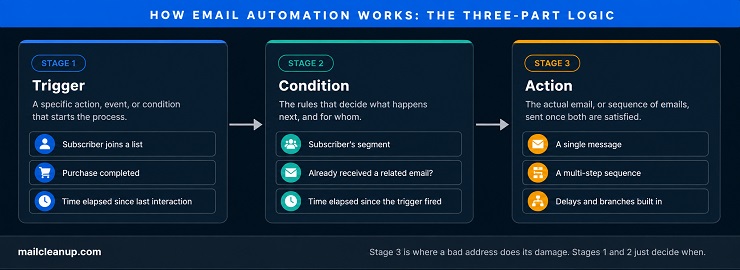
This trigger-condition-action structure is what separates automation from a manually scheduled campaign you send yourself. What is email automation, stripped of platform-specific jargon? Three repeating steps, for every subscriber who qualifies. A campaign has a fixed send date you decide in advance. An automated workflow has no send date at all. It waits, sometimes indefinitely, until a specific subscriber meets a specific condition. Then it fires for that one person, independent of everyone else on your list.
The practical effect is that automation runs continuously in the background, whether you’re watching it or not. A welcome sequence you set up in January is still firing in December, for every new subscriber who joins in between. Nobody touches the workflow itself in the meantime. That’s the efficiency automation is known for. Without a verified list feeding it, we’ve seen that same efficiency turn one bad address into a pattern fast. Bad addresses keep getting hit automatically, over and over, until someone notices the damage in a deliverability report.
Types of Email Automation Triggers
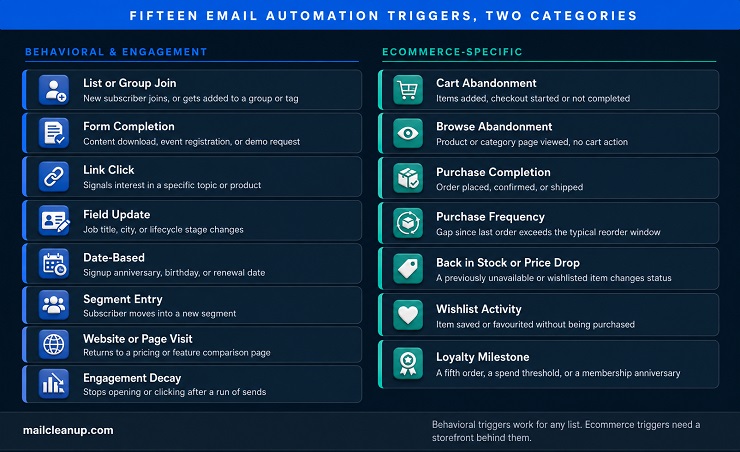
Every workflow starts with a trigger, but “a subscriber does something” covers a lot of ground. What is email automation without something to react to? Not automation, just a delayed manual send. The specific trigger you pick determines how relevant the resulting email feels, and picking the wrong one is usually why a technically working sequence still underperforms. These email automation triggers split into two families: ones that apply to almost any list, and ones specific to ecommerce.
Behavioral and Engagement Email Automation Triggers
These work for any type of list, whether you’re running a SaaS product, a media newsletter, or a services business. None of them depend on a purchase happening anywhere.
- List or group join: a new subscriber joins your list, or an existing one gets added to a specific group or tag. This is the trigger behind every welcome sequence. Most platforms treat it as a default requiring no setup on your end, which is exactly why so many welcome sequences feel generic. The stronger version fires off a specific opt-in source instead, a lead magnet, a webinar signup, a free trial start. That lets the email reference what the person actually signed up for, not a vague welcome.
- Form completion: a subscriber fills out a specific form, a content download, an event registration, a demo request, a survey. Each form can trigger its own tailored follow-up. It shouldn’t route everyone into the same generic nurture track regardless of which form they filled out. Someone who downloaded your beginner’s guide and someone who requested a sales demo are at very different points in their decision. Treating both the same way is a common way this trigger type gets wasted.
- Link click: clicking a specific link inside an email signals interest in a topic or product, often before the subscriber has told you anything else. You can trigger an immediate follow-up on that same topic, or tag the subscriber and let that data feed a later segment instead. The immediate-follow-up version works best when the click itself is high-intent, a pricing page link, a specific product link. It works less well when the click is ambiguous, like a generic “learn more.”
- Field update: a subscriber’s own data changes, a new job title, a new city, a new lifecycle stage in your CRM. The update itself becomes the trigger. That makes this one of the few trigger types built around what became true about someone on your list, not what they actually did. A promotion showing up in a job title field is a legitimate trigger for a B2B account team to reach out. The subscriber never had to click or open anything to cause it.
- Date-based triggers: a signup anniversary, a birthday, a subscription renewal date, or a specific calendar date you set manually. These fire without the subscriber taking any action at all. That makes them the most predictable trigger type on this list, since you know exactly when they’ll fire, sometimes months in advance. That predictability is also the limitation. A birthday email still fires on schedule for someone who’s stopped engaging entirely. That’s exactly the kind of automation that can run for years on your list without anyone noticing it’s stopped landing.
- Segment entry: a subscriber moves into a new segment based on scoring, engagement level, or behavior. That move itself triggers a message suited to where they landed. This is a step up in sophistication from the triggers above, since it depends on a scoring system already being in place. It’s also the most flexible trigger on this list. Almost any combination of the triggers on your list can feed the score that eventually moves someone into a new segment.
- Website or page visit: a subscriber returns to a specific page without necessarily buying or filling out anything. Pricing pages and feature comparisons are the most common examples, since both signal purchase or upgrade intent directly. This trigger needs your email platform connected to website tracking to work at all. That’s why it shows up less often than the others on this list. For SaaS and services businesses specifically, a repeat pricing-page visit is one of the strongest intent signals available. It’s often stronger than a form fill from months earlier.
- Engagement decay: a subscriber stops opening or clicking after a run of sends that used to get a response. This is the underlying condition behind re-engagement campaigns. It’s worth treating as its own trigger type, though, rather than folding it entirely into that one workflow. You can route that same decay signal into a frequency reduction or a preference-center prompt, not just a win-back attempt.
Ecommerce-Specific Email Automation Triggers
These depend on purchase behavior a content site or SaaS product doesn’t generate, so they only make sense once there’s a storefront behind the list.
- Cart abandonment: items added to a cart, checkout started or not started, no purchase completed inside a set window. This is the highest-volume ecommerce trigger for most stores, since browsing without buying happens far more often than buying does. Every major platform ships pre-built automation for it. That’s part of why it’s so commonly automated without much thought given to your own timing or content beyond the default template.
- Browse abandonment: a product or category page viewed, no add-to-cart action taken. Lower intent than cart abandonment, since nothing was actually chosen. That means your follow-up has to work harder to justify the interruption. A reminder about a product someone glanced at reads very differently than a reminder about one they’d already decided to buy.
- Purchase completion: an order placed, confirmed, or shipped. This is the trigger behind every post-purchase flow. It’s also the trigger with the least ambiguity about intent, since the transaction already happened. Everything downstream from here is about building your relationship with them, not persuading anyone.
- Purchase frequency: a gap since a customer’s last order that’s longer than their typical reorder window. This is most useful if you sell consumables or subscription-adjacent products, where a predictable reorder pattern actually exists. A customer who reliably reorders coffee every five weeks and hits week seven with no order is a specific, meaningful trigger. A generic thirty-day inactivity window applied to every product category regardless of actual reorder rate is not the same thing.
- Back in stock or price drop: a previously out-of-stock or wishlisted item becomes available again, or its price drops. Both versions share the same mechanic underneath. You’re notifying someone the instant something changes on a product they cared about, rather than waiting for them to check back.
- Wishlist activity: an item gets added to a wishlist or saved-for-later list without being purchased. This sits between browse abandonment and cart abandonment in intent. It’s more deliberate than a page view, since saving something takes an extra step. It isn’t yet a checkout attempt, though, which is why your messaging here usually stays softer than cart-recovery copy.
- Loyalty milestone: a customer crosses a threshold, a fifth order, a certain amount spent, a membership anniversary. This is one of the few triggers built entirely around recognizing an existing customer, rather than converting or recovering one. It tends to get underused relative to how cheap it is for you to set up.
Common Email Automation Workflows
Triggers are the mechanism. Workflows are what a subscriber actually experiences. What is email marketing automation if not this list of triggered sequences? That’s the practical, ground-level answer, the six real email automation examples that follow. Here’s how the trigger types above turn into a real email automation workflow you can build today. Each one’s own full depth lives elsewhere if you want to go further. Three of these, browse abandonment, cart recovery, and post-purchase, sit inside the broader ecommerce lifecycle our ecommerce email marketing guide covers end to end. The rest apply to any list, ecommerce or not.
Welcome and Onboarding Email Automation
Triggered the moment someone joins your list, a welcome sequence is usually the single highest-performing automation you’ll run. A brand-new subscriber is at peak interest right when they sign up, before anything competes for their attention the way it will a month later. A good sequence does four things in order: confirms the subscription and delivers whatever was promised, introduces the brand. It also sets an honest expectation for how often you’ll be in touch, and invites one small, low-friction action.
Most run two to five emails over the first one to two weeks. A single welcome email beats none, but a short sequence consistently outperforms one lone message. We cover full sequence structure, timing, and real examples in our dedicated guide to welcome email series.
Browse Abandonment Email Automation
Triggered when someone views a product or category page without adding anything to a cart, browse abandonment sits a notch below cart abandonment in intent. Nothing’s actually been chosen yet, so tone matters here more than in almost any other workflow. A single, low-pressure follow-up referencing the specific item or category they looked at tends to outperform anything that reads like a hard sell. Most stores send it within a few hours, rather than stacking a multi-email sequence the way cart recovery does. Full flow structure and timing lives in our dedicated [browse abandonment email guide].
Abandoned Cart Email Automation
Triggered when a shopper adds items to a cart and leaves without completing checkout, a genuinely common event. Industry data puts the average cart abandonment rate above 70 percent. It’s also one of the highest-converting automated flows available, precisely because the shopper’s already told you what they want. Timing does most of the work here. A first email sent within an hour recovers meaningfully more than one sent the next day. A short sequence, roughly one hour, one day, then three days out, consistently beats a single reminder. We cover the full sequence, subject line approach, and recovery benchmarks in our dedicated abandoned cart email guide.
Post-Purchase Email Automation
Triggered by a completed order, post-purchase automation runs from the order confirmation itself through shipping updates. It continues with a review request once the product’s had time to arrive, and a cross-sell suggestion further out. The confirmation and shipping messages are functional and expected. The review and cross-sell messages are where the relationship actually gets built, since they’re the first contact after the sale that isn’t purely transactional. Done well, the sequence turns a single purchase into the start of a relationship instead of the end of one. Full flow, timing, and content structure lives in our dedicated [post-purchase email flow guide].
Re-Engagement and Win-Back Email Automation
Triggered by a stretch of inactivity, typically 60 to 90 days without an open or click. Re-engagement campaigns try to win a subscriber back before you write them off. A short, progressive sequence works better than one message. Start with a soft check-in, then a stronger incentive if that doesn’t land, then a last-chance email asking whether they want to stay subscribed. Reactivation rates typically land somewhere in the 5 to 15 percent range, modest on its own, but the sequence does a second job beyond conversion. It clears out subscribers who never respond, which matters more here than in any other workflow type.
This is also the workflow carrying the most deliverability risk covered anywhere in this guide, which the next section covers in full. We go deeper on sequence structure and subject lines in our dedicated [re-engagement email campaign guide].
Drip Campaign Email Automation
“Drip campaign” gets used as a catch-all for almost any automated sequence. The term more precisely describes a scheduled, content-led series that nurtures a subscriber over time rather than reacting to one specific behavior. A welcome sequence or cart-recovery flow responds to a single action and largely wraps up once that action’s addressed. A drip campaign runs closer to a syllabus: a set number of emails on a fixed schedule, each building on the last. It works toward an outcome no single email could deliver alone.
A common use case beyond onboarding is a lead who downloaded something from you but isn’t ready to buy yet. Drip content keeps them warm without demanding a decision on every send. We cover drip structure, more use cases, and how it differs from everything above in our dedicated email drip campaign guide.
The Email Automation Risk Ladder
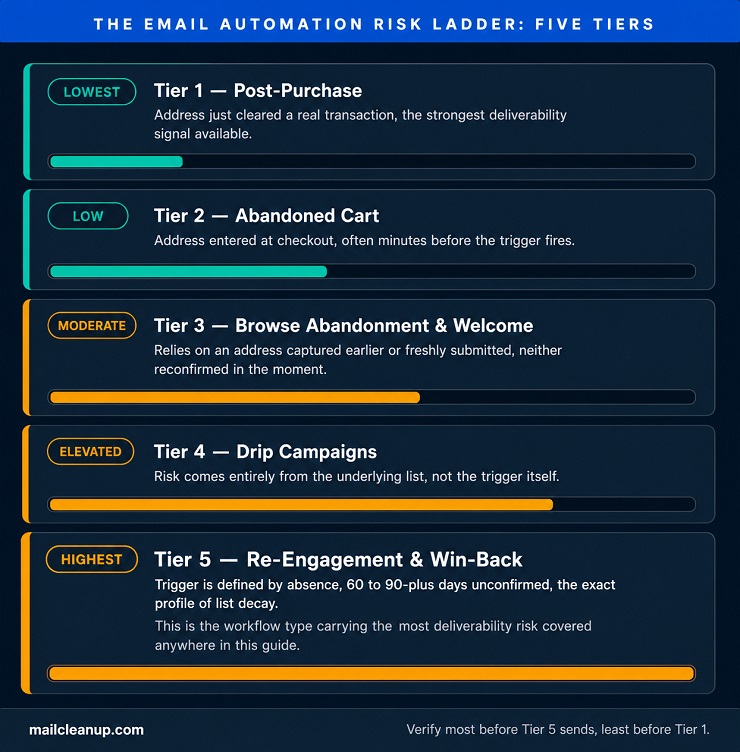
Every workflow covered above gets treated as equally safe to automate in most guides you’ll read. It isn’t. What determines the real risk is how recently the specific address behind each trigger was actually confirmed to work. That single variable is what separates a routine automation from one that’s quietly training Gmail and Yahoo to distrust your domain. We call this the Email Automation Risk Ladder, five tiers ranked by how stale the underlying address tends to be when the automation fires.
The ranking follows one question straight through every workflow type this guide has covered. What, if anything, confirmed this specific address was still good right before the automation fired?
| Risk Tier | Workflow Type | Why | Before You Automate It |
|---|---|---|---|
| Lowest | Post-Purchase | Address just cleared a real transaction, the strongest deliverability signal available | Minimal extra checking needed |
| Low | Abandoned Cart | Address entered at checkout, often minutes before the trigger fires | Spot-check for obvious typos at capture |
| Moderate | Browse Abandonment, Welcome and Onboarding | Relies on an address captured earlier, or freshly submitted, neither reconfirmed in the moment | Verify at signup if it isn’t double opt-in |
| Elevated | Drip Campaigns | Risk comes entirely from the underlying list, not the trigger itself | Verify the list before building the drip, not after |
| Highest | Re-Engagement and Win-Back | Trigger is defined by absence, 60 to 90-plus days unconfirmed, the exact profile of list decay | Verify the segment before every send, not just once |
The pattern across all five tiers comes down to one thing. A trigger that follows a real, recent action, a purchase, a cart entry, tells you almost nothing is wrong with the address. A trigger that follows an absence tells you the opposite. Nobody’s confirmed anything about that address in months, and the automation fires into that uncertainty anyway, at scale, with nobody watching each individual send. That’s exactly the pattern this guide opened with.
Verifying a list before automating isn’t one blanket rule applied evenly everywhere. It matters most exactly where the ladder says it does, and least where it doesn’t. That’s also why “always verify before every send” undersells the real risk on Tier 5 and oversells it on Tier 1. Our email verification features guide covers what a verification pass actually checks. Our email list hygiene guide covers keeping the Tier 4 and 5 segments clean on an ongoing basis rather than once.
The sender reputation those tiers put at risk is the same one our email deliverability guide covers in full. Building this ranking into your email marketing automation strategy from day one costs nothing and prevents real damage down the line.
Benefits of Email Automation
None of this is a reason to avoid email automation. It’s a reason to make sure your list is clean before switching it on. Once that’s handled, the same mechanics driving the risk on Tier 4 and 5 also drive real, compounding advantages no manual send can match.
- Time saved on repetitive sends: once you build a workflow, it runs for every subscriber who meets the trigger going forward. Nobody drafts or schedules that specific email again.
- Relevance at the moment it matters: a message responding to what someone just did lands differently than one sent on a fixed schedule. The timing itself is part of the relevance.
- Personalization at a scale manual sending can’t match: sending genuinely personalized follow-ups to thousands of individual triggers by hand isn’t realistic. Automation is what makes personalization survive contact with real list size.
- Consistency independent of who’s watching: a workflow built correctly once keeps performing the same way in December as it did in January. That holds whether or not anyone on your team remembers it exists.
- Data that compounds: every subscriber who moves through a workflow generates behavioral data, opens, clicks, conversions, tied to that specific trigger. That sharpens future segmentation and messaging in a way a one-off campaign never does.
Every one of these benefits assumes the list underneath the automation is actually good. None of them survive contact with an unverified one. What is email marketing automation actually worth to you without a clean list behind it? Considerably less than the benefits above promise. These email automation benefits compound, but only on top of a list that’s actually good. Real email automation examples only work when that assumption holds.
AI in Email Automation
AI has moved from a bolt-on feature to a default layer in most automation platforms over the past few years. Four capabilities show up most often, and each changes a different part of the logic you read about above.
Send-time optimization fires each subscriber’s email at the specific time they’re individually most likely to open it. That’s different from one fixed time for the whole list. The model builds this from each subscriber’s own historical open pattern, not a single best time applied across everyone. Someone who reliably opens email at 6 a.m. gets their send scheduled there. Someone else on the same list might get theirs three hours later. This is one of the easier AI features to trust. If it guesses wrong for one of your subscribers, the downside is usually just a slightly later open, not a damaged sequence.
Predictive segmentation scores subscribers by likely future behavior instead of relying on rules someone set manually. A marketer might manually decide anyone who hasn’t purchased in 60 days goes into a win-back segment. The model instead weighs dozens of signals at once, browsing recency, click patterns, past purchase category. It produces a likelihood score for things like churn risk or next purchase. The practical difference from manual segmentation is scale. You can maintain a handful of meaningful segments by hand, while a model maintains a genuinely predictive score for every subscriber individually.
Subject-line and content generation drafts variants faster than you could test them one at a time. Most platforms now generate several subject-line options from a single prompt. They then route traffic toward whichever one is actually performing once real opens start coming in. The upside is speed. The real risk is tone drift, an AI-generated line that technically matches the brief. It just doesn’t sound like anything a person on your team would actually write. That’s why most teams still review generated copy before it goes out, rather than letting it run fully unsupervised.
Trigger refinement weighs which combination of a subscriber’s behaviors actually predicts a conversion for you, rather than firing on one behavior alone. A basic cart-abandonment trigger fires on cart activity by itself. A refined version might hold off if that subscriber is already deep in another sequence you’re running. It might also weight the trigger differently based on how many times they’ve abandoned a cart before without buying.
All four get better with clean data and worse with bad data. That’s exactly where AI-driven automation runs into the same wall the rest of this guide has been pointing at. What is email automation once a model is choosing the send time and the segment instead of you? Mechanically, still the same three-part logic covered earlier. The condition step just gets a better-informed guess feeding it, assuming the data behind that guess is actually trustworthy.
Why AI Email Automation Still Needs a Clean List
Send-time optimization and predictive segmentation both train on engagement signals, mostly opens. Apple’s Mail Privacy Protection, and similar features on other clients, pre-fetch images automatically whether a subscriber opens the email or not. That inflates open rates and makes “time of open” data far less reliable than it looks. An AI model reading that data can’t tell a real open from an automated pre-fetch. It optimizes toward whatever pattern the data shows, real or not.
Here’s what that actually looks like in practice, on a list you might be running right now. A subscriber’s mail client silently pre-fetches every email the moment it lands, say 3 a.m., regardless of when the person actually reads it hours later. A send-time model trained on that pattern concludes 3 a.m. is this subscriber’s best time to open email. It starts scheduling sends there. Nobody’s actually reading anything at 3 a.m. The model just learned a false signal, and it’s now confidently optimizing toward it.
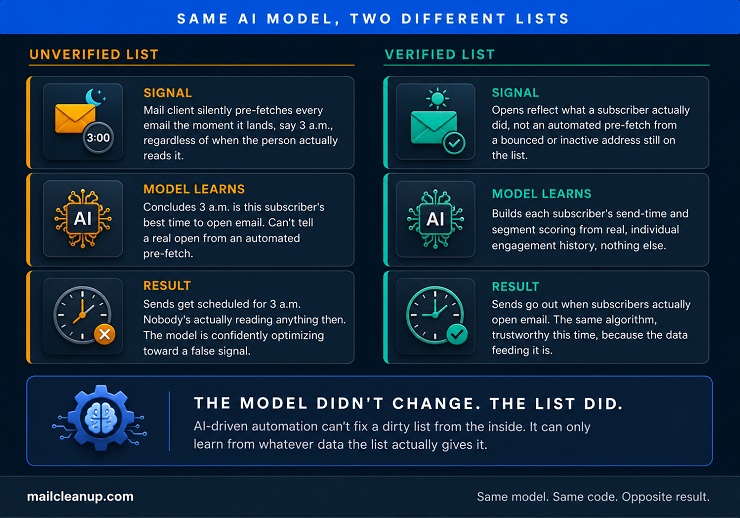
A dirty list makes this worse in a specific way, one you can’t fix by tuning the AI model itself. Bounced and invalid addresses on your list generate no real engagement at all. A model trained on a list still carrying them is learning from noise it has no way to identify as noise. The output looks precise. The confidence behind it is often not earned. Feed the same model a verified list instead. The identical algorithm starts producing genuinely trustworthy send-time and segmentation decisions.
Every signal it’s learning from now reflects something a real person actually did. We go deeper on what AI-driven automation can and can’t fix, and where it’s headed next, in our dedicated guide to AI in email marketing.
Email Automation Mistakes to Avoid
What is email marketing automation supposed to prevent, if not exactly this kind of easily-avoided failure? This email automation guide wouldn’t be complete without naming the mistakes too, not just the mechanics. Most of what makes email automation fail traces back to nine recurring patterns, not one-off bad luck.
- Automating onto an unverified list: the mistake behind Tier 4 and 5 on the ladder above. Fire a win-back sequence at addresses nobody’s confirmed in months, and you’re not recovering subscribers. You’re teaching inbox providers your domain sends to addresses that bounce.
- Treating every trigger as equally safe: the Risk Ladder exists because a post-purchase send and a win-back send carry very different risk. Both are technically automated email, but that doesn’t make them equally safe to send without a second thought.
- No exit condition once the goal’s met: a subscriber who already bought from you keeps getting cart-recovery emails for a cart they cleared. Or a lead who already converted stays in a nurture sequence built for someone who hasn’t. Either one reads as not paying attention, and it usually means the workflow never checked for the obvious exit.
- Letting workflows overlap and stack: a shopper can trigger cart recovery, browse abandonment, and a newsletter drip in the same week. All three can fire from the same platform without your workflows checking for overlap. Getting three “come back” emails in three days from one brand reads as spam, even when every individual message was well built.
- Never revisiting a workflow after launch: a sequence built two years ago is still running on today’s prices, today’s product line, and today’s list. None of that necessarily matches what it was built against. Give automations the same periodic review your live campaigns get, not a one-time setup assumed to still be right.
- No suppression sync across tools: if someone unsubscribes or complains on one platform, the tool needs to sync that fast. Otherwise they keep getting sends from you after opting out. That’s both a bad experience and a compliance problem, not just a deliverability one.
- One version for everyone: the same welcome sequence, or the same cart-recovery discount, goes out regardless of who your subscriber is. It doesn’t matter what they’ve actually done before. That wastes the one advantage automation has over a single blast send to the whole list.
- No monitoring for silent breakage: an integration disconnects, or one step in a sequence stops firing, and nothing looks wrong. A manual campaign that never sent gets noticed the same day. A broken automation can run silently for months.
- Never testing what’s already running: a workflow gets built once, and “it’s already automated” becomes the excuse. Nobody tests your subject line, timing, or copy again after that. An active campaign gets that scrutiny. A workflow running on autopilot usually doesn’t.
These email automation mistakes share one root cause: treating a workflow as finished the moment it’s switched on. Fold list verification into your email marketing automation strategy from the start, and most of these nine mistakes stop being possible.
Where to Start With Email Automation
This guide on email automation has covered fifteen trigger types, six workflow categories, five deliverability risk tiers, four AI capabilities, and nine ways automation commonly fails. All of that reduces to one variable that decides whether any of it works. That variable is how recently the address behind each send was actually confirmed to be real. Get that one thing right, and everything else in this guide, the triggers, the timing, the AI layer, works close to as advertised. Get it wrong, and the same mechanics that make email automation efficient make the damage compound just as efficiently.
If you’re starting from nothing, don’t build in whatever order feels most exciting. Build in Risk Ladder order instead:
- Post-purchase and welcome sequences first. Both sit at the low end of the ladder. Both work even before your list has years of history behind it.
- Browse abandonment and cart recovery next, once you’ve got a basic verification pass in place for new signups.
- Re-engagement and win-back last, and only once you’ve verified the specific segment you’re pointing it at. That’s not the same as having verified your list in general, months ago.
That single ordering choice does more to protect your sender reputation than any individual tactic covered above.
Not everyone reading this is starting from zero. If you already have workflows live, the useful move isn’t building anything new first. It’s auditing what’s already running against the ladder above. Find whichever of your existing automations sits at Tier 4 or Tier 5, drip campaigns and re-engagement sequences. Check the list behind those specifically before anything else. Those are the ones most likely already doing quiet damage, and they’re also the ones most people never think to re-check once they’re live.
Whichever situation you’re actually in, starting fresh or auditing something already live, the check happens in the same place. It’s not inside your automation platform, and it’s not in the copy or the timing. It’s the list underneath, checked before the workflow fires, not after a deliverability report shows the damage already done. MailCleanup verifies exactly that, whether the addresses feeding your automation are still real, before you find out the hard way.
FAQs on Email Automation
What is email automation?
Email automation is sending emails automatically when a specific trigger fires, a signup, a purchase, a stretch of inactivity. A person doesn’t compose or send each one by hand. The trigger decides when it goes out. The same message fires every time that trigger happens, whether that’s once a day or a thousand times.
How does email automation work?
Every email automation workflow runs on the same three-part logic. A trigger starts the process, a specific action like a signup or a purchase. A condition decides what happens next and for whom, checking things like segment or timing. An action sends the actual email once both are satisfied, sometimes a single message, sometimes a longer sequence.
What’s the difference between email automation and email marketing automation?
Email automation is the broader term, covering any trigger-based sending, including uses that have nothing to do with marketing, like an automatic support-ticket reply. Email marketing automation is the specific slice this guide covers: automated sends aimed at leads, customers, or subscribers. It’s built to move them through a relationship with a business, not manage day-to-day inbox tasks.
Is email automation worth it for a small business?
Yes, for most small businesses. The email automation benefits compound quickly. A welcome sequence or cart-recovery flow built once keeps working for every new subscriber going forward. Nobody has to draft or send it again. The upfront setup is the main cost. After that, it runs on its own.
How many emails should be in an email automation sequence?
It depends on the type of email automation workflow. A welcome sequence typically runs two to five emails over one to two weeks. Cart recovery usually runs three emails over about three days. More emails isn’t automatically better. Every email in a sequence needs its own clear reason to exist.
What triggers email automation?
Two broad categories of email automation triggers. Behavioral triggers work for any list: a signup, a form fill, a link click, a birthday, or a segment change. Ecommerce triggers depend on purchase activity: cart or browse abandonment, a completed order, or a gap since the last purchase.
How does email automation avoid spam filters?
Start with a verified list for your email automation, since bounces and spam-trap hits from bad addresses are what damage sender reputation fastest. Beyond that, the same deliverability fundamentals apply as any other email: correct authentication, consistent sending patterns, and content that doesn’t trip spam filters.
What mistakes should I avoid with email automation?
The most common email automation mistake is automating onto a list nobody’s verified, especially for re-engagement sequences targeting the most dormant subscribers. Others that show up often: no exit condition once a subscriber’s already converted, and workflows overlapping and stacking on the same person. Sequences left untouched for years after launch are just as common.