
Every email you send leaves from an IP address, and your email provider usually picks it for you. Then a pricing page or a help article asks whether you want a dedicated IP. A fair question follows: do I need a dedicated IP? Many answers start from a monthly volume number, which sounds exact but leaves the real question open.
Getting this wrong costs you either way. A dedicated IP bought too early has no sending history, so every slip lands on a brand-new reputation. A shared IP kept too long ties you to other senders’ habits. It also gives you no fixed address to hand a customer who wants to approve your mail.
The volume number many guides lean on is often one provider’s own rule, not a test of what your sending needs. This guide explains what each kind of IP does to your reputation and what a dedicated IP asks of you. You will be able to settle the dedicated IP vs shared IP choice with a five-question check on how you really send. You can also read a provider’s conditions and price before you commit, and move in steps that keep the risk low. That way you do not pay for a dedicated IP too early or stay on a shared one after you have outgrown it.
The focus is the address your email is sent from, not your website’s address. Once you know what your provider requires and how steadily you send, the choice gets much easier. And your quietest sending week may tell you more than your busiest.
TL;DR
- A shared IP pools every sender’s sending history into one reputation, while a dedicated IP builds its reputation from its owner’s mail alone.
- Most beginners do not need a dedicated IP, since volume thresholds are provider rules, not deliverability laws, and fit matters more than size.
- Before choosing, a sender should ask the provider about price, rules and pool quality, since those answers matter more than any general rule.
- A dedicated IP asks for authentication and reverse DNS records, a gradual warm-up, steady sending, a verified list and regular monitoring.
- Managed dedicated IPs and vetted shared pools sit between the two choices, and a staged move keeps the risk low in either direction.
Dedicated IP vs Shared IP for Email: What Each One Is
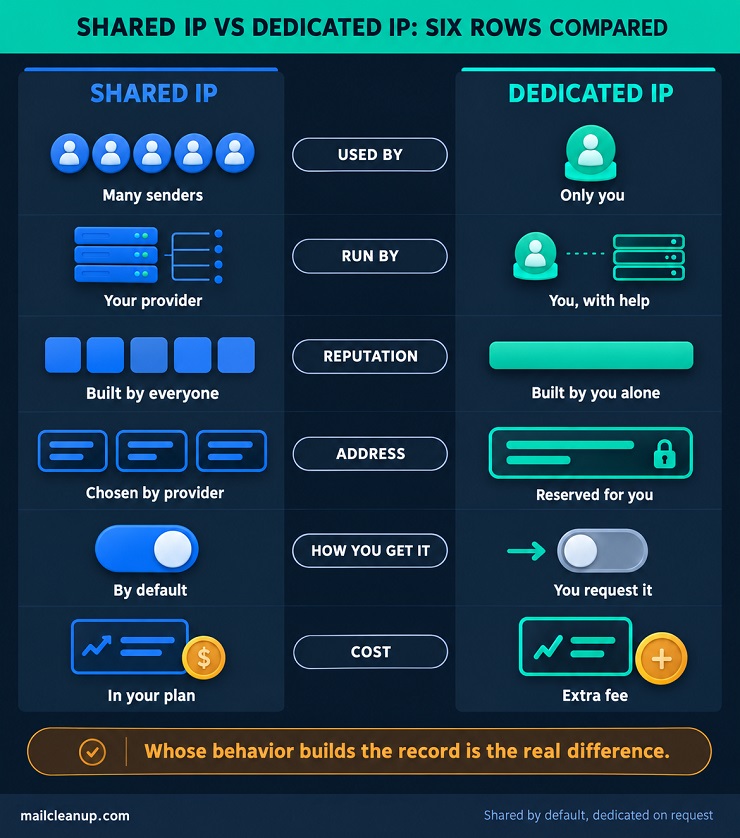
A shared IP is an address that many senders use together. A dedicated IP belongs to you alone. Every email you send leaves from one of these two kinds of address. That is why the dedicated IP vs shared IP question matters, even if nobody has asked you to decide it yet.
An IP address is a string of numbers that identifies the server an email was sent from. Mailbox providers, the companies that run inboxes, such as Gmail and Yahoo, keep a record of how each address behaves. That record is the address’s reputation, and it can affect whether your message reaches the inbox.
Shared IP vs dedicated IP is mostly a question of whose behavior ends up in that record. On a shared address, that means every sender’s behavior. On a dedicated address, it means only yours.
What Is a Shared IP for Email?
A shared IP for email is a sending address that many senders use at the same time. The sending history attached to that address, and so its reputation, belongs to all of them together.
In practice, an email provider sends mail for many customers from the same address, or from a small group of addresses called a pool. An email provider is the service you use to send your emails. A shared IP for email marketing works the same way, whether you send newsletters or promotions.
- Used by: many senders at once.
- Run by: your email provider, which manages the pool.
- Reputation: built by everyone on the address, so it belongs to no single sender.
- Address: chosen by the provider, so you may not know which addresses carry your mail.
- How you get it: by default, with nothing to buy or set up.
- Cost: usually included in your plan, with no separate fee for the address.
In the dedicated IP vs shared IP choice, shared is the starting point at many providers. New accounts at Mailchimp, Brevo, Amazon SES and Marketo send from shared addresses by default, and most ActiveCampaign customers send from a shared pool. If those names are new to you, Mailchimp, Brevo and ActiveCampaign are popular email marketing platforms. Amazon SES is Amazon’s email sending service, and Marketo is a marketing automation platform.
Quick check: if you never asked your provider for a dedicated IP, you are most likely on a shared one.
What Is a Dedicated IP for Email?
A dedicated IP for email is a sending address that only one sender uses. The sending history attached to that address, and so its reputation, belongs to that sender alone.
In a dedicated IP vs shared IP comparison, this is the side you have to ask for. Your email provider reserves the address for your account and sends only your mail from it. Some providers set conditions first, such as a minimum number of contacts or a minimum amount of monthly email.
- Used by: one sender only, which is you.
- Run by: you, with different amounts of help from your provider.
- Reputation: built from your own sending alone.
- Address: reserved for you, and a standard dedicated IP at Amazon SES is a fixed address you can look up.
- How you get it: you request it, and the provider may set conditions.
- Cost: usually an extra fee on top of your plan.
How you get one depends on the provider. At Amazon SES, a standard dedicated IP starts with a support request and costs a monthly fee for each address. At Mailchimp, it is an add-on you buy. At Brevo, it is an add-on too, and the Enterprise plan includes one. At ActiveCampaign, only senders with a large, active contact list qualify. At Marketo, it is sold separately, and not every customer qualifies.
A new dedicated address starts with little or no sending history, so it has to earn its reputation from your mail. A fixed address also lets a business that filters mail by address put yours on its approved list.
Your Email-Sending IP vs Your Website’s IP
Your website’s IP and your email-sending IP are two different addresses. Some guides about dedicated IP vs shared IP are written for website owners, so it helps to keep the two apart.
- Your website’s IP: the address that browsers connect to when someone opens your site.
- Your email-sending IP: the address your messages leave from, which is usually one of your email provider’s addresses rather than your website’s.
They do not have to match. A hosting plan can work in a mixed way: the website sits on a shared address, while email goes out from a dedicated one. A dedicated IP for email is therefore its own setup, whatever your website uses.
Hosting guides also cover website topics, such as SSL certificates and search rankings. Those topics belong to the website’s address. They do not apply to the address your email leaves from, so they stay out of this comparison.
Shared IP vs Dedicated IP: What Each One Does to Your Reputation
A dedicated IP gives you a reputation of your own. A shared IP gives you one that every sender on the address builds together. That difference is what the dedicated IP vs shared IP choice really changes.
Reputation comes mostly from history: how much mail an address has sent, and how steadily, according to Amazon SES. Addresses earn a good one the slow way, by sending steady volumes for a long time.
The sending address is one of several factors behind email deliverability. Dedicated vs shared IP changes only one of them: whose behavior the address’s record reflects.
Shared IP Benefits and Risks
A shared IP for email marketing is the easy, low-cost option, but your reputation is tied to everyone else on the address. That trade-off sits at the center of the dedicated IP vs shared IP decision. Start with what you gain.
- You can start right away: the provider has already set up the addresses, so there is nothing to request and no waiting.
- The pool already has traffic: many senders use it, and steady sending builds a good reputation for everyone on it.
- Someone else runs it: the provider manages the pool, so you do not have to.
- It costs less: you share the cost of the addresses instead of paying extra for one that is only yours.
- Uneven sending is fine: you can send more one week and less the next, because shared addresses cope with changing volume.
The risks come from the same fact: the address is not only yours.
- Other senders’ behavior reaches you: the reputation belongs to the whole address, so your record cannot be kept apart.
- The provider is in charge: the provider controls a shared address’s reputation, so your good habits cannot fully protect you.
- No separate records: you cannot split marketing mail and receipts into different reputations on shared addresses, as Amazon SES notes.
- No fixed address to share: the addresses can change, so a business that filters mail by address cannot list yours.
- Problems are harder to trace: when results dip, you may not know whether your mail or someone else’s caused it.
Even providers that watch their pools closely describe this risk. Complaints about one customer’s mail can affect delivery for everyone on the address, as Brevo’s help pages explain. No provider can promise that every sender on a shared address follows best practices, as Mailchimp’s own article states. So a shared IP for email marketing suits senders who want a simple start and can live with a reputation they do not control.
Dedicated IP Benefits and Risks
A dedicated IP for email marketing gives you control and a reputation that is yours alone. You also take on the work and the risk. In the shared IP vs dedicated IP trade-off, you are choosing control over convenience.
The main dedicated IP benefits are control, separation and a fixed address.
- Your reputation is yours alone: only your mail uses the address, so its record reflects your own sending.
- Mail types can be kept apart: you can group dedicated addresses into pools, such as one for marketing and one for receipts.
- The address stays fixed: a standard dedicated IP does not change, so a business can list it as approved.
- Cause and effect are clearer: with nobody else on the address, a change in results points back to you.
The risks mirror those benefits.
- It starts with no history: a new address has little or no record for mailbox providers to judge.
- It needs steady traffic: most mailbox providers only track an address once it sends them a meaningful amount of mail, according to Amazon SES. A sender with little mail gives them little to track.
- Big swings look suspicious: sudden jumps or drops in volume can make mailbox providers distrust your mail. Even on an address with a good record, consistent volume matters, as Marketo advises. An address left idle for a few weeks can go almost cold, ActiveCampaign warns.
- Nothing absorbs your mistakes: every bounce (an email that could not be delivered), complaint or bad send lands on your record alone.
- It costs more and needs an owner: providers charge extra for it, and someone has to run it.
Each of the dedicated IP benefits has a matching duty. A dedicated IP for email marketing pays off only for a sender who can meet those duties. The dedicated IP vs shared IP choice is really about whether that sender is you.
Domain Reputation vs IP Reputation
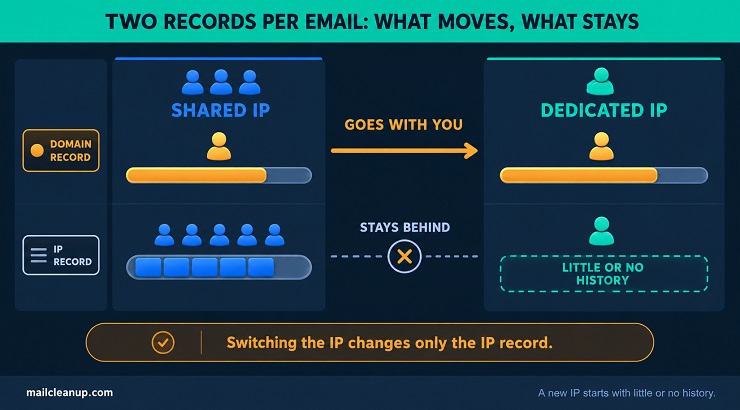
Your emails carry two records, not one. One belongs to the IP address, and the other belongs to your domain, which is the web name your emails are sent under.
Each IP address and each DKIM domain has its own reputation, and both can affect delivery, according to Yahoo’s sender guidance. A DKIM domain is the domain used to sign your messages, which lets mailbox providers tie each message to its sender.
The short version: your domain’s record goes with you, and your IP address’s record stays with the address.
Provider documentation shows the same split. On Brevo’s shared addresses, the IP’s reputation is shared, yet each customer’s domain reputation stays separate, according to its help pages. That detail matters in the dedicated vs shared IP decision. Authenticating your mail means proving it really comes from you. Done properly, it should give you a consistent domain reputation no matter which IP address sends it, according to Yahoo.
So a dedicated IP vs shared IP switch touches only the second record. A dedicated IP gives you control over the record tied to the address, not over both records.
For a closer look at how both records are built and repaired, the post on email sender reputation goes through it step by step.
What Stays the Same Whichever IP You Use
Moving to a dedicated IP leaves the basics of good sending exactly as they were. In dedicated IP vs shared IP sending, five things stay the same.
- Authentication: you still have to prove your mail really comes from you. At a minimum, Yahoo’s rules call for SPF or DKIM, two standard ways to do it. Email authentication is the same job on any address.
- Permission: email only people who asked to hear from you, and check that every recipient requested your mail, as Yahoo advises.
- List quality: mail to people who ignore it or mark it as spam hurts your reputation, so Yahoo advises removing invalid recipients promptly.
- Honest content: subject lines and sender details must not mislead, a rule Yahoo ties to the CAN-SPAM Act, the US law on commercial email.
- Complaint limit: Yahoo’s rule is a spam rate under 0.3% for every sender, or fewer than 3 complaints per 1,000 messages reaching the inbox.
None of these changes with the address. The Google and Yahoo bulk sender requirements apply whichever address you send from. A dedicated IP for email marketing gives you a record of your own. It does not fix a weak list or mail that people do not want. A dedicated IP alone does not improve deliverability, and it can help or hurt, as ActiveCampaign’s help page puts it.
Do I Need a Dedicated IP? The Volume Question Answered
Most beginners do not need a dedicated IP. What decides it is what your provider requires and how steadily you send, not one magic volume number. In the dedicated IP vs shared IP choice, fit matters more than size.
When you ask yourself, do I need a dedicated IP, a volume number feels like the answer. It rarely is, because every provider draws its own line. A dedicated vs shared IP decision built on one number can go wrong in both directions. You may buy too early, or stay on a shared address long after you have outgrown it.
Why Volume Rules for a Dedicated IP Disagree
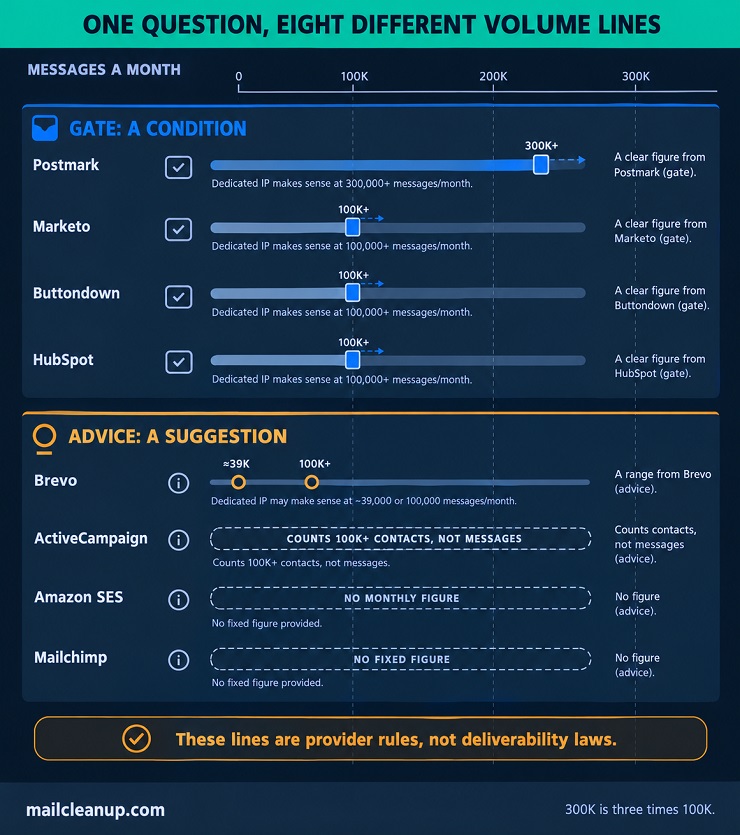
Every provider draws its own line for a dedicated IP. For anyone weighing dedicated IP vs shared IP, that matters. The line may be a rule about who can buy one, or only advice about who might want one. Here is what each provider’s own help page tells you, as of October 2026.
| Provider | What its page says | Kind of rule |
|---|---|---|
| Postmark | 300,000+ messages a month; a second IP at 100,000+ a day | Gate |
| Marketo | Over 100,000 emails a month, sent steadily | Gate |
| Buttondown | Enterprise plan; over 100,000 emails a month | Gate |
| ActiveCampaign | 100,000+ active, engaged contacts | Gate |
| HubSpot | Over 100,000 messages a month, to an engaged list | Advice |
| Brevo | 3+ campaigns a week to 3,000+ contacts, or over 100,000 emails a month | Advice |
| Amazon SES | No monthly figure; shared unless volume is large and regular | Advice |
| Mailchimp | No fixed figure; loose guidance | Advice |
Read down the table and three differences stand out. The first is the number. Three providers set a message figure for who can buy. The 300,000 a month at Postmark is three times the 100,000 at Marketo and Buttondown. On volume alone, if you mailed 150,000 messages a month, you would clear the bar at Marketo and Buttondown but not at Postmark.
The second is the unit. Contacts are the unit at ActiveCampaign, campaigns and contacts at Brevo, and messages at most of the others. The unit changes the answer. A list of 100,000 contacts mailed once a month sends 100,000 messages, but the same list mailed every week sends about 430,000 a month. Even within Brevo, the first test works out to at least about 39,000 emails a month, well under the 100,000 in its second test.
The third is the kind of rule. Four providers set a gate, which means a condition you must meet before they will sell you one. The other four only advise. So dedicated vs shared IP volume rules tell you what a provider will sell you, or what it suggests. They do not tell you whether you need a dedicated IP for email marketing. They also say nothing about how evenly you send, and mailbox providers care about the pattern as well as the size. Providers change these rules, so check your own provider’s page before you decide.
Sending Pattern Matters as Much as Volume
Steady traffic decides it. A dedicated IP works only when mailbox providers see enough of your mail, on a regular rhythm, to form a view of the address.
The minimum is small, and it is set per mailbox provider. A provider needs something to judge, so the advice at Amazon SES is several hundred emails to it in a day, at least monthly. That is far less than the 100,000 a month that some providers name. It also applies to each mailbox provider separately, not to your list as a whole.
Pattern matters as much as size. A sender who mails heavily in November and barely in July looks very different from one who mails every week. A sender with uneven or seasonal volume cannot keep a dedicated IP going, Marketo says. The same idea shows in Amazon SES’s advice: shared addresses suit sending that follows no set pattern. For very irregular sending, its better dedicated option is a managed dedicated IP, an address the provider sets up and builds up for you. Here is a quick way to test your own pattern.
- Write down your weekly totals: note how many emails you sent in each week of the past few months.
- Look at the quietest weeks: they show how a mailbox provider sees you in a slow period, which the average hides.
- Ask if the quiet weeks still look regular: if you go silent for weeks at a time, a dedicated IP can go almost cold. A shared IP fits better in that case.
In the dedicated IP vs shared IP decision, your quietest week tells you more than your busiest. A dedicated IP for email works for steady senders, and this test shows quickly whether you are one.
The IP Fit Check: Five Questions to Settle the Choice
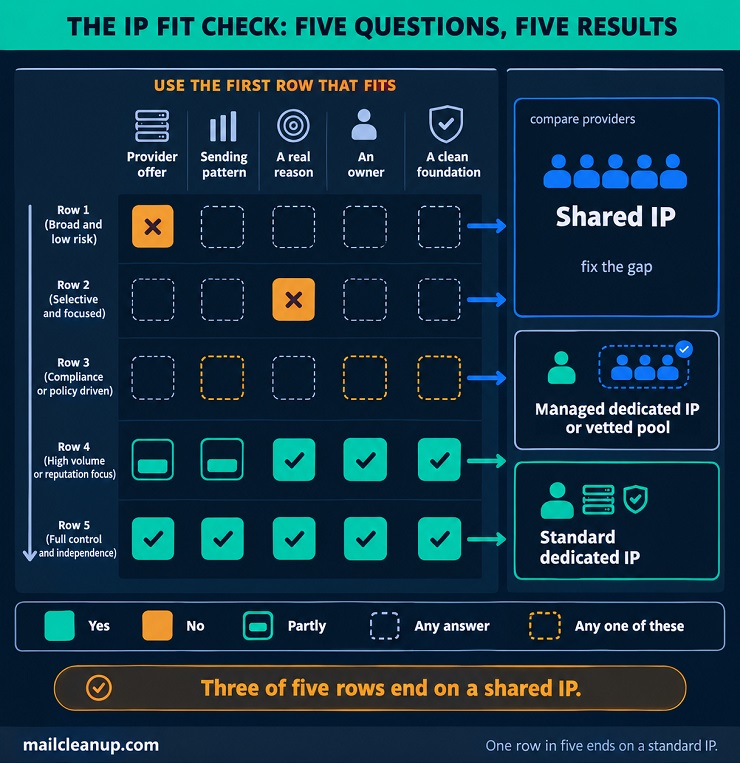
The IP Fit Check turns the dedicated IP vs shared IP decision into five questions. They run from the quickest to settle to the slowest, so you can stop as soon as an answer settles it.
- Provider offer: does your provider offer a dedicated IP, and what does it ask of you? Each provider sets its own conditions, so this is the quickest question to settle.
- Sending pattern: do you send steadily enough, to each mailbox provider, for a reputation to form? A rough guide from Amazon SES is several hundred emails to a mailbox provider in a day, at least once a month. A steady rhythm is a Marketo condition too.
- A real reason: is there a need that a shared IP cannot meet? You may only need a second DKIM domain to keep marketing mail and receipts apart. A fixed address that a customer can approve needs a dedicated IP.
- An owner: can someone own the work? A new dedicated IP needs warm-up, which means raising volume slowly. After that, you need steady sending and quick action when complaints rise.
- A clean foundation: are your list and authentication ready to carry an address alone? On a dedicated IP, no other senders cushion a bad send.
Your answers point to one of three outcomes. You can stay shared, choose a managed dedicated IP or a vetted shared pool, or choose a standard dedicated IP. A managed dedicated IP is an address the provider sets up and builds up for you. A vetted shared pool is a shared address open only to senders with strict practices. Use the first row that fits.
| Your answers | What fits | Why |
|---|---|---|
| “No” to question 1 | Shared IP; compare providers | The provider’s rule decides if you can buy |
| “No” to question 3 | Shared IP | A dedicated address adds nothing you need |
| “No” to question 2, 4 or 5 | Shared IP for now; fix the gap | Thin sending, no owner or a weak list hurt more on a dedicated IP |
| “Partly” to question 2, “yes” to the rest | Managed dedicated IP or vetted shared pool | Built for uneven sending and strict senders |
| “Yes” to all five | Standard dedicated IP | Steady traffic, a reason, an owner and a clean base |
Read down the table and stop at the first row that fits. Three of the five rows end on a shared IP, which is why shared is the right starting point for so many senders. Managed dedicated IPs exist at Amazon SES, and Marketo runs a vetted shared pool. Not every provider offers either. The shared IP vs dedicated IP answer can also change, so repeat the check whenever your sending changes.
Who Should Stay on a Shared IP
A shared IP for email suits most senders who are starting out. For 99% of ActiveCampaign users, a shared IP gives better inbox delivery, by that provider’s own count. In the shared IP vs dedicated IP choice, a shared IP for email marketing is the right call if any of these describe you.
- If you are new to email: a shared IP lets you start with no setup and borrow a record that is already built.
- If you send now and then: a shared IP fits, as in ActiveCampaign’s own example of a sender who mails two messages a month.
- If your volume swings or follows the seasons: a shared IP copes with changing volume, while a dedicated IP needs a steady rhythm.
- If your list is small: a small list on a dedicated IP usually delivers worse, as ActiveCampaign notes.
- If nobody can own the work: a dedicated IP needs someone to watch it and fix problems, and the sender carries the result.
One exception to the dedicated IP vs shared IP rule of thumb is worth knowing. A small group of recipients who approve mail by address can justify a dedicated IP even at low volume. Their systems let mail in or keep it out by a list of approved addresses rather than by reputation, according to Amazon SES.
Cold outreach is a different case. The people you write to have not asked to hear from you, so the risks and the setup differ. Cold email deliverability covers both.
Who Is Ready for a Dedicated IP
A dedicated IP is worth having when your sending is steady, you have a real reason, and someone owns the work. The dedicated IP benefits are real, but they depend on those conditions. In the dedicated IP vs shared IP choice, readiness matters more than size.
- If your sending is steady: you mail on a regular rhythm in similar amounts, so mailbox providers can learn the address.
- If a business needs a fixed address to approve: a standard dedicated IP gives you one. Approval by company mail filters is also simpler on a dedicated IP, especially for B2B senders, as Brevo notes.
- If you want mail types on separate IPs: you can group dedicated addresses into pools, such as one for marketing and one for receipts.
- If someone owns the work: a named person watches complaints and bounces, keeps volume steady and acts fast when something slips.
- If your list is permission-based and engaged: that is one of the conditions HubSpot lists for considering a dedicated IP.
If most of these describe you, a dedicated IP for email marketing is worth asking your provider about. If they do not, the dedicated IP benefits will not outweigh the work.
Dedicated IP for Email Marketing: Standard, Managed and the Middle Options
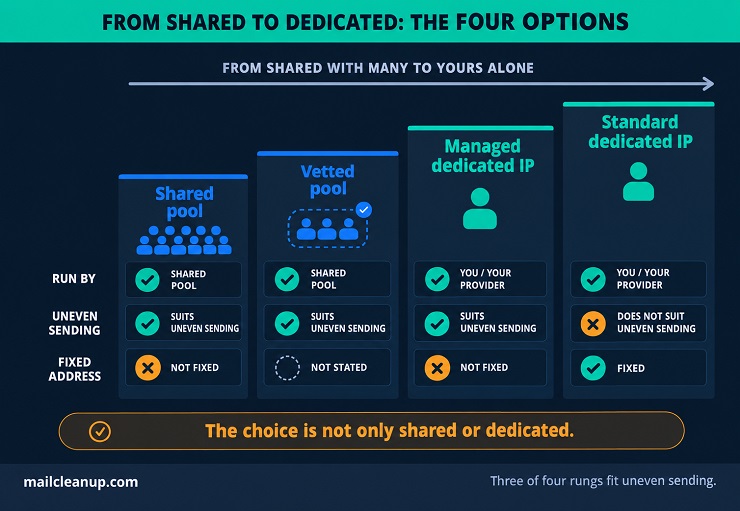
The choice is not only shared or dedicated. Between the two sit managed dedicated IPs and vetted shared pools. You can also keep different kinds of mail apart without buying an address for each.
You may hear only about the two ends. The options in the middle can fit you better, so it helps to know they exist. In the dedicated IP vs shared IP choice, a dedicated IP for email marketing also comes in more than one form.
Standard vs Managed Dedicated IPs
A standard dedicated IP is one you set up and run yourself. A managed dedicated IP is one your provider sets up and runs for you. Standard vs managed is the first split inside the dedicated side of the dedicated IP vs shared IP choice. A dedicated IP for email can be run either way, and Amazon SES sells both under those names. Its documentation shows who does what.
| Standard | Managed | |
|---|---|---|
| Setup | You send a support request | Allocated once you opt in |
| Warm-up | You raise volume day by day | Done for you, one mailbox provider at a time |
| Growth | You add and move addresses | The pool grows and shrinks with your sending |
| Address | Fixed, and you can look it up | Changes as the pool changes |
| Uneven sending | Not a good fit | A good fit |
| Price shape | A monthly fee for each IP | A monthly fee plus a fee per email |
The address row matters most for a beginner. Only a standard dedicated IP stays fixed, so a customer who wants to approve your address by name needs standard. A managed pool can add or drop addresses as your sending moves, which is why it suits uneven senders.
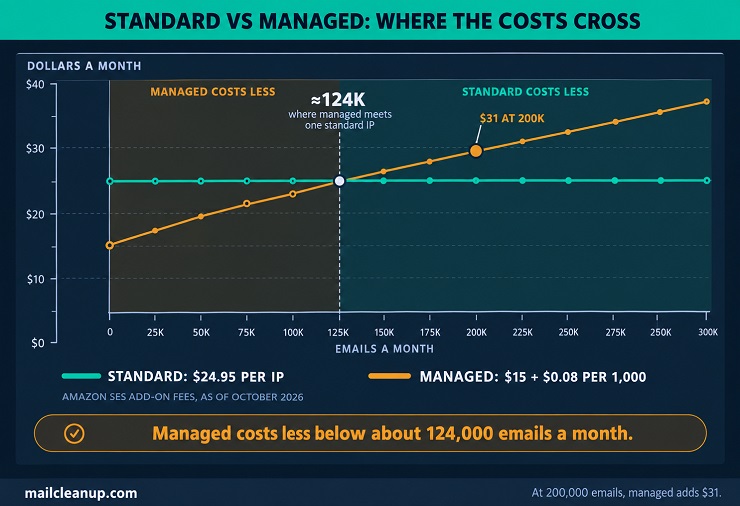
Price is the other difference. As of October 2026, each standard IP costs $24.95 a month at Amazon SES. A managed IP costs $15 a month for the account. On top of that, it adds $0.08 for every 1,000 emails, up to the first 10 million emails a month. A standard IP costs the same whatever you send, but the managed fee grows with volume. If you mail 200,000 emails a month, managed adds $31 and one standard IP adds $24.95. Under about 124,000 emails a month, managed costs less than one standard IP. These are add-on fees only, and Amazon SES also sells plans that bundle managed dedicated IPs.
The same split shows up elsewhere. At Postmark, warm-up is managed or do-it-yourself, and at HubSpot it is automatic. At ActiveCampaign, you can start with a pre-warmed address or a cold one that you warm yourself. At Marketo, a deliverability consultant coaches you through it.
The Vetted Pool: A Shared IP With Stricter Senders
A vetted shared pool is a shared address that only senders with strict practices can join. It is the middle step in the dedicated IP vs shared IP choice. In the shared IP vs dedicated IP choice, it suits you if you want cleaner company without the work of running your own address.
The Trusted IP pool is Marketo’s version. It runs apart from the ordinary shared addresses and is open to customers who keep to strict best practices. To apply, you fill in a questionnaire. In Marketo’s documentation, the pool sits right after the dedicated IP rule. At Marketo, a sender under 100,000 emails a month, or with uneven or seasonal volume, cannot keep a dedicated IP. The pool is the option that remains.
Vetting means a check before you join and a standard you keep meeting. A vetted pool is still a shared IP for email marketing, so you still share an address, but with fewer strangers. The reputation then depends less on who else is inside.
Ask your provider: is there a separate shared pool for senders with strict practices, and what does it take to join?
If you are on an ordinary shared pool, it is still watched. At Brevo, campaigns on shared IPs are monitored. A sender whose results hurt the pool may be asked to move to a dedicated IP. At ActiveCampaign, a deliverability team balances and monitors the shared pools. No provider can promise that every sender on an ordinary shared IP for email follows best practices. That is the gap a vetted tier is meant to close.
Keeping Marketing and Transactional Mail Apart
You do not always need a dedicated IP to keep marketing mail and receipts apart. You can separate them by IP, by DKIM domain, or by both. Transactional emails are the messages a person’s action triggers, such as receipts and password resets.
The reason to separate them is shared reputation. Each IP and each DKIM domain has its own reputation, and Yahoo advises against sending marketing mail from the same IPs as transactional mail. If both streams share one reputation, a bad marketing send can hurt the receipts people are waiting for. In a dedicated vs shared IP setup, you have three routes.
- Separate IPs: put each stream on its own address. At Amazon SES, one pool of dedicated IPs can carry your marketing mail while a second pool carries your transactional mail. At Brevo, you can group several dedicated IPs into a pool and give different email types their own addresses. At Postmark, you choose whether a dedicated IP carries transactional or broadcast mail.
- Separate DKIM domains: you sign each stream with its own DKIM domain, one for marketing and one for receipts. That is an alternative to separate IPs, and Yahoo lists it as one. DKIM signing shows how the signature works.
- Both together: use separate IPs and separate DKIM domains, so neither reputation is shared between your streams. A company with several brands can go further: HubSpot Enterprise accounts with the Brands add-on can give each brand its own dedicated IP.
In the dedicated IP vs shared IP choice, a dedicated IP for email marketing is one route to separation, not the only one. If you want to avoid paying for another IP, a second DKIM domain can do part of the job. Setting up and protecting transactional mail in full gets its own treatment in [our guide to transactional email deliverability].
What a Dedicated IP for Email Requires Before the First Send
A dedicated IP for email asks five things of you before the first send. You set up the records that prove who you are, plan the warm-up and clean the list. You also decide how to watch results and check the address’s history. On a shared IP, your provider handles much of this.
In the dedicated IP vs shared IP choice, these tasks are the price of control. A dedicated IP for email marketing gives you a reputation of your own, and it hands you the work of looking after it. Providers differ in how much help they give, so that is worth asking about before you buy.
Authentication and Reverse DNS Setup
A dedicated IP needs two setup jobs before the first send. One is SPF, which lists who may send for your domain. The other is reverse DNS, which gives the address a proper name. Both live in DNS, the system that links names to addresses.
SPF is a record that names the IP addresses permitted to send your domain’s mail. If your new address is missing from that list, a mailbox provider can reject the mail. That is something Yahoo says its systems can do. So the address has to be added before you send, or your provider has to add it for you. The record is explained in full in Sender Policy Framework.
In plain words: SPF says who may send, and reverse DNS says what the address is called.
Reverse DNS works the other way round. Forward DNS turns a name into an address, and reverse DNS turns an address back into a name. The record that does this is called a PTR record. Under Yahoo’s rules, each sending IP needs a valid DNS record in both directions, forward and reverse. The name should mean something and should tie back to your domain. It should point to a fixed mail server, not look like a temporary address.
In the dedicated IP vs shared IP choice, this is one of the jobs a shared address spares you. On a dedicated address, who sets it up depends on the provider. Reverse DNS records live with whoever owns the address. That is usually your provider, so you ask the provider and not your own DNS host.
At Postmark, reverse DNS is handled for you through its own domains. At HubSpot, you add a few records at your DNS host. One ties the address to your domain, and others set up SPF and DKIM. You get an email from HubSpot if one of them breaks. At ActiveCampaign, authentication is a recommended extra on a dedicated address, not a requirement. Here is a short checklist to run through before the first send.
- Ask who sets the reverse DNS record, you or your provider.
- Confirm the new address is in your SPF record, or that your provider has added it.
- Check that the reverse DNS name means something and ties back to your domain.
- Check that DKIM signing is on for the domain you send from.
If the address ever changes, the SPF list and the reverse DNS record have to change with it.
Warming Up a Dedicated IP for Email: What to Expect
Warm-up means raising your volume slowly on a new address so mailbox providers can learn it. In the dedicated IP vs shared IP choice, a shared pool is already warm, but a new dedicated IP starts cold. A new dedicated IP has no history, so it cannot carry a full load on day one. A cold address that suddenly sends a lot is often slowed down or treated as spam, according to Marketo.
Who runs the warm-up depends on the provider. Some do it for you. At HubSpot, the move from shared IPs to your new address happens automatically, in steps, over 40 days. In Postmark’s managed option, a daily limit applies and the extra goes over its shared pool. After 3 to 6 weeks, a typical sender has an established reputation, according to Postmark. Others share the work. At ActiveCampaign, a pre-warmed address can handle about 100,000 messages a day, and you still warm up the address and your domain together. With Amazon SES standard or Postmark’s do-it-yourself option, the whole job is yours. A day-by-day schedule is in email warmup.
Warm-up does not end the work. If your address goes quiet, it can go cold again, and providers draw the line in different places.
| Provider | If the address sits quiet |
|---|---|
| HubSpot | Warm-up pauses after more than 7 days without sending |
| Brevo | Warm-up restarts after 30 days of inactivity, and gaps over a week are best avoided |
| ActiveCampaign | The address goes cold after 30 days unused, and sending less than once a week is a sign a dedicated IP is the wrong fit |
| Postmark | The address must be re-warmed if weekly volume stays under 20,000 messages for 4 weeks |
The lines differ, but they agree on the idea: a dedicated IP needs regular sending. The shortest limit is 7 days at HubSpot. The 30 days at Brevo and ActiveCampaign is more than four times longer. At Postmark, the count is weekly volume instead of days.
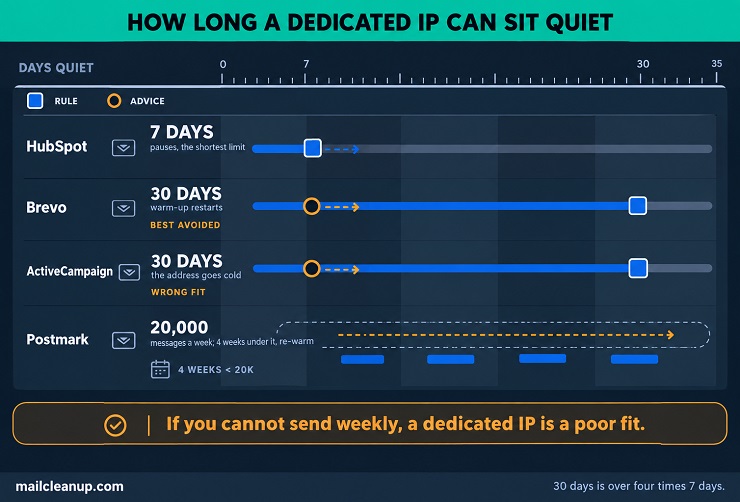
Rule of thumb: if you cannot send at least once a week, a dedicated IP will be a poor fit.
In a dedicated vs shared IP decision, warm-up is the cost of starting fresh. A dedicated IP for email needs the same rhythm after warm-up as during it.
Why Your List Must Be Clean Before the First Send
On a dedicated IP, every bounce, complaint and spam trap hit lands on your own history. A spam trap is an address that catches senders with poor list habits. So you need the list clean before the first send. In the dedicated IP vs shared IP choice, a shared IP for email marketing softens a bad list, and a dedicated address does not.
Providers say the same thing. At ActiveCampaign, problems with list hygiene, data collection and engagement carry over to a dedicated IP. The advice is to fix the root cause before you start one. At Brevo, a dedicated IP’s reputation suffers when you mail inactive contacts or draw many spam complaints, and the responsibility is yours. At Postmark, landing on a blocklist again and again is not normal and points to the sender’s own list practices. A blocklist is a list that mail systems use to block certain senders.
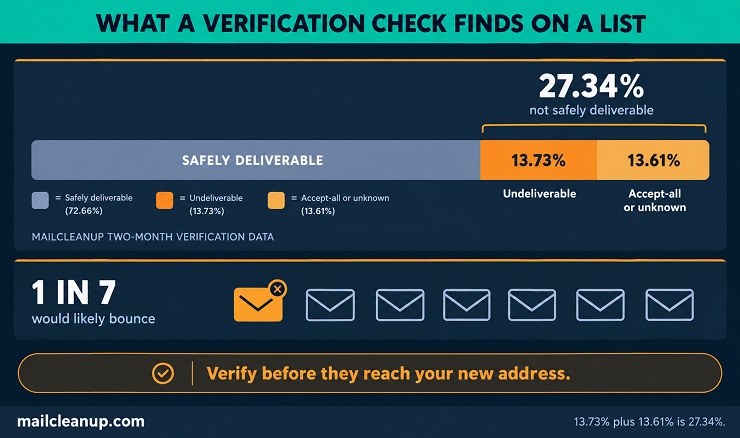
The numbers show how much there can be to clean before you send. In MailCleanup’s two-month verification data, 13.73% of the addresses checked were undeliverable. Another 13.61% were accept-all or unknown, which means the server accepts mail for any address, or the result could not be settled. In all, 27.34% were not safely deliverable, and about 1 in 7 addresses would likely bounce.
- Undeliverable addresses: they bounce, and every bounce lands on your own history.
- Spam traps: they flag your questionable list building and email sending practices to known spam filters. The post on what spam traps are explains how they end up on your list.
- Risky addresses: accept-all and unknown results, which cannot be confirmed either way.
A verification check before the first send takes these out before they reach your new address. Email verification is the check that finds them, and bulk email verification runs it on a whole list at once. Regular list hygiene keeps the list clean after that, so a dedicated IP for email marketing keeps building a good record.
Monitoring a Dedicated IP
Watching a dedicated IP means checking four things: bounces, complaints, blocklist status and what mailbox providers say about your address. A dedicated IP for email gives you a cleaner view, because the numbers are only yours. On a shared IP, the reports from mailbox providers’ tools also include other senders, as ActiveCampaign notes. In the dedicated IP vs shared IP choice, clean data is one of the quiet benefits of a dedicated address.
- Google Postmaster Tools: shows how Gmail sees your domain and your IP.
- Microsoft SNDS: short for Smart Network Data Services, it reports on individual IPs as Microsoft services such as Outlook and Hotmail see them. With a provider-run address, the access request usually goes through the provider, as SendGrid’s guide shows.
- SenderScore: a third-party score for your IP, built from factors such as complaints and spam traps.
- Your provider’s dashboard: HubSpot emails you if a DNS record breaks, and Brevo’s Enterprise plan has a dashboard for IP reputation.
- Complaint feedback loops: they send you a copy of each spam complaint. At Yahoo, the loop must be active for every DKIM domain you use.
Complaint rate is the number to watch most closely. The limit for every sender at Yahoo is a spam rate under 0.3%. Spam complaint rate shows how the rate is worked out. Some mailbox providers send complaint reports back through feedback loops, and they do not all work the same way. Where your mail lands during the ramp-up gets its own treatment in [our dedicated guide to email deliverability and inbox placement testing].
Check a Dedicated IP’s History First
A dedicated IP for email is not always as blank as it sounds, so ask what kind of address you are getting. Providers differ here. At Postmark, a dedicated IP is always new and clean, and no other customer has used it. A Brevo dedicated IP starts with a neutral reputation, and you build the record from there. At ActiveCampaign, a pre-warmed address is the default, and a cold one is available on request. In the shared IP vs dedicated IP choice, a shared pool comes with a long history. A dedicated address comes with whatever history the provider gives it.
Providers also disagree about pre-warmed addresses. In Postmark’s view, a pre-warmed address is only a temporary fix, because receivers notice when an address changes hands. At ActiveCampaign, a pre-warmed address is the recommended start, because it is the fastest. Both are provider views, so ask yours what it supplies and why. That question belongs in any dedicated IP vs shared IP decision.
- Is the address new, or has another customer used it?
- Is it pre-warmed, and how much can it carry on day one?
- Is your new address on a blocklist today?
- Who handles removal, and will the provider replace your address if it is badly listed?
A blocklist is a list that mail systems use to block mail from certain addresses. Before the first send, check whether your new address is on one. Also ask what the provider does if it lands on one after you start. At Brevo, a burnt-out dedicated IP is not replaced, and the advice is to fix the cause before asking for removal. At Postmark, repeated blocklisting is treated as a sign of the sender’s own practices, and access can be withdrawn if problems persist. The post on blacklist check and removal covers the steps.
What to Ask Your Provider Before Choosing Dedicated vs Shared IP
Before you choose, ask your provider about price, rules and pool quality. The answers differ from one provider to the next, so they matter more than any general rule.
In the dedicated IP vs shared IP choice, money is one part of the picture, and rules and pool quality are the rest. A shared IP is the cheaper start, and a dedicated IP adds fees, conditions and work. In a dedicated vs shared IP decision, you can compare the money today, so start there.
What a Shared IP Costs
A shared IP for email marketing usually costs nothing extra, because it comes with the plan you already pay for. At Marketo, sending from a shared IP never costs extra, and Amazon SES includes shared addresses in its standard price. In the dedicated IP vs shared IP choice, that is the main money advantage. A shared IP for email also asks nothing of your mailing rhythm, while a dedicated IP needs a steady one, as Marketo notes.
Two things are worth confirming. The first is your sending limits, because plans can cap how much you send. At HubSpot, a dedicated IP comes with no sending limits, so ask what your own plan allows. The second is which pool you are in. Some providers run more than one shared pool, such as Marketo’s Trusted IP pool, so ask which one you are on.
What a Dedicated IP Costs
A dedicated IP for email marketing usually costs extra, and providers charge for it in four ways. Some sell it as an add-on to a plan, and some charge per address. Others charge a monthly fee plus a fee per email, or include it in a higher plan. In the dedicated IP vs shared IP choice, the price is only one part of what you pay.
Here is what each provider’s own page shows you, as of October 2026.
| Provider | Price shown | How it is sold |
|---|---|---|
| Amazon SES | $24.95 a month per standard IP; managed $15 plus $0.08 per 1,000 emails | Per address, or monthly plus per email |
| Postmark | $50 per IP per month | Per address |
| Buttondown | An extra $50 a month | Add-on on an enterprise plan |
| ActiveCampaign | $750 per IP | Per address, any plan |
| Brevo | $251 a year per IP; one included in Enterprise | Add-on on Professional and Enterprise |
| HubSpot | Not shown; sold through sales | Add-on for Marketing Hub Professional and Enterprise |
| Mailchimp | Not shown in its article | Add-on |
| Marketo | Not shown; ask your account team | Add-on |
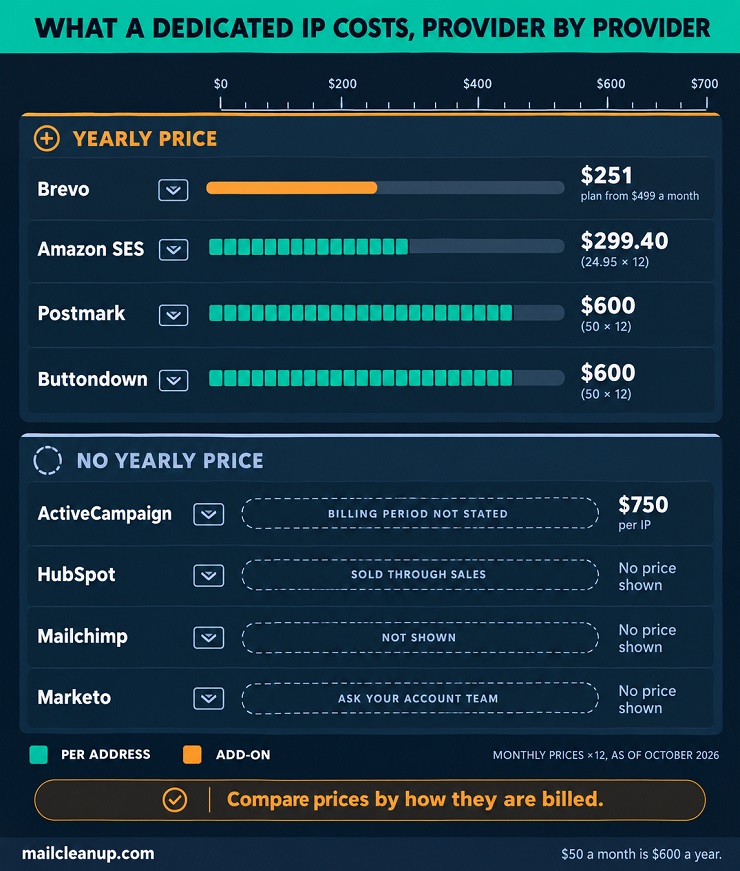
Compare the numbers by how they are billed. At $50 per IP per month, a Postmark IP comes to $600 a year. The extra $50 a month at Buttondown is the same $600 a year. One standard IP at Amazon SES comes to $299.40 a year. At Brevo, $251 a year is about $21 a month, but the add-on is sold only on the Professional plan and higher tiers. That plan starts at $499 a month before tax, for 150,000 emails. The IP is about 4% of that combined cost, so if you want Brevo’s add-on, the plan is the real price of entry.
At ActiveCampaign, the page lists $750 for each IP but no billing period. Ask before you compare it with monthly prices. A sender with high volume there may use 3 to 4 IPs, which is $2,250 to $3,000 at $750 each. For HubSpot, Mailchimp and Marketo, no price is shown, so the price is a question for your account contact.
The fee is not the whole cost. Someone also has to run the address, with warm-up, monitoring and list checks. If you run it yourself, that time costs you something, and it still does when the provider does part of the work. In a shared IP vs dedicated IP cost comparison, the fee is only the visible part.
How to Judge a Provider’s Shared IP Pool
A good shared pool shows in how the provider watches it. In the dedicated IP vs shared IP choice, these six answers carry as much weight as the price.
- How senders are watched: campaigns on Brevo’s shared IPs are monitored, and ActiveCampaign’s team balances and monitors its pools. Ask your provider for the same detail.
- When a sender causes trouble: at Brevo, a sender who hurts the pool may be asked to move to a dedicated IP. Ask what yours does.
- A vetted or managed tier: Marketo has a Trusted IP pool, and Amazon SES sells managed dedicated IPs. Ask what yours offers.
- Your sending IPs: at Amazon SES, shared addresses can change and you cannot tell which ones carry your mail. Ask whether yours are listed.
- How problems are resolved: issues can be harder to resolve on a shared IP, as Marketo notes. Ask who investigates a drop in delivery.
- If you outgrow the pool: ask about the conditions, fees and plan requirements for a dedicated IP.
Clear, specific answers are a good sign, and vague ones deserve a second look. A shared IP for email marketing is only as good as the pool and the people watching it.
Moving Between Dedicated IP vs Shared IP Setups
You can move between a shared IP and a dedicated IP in either direction, and a staged move is safer than a switch overnight. In the dedicated IP vs shared IP choice, neither side is permanent.
Providers build the move in steps. At HubSpot, traffic shifts to a new dedicated IP gradually, over 40 days. At Postmark, overflow goes over its shared pool during a managed warm-up. The same idea works for you, whichever way you move.
A Staged Plan for Moving to a Dedicated IP
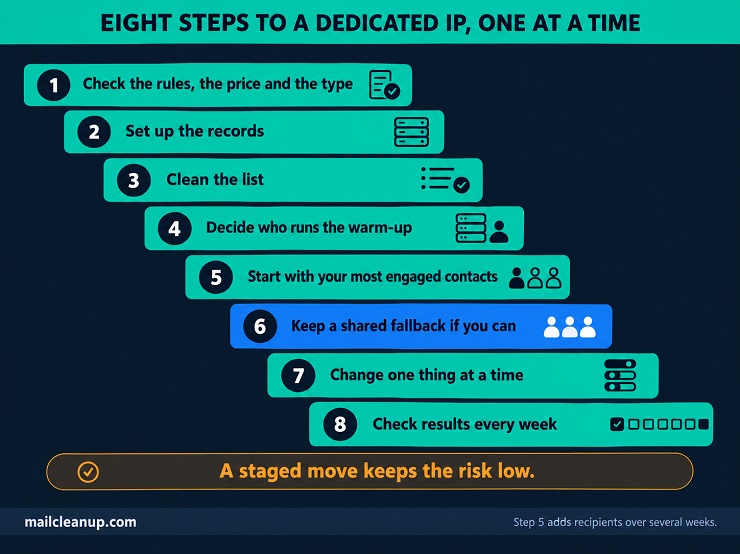
A staged move keeps the risk low. In the dedicated IP vs shared IP choice, the move to a dedicated IP for email marketing is the one that needs a plan. Work through these steps in order.
- Check the rules, the price and the type: confirm the provider’s conditions, know the fee, and choose between standard and managed. At HubSpot, once a dedicated IP is connected, all marketing email goes through it, so ask whether your move is all-or-nothing.
- Set up the records: add the new address to your SPF record, get reverse DNS set, and check that DKIM signing is on.
- Clean the list: verify it before the first send, so the new address starts clean.
- Decide who runs the warm-up: your provider or you.
- Start with your most engaged contacts: at HubSpot, the advice is to begin with small campaigns to them. Then add recipients over several weeks.
- Keep a shared fallback if you can: at Postmark, overflow goes over the shared pool during managed warm-up. At HubSpot, traffic shifts in steps from shared addresses.
- Change one thing at a time: a new address, a new list and a new template together make problems hard to trace.
- Check results every week: watch bounces, complaints and blocklist status.
When to Reconsider Your IP Choice
Your first choice does not have to last. Review it when your sending, your needs or your provider’s rules change. Two lists of signs help in a dedicated vs shared IP review.
These signs say a shared pool is holding you back.
- A customer needs a fixed address to approve: shared addresses can change over time.
- You need separate reputations: on shared addresses, marketing mail and receipts cannot be split, as Amazon SES notes.
- Your reports are muddy: shared-IP reports include other senders, as ActiveCampaign notes.
- Your provider asks you to move: at Brevo, a sender who hurts a shared pool may be asked to move to a dedicated IP.
- You now meet the conditions and send steadily: at Marketo, that means over 100,000 emails a month on a steady rhythm.
These signs say a dedicated IP is working against you.
- Your sending has turned uneven or seasonal: at Marketo, a sender with uneven or seasonal volume cannot keep a dedicated IP going.
- The address keeps going quiet: a gap longer than a week is best avoided at Brevo. Sending less than once a week is a poor fit at ActiveCampaign.
- Complaints or blocklist trouble keep returning: at Brevo, a burnt-out dedicated IP is not replaced, so the cause has to be fixed.
- Nobody owns the work any more: a dedicated IP needs someone to watch it and fix problems.
- Results are worse than before the move: a small list on a dedicated IP usually delivers worse, as ActiveCampaign notes.
If several signs on one list fit you, look at the other side. In the dedicated IP vs shared IP choice, the right answer is the one that fits how you send now.
Moving Back to a Shared IP
In the dedicated IP vs shared IP choice, moving back to a shared IP for email is a normal move, not a failure. Providers say so themselves. At Brevo, a shared IP is the suggestion if you cannot keep volume high and steady. At ActiveCampaign, a sender who mails less than once a week should not be on a dedicated IP.
You give up two things when you move back.
- A fixed address: customers can no longer approve it by name, because shared addresses can change over time at Amazon SES.
- A reputation that is yours alone: on shared addresses at Amazon SES, one reputation covers your whole account.
Ask your provider how to release the address and whether you can return to its shared pool or a vetted pool. Ask what happens to the address and its history when you leave. Tell any customer who approved your address by name before you move. Keep authentication and list checks as they are, because they do not depend on the address.
Moving back is the right call when your sending has turned uneven, the address keeps going quiet, or nobody can run it. In the shared IP vs dedicated IP choice, a shared address you can run well beats a dedicated one you cannot.
Your Next Step on Dedicated IP vs Shared IP
Your next step is a short check, not a purchase. In the dedicated IP vs shared IP choice, three small jobs tell you more than any rule of thumb. You can do the first two before you spend anything. The first job is to pull your weekly sending totals for the past few months and look at your quietest weeks. In a dedicated vs shared IP decision, those weeks show whether a dedicated address would stay warm. If you go silent for weeks, or send less than once a week, a shared IP for email marketing is the better fit.
The second job is to ask your provider about its shared pool, its dedicated IP price, its conditions, and any managed or vetted option. Some plans also include expert help. A Brevo Professional plan, for example, includes 3 hours a year of support from deliverability strategists. That time is worth using before you buy an IP.
The third job is to verify your list before any change. A dedicated IP puts every bounce and complaint on your own history, so a clean list is your first protection. Whichever way you decide, repeat these three jobs when your sending changes, because the best answer today may not hold in a year.
Start today: open your sending report and find your quietest week.
FAQs on Dedicated IP vs Shared IP
Do I need a dedicated IP for email?
Most beginners do not. If you are asking, do I need a dedicated IP, the answer is usually no. By ActiveCampaign’s own count, 99% of its users see better deliverability from a shared IP. A dedicated IP for email fits senders with steady volume, a real reason and someone to run it.
Is a dedicated IP worth it for a small email list?
Usually not. Your small list gives a dedicated IP too little steady mail to build a reputation. At Marketo, a dedicated IP is for senders mailing over 100,000 emails a month. Fewer than two mailings a month also counts against a dedicated IP there. A shared IP for email marketing is the safer start.
Is a dedicated IP better than a shared IP for deliverability?
Not by itself. A dedicated IP gives you a reputation of your own, but it does not fix a weak list. In MailCleanup’s two-month verification data, 13.73% of addresses checked were undeliverable. With authentication, your domain keeps one consistent reputation whichever IP sends, according to Yahoo. In a shared IP vs dedicated IP choice, list quality counts for more.
How much does a dedicated IP for email cost?
A dedicated IP for email marketing usually costs extra. As of October 2026, a standard IP is $24.95 a month at Amazon SES and $50 a month at Postmark. At Buttondown, you pay an extra $50 a month. At Brevo it is $251 a year, on a plan from $499 a month. The $750 per IP at ActiveCampaign has no billing period listed.
How much does a dedicated IP for email cost?
A dedicated IP for email marketing usually costs extra. As of October 2026, a standard IP is $24.95 a month at Amazon SES and $50 a month at Postmark. At Buttondown, you pay an extra $50 a month. At Brevo it is $251 a year, on a plan from $499 a month. The $750 per IP at ActiveCampaign has no billing period listed.
How long does it take to warm up a dedicated IP?
It depends on who runs the warm-up. At HubSpot, a new IP is warmed automatically over 40 days. At Postmark, a typical sender has an established reputation after 3 to 6 weeks of managed warm-up. At ActiveCampaign, a pre-warmed IP handles about 100,000 messages a day. The dedicated IP benefits of control and a clear record only show fully once you finish that ramp.
How do I switch from a shared IP to a dedicated IP?
Move in steps. Confirm the provider’s conditions and price, then set up SPF, reverse DNS and DKIM. Verify your list and warm the address up with your most engaged contacts first. During managed warm-up at Postmark, overflow mail goes over the shared pool. A staged plan keeps a dedicated IP vs shared IP switch low in risk.
What happens if my dedicated IP gets blocklisted?
Mail systems that use the list can block your mail until the listing is cleared. At Brevo, the advice is to fix the cause before asking for removal, and a burnt-out dedicated IP is not replaced. At Postmark, repeated listings point to the sender’s own practices, and access can be withdrawn. In a shared IP vs dedicated IP comparison, the cleanup falls to you.