
An abuse email address can mean two different things, and advice for one often works against the advice for the other. One is the abuse@ mailbox a domain keeps open so people can report spam that comes from it. The other is a subscriber address with a record of its owner reporting mail as spam. Guides tend to explain one meaning and leave the other out.
Mix them up and you fix the wrong thing. A mailbox that rejects or filters incoming reports hides a problem on your side, and often nobody tells you. A flag on a list address records what happened to someone else’s mail. Treating it as a forecast can cost you subscribers you could have kept. Mail sent to another organization’s abuse@ costs you more, because it lands on a desk that handles complaints.
The way out is to tell the two meanings apart before you touch either. This post shows how to run, register and test your own abuse@ mailbox, and how to report spam to someone else’s, Gmail included. It then shows what a verification flag can and cannot tell you, and what to do with complainers and abuse@ addresses on your list. Phishing notices, security-team mailboxes and workplace misuse are separate subjects. By the end, you will know which of your own addresses to test first.
TL;DR
- An abuse email address means either the abuse@ mailbox a domain keeps for spam reports or a subscriber address with a complaint history.
- A working abuse@ mailbox needs a shared queue with an owner and a backup, filtering that never rejects, and a test after every change.
- A spam report that gets acted on names a time window, a count, a sending address and one request, and includes the complete message.
- A complaint flag on a list address is a history, not a forecast, and it says nothing about whether the mailbox works.
- Another organization’s abuse@ on a list is a complaint desk, not a subscriber, so it stays out of sends and on a do-not-send list.
- A flagged address should be mailed only with evidence: a complaint about the sender’s own mail or a bought-list origin rules it out.
What Is an Abuse Email Address? Two Meanings, One Name
An abuse email address is either a mailbox a domain publishes or a subscriber address with a complaint history. Which one it is depends on which side of the inbox you stand on. For a domain owner, it is the abuse@ mailbox where people and mail systems report spam and misuse coming from that domain. For a sender, it is a subscriber address whose owner has a history of reporting mail as spam. Many verification tools use the term this way.
Why does one name cover both? Once you follow the chain, the confusion is easier to untangle. Mail systems use the word abuse for misuse of the network, so the mailbox that takes those reports is the abuse@ address. Some sending platforms call a recipient’s spam report an abuse complaint. Verification tools that collect complaint data can then label the address itself, and that is how the word reached subscriber lists. In short, reports go to the mailbox, spam clicks become complaints, and addresses that keep filing them get labeled abuse emails.
Ask what is an abuse email address and the answer changes with the direction of travel. The mailbox receives reports about you, and you publish and maintain it. It is a role address, an inbox named for a function rather than a person. The subscriber address carries a record of someone else’s habits, so it is something you inherit and manage. Lined up on six points, the two meanings show where the handling splits.
| Point | Mailbox meaning | List meaning |
|---|---|---|
| What it is | A role address, usually abuse@, published to receive spam and misuse reports | A subscriber address whose owner keeps reporting mail as spam |
| How it comes about | The domain owner sets it up on purpose | The recipient’s repeated spam reports |
| Who writes to it | Recipients, mail systems and network owners | Nobody, because it is a label |
| What it affects | Whether reports about your mail reach someone who can act | How often your mail gets reported, if you keep sending to it |
| What a verification result calls it | Role-based, because the name matches a role list | A flag for past spam reports, in tools that carry one |
| What you do | Keep yours working and read; report to other people’s | Decide whether to send; suppress it once it complains about your mail |
Read down the left column and you find infrastructure to keep running. Read down the right and you find behavior to manage. That split explains why the abuse email meaning seems to contradict itself from one guide to the next. The mailbox advice says to let everything in and read it, including messages that look like spam. The list advice says to think hard before you send to the address at all. If you run a domain and send mail from it, both columns apply to you.
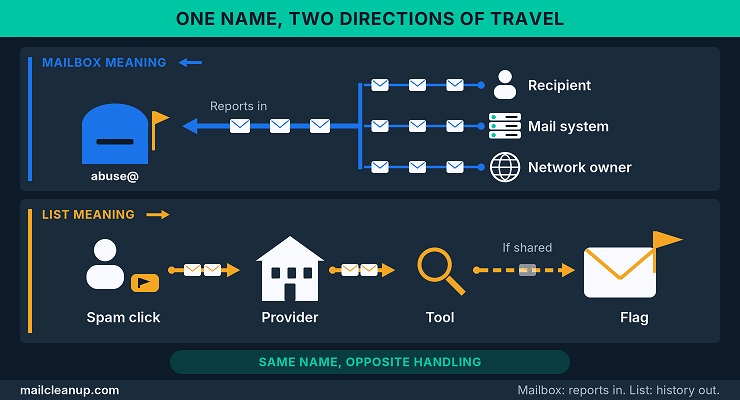
You meet the mailbox meaning when you look up who runs the network a message came from. You also meet it when you enroll in a feedback loop, a service that tells senders which recipients reported their mail. You meet the list meaning in a verification report or in a sending platform’s complaint warning.
A quick test works on any page you read:
- If the advice is to set an address up, register it and monitor it, the page means the mailbox.
- If the advice is to remove, suppress or screen addresses, the page means the list.
Running an Abuse Email Address on Your Sending Domain
Running an abuse email address is four jobs, not one. You decide whether you need one, learn what lands in it and set it up so reports reach someone who can act. Then you prove it still works after your mail setup changes. The address is cheap to create and easy to neglect, which is why it fails quietly. Reports bounce, and nobody on your side may find out until a mailbox provider has already acted.
Who needs an abuse email address
If you run a domain that sends mail, you should have a working abuse email address on it. The standard behind the abuse@ mailbox is RFC 2142, a 1997 specification of well-known mailbox names. It encourages every organization that exchanges email on the Internet to support, at a minimum, each name whose function exists inside it. We treat any sending domain as having that function, because its mail can draw complaints.
The address belongs on your main domain. The standard asks for it there, even when the mail that generates complaints comes from hosts with more specific names. It also calls support on subdomains valid and encouraged where it makes sense, so a sending subdomain can carry its own abuse@ as well.
Three groups end up needing one, each for a different reason:
- Domains that send mail: the standard expects the address on your main domain, and people reporting a problem expect to find it there.
- Owners of IP address blocks: the registry that hands out the block can require an abuse contact. The RIPE NCC, a regional registry, requires one for every block it allocates directly. The mailbox behind it is meant for abuse reports from that network, whether automated or sent by hand. The registry checks it at least annually.
- Senders enrolling in a feedback loop: the enrollment often asks for a monitored abuse@ or postmaster@ mailbox on your sending domain. Some providers verify ownership by sending a message to it.
The standard names other mailboxes too, such as postmaster@ for domains that run a mail server and security@ for security bulletins or queries. The abuse@ mailbox is only one of them, and it is the one tied to complaints about your mail. The dedicated post on role-based email addresses sorts the familiar prefixes into those the standard names and those that are only convention.
What arrives in the abuse inbox and who sends it
Five kinds of mail reach an abuse email address, and each calls for a different response. Recipients, mailbox providers, network owners and feedback loop providers write on purpose, while junk arrives because the address is easy to guess.
Most recipients never write to this address. They do not know it exists, so they press the spam button and the report goes to their mailbox provider instead. The people who do write tend to understand how mail delivery works, and many of them can decide whether your mail gets delivered. That usually makes the inbox quieter than a complaint dashboard and more consequential per message. A provider that cannot reach you here may have no choice but to protect its own users, and that can mean a block.
Reports are not only about spam. A broken unsubscribe link, a campaign sent to an old list or a third-party sender mailing the wrong audience can each trigger one. That makes this inbox an early-warning channel for deliverability as well as security. Sorting the mail by sender shows what each message needs from you.
| Sender | What arrives | Response |
|---|---|---|
| A recipient who knows the address | A forwarded copy of an unwanted message | Find the source; suppress the affected addresses if valid |
| A mailbox provider or mail administrator | A report that your mail is unwanted, often before a block | Treat it as an early warning and fix the source |
| A network owner or security team | Sending IPs, domains and a sample message | Match the evidence to your logs and stop the source |
| A feedback-loop provider | Automated complaint reports, if you registered this address | Keep each report whole and process it as a complaint feed |
| A spammer or bot | Junk, because the address is easy to guess | Tag it and keep it; never discard it |
Reply to the people on that list and not to the machines. An automatic acknowledgement is usually helpful, according to the standard, but it risks mail loops between auto-responders. Automated reports are where that risk bites, so send a short human reply to a person and no auto-reply to a feed. Keep every report whole. The headers, the technical lines that record a message’s route, and the timestamps are the evidence you need to trace the source.
Expect junk, and do not let it hide your reports. Wide use of the same mailbox names makes flooding easier, as the standard itself notes, and any address this easy to guess draws spam. The trouble is that a genuine report usually carries a copy of the offending message, so a content filter sees it as spam too. A header tag marks suspect mail without changing it, whereas a filter that rejects or reroutes takes the reports down with the junk.
The automated reports in the fourth row follow a fixed layout, and each major provider enrolls senders differently. Many senders register a dedicated endpoint for them, which may or may not be the abuse inbox. Check where your own reports land before you assume they reach you. For provider-by-provider enrollment rules, the email feedback loop guide walks through each format.
Setting up and registering an abuse email address
Setting up an abuse email address takes five steps, and skipping any one of them is how the address ends up failing quietly. Most of the work is routing and filtering, not creating the alias, the extra address that points at a real mailbox. The steps run in this order:
- Create the alias on your main domain: add it on any sending subdomain that already receives mail. Make sure your mail server accepts the name in any capitalization, as the standard requires.
- Route it to a queue, not a person: point it at a shared mailbox or ticketing queue with a named owner and a backup. That way a holiday or a resignation cannot stall it. Check where it lands, because a sales or first-line support inbox may forward reports late or never.
- Clear the filters from its path: exempt the address from content filtering. Use a mailbox with room to grow instead of a free consumer account, which tends to bring strict rate limits and heavy filtering.
- Register it where reporters look: list the address with abuse.net for your domain. Keep the registry record for any IP block pointed at the same queue.
- Write down who answers it: record the owner, the backup and a response target, such as the same business day. A slow week then shows up as a missed target and not as silence.
Registration deserves a closer look, because the people who report to you often start with a lookup and not a guess. The abuse.net database lets anyone find a domain’s abuse address through a web page or by email, and it answers automated lookups too. Domain managers can send in their own contact details. Most updates are processed automatically within an hour, according to its FAQ, although some wait days or weeks.
Without your entry it falls back on other sources, such as the contacts in a domain’s registration record and mail server tests. It may also use postmaster@. The address a reporter finds may then be one you read rarely. A listing is not a blacklist entry, and the service blocks nothing, as its FAQ makes clear. Send the entry as plain text, and check the format on its own update page first.
Testing that your abuse email address works
An abuse email address works when a spam-like message sent from outside your network arrives unchanged in a mailbox someone reads. A bounce, a junk folder or a silent drop each means it does not.
Test from outside, because the failure is invisible from inside. Mail between colleagues can reach the alias even when the route from the open Internet has broken. A message sent from your own office therefore proves little. The break usually follows a change nobody linked to the abuse address. Typical culprits are a new filter, a platform migration or a forwarding rule that now points at a closed mailbox.
Run the test in five steps:
- List every address you have published: the abuse@ on your main domain and on any bounce, tracking or image domain your mail uses. Add any address in a registry record or on abuse.net.
- Send each one a test from outside your network: use a personal mailbox at a different provider. Put the address under test in the subject line and a spam-like line in the body.
- Watch the queue: note which messages arrive, which bounce at once, which bounce after a delay and which never appear.
- Inspect what arrived: the message should be unchanged, outside the junk folder and free of an auto-reply that sends reporters to a web form.
- Time the human reply: someone should answer within the response target you set, or the queue works and nobody is reading it.
Make the body an abuse email example that looks like a real report. A short note plus a spam-like line copied from your own spam folder is enough. An alternative is GTUBE, a 68-byte test string published by the makers of the SpamAssassin spam filter. Filters that support it are meant to treat any message containing it as spam. If your filter supports it, a message carrying the string should be tagged but still delivered. If the filter does not recognize the string, a delivery proves nothing.
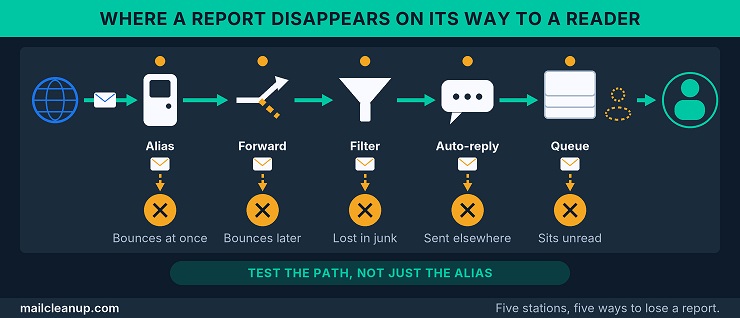
The results fall into five patterns, and each points at a different part of the path around the alias.
| Outcome | Usual cause | Fix |
|---|---|---|
| Bounces at once | The alias is missing or the mailbox is full | Create the alias and clear space |
| Bounces after a delay | Forwarding behind the alias points at a closed mailbox | Trace the forwarding chain to its end |
| Never arrives, or lands in junk | A content filter treats the report as spam | Exempt the address from filtering |
| Arrives with an auto-reply to a web form | An auto-responder sends reporters elsewhere | Remove it and reply as a person |
| Arrives and sits | Nobody owns the queue | Name an owner and a backup |
The pattern across those rows is that the address rarely fails at the alias itself. It fails in the path around it: a forwarding rule, a filter or an unattended queue. A test that only checks whether the alias exists therefore misses most failures. The same test belongs after every change to your mail platform, your domain settings or your staff.
Unanswered reports can also cost more than goodwill. A reporter who gets no reply from you may escalate to a block or a listing. Clearing a listing usually takes more work than answering a message. Reporters notice quickly when repeated reports produce no change, and they have other ways to act. To find an existing listing and see what clearing it takes, start with email blacklist check and removal.
Reply from an address that accepts mail: a reply from a [no-reply email address] leaves the reporter nowhere to answer. That defeats the point of replying. Use a monitored address, and keep your replies consistent across every route a report can arrive by. Then the same reporter always meets the same desk.
Reporting Spam to an Abuse Email Address, Gmail Included
Reporting spam to an abuse email address mirrors running one. You need the right address, a report an abuse desk can act on and a clear view of where Gmail differs. The address comes first, because the party you can see in a message is often not the party who controls the mail. Abuse desks weigh evidence over argument, so a short report with the full headers beats a long complaint without them.
Finding the abuse email address for a domain or a sender
Finding the abuse email address for a domain or a sender starts with the headers, not the From line. You cannot trust the From line, because anyone can forge it. The evidence that tells you where to write is the sending IP address and the domains the message links to.
Even the IP address needs care. Abusive messages often carry false Received lines. Each mail server adds one such entry to record where a message came from. Forged entries try to send reporters to the wrong desk. Treat the address your own mail provider recorded as the reliable one, because the earliest entries sit lowest and are the easiest to fake.
Four lookups cover most cases, in this order:
- Read the headers for the sending IP: find the Received line your provider added, and note its IP address and time.
- Look the IP up in a registry tool: the RIPE NCC’s abuse contact finder is one. It shows you the network operator’s abuse contact, which is an internet provider or other operator and not the sender.
- Check any domain involved: registrars accredited by ICANN must publish an abuse email address within the domain’s WHOIS record, the public registration data. You can also check whether the owner listed a contact with abuse.net.
- Fall back to abuse@ on the domain: the standard expects it on the main domain. Treat it as a guess until a reply tells you someone reads it.
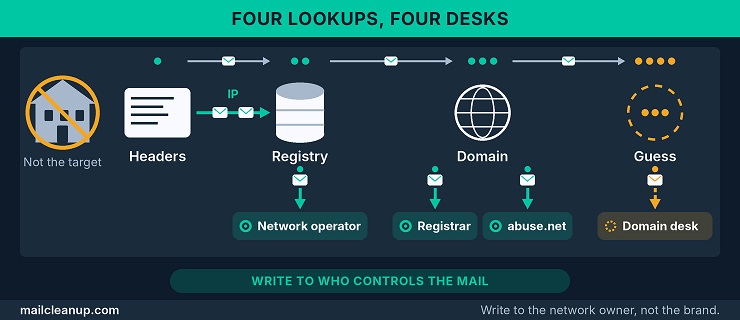
Send your report to whoever controls the infrastructure, not to the brand named in the message. A bank whose name is forged in a phishing email did not send it, and the network that carried it can stop it. If the contact bounces, the RIPE NCC asks to be told. If it stays silent, the registry cannot make the operator answer, as the RIPE NCC itself notes.
What an abuse report needs before anyone acts on it
An abuse report sent to an abuse email address gets acted on when it carries evidence the desk can check against its own logs. It has six parts:
- The full headers: they show which server handed the message over and when. Google’s own abuse form asks for them as the evidence that makes a report actionable.
- The whole message: forward it or paste it unedited, because the desk needs the content as sent and not your summary of it.
- The time, with the time zone: the Date line carries a zone. Logs are searched by time, so a bare time can point at the wrong entries.
- The IP address and domains you found: include your lookup results, so the desk does not have to repeat your work.
- The scale and the harm: say how many messages arrived, when they started and stopped, and what damage they did.
- The request: end with one line saying what you want done, such as stopping the source and confirming when it is done.
Keep the tone flat and factual, because the desk is checking claims against logs and not weighing feelings. Lead with a two-line summary and put the evidence beneath it, which is the shape of an abuse email example worth copying.
Gmail abuse email address: how reports reach Google
Reports about a Gmail account reach Google through a web form that asks for the account’s address and the full message headers. Anyone searching for a Gmail abuse email address is usually trying to do one of four things, and each has its own route.
| What you want | Where it goes |
|---|---|
| An unwanted message in your own inbox | Report it as spam inside Gmail |
| A Gmail account sending mail that breaks Google’s rules | Google’s abuse form for Gmail accounts |
| Content you believe breaks the law where you live | Google’s separate content-reporting page |
| Your own mail bouncing or being rejected | Gmail’s help on bounced mail and its bulk sender guidelines |
The abuse form asks you for five things:
- You give your own contact address, so Google can reach you if it needs more.
- You name the single Gmail address you are reporting, which cannot be your contact address.
- You paste the full header, the subject line and the full body of the message.
- You add any context that would help an investigation.
- You say whether the message is impersonating Google.
After you submit, Google replies only if it needs more details, and it says there is no need to send the same report twice. It also says the original headers are what make a report actionable, which is why the headers matter more than the description you write.
If the problem is your own mail being rejected at Gmail, the abuse form is the wrong door. Bounced or rejected mail has its own help page, and Google points high-volume senders to its bulk sender guidelines. Those guidelines cover authentication, which proves you own your sending domain, and unsubscribe handling. They also set limits on complaint rates, the share of your mail that recipients report as spam. Where the two providers’ requirements agree and differ is laid out in Google & Yahoo bulk sender requirements.
Abuse Emails on Your List: Complainers and abuse@ Mailboxes
Your list can hold two kinds of abuse emails, and they need different handling. One is a subscriber with a complaint history. The other is another organization’s abuse email address, such as abuse@ at a scraped company, that ended up on your list. A verification result can show either, so the first job is to read it correctly.
Abuse email meaning in a verification result: How an address earns the flag
In a verification result, abuse emails are addresses whose owners have a history of reporting mail as spam. The abuse email meaning here is narrower than the general term. It describes what an address did and says nothing about whether the mailbox works. A flagged abuse email address can be fully deliverable, which is why you may find it beside results that look healthy.
The path to the flag is short. A recipient clicks the spam button instead of unsubscribing from your mail. The mailbox provider records the report, and some providers pass it on to the sender or a partner through a feedback loop. A tool that gathers those reports can flag the address once the pattern repeats.
Complaint histories tend to grow from three causes:
- They never asked: the address came from a bought list, or the owner forgot signing up, so your mail looked like a stranger’s.
- Leaving was harder than reporting: your unsubscribe link was hard to find or did not work, so the spam button became the way out.
- The mail looked wrong: it arrived too often, felt irrelevant or resembled a phishing message.
The second cause is the cheapest to fix. Google ties the exit to the complaint directly: mail without one-click unsubscribe draws more spam reports from your recipients. It adds that a low spam rate improves delivery. Anyone who can leave in one click has no reason to press the spam button. One-click unsubscribe is the place to see what Google and Yahoo expect from that exit.
Each complaint also moves the rate that mailbox providers watch. A complaint rate is the share of your mail that recipients report as spam. A handful of complaints can shift a small list’s rate more than hundreds shift a large one’s. Anyone who wants the arithmetic, including which count goes in the denominator, can find it in spam complaint rate.
What a verifier can and cannot tell you about abuse emails
A verifier can tell you whether an address exists and what kind it is. It cannot tell you whether the owner will complain about your mail. A flag on an abuse email address records what happened to someone else’s mail, which is a history and not a forecast.
Set side by side, the two checks answer different questions.
| Aspect | Mailbox check | Complaint flag |
|---|---|---|
| Question it answers | Can this address receive mail? | Has its owner reported mail before? |
| Where the answer comes from | The receiving mail server, checked now | Complaint reports collected in the past |
| How current it is | As of the check | As of the last complaint seen |
| What it cannot say | Whether the owner wants your mail | Whether the owner will report yours |
The flag is only as complete as the complaints its builder could see, and three limits follow from that:
- Gmail reports in aggregate: descriptions of feedback loops often say the provider names the addresses that complained, but that is not how Gmail’s works. It reports aggregate rates for the campaign identifiers a sender embeds. Google tells senders not to use an identifier unique to each message, so a rate cannot name the people behind it.
- Other providers set their own formats: each one chooses what its reports contain, and you cannot assume that stays fixed.
- The sources are thinly documented: vendor pages that describe the flag name feedback loops and partner reports among their sources. They do not say how those sources cover a provider that shares only aggregate data.
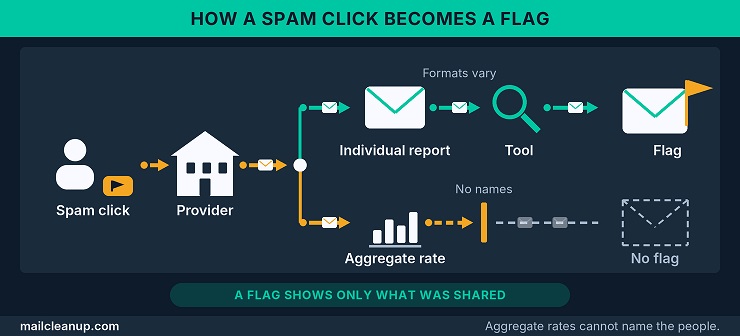
Not every verifier carries this flag, and ours does not. MailCleanup’s result categories cover mailbox status, address type and risks such as spam traps, which are addresses that exist to catch careless senders. They do not cover complaint history. For complaint history on your own mail, the better record is the feedback loop data you receive, where a provider shares it. The result categories MailCleanup does return are mapped, with an action for each, in email verification features explained.
Treat the two as separate questions. Run the mailbox check on every address, and treat a complaint record as extra context where you have one. A complaint flag that sits beside a failed mailbox check adds little, because mail to a dead address never reaches anyone to complain. What is email verification covers the checks behind that first question.
Deciding whether to send to an address flagged for complaints
Whether to email a flagged abuse email address comes down to four questions. Did it complain about your mail, how did you acquire it, can you show consent, and has the owner shown interest since? The first answer can end the discussion, and the rest are judgment calls.
Work through them in this order:
- If the address complained about your own mail, treat that as an unsubscribe and keep it off every list that sends similar mail.
- If it came from a bought list, leave it out, because that address has probably been mailed by many strangers already.
- If you hold a record of consent, you can send, but keep it in its own segment away from your main campaigns.
- If the owner has bought from you or replied to you recently, that is evidence of interest and you can send with care.
- If none of these applies, leave the address out of marketing sends until the owner shows interest.
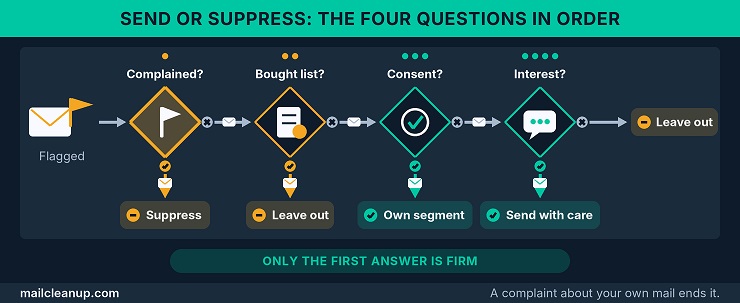
The first answer is the only firm one. Industry guidance on feedback loops, written by mailbox providers and senders together, says to treat a complaint like an unsubscribe request. It also says to assume the owner wants no more of your mail. The exceptions are narrow, such as a list the recipient pays for. Getting those reports in the first place, provider by provider, is the subject of email feedback loop.
Consent is the second lever. A double opt-in, where the owner confirms the signup by clicking a link, leaves a timestamped record that the owner asked for your mail. Many owners forget what they signed up for, so the record has to show the request and not rely on memory. To build that record, weigh double opt-in vs single opt-in before your next signup form goes live.
Transactional mail is the exception. The same guidance calls a complaint about something like a booking confirmation a case for judgment, because the owner may not have meant it.
When abuse@ itself turns up on your list
An abuse@ address on your list is not a complainer. It is the mailbox another organization keeps for complaints, so marketing sent to it is rarely wanted. Treat it as an abuse email address belonging to someone else’s desk, and keep it out of your marketing sends.
The standard behind the mailbox sets abuse@ aside for reports of inappropriate behavior. The people who read it can act on a complaint, so an unwanted promotion landing there can draw one. Your own abuse@ mailbox is the opposite case: it stays deliverable and monitored.
Two habits keep the other kind out for good:
- Keep the address on a suppression list, your do-not-send record, instead of deleting it, so a fresh import cannot bring it back.
- Check where the rest of that import came from, because an abuse@ address can be a sign of a scraped or bought list.
The exception is a documented request from that desk itself, such as a vendor’s abuse team asking for your service notices. Keep that request on file, because it is the clearest evidence that the notice is wanted. Without one, the address has no reason to be on a marketing list. Where one exists, the usual role-address rules apply, and role-based email addresses sets out when to keep one and when to remove it.
Abuse Email Example: What Each Meaning Looks Like in Practice
An abuse email example is easier to follow when you can see both meanings side by side. One shows a working mailbox and the report it receives. The other follows a single list address and the history that earns the flag. Every detail is illustrative, and none comes from a real domain or list. No example shows a full abuse email address, only the role name abuse@, so you cannot mistake any of it for a real contact.
Mailbox side: A working abuse@ setup and the report it receives
A working abuse email address is boring on purpose, which is what you want from it. It is one address on your main domain, one shared queue behind it, no filter that rejects mail, and a written response target. The report it receives should be just as plain.
The finished setup fits in six rows.
| Part | Choice |
|---|---|
| Address | The role name abuse@ on the main domain and any sending subdomain |
| Destination | A shared ticket queue, with an owner and a backup |
| Filtering | Spam tagged, never rejected or rerouted |
| Registration | Entries at abuse.net and in the registry point to the same queue |
| Response target | Same business day, written down |
| Re-test | After any platform, domain or staff change |
Each row closes one way your address fails, because on the mailbox side the abuse email meaning is a duty and not a label. Registration matters because reporters often start with a lookup, and the entry decides which address they find. A report that reaches the queue should read like this abuse email example. Its times are in UTC, the single reference zone that avoids local-time confusion.
Subject: Unsolicited mail from your network, 7 November
Between 09:10 and 11:40 UTC on 7 November, 14 messages advertising a loan reached my mailbox. They came from IP 203.0.113.45, which sits in your network.
Full headers and one complete message follow. Please stop the source and tell me when it is done.
(full headers pasted here)
(one complete message pasted here)
Notice what the example leaves out: no adjectives, no threats and no guesses about motive. It gives a time window, a count, an IP address and a request. The time window carries its zone, so the desk can match it to its logs. If you copy one thing, copy the order: facts first, evidence beneath, one request last.
List side: One address and the history that earns the flag
The list side of this abuse email example follows one subscriber address through eight sends. It ends as one of the abuse emails a verification tool would flag, and you could have avoided every step that led there.
Every row is invented for illustration.
| Step | What happened | What it tells you |
|---|---|---|
| Signup | One form, no confirmation | No proof the owner asked |
| Sends 1 to 6 | Weekly promotions, no clicks | The owner never engaged |
| Send 7 | Unsubscribe link in small grey text | Leaving was harder than reporting |
| Send 8 | The owner hits the spam button | A complaint is recorded |
Nothing in that history says the mailbox was faulty. A mailbox check would pass at every step, which is why you need both: the flag and the check answer different questions. That is the list-side abuse email meaning in action, a record attached to an abuse email address by what happened to it.
As the sender, you may never see step 8. If the provider shares individual reports, a message names the send. If it shares only rates, the rate moves and nobody can tell which address caused it.
Three small changes in your own program would have broken the chain:
- A confirmed signup would have left a record of consent.
- A one-click exit would have given the owner a better way out than the spam button.
- A pause after six silent sends would have stopped a seventh from landing.
Test Your Abuse Email Address First, Then Check Your List for Abuse Emails
Start with the mailbox, because it is the half you control completely. This week, send a test to your own abuse email address from outside your network. Put a spam-like line in the body and the address in the subject. If it does not arrive unchanged in a queue someone reads, fix that before anything else.
Then turn to the list. Search it for abuse@ addresses that belong to someone else, and move them to your suppression list. Check your own feedback loop reports too, and keep every address that complained off your sends. Keep the abuse email meaning straight when you read the results. Abuse emails flagged for complaints are a history, and abuse@ on a list is someone else’s mailbox.
A mailbox check will not show complaint history, so the two jobs stay separate. The check clears out dead addresses and flags role addresses, and your feedback loop reports supply the complaints. Repeat both on a schedule, because a list collects new problems as it ages. MailCleanup’s bulk email verification runs the mailbox check and marks role addresses in one pass, with no account needed. Pair it with email list hygiene, which gives the schedule for repeating it.
FAQs on Abuse Email Address
What is an abuse email address?
People asking what is an abuse email address generally mean one of two things. On your domain, it is the abuse@ mailbox that receives reports of spam and misuse from your mail. On a mailing list, it is a subscriber address with a record of reporting mail as spam.
What are abuse emails?
Abuse emails are subscriber addresses whose owners keep reporting mail as spam. Verification tools that flag these addresses do so from complaint reports. The abuse email meaning on a list is a history, not a forecast, so it tells you nothing about whether the mailbox works.
Is an abuse@ address actually required?
RFC 2142, a 1997 specification, encourages every organization that exchanges email to support abuse@ wherever the function exists. It is a convention, not a law. The RIPE NCC, a regional registry, makes an abuse contact mandatory for the IP blocks it allocates directly and checks it at least annually. If your domain sends mail, give it a working abuse email address.
Should abuse@ be an alias or a real mailbox?
Either works for an abuse email address if it reaches a shared queue with an owner and a backup. An alias that forwards to one person’s inbox is the weak choice, because a holiday or a resignation leaves reports unread. Test it from outside your network after every change, with a short abuse email example as the message.
Should I send to abuse emails on my list?
Only with evidence, because abuse emails carry a history of complaints. An address that complained about your own mail stays suppressed, and one from a bought list stays out. A subscriber with a confirmed signup or a recent purchase can be mailed with care, in a separate segment. Mail to another organization’s abuse@ should not be sent, because it is a complaint desk.
How do I report an abusive Gmail account?
Google takes reports about a Gmail account through its abuse form, so you need no Gmail abuse email address to file one. Paste the full headers, the technical lines that record a message’s route. Add the subject and the body, and name the one Gmail address you are reporting. Google answers you only when it needs more details, and resubmitting adds nothing.
Can abuse@ and postmaster@ go to the same mailbox?
Yes, in a small team both can forward to one shared queue that labels each message by address and has an owner. They do different jobs: the abuse email address takes complaints about unwanted mail, and postmaster@ covers the mail server itself. Signing up for complaint reports from a mailbox provider can send its confirmation to either one, so both must reach your queue.
Who should read the abuse@ inbox?
A mailbox nobody owns fails quietly, so name an owner who can stop a sending source and suppress affected addresses. Add a backup who covers holidays and staff turnover, and set a same-business-day response target. That turns your abuse email address into a working channel, because reporters stop trusting one that ignores repeated reports.