
Every guide to abandoned cart email opens with the same statistic: most online shoppers add something to a cart and never buy it. Then it moves straight into subject line formulas and discount timing, which is useful, and this guide covers all of it in real depth. But there’s a question almost none of them ask: did the email even have a real address to land in?
Guest checkout is the point in your funnel with the least friction and the least verification. A shopper might mistype an address, use a throwaway one to dodge a signup, or fat-finger a domain entirely. Any of these still triggers your abandoned cart email sequence, and your automation runs exactly as built. The message just has nowhere real to go. That gap sits underneath every open rate, click rate, and abandoned cart email conversion rate you’ve ever seen quoted. It’s the one thing this guide adds that a subject-line list can’t.
Everything else you’d expect is here too: why shoppers actually abandon carts, what belongs in the email, and how to time it. You’ll also find real examples worth studying and a full walkthrough for setting the whole thing up. If your sequence is live and the numbers are underperforming, the section on abandoned cart email conversion rate below is where to look first. This post is one piece of a larger picture. For the full lifecycle, including browse abandonment and post-purchase flows, our guide to ecommerce email marketing covers where this fits. It sits alongside everything else you’re likely already sending.
TL;DR on Abandoned Cart Email
- Abandoned cart emails recover revenue from high-intent shoppers by reminding them what they left behind, usually through a short automated sequence.
- A working sequence runs two to three emails, spaced hours to days apart, with incentives held back until a plain reminder alone falls short.
- Product details, personalization built on real data, a single clear call-to-action, and honest urgency are the components every effective abandoned cart email shares.
- Four subject line approaches – urgency, personalization, curiosity, and incentive – each work best at a different point in the sequence rather than interchangeably.
- GDPR, the ePrivacy Directive, CAN-SPAM, and CASL all apply to abandoned cart email, since it’s generally classified as marketing rather than transactional.
- MailCleanup verifies addresses before they ever enter an automation flow, closing the reachability gap most setup guides never check.
Understanding Cart Abandonment
Before any abandoned cart email gets written, it helps to be precise about the mechanics behind it. What triggers one, why shoppers leave in the first place, and which specific setup you’re actually running all matter.
What Is an Abandoned Cart Email?
An abandoned cart email is an automated message sent to a shopper who adds a product to their cart but leaves before completing checkout. Understanding how to setup abandoned cart email automation starts with knowing exactly what triggers it. Your platform or email tool watches for the pattern: an item added, then a gap with no purchase. Once that gap passes a set length of time, it fires the message on its own. You’re not writing and sending each one by hand. You set the trigger, the delay, and the content once. Abandoned cart email automation handles the rest for every shopper who matches the pattern going forward.
The data behind it is first-party and consent-based. You already have this shopper’s email address because they gave it to you directly, through a login, a newsletter signup, or checkout itself. It didn’t come from a third-party list or an ad network. An abandoned cart recovery email works because of that first-party trust, not despite it. That distinction matters for two reasons. It’s central to the compliance section later in this guide, and it’s also why these emails tend to outperform a cold promotional send. The recipient has already shown real intent, and the message references something they were actually doing on your site minutes or hours earlier.
Most abandoned cart emails don’t stand alone. They’re the first message in what’s usually called an abandoned cart email sequence. That’s a short series that escalates from a plain reminder toward a stronger nudge if the shopper still hasn’t returned. We’ll walk through exactly how that sequence should be structured further down.
Why Do Shoppers Abandon Their Carts?
Before you can write a good abandoned cart email, it helps to know what you’re actually responding to. The Baymard Institute tracks checkout behavior across some of the largest ecommerce sites in the US and EU. It puts the average cart abandonment rate at 70.22%, based on a running average across 50 separate studies. In plain terms, for roughly every ten shoppers who add something to a cart, seven leave without buying it.
A large share of that, 42% by Baymard’s own most recent count, comes down to shoppers who were just browsing. Others genuinely weren’t ready to buy yet. No subject line fixes that, and no discount code will either. It’s worth naming honestly rather than promising your abandoned cart email will recover all of it. Once you set that segment aside, the remaining reasons are specific and consistent across studies. Most are things a well-built email, or a better checkout, can actually influence:
| Reason for abandonment | Share of shoppers citing it |
|---|---|
| Extra costs too high (shipping, tax, fees) | 40% |
| Delivery was too slow | 20% |
| Didn’t trust the site with payment information | 19% |
| Site required account creation | 18% |
| Checkout process too long or complicated | 17% |
| Website had errors or crashed | 17% |
| Returns policy wasn’t satisfactory | 13% |
| Couldn’t see total order cost up front | 12% |
| Credit card was declined | 10% |
| Not enough payment methods offered | 9% |
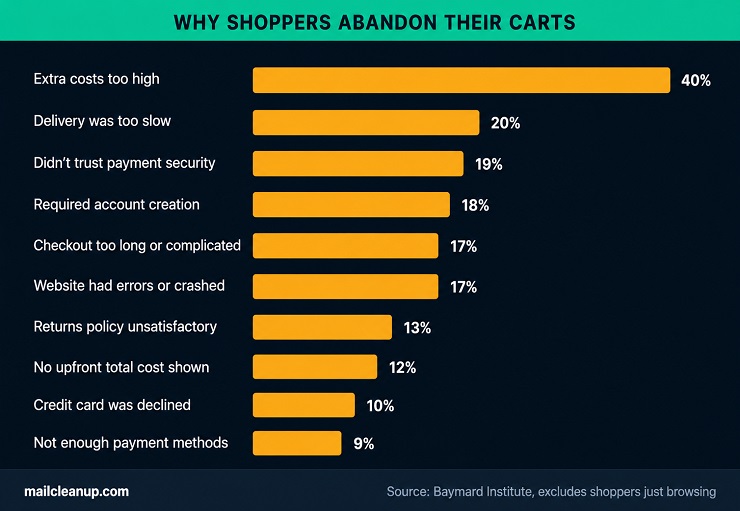
Look at where the weight actually sits. Cost and trust concerns, extra fees, payment security, an unclear total, account for more abandoned carts than anything in the checkout form itself. That’s genuinely useful for an abandoned cart email specifically. A well-placed shipping offer or a visible trust signal addresses exactly what made someone hesitate, in a way a follow-up email realistically can. A broken checkout page or a missing payment method isn’t something any email will fix. Your abandoned cart email sequence recovers the hesitant buyer; it doesn’t repair a checkout your developer still needs to look at. A best abandoned cart email starts from understanding which of these reasons it can actually influence.
Abandoned Cart Email vs. Abandoned Checkout: What’s the Difference?
Not every platform uses “abandoned cart” to mean the same thing, and the difference matters more than it looks like it should. It changes what data you actually have to work with. An abandoned cart trigger fires when a shopper adds a product to their cart and then leaves without starting checkout at all. Depending on your platform, this often only works for a logged-in or already-identified shopper. A brand-new visitor hasn’t given you an email address yet. An abandoned checkout trigger fires one step later: the shopper has entered the checkout flow. In most setups, they’ve typed in an email address as part of it, but still didn’t complete the purchase.
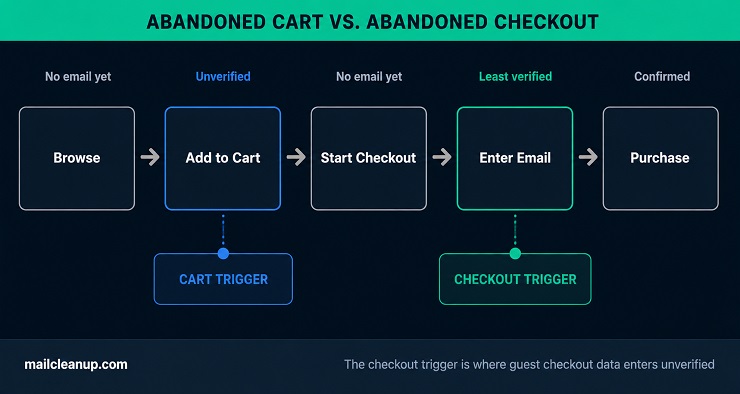
That second trigger is the one guest checkout actually depends on. A first-time shopper with no account and no login still enters an email address the moment they start checking out. That’s the exact address your abandoned checkout email will use. It’s also, not coincidentally, the least-verified address anywhere in your funnel. Nobody confirms it. Nothing checks it against a real mail server before your automation treats it as a valid contact. A typo, a fake domain, or a disposable address used to dodge a signup: all of these pass through untouched. Each one still counts as a triggered send when your platform reports on the flow.
Most guides use “abandoned cart email” as an umbrella term for both triggers, and this guide does the same for readability. But if you’re troubleshooting a specific number, start with which trigger actually fired. What you did or didn’t verify about the address behind it is usually where the real answer lives. We’ll come back to exactly how much this affects your abandoned cart email conversion rate a bit further down.
The Core Components of an Effective Abandoned Cart Email
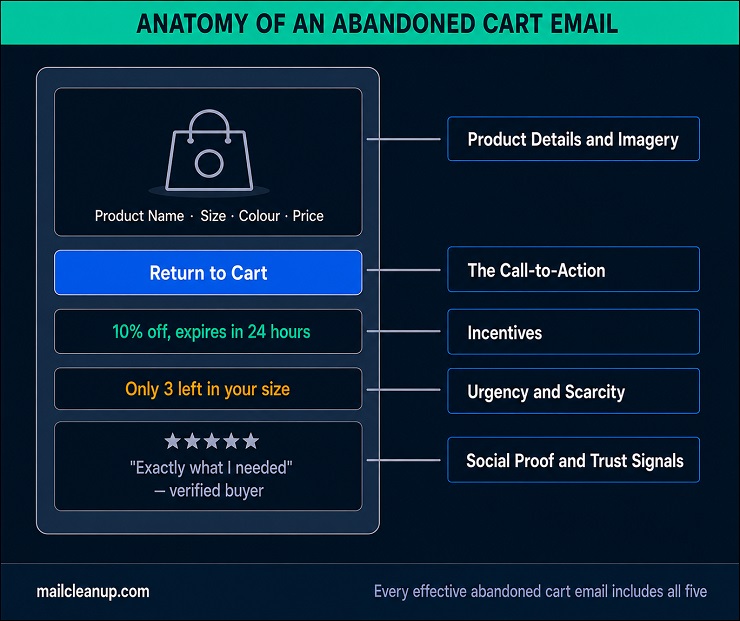
You now understand why carts get abandoned and what your platform is actually triggering on. The next question is what the email itself needs to contain. Abandoned cart email best practices tend to agree on the same core list, and the pieces below aren’t optional extras. Leave one out and you’re not sending a leaner send, you’re sending an incomplete one. What separates a best abandoned cart email from a forgettable one is rarely one clever trick; it’s how well these work together.
1. Product Details and Imagery
Your shopper needs to recognize, immediately, what your abandoned cart email is actually reminding them about. That means the actual product name, a clear photo, the price, and whatever specific variant they chose: size, color, quantity. Skip the generic “you left something in your cart” line with no visual anchor.
This matters more than it sounds like it should. Someone who added a product three hours ago and got pulled into something else may not remember the exact item without seeing it again. Include every product if they left more than one, not just the first or the most expensive item. You don’t know which one was the actual reason they were shopping in the first place. If your platform supports it, pull this content in dynamically from the cart data itself, rather than writing it by hand for each shopper. Static, hand-built emails don’t scale past a handful of orders a day.
One detail worth checking directly: does your template show the item’s actual selected variant, or just the base product? A shopper who chose a specific color or size wants to see that exact choice reflected back. A generic stock photo of the product in some other option won’t do.
2. Personalization (Beyond a First Name)
Using someone’s first name is personalization in the most basic sense, and it’s table stakes at this point, not a differentiator. Real personalization goes further: it uses what you actually know about this specific shopper to shape the offer, not just the greeting. A few signals worth building into your abandoned cart email automation:
- Cart value: a $400 cart and a $25 cart shouldn’t get the same incentive; one overspends, the other underdelivers.
- Browse history: a recommendation based on the other items this shopper browsed reads as genuinely useful, not generic.
- Purchase history: a returning customer who already trusts your brand needs a different message than a first-time visitor who’s never bought from you before.
- Loyalty status: mention your rewards program directly and remind the shopper how many points this purchase would earn them.
One caution worth building in as a filter, not an afterthought: exclude anyone with an open support ticket tied to their order. This flow isn’t the place for them. Sending a cart reminder to someone stuck on a shipping or sizing question reads as tone-deaf. It’s an easy segment to filter out once your support and email tools are connected.
3. The Call-to-Action
Every abandoned cart email needs exactly one primary action. State it clearly enough that a shopper scanning quickly on their phone knows exactly what happens if they tap it. “Return to Cart,” “Complete Your Purchase,” and “Checkout Now” all work because they say precisely what comes next. Vague alternatives like “Learn More” or “Click Here” don’t.
Make the button itself impossible to miss. Use a color that contrasts against the email, a size above the minimum tap target, and a position readers see without scrolling. On a longer email, repeat it again near the bottom rather than making someone scroll back up once they’ve decided to act.
Resist the urge to offer more than one competing action. Putting a cart button, a browsing link, and a sale-page link in the same message forces a decision. It’s not one you want the shopper making. Give them one clear path back to the purchase, and put anything else, related products, a browse-more link, below it, not beside it. The rest of your abandoned cart email copy exists to support that one action, not compete with it. An abandoned cart recovery email that asks for two things at once usually gets neither.
4. Incentives: Discounts, Free Shipping, and When to Use Them
Not every abandoned cart email needs a discount. Leading with one by default trains your shoppers to abandon on purpose, waiting for the coupon instead of buying at full price. Save the incentive for later in the sequence, once a plain reminder has already had its chance to work.
Short on abandoned cart email ideas beyond a straight discount? A few options consistently work, matched to what’s actually holding the shopper back:
- Free shipping: since cost is the single largest reason your shoppers abandon carts, this often beats a percentage discount by answering the objection directly.
- A small, time-limited percentage off: particularly effective on lower-priced items, where even a modest discount is enough to tip the decision.
- A small gift with purchase or an extended return window: both work as incentives without training shoppers to expect a discount every time.
Segment your incentives where you can. A shopper who’s abandoned the same cart twice already might need a stronger nudge than someone seeing their first reminder. A high-value cart can also usually absorb a smaller percentage discount, protecting your margin better than one flat offer applied to every order size.
Whatever you choose, state it plainly and put an expiration on it. “10% off, expires in 24 hours” gives a shopper a real reason to act now. Otherwise, they’ll set your email aside to deal with later, which in practice usually means never.
5. Urgency and Scarcity
Urgency in an abandoned cart email works because it removes the option to decide later, and “later” is where most abandoned carts quietly die. But it only works if it’s true. A countdown timer that resets every time the shopper opens the email is a common trap. So is a low-stock warning on an item you actually have plenty of. Shoppers notice eventually, and once they catch you in it, every future urgency claim you make loses its effect.
Real stock-based urgency, an actual remaining count for a genuinely limited item, works because it’s verifiable and specific. Time-limited offers work the same way: a real expiration on a real discount, not a countdown that just starts over. Some brands hold the actual cart items in reserve for a set window and tell the shopper directly. That reframes the message from “you might lose this” into “we’re holding this for you, but not indefinitely.” Either version works. What doesn’t work is urgency with nothing real behind it.
6. Social Proof and Trust Signals
Trust concerns show up twice in the abandonment data above: distrust around submitting payment information, and an unsatisfactory returns policy. Both are addressable directly inside the abandoned cart email, and neither requires a discount to fix.
Star ratings and short customer reviews for the specific product left in the cart do real work here. That’s especially true for a shopper who’s never bought from your brand before and has no other reason to trust the purchase. A stated guarantee, free returns, a satisfaction promise, or a warranty answers the returns-policy objection directly. It doesn’t rely on the shopper having already checked your policy page on their own. Security badges and a visible mention of encrypted checkout can matter too, particularly for a higher-priced item where payment concerns run higher.
Match the type of proof to what’s actually likely holding this shopper back rather than throwing in every trust signal you have. A $30 item probably doesn’t need a security badge front and center; a $600 item probably does.
7. Mobile Optimization
Most abandoned cart emails get opened on a phone, not a desktop. A design that looks clean in your email builder’s preview pane can still fail the only screen that actually matters. Stack everything in a single column so nothing requires horizontal scrolling. Compress your images so the email loads quickly on a mobile connection. Keep the surrounding copy clear enough that the message still makes sense if an image fails to load at all.
Keep your subject line and preview text short enough to display in full on a phone’s lock screen or inbox list. Most clients cut off longer text well before a desktop view would. Make your CTA button large enough to tap accurately with a thumb, not a mouse pointer. Leave real space around it so a shopper doesn’t accidentally tap a different link entirely.
Test on an actual device before you launch the flow, not just in your builder’s mobile preview. Gmail, Apple Mail, and Outlook each render HTML differently enough that a template built and checked in one can genuinely break in another.
Abandoned Cart Email Subject Lines That Get Opened
None of the components covered above matter if your email never gets opened. The subject line is the gate everything else has to get through first. It deserves real attention, not a rushed line tacked on at the end.
Most inboxes and lock screens cut off your subject line somewhere between 40 and 50 characters, more on mobile than desktop. Front-load the important part: the product, the offer, or the specific hook. Anything after that point may never actually get seen by your reader. A clever ending on a subject line that gets truncated at 45 characters accomplishes nothing.
Four approaches consistently perform well for abandoned cart email subject lines. None of them is universally “best” for every brand. Which one wins depends on your brand voice, your audience, and where in the sequence this particular email sits. Abandoned cart email best practices for subject lines specifically come down to clarity over cleverness, in almost every test.
1. Urgency and Scarcity Subject Lines
These work on the same principle covered earlier: real urgency, honestly stated, gets attention. A subject line that implies scarcity you can’t back up in the abandoned cart email itself just sets up a letdown one click later.
A few examples worth adapting to your own voice:
- “Your cart closes out in 2 hours”
- “Only 3 left in the size you picked”
- “Last chance before this sells out”
- “Your reserved items expire tonight”
Keep these for moments where something is genuinely time-limited or low in stock. Save your plain reminder subject lines for the first email in the sequence. Hold urgency in reserve for later, for a moment where it actually reflects something true. For a fuller abandoned cart email example of urgency done well, see the dedicated examples section below.
2. Personalized Subject Lines
A personalized subject line goes past a first name. It references something specific: the actual product, the category the shopper was browsing, or a detail pulled straight from their cart. Learning how to setup abandoned cart email subject lines that actually get opened takes real testing, not guesswork.
- “[Name], your [product] is still waiting”
- “Still deciding on the [product]?”
- “We saved your size in [product]”
The bracketed fields need real data behind them. A subject line that says “your product” instead of the actual name looks like a broken merge tag. It has no place in a real abandoned cart email.
3. Curiosity and Benefit-Led Subject Lines
Not every subject line needs to state everything upfront. A softer, more curious approach can outperform a direct one, especially for a brand whose voice leans casual rather than transactional.
- “Still thinking it over?”
- “One thing to know before this cart clears”
- “A few reasons to go back to your cart”
This approach works best when the abandoned cart email content actually pays off the curiosity quickly. If the subject line promises “one thing to know” and the email buries it under three paragraphs of unrelated copy, that promise falls flat. The next email from your brand gets a lot less benefit of the doubt.
4. Incentive-Led Subject Lines
An incentive-led abandoned cart email subject line puts the offer right in the subject itself. That might be a specific discount, free shipping, or a stated dollar amount off. It works, but it works best later in the sequence, not first. The best abandoned cart email subject line is rarely the one that tries hardest in the first message.
- “10% off what’s already in your cart”
- “Free shipping on the order you started”
- “Your cart, plus a little something extra”
Leading with a discount in the very first subject line undercuts the point made earlier about not training shoppers to expect one automatically. Save this style for email two or three in your abandoned cart email sequence, once a plain reminder has already had its chance. An incentive-led line works well for an abandoned cart recovery email precisely when a plain reminder alone hasn’t already closed the sale.
How to Structure an Abandoned Cart Email Sequence
A single abandoned cart email can recover some sales on its own. A properly sequenced series recovers meaningfully more, because it gives a shopper multiple distinct reasons to come back rather than one repeated nudge. Getting the sequence right matters as much as getting any individual email right.
When to Send Each Email
Abandoned cart email timing varies across brands and even across products within the same store, but a consistent pattern holds up across the data:
| Send it | What it should do | |
|---|---|---|
| First | Within the first few hours (many brands test between 30 minutes and 4 hours) | Plain reminder, no discount |
| Second | 24 to 48 hours after abandonment | Add urgency, social proof, or a modest incentive |
| Third | 48 to 72 hours after abandonment | Final incentive, or a pivot toward alternative products |
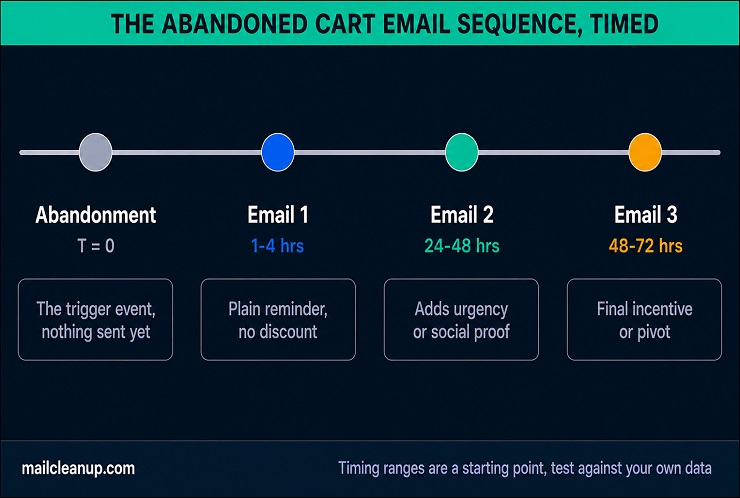
Test within that first-email window rather than assuming one exact number is right for your store. A considered purchase, furniture, or a high-end appliance may convert better with a longer gap than a low-cost impulse item does.
One timing detail worth building into your abandoned cart email automation directly: a cart abandoned at 11pm plus a 30-minute delay sends at 11:30pm. It gets buried under everything else by morning. Restrict your sending window to reasonable waking hours, roughly 6am to 9pm. Let a cart abandoned overnight simply wait until morning instead of firing in the middle of the night.
How Many Emails Belong in the Sequence
Two to three emails is the standard length for an abandoned cart email sequence, and it’s a reasonable place to start. A single email leaves real recovery on the table. Five or six starts to feel like harassment rather than a reminder, and it puts your unsubscribe rate at risk. For most stores, the best abandoned cart email in the whole sequence turns out to be the second one, not the first or last.
If a shopper hasn’t opened or clicked after two emails, a third rarely changes the outcome through repetition alone. It needs a genuinely different angle, not just a repeat of the same message with a bigger discount attached. Test your own sequence length against your own recovery data rather than copying a number from this guide or any other. What works for a $30 impulse product won’t necessarily work for a $2,000 one. Abandoned cart email best practices are directional guidance here, not fixed rules, and your own data should always win the argument. If you’re researching how to setup abandoned cart email sequences from scratch, start with the number, not the content.
What Should Change Between Email One, Two, and Three
Sending the identical email three times with only the date changed wastes the second and third chance instead of using them. Each email in your abandoned cart email sequence should shift its angle along with its timing. The first email stays simple: a reminder, the product, a clear way back to the cart, nothing more. This is the email most likely to convert shoppers who were only briefly distracted. It shouldn’t be cluttered with a hard sell they don’t need yet.
Your second email can afford to work harder. This is where social proof, a trust signal, or a modest incentive earns its place, once a plain reminder has already had its shot. The tone can shift slightly too, a little more direct about the ask, without tipping into pressure.
Your third email is where a real decision point shows up. For a shopper who still hasn’t engaged, a stronger incentive is one option. The other is to stop pushing the same product and pivot instead: show two or three alternatives. The item they left behind clearly hasn’t converted them after two tries, so a different product might. A shopper who ignored your first two emails may still respond to a different one entirely.
Real Abandoned Cart Email Examples and Patterns That Convert
Most examples roundups return to the same five or six brands. The specific company matters less than the pattern behind what they’re doing. The abandoned cart email examples below are organized by approach, not by name recognition. Adapt whichever pattern matches your own brand voice best. If you’re short on abandoned cart email ideas of your own, these four categories are a reasonable place to start.
Discount and Incentive-Led Examples
This pattern ties directly back to the incentive guidance covered earlier. Hold the discount back, then lead with it once a plain reminder hasn’t worked.
“Still thinking it over? Here’s 10% to help you decide.” A mid-size home goods retailer sends this as the third email in its sequence, two days after the first plain reminder. The discount is specific, expires in 24 hours, and applies only to the exact items already in the cart, not storewide. That specificity matters: a storewide code invites a shopper to go hunting for something cheaper than what they originally wanted.
“Free shipping, because your snacks shouldn’t wait.” A subscription snack box brand uses free shipping instead of a percentage discount for its second abandoned cart email. For a $35 box, free shipping is worth roughly the same as a 15% discount. It doesn’t set a precedent of always expecting a percentage off, though. It also directly answers the most common reason carts get abandoned in the first place: unexpected shipping costs.
Both examples share the same discipline: the incentive addresses a specific, known objection instead of being a generic sweetener. Notice that neither example leads with the biggest discount you could offer. That’s the difference between an incentive that converts and one that just erodes your margin for shoppers who would have bought anyway. Good abandoned cart email copy always starts from the actual objection, not the discount itself.
Storytelling and Brand-Voice-Led Examples
Not every brand needs a discount to recover a cart. A distinctive voice can do the work instead, especially for a brand whose whole value proposition rests on being different from a generic retailer.
“We saved this because it matters.” A sustainable home goods brand skips the discount code entirely. Instead, its second email explains where the abandoned item’s materials came from and why the packaging is plastic-free. The email closes with a single line inviting the shopper to reply directly with any questions, no automated chatbot, just a real address. For a brand built on caring more than a mass retailer, a coupon in the first follow-up would undercut that exact positioning.
“You stood at the counter and walked away. Come back.” A specialty coffee roaster writes its abandoned cart email in the same playful, slightly theatrical voice it uses across its whole site. The abandoned bag of beans becomes a small ongoing joke, not a lost sale. There’s no discount and no urgency, just personality carried all the way through. This only works if that voice is already established everywhere else the brand shows up. A generic retailer trying this cold, with no existing tone to draw on, reads as try-hard instead of charming.
If you’re considering this approach, be honest about whether your brand voice is distinctive enough to carry an email with no other hook. A safer middle ground exists too: keep the voice, but add a modest incentive as backup. The best abandoned cart email isn’t necessarily the flashiest one; it’s the one closest to how your brand already talks to customers.
Urgency and Scarcity-Led Examples
The same rule from earlier applies here without exception: only use urgency that’s actually true.
“3 left in your size, then it’s gone.” A footwear brand pulls real-time inventory data into its abandoned cart email. It shows the exact remaining count for the specific size the shopper had in their cart. The number updates with each send. If stock climbs back up from a return, your next email reflects that honestly instead of repeating a stale number.
“Today only: this collection goes back to full price tomorrow.” A jewelry brand times its email to land during an already-scheduled sale, not a fake one-off discount invented for cart abandoners. The urgency is real because the sale itself is real, ending on a fixed date the brand didn’t invent.
Both examples pass a simple test: could you show a customer the actual data behind the claim if they asked? If the answer is no, the urgency isn’t real yet, and it doesn’t belong in your abandoned cart email until it is.
Personalization-Led Examples
This is the pattern with the most room to differentiate, because it depends entirely on data most brands already have and rarely use well.
“Since you loved the desk lamp, a few more picks.” An outdoor gear retailer’s abandoned cart email includes the actual item, plus three more pulled from the shopper’s browse history. It’s not a generic bestsellers list. Someone who spent time comparing three different tents sees tent-related recommendations, not a random assortment of hiking boots and water bottles.
“You’re 40 points from your next reward.” A beauty brand’s abandoned cart email calculates, in real time, exactly how many loyalty points this purchase would add. It also shows how close that puts the shopper to their next reward tier. It’s a second, independent reason to buy that has nothing to do with the product itself. It has everything to do with a system your shopper already opted into.
These examples only work because the underlying data is accurate. A recommendation engine pulling from stale browse history does real damage to trust. So does a loyalty calculation that’s off by a few points. Either one hurts more than sending no personalization at all. Get it right, and an abandoned cart recovery email built on real data becomes one of the highest-trust messages your brand sends.
Abandoned Cart Email Conversion Rate: What the Benchmarks Don’t Isolate
Every section so far has covered what to put in the email and how to time it. This section covers something different: how to actually read the numbers your abandoned cart email produces, and one thing almost nobody checks first.
What Industry Benchmarks Actually Show
Published benchmarks for abandoned cart email vary by source, but a few numbers show up consistently enough to be useful as a baseline.
| Metric | Reported figure | Source |
|---|---|---|
| Open rate | 35.75% | Omnisend, 2025 client data |
| Average click rate | 6% (11.3% among top-performing accounts) | Klaviyo benchmark data |
| Conversion rate | 1.51% | Omnisend, 2025 client data |
| Click-to-conversion rate | 39.46% | Omnisend, 2025 client data |
These numbers come from platforms measuring their own users, not an independent check on your list specifically. Treat them as a directional baseline for your own numbers, not a target to hit exactly. Notice the gap between click rate and click-to-conversion rate. Roughly 4 in 10 people who click actually buy. That’s the highest-intent moment in the whole flow, worth remembering once you get to what these numbers don’t show. Open rate in particular reflects how well your abandoned cart email subject line is doing its job, more than anything else in the message.
The Variable Those Benchmarks Never Separate Out
Every number in that table assumes your full send list was reachable. None of the platforms publishing those benchmarks separate out how many sends never had a real mailbox behind them in the first place. That’s the blind spot in every abandoned cart recovery email benchmark you’ll find published anywhere. A best abandoned cart email won’t necessarily beat these benchmarks if the underlying list was never fully reachable to begin with.
MailCleanup’s own verification data offers a useful reference point here, drawn from the most recent two-month window of client lists actually checked:
| Status | Share of addresses checked |
|---|---|
| Deliverable | 72.66% |
| Undeliverable | 13.73% |
| Accept-all | 7.48% |
| Unknown | 6.13% |
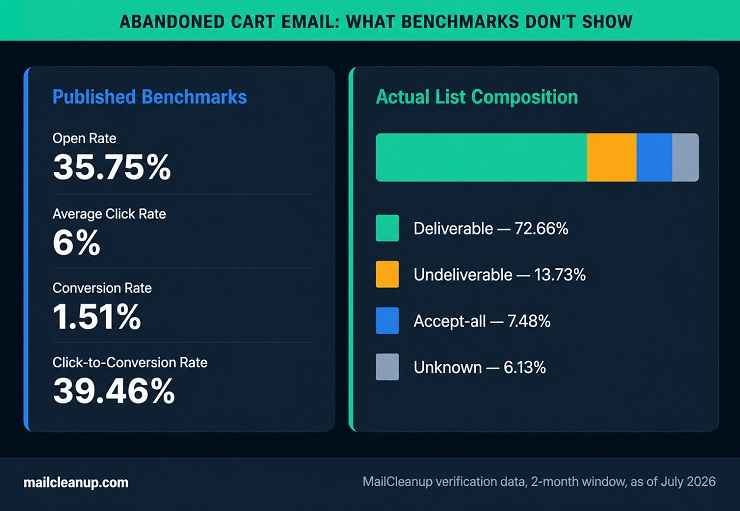
Roughly 1 in 4 addresses fell into one of the three risk categories. That’s not a measurement of abandoned cart addresses specifically. It’s a general benchmark for what typical, unverified lists look like when actually checked.
There’s no reason to expect a freshly typed checkout address to be systematically cleaner than that baseline. If anything, guest checkout is the least-verified moment in your entire funnel, exactly as covered earlier. A mistyped address, a throwaway domain, a fake entry used to get past a required field: none of that gets caught. Your abandoned cart email automation still treats it as a valid send. Our guide to email verification covers the specific methods behind catching this before it happens. Repeatedly sending to addresses that bounce does more than distort a single campaign’s numbers. It also affects sender reputation over time, the deliverability signal our guide to sender reputation covers in full.
This is why a flat abandoned cart email conversion rate can be a misleading number to chase on its own. If 10% or 15% of your list was never reachable, your real performance looks different. Against the shoppers who actually received the email, it’s meaningfully better than the blended number suggests. “My copy isn’t converting” and “some of my sends never had anywhere to land” look identical in a standard analytics dashboard. It only shows up once you check the list itself.
None of this means abandoned cart email best practices around copy, timing, and incentives stop mattering. They still do all the work covered earlier in this guide. Verifying new addresses at collection is one piece of this. Keeping the rest of your list clean over time, covered in our guide to email list hygiene, is the ongoing complement to it. It just means the numbers you’re using to judge that work might be measuring something other than what you think they’re measuring.
How to Set Up Abandoned Cart Email Automation
Understanding the reachability problem covered above is one thing. Actually building your abandoned cart email sequence, in a way that accounts for that problem, is another.
1. Native Platform Tools (Shopify and Similar)
If your store runs on Shopify, BigCommerce, or a similar all-in-one platform, a built-in tool for abandoned cart email is likely already available. You don’t need to install anything else to get started. Shopify’s native tool includes a pre-built template you can customize and automatic syncing of cart data, customer details, and pricing. Built-in analytics cover open and click rates. It comes with 10,000 free emails a month before any paid tier kicks in. That’s enough for most small to mid-size stores to run a full sequence without hitting a limit.
Third-party tools like Klaviyo or Omnisend can also connect directly to Shopify, syncing customer, order, and product data automatically once installed. If you’re wondering how to setup abandoned cart email automation without an engineering team, native platform tools are the place most stores should start.
The tradeoff is simple: native tools are the fastest path to a working sequence. Dedicated platforms trade that simplicity for more depth. Whether native or dedicated makes for the best abandoned cart email setup for your store depends entirely on how complex your needs actually are. Following abandoned cart email best practices doesn’t require the more expensive option; it requires matching the tool to what your store actually needs.
2. Dedicated ESP Automation (Klaviyo, Omnisend, and Similar)
A dedicated email service provider offers more capability for your abandoned cart email than a native tool usually can. That comes at the cost of a separate subscription and a bit more setup time.
Expect dynamic product blocks that pull directly from your synced catalog, along with predictive send-time features. Multichannel sequences can combine email with SMS or push notifications in the same flow. Revenue attribution tends to be more precise too. It shows exactly how much each individual email in the sequence generated, rather than lumping the whole flow into one number.
This depth usually justifies the extra cost for a store running a genuinely complex sequence. Think segmentation by cart value, product category, and customer history, all at once. A smaller store with a single, simple reminder email may not need any of it.
3. Measuring and Improving Sequence Performance
Setting up your abandoned cart email sequence is the first half of the work. The second half is watching what it actually does once it’s live, and adjusting from there.
A handful of metrics matter more than the rest:
- Open rate: whether your subject lines are actually working.
- Click rate: whether the email content and call-to-action are compelling enough to drive action.
- Conversion rate: the share of sends that result in a completed purchase, the number that ties most directly to revenue.
- Revenue per email: useful for comparing one sequence, or one version of a sequence, against another.
- Unsubscribe and spam complaint rate: an early signal you’re sending too often or missing the mark on relevance.
Test one variable at a time against a large enough sample to trust the result, then apply the winner before testing the next variable. Good candidates include the subject line, your abandoned cart email timing, and whether an incentive helps or just cuts into margin. Tag every link with UTM parameters too. Otherwise, recovered purchases risk showing up as ordinary direct traffic in your analytics. They won’t get credited to the email that actually earned them. That makes it hard to tell whether your abandoned cart recovery email is genuinely working or just running.
The Setup Step Most Guides Skip
None of the metrics above mean much if a chunk of your list was never reachable to begin with. This is the step almost no abandoned cart email guide mentions. Verify the addresses feeding your automation before they ever trigger a send. Don’t wait until you’re staring at a conversion rate that doesn’t add up.
Most email marketing platforms sync data automatically. Almost none of them check whether an address is real before adding it to your abandoned cart email automation. Guest checkout, the exact trigger covered earlier, hands your platform an email address with zero verification attached to it.
A dedicated email verification tool like MailCleanup checks an address against a real mail server before it ever enters your sequence. It catches typos, disposable domains, and dead mailboxes at the moment they’re collected. That beats finding out three emails later that a send never had anywhere to go. Run this at signup and checkout. The conversion rate covered earlier stops being a mystery number and starts reflecting what your abandoned cart email actually did.
Abandoned Cart Email Compliance: GDPR, CAN-SPAM, and CASL
Compliance isn’t the most exciting part of an abandoned cart email. Skipping it is exactly the kind of mistake that turns a working sequence into a legal problem. None of this replaces professional legal advice for your specific business. It’s a working overview, not a substitute for counsel who knows your situation.
GDPR and the ePrivacy Directive
GDPR governs how you can collect and use a shopper’s personal data, including their email address. It requires a lawful basis before you do either. Consent is one lawful basis, but it isn’t the only one. Many stores rely on “legitimate interest” instead for cart recovery specifically, since the shopper already engaged in a transaction-adjacent action by starting checkout. Every abandoned cart recovery email needs a lawful basis before it goes out, whichever one your business ultimately relies on.
The ePrivacy Directive adds a separate layer on top of GDPR, specifically for electronic marketing. It generally requires opt-in consent for a marketing email. One useful exception applies: a “soft opt-in” for existing customers who provided their email during a purchase. That covers reminders about the same or similar products, as long as a clear opt-out is included every time.
Whether your abandoned cart email qualifies depends on the shopper’s status and which basis your business relies on. That’s exactly the kind of specific question our full guide to email compliance walks through in depth.
CAN-SPAM
In the US, the CAN-SPAM Act, enforced by the FTC, doesn’t require opt-in consent before you send a marketing email. An abandoned cart email still counts as a marketing message under the law, not a transactional one. Its purpose is to drive a purchase, not confirm one already made. That distinction catches people off guard, since your email feels like a simple reminder rather than an ad.
CAN-SPAM does require a few specific things regardless of consent:
- An accurate “From” line
- A real physical mailing address
- A subject line that matches what’s actually inside the email
- A clear indication the message is an advertisement
- A working opt-out link that you actually honor promptly
CASL
Canada’s CASL, enforced by the CRTC, is stricter than CAN-SPAM. It requires consent, either express or implied, before you send a commercial electronic message at all. Express consent is the shopper actively opting in. Implied consent can come from an existing business relationship. Whether a checkout in progress establishes that relationship depends on your specific situation. Either way, your abandoned cart email still needs to identify your business clearly and include a working unsubscribe mechanism. That’s true regardless of which region’s abandoned cart email best practices you’re already following for copy and timing.
Abandoned Cart Email Mistakes That Aren’t Covered Above
A few abandoned cart email mistakes don’t fit neatly into the sections above, but they’re common enough to call out on their own. Most of them trace back to skipping real thought about how to setup abandoned cart email flows properly the first time.
- Letting the sequence run past a purchase: make sure email two and three never send once a shopper completes checkout. This usually comes down to whether your platform’s suppression logic actually connects to real-time order data.
- Sending for an item that’s no longer in stock: a cart reminder for something a shopper can’t buy anymore wastes the send. It also damages trust. Sync inventory in real time, or check stock before each email fires.
- Running abandoned cart in isolation from every other automated flow: a shopper mid-checkout might belong to several flows at once. They could be inside a welcome series, a browse abandonment flow, or a win-back campaign at the same time. Getting three separate emails in one afternoon from the same brand reads as spam, whatever each individual message actually says. Check for overlap across your other flows and set priority rules so only one message goes out at a time.
- Treating every abandonment the same, regardless of why: a shopper whose card was declined wasn’t hesitating, their payment just failed. Sending “still thinking it over?” to that segment misses the actual problem and can come across as tone-deaf. If your platform can distinguish a payment failure from a simple walk-away, message it differently. A payment issue calls for a direct nudge in your abandoned cart recovery email to retry with a different card, not a discount.
- Assuming the email is exempt from marketing rules because it feels transactional: it rarely is. As covered above, it counts as a marketing message under most definitions. Its purpose is to drive a new purchase, not confirm one that already happened.
- Being too specific about what you tracked: referencing the exact product a shopper viewed works well. Referencing exactly how long they looked at it, or which page they arrived from, reads as surveillance rather than personalization.
- Skipping a dark mode check: many inboxes now default to dark mode. An email built for a white background can flip to something unreadable, dark text on a dark background, or a logo that disappears entirely. Test your abandoned cart email in both light and dark mode before launching, not just across different clients.
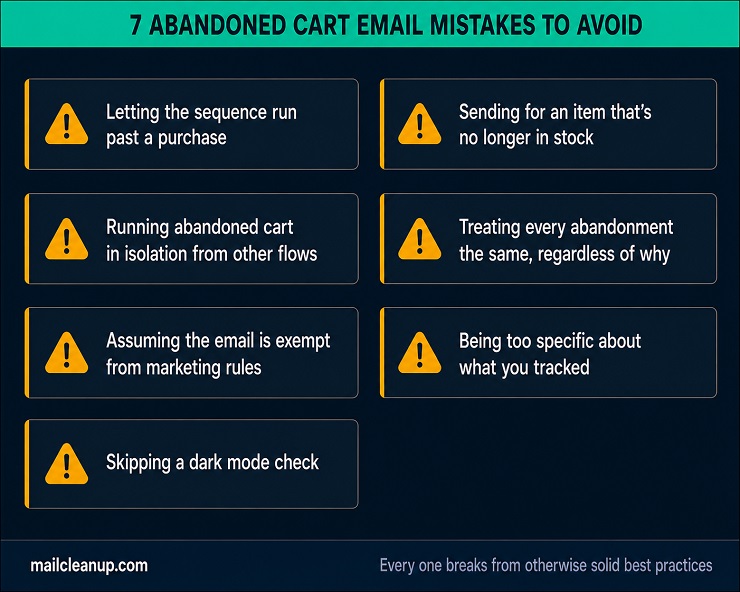
Every one of these breaks from otherwise solid abandoned cart email best practices is easy to miss until a customer points it out.
Building Your Abandoned Cart Email Program: What to Set Up First
If you’re starting from nothing, don’t try to build everything in this guide at once. A focused rollout gets a working abandoned cart email live faster, and gives you real data to improve from sooner. There’s no single best abandoned cart email template to copy; there’s only the version that fits your product, your price point, and your audience.
- Confirm which trigger you’re actually using, cart or checkout, since that determines what data you have and how clean it’s likely to be.
- Build a three-email sequence with the timing covered earlier: a plain reminder, a version with social proof or an incentive, then a final touch.
- Verify addresses before they enter the flow, not after a conversion rate leaves you guessing why.
- Set up open rate, click rate, and revenue-per-email tracking from day one, so you have a real baseline to test against.
This order follows abandoned cart email best practices in sequence: trigger first, timing second, reachability third, measurement fourth. Step one above is really about how to setup abandoned cart email triggers correctly before anything else.
Once that foundation is running, the natural next step is extending the same logic further. [Browse abandonment email] covers shoppers who never even added anything to a cart. Post-purchase email flow covers customers already through the door. Both get their own dedicated treatment in this series.
FAQs on Abandoned Cart Emails
A few questions about abandoned cart email come up often enough to answer directly.
What is an abandoned cart email?
An abandoned cart email is an automated message sent to a shopper who added a product to their cart but left before completing checkout. It reminds them what they left behind and includes a direct link back to finish the purchase. Most stores send it as part of a short automated sequence rather than a single, one-off message.
Are abandoned cart emails legal?
Yes, in most cases. Your abandoned cart email needs accurate sender information, a clear indication it’s a marketing message, and a working way to opt out. Requirements vary by region. GDPR and the ePrivacy Directive apply in the EU, CAN-SPAM in the US, and CASL in Canada, each with its own specific rules.
Do I need consent to send an abandoned cart email?
It depends on your legal basis and the shopper’s status. GDPR allows “legitimate interest” as an alternative to consent for an abandoned cart email specifically. The ePrivacy Directive’s “soft opt-in” covers existing customers who provided their email during a purchase. CASL and CAN-SPAM each set their own separate rules, covered above.
How many emails should be in an abandoned cart email sequence?
Two to three emails is the standard for an abandoned cart email sequence. Space them roughly a few hours, one day, and two to three days after abandonment. A single email leaves recovery on the table, while more than three risks feeling like harassment. Test your own sequence length against your own recovery data rather than copying a fixed number.
When should I send the first abandoned cart email?
Most stores send the first abandoned cart email between 30 minutes and 4 hours after the shopper leaves. Test within that range to find what works for your own audience and products. A considered purchase may convert better with a longer gap than a low-cost impulse item does. Avoid sending instantly; give the shopper a real chance to return on their own first.
What’s a good conversion rate for an abandoned cart email?
Reported figures vary, but a 1.5% abandoned cart email conversion rate is a reasonable industry reference point. Average click rates run around 6%, higher among top-performing accounts. Whether your own numbers are actually comparable depends on factors these published benchmarks don’t separate out. That includes how many addresses in your list were reachable in the first place.
Is an abandoned cart email different from an abandoned checkout email?
Yes. An abandoned cart trigger fires when a shopper adds an item but never starts checkout. This often requires them to already be logged in or identified. An abandoned checkout trigger fires after they’ve entered an email address during checkout itself. That’s what most guest-checkout abandoned cart email flows actually rely on.
Why isn’t my abandoned cart email converting?
Copy, timing, and incentives are the usual suspects, and they’re worth checking first. But some sends never had a real address behind them at all, since guest checkout is the least-verified moment in most funnels. Check your list for undeliverable or invalid addresses before assuming your abandoned cart email itself is the problem.