
When a new domain sends its first email, inbox providers like Gmail, Outlook, and Yahoo face a simple problem: they have no data on you. No sending history. No engagement record. No signals that tell them whether you are a legitimate business communicating with people who want to hear from you, or a spammer who just registered a domain this morning.
Their default response to that uncertainty is suspicion. They throttle your messages, route them to spam, or reject them outright. Not because anything is technically wrong with your email, but because an unknown sender with no track record looks statistically identical to a threat.
Email warmup is the process that changes this. By gradually increasing your sending volume over a controlled period, you give inbox providers the positive engagement signals they need to build a reputation score for your domain. You go from unknown to trusted. And once that trust exists, your emails get delivered where they belong.
This guide covers the complete picture: what email warmup actually is, how it differs from domain warmup and IP warmup, when each applies to you, what you need to set up before you send a single warmup email, and a week-by-week schedule for executing the ramp. It also covers the signals that tell you warmup is working, the mistakes that kill it quietly, what to do when a warm domain goes cold, and how to maintain sending reputation once the initial warmup is done.
TL;DR
- Email warmup is the process of gradually increasing sending volume from a new or cold sending infrastructure so inbox providers can build a positive reputation score for your domain and IP before you send at full scale.
- Domain warmup and IP warmup are distinct processes. Domain warmup is required whenever you use a new sending domain. IP warmup is only required if you are sending on a dedicated IP address, not a shared one.
- Before starting any warmup, your SPF, DKIM, and DMARC records must be correctly configured and your list must be verified. Starting warmup with invalid or risky addresses is the most common cause of failed warmups.
- The standard warmup period for most senders is four to eight weeks, starting with your most engaged contacts and expanding to broader segments as positive signals accumulate.
- Warmup is not a one-time event. Sending reputation requires ongoing maintenance. A warm domain that goes inactive for 30 or more days needs to be rewarmed before high-volume sending resumes.
- The signals to watch during warmup are domain reputation band in Google Postmaster Tools, spam placement rate, bounce rate, complaint rate, and the presence of 4xx deferral codes from major ISPs.
- Stopping warmup too early, scaling volume too fast, and sending to unverified lists are the three most common causes of warmup failure.
What Is Email Warmup and Why Does It Matter
Email warmup is the process of establishing a positive sending reputation with inbox providers by gradually increasing the volume of email sent from a new or dormant sending infrastructure over a controlled period of time.
The mechanism behind it is worth understanding properly, because it explains why warmup works the way it does and why shortcuts do not.
Inbox providers like Gmail, Outlook, and Yahoo do not evaluate your emails in isolation. They evaluate the sender behind them. Every domain and IP address that sends email accumulates a reputation score based on observable behaviour signals: how many recipients open messages, whether replies come back, how often emails generate spam complaints, how frequently messages bounce, and whether sending patterns look like a human business or an automated blast.
When a domain is brand new, that score is zero. There is no positive data, no negative data, just absence. And absence is treated as risk.
A sender who starts blasting 50,000 emails from a new domain on day one generates no positive engagement signals to counterbalance the raw volume. From the inbox provider’s perspective, this is exactly what spam operations look like. Domain is registered, large volume sent immediately, no established relationship with recipients. The result is aggressive filtering, throttling, or outright rejection. Not because the content is bad, but because the pattern is indistinguishable from abuse.
Warmup solves this by building the signal record first. You start small, with recipients most likely to engage, and those engagements, opens, replies, clicks, create the positive reputation data that inbox providers use to classify you as a legitimate sender. As that data accumulates, providers become progressively more willing to deliver your emails at higher volumes and to the inbox rather than spam.
The warmup period is not a formality. It is the phase during which your entire sending program’s future deliverability is either earned or squandered.
Email Warmup vs Domain Warmup vs IP Warmup: What Is the Difference
These three terms are used interchangeably by most guides, which creates genuine confusion about what you are actually trying to accomplish. They refer to related but distinct processes, and treating them as synonyms leads to senders either doing unnecessary work or skipping something they actually need.
Here is how each one works, and how they relate to each other.
Email Warmup: The Umbrella Concept
Email warmup is the broad term for the process of building sending reputation for new or cold sending infrastructure. When most people say “email warmup,” they mean the entire process, which typically involves warming both the sending domain and, in some cases, a dedicated IP address simultaneously.
Think of email warmup as the strategic framework. Domain warmup and IP warmup are the two specific technical processes that sit underneath it.
Domain Warmup: Building Reputation for Your Sending Domain
Domain warmup is the process of establishing a positive reputation for your sending domain specifically. The domain, meaning the part of your email address after the @ symbol, is the identity that inbox providers use to track your sending history across every IP you have ever used.
This is the more important of the two warmup types in the current email environment. Since 2024, Gmail, Outlook, and Yahoo have placed significantly more weight on domain reputation than IP reputation when making filtering decisions. Your domain reputation follows you regardless of which IP you send from or which ESP you use. Switching platforms does not reset it.
Domain warmup is required whenever you are sending from a domain that has no established sending history with inbox providers. This includes newly registered domains, domains that have been dormant for extended periods, and subdomains, which develop their own separate reputation independent of the parent domain.
IP Warmup: Building Reputation for a Dedicated IP Address
IP warmup is the process of establishing a positive reputation for a specific dedicated IP address. When you send from a brand new dedicated IP, inbox providers have no history attached to it. Like a new domain, it starts cold.
The critical distinction here is that IP warmup is only relevant if you are sending on a dedicated IP address. If you are sending on a shared IP pool managed by your ESP, the IP warmup has already been handled by the ESP collectively for all senders on that pool. You do not need to manage it yourself. A detailed post on dedicated IP vs shared IP not only explains the distinction between the two but also educates you on what type of IP is best for you.
Most senders do not need to think about IP warmup at all. Dedicated IPs are only recommended once you are sending more than 50,000 emails per month with consistent volume. Below that threshold, a shared IP is almost always the better option.
The Three Warmup Layers: How They Fit Together
| Layer | What Gets Warmed | Who Manages It | When It Applies |
|---|---|---|---|
| Domain warmup | Your sending domain’s reputation | You | Any new or dormant sending domain |
| IP warmup | Your dedicated IP’s reputation | You | Only with a dedicated IP above ~50,000 emails/month |
| Shared IP | The IP pool’s reputation | Your ESP | Managed collectively, not your responsibility |

In practice, most senders warming a new setup are doing domain warmup. If they are also on a new dedicated IP, they are doing both simultaneously. If they are on a shared IP, they are doing domain warmup only.
Do You Actually Need to Warm Up? A Scenario-Based Decision Guide
Not every sending situation requires the same warmup process. Working out exactly what applies to you prevents wasted effort and avoids the mistake of skipping warmup you actually need.
The following table covers the most common scenarios and what each requires.
| Scenario | Domain Warmup Required? | IP Warmup Required? | Notes |
|---|---|---|---|
| New domain, shared IP | Yes | No | ESP manages IP reputation. You own the domain warmup. |
| New domain, new dedicated IP | Yes | Yes | Both start cold. This is the most demanding warmup scenario. |
| Existing domain, new dedicated IP | No | Yes | Domain has history. Only the IP needs a ramp. |
| Existing domain, moving to new ESP on shared IP | Yes | No | Domain reputation carries over but ESP needs to learn your domain. Ramp volume gradually. |
| Existing domain, 30+ days of sending inactivity | Yes | Yes (if dedicated IP) | Both decay. Treat as a fresh start at reduced speed. |
| Warm domain, seasonal volume spike (e.g. Black Friday) | Partial | Partial | Spike beyond your established sending pattern needs a controlled ramp up. Do not jump from 10,000 to 200,000 in one send. |
| New subdomain, warm parent domain | Yes | No | Subdomains develop their own reputation independently. The parent’s warmth does not carry over. |
| Severely damaged domain, requiring reputation restart | Yes | Yes (if dedicated IP) | May require a fresh domain and IP rather than recovery. |

One scenario people consistently miss is the subdomain case. If you have been sending marketing email from yourcompany.com for two years and decide to switch to email.yourcompany.com to separate your sending streams, that subdomain starts with zero reputation regardless of how strong the parent domain’s history is. It needs to be warmed from scratch.
The seasonal spike scenario is also underestimated. A domain sending 5,000 emails per week that suddenly attempts a 100,000-email Black Friday campaign is presenting inbox providers with a sudden, dramatic deviation from its established pattern. Even with a healthy reputation, that spike can trigger throttling and spam placement. The right approach is to ramp toward peak volume in the weeks before a major send event rather than attempting the full volume in one go.
Before You Start: What to Set Up Before Email Warmup Begins
Warmup failure rarely happens during the ramp itself. It happens in the five minutes before the first email goes out, when something that should have been set up was not.
There are four things that must be in place before a single warmup email leaves your infrastructure. Not as best practice. As hard prerequisites.
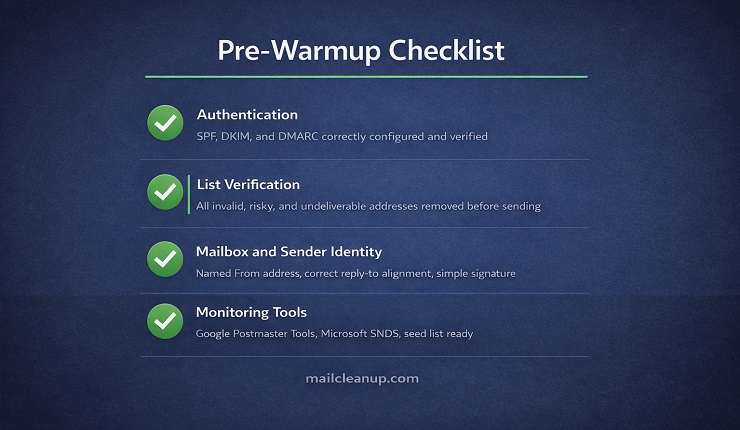
Authentication: SPF, DKIM, and DMARC
Inbox providers use authentication records to verify that your emails are actually coming from who they claim to be coming from. Without correct authentication, your warmup emails are treated as unauthenticated mail from an unknown sender, which is one of the strongest negative signals an inbox provider can observe.
This is not a warmup-specific requirement. It is a baseline requirement for deliverability in 2025 and beyond. Gmail and Yahoo made SPF, DKIM, and DMARC mandatory for bulk senders in February 2024, and Outlook followed with stricter enforcement shortly after. If you have not set these up yet, our guide to email authentication covers each protocol in detail, including exactly what to configure and how to verify it is working.
Before warmup begins, confirm all three:
- SPF: A DNS TXT record that specifies which servers are authorised to send email on behalf of your domain. Publish one SPF record per domain and include every sending source.
- DKIM: A digital signature attached to outgoing messages. Use a 2048-bit key. Verify that your ESP is signing messages with your own domain, not theirs, so the reputation accrues to you.
- DMARC: A policy record that tells inbox providers what to do when SPF or DKIM fails. Start with p=none and a reporting address (rua=) so you receive alignment data from day one. Move to p=quarantine and then p=reject once warmup is established and DMARC reports confirm clean alignment.
One more item worth adding if your volume justifies it: a custom return-path domain. By default, many ESPs handle bounces through their own return-path domain, which means bounce reputation accrues to them rather than you. Setting a custom return-path that matches your sending domain gives inbox providers a consistent identity signal across all four domains they evaluate: your From domain, your DKIM signing domain, your return-path domain, and any link domains in your content.
Verify everything with a DNS checker tool before proceeding. Then send a test message through mail-tester.com or a similar tool to confirm SPF, DKIM, and DMARC are aligning correctly.
List Verification: The Step Almost Everyone Skips
This is the most consequential pre-warmup step, and the one most commonly skipped.
Your warmup period is when your domain reputation is at its most fragile. Inbox providers are watching every signal closely during the early stages of the ramp. A bounce rate above 2% during warmup signals that your list is low quality, and that signal lands harder in weeks one and two than it would at any other point in your sending program.
If you start warmup with a list that contains invalid addresses, role accounts, catch-all domains, or risky email addresses, those bounces hit during the exact window when you can least afford them.
Run your full list through a verification tool before warmup begins. Even a list you believe is clean can contain 5 to 10% problematic addresses, particularly if it includes any imports, third-party acquisitions, or contacts collected more than 12 months ago. Email addresses degrade at roughly 22% per year. A list that was clean 18 months ago is a different list today.
MailCleanup’s bulk verification process checks each address across multiple layers before your warmup begins:
- Syntax and formatting validation
- Domain and MX record verification
- SMTP-level mailbox confirmation
- Disposable and temporary address detection
- Catch-all domain identification
- Risk scoring for addresses likely to generate complaints or soft bounces
Removing invalid and risky addresses before the first warmup email goes out is not a precaution. It is the difference between a warmup that builds reputation and one that destroys it before it gets started.
Mailbox and Sender Identity Setup
Inbox providers evaluate not just your domain and IP but the identity attached to each email. During warmup, every signal counts, and a mailbox that looks like a real person sending real messages builds trust faster than one that looks like a sending platform.
Set up the following before warmup begins:
- From name: Use a human name, not a brand or role. “James from Acme” or “Sarah at Acme” performs better than “Acme Marketing” during the warmup phase.
- From address: Use a named address such as [email protected] rather than info@, support@, or hello@. Role-based addresses are treated with more suspicion by spam filters.
- Reply-to alignment: Ensure the reply-to address matches the From domain. Mismatches between the two create authentication alignment problems and look suspicious.
- Email signature: Keep it simple during warmup. Name, title, company, website, physical address. Minimal images, no heavy HTML. Complex signatures during low-volume warmup can trigger content filters before your reputation is established.
- Time zone and working hours: Set these correctly in your ESP. Emails sent at 3am local time look automated.
Monitoring Tools
You cannot manage a warmup you cannot see. Set up the following before your first send:
| Tool | What It Shows | Why It Matters During Warmup |
|---|---|---|
| Google Postmaster Tools | Domain reputation band (High/Medium/Low/Bad), spam rate, authentication pass rate | The primary signal for how Gmail views your domain as warmup progresses |
| Microsoft SNDS | IP reputation, complaint rate with Outlook’s infrastructure | Required if significant portion of list uses Outlook or Microsoft 365 |
| MXToolbox | Blacklist status, DNS record verification | Catch any blacklist listings before they compound |
| A seed list (Gmail + Outlook addresses) | Where warmup emails actually land: inbox, spam, or promotions | The only way to confirm inbox placement directly during the ramp |
Check Google Postmaster Tools and your seed list daily during weeks one and two. Once the ramp is stable, weekly monitoring is sufficient.
How to Warm Up Your Email Domain: A Week-by-Week Schedule
There is no single warmup schedule that works for every sender. Your correct schedule depends on your total intended send volume, your list quality (check how the list quality can be improved by the email list scrubbing process), and how quickly positive engagement signals accumulate. What follows is a practical framework built around the principles that hold across all sending scenarios: start with your highest-engagement contacts, expand slowly, and let your metrics determine whether you move forward or hold.
One principle runs through every week of this schedule: do not increase volume until the previous period’s metrics are healthy. Volume is a reward for good signals, not a default setting.
Who to Send to First: Building Your Audience Segments
Before the schedule starts, you need to segment your list into engagement tiers. These tiers determine which contacts receive warmup emails at which stage.
| Segment | Definition | When to Use |
|---|---|---|
| Tier 1: Hyper-engaged | Opened or clicked in the last 30 days | Weeks 1 and 2 only |
| Tier 2: Recently engaged | Opened or clicked in the last 60 to 90 days | Weeks 2 and 3 |
| Tier 3: Moderately engaged | Opened or clicked in the last 90 to 120 days | Weeks 3 and 4 |
| Tier 4: Less engaged | Opened or clicked more than 120 days ago | Week 4 onwards, after reputation is established |
If you are starting from scratch with no engagement data, use your most recent signups first. Contacts tend to be most active in the period immediately after they sign up. Work backwards through your list chronologically, with the newest additions warming first.
Week 1: Establishing the Foundation
Target: Tier 1 contacts only. No exceptions.
Send volume: 50 to 500 emails per day, split across major ISPs (Gmail, Outlook, Yahoo).
The goal in week one is not volume. It is establishing a clean baseline of positive signals before inbox providers have formed any opinion about your domain. Send your best content to your most reliably engaged recipients and keep everything simple.
Content guidance for week one:
- Plain text or very light HTML only. No heavy images, no promotional language.
- A welcome message, a high-value piece of content, or a confirmation of something the recipient requested. Transactional-style content earns more ISP goodwill than promotional material this early.
- No links to third-party domains where possible. Every domain in your email content is evaluated separately.
- Subject lines that are clear and honest. No clickbait, no excessive capitalisation, nothing that pattern-matches to spam.
Proceed to week 2 only if:
- Open rates are above 20%
- Bounce rate is below 2%
- Spam complaint rate is below 0.08%
- Seed list confirms inbox placement at Gmail and Outlook
If any of these signals are off, hold at week one volume, investigate the cause, and do not proceed until metrics stabilise.
Week 2: Controlled Growth
Target: Tier 1 continued, begin introducing Tier 2.
Send volume: Double or increase by 50% from your week one endpoint, depending on list size. If you finished week one at 500 per day, target 750 to 1,000 per day across the week.
Week two introduces slightly less recent contacts while keeping your Tier 1 segment active. This is important: do not stop sending to early engaged contacts as you add new ones. Cumulative sending to your best contacts maintains the overall engagement rate even as less-engaged recipients enter the mix.
Spread your daily volume across the working day rather than batching sends. A natural human business sends emails throughout the day, not in a single burst at 9am.
Proceed to week 3 only if:
- Open rates remain above 20%
- Bounce rate stays below 2%
- Complaint rate stays below 0.08%
- No significant 4xx deferral patterns appearing in your sending logs from Gmail or Outlook
Week 3: Scaling Up
Target: Tiers 1, 2, and 3 in the mix.
Send volume: Increase by 30 to 50% from your week two endpoint. The doubling approach from early warmup slows here. Controlled, steady growth is safer than aggressive ramping once volume becomes more substantial.
By week three, your domain should be accumulating enough reputation data that Google Postmaster Tools will begin showing a domain reputation band. Check it. If it reads Medium or High, the warmup is tracking correctly. If it reads Low, slow the ramp immediately and investigate which signals are dragging it down before continuing.
At this stage you can also begin introducing more varied content types, including promotional material, provided engagement metrics remain strong. The caution around promotional content applies most strongly in the first two weeks when your reputation is being established from a blank slate.
Hold at week three volume if:
- Domain reputation in Postmaster Tools reads Low or Bad
- You observe a significant spike in 4xx deferral codes from a specific ISP
- Complaint rate begins creeping above 0.08%
Week 4 and Beyond: Reaching Full Volume
Target: All segments including Tier 4, with careful monitoring.
Send volume: Continue increasing by 20 to 30% per step until you reach your intended full sending volume.
Week four is where many senders make their biggest mistake: they assume the warmup is complete and jump to full volume in a single send. Do not do this. Continue the incremental ramp even in week four and beyond. “Warmup complete” does not mean you have reached full volume. It means your domain reputation is established enough to continue scaling without aggressive filtering. The final ramp to full volume still needs to happen gradually.
If your intended send volume is very large (100,000 or more emails per day), your warmup may extend to six or eight weeks. That is not a failure. It is the correct approach. Rushing to reach volume before positive signals justify it is what creates lasting deliverability damage.
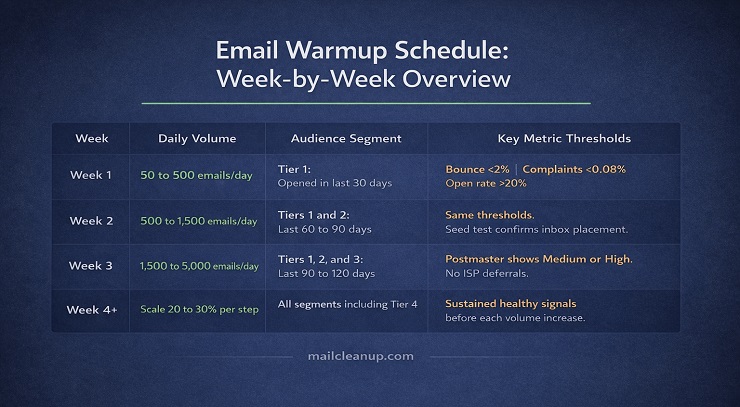
Reference: Four-Week Warmup Schedule Overview
| Week | Daily Volume (Indicative) | Audience Segment | Key Metric Thresholds |
|---|---|---|---|
| 1 | 50 to 500 | Tier 1 only | Open rate >20%, bounce <2%, complaints <0.08% |
| 2 | 500 to 1,500 | Tiers 1 and 2 | Same thresholds; seed test confirms inbox placement |
| 3 | 1,500 to 5,000 | Tiers 1, 2, and 3 | Postmaster shows Medium or High; no ISP-level deferrals |
| 4+ | Scale 20 to 30% per step | All segments | Sustained healthy signals before each volume increase |
IP Warmup: When It Applies and How It Differs from Domain Warmup
Most senders warming a new email setup only need to think about domain warmup. IP warmup is a separate requirement that applies in specific circumstances, and confusing the two leads to either unnecessary complexity or skipped steps that matter.
Shared IP vs Dedicated IP: Which Senders Actually Need IP Warmup
The first question is whether you are on a shared IP or a dedicated IP.
Shared IP: Your ESP sends email on your behalf from an IP address shared with other customers. The ESP manages the collective reputation of that IP pool. You do not warm the IP yourself, and you do not need to. Your only warmup responsibility is the domain.
The trade-off with shared IPs is that other senders on the same pool can affect your deliverability if they send poorly. Most reputable ESPs monitor shared IP pools closely and remove bad actors, but it is worth understanding the dependency.
Dedicated IP: An IP address assigned exclusively to your sending. No other sender shares its reputation. This gives you complete control over your IP’s reputation, but it also means the IP starts cold. A new dedicated IP has zero sending history and needs to be warmed before it can support high-volume sending.
The volume threshold at which a dedicated IP makes sense is typically 50,000 or more emails per month, sent consistently. Below that threshold, a shared IP is almost always safer. Inbox providers need to see enough data from a given IP to build a reliable reputation profile. If you are sending 10,000 emails a month on a dedicated IP, you are not generating enough signal for providers to properly evaluate you, which can actually hurt deliverability compared to a well-managed shared pool.
How IP Warmup Works Alongside Domain Warmup
If you are warming both a new domain and a new dedicated IP simultaneously, the warmup schedule is essentially the same. The volume ramp, engagement-first audience selection, and signal monitoring all apply to both. You are building two reputation records in parallel, using the same sends.
One practical distinction: IP warmup is slightly more sensitive to volume spikes than domain warmup. Most IP reputation systems track data on a 30-day rolling window, which means if you go more than 30 days without sending on a dedicated IP, that IP is considered cold again and needs to be rewarmed regardless of its previous history.
IP Warmup Volume Reference
The schedule below is an indicative hourly sending limit framework, adapted from SendGrid’s published warmup guidance. Adjust based on your total intended volume and the engagement signals you observe.
| Day | Hourly Sending Limit |
|---|---|
| 1 | 20 |
| 2 to 3 | 40 to 55 |
| 4 to 5 | 80 to 110 |
| 6 to 7 | 150 to 215 |
| 8 to 10 | 300 to 580 |
| 11 to 14 | 800 to 2,200 |
| 15 to 18 | 3,000 to 8,500 |
| 19 to 22 | 12,000 to 33,000 |
| 23 to 26 | 46,000 to 126,000 |
| 27 to 30 | 176,000 to 484,000 |
These are ceilings, not targets. If engagement signals are weak or complaint rates are climbing at any stage of this schedule, slow the ramp rather than pushing to the next threshold.
One specific rule worth calling out: maintain consistent daily sending across all major ISPs in parallel. Do not warm Gmail on Monday and Yahoo on Tuesday. Sporadic, ISP-specific sending patterns look inconsistent to inbox providers and slow the trust-building process. Each major ISP needs to see a steady, growing stream of your mail to build a reliable picture of your sending behaviour.
The Signals That Tell You Warmup Is Working (and When to Pause)
Most warmup guides tell you to “monitor your metrics.” Few tell you which specific signals to watch, what healthy looks like at each stage, and at what point a number becomes a reason to stop.
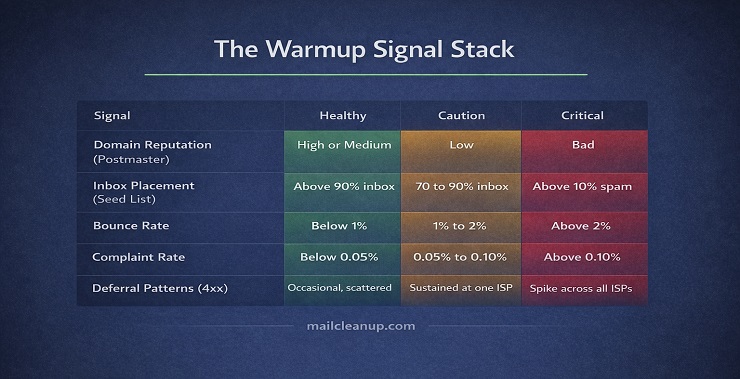
This section fixes that. The five signals below make up what we call the Warmup Signal Stack. Tracked together, they give you a complete picture of how inbox providers are responding to your ramp at any given moment.
Signal 1: Domain Reputation Band (Google Postmaster Tools)
This is your most important warmup indicator. Google Postmaster Tools shows your domain’s current reputation band with Gmail specifically: High, Medium, Low, or Bad.
During the first week of warmup, the band may show as no data because not enough Gmail recipients have received your mail to generate a rating. That is normal. By week two or three, a band should appear.
| Reputation Band | What It Means | What to Do |
|---|---|---|
| High | Gmail trusts your domain. Inbox placement is strong. | Continue ramp as planned. |
| Medium | Some filtering may occur. Reputation is building but not established. | Continue with caution. Do not accelerate volume. |
| Low | Gmail is applying aggressive filtering. Something is wrong. | Stop volume increase immediately. Investigate complaint rate, bounce rate, and content. |
| Bad | Near-total spam placement or outright rejection. Severe damage. | Halt sending. Diagnose root cause before resuming at significantly reduced volume. |
Check Postmaster Tools daily during weeks one and two. If you start at Medium and trend upward to High as the ramp progresses, the warmup is working. If you start at Medium and trend toward Low, the ramp is moving faster than your reputation can support.
Signal 2: Spam Placement Rate
Your seed list, a small set of test addresses across Gmail and Outlook that you send to alongside your real campaigns, tells you directly where your warmup emails are landing. This is the only way to confirm inbox placement with certainty during the warmup period. Postmaster Tools shows reputation, but your seed list shows reality.
Check seed results after every send during weeks one and two.
- Inbox placement above 90%: Warmup is tracking correctly. Continue.
- Promotions tab placement (Gmail): Not ideal but not a crisis. Review content and sender identity for anything that looks promotional.
- Spam placement above 10%: A significant problem. Stop the ramp, do not increase volume, and investigate before the next send.
Signal 3: Bounce Rate
Bounce rate during warmup is more consequential than bounce rate during a regular campaign, because inbox providers are forming their first opinion of your domain on limited data. A single bad send with high bounces in week one can set your reputation back by weeks.
| Bounce Rate | Status | Action |
|---|---|---|
| Below 1% | Healthy | Proceed |
| 1% to 2% | Caution | Monitor closely. Do not increase volume until it drops. |
| Above 2% | Problem | Stop volume increase. Audit list quality. Remove invalid addresses before next send. |
| Above 5% | Critical | Halt sending. Full list re-verification required before resuming. |
Hard bounces, meaning permanent delivery failures to invalid or non-existent addresses, should be suppressed immediately on first occurrence. There is no retry logic for a hard bounce. Sending to the same address a second time after a hard bounce is one of the fastest ways to damage your warmup progress.
If you see a spike in bounces during warmup, the most likely causes in order of probability are: an unverified or partially cleaned list, incorrect MX records on your sending domain, or authentication failures generating 5.7.x rejection codes. Our guide to SMTP error codes covers how to read bounce codes and diagnose which layer the failure is coming from.
Signal 4: Spam Complaint Rate
This is the signal inbox providers weight most heavily. A spam complaint means a real recipient marked your email as junk. That is a direct, human signal that your mail is unwanted, and inbox providers treat it as such.
Google’s published guidance puts the threshold for complaint-related filtering action at 0.10%, with sustained rates above 0.30% leading to significant deliverability penalties. In practice, during the warmup phase, you want to stay well below these published thresholds.
| Complaint Rate | Status | Action |
|---|---|---|
| Below 0.05% | Healthy | Proceed |
| 0.05% to 0.10% | Caution | Review audience segmentation. Are the right contacts receiving this content? |
| Above 0.10% | Problem | Stop ramp. Investigate content, consent practices, and audience targeting immediately. |
| Above 0.30% | Critical | Halt sending. Deliverability damage is likely already occurring. Full audit required. |
Complaint rate during warmup most commonly indicates one of three things: you are sending to contacts who did not clearly opt in to receive email from you, your content does not match what recipients expected when they signed up, or your unsubscribe mechanism is not prominent enough and recipients are hitting spam instead.
Signal 5: Deferral Patterns (4xx SMTP Codes)
Deferrals are temporary rejections. The receiving server accepted your connection but declined to deliver the message right now, returning a 4xx SMTP code with a retry instruction. Some deferrals during warmup are normal, particularly in the early days when inbox providers are still forming a reputation score for your domain.
What matters is the pattern, not the occasional instance.
- Scattered 4xx codes across multiple ISPs: Normal warmup friction. Monitor but do not panic.
- Sustained 4xx codes concentrated at a single ISP (e.g. all deferrals from Gmail): That ISP is throttling you specifically. Reduce your hourly sending rate to that provider and hold volume steady for 48 to 72 hours before attempting to ramp again.
- 421 codes specifically (rate limit exceeded): You are sending too fast. Spread your hourly volume across more hours of the day and reduce concurrency.
- A sudden spike in 4xx codes across all ISPs simultaneously: Your domain may have been listed on a blocklist. Check MXToolbox immediately. Refer to our guide on email blacklist check and removal for the remediation steps.
The key distinction with deferrals is that they are soft signals. A deferral means slow down, not stop. A 5xx code means stop. Reading the difference correctly determines whether you adjust your pace or halt the ramp entirely.
The Warmup Signal Stack: Quick Reference
| Signal | Tool | Healthy Threshold | Pause Threshold |
|---|---|---|---|
| Domain reputation | Google Postmaster Tools | Medium trending to High | Low or Bad |
| Inbox placement | Seed list | Above 90% inbox | Above 10% spam |
| Bounce rate | ESP reporting | Below 1% | Above 2% |
| Complaint rate | Postmaster Tools / FBL | Below 0.05% | Above 0.10% |
| Deferral patterns | ESP sending logs | Occasional 4xx | Sustained 4xx at specific ISP |
Email Warmup Mistakes That Stall or Kill Deliverability
Every warmup mistake comes from the same underlying cause: impatience or inattention. The process is not complicated, but it is unforgiving when shortcuts are taken. These are the mistakes that most commonly stall warmups or cause lasting deliverability damage.
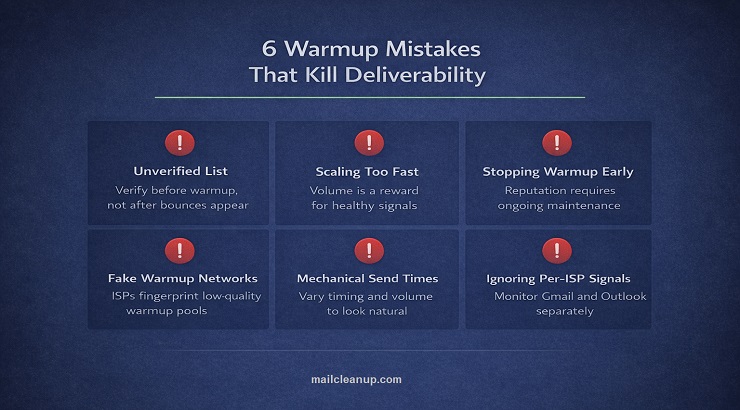
Mistake 1: Starting Warmup with an Unverified List
This is the most common cause of failed warmups, and it happens because senders treat list verification as something to do after problems appear rather than before warmup begins.
If your list contains invalid addresses, those addresses generate hard bounces during the exact window when your domain reputation is most fragile. A 4% bounce rate in week one of a warmup does not just hurt that send. It sets a negative baseline that can take weeks to recover from.
Run your full list through a verification tool before the first warmup email goes out. This is non-negotiable. MailCleanup’s bulk verification removes invalid, risky, and undeliverable addresses before they generate the signals that damage your warmup at its most critical stage. Even a list you cleaned six months ago should be re-verified before a new warmup begins, because email address validity degrades continuously.
Mistake 2: Scaling Volume Too Fast
The warmup schedule exists for a reason. Doubling or tripling volume ahead of what your engagement signals justify forces inbox providers to process a volume spike before they have enough positive reputation data to trust you at that scale. The result is throttling, increased spam placement, or outright blocking.
The rule is simple: volume increases are a reward for healthy signals, not a default cadence. If your metrics at the end of week two look shaky, hold the volume and fix the signal problem before proceeding. An extra week of patience at the right volume is infinitely cheaper than the reputation damage that comes from pushing ahead too fast.
Mistake 3: Stopping Warmup After the Initial Period
Many senders treat warmup as a phase that ends once they reach their target volume. It does not end there.
Sending reputation is not a permanent asset. It is an ongoing signal record that inbox providers update continuously based on your current behaviour. If you complete warmup, reach full volume, and then stop running warmup emails alongside your live campaigns, your engagement metrics become entirely dependent on your campaign performance. During slower sending periods or gaps between campaigns, reputation signals can decay.
The correct approach is to maintain a baseline level of warmup activity, typically through an automated warmup tool, even after the initial phase is complete. This keeps a floor of positive engagement signals flowing to inbox providers between campaigns, which smooths out any dips that would otherwise occur during quiet sending periods.
Mistake 4: Using Low-Quality or Fake Warmup Networks
Automated warmup tools work by sending emails between a network of inboxes that open, reply, and move messages out of spam to simulate positive engagement. The quality of that network matters enormously.
Inbox providers, particularly Gmail, have become increasingly sophisticated at detecting warmup network activity. Networks that use recycled templates, identical message structures across thousands of accounts, or purely AI-generated content are fingerprinted and discounted. If your warmup tool’s network is flagged as artificial, the “positive” signals it generates carry no weight, and your warmup stalls even though the numbers look good.
When evaluating a warmup tool, look for networks that use real, aged email accounts with natural sending histories, vary message content and conversation structure, and operate across multiple providers rather than just Gmail.
Mistake 5: Sending Identical Volume at Identical Times Every Day
Natural human businesses do not send exactly 200 emails every morning at 9:00am. That kind of mechanical precision is a pattern inbox providers associate with automated bulk senders, which is not the category you want to be in during warmup.
Vary your send times within your working day. Let the volume fluctuate slightly from day to day rather than hitting the exact same number every session. If you are using an automated warmup tool, ensure it has cadence randomisation enabled. The goal is to look like a business communicating with real people, not a system executing a schedule.
Mistake 6: Treating Gmail, Outlook, and Yahoo as One Audience
Each major inbox provider has its own reputation system, its own signals weighting, and its own filtering thresholds. A warmup that is generating excellent signals at Gmail may be experiencing undetected problems at Outlook if you are not monitoring both separately.
During warmup, check your seed list results and deferral patterns by ISP, not just in aggregate. If you see inbox placement drop at one specific provider while others remain healthy, that is a targeted problem that requires a targeted response, typically reducing sending rate to that ISP specifically while the others continue to ramp.
Gmail and Outlook are the two that require the most active monitoring. Gmail through Google Postmaster Tools, and Outlook through Microsoft SNDS. We covered both tools in the context of email sender reputation monitoring, and the same monitoring practices apply during warmup.
Rewarming: What to Do When a Warm Domain Goes Cold
Warmup is commonly understood as something you do once, at the beginning of a new sending program. The reality is that warming is something you may need to repeat, and knowing when to rewarm and how to approach it differently from an initial warmup can save significant time and deliverability damage.
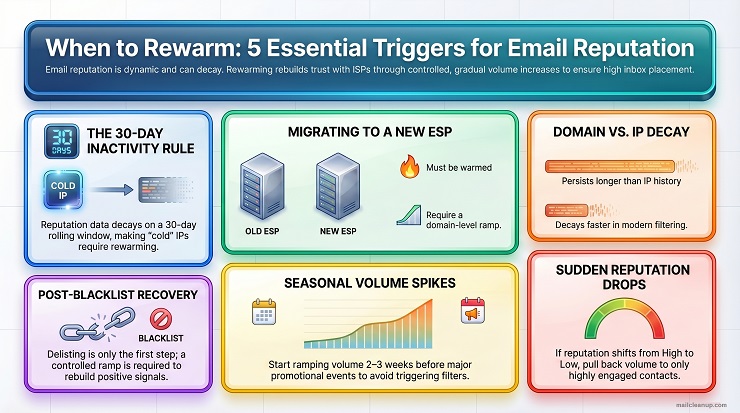
When Rewarming Is Required
A domain or IP that was previously warm can become cold again under several circumstances:
Sending inactivity for 30 or more days: Most ISP reputation systems operate on a 30-day rolling window. If your dedicated IP has not sent any email in 30 days, its reputation data has largely decayed and the IP is considered cold again. The same principle applies to domain reputation, though domain history typically decays more slowly than IP history given the post-2024 shift toward domain-based filtering.
Migrating to a new ESP: When you move your sending to a new email service provider, your domain reputation carries with you, but your IP changes. If you are moving to a dedicated IP at the new provider, that IP needs to be warmed. If you are moving to a shared IP pool, the pool is already warm but you should still ramp your domain’s volume gradually at the new provider rather than immediately sending at full scale.
Recovering from a blacklisting event: If your domain was listed on a major public blacklist and has been delisted, do not resume full-volume sending immediately. The blacklisting is resolved but your reputation signals during the period of being listed may have been severely damaged. A controlled ramp is required to rebuild the positive signal record before full volume resumes. Our email blacklist check and removal guide covers the delisting process in detail. Rewarming is the step that comes after.
Seasonal volume spikes beyond your established pattern: If your domain typically sends 10,000 emails per week and you are planning a 150,000-email promotional campaign for a peak season event, your sending pattern will deviate dramatically from what inbox providers have learned to expect from you. Begin ramping volume two to three weeks before the planned send date rather than attempting the full volume in one go.
A significant reputation drop without an obvious cause: If Google Postmaster Tools shows your domain reputation has dropped from High to Low without a clear triggering event, treat it as a signal that your sending has drifted from the patterns that earned your reputation in the first place. Pull back to lower volume, send only to your most engaged contacts, and let positive signals rebuild before expanding again.
How Rewarming Differs from Initial Warmup
Rewarming is faster than initial warmup because your domain’s historical reputation does not disappear entirely. Inbox providers retain some memory of a domain’s past behaviour even after a period of inactivity.
In practical terms, this means:
- You can start a rewarm at a higher initial volume than you would for a completely new domain. A domain with two years of positive sending history can typically open a rewarm at 1,000 to 2,000 emails per day rather than 50 to 100.
- The ramp to full volume takes two to three weeks rather than four to eight, assuming engagement signals remain healthy throughout.
- The same metric thresholds apply. Bounce rate, complaint rate, and inbox placement standards do not change just because the domain is familiar to inbox providers.
What to Check Before Rewarming
Before you restart volume on a previously warm domain or IP, run through the following:
- List freshness: How long has it been since the list was verified? Any contacts added or not validated in the past six months should be re-verified before rewarming begins. Address validity degrades continuously. Use MailCleanup to re-verify your full list and remove any addresses that have become invalid or risky since your last send.
- Authentication records: Confirm that SPF, DKIM, and DMARC records are still correctly configured and aligning. ESP migrations, DNS changes, or platform updates can silently break authentication records.
- Blacklist status: Check your domain and IP against major blacklists through MXToolbox before resuming. If you are listed, resolve the listing first. Rewarming while blacklisted is not possible.
- Engagement segmentation: Re-identify your highest-engagement contacts. If your list has been dormant for months, contacts who were in Tier 1 may have disengaged. Re-segment based on the most recent engagement data available before deciding who receives the first rewarm sends.
Post-Warmup: How to Maintain Sending Reputation After Warmup Ends
Completing warmup and reaching full volume is a milestone, not a finish line. Sending reputation requires consistent, ongoing management. The practices that made warmup successful are the same practices that keep reputation healthy long-term.
Keep Warmup Activity Running in the Background
Many senders turn off their warmup tool the moment they hit their target sending volume. This removes the floor of positive engagement signals that warmup activity was providing alongside their live campaigns.
Keep a baseline level of warmup running continuously, even after the initial phase is complete. The volume does not need to be high. Even 20 to 30 warmup interactions per day per inbox keeps positive signals flowing to inbox providers during gaps between live campaigns, slower sending periods, and weekends when campaign volume naturally drops.
Maintain Consistent Sending Cadence
Inbox providers build a model of your expected sending behaviour based on your historical patterns. Dramatic deviations from that pattern, whether sudden spikes or extended silences, trigger recalibration. During recalibration, filtering tends to be more conservative.
Send on a consistent schedule. If you typically send three times per week, sending seven times one week and once the next creates the kind of inconsistency that erodes the stability your warmup worked to establish. Planned volume increases should happen gradually, not in a single step.
Roll List Hygiene Into Your Regular Process
The list you warmed up with will degrade over time. Email addresses become invalid, people change jobs, domains expire, and contacts disengage. An address that was valid and engaged during warmup may be a bounce risk or a spam trap risk 12 months later.
Build list verification into your regular sending process:
- Re-verify your full list at least every six months.
- Verify any new import or third-party acquisition before it enters your active sending pool. Imported lists are the most common source of sudden bounce spikes in otherwise healthy sending programs.
- Suppress contacts who have not engaged in 90 to 180 days rather than continuing to send to unresponsive addresses. Low engagement rates drag down your sender reputation over time just as surely as high bounce rates do.
MailCleanup is built for exactly this kind of ongoing email list hygiene. Upload your list before each significant send and remove the addresses that have degraded since your last verification. The cost of verification is a fraction of the cost of the reputation damage that comes from skipping it.
Monitor Weekly After Warmup Is Complete
Once warmup is done and full volume is established, shift from daily monitoring to a weekly cadence:
- Google Postmaster Tools: Domain reputation band and spam rate trend.
- Microsoft SNDS: Outlook complaint rate and IP reputation.
- Bounce rate per campaign: Flag any campaign that produces a bounce rate above 1%.
- Complaint rate per campaign: Anything above 0.05% warrants a review of the audience segment that received that send.
- MXToolbox blacklist check: Monthly is sufficient unless you see sudden deliverability drops, at which point check immediately.
If any of these signals move in the wrong direction, act on the first warning rather than waiting for a second. Deliverability problems compound. A small complaint rate increase that is ignored for two weeks becomes a much harder recovery than one that is addressed in the first send cycle.
For a complete picture of the ongoing reputation management practices that protect deliverability between campaigns, our guide to email sender reputation covers the full framework.
Your Sending Reputation Is Built Before You Send, Not After
Email warmup is the part of email deliverability most senders treat as an obstacle. Something to get through before the real work starts. That framing gets it backwards.
The warmup period is when the decisions that determine your long-term inbox placement are made. The domain reputation you build in the first four to eight weeks follows your sending program everywhere. It shapes how Gmail, Outlook, and Yahoo respond to every campaign you send for months after the warmup itself is forgotten.
Get the foundation right: verify your list before the first email goes out, set up authentication correctly, start with your most engaged contacts, and let your metrics determine the pace rather than a calendar. Maintain warmup activity after the initial phase ends. Monitor the signals that actually matter rather than vanity metrics that look good in a dashboard.
Inbox placement is not a feature your ESP provides. It is something your domain earns, one send at a time, starting from the very first warmup email. Build that foundation properly and every campaign that follows benefits from it.
FAQs on Email Warmup, Domain Warmup & IP Warmup
What is email warmup?
Email warmup is the process of gradually increasing sending volume from a new or dormant email domain or IP address so that inbox providers like Gmail, Outlook, and Yahoo can build a positive reputation score for your sending infrastructure before you send at full scale. Inbox providers assign reputation scores based on observable behaviour signals including engagement rates, bounce rates, and complaint rates. A new sender with no history is treated as a risk by default. Warmup creates the positive signal record that changes that classification, moving your domain from unknown to trusted over a period of typically four to eight weeks.
What is the difference between email warmup, domain warmup, and IP warmup?
Email warmup is the umbrella term for the overall process of building sending reputation. Domain warmup specifically refers to establishing reputation for your sending domain, which is required whenever you send from a new or dormant domain. IP warmup refers to establishing reputation for a dedicated IP address, which is only required if you are sending on a dedicated IP rather than a shared IP pool. Most senders only need to think about domain warmup. IP warmup becomes relevant once you are sending more than 50,000 emails per month consistently and have moved to a dedicated IP address.
How long does email warmup take?
For most senders, email warmup takes four to eight weeks from the first send to reaching full intended volume. The exact timeline depends on your total send volume, list quality, and how quickly positive engagement signals accumulate. Senders targeting very high daily volumes of 100,000 or more emails per day should plan for six to eight weeks or longer. Attempting to compress the warmup timeline by scaling volume faster than your metrics justify is the most common cause of warmup failure and lasting deliverability damage.
Do you need to warm up a shared IP address?
No. If you are sending on a shared IP pool managed by your ESP, the IP warmup has already been handled collectively by the ESP for all senders on that pool. You do not need to manage it yourself. Your only warmup responsibility when on a shared IP is the domain. The trade-off with shared IPs is that other senders on the same pool can affect your deliverability if they send poorly, which is why most reputable ESPs monitor shared pools carefully and remove bad actors. A dedicated IP is generally only recommended once you are sending more than 50,000 emails per month with consistent volume.
What should you do before starting email warmup?
Before sending a single warmup email, four things must be in place. First, your SPF, DKIM, and DMARC authentication records must be correctly configured and verified. Unauthenticated mail from a new domain is almost always filtered regardless of sending volume. Second, your list must be verified and cleaned. Invalid, risky, and undeliverable addresses generate bounces during the most reputation-sensitive period of your entire sending program. Third, your mailbox and sender identity should be set up to look like a real person sending real messages, with a named From address, simple signature, and correct reply-to alignment. Fourth, monitoring tools including Google Postmaster Tools, Microsoft SNDS, and a seed list should be set up before your first send so you have baseline data from day one.
What happens if you skip email warmup?
Sending high volumes from a new domain or cold IP without warming up tells inbox providers that an unknown sender has suddenly appeared and is attempting to reach a large number of recipients. This pattern is statistically indistinguishable from spam activity. The result is aggressive filtering, which means emails routed to spam, throttling where the receiving server accepts messages slowly or in batches, or outright rejection. In severe cases, the domain can be listed on blocklists within days of the first send. Recovering from this situation takes significantly longer than completing a proper warmup would have taken in the first place. The reputation damage that results from skipping warmup can follow a domain for months.
When do you need to rewarm a domain or IP?
Rewarming is required in several situations: when a dedicated IP has had no sending activity for 30 or more days, since IP reputation data decays within that window; when migrating to a new ESP and moving to a new dedicated IP; when recovering from a blacklisting event after the domain or IP has been delisted; when planning a seasonal volume spike that significantly exceeds your established sending pattern; and when your domain reputation band in Google Postmaster Tools has dropped unexpectedly. Rewarming is faster than initial warmup because inbox providers retain some memory of a domain’s historical behaviour, but the same metric thresholds for bounce rate, complaint rate, and inbox placement apply throughout.
How do you know when email warmup is complete?
Warmup is complete when your domain reputation band in Google Postmaster Tools has reached and held at Medium or High across multiple sends, your seed list confirms consistent inbox placement above 90% at Gmail and Outlook, your bounce rate is sustained below 1%, your complaint rate is below 0.05%, and you have reached your intended full sending volume without triggering ISP-level throttling or filtering. Meeting all five conditions simultaneously is what defines a completed warmup. Reaching target volume alone is not sufficient if the underlying reputation signals have not stabilised. After warmup ends, maintain baseline warmup activity and continue weekly monitoring to sustain the reputation you have built.