
If you search for an email marketing guide today, you will find dozens of them. Most follow the same template: a definition, a list of email types, a few tips on subject lines, and a CTA to sign up for whatever ESP is sponsoring the post. They are not wrong, exactly. They are just incomplete in ways that matter.
Here is what most of those guides skip. They teach you how to write emails but not how to make sure those emails actually arrive. They tell you to build a list but not how to keep it healthy enough to send to. They mention metrics like open rate without explaining that open rate has been partially unreliable since Apple introduced Mail Privacy Protection in 2021. For a beginner, that missing context does not just leave gaps. It sends you in the wrong direction from day one.
This email marketing guide is built differently. We cover the full picture: what the channel is, how to set it up properly from the ground up, how to build and maintain a list that performs, what authentication means and why it became mandatory in 2024, how to write campaigns that convert, and how to measure results using signals that actually reflect engagement. By the time you finish reading, you will have everything you need to start email marketing the right way, and avoid the mistakes that quietly kill deliverability for beginners who did not know they needed to worry about them.
TL;DR on Email Marketing
- Email marketing delivers the highest ROI of any digital marketing channel, consistently returning $36 to $42 for every $1 spent, but only when the foundational layers are in place before you send your first campaign.
- Your email list is an owned asset. Unlike social media followers, your subscribers are not subject to algorithm changes or platform risk. The relationship is portable and entirely yours.
- Authentication (SPF, DKIM, DMARC) is now mandatory for bulk senders following the 2024 Gmail and Yahoo requirements. Setting this up is not optional and must happen before your first send.
- List quality determines deliverability. Invalid addresses generate bounces, bounces damage your sender reputation, and a damaged sender reputation means your emails stop reaching real inboxes. Run your list through an email verification tool before every major campaign.
- MailCleanup’s latest email list decay report found that the list decays at 23.79% annually. A list you built two years ago and have not cleaned since could be nearly half-invalid. List hygiene is an ongoing discipline, not a one-time task for fruitful email marketing.
- Open rate is no longer a reliable primary metric. Apple Mail Privacy Protection has been inflating open rates with machine-opens since 2021. Click-through rate and click-to-open rate are the engagement signals worth optimising for.
- AI email marketing tools are now built into most major ESPs. They can improve send time, subject line performance, and segmentation, but they cannot compensate for a poor-quality list or missing authentication.
- This guide covers the Email Marketing Readiness Stack: five layers that must be in place before your content strategy can deliver results.
What Is Email Marketing and Why It Still Outperforms Every Other Channel
Email is the oldest digital marketing channel still in active use, and it consistently outperforms newer ones on ROI, reach, and revenue per contact. Before we explore how it works, this email marketing guide starts with why it works, because that understanding changes how you approach everything that follows.
What Email Marketing Actually Is
Email marketing is the practice of sending targeted commercial messages to a group of people via email. Those messages might promote a product, welcome a new subscriber, share useful content, or bring a lapsed customer back. Whatever the specific purpose, every marketing email has three things in common: it is intentional, it goes to a defined audience, and it is designed to produce a measurable outcome.
What separates email from other marketing channels is consent. Everyone on your list chose to be there. They gave you their address because they wanted to hear from you. That single fact changes the entire dynamic. You are not interrupting someone who scrolled past an ad. You are arriving in the inbox of someone who invited you.
This is also what makes email scale in a way few channels do. You can send to 500 people or 500,000 with the same toolset. Cost per send stays low regardless of list size, and the return on that investment is consistently higher than almost every other channel in digital marketing.
The Owned Channel Advantage
Here is something every email marketing guide for beginners should make crystal clear, but most gloss over: the platforms you build on matter as much as the audience you build.
When you grow a following on Instagram, TikTok, or LinkedIn, you are building on rented ground. The platform decides who sees your content, how often, and under what conditions. Algorithm changes, policy shifts, or a platform simply declining in relevance can reduce your reach to near-zero overnight. It has happened repeatedly across every major social network, and it will keep happening.
Your email list is different. You own it outright. If you move to a different email platform tomorrow, your list comes with you. If a social network shuts down next year, your email audience is completely unaffected. No algorithm decides whether your email reaches your subscriber. It either lands in their inbox or it does not, and the factors that determine that outcome are largely within your control.
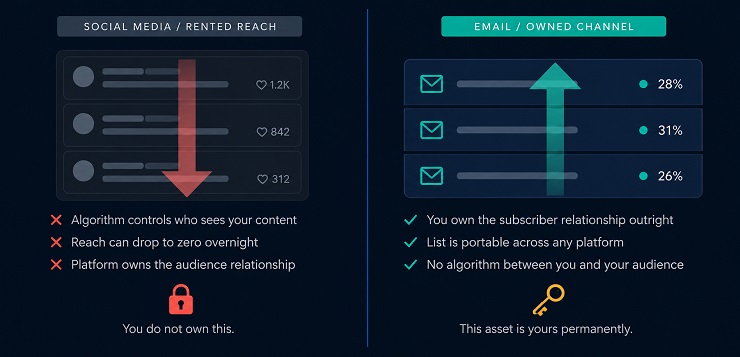
This is why we consistently describe email as the backbone of a sustainable digital marketing strategy. Social channels are powerful for discovery and awareness. Email is where you build the relationship, retain the customer, and generate repeatable revenue.
Does Email Marketing Work?
Yes. Consistently, across industries and business sizes.
The widely cited return is $36 to $42 for every $1 spent, making it the highest ROI channel in digital marketing by a significant margin. That figure comes from aggregated campaign data across industries and list types, so your individual results will depend on your setup, your audience, and your execution. But the directional answer is unambiguous: when set up correctly, email marketing works exceptionally well.
The key phrase there is “when set up correctly.” Does email marketing work when you send to a list full of invalid addresses? No. Does it work when your authentication is missing and your emails land in spam? No. Does it work without a clear strategy or any segmentation? Rarely.
This email marketing guide exists because doing it correctly involves more than writing a good subject line and pressing send. It involves building a quality list, setting up your sending infrastructure properly, authenticating your domain, and having a strategy that matches your audience’s expectations. Get those foundations right and the channel delivers. Skip them and even excellent content fails to reach anyone.
The Email Marketing Readiness Stack
This email marketing guide takes a different approach from most. Before you write a single line of copy, there are five foundational layers that need to be in place. We call this the Email Marketing Readiness Stack.
Think of it as a dependency chain. Each layer only performs when the layer beneath it is solid. Strong content cannot rescue poor authentication. Smart segmentation cannot compensate for a list full of invalid addresses. The stack builds from the bottom up, and skipping any layer weakens everything above it. Most beginner guides start at Layer 4 or 5 and wonder why results are disappointing.
Here is how the stack breaks down.
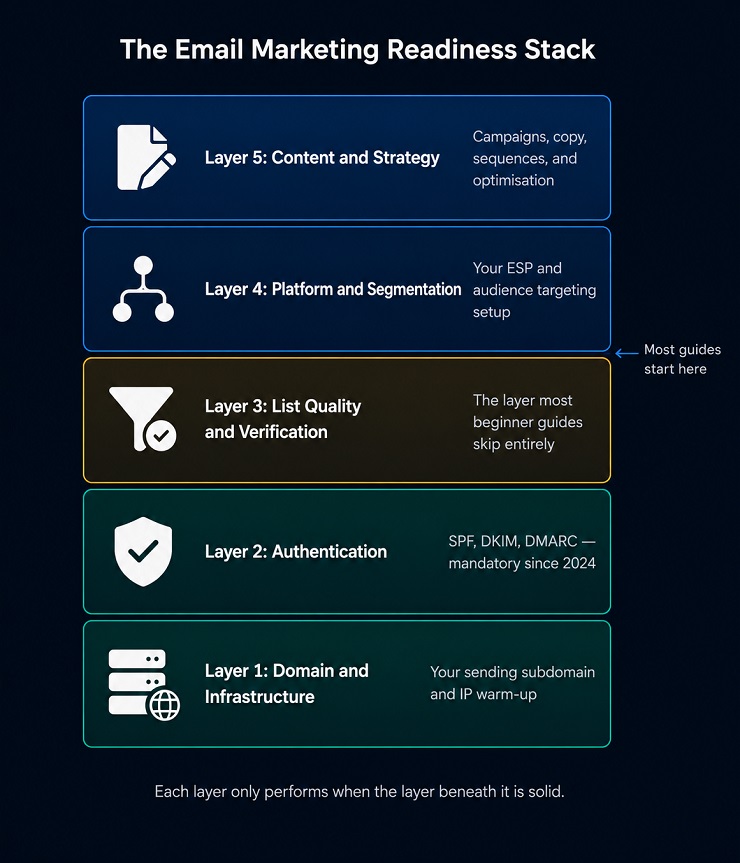
Layer 1: Domain and Sending Infrastructure
The foundation of your email marketing strategy is your sending domain. When you send marketing emails, you should use a dedicated sending subdomain (such as mail.yourbusiness.com) rather than your primary website domain. This contains any reputation damage from a poorly performing campaign to the subdomain, keeping your main domain’s standing intact.
If you are brand new to email marketing, you also need to account for IP warm-up. ISPs are cautious about domains and IP addresses they have never seen before. Sending large volumes from a cold domain triggers spam filters even when your content is clean. You earn trust by starting small, say a few hundred sends per day, and increasing volume gradually over several weeks as ISPs observe consistent, engaged behaviour from your domain.
We cover the full warm-up process in our email warmup guide, including week-by-week volume schedules and the reputation signals to monitor as your infrastructure matures.
Layer 2: Authentication (SPF, DKIM, DMARC)
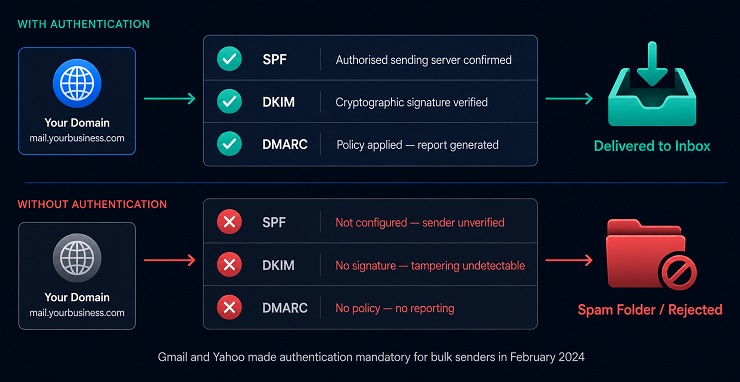
Authentication tells receiving mail servers that your emails genuinely came from you and have not been tampered with in transit. Without it, your emails are effectively unverified messages from an unknown sender. Most modern mail servers treat that with significant suspicion, and rightly so.
This email marketing guide dedicates a full section to authentication later on, but the headline version is this: you need three DNS records in place before you send your first campaign.
- SPF tells receiving servers which mail servers are authorised to send on behalf of your domain.
- DKIM adds a cryptographic signature to your emails that proves they arrived intact and untampered.
- DMARC sets the policy for what happens when an email fails those checks, and sends you reports on authentication activity.
Since February 2024, Gmail and Yahoo require all three for bulk senders. Authentication is no longer optional configuration.
Layer 3: List Quality and Verification
This is the layer an email marketing guide for beginners almost never covers, and it is the one that determines whether your campaigns reach real inboxes.
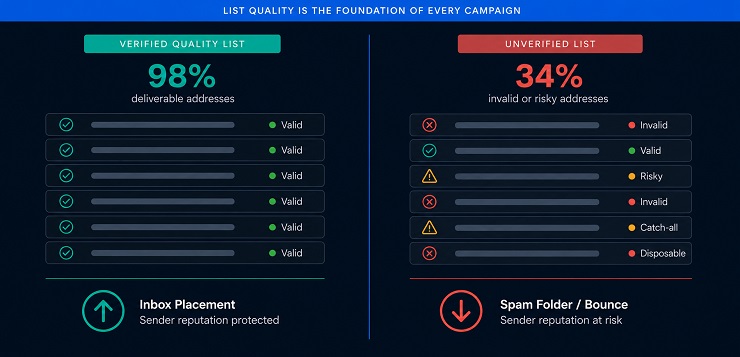
Your list quality determines whether the emails you send actually arrive at valid addresses. A list containing invalid addresses, fake signups, or long-abandoned accounts generates hard bounces the moment you send to it. Those bounces damage your sender reputation. A damaged sender reputation means future emails, including ones going to perfectly valid subscribers, start landing in spam rather than the inbox.
Standard practice before any campaign is to run your list through an email verification tool. Verification checks each address across multiple layers: syntax validity, domain existence, MX records, SMTP-level mailbox confirmation, disposable address detection, and catch-all identification. The output is a clean list ready to send safely.
This is exactly what MailCleanup is built for. Our guide to email verification features explains what each check finds and what to do with every result category.
Layer 4: Platform and Segmentation
Once Layers 1 to 3 are solid, you need an Email Service Provider (ESP) to send your campaigns. Your ESP manages your list, powers automation, handles deliverability compliance, and gives you the performance data to improve over time.
Choosing the right one depends on your situation:
| ESP | Best For |
|---|---|
| Mailchimp | Beginners with smaller lists, straightforward campaigns |
| Klaviyo | Ecommerce businesses needing behavioural automation |
| ActiveCampaign | Multi-step automation and lead scoring |
| HubSpot | B2B teams wanting CRM and email in one platform |
| MailerLite | Budget-conscious beginners who want clean, simple tooling |
Segmentation, which is the practice of dividing your list into groups based on shared characteristics so you can send more relevant messages, is the other critical element at this layer. Even basic segmentation, separating new subscribers from repeat customers for example, meaningfully improves engagement rates. We cover segmentation in full in our dedicated email segmentation guide.
Layer 5: Content and Campaign Strategy
The top layer is where most guides start: your actual emails. Subject lines, body copy, design, calls to action, campaign types, sending frequency, and personalisation. These matter enormously, and we spend significant time on each of them in this email marketing guide.
But they are the last layer to build, not the first. When the four layers beneath are solid, well-crafted content produces strong, measurable results. When those foundations are missing, the best-written email in the world struggles to reach its audience. The Readiness Stack exists to make sure your content has the conditions it needs to succeed before you write a word of it.
How to Build an Email List That Actually Performs
The quality of your list determines the quality of every campaign you will ever run. Before we get into the tactics of how to grow it, we want to be clear about what we mean by a “performing” list. It is not simply a large list. It is a list of real, opted-in, engaged people who want to hear from you.
This section of our email marketing guide covers how to build that kind of list from the very beginning but in a concise way. If you want a detailed guide on how to build an email list, we have a dedicated post for it that teaches you the best strategies, which opt-in methods and channels offer the low-high consent risk, mistakes and best practices.
How to Collect Email Addresses Organically
Organic list building means earning email addresses from people who genuinely want to subscribe. This is the only method we recommend. The alternative, buying a list, creates more problems than it solves, and we explain exactly why in our dedicated guide on why you should not buy email lists.
Here are the most effective organic methods for email marketing for beginners and established senders alike:
- Website opt-in forms: Place these at high-intent moments. Exit-intent popups, embedded forms within blog posts, sticky header or footer bars, and dedicated landing pages all work well. Keep the form simple. A first name and email address is usually enough. Every additional field you add reduces the number of people who complete it.
- Lead magnets: Offer something genuinely useful in exchange for an email address. A checklist, template, short guide, or discount code are all common options. The lead magnet needs to be specific enough to attract the right subscribers, not just anyone looking for a freebie.
- Gated content: Longer-form resources such as ebooks, research reports, or recorded webinars work well as content upgrades behind an email capture form. These tend to attract higher-intent subscribers who are genuinely engaged with your subject area.
- At point of purchase: For ecommerce businesses, asking customers to opt in to marketing at checkout is one of the highest-quality list-building methods available. These subscribers already trust you enough to buy. They are among the most likely to engage with future campaigns.
- Social and paid acquisition: Use social content or paid ads to drive traffic to a dedicated opt-in landing page. Social channels build the initial discovery. Email is where you convert that discovery into a durable relationship.
Why Double Opt-In Matters More Than List Size
Single opt-in means someone submits your sign-up form and is immediately added to your list. Double opt-in means they submit the form, receive a confirmation email, and click a link in that email to complete their subscription.
It is an extra step, and it does reduce the raw number of subscribers who complete the process. But the subscribers who do are significantly better quality than single opt-in equivalents.
Double opt-in protects your list at the point of entry in three concrete ways:
- It eliminates typos. A mistyped email address cannot confirm a subscription, so it never makes it onto your list.
- It blocks bot signups. Automated form submissions are increasingly common on high-traffic opt-in forms. Bots cannot complete a confirmation click from a real inbox.
- It filters impulse signups. Someone who filled in a form in the moment but has zero intention of reading your emails will not bother confirming. Losing them is a good thing for your deliverability.
As an email marketing guide for beginners, our recommendation here is straightforward: use double opt-in as your default from day one. The subscribers you gain will be more engaged, and your list will perform better for longer.
How Email Lists Decay Over Time
This is one of the most important things this email marketing guide wants you to understand before you start building your list, and it is something almost no beginner resource mentions.
Your list decays naturally, even when you do everything right. People change jobs and lose access to work email addresses. They abandon personal accounts and create new ones. Companies shut down and their domains expire with them. An address that was perfectly valid when collected becomes undeliverable over time, through no fault of yours.
The commonly cited decay rate is around 22 to 25 percent per year. Our own recent report on email list decay found that email lists decay by 23.79% annually. That means roughly one in four addresses on your list becomes invalid every twelve months if you are not actively maintaining it. If you collected a list of 10,000 contacts two years ago and have not cleaned it since, you could currently be sending to 4,000 to 5,000 dead addresses without knowing it.
The practical implication is this: email list hygiene is not a one-time task you do before a big campaign. It is an ongoing discipline. Our email list hygiene guide covers the full practice of how to keep your list healthy over time and what the deliverability consequences of neglecting it look like in practice.
List Quality as a Pre-Send Standard
Before any campaign goes out, especially a first campaign or one sent to a list that has been dormant, run it through an email verification tool. This applies whether you have 500 subscribers or 500,000.
We cover exactly what a thorough check looks at, layer by layer, later in this guide’s deliverability section. The short version is that skipping this step is one of the most common reasons a first campaign underperforms before it’s even sent.
Email Authentication: The Non-Negotiable Foundation New Senders Skip
If list quality is the most overlooked layer in email marketing for beginners, authentication is a close second. Most guides mention it briefly. Some skip it entirely. And yet without proper authentication, your emails may never reach the inbox regardless of how well-written, well-targeted, or professionally designed they are.
This section of our email marketing guide gives you the full picture of what authentication is, why the rules changed in 2024, and what skipping it actually costs you.
SPF, DKIM, and DMARC in Plain Terms
We touched on all three authentication protocols in the Readiness Stack section. This email marketing guide now gives you the more complete explanation of what each one does and how they work together.
SPF (Sender Policy Framework)
SPF is a DNS record you add to your domain that specifies which mail servers are authorised to send email on your behalf. When a receiving server gets an email claiming to come from your domain, it checks your SPF record to verify the sending server is on your approved list. If it is not, the email fails the SPF check and the receiving server treats it with suspicion.
Setting this up is straightforward. Your ESP will provide the SPF record details you need to add to your domain’s DNS settings, usually with step-by-step instructions.
DKIM (DomainKeys Identified Mail)
DKIM adds a cryptographic signature to every email you send. The receiving server uses a public key stored in your DNS to verify that the signature is valid, confirming the email genuinely came from your domain and was not altered in transit. Think of it as a tamper-evident seal on every message. If the email was interfered with between sending and receiving, the signature breaks and the receiving server knows it.
DMARC (Domain-based Message Authentication, Reporting, and Conformance)
DMARC builds on SPF and DKIM. It tells receiving servers what to do when an email fails authentication checks: deliver it anyway, send it to the spam folder, or reject it outright. DMARC also generates aggregate reports showing authentication activity across your domain, which is valuable for spotting misconfigurations early and detecting if anyone is spoofing your domain to send fraudulent emails.
The three protocols work as a set. SPF and DKIM handle the verification. DMARC provides the enforcement policy and the reporting loop. All three need to be in place for your authentication setup to be complete.
For full step-by-step implementation of each protocol, including how to verify everything is working before your first send, see the respective guides – SPF, DKIM, DMARC.
What the 2024 Gmail and Yahoo Requirements Changed
In February 2024, Gmail and Yahoo introduced mandatory requirements for bulk email senders, defined as anyone sending more than 5,000 emails per day to Gmail addresses. The core requirements were:
- SPF or DKIM authentication in place (with both recommended)
- A published DMARC policy on the sending domain
- One-click unsubscribe functionality in all marketing emails
- Spam complaint rate kept below 0.10 percent, with 0.30 percent as the threshold for suspension
This was a defining moment for email marketing strategy across the industry. Authentication moved from a best practice that careful senders followed voluntarily to a hard technical requirement that receiving servers enforce automatically. Senders who had been delivering without full authentication in place saw immediate consequences: emails were rejected, campaigns failed to deliver, and reputation recovery took weeks.
If you are starting email marketing today, you are starting after this change. Authentication is not something you bolt on when you scale up. It is something you set up before your first campaign, even if you are only sending to a small initial list.
What Happens When You Skip Authentication
When you send without authentication in place, the sequence of events is predictable and damaging.
Your emails arrive at receiving mail servers without a verified identity. The servers have no way to confirm you are who you claim to be. Depending on the receiving server’s policies and your DMARC configuration (or absence of one), those emails may be delivered to spam, quarantined, or rejected before they reach the inbox at all.
Over time, a pattern of unauthenticated sending combined with elevated spam complaint rates causes receiving servers to assign your domain a progressively lower trust score. Deliverability degrades. Eventually, even your most engaged subscribers stop receiving your emails because they are being filtered before they ever arrive.
The fix is not technically difficult, but it must happen before sending begins. Our email authentication guide walks through every step of the setup, including how to confirm each protocol is live and working correctly.
Types of Email Marketing Campaigns
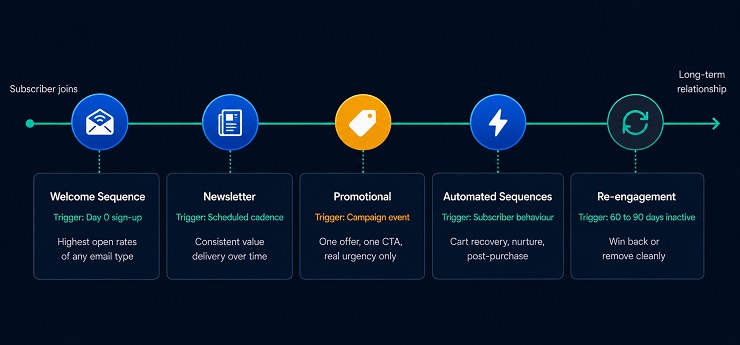
Understanding the different types of emails in your arsenal is central to building a coherent email marketing strategy. Each campaign type serves a distinct purpose at a different stage of the subscriber relationship. Using the right type at the right moment is what separates a strategy from a broadcast.
Welcome Sequences
The welcome sequence is the first automated series a new subscriber receives after joining your list, and it is consistently the highest-performing email series in terms of open rates, click-through rates, and revenue generation per recipient.
This is not a coincidence. A new subscriber is at peak interest the moment they sign up. They have just taken an action that signals genuine intent. The welcome sequence is your opportunity to capitalise on that interest before it fades.
A well-structured welcome sequence typically does four things:
- Confirms the subscription and delivers whatever was promised (a lead magnet, a discount code, access to a resource)
- Introduces your brand and what the subscriber can expect from future emails
- Establishes your sending cadence so the subscriber knows how often they will hear from you
- Invites early engagement through a low-friction action such as clicking a link, answering a question, or browsing a specific product category
Welcome sequences typically run between two and five emails over the first one to two weeks. A single welcome email is better than none, but a short sequence performs meaningfully better than a single touchpoint. Most ESPs allow you to build these as automated flows triggered by the sign-up event, so you build them once and they run indefinitely.
Newsletters
The newsletter is the recurring campaign type most businesses think of first when they consider email marketing for beginners. It is a regular, scheduled email that keeps your subscribers informed, engaged, and connected to your brand between purchases or conversion moments.
What makes a newsletter work is consistency and value density. Your subscribers agreed to receive emails from you based on a specific expectation. The newsletter is your commitment to meet that expectation reliably. If you send every Tuesday, send every Tuesday. If your newsletter covers industry news, cover industry news. Unpredictability erodes the trust that email marketing is built on.
A few practical principles that apply regardless of your niche:
- Pick one consistent topic focus and stick to it. A newsletter that covers everything stands for nothing.
- Keep it skimmable. Most people read newsletters in under two minutes. Use clear headings, short paragraphs, and a single primary CTA.
- Frequency is a function of the value you can deliver. A weekly newsletter filled with genuinely useful content outperforms a daily newsletter that is thin. Start at a cadence you can sustain and increase from there.
Promotional and Announcement Emails
Promotional emails are single-purpose campaigns designed to drive a specific action: make a purchase, register for an event, claim an offer, or respond to a time-sensitive opportunity.
These are the emails most people picture when they think of marketing email: a sale announcement, a product launch, a seasonal offer, a limited-time discount. Done well, they drive significant short-term revenue. Done poorly or too frequently, they are the reason subscribers hit unsubscribe.
The key principles for promotional email marketing strategy:
- One email, one offer, one CTA. Giving recipients multiple competing actions reduces conversion on all of them.
- Urgency should be real. A countdown timer that resets every time the email is opened is a transparency problem, not a conversion tactic. Real scarcity and real deadlines outperform manufactured ones.
- Frequency matters. Promotional emails sent too often train subscribers to ignore them. Reserve promotional sends for genuinely valuable offers and your audience will treat them accordingly.
Automated Behavioural Sequences
Behavioural automation triggers based on what an individual subscriber does, not a fixed calendar date. A cart abandonment sequence fires when items sit unpurchased. Browse abandonment fires on a product view with no cart action, a softer version of the same idea. Post-purchase sequences confirm the order, then request a review or suggest a complementary product once it’s arrived. Re-engagement sequences fire after roughly 60 to 90 days of inactivity, trying to win a subscriber back before writing them off.
All four need an ESP with real automation capability and, just as importantly, a verified list underneath them, since a high bounce rate inside an automated flow damages your sender reputation at the same speed the automation saves you time. We cover all six major workflow types, plus the deliverability risk that varies significantly between them, in our complete email automation guide.
Transactional Emails
Transactional emails are not marketing emails in the traditional sense, but they are worth understanding as part of your complete email marketing picture.
A transactional email is triggered by a specific action the recipient took: an order confirmation, a shipping notification, a password reset, a receipt, an account welcome after signup. The recipient expects this email and is typically looking for it. This gives transactional emails significantly higher engagement rates than marketing campaigns.
The key distinctions between transactional and marketing emails are:
| Transactional | Marketing | |
|---|---|---|
| Trigger | Recipient action | Sender decision |
| Expectation | High (anticipated) | Variable |
| Opt-in required | No (legally exempt in most jurisdictions) | Yes |
| Primary goal | Inform or confirm | Convert or engage |
Some ESPs handle both transactional and marketing email. Others are designed for one or the other. If your business depends on reliable transactional email delivery (ecommerce, SaaS, booking systems), ensure your ESP has dedicated transactional infrastructure with its own sending reputation, separate from your marketing campaigns.
Email Marketing Strategy: Goals, Segmentation, and Frequency
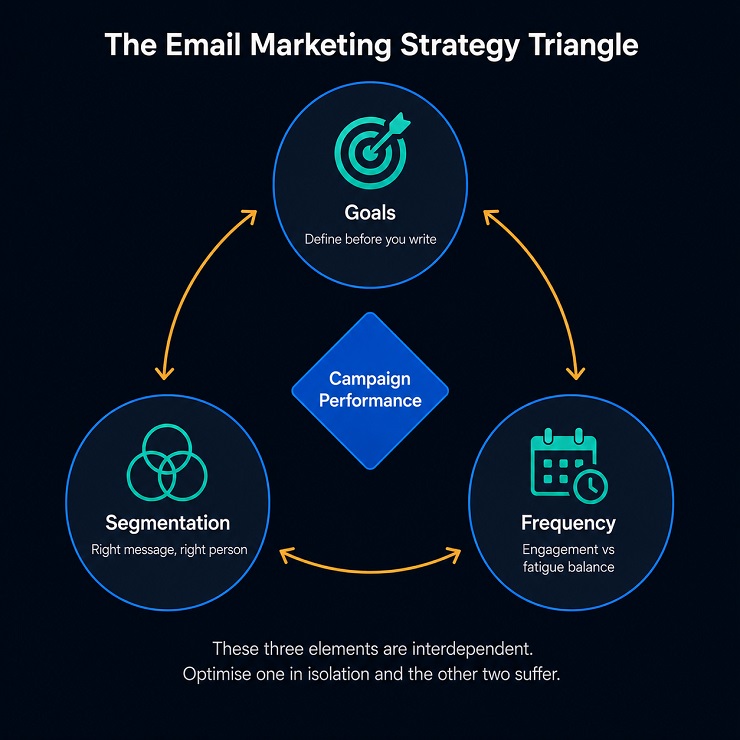
Having the right campaign types in your toolkit is only part of the picture. The other part is the strategic layer that decides when to use which type, who receives it, and how often. Without this layer, even well-produced emails become noise.
Setting Goals Before You Write a Single Email
Every campaign needs a measurable goal defined before any copy is written, any design is considered, or any list segment is selected. This sounds obvious, but it is one of the most consistently skipped steps in email marketing for beginners. Without a clear goal, you have no basis for knowing whether a campaign worked.
Goals should be specific and tied to a concrete metric. Here are examples of well-formed campaign goals versus vague ones:
| Vague Goal | Specific Goal |
|---|---|
| “Increase engagement” | “Achieve a click-through rate above 3% on this campaign” |
| “Drive sales” | “Generate 50 purchases from the promotional send” |
| “Get more opens” | “Reach a 25% open rate on the welcome email” |
| “Re-engage subscribers” | “Return 15% of inactive subscribers to active status within 30 days” |
Your goal also determines the single most important element of your campaign design: the call to action. If your goal is clicks, everything in the email points toward one click. If your goal is purchases, the email removes every friction point between the subscriber and the checkout. A campaign with a clearly defined goal is a campaign that can be evaluated, improved, and replicated.
Segmenting Your Audience from the Start
Segmentation is the practice of dividing your email list into groups based on shared characteristics so you can send more relevant messages to each group. It is one of the most reliably effective email marketing strategy improvements available, and it does not require a large list or a sophisticated ESP to implement at a basic level.
The most common segmentation approaches and what they unlock:
- New vs. returning subscribers: Different messaging cadences, different assumptions about brand familiarity.
- Purchase history: Customers who have bought a specific product category can be targeted with relevant complementary offers rather than generic promotions.
- Engagement level: Highly engaged subscribers (those who open and click regularly) can receive more frequent sends. Less engaged segments benefit from lighter-touch, higher-value messaging to prevent churn.
- Source of sign-up: Subscribers who joined via a specific lead magnet have a known interest. Use it.
- Geography: Relevant for businesses where location affects the offer (event-based businesses, region-specific products, time-zone-sensitive sends).
We cover the full segmentation strategy, including advanced behavioural segmentation and predictive audience splitting, in our dedicated email segmentation guide. The key takeaway here is that even simple segmentation applied from day one produces meaningfully better results than sending the same email to your entire list every time.
Sending Frequency: Finding the Engagement and Fatigue Balance
Frequency is one of the most debated topics in email marketing strategy, and the honest answer is that there is no universal right answer. The correct frequency for your list depends on your audience, your content quality, your industry, and the expectations you set when subscribers joined.
What we can tell you with confidence is how the consequences of each extreme play out:
Too infrequent: Subscribers forget who you are. When an email eventually arrives, they do not recognise the sender name, disengage, or mark it as spam. Your sender reputation suffers from spam complaints on emails that are not actually spam.
Too frequent: Subscribers feel overwhelmed. Unsubscribe rates climb. Engagement rates fall. Lower engagement signals to ISPs that your content is not valued, which gradually reduces inbox placement across your list.
The practical starting point for most senders is one email per week. This cadence is frequent enough to build recognition and maintain the relationship, but light enough to stay within the tolerance of most subscriber types. From there, monitor your unsubscribe rate and your click-through rate as paired signals. If unsubscribes climb while clicks fall, you are pushing frequency too high for your current content quality. If engagement is strong and stable, you have room to increase.
A/B testing your sending frequency, like testing two segments at different cadences over four to six weeks, gives you data specific to your audience rather than relying on industry averages. We cover that in full in our email A/B testing guide.
How to Write Emails That Get Opened and Read
The best email marketing strategy in the world produces nothing if the emails themselves do not get opened, read, and acted upon. This section of our email marketing guide covers the craft elements of the email itself, from the first thing the subscriber sees to the action you want them to take.
Subject Lines: Specificity Beats Cleverness
The subject line is the single most important determinant of whether your email gets opened and “make it compelling” isn’t actionable advice on its own.
Our dedicated best practices for email subject lines guide covers what actually drives opens by device and audience, which techniques work and when they backfire, and why a subject line test only means something if the list running it is clean.
Preview Text as a Second Subject Line
Preview text is the short snippet of text that appears after the subject line in most email clients before the subscriber opens the email. Most email clients display between 40 and 100 characters of preview text.
Many senders leave this unset, which means the email client pulls the first text it finds in the email body, often something like “View this email in your browser” or the first line of a legal disclaimer. This is a missed opportunity that costs opens.
Treat preview text as a second subject line. Use it to extend the subject line’s message, add a secondary benefit, or create a natural continuation that gives the recipient another reason to open. For example:
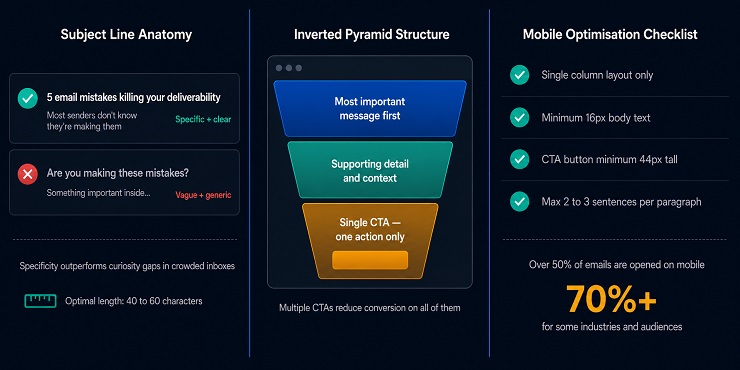
- Subject: 5 email mistakes killing your deliverability
- Preview: Most senders do not even know they are making them
These two lines work together to create a reading experience that begins before the email is opened. That is the goal.
Email Body Structure and CTA
Once a subscriber opens your email, the structure of the body determines whether they read it, scan it, or close it. The principle that works across almost every email type is the inverted pyramid: the most important information and the primary call to action as early as possible, with supporting detail below for those who want it.
The One CTA Rule
Every marketing email should have one primary call to action. One. Not two, not three, not a primary CTA with several secondary options nested below. When you give a reader multiple competing actions, decision fatigue reduces the likelihood they will take any of them.
Your CTA should:
- Be visually distinct (a button rather than a text link in most cases)
- Use action-oriented language that reflects the outcome (“Get my free guide” rather than “Click here”)
- Appear early in the email, ideally within the first scroll on mobile
- Be repeated at the bottom of longer emails for readers who scroll all the way through
Personalisation
Even basic personalisation, using the subscriber’s first name in the subject line or opening line, produces measurable engagement improvements over unpersonalised equivalents. More sophisticated personalisation, recommending products based on purchase history or tailoring content based on subscriber segment, produces proportionally larger improvements.
We cover the full personalisation strategy, including dynamic content blocks and behavioural triggers, in our dedicated email personalisation guide.
Note: We have a dedicated guide on email copywriting that will teach you how to effectively write subject line, preheader, email body, and CTA with the help of known marketing formulas.
Mobile-First Design
More than half of all marketing emails are now opened on mobile devices. For some audiences and industries, that figure is above 70 percent. Designing for desktop and hoping it looks acceptable on mobile is no longer a workable approach.
Mobile-first email design means:
- Single column layouts. Multi-column layouts collapse unpredictably on small screens. Single column is the safe default.
- Minimum 16px body text. Anything smaller requires pinch-zooming, which most mobile users will not do.
- CTA buttons at least 44px tall. Apple’s own Human Interface Guidelines recommend 44×44 pixels as the minimum tappable target size. A small text link is effectively invisible on a touchscreen.
- Short paragraphs. Two to three sentences per paragraph maximum. On a mobile screen, a four-line paragraph on desktop becomes an eight-line block that readers skip.
- Preview on mobile before sending. Every major ESP has a mobile preview function. Use it as a standard step before every send, not an occasional check.
AI Email Marketing: What It Does and Where It Actually Helps
AI is a standard layer in most ESPs now, not a specialty add-on. Send-time optimisation picks each subscriber’s best delivery window individually instead of one fixed time for your whole list. Predictive segmentation scores subscribers by likely future behaviour, churn risk, purchase likelihood, lifetime value, using more signals than a person could track manually. Subject-line generation and content drafting speed up production, though the output still needs a human editing pass before it goes out.
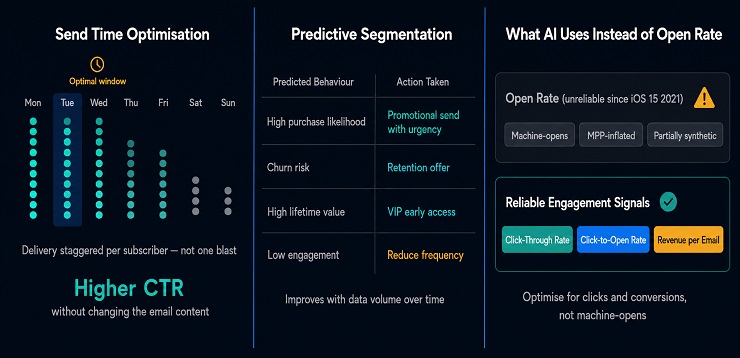
None of that works cleanly on synthetic data. Apple’s Mail Privacy Protection inflates opens for a large share of most lists. AI tools optimising for open rate are, in some cases, optimising for a signal that never happened. The more reliable models lean on clicks and on-site behaviour instead. That only works if your list is clean enough for those signals to mean anything in the first place.
We go deeper on exactly how AI-driven automation works, and where dirty data breaks it, in our dedicated guide to AI in email marketing.
List Quality and Deliverability: The Foundation Every Beginner Guide Skips
We have referenced list quality and deliverability throughout this guide to email marketing because they underpin every layer of the Readiness Stack. This section gives you the complete picture of what happens when list quality is neglected and how to prevent it.
This is where MailCleanup’s expertise is most directly relevant, and it is where we can offer you the most substantive guidance that you will not find in a standard email marketing guide for beginners.
What Happens When Your Bounce Rate Crosses the Safe Threshold
Every email you send to an invalid address generates a bounce. A bounce is the receiving server’s way of telling your sending server that the message could not be delivered. Bounces come in two types, which we cover in the next section, but the effect of both on your sender reputation follows the same trajectory.
ISPs track bounce rates at the domain and IP level, and once yours crosses into risk territory, the damage doesn’t stop at the invalid addresses causing it.
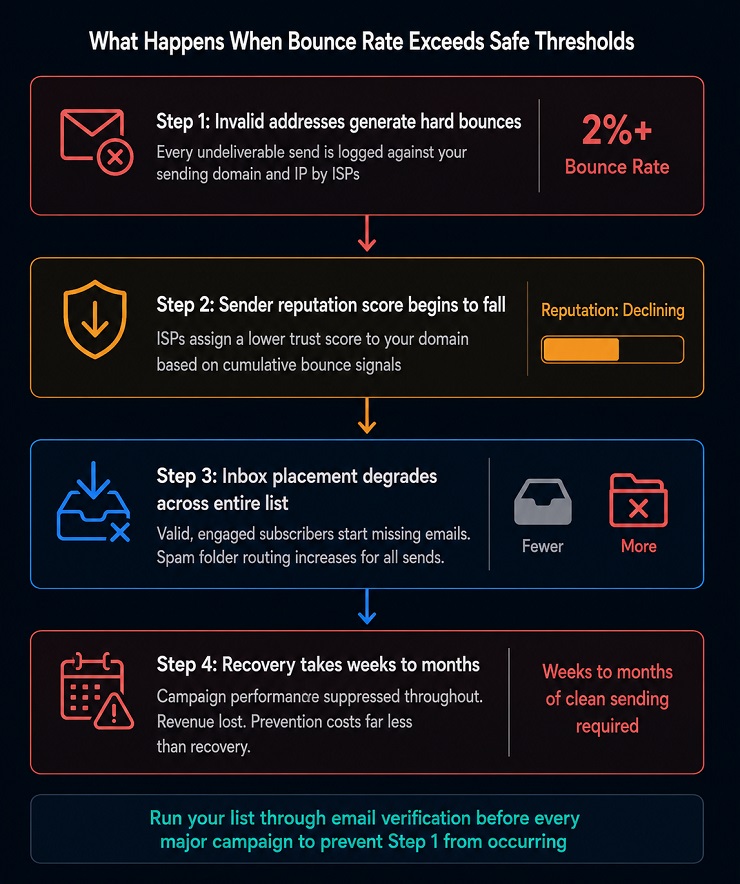
Here is the sequence that plays out when bounce rates exceed safe thresholds:
Step 1: ISPs register elevated bounce signals from your domain. Each bounce is logged against your sending domain and IP address. ISPs use this data to build a real-time trust score for your infrastructure.
Step 2: Your sender reputation score begins to fall. A falling sender reputation causes ISPs to route an increasing proportion of your emails to the spam folder rather than the inbox, even for valid, engaged subscribers who would have opened them.
Step 3: Inbox placement degrades across your entire list. This is the part that surprises most senders. The reputation damage is not limited to the invalid addresses generating the bounces. It affects all emails from your domain. Your best subscribers, the ones who open every email and click every link, start missing your campaigns because they are being filtered before they arrive.
Step 4: Recovery is slow. Rebuilding a damaged sender reputation takes weeks to months of clean, low-bounce, high-engagement sending. During that time, campaign performance is suppressed and revenue is lost. Prevention is substantially cheaper than recovery.
For a detailed breakdown of what constitutes an acceptable email bounce rate across different sending contexts, see our dedicated guide.
Sender Reputation: What It Is and What Destroys It
Your sender reputation is the trust score that ISPs assign to your sending domain and IP address based on the history of mail sent from them. It is not a publicly visible number, but its effects are entirely visible in your deliverability data.
The factors that build sender reputation:
- Consistently low bounce rates
- High engagement rates (opens, clicks, replies)
- Low spam complaint rates
- Proper authentication in place
- Gradual, consistent sending volume rather than sporadic large spikes
The factors that destroy sender reputation, often faster than they were built:
- Sending to invalid addresses (hard bounces)
- Spam complaints above 0.10 percent of sends (the threshold Gmail now enforces)
- Sudden large volume spikes from a domain with no prior sending history
- Missing or misconfigured authentication
- Sending to purchased or scraped lists
The critical insight here is that sender reputation is shared across your domain. If you have multiple teams or campaigns sending from the same domain without consistent quality controls, the behaviour of any one campaign affects the deliverability of all the others.
We cover sender reputation in full, including how to diagnose a reputation problem and the step-by-step process for recovery, in our dedicated guide.
Email Verification as the Pre-Send Quality Check
Email verification is the process of checking each address on your list against a series of technical checks before you send to it. It is the most direct and reliable method of protecting your bounce rate and, by extension, your sender reputation.
A complete email verification process checks each address across the following layers:
What Email Verification Actually Checks
Syntax validation confirms the address is correctly formatted. A missing “@” symbol, an invalid domain format, or an illegal character means the address can never be delivered to.
Domain verification confirms the domain in the email address exists and is active. A domain that has expired or never existed cannot receive mail, regardless of how the address itself is formatted.
MX record lookup checks whether the domain has active mail exchange records configured. Without MX records, the domain cannot receive incoming email even if it exists.
SMTP verification connects to the receiving mail server and checks whether the specific mailbox is live and accepting messages. This is the deepest technical layer of verification, operating at the server level without actually sending an email.
Disposable address detection identifies temporary email addresses generated by services designed to create throwaway inboxes. These addresses expire after minutes or hours and are useless for long-term list building.
Catch-all detection flags domains configured to accept all incoming email regardless of whether the specific mailbox exists. These addresses cannot be confirmed as valid through SMTP checking, and sending to them carries elevated bounce risk.
The output of a full verification run is a clean, segmented list that tells you exactly which addresses are safe to send to, which carry risk, and which should be removed entirely. Running this process before any major campaign is standard practice for senders who understand what bounce rates cost.
MailCleanup runs all of these checks. Upload your list, run the verification, download your clean results. No account required and results come directly to your inbox. For a complete explanation of what each check finds and what to do with every result category, see our email verification features guide.
For the ongoing practice of maintaining list health between campaigns rather than just before them, our email list hygiene guide covers the full discipline.
Email Marketing Metrics That Actually Matter
Measuring your email marketing performance correctly is what separates a programme that improves over time from one that generates activity without direction. The metrics below are the ones worth building your reporting around from day one. What we cover here that most beginner guides do not is the open rate problem, because understanding it changes how you interpret your data from campaign one.
The Metrics Worth Tracking
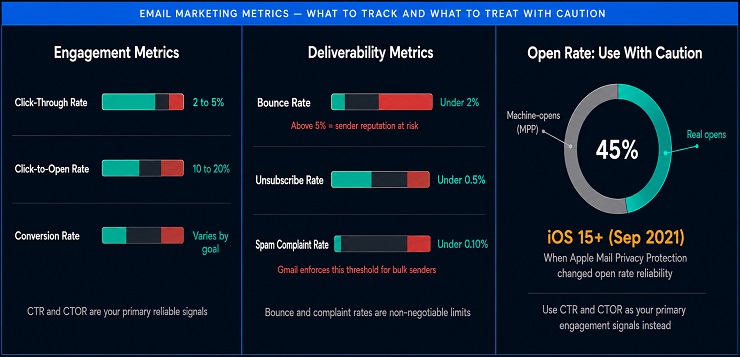
| Metric | What It Measures | Healthy Benchmark |
|---|---|---|
| Open Rate | Percentage of delivered emails that were opened | 20 to 40% (but see MPP caveat below) |
| Click-Through Rate (CTR) | Percentage of delivered emails where at least one link was clicked | 2 to 5% |
| Click-to-Open Rate (CTOR) | Clicks as a percentage of opens (content quality indicator) | 10 to 20% |
| Conversion Rate | Percentage of recipients who completed the desired action | Varies by goal and industry |
| Bounce Rate | Percentage of emails that were not delivered | Below 2% |
| Unsubscribe Rate | Percentage of recipients who unsubscribed after a send | Below 0.5% |
Each metric tells you something specific about a different layer of your campaign. Bounce rate tells you about list quality. Unsubscribe rate tells you about content relevance and sending frequency. CTR tells you whether your email content is compelling enough to act on. Conversion rate tells you whether the full journey from email to outcome is working. They are most useful when read together rather than optimised for individually.
The Open Rate Problem Every Beginner Guide Gets Wrong
Open rate is the metric most email marketers track first and most often. It is also, since September 2021, a partially unreliable one. This is one of the most important email marketing tips for beginners in this guide, and it is almost never covered in standard beginner resources.
Here is what happened. Apple introduced Mail Privacy Protection with iOS 15. When an Apple Mail user opens your email, MPP pre-fetches the email content, including your tracking pixel, in the background. This registers as an open in your ESP’s data, whether or not the person actually looked at your email. For many senders, Apple Mail accounts for 40 to 60 percent of their list. That means a significant proportion of reported opens are machine-generated rather than human.
The practical consequences are:
- Your reported open rate is likely higher than your real open rate
- Open rate trends are distorted, making it harder to spot genuine engagement changes
- A/B tests optimised for open rate may be selecting based on machine-open noise rather than genuine human preference
- Send time optimisation tools that rely on historical open data may be partially working from synthetic signals
What to use instead:
Click-through rate and click-to-open rate are the reliable engagement indicators. Clicks require a human decision and are not affected by MPP. CTOR, which measures clicks as a proportion of opens, is a particularly useful content quality indicator because it captures whether the subscribers who did open your email found it compelling enough to act on.
For revenue-driven campaigns, conversion rate and revenue per email are the metrics that matter most. For list health, bounce rate and unsubscribe rate are the signals to monitor closely.
Open rate is not worthless. It still provides directional signal, particularly for comparing performance within the same audience over time where MPP impact is relatively consistent. But it should no longer be treated as your primary engagement metric, and it should never be the sole basis for campaign success or failure decisions.
The Metrics That Reliably Indicate Engagement
Given the limitations of open rate, here are the metrics this beginner’s guide to email marketing recommends you build your performance framework around from the start.
Click-Through Rate is your primary engagement health indicator. If your CTR is trending downward over multiple campaigns to the same audience, your content is losing relevance or your frequency is too high. If CTR is stable or growing, your content programme is working.
Click-to-Open Rate tells you about content quality independent of deliverability. A high CTOR on a low CTR send usually indicates a deliverability problem: the email reached fewer inboxes than expected, but those who did see it found it compelling. A low CTOR on a high CTR send usually indicates a subject line that over-promised relative to the content inside.
Unsubscribe Rate is an early warning signal. A single send with an elevated unsubscribe rate is not necessarily a problem. A pattern of elevated unsubscribes across multiple sends signals that your content, frequency, or audience targeting needs adjustment. Treat it as feedback, not just attrition.
Spam Complaint Rate is the most consequential metric for your deliverability. Gmail now actively enforces a complaint rate below 0.10 percent for bulk senders. Even before enforcement, complaint rates above this threshold indicate a fundamental mismatch between what subscribers expected when they signed up and what they are receiving. This is a strategy problem, not just a metrics problem.
That covers what you need to read your results correctly from your very first campaign. Once you’re tracking these consistently and want the fuller picture, our complete guide to every email marketing KPI breaks each one down by tier, deliverability, engagement, and revenue, gives current benchmarks by industry, and shows you how to pick the right KPI for whatever goal you’re actually working toward.
Email Marketing Compliance: What You Must Get Right
Email marketing is one of the most regulated forms of digital communication. The rules exist to protect consumers from unsolicited, deceptive, or privacy-violating email, and non-compliance carries consequences that range from financial penalties to permanent blacklisting. This section of our guide to email marketing gives you the core requirements across the three frameworks most likely to apply to your sending.
We want to be clear upfront: this is not legal advice. Compliance requirements vary by jurisdiction, audience location, and business type. If you are operating at scale or in a regulated industry, consult a legal professional to confirm your specific obligations.
Also, this is a brief information about these email compliance rules. We have a dedicated guide on email compliance that breakdowns all of the important laws in detail.

CAN-SPAM: The Core Requirements
CAN-SPAM (Controlling the Assault of Non-Solicited Pornography And Marketing Act) governs commercial email sent to recipients in the United States. Despite the name, it applies to all commercial email, not just spam, and its requirements are relatively straightforward.
The core obligations under CAN-SPAM:
- No deceptive headers. Your “From,” “To,” and routing information must accurately identify who sent the email. You cannot impersonate another sender or obscure your identity.
- No misleading subject lines. Your subject line must accurately reflect the content of the email. A subject line designed to deceive recipients into opening an email violates CAN-SPAM regardless of the content inside.
- Clear identification as an advertisement. Commercial emails must be identified as advertising, though the law gives flexibility in how this is communicated.
- Physical postal address. Every commercial email must include a valid physical postal address for your business. This can be a PO Box, a registered business address, or a third-party registered agent address.
- A working unsubscribe mechanism. Every commercial email must include a clear and conspicuous way to opt out of future emails. Unsubscribe requests must be honoured within ten business days and cannot require the recipient to take more than one step to complete the process.
The penalty for non-compliance: Each separate email in violation of CAN-SPAM is subject to a penalty of up to $53,088. For a bulk send, that is a significant exposure.
GDPR: Consent-First Sending
The General Data Protection Regulation (GDPR) applies to anyone who collects or processes personal data from individuals located in the European Union, regardless of where the sending business is based. If any of your subscribers are in the EU, GDPR applies to how you handle their data.
GDPR is meaningfully stricter than CAN-SPAM on the question of consent. The key principles for email marketers:
Lawful basis for processing – You must have a valid legal basis for storing and using subscriber data. For marketing email, this is almost always explicit consent: the subscriber actively opted in to receive commercial communications from you. Pre-ticked boxes, implied consent, and purchasing consent from a third party do not meet the GDPR standard.
Right to erasure – Subscribers have the right to request that their data be deleted entirely. You must be able to action this request completely, which means knowing where subscriber data is stored across your systems, including your ESP, your CRM, and any third-party integrations.
Data minimisation – Collect only the data you need for the stated purpose. Collecting a subscriber’s date of birth, phone number, and physical address when you only need their name and email for a newsletter is a GDPR problem.
Breach notification – If subscriber data is compromised in a security incident, you are required to notify the relevant supervisory authority within 72 hours of becoming aware of the breach.
The maximum penalty under GDPR is 4 percent of global annual turnover or EUR 20 million, whichever is higher. Most enforcement actions target systemic violations rather than individual errors, but the reputational damage of a data breach or regulatory action applies regardless of scale.
CASL: What Canadian Senders Must Know
Canada’s Anti-Spam Legislation (CASL) is widely considered the strictest commercial email regulation in the world. If you send commercial email to recipients in Canada, CASL applies.
The key distinction from CAN-SPAM is that CASL requires express or implied consent before sending, not just an opt-out mechanism after the fact. You cannot send a first marketing email and include an unsubscribe link at the bottom. You need consent to send in the first place.
Express consent means the recipient explicitly agreed to receive commercial email from you, through a sign-up form, a checkbox at checkout, or a verbal request confirmed in writing.
Implied consent exists in specific defined circumstances: an existing business relationship within the past two years, a purchase or contract within the past two years, or a prominent publication of the email address without a statement against receiving commercial email.
CASL also requires that every commercial email clearly identifies the sender and includes a working unsubscribe mechanism, similar to CAN-SPAM. The penalty for non-compliance reaches up to CAD 10 million per violation.
If your list includes Canadian subscribers, audit your consent records before your next send. CASL enforcement has been active since 2014, and the CRTC has issued significant penalties against both Canadian and international senders who could not demonstrate valid consent for their mailing list.
Your List Is the Channel. Everything Else Depends on What Is In It.
Every element of this email marketing guide points back to the same foundational truth: the quality of your email programme is inseparable from the quality of your list.
The channel itself is exceptionally powerful. The ROI is real. The owned relationship is durable in a way that social media reach is not. The automation capability available today, including AI-driven personalisation, predictive segmentation, and behavioural triggers, is genuinely impressive and increasingly accessible. But all of it runs on your list. Authentication protects your domain’s reputation, but it does not validate who is on your list. Your ESP manages delivery, but it does not tell you whether the addresses you are sending to are real. Your content strategy determines what you say, but it cannot compensate for saying it to invalid addresses that generate bounces and silently erode your sender standing with every send.
This is why we built MailCleanup the way we did. You should not need an account, a subscription, or a technical team to verify that your list is clean before you send. Upload your list, get your verified results delivered to your inbox, and send with confidence that the addresses you are reaching are real. That is the simplest possible description of what email verification does and why it sits at Layer 3 of the Readiness Stack, below every campaign decision you will ever make.
Start with a clean list. Maintain it as the channel grows. And build every layer of your email marketing strategy on a foundation that can actually support it.
FAQs on Email Marketing & its Guide
What is email marketing and how does it work?
Email marketing is the practice of sending targeted commercial messages to a list of people who have opted in to hear from you. It works by combining a verified subscriber list, an email service provider to manage delivery, and a content strategy designed to achieve a specific outcome. The channel is direct, measurable, and consistently delivers the highest ROI in digital marketing.
Does email marketing work for small businesses?
Yes, and often more effectively than for large ones. Small businesses can personalise at a level that scales poorly for enterprise senders. The channel requires no minimum list size to produce results. Even a list of a few hundred engaged subscribers, built organically and sent to consistently, generates measurable revenue and relationship value from the very first campaign.
What is a good email marketing strategy for beginners?
Start with the foundations before the content: set up your sending domain, authenticate with SPF, DKIM, and DMARC, verify your list, and choose an ESP that matches your scale. Then define a measurable goal for each campaign, build a welcome sequence, establish a consistent sending cadence, and track click-through rate and conversion rate as your primary performance signals.
How do I build an email list from scratch?
Use organic methods only. Add opt-in forms to your website at high-intent moments, offer a lead magnet that genuinely solves a problem for your target audience, and enable double opt-in to filter out invalid addresses and low-intent signups from the start. Never purchase a list. Bought lists generate bounces, damage sender reputation, and violate most compliance frameworks.
What is AI email marketing?
AI email marketing refers to machine learning features built into modern ESPs that assist with campaign creation and optimisation. Common capabilities include send time optimisation, subject line generation and scoring, predictive segmentation based on subscriber behaviour, and automated content drafting. AI improves efficiency and performance but cannot compensate for a poor-quality list or missing authentication.
How often should I send marketing emails?
Once per week is the standard starting point for most senders. It is frequent enough to build recognition and maintain the relationship without overwhelming most subscriber types. Monitor unsubscribe rate and click-through rate together. If unsubscribes rise while clicks fall, reduce frequency or improve content quality. If engagement is strong and stable, you have room to increase cadence.
What is an acceptable email bounce rate?
It depends on your industry, campaign type, and list source. See our acceptable email bounce rate guide for the full benchmark breakdown. What matters more than any single number is what crosses it: once your rate moves into risk territory, the damage spreads to your entire list’s inbox placement, not just the addresses that actually bounced. Run your list through an email verification tool before any major campaign to keep your rate as low as possible.
How do I know if my email marketing is working?
Track click-through rate as your primary engagement indicator, conversion rate as your primary performance indicator, and bounce rate as your list health signal. Treat open rate as directional rather than definitive, since Apple Mail Privacy Protection has been inflating open rates with machine-opens since 2021. A working programme shows stable or improving CTR, conversion rate, and bounce rate across campaigns over time.