
If you have read other email personalization guides before, you already know the standard advice: add the subscriber’s first name to the subject line, segment your list, use dynamic content, and watch your engagement improve. That advice is not wrong. It is just incomplete.
What most guides skip is the part that determines whether any of it actually works. Email personalization runs on data. The richer and more accurate that data is, the more effective the personalization becomes. But if the list underpinning your strategy is full of invalid addresses, stale records, wrong field values, and inactive contacts, every layer of your personalization system fires incorrectly. Merge tags break. Segmentation puts contacts in the wrong buckets. Behavioural triggers fire to addresses that will never open anything. And the AI models you invest in get trained on noise.
We built this email personalization guide around a framework we call the Email Personalization Depth Matrix. It maps four levels of personalization, from basic merge tags through to predictive AI, and shows exactly what each level requires to work and what breaks when the list underneath it has not been cleaned. By the end of this guide, you will know how to build personalization that actually behaves the way it is supposed to.
TL;DR on Email Personalization
- Email personalization is the use of subscriber data to tailor message content, timing, structure, and offer to the individual, and it goes well beyond putting a first name in a subject line.
- There are four levels of email personalization: Surface, Contextual, Behavioural, and Predictive/AI, and each level requires a higher standard of data quality than the one below it.
- Personalised emails drive 41% higher click-through rates and up to 6x higher transaction rates than generic sends, but open rate figures must be read with caution because Apple Mail Privacy Protection inflates them across the board.
- Every level of email personalization fails in predictable ways when the list underneath it is dirty: wrong names fire at scale, contacts land in the wrong segments, triggers reach invalid addresses, and AI models train on corrupted signals.
- AI email personalization adds genuine capability at Level 4, specifically send-time optimisation, predictive content selection, and churn prediction, but it only produces accurate results when the data it trains on comes from a verified, clean list.
- Segmentation and email personalization are not the same thing: segmentation decides who receives which category of message, while personalization shapes what that message says to the individual within that group.
- Your email personalization strategy is only as reliable as the list it runs on, and verifying that list before building personalization logic is not a hygiene task but a prerequisite.
What Email Personalization Actually Means
What is email personalization, really? Most definitions stop at “using subscriber data to tailor messages,” which is accurate but thin. In practice, email personalization is a system. It takes what you know about a subscriber, from their name and location through to their browsing history and purchase behaviour, and uses that information to shape every relevant element of the email they receive: the subject line, the greeting, the body copy, the offer, the product recommendations, the send time, and sometimes the entire structure of the message itself.
When we talk about email personalization in this email personalization guide, we mean the full system, not just the surface features that are easiest to see.
What Email Personalization Is Not
There is a lot of confusion in the industry about what actually counts as email personalization. Part of that confusion comes from how the tactic is most commonly taught: add the subscriber’s first name to the subject line and you are personalising. That framing undersells the capability and, more importantly, it leads senders to underinvest in the data quality work that makes the more powerful levels of email personalization possible.
Email personalization is not any of the following:
- Adding a first name to the subject line and treating the job as done
- Sending the same email body to your entire list with a single {{FirstName}} merge tag swapped in
- Segmenting your list, because segmentation is the foundation personalization is built on, not personalization itself
- Using an identical message for every subscriber while calling it personal because your ESP auto-filled a name field
- Personalising only the subject line while leaving the body content completely generic for everyone
What email personalization actually is, is using everything you legitimately know about a subscriber to make the email they receive feel relevant to their current situation, not just addressed to them by name. That is a meaningfully different brief, and it is the one we are working from throughout this guide.
How Email Personalization Differs from Email Segmentation
These two terms are used interchangeably across the industry, and that is a problem worth fixing before we go any further, because they solve different problems and operate at completely different levels of your email programme.
| Email Segmentation | Email Personalization | |
|---|---|---|
| What it does | Groups contacts by shared characteristics | Tailors the message to the individual within or across those groups |
| What it uses | Demographic data, behavioural data, lifecycle stage | Individual contact data, behavioural signals, real-time context |
| Output | Different campaigns or content streams for different groups | A message that feels written for one specific person |
| When it operates | At the campaign planning level | At the message rendering level |
| What it requires | A clean list with accurate segment data | Accurate individual data fields and verified addresses |
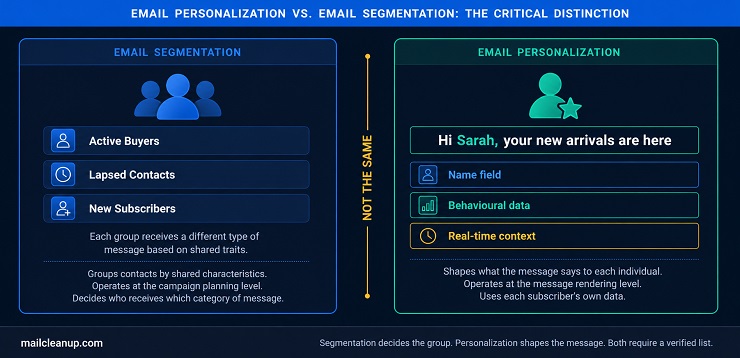
Segmentation is how you decide that one group of subscribers receives a reactivation campaign while another group receives a product launch email. Email personalization is how you make each version of that email feel relevant to the individual who is reading it. If you want to go deep on how segmentation works as its own discipline, we cover the full picture in our guide to email segmentation.
The critical point is this: you cannot have effective email personalization without reliable segmentation underneath it, and you cannot have reliable segmentation without a clean, verified list.
Why Email Personalization Statistics Deserve More Scrutiny
The performance case for email personalization is strong and well-documented. You will see figures like “29% higher open rates” and “6x transaction rates” cited across every email personalization guide and benchmark report in the industry. Those numbers are real. They also deserve some context before you build a strategy around them, especially when one of the most cited metrics is fundamentally compromised.
Email Personalization Statistics That Matter Beyond Open Rate
Here is the core performance data, drawn from primary research published by Litmus, Campaign Monitor, Salesforce, MoEngage, and Mailmend:
| Metric | Personalised vs. Generic | What It Actually Measures |
|---|---|---|
| Click-through rate | 41% higher | Content engagement: the most reliable indicator |
| Transaction rate | Up to 6x higher | Direct purchase conversion from email |
| Revenue per email send | Up to 760% higher with segmented personalization | Full campaign ROI |
| Open rate (subject line personalization) | Up to 50% higher | Email opens: see MPP caveat below |
| Conversion rate | 275% higher in documented case study (Samsung Galaxy Note 9) | Revenue outcome tied to a specific personalised campaign |
There is one important caveat that applies to every open rate figure in this table, and in any email personalization statistics source you read.
MPP Caveat: Apple Mail Privacy Protection, introduced in 2021 and now widely adopted, pre-loads email tracking pixels on Apple devices and logs an open event even when the subscriber has not opened the email. This inflates open rate figures across the board for any sender with a meaningful Apple Mail audience. Any comparison of open rates between personalised and generic emails is therefore unreliable as a measure of personalization performance. Open rate should not be your primary indicator.
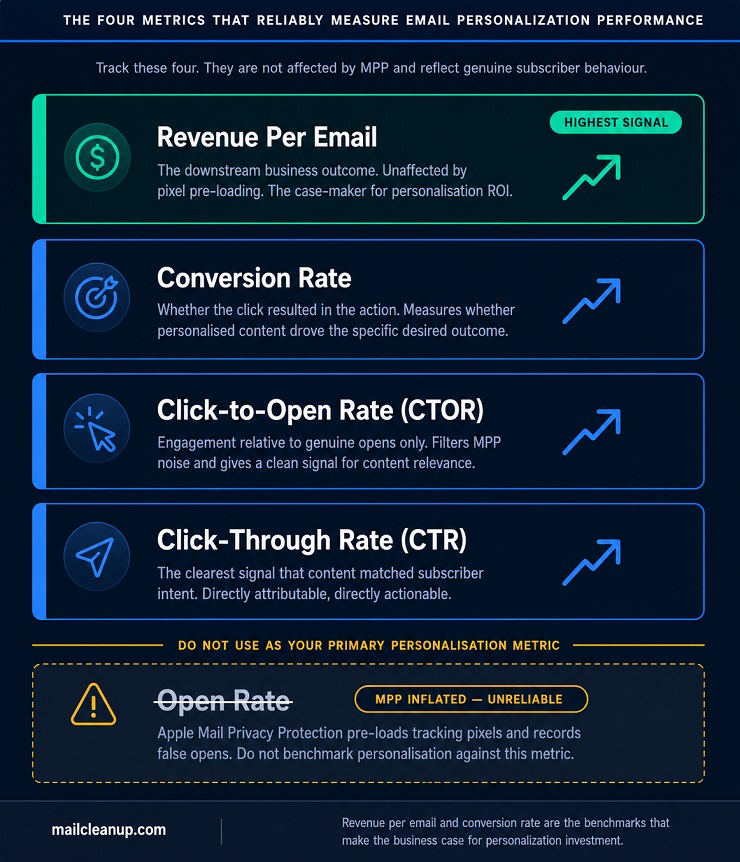
The metrics that do not have this problem are the ones that measure what happens after a genuine open: click-through rate, click-to-open rate, conversion rate, and revenue per send. Track those, and you will have an accurate picture of what your personalization is actually doing. For a full breakdown of which email metrics are reliable and which are not, see our email marketing KPIs guide.
Why Open Rate Is the Wrong Metric for Your Email Personalization Strategy
This is not an argument that personalised emails do not get opened more than generic ones. They do. The issue is that you cannot accurately measure how much more often because the open rate baseline is compromised by MPP across your entire list simultaneously. You cannot isolate the personalization effect from the pixel pre-loading effect.
What you can isolate and measure is downstream behaviour. A subscriber who clicked through a personalised email, visited a product page, and completed a purchase is a signal no tracking pixel can fabricate. That chain of events is accurate, attributable, and exactly what your email personalization strategy should be optimising for.
The four metrics worth anchoring your personalization measurement to:
- Click-through rate (CTR): The clearest signal that your content matched the subscriber’s actual interest at the moment they engaged
- Click-to-open rate (CTOR): Engagement relative to genuine opens, which filters out the MPP noise and gives you a cleaner relevance signal
- Conversion rate: Whether the click resulted in the specific action you were optimising for, a purchase, a sign-up, a download
- Revenue per email: The downstream business outcome of the campaign, which is the number that makes the case to stakeholders
Build your measurement framework around these four metrics and you will know whether your email personalization strategy is working, regardless of what your open rate dashboard is showing you.
The 4 Levels of Email Personalization
Not all email personalization is the same. A first name in a subject line and an AI-generated product recommendation are both “personalization” in the broad sense, but they operate at completely different levels of complexity, require completely different data inputs, and fail in completely different ways when the list is not clean.
If you are using this email personalization guide to build or improve your personalization programme, this is the framework that structures everything else.
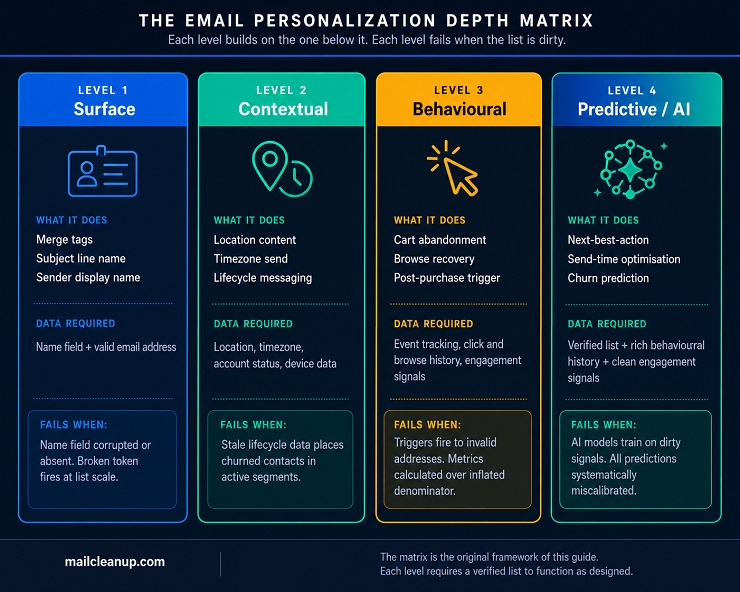
We call it the Email Personalization Depth Matrix, and here is the full picture before we work through each level.
| Level | Name | What It Does | Data Required | List Quality Needed | Failure Mode on a Dirty List |
|---|---|---|---|---|---|
| 1 | Surface | Name merge, subject line personalization, sender name | Name field, email address | Valid addresses with accurate name fields | Wrong name fires at scale; {FirstName} token exposed for missing records |
| 2 | Contextual | Location content, timezone send, lifecycle messaging, device layout | Location, timezone, account stage, device data | Valid addresses correctly segmented with current lifecycle data | Wrong lifecycle stage assigned: churned contact receives an onboarding email |
| 3 | Behavioural | Cart abandonment, browse recovery, post-purchase sequences, re-engagement triggers | Click history, browse data, purchase history, engagement signals | Verified list; invalid and inactive addresses corrupt engagement baselines | Triggers fire to invalid addresses; performance metrics calculated over an inflated denominator |
| 4 | Predictive / AI | Next-best-action content, send-time optimisation, churn prediction, AI content variants | Rich behavioural history, transaction data, clean engagement signals | Fully verified list; AI models trained on dirty data produce false predictions | personalization decisions based on noise; predicted segments wrong; ROI projections unreliable |
The principle running through the matrix is consistent: each level builds on the level below, each level requires more data to function, and each level’s failure mode is a direct consequence of data problems in the list.
Level 1: Surface Email Personalization
Surface email personalization is the entry point. You take information the subscriber explicitly gave you, most commonly their name, and insert it into the subject line, the greeting, or the sender display name. It is the easiest level to implement and, perhaps counterintuitively, one of the most likely levels to be implemented incorrectly.
Surface personalization requires two things to work: an accurate name field and a valid email address. That sounds straightforward. In practice, it is where most list data problems first become visible. If a subscriber signed up using “test” as their name, or if a record was imported from a spreadsheet with the name column offset by one position, your subject line sends at scale reading “Hey Test” or, worse, “Hey {{FirstName}}” to however many contacts share that data problem across your list.
The fallback rule for Level 1 surface email personalization: Every merge tag must have a defined fallback value before you deploy. If you are personalising with {{FirstName}}, you must specify what the system renders when that field is empty or corrupted. “Hey there” is a fallback. A broken merge tag token is not personalization. It is a brand credibility problem at whatever scale your list sits at.
Surface personalization is not a trivial level to get right when you are sending to large lists. Before you build anything above it, make sure name fields are clean and every merge tag has a fallback defined.
Level 2: Contextual Email Personalization
Contextual email personalization uses situational data about the subscriber to tailor the message beyond their name. You are not just addressing them; you are shaping the content around where they are, what time it is for them, what device they are on, and where they are in their relationship with your business.
What makes Level 2 particularly valuable is that it does not require the subscriber to have taken any recent action. You are using what you already know about their context, not their behaviour. That means contextual email personalization works even for subscribers who have not yet generated much behavioural data.
Four contextual personalization signals that meaningfully change the email experience:
- Location: Show the subscriber local inventory, region-specific pricing, local event details, or weather-triggered product content based on their geographic data
- Timezone: Deliver the email during the subscriber’s morning window, not your server’s morning window
- Lifecycle stage: Match the message to where the subscriber is in their customer journey, from first purchase through to long-term loyalty
- Device type: Render a mobile-optimised layout with simplified CTAs for subscribers on iPhone and a richer layout for subscribers reading on desktop
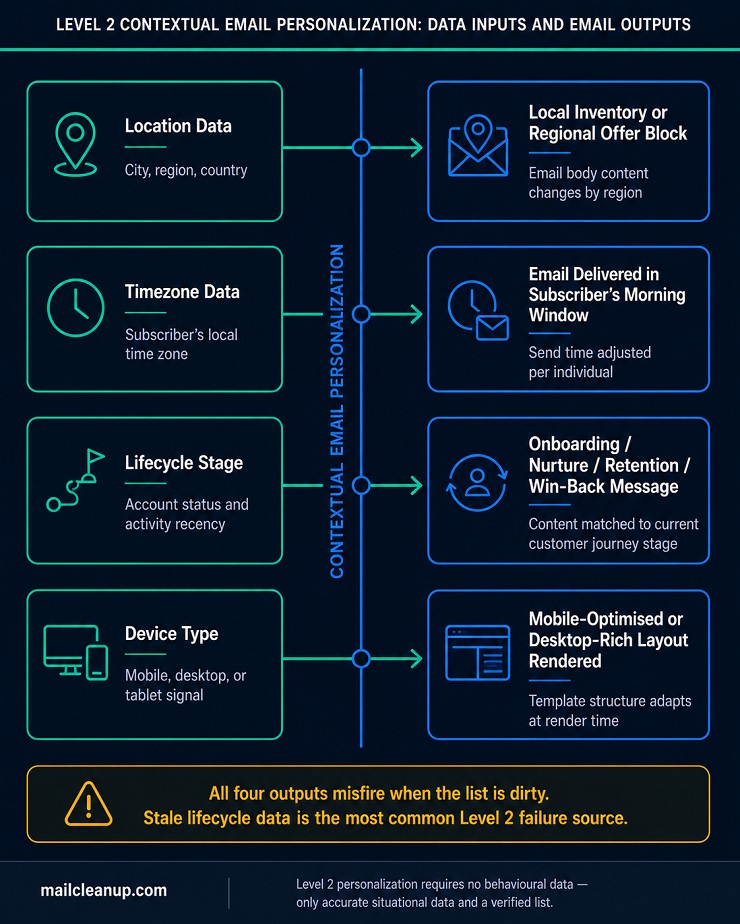
The failure mode at Level 2 is stale lifecycle data. If your list has not been cleaned and audited recently, you may have contacts sitting in your “active customer” segment who have not engaged with anything in 18 months. Your contextual personalization addresses them as current, engaged buyers. The email lands, and it feels completely out of touch with where they actually are.
Level 3: Behavioural Email personalization
Behavioural email personalization is where your strategy stops being about what you know about the subscriber and starts being about what they have done. You are responding to demonstrated signals, not applying assumptions.
This level requires more sophisticated data infrastructure than Levels 1 and 2. You need event tracking on your website, an integration between your ESP and your ecommerce platform or CRM, and a trigger logic system that fires the right email when the right action occurs. That investment pays back consistently, because behavioural emails have the highest engagement rates of any email type in almost every programme we see. They arrive at the moment of intent, and relevance at the moment of intent converts.
The most effective behavioural triggers and what they each require:
| Trigger | What the Subscriber Did | Data Required | Email Response |
|---|---|---|---|
| Cart abandonment | Added item to cart, did not complete purchase | Cart data, product catalogue, email address | Reminder featuring the specific abandoned product with image |
| Browse abandonment | Viewed product or category page, did not add to cart | Session tracking, browse data | Email featuring recently viewed items or category |
| Post-purchase | Completed a transaction | Purchase record, product catalogue | Thank-you confirmation plus cross-sell sequence with complementary items |
| Re-engagement | No opens or clicks for 60 to 90 days | Full engagement history, last interaction date | Win-back sequence referencing past activity or preferences |
| Onboarding milestone | Completed a product action or reached a usage threshold | Product event log, activation stage | Next-step guide matched to their current activation point |
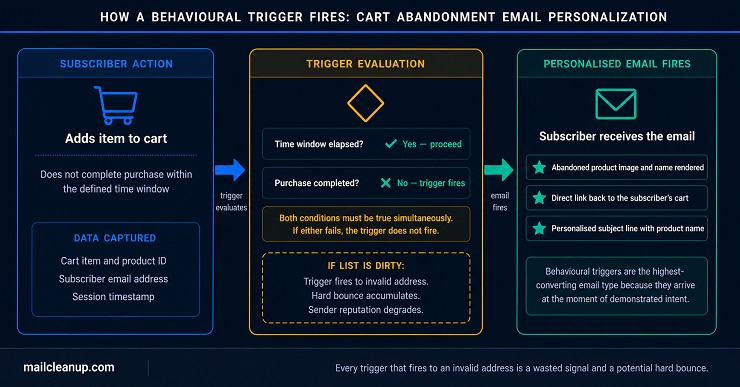
There is a deliverability dimension to Level 3 that we cover in full later in this guide. For now, the critical point is this: every behavioural trigger that fires to an invalid or permanently inactive address is a wasted signal. And when your list contains a significant volume of those addresses, the engagement benchmarks you are measuring your performance against are being diluted by contacts who will never respond to anything.
Level 4: Predictive Email Personalization and AI
Predictive email personalization and AI email personalization sit at the top of the matrix. At this level, the system is no longer just responding to what the subscriber has done. It is anticipating what they are likely to do next and shaping the email to match that prediction before they have done anything to trigger it.
AI email personalization at this level uses machine learning models trained on historical data to make decisions at a scale and granularity that no rule-based system can replicate. The three capabilities that make it genuinely different from the levels below:
- Next-best-action content recommendations: The model analyses each subscriber’s full behavioural history, purchase patterns, and similar-subscriber activity to predict which product, content type, or offer they are most likely to engage with next, then inserts that into the email automatically at render time
- Individual send-time optimisation: Rather than selecting a single send time for a campaign, the model calculates the specific time window each subscriber historically opens and engages, and staggers delivery accordingly across hours or even days
- Predictive churn detection: The model identifies subscribers showing early disengagement signals before they go fully dormant and triggers a re-engagement sequence at the right moment, rather than waiting until they have already churned and a win-back is needed
Level 4 also introduces AI-generated copy variants, where the model selects the subject line or content tone most likely to perform for each individual based on their prior engagement patterns.
What distinguishes AI email personalization from every level below it is the data requirement. These models train on historical engagement signals. If those signals are corrupted by invalid addresses inflating send volumes, inactive contacts diluting engagement rates, and misfired triggers from bad data, the AI’s predictions will be wrong in proportion to the corruption in the training data. We come back to this point in specific detail in a later section of this guide.
Email Personalization Techniques: How Each Level Works
The Email Personalization Depth Matrix gives you the framework. Now let us walk through the actual mechanics: the email personalization techniques that power each level, how they are implemented, and what they need from your list and your data infrastructure to perform reliably.
Every email personalization technique covered in this email personalization guide maps to a specific level of the Depth Matrix, which means every technique also carries the same data quality requirement and the same failure mode as its level. That is not an incidental detail. It is the reason we built the matrix before covering the techniques.
Dynamic Content and Email Personalization Techniques
Dynamic content is the core mechanism behind most email personalization above Level 1. Instead of creating a separate email template for each subscriber group, you build one email with content blocks that change based on subscriber attributes or conditions. Your ESP renders the correct version of each block for each individual subscriber at send time.
This makes dynamic content one of the most scalable email personalization techniques available. You build the template once. The system handles thousands of individual variations simultaneously, pulling from your subscriber data to determine which version of each block each person sees.
| Dynamic Content Type | Level | What Changes in the Email | Data It Draws On |
|---|---|---|---|
| Personalised greeting block | 1 | Subscriber’s first name in the salutation | Name field |
| Location-specific offer block | 2 | Regional pricing, local inventory, or weather-triggered product | Location data |
| Product recommendation block | 3 | Specific products based on browse or purchase history | Browse and purchase data |
| Lifecycle content block | 2 / 3 | Onboarding, nurture, retention, or re-engagement content | Account status and last activity date |
| AI-curated content block | 4 | ML-selected product, content, or offer based on predicted preference | Full behavioural history and clean engagement signals |
The failure mode for dynamic content is simple: if the data field a block depends on is missing, incorrect, or stale, the block either renders the fallback or renders incorrect content. In both cases, the subscriber receives an email that does not match their situation. The more sophisticated the dynamic content, the more it depends on data being accurate.
Merge Tags, Fallback Logic, and Surface Email Personalization
Merge tags are the most widely used email personalization technique and the one most often deployed without the safety net it requires. A merge tag is a placeholder in your email template, such as {{FirstName}} or {{City}}, that your ESP replaces with the subscriber’s actual field data at send time.
They are straightforward to implement. They are also the first point of failure when list data is not clean, because the tag renders whatever value is in that field, whether that value is accurate, blank, a placeholder, or an import error from a badly formatted spreadsheet.
The fallback rule for all merge tags: Define a fallback value for every personalization tag before you send. Without a fallback, an empty or corrupted field produces a broken token in the subscriber’s inbox. “Hi {{FirstName}}” is not a personalised email. It is a data failure sent at the scale of your list. For name fields, “there” is a reliable default. “Hi there” reads naturally and never exposes a broken tag.
How to implement merge tags with reliable fallback logic:
- Identify every personalization field you plan to use before building the template
- Run a completeness check on each field across your list to understand how many records have gaps
- Define a fallback value for every tag, not just the ones you think might have missing data
- Test the email with a subscriber record that has the relevant field deliberately left empty to confirm the fallback fires correctly
- Check any imported lists for field offset errors, where name column data has shifted by one column during the import process, a common source of wrong-name personalization at scale
The merge tag itself is not the risk. The data behind it is. Cleaning your list to remove invalid records and correcting field data before deploying personalization removes the problem at its source.
Behavioural Triggers: Email Personalization Techniques That React to Action
Trigger-based emails are the highest-performing email personalization techniques in most programmes because they arrive at the moment of demonstrated intent. The subscriber has done something, and the email responds to that action with directly relevant content, not content the sender thinks might be relevant.
Building trigger-based email personalization requires two things working together: an event tracking layer that captures subscriber actions on your website or in your product and passes them to your ESP, and a trigger logic system that evaluates those events and fires the right email sequence when the right condition is met.
The most valuable behavioural trigger types and how they work:
| Trigger Type | Condition That Fires It | Email personalization Response | Key Data Required |
|---|---|---|---|
| Cart abandonment | Item added to cart, no purchase after a defined window | Email featuring the specific abandoned product with image and direct link to cart | Cart contents, product data, email address match |
| Browse abandonment | Product or category page viewed, no cart addition | Email featuring recently viewed items or related products in that category | Session tracking, browse event data |
| Post-purchase | Purchase transaction completed | Thank-you email plus a cross-sell sequence featuring complementary products | Purchase record, product catalogue, order value |
| Engagement drop | No opens or clicks for 60 to 90 days | Re-engagement sequence referencing the subscriber’s last known activity or preference | Engagement history, last active date |
| Onboarding milestone | Product feature used or activation threshold reached | Next-step guide matched to the subscriber’s current stage in the onboarding flow | Product usage event log, activation stage mapping |
One point worth holding in mind as you build trigger logic: every trigger that fires to an address that no longer exists, or to a contact who has been permanently inactive for years, is a false signal in your engagement data and a potential hard bounce waiting to accumulate. The more triggers you run at scale, the more your performance measurement depends on your list being clean underneath them.
Predictive and AI Email Personalization Techniques
AI email personalization adds a category of capability that rule-based personalization simply cannot replicate: it identifies patterns across your entire subscriber dataset and uses those patterns to make decisions that no manually authored rule set could produce at scale.
The five specific capabilities AI email personalization techniques enable:
- Predictive product recommendations: The model analyses purchase patterns, browse behaviour, and similar-subscriber activity to identify the product each individual is most likely to buy next, not just the most popular item in a category, and inserts that recommendation into the email at render time
- Individual send-time optimisation: The model calculates the specific time window each subscriber is historically most likely to open and engage, then staggers delivery so each subscriber receives the email during their personal high-engagement window rather than at a single campaign-wide send time
- Predictive churn scoring: The model detects early-stage disengagement signals across subscriber behaviour, identifies the contacts most at risk of going dormant, and triggers a re-engagement sequence before they are fully inactive
- AI-generated copy and subject line variants: The model generates and tests multiple copy directions at send time, serving each subscriber the variant that matches their prior engagement patterns with similar content types
- Real-time dynamic content selection: The model selects which content block, offer, or product to display for each subscriber based on their complete behavioural profile, not a static segment rule that treats everyone in a bucket the same way
These techniques sit at Level 4 of the matrix for a reason. They depend on the quality and volume of the data they train on. In the later sections of this guide, we explain specifically what that means for your list and why AI personalization is the level where a dirty list does the most damage to your results before you even realise it.
AI Email Personalization: What It Does and What It Requires
Most guides treat AI personalization as a feature category on an ESP comparison table, listed alongside dynamic content and A/B testing as though it is the same class of tool, just more advanced. It is not. AI email personalization operates on a fundamentally different logic, and understanding that difference is what determines whether you invest in it at the right moment in your programme’s development. As we establish throughout this email personalization guide, Level 4 is the most powerful and the most data-dependent level in the stack, and getting the sequencing wrong is expensive.
What ESP AI Features Do for Email Personalization
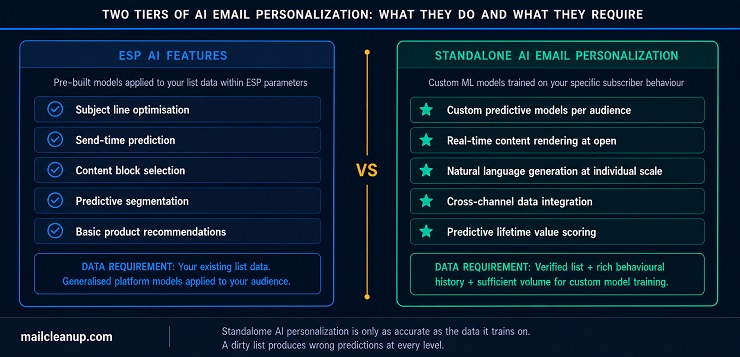
Most major ESPs now include AI-assisted features in their standard offering. These are genuinely useful capabilities, but it is important to understand what they are: rule-based AI applications that analyse patterns in your existing data and apply pre-built models to make specific predictions or recommendations within defined parameters. They are tools built for the general case, not models trained on your specific audience.
Here is what ESP AI features typically do and where they sit in the Email Personalization Depth Matrix:
| ESP AI Feature | What It Does | Level in the Depth Matrix |
|---|---|---|
| Subject line optimisation | Analyses your list’s historical open patterns to recommend subject line length, word choice, and structure | Level 1 / 2 |
| Send-time prediction | Uses your list’s historical open timing data to recommend a send window for the campaign | Level 2 |
| Content block selection | Selects from predefined dynamic content blocks based on segment rules you have configured | Level 2 / 3 |
| Predictive segmentation | Groups contacts based on predicted behaviour (likely to purchase, likely to churn) using engagement data in your account | Level 3 / 4 |
| Product recommendations | Pulls from a connected product catalogue to surface relevant items based on browse or purchase history | Level 3 |
The limitation of ESP AI features is scope. They work within the boundaries of your existing data and within the generalised models the platform has already built. They are powerful starting points for your email personalization strategy, but they are not the same thing as a standalone AI personalization system that trains a custom model on your specific subscriber behaviour.
What Standalone AI Email Personalization Systems Add
Standalone AI email personalization platforms go beyond what an ESP can do because they build models specific to your subscriber base rather than applying industry-generalised logic to it. The difference is meaningful at scale: your subscribers are not the average of all subscribers across every account on a platform. A model trained on your data learns your audience’s patterns.
What standalone AI email personalization specifically enables that ESP AI features typically cannot:
- Custom predictive models: Trained on your own behavioural and transaction data rather than industry-wide averages, producing predictions calibrated to how your audience actually behaves
- Real-time content rendering: The email is finalised at the moment the subscriber opens it rather than at the moment it is sent, allowing for live inventory levels, current pricing, and live countdown timers that are accurate at open time
- Natural language generation at individual scale: Personalised subject lines and body copy generated for each subscriber based on their engagement history with specific content types, not just A/B variant testing across broad segment groups
- Cross-channel data integration: Pulls simultaneously from your CRM, ecommerce platform, loyalty programme, and customer support history to build a complete individual profile that no single data source could produce alone
- Predictive lifetime value scoring: Shapes which offer, discount depth, or content investment each subscriber receives based on their predicted long-term value to the business, not just their most recent action
The business case for standalone AI personalization is real at scale. The data requirement is equally real, and it is non-negotiable. These systems build their accuracy on your engagement signals, your click history, your purchase patterns, and your behavioural sequences. If those signals are contaminated by invalid addresses, inflated send denominators, and inactive contacts who never engage with anything, the models learn the wrong patterns and produce predictions that are systematically off.
Why AI Email Personalization Fails Without Clean Training Data
Here is the specific failure chain that occurs when AI email personalization runs on a dirty list, and it is worth understanding in detail because it does not fail obviously. The emails go out, the system reports its predictions, the dashboard shows results, and those results look plausible. But the predictions were calibrated against a dataset that includes contacts who will never engage with anything, ever, because the addresses no longer exist or the subscribers have been permanently inactive for years.
| List Condition | Training Data Quality | AI Prediction Quality | Actual Campaign Outcome |
|---|---|---|---|
| Fully verified, clean list | Accurate engagement signals from real, active contacts | Reliable next-best-action, accurate send-time windows, calibrated churn scores | AI personalization performs as the model projects |
| 10 to 15% invalid or inactive addresses | Signals diluted by 10 to 15% non-responders included in training data | Slightly deflated confidence scores; send-time windows skewed toward inactive contact patterns | Marginal underperformance that gets attributed to content quality rather than data quality |
| 25% or more invalid or inactive addresses | Substantial noise in training data; false baselines throughout | Wrong segment predictions; churn scores miscalibrated; recommendations based on distorted engagement history | Significant underperformance; personalization decisions systematically wrong across every send |
The reason this failure is more serious at Level 4 than at any level below it comes down to scope. Level 1 personalization with a wrong name field produces an embarrassing email for the sends that misfire. AI personalization trained on a dirty list makes systematically wrong decisions at scale, across every send, persistently, until the training data is corrected. The investment in the technology does not deliver not because the technology is wrong, but because the foundation it runs on is unsound.
This same failure mode shows up across other AI-driven parts of an email program too, not just personalization. Our full breakdown of AI in email marketing ranks every major use case by how much a messy list actually puts at risk.
Email Personalization Best Practices That Hold Up at Scale
There is no shortage of email personalization best practices lists in the industry, and most of them are genuinely good. The issue is that almost every list assumes your list is already in good shape and moves straight to the strategy layer. In this section of the email personalization guide, we are starting where the work actually starts: with the data your personalization depends on. Once that foundation is solid, the strategy layer is far more straightforward than most guides make it look.
Email Personalization Best Practices for Data and List Quality
Three email personalization best practices in this category are non-negotiable if you want your personalization system to behave as intended at any level of the Depth Matrix.
- Verify and clean your list before you build any personalization logic on top of it. A personalization system built on a dirty list amplifies the wrong outcomes. Invalid addresses corrupt your engagement metrics. Stale data puts contacts in the wrong segments. And the more sophisticated your personalization, the more damage unclean data causes to every layer above it. Make email list hygiene a scheduled discipline, not a one-time task you do before a big campaign launch.
- Run a field completeness audit before you deploy any merge-tag personalization. If 30% of your list is missing a value for a field you plan to personalise against, your fallback text is going to fire for 30% of your recipients. Know the completeness rate for every field you intend to use before you commit to a personalization approach, and make a deliberate decision: proceed, collect the missing data first, or choose a different personalization signal with better coverage.
- Treat list verification as a prerequisite for moving between levels. If Level 1 personalization is already surfacing data quality problems, those problems compound significantly at Level 3 and Level 4. Clean the list at the level you are currently operating before you invest time and budget in the level above it.
These three practices are not about being cautious. They are about protecting the return on the personalization investment you are already making. Skipping them does not save time; it defers the cost to a point where it is more expensive to fix.
Email Personalization Best Practices for Data Collection and Privacy
The data that powers email personalization has to come from somewhere, and the shift away from third-party data means it increasingly has to come directly from your subscribers. That creates both an opportunity and a responsibility that your email personalization strategy needs to account for.
- Use progressive profiling to build richer subscriber data over time, not through a long sign-up form that kills conversion. Ask one additional question at the right moment in the subscriber journey: at post-purchase, after a content download, at the anniversary of their first sign-up, or when they take a high-intent action. A single well-timed question builds a richer profile gradually and feels natural rather than intrusive.
- Prioritise zero-party data wherever possible. Zero-party data is what the subscriber intentionally and explicitly tells you: their preferences, their interests, their goals, their communication frequency preference. It is the highest-quality personalization data you can collect because there is no inference required. What they told you is what they mean. Build mechanisms to collect it and use it directly in your personalization logic.
- Personalise only against data you collected with clear consent and only for the purpose it was collected for. Using a subscriber’s location data to surface local inventory in an email is within scope if you disclosed that use at collection. Using their browse history to infer sensitive attributes and shape unrelated communications is not. GDPR and CCPA have specific requirements here, and the bar is higher than many senders realise.
The over-personalization line: personalization stops being helpful and starts being unsettling when it signals to the subscriber that you know more about them than they expected you to. The practical rule is this: personalise against data the subscriber knowingly provided or knowingly generated through their direct interaction with your emails and your website. Do not personalise against data they would not expect you to hold or use. Crossing that line does not just damage the relationship with the individual subscriber; it generates the kind of social media reactions that travel.
Email Personalization Best Practices for Testing and Measurement
Testing is where email personalization best practices most commonly break down in practice. Senders test multiple elements simultaneously, get a result, and attribute the outcome to whichever element they most wanted to prove. That is not a test. It is confirmation bias with a send button.
- Test one personalization variable at a time. If you change both the subject line personalization and the product recommendation block in the same send, you cannot know which one drove the performance difference. Run sequential tests with a single variable changed between each, let each test run long enough to reach statistical significance before drawing conclusions, and document the result before moving to the next variable.
- Match the metric to the personalization element you are testing. Subject line personalization should be measured against click-to-open rate, not open rate, because MPP has compromised open rate data as a reliable signal. Content block personalization should be measured against conversion rate and revenue per email. AI send-time optimisation should be measured against click-through rate in the individual send-time window versus the control group. Using the wrong metric gives you a confident answer to the wrong question.
One measurement point that applies to all of the above: your personalization performance benchmarks are only meaningful if your list is clean. If invalid and inactive addresses are included in your send volume, your denominators are inflated and your engagement rates are suppressed below what they would be on a verified list. Establishing a personalization baseline before cleaning your list gives you a baseline you cannot trust.
Email Personalization Examples: B2C and B2B
The most useful email personalization examples are not brand case studies. Brand case studies tell you what a major retailer or a streaming platform did with data infrastructure and engineering teams that most senders do not have access to. The email personalization examples in this email personalization guide are described functionally: what the trigger was, what personalization was applied, what data it required, and what outcome it was designed to drive. That way, you can take the logic and apply it to your own programme regardless of your platform or list size.
B2C Email Personalization Examples That Drive Conversion
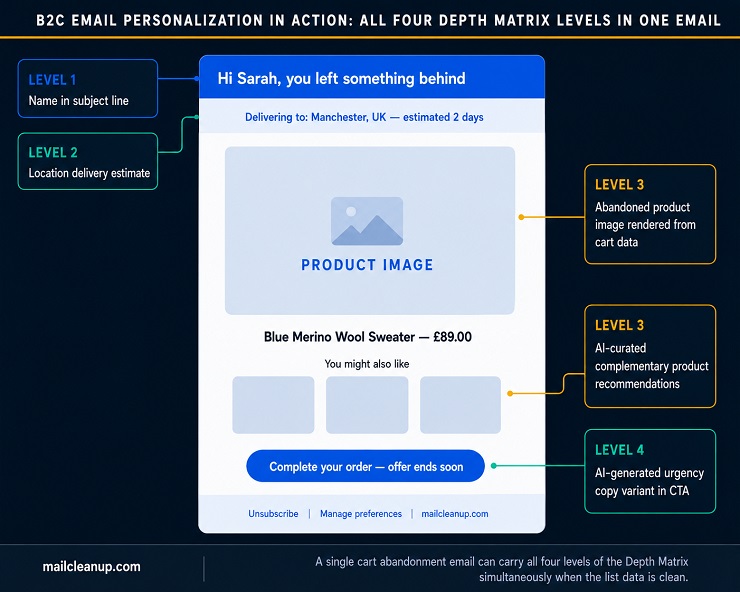
B2C personalization works best when it responds to a specific subscriber action or a specific piece of context with immediate relevance. The closer the email is to the moment of intent, the higher the conversion rate tends to be. Here is how five of the most effective B2C personalization scenarios work in practice:
| Scenario | What Triggers It | Personalization Applied | Data Required | What It Is Designed to Drive |
|---|---|---|---|---|
| Cart abandonment recovery | Item added to cart with no purchase within one to three hours | Email renders the exact abandoned product with image, name, price, and a direct link back to the cart | Cart contents, product catalogue, email address match to cart session | Recovery of the specific interrupted purchase |
| Birthday or anniversary offer | Subscriber’s birthday or account anniversary date arriving | Email references the specific milestone and includes an offer or discount matched to their purchase history rather than a generic promotion | Date field, purchase history, offer logic | A loyalty-linked purchase at a high-intent personal moment |
| Post-purchase cross-sell | Purchase transaction completed | Email sent within 24 to 48 hours featuring complementary products matched specifically to the item purchased, not generic category bestsellers | Purchase record, product catalogue, complementary product logic | Increased average order value through an immediately relevant follow-on purchase |
| Winback with behavioural context | No opens or clicks for 90 days | Email references the subscriber’s last known activity or purchase and uses that context to anchor the re-engagement message to something real | Engagement history, last purchase or click date | Re-establishing relevance using the subscriber’s own history rather than a generic discount |
| VIP tier upgrade notification | Subscriber crosses a cumulative spend threshold | Email confirms the new tier, explains the specific benefits unlocked, and presents an offer matched to their purchase category history | Cumulative spend data, loyalty tier logic, purchase category history | Reinforcing loyalty and prompting an immediate next-tier qualifying purchase |
The pattern across all five of these B2C email personalization examples is consistent: the email is a direct response to something specific about this subscriber, either something they did, something they are about to experience, or something they have earned. That specificity is what produces the engagement and conversion lifts the data shows. A generic promotional email cannot replicate it, regardless of how well it is written.
B2B Email Personalization Examples That Build Pipeline
B2B email personalization examples operate on a different logic to B2C. The purchase cycle is longer, the decision involves multiple stakeholders, and the relevant signals are typically about professional context and account behaviour rather than individual purchase history. personalization that works in B2B feels context-accurate: it demonstrates awareness of the subscriber’s professional situation, not just their name and company name in a subject line.
| Scenario | What Triggers It | Personalization Applied | Data Required | What It Is Designed to Drive |
|---|---|---|---|---|
| Role-based content variant | Subscriber’s job title or function identifies them as a decision-maker or a practitioner | Decision-maker receives a business case and ROI framing; practitioner receives technical depth and integration detail | Job title or role field, CRM segment data, content variant library | Delivering the argument that matches this person’s actual buying influence, not a one-size version |
| Account engagement score email | Account-level engagement drops below a defined threshold | Email references the specific product area or content category the account has previously engaged with and offers a targeted next step | Account engagement score, product usage or content interaction history | Re-engaging the account at the moment of risk, before the relationship goes fully cold |
| Trigger event outreach | A relevant external signal is detected: a funding announcement, headcount growth, a new product launch, or a leadership change | Email references the specific event and connects it directly to the problem your product addresses in that context | Intent data or signal monitoring integration, account record, company context | Making outreach feel timely and informed rather than generic and interruptive |
| Product usage milestone | Subscriber or account reaches a meaningful activation event within your platform | Email acknowledges the specific milestone, surfaces the next logical feature for that stage of adoption, and provides a direct path to it | Product event log, activation stage mapping, feature adoption data by cohort | Accelerating product adoption and reducing churn risk by guiding users forward at the exact right moment |
| Trial expiry sequence | Free trial end date approaching within a defined window | Sequence references the specific features the trial user has activated and the ones they have not, and builds the conversion argument around that gap | Trial start date, feature usage log, account activity data, activation stage | Converting the trial to paid using the subscriber’s own usage data rather than a generic product pitch |
The distinguishing characteristic of effective B2B email personalization is that it demonstrates real awareness of the subscriber’s professional situation. The best B2B examples in this category feel like they were written by someone who actually knows the account. That effect is not achieved through creativity; it is achieved through data specificity. And data specificity only holds up if the underlying CRM records and list data are accurate and current.
How Email Personalization and Deliverability Reinforce Each Other
Most guides treat personalization and deliverability as separate disciplines. personalization is a content strategy; deliverability is a technical problem. In practice, they are part of the same system, and understanding how they reinforce each other is one of the most important connections this email personalization guide makes. Get one right without the other, and you are leaving a significant part of the result on the table.
How Email Personalization Signals Build Sender Reputation
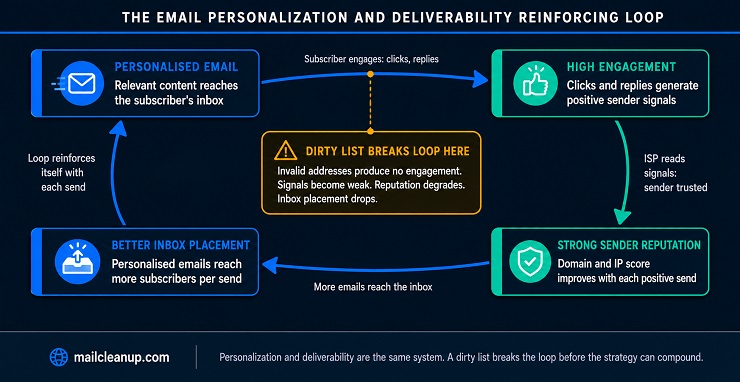
When a subscriber receives an email that is immediately relevant to them, they engage with it. They click through, occasionally they reply, and sometimes they forward it. These engagement events, clicks and replies especially, are the signals mailbox providers use to assess whether you are a sender worth routing to the inbox. Positive signals, accumulated consistently across a verified and engaged list, build sender reputation. Sender reputation is the core variable that determines inbox placement.
Here is the full reinforcing loop, and the single point at which a dirty list breaks it:
| Stage | What Happens | Why It Matters |
|---|---|---|
| Personalised email reaches inbox | Relevant content drives clicks, replies, and forwards | High-quality engagement signals are generated at the individual level |
| Mailbox provider reads the signals | Positive engagement improves domain and IP reputation score | Sender is classified as trustworthy and preferred |
| Better sender reputation | More emails routed to primary inbox, fewer filtered to spam or promotions tab | Personalised content reaches more of the subscribers it was built for |
| Cycle continues | Engagement rate stays high; positive signals accumulate with each send | The loop reinforces itself and compounds over time |
| Dirty list breaks it | Invalid addresses generate hard bounces; inactive contacts dilute engagement rate; signals look weak to mailbox providers | Sender reputation degrades; inbox placement drops; personalised emails reach fewer inboxes regardless of content quality |
The last row is the one most senders do not plan for. The loop runs in both directions with equal force. A clean list with relevant personalization builds reputation, earns inbox placement, and allows the personalization investment to pay back. A dirty list dilutes signals, degrades reputation, and makes the personalization invisible because the emails carrying it are being filtered before they arrive.
What Happens to Email Personalization Performance When the Loop Breaks
When the deliverability-personalization loop breaks, the symptoms look exactly like a content problem. Click-through rates drop. Conversion rates soften. You change subject lines, test new offers, rewrite copy, and the metrics move only slightly or not at all. The actual cause, invalid addresses and inflated send denominators degrading your sender reputation, does not get addressed because it is not visible at the campaign level.
| Root Cause in the List | What the Sender Observes | What Is Actually Happening |
|---|---|---|
| High volume of invalid addresses | Elevated hard bounce rate; declining CTR across campaigns | Sender reputation being damaged; inbox placement degrading campaign by campaign |
| Large inactive segment kept in sends | Flat engagement across all campaigns despite content changes | Positive signals diluted by zero-activity contacts; domain reputation under sustained pressure |
| Behavioural triggers firing to invalid addresses | Trigger campaign metrics look weak against historical benchmarks | Invalid contacts inflating denominators; real performance obscured |
| Stale lifecycle data placing contacts in wrong segments | Contextual personalization triggers rising unsubscribes | Contextual and behavioural personalization misfiring systematically across every send |
The fix in every case starts at the same point: audit the list, remove invalid and permanently inactive addresses, and re-establish a clean engagement baseline before you assess what the personalization is actually doing. Until the list is clean, you cannot accurately attribute performance to personalization quality, because the performance data itself is corrupted by the list it was measured on.
Why Email Personalization Fails Without a Verified List
Most email personalization guides stop at strategy. They tell you how to implement personalization and assume that the list underneath it is in reasonable shape. The core argument of this email personalization guide is that this assumption is the most expensive one in email marketing, and that the failure it produces is systematic, not random. A dirty list does not cause occasional personalization errors. It causes predictable, structural failures across every level of the Depth Matrix.
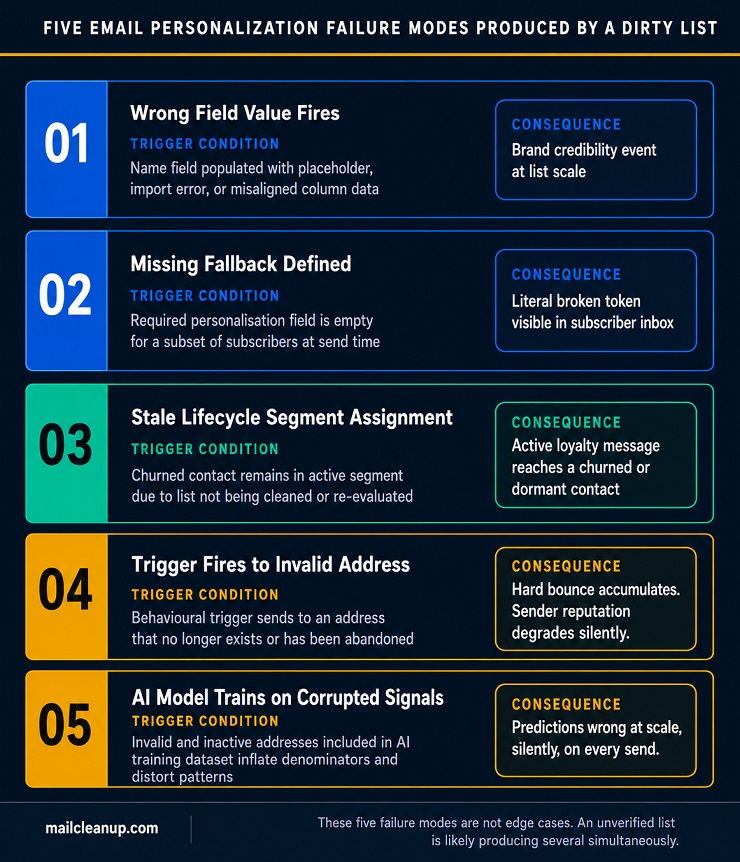
The Five Email Personalization Failure Modes Caused by a Dirty List
These are not edge cases. If your list has not been verified recently, it is likely experiencing several of these simultaneously, quietly, across every send you are making.
- Wrong field value fires at scale: The personalization pulls a name, location, or preference field that was populated incorrectly during import, through a form with no validation logic, or through a data merge error where columns shifted by one. The email goes out reading “Hi Test” or “Hi null” or with the wrong city in the subject line. Each instance is a brand credibility event, and it scales directly with your list size.
- Missing field with no fallback defined: A required personalization field is empty for a subset of subscribers and no fallback value was set before the send. The merge tag renders as a literal broken token. Subscribers receive “Hi {{FirstName}}” or “Your recommended product: {{ProductName}}” in their inbox. This is the most visible personalization failure mode and the most preventable one.
- Wrong segment assignment from stale lifecycle data: A subscriber who last purchased 22 months ago is still tagged as “active customer” because the list has not been cleaned or re-evaluated. Your contextual personalization sends them a loyalty tier upgrade message or an active customer exclusive offer. They are confused at best, actively irritated at worst, and more likely to unsubscribe or mark the email as spam.
- Behavioural trigger fires to an invalid address: A cart abandonment, browse recovery, or re-engagement trigger fires for an address that no longer exists. The email bounces. The trigger is logged as sent. The hard bounce accumulates against your domain. Your behavioural campaign metrics are simultaneously suppressed below their real performance and your sender reputation is degrading, both at the same time, without a single content change.
- AI model trains on corrupted signals: At Level 4, every personalization decision the model makes is a function of the data it was trained on. If invalid and inactive contacts are included in that dataset, the predictions are calibrated against a distorted picture of how your audience actually behaves. The recommendations it surfaces, the segments it builds, and the churn scores it assigns are all wrong in direct proportion to the volume of noise in the training data.
Why Bad Email Personalization Is Worse Than No Personalization
A generic email that does not resonate is ignored. A personalised email that misfires is noticed. The subscriber sees that you tried to address them personally and got it wrong. That gap between the promise of personalization, “this sender knows me,” and the execution, “they called me null,” is more damaging to trust than never having attempted personalization at all. It signals not just irrelevance but incompetence.
The scale amplification factor is the part most guides do not address. When a generic email underperforms, the cost is a missed opportunity spread across your list. When a personalised email misfires, the damage scales with the sophistication of the attempt. A {{FirstName}} token failure to 200,000 subscribers generates 200,000 simultaneous brand credibility events. A Level 3 behavioural trigger that fires the wrong product to the wrong segment at that same scale is a campaign-level failure that competitors can observe in the review data and case studies that follow.
The personalization Tax: Every misfire produced by a dirty list is not just a performance miss. It is an active cost that scales with your ambition. The more sophisticated your personalization investment, the more expensive a dirty list becomes. Level 1 misfires are embarrassing. Level 4 misfires are systematic strategy failures running silently, at full send volume, every time you press send. The tax is proportional to the level. The prevention is always the same: verify the list first.
What List Verification Fixes at Each Email Personalization Level
Verifying your list before deploying personalization does not just prevent bounce accumulation. It removes the specific class of data problem that causes each level of the Depth Matrix to fail, and it does so at the source rather than at the symptom.
| Level | Primary Failure Mode Prevented | What Verification Specifically Removes |
|---|---|---|
| Level 1 Surface | Wrong name tokens and exposed broken merge tags | Invalid addresses where name and field data is corrupted, absent, or structurally offset |
| Level 2 Contextual | Stale lifecycle assignments and wrong segment placements | Inactive and unengaged contacts that distort segment accuracy and inflate lifecycle group counts |
| Level 3 Behavioural | Triggers firing to invalid addresses; inflated send denominators; corrupted engagement baselines | Invalid addresses that generate hard bounces from every trigger send and suppress true engagement rates |
| Level 4 Predictive / AI | AI models trained on false signals; wrong predictions; miscalibrated churn and value scores | Noise addresses that corrupt every training dataset the machine learning model runs on |
You can walk through the full process in our guide on how to clean your email list. If you need to compare verification services based on your list volume and workflow, our breakdown of the best email list cleaning services covers the criteria that matter most.
How to Build Your Email Personalization Strategy Step by Step
Most email personalization strategy frameworks begin at segmentation or merge tags and treat data preparation as a footnote. The strategy sequence in this email personalization guide deliberately starts one step earlier, because the step that most frameworks skip is the one that determines whether every step above it produces results you can trust.
The Email Personalization Strategy Build Sequence
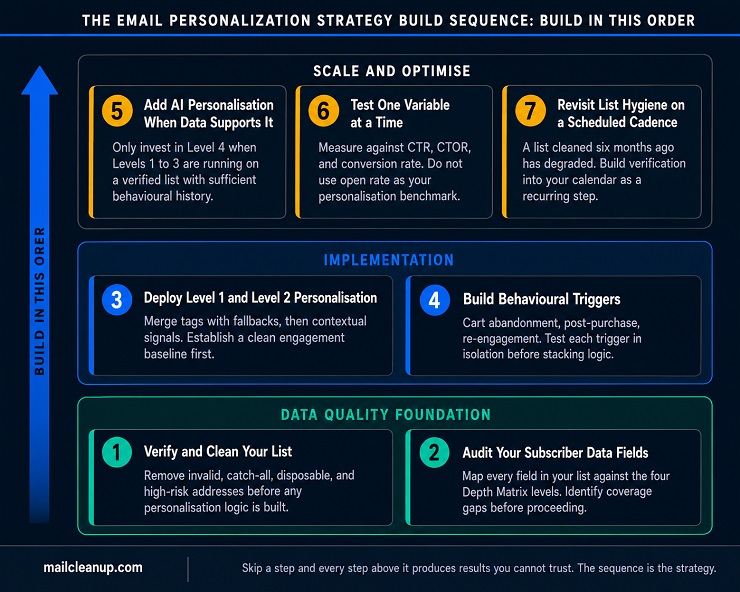
Follow this sequence in order. Each step is a prerequisite for the one above it. Cutting steps to move faster produces the kind of results that get blamed on strategy rather than on the skipped foundation work, which means the real problem never gets fixed.
- Verify and clean your list: Remove invalid, catch-all, disposable, and high-risk addresses before you build any personalization logic on top of your list. This is not Step 3 or Step 5. It is Step 1. Everything above it depends on the list being sound.
- Audit what subscriber data you actually have: Map every data field in your list or CRM against the four levels of the Depth Matrix. Identify where field coverage is strong and where it has gaps. This audit tells you which levels of personalization you can credibly deploy right now and where you need to collect more data before proceeding.
- Deploy Level 1 and Level 2 personalization on verified data: Start with name merge tags and a defined fallback for every tag. Add contextual personalization using the fields you confirmed in Step 2 are accurate and complete. Do not move to Level 3 until you have a clean engagement baseline from Level 1 and Level 2 sends to measure against.
- Build behavioural triggers once engagement baselines are established: With a verified list and reliable engagement data in hand, set up your primary behavioural triggers: cart abandonment, post-purchase sequence, browse recovery, and re-engagement. Test each trigger in isolation before stacking sequences or adding conditional logic.
- Add AI personalization only when your data volume and quality support it: AI personalization at Level 4 requires a substantial volume of clean, accurate engagement signals. If your list has been verified and your behavioural triggers have been running long enough to generate meaningful history, you have the data foundation. If not, wait. Investing in Level 4 technology on a Level 2 data foundation returns Level 2 results at a Level 4 cost.
- Test one personalization variable at a time and track post-open metrics: Use click-through rate, click-to-open rate, conversion rate, and revenue per email as your primary performance indicators. Open rate is not a reliable signal for personalization testing due to the MPP distortion covered earlier in this guide.
- Revisit list hygiene on a scheduled cadence: A list you verified six months ago has degraded. Addresses lapse, contacts go dormant, and lifecycle data goes stale. Build list verification into your programme calendar as a regular maintenance step, not an emergency fix triggered by a deliverability crisis.
How to Scale Your Email Personalization Strategy as Your Data Matures
The Depth Matrix is not only a framework for understanding where you are now. It is a roadmap for where you are going. As your list quality improves and your behavioural data accumulates, the next level of personalization becomes achievable. The milestone signals in the table below tell you when you are genuinely ready to move up rather than ready to spend on the next level.
| Current Level | Signal That You Are Ready to Move Up | Recommended Next Step |
|---|---|---|
| Level 1 Surface | Name fields are complete for 95% or more of your list; no merge tag token failures in your last three sends | Collect location and timezone data to add Level 2 contextual personalization |
| Level 2 Contextual | Contextual sends are outperforming generic sends on click-through rate; lifecycle segments are accurate and current on a verified list | Set up your first behavioural trigger, starting with cart abandonment or post-purchase sequence |
| Level 3 Behavioural | Triggers are running cleanly on a verified list; 60 or more days of clean engagement data is available as a baseline | Evaluate AI personalization tools and assess your data volume against the vendor’s minimum requirements |
| Level 4 Predictive / AI | AI model has sufficient clean training data; predictions are being validated against control groups in live sends | Expand AI capabilities: add individual send-time optimisation, then layer in predictive churn detection |
The most consistent mistake we see at this stage is skipping the milestone check and investing in Level 4 technology while Level 2 data quality problems are still unresolved. AI personalization does not fix a data quality problem. It amplifies it. Treat the milestones in this table as gates rather than suggestions, and your email personalization strategy will scale on a foundation that holds its shape. For the full picture of how personalization fits within your broader email programme, our email marketing guide covers the wider strategic context.
Your Email Personalization Strategy Starts With a List That Can Deliver It
Every level of the Email Personalization Depth Matrix we have built through this guide depends on the same foundation: subscriber data that is accurate, current, and tied to email addresses that actually exist. Without that foundation, Surface personalization misfires on wrong names and broken tokens. Contextual personalization places contacts in the wrong lifecycle stage. Behavioural triggers fire to addresses that generate hard bounces. And AI models train on distorted signals and produce predictions that mislead every strategic decision built on top of them.
The good news is that the fix is not a new platform, a larger team, or a more sophisticated technology stack. It is a clean list. When invalid, catch-all, disposable, and high-risk addresses are removed from your send pool, every layer of personalization above them performs more accurately. Your engagement metrics become reliable. Your sender reputation loop starts reinforcing rather than degrading. Your AI models train on signals that actually reflect how your subscribers behave, and the predictions they produce become genuinely useful rather than systematically misleading.
We built MailCleanup for exactly this starting point. Upload your list, run it through our multi-layer verification process, and download a verified list that your email personalization strategy can actually run on. No account required. No complicated setup. The sophistication of your personalization is only limited by the accuracy of the data beneath it. Get the data right first, and every level of the matrix becomes achievable.
FAQs About Email Personalization
What is email personalization?
Email personalization is the practice of using subscriber data to tailor the content, timing, subject line, and structure of an email to the individual recipient rather than sending a generic message to everyone. It ranges from simple merge tags such as a first name in a subject line through to AI-driven product recommendations and predictive send-time optimisation across your full subscriber base.
How is email personalization different from email segmentation?
Segmentation groups contacts by shared characteristics, such as location, behaviour, or lifecycle stage, and determines which category of message each group receives. Email personalization shapes what that message actually says to each individual within or across those groups. Segmentation is a campaign-level decision; personalization is a message-level execution. Both depend on accurate, verified list data to function correctly.
Does email personalization improve deliverability?
Yes, indirectly and significantly. Personalised emails drive higher click-through rates and lower unsubscribe rates than generic sends, both of which are positive engagement signals that mailbox providers use to assess sender trustworthiness. Stronger sender reputation improves inbox placement. However, this only works when the list is clean: personalization sent to invalid or inactive addresses dilutes those signals and can damage reputation instead.
What data do I need to start personalizing emails?
At minimum, you need a valid email address and at least one additional data field, such as a subscriber’s first name, for basic Level 1 personalization. For contextual and behavioural personalization, you need location, lifecycle stage, and engagement history. For AI-driven Level 4 personalization, you need a substantial volume of verified, clean engagement and transaction data that has been collected and maintained over time.
How does AI email personalization work?
AI email personalization uses machine learning models trained on your subscribers’ historical engagement and transaction data to make predictions at the individual level. These predictions power capabilities such as next-best-action content recommendations, individual send-time optimisation, predictive churn detection, and AI-generated copy variants. The accuracy of every prediction depends directly on the volume and quality of the data the models were trained on.
What are the most common email personalization mistakes?
The five most common mistakes are: using a merge tag without defining a fallback value, building personalization logic on top of an unverified list, treating segmentation and personalization as the same thing, testing multiple personalization variables simultaneously rather than one at a time, and measuring personalization performance against open rate rather than click-through rate, conversion rate, or revenue per email.
Can email personalization hurt my sender reputation?
It can, in two scenarios. If merge tag errors cause recipients to mark the email as spam out of confusion or irritation, your reputation takes a hit. More commonly, if personalised emails are sent to a list containing invalid addresses, the resulting hard bounces and diluted engagement signals degrade your sender reputation over time. The personalization itself is not the risk; the list quality underneath it is.
How do I start email personalization if I don’t have much subscriber data?
Start at Level 1 with what you already have: a valid email address and a first name field. Deploy name personalization with a reliable fallback value defined, measure click-through rate and conversion rate as your baseline, and use progressive profiling to collect one additional data field per subscriber touchpoint over time. Each new field you collect moves you toward the next level of personalization in the Depth Matrix.