

Your sending platform tells you when a message was accepted. It does not tell you which folder the provider chose afterwards, and that choice decides whether anyone reads the mail. Inbox placement testing answers that by sending your message to test mailboxes and reading where each copy landed.
The catch is what a clean result can hide. A seed test sees the folder one message reached at a few clean mailboxes at one moment. It has no view of the list the message is about to reach or of how your recipients have treated your mail. It also cannot say why a result looks the way it does. A clean report can therefore sit on top of an unsafe send, and a poor one can leave you guessing which fix to make. The first costs bounces, complaints and reputation. The second costs time spent on the wrong fix.
The answer is to stop treating the test as the whole check. How to test email deliverability comes down to one routine of six checks. The placement test comes last, so each check ahead of it removes a cause first. Few guides define a pass before the test or say what to do with the result after it. Here you set the pass rule first and end each run with a decision to send, fix or hold. Whether you use an email deliverability testing tool or mailboxes of your own, you will learn how far to trust each result. It starts with what a placement test cannot see.
TL;DR
- Email deliverability testing is a six-check routine, and inbox placement testing is its last check, the one that observes where the message lands.
- A seed-list test shows where one message landed at each tested provider, and it cannot see list quality, recipient history or company filtering rules.
- Authentication, reputation, list and message checks run ahead of the placement test, so a poor result points to a cause instead of a guess.
- A useful test uses a seed list that mirrors the providers a sender’s recipients use, and sends the real message through the real route.
- Placement results are read provider by provider, and a missing copy is traced through the wait, the seed and the refusal log first.
- A pass rule set before the test turns each result into a send, fix or hold decision, and a dated record builds the baseline.
What Inbox Placement Testing Shows and What It Cannot See
Your sending platform can report that the mail server at the other end accepted a message. It cannot report which folder that server chose next, and that second decision is the one your reader experiences. Inbox placement testing closes the gap for a single message by looking at the folder directly.
It is also easy to over-trust. A placement result describes one message, at one moment, at a handful of test mailboxes. What it leaves out decides how much weight you can put on it. Everything here concerns checks before a send; reviewing a whole sending program on a schedule is wider work with its own routine.
What an Inbox Placement Test Shows
An inbox placement test uses the message you actually plan to send. You send it to mailboxes you control, then check which folder each copy reached. Those mailboxes form a seed list: test accounts at the mailbox providers your recipients use, such as Gmail, Outlook and Yahoo. The same filters that judge your real mail then judge the copies.
Each copy ends up in one of four places:
- The main inbox, where your recipient sees it with everything else.
- A tab or category inside the inbox, such as Promotions in Gmail.
- The spam or junk folder.
- Nowhere the test can find, which you will see labelled missing.
Inbox placement testing reports mailbox by mailbox because each provider runs its own filters, so you can see where they disagree. A message that reaches the inbox at one provider and spam at another shows up as exactly that, not as an average.
The result is informative because each provider filters a test copy on what it can see about the sender and the message. That includes the sending domain and the route the message travelled, meaning the platform and IP address it was sent from. It also includes whether the message authenticated, meaning it proved it came from your domain, and what its content and links look like.
That is why placement is a different question from delivery:
- Delivery means the recipient’s mail server took the message in without bouncing it.
- Placement is the folder that server chose after taking it in, and that folder can be spam.
A message can be delivered in the technical sense and still sit in spam where no one reads it. Providers make that second decision on their own signals, and a sender controls some of it but not all. How that works is the subject of the dedicated post on what email deliverability covers.
You can run a small version by hand with a few mailboxes of your own at different providers. An email deliverability testing tool keeps a larger seed list and returns a fuller report. Inbox placement tools differ in how many providers they cover and how much they report about each result.
Reading the result: treat it as a sample of how this message was handled at these mailboxes at this moment. That makes it a strong signal for what to fix and a weak promise about what every subscriber will see.
What an Inbox Placement Test Cannot See
An inbox placement test cannot see your real list, your recipients’ history with your mail, or the filters they and their employers apply. It also cannot see what changes after the run, or the cause of a result. The test copy lands in a clean mailbox that expects it, while your real send meets all five.
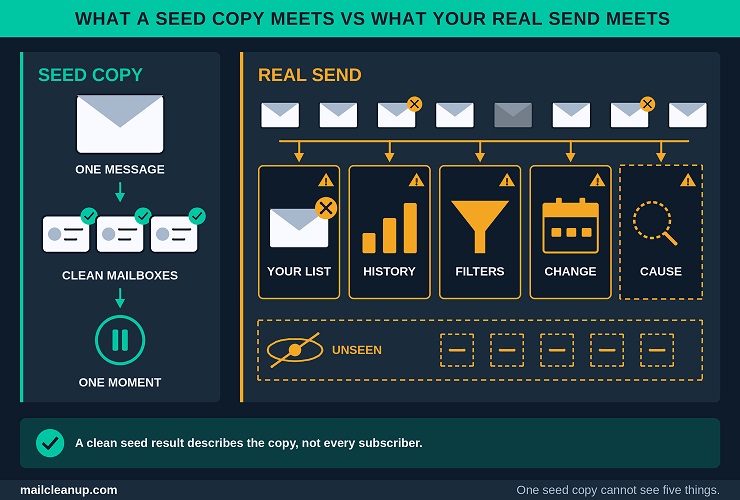
- Your actual list: seed mailboxes are valid, active and expecting mail. Addresses that bounce, never opted in or went quiet years ago do not appear in the test at all. Their cost arrives after the send, as bounces and complaints, and no seed result warns you about it.
- Recipient history: sender signals are not the whole story at Gmail. According to Google, it weighs what users report and other signals together with authentication when it sorts a message. How people have reacted to your mail can therefore shape where the next one lands. A seed mailbox has no history with you, so its result can differ from what an engaged or a disengaged subscriber sees. The test cannot say in which direction.
- Recipient and company filters: people set their own rules, and Gmail users can choose which inbox categories to show or switch categories off. A company mailbox can also sit behind a mail gateway, the system that filters mail before it reaches staff. A consumer test mailbox has no such gateway. A seed result shows you the provider’s decision, not the recipient’s final view.
- Change after the run: the result is one run on one day. Filters and sender reputation move. A clean run before a change to your list, template or volume says little about the send that follows it.
- The cause: the test reports where a copy landed, not why. Unless it also reports authentication or content findings, a spam result tells you something is wrong without naming which of several causes to fix.
None of these limits makes inbox placement testing less useful; they decide what else you need around it. Your list needs its own check, because a seed list cannot stand in for it. Engagement shows up in complaint and bounce trends and in provider dashboards. Cause comes from the authentication, reputation and message checks. That is why we run placement testing as the last of six checks, not the only one.
How Inbox Placement Testing Differs From Email Deliverability Testing
Email deliverability testing is the whole routine you run to decide whether a message is ready to send. Inbox placement testing is one method inside it. The routine covers authentication, reputation, list, message content and placement, while the method looks at the folder a message actually reached. People often use the two terms as if they were interchangeable, and they are not.
Set side by side, the two answer different questions:
| Inbox placement testing | Email deliverability testing | |
|---|---|---|
| Question it answers | Where did this message land? | Is this send ready, and what is in the way? |
| What it observes | Which folder each test copy reached, tabs included | Authentication, reputation, list, message content and, last, placement |
| What it cannot tell you | Why a copy landed there, or how your list will behave | What every subscriber will see |
| Output | A result per mailbox | A send, fix or hold decision |
Placement testing answers where. The rest of email deliverability testing answers why, and whether to send. Neither works well alone, which is why you treat them as parts of one routine.
Part of the confusion comes from labels. Some email deliverability test tools call a spam-score check, an authentication lookup or a reputation lookup a deliverability test. A spam-score check rates a message’s spam risk from its content and setup, and the others read records and lists. Each is useful, but none observes a folder, so a pass on one of them does not tell you where the message landed. In the other direction, a placement report without authentication, reputation or list findings tells you where a message landed but not why.
Matching the method to your question keeps this simple:
- If you want to know where one message landed, use an inbox placement test.
- To learn why it landed there, work through the authentication, reputation, list and message checks.
- When you need to decide whether the send should go, run all six checks. Judge them against a pass rule, which is the result you decided counts as a pass before the test.
How to Test Email Deliverability Before Every Send: Six Checks in Order
How to test email deliverability before a send comes down to six checks and one decision. You run the checks in a fixed order, from the cheapest and most decisive to the one that spends a send. Each check removes a cause before you read the next result. That is what lets inbox placement testing point at something specific, not at everything at once.
The Six Pre-Send Checks at a Glance
The six checks are the target, authentication, reputation, the list, the message and the inbox placement test, run in that order. That is how to test email deliverability without guessing, because each check ends in a pass rule: the result that lets you move on. A failed check stops the routine until you fix it.
- Set the target and pass rule: decide the message, the sending route, the mailboxes and the pass rule before you send anything. Writing the pass rule first keeps you from grading the result to fit it. It passes once the target is written down.
- Check authentication in the message you receive: send a test to a mailbox you control. Read the SPF, DKIM and DMARC results on the copy that arrives. Those are the three records that show a message really comes from your domain. It passes when all three show pass and the passing domain matches your From address.
- Check reputation signals: look up whether your sending domain or IP address appears on a blocklist. A blocklist is a public list that providers use to refuse or distrust mail. Then read what the mailbox providers’ own dashboards report. It passes when no list names you and no dashboard shows a failing status.
- Check the email list: confirm that the addresses you are about to send to are verified and current. Hold back any segment you cannot vouch for. It passes when no unverified or long-dormant segment goes into this send.
- Check the message: run a spam-score test, then check the links, the unsubscribe path and the plain-text version. It passes when the test shows no authentication or link warnings and the unsubscribe works.
- Run the inbox placement test: send the real message through the real route to a seed list that matches your audience. Then read the result provider by provider. It passes when every provider meets the rule you wrote in check one.
Inbox placement testing is the sixth check, and the five before it make its result readable. After it comes one decision, send, fix or hold, which goes into a dated record so the next test has something to compare with.
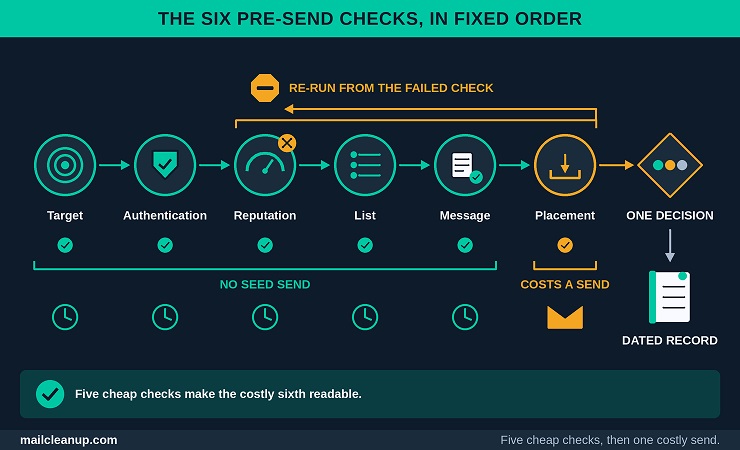
Checks one to five cost time but no seed send, while check six costs a send. The order therefore also runs from cheap to costly. Where nothing has changed since your last send, checks two and three are a quick re-confirmation. Checks four and five need a fresh look, because the list and the message are the parts most likely to change between sends.
Why the Order of Email Deliverability Checks Matters
The order of the checks is the reason a placement result means something. Each check removes one possible cause, so the causes left by the time you read the seed results are fewer and easier to name. Email deliverability testing in a fixed order turns a bad result into a short list of suspects instead of a long one.
The target and pass rule come first because a result has no meaning until you know what counts as passing. A Promotions result is acceptable for a sale email and a miss for a password reset. You want that decided before the result arrives, not after.
Authentication and reputation come next because they are cheap, need no seed send, and fail loudly. Mail without authentication is likely to be rejected, according to Google’s help page. Postmaster Tools, Google’s free dashboard for senders, also names a blocklisted domain or IP among its delivery-error reasons. If either check fails, a poor placement result adds nothing, because you already know a cause and fixing it comes before more testing.
Stop rule: when a check fails, stop at that check, fix it, and then re-run that check and every check after it.
The list and message checks come before the placement test for a different reason. The seed copies cannot see your list, and a spam-score test cannot see where mail landed. Each covers something the placement result would otherwise have to carry. Checking them first keeps the test from explaining what it cannot observe.
Inbox placement testing sits last in that order because it spends a send and depends on all five checks before it. When they have all passed and a provider still routes the copy to spam, the remaining causes are narrower. They are how that provider’s filter reads this content, or a provider-specific view of your sender that the checks cannot show. That narrowing is what the order buys you.
Set the Test Target and Pass Rule First
In email deliverability testing, writing the target down is the step that is easiest to skip and hardest to repair afterwards. A target is five decisions you make before anything is sent. It also tells inbox placement testing what to measure and what to judge the result against.
- Message and stream: the exact email you plan to send, and the stream it belongs to. A stream is a type of sending: a promotional campaign, a lifecycle message, a transactional message such as a receipt, or cold outreach. Each stream has its own route and its own tolerance for a miss.
- Sending route: the sending domain, the tracking domain your links use, the IP address you send from, and the platform account. A test through a different route tells you about that route, not yours.
- Mailbox mix: the providers your recipients actually use. Count the addresses in your list by domain, then group them by mailbox provider. That way the test reflects your audience and not an even spread.
- Pass rule: the outcome that clears the send, per provider and per stream, written before you run the test.
- Ramp status: whether this send comes from a new domain or IP address, or follows a large jump in volume. A ramp is tested more often and held to a stricter rule.
The pass rule is the decision that varies most between senders, because it depends on what a miss costs you. These starting points show how it shifts by stream:
| Stream | Starting pass rule | Why it differs |
|---|---|---|
| Promotional campaign | Authentication passes; no spam or missing; Promotions tab acceptable | Offers usually belong in Promotions for users with categories on |
| Lifecycle or transactional | Authentication passes; no spam or missing; a tab only if recipients check it | An expected account message in an ignored tab is a miss |
| Cold outreach | Authentication passes; no spam or missing; test every batch | Cold outreach tends to leave less room for error |
The table gives starting points, not thresholds. You tighten or loosen each row as your own results show what a miss costs.
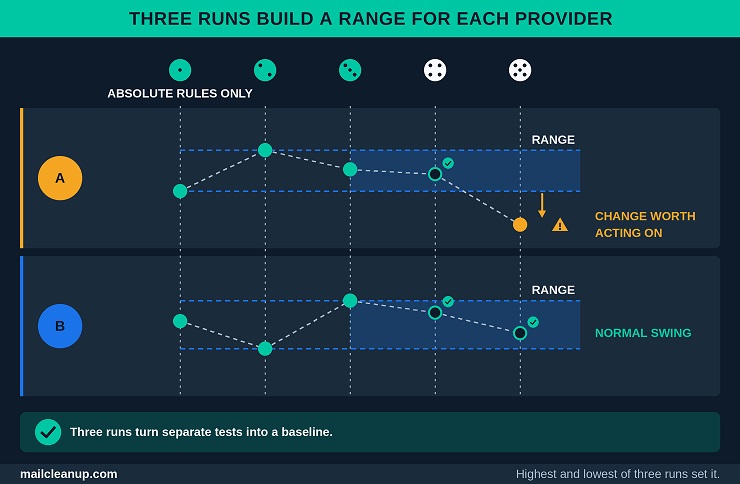
The first run you ever do has nothing to compare with, so it is a baseline. Apply only the absolute rules on that run: authentication passes, nothing lands in spam and nothing is missing. Keep every other result as the reference for the next run.
Example target: the monthly newsletter, sent from the mail subdomain through the email platform to Gmail, Outlook, Yahoo and business mailboxes. It passes when authentication succeeds, no copy lands in spam or goes missing, and Promotions is acceptable at Gmail.
Email Deliverability Testing Before the Placement Test: Four Checks That Remove Known Causes
How to test email deliverability well starts before the seed test. Four checks come first, and each removes a cause that inbox placement testing cannot isolate on its own. Authentication and reputation show whether providers already have a reason to distrust you. The list and the message show whether you are about to give them one.
Check Authentication in the Message You Receive
Send a test through your normal route to a mailbox you control. Then read the authentication results that the receiving provider recorded on the copy. Those results are the provider’s own verdict, so they tell you more than a setup page that confirms your records exist. Note which folder the copy landed in. One mailbox is a thin sample, but it previews what inbox placement testing will show.
Here is how to read them in Gmail:
- Send the test through the real route: use the same platform, sending domain and settings as the real send. Address it to a Gmail mailbox you control. A test sent any other way tells you about that other way.
- Open the full header: in Gmail on a computer, open the message, click More next to Reply, then choose Show original. The full header then appears in a new window, as Google’s help page describes. In other mailboxes, you will find an equivalent, often labeled View Message Source or View Raw Message.
- Find the Authentication-Results line: it is where the receiving system records its verdict. Each method appears with a result beside it, so you can read all three at a glance.
- Read the domain beside each result: each result carries a domain. DKIM names the one that signed the message, and SPF names the one it checked.
- Compare both with your From address: the From line shows the domain your recipients see, and the passing results should match it.
A result on its own is not enough. DMARC passes a message only when SPF or DKIM passes and the passing domain matches the From address. That match is called alignment, and a message that fails SPF and DKIM together fails DMARC too. These are the results you will meet:
| Result | What it means | What to do |
|---|---|---|
| pass | The check succeeded for that method | Note the domain beside it and compare it with your From address |
| fail | The check ran and the message did not meet it | Stop and fix the record or the signing setup |
| none | No record or signature was found to check | Set that method up for this sending route |
| softfail or neutral | SPF only: the record says the sending server is probably not authorized, or makes no claim | Check that your platform is listed in the SPF record |
| temperror or permerror | The check could not finish: a temporary fault, or a permanent error such as a broken record | Send again after a temporary fault; correct a broken record |
Most of the work sits in the domain beside a pass, not in the pass itself. A signature can verify for your sending platform’s domain and still not count toward your DMARC result. Each outside service you send through should sign with its own DKIM key on your domain, as Google advises.
Quick check in the Gmail app: on Android, open View details, then the security details, and look for Mailed by and Signed by lines. In Gmail, a message counts as authenticated when both appear, with the sending domain on the Signed by line. A question mark beside your name means Gmail could not authenticate the message.
The check passes when SPF, DKIM and DMARC all show pass and the domain that passed matches your From address. Google’s compliance dashboard lists SPF and DKIM authentication among the requirements for every sender. It lists DMARC authentication for bulk senders only. A bulk sender, in Google’s definition, is one that sends roughly 5,000 or more messages to Gmail accounts in 24 hours. Yahoo sets its own requirements too. Google and Yahoo bulk sender requirements sets the two side by side.
SPF lists the servers allowed to send for your domain, and DKIM signs each message so a receiver can verify it. DMARC tells receivers what to do when neither lines up with your From address. For how the three work together and what each provider expects, turn to email authentication.
The header holds far more than these three results. It records each server the message passed through and when, plus the sender, the subject and a unique message ID. Reading every line is a skill of its own. A separate post on [how to read an email header in full] teaches that skill.
Check Blocklists Before You Test
Before you test, look up your sending IP address, your sending domain and the domains in your links on public blocklists. A listing can block or divert mail whatever the message says. In email deliverability testing, a blocklist lookup is among the cheapest checks. Inbox placement testing from a listed sender then mostly confirms what that lookup would have shown.
Three lookups cover the ground:
- Your sending IP address, the address your platform sends from. On shared infrastructure a listing can belong to the platform’s shared pool of addresses rather than to you, so raise it with the platform.
- Your sending domain, the one in your From address and the one that signs your mail.
- Your link domains, meaning your tracking domain and landing pages. Some blocklists track the domains that appear in a message’s links, not only the sender.
A clean lookup shows that none of the lists you checked names you at that moment. It does not show how any one provider rates you, because providers also keep internal lists that public lookups do not show. Postmaster Tools reports blocklist rejections for Gmail only, so a clean Gmail report does not clear your IP address elsewhere.
This check passes when no list names your IP address, your domain or your link domains. A listing stops the routine, and it is worth treating as a symptom. Complaints, bad addresses, broken authentication or a sudden volume spike can all trigger one. To get delisted and stay off the lists afterwards, follow blocklist check and removal.
Read Provider Dashboards for What They Measure
Provider dashboards show how a mailbox provider rates your mail in aggregate, after the fact. They do not show where a single message landed, which is why they complement inbox placement testing instead of replacing it. In email deliverability testing they are the history half, and the seed test is the single-message half. Google offers Postmaster Tools for mail sent to personal Gmail accounts. Microsoft and Yahoo publish their own sender tools for their mailboxes, SNDS and Sender Hub.
Of its eight dashboards, five areas matter for this check:
- Compliance status: shows whether your sending meets Google’s sender requirements, rated Compliant, Needs work or No data found. No data found means the dashboard could not evaluate that requirement from the mail it received. A fix can need as long as seven days to show up.
- Spam rate: the share of your mail that recipients mark as spam after it reaches their inbox. If Gmail routes much of your mail to spam by itself, the rate can look low, because recipients see less of your mail.
- Delivery errors: the share of authenticated messages that Gmail rejected or temporarily failed, with the reason. Reasons include rate limiting, suspected spam, low reputation and public blocklists.
- Authentication: the percentage of your mail that passes each of SPF, DKIM and DMARC. When both are set up correctly, DKIM and DMARC typically pass 95% of the time or better, according to Google.
- Reputation: the help pages Google publishes still describe IP and domain dashboards that rate your sending as Bad, Low, Medium or High. Google has said it will retire both dashboards and has postponed retiring the old interface. It also says reputation is one factor among many in deliverability.
None of these shows a folder. They report what the provider saw across many messages, and the data usually refreshes within a day but can lag, according to Google. Days with low volume can leave gaps. A dashboard therefore describes your recent sending, not the message that is about to go out. If most of your list uses company mailboxes, a dashboard for personal Gmail accounts describes only a small part of it.
You pass this check when no dashboard shows a failing status or a climbing error rate. Your spam rate must also stay inside the limits Google sets. That user-reported rate has its own denominators and thresholds. If yours is climbing, spam complaint rate shows how it is calculated and what moves it.
Check the Email List You Are About to Send To
Confirm before the send that the addresses on your list are valid and that the people behind them still want your mail. Inbox placement testing can check neither, because its mailboxes were set up to receive mail. The check passes when every segment in the send is verified and none has sat dormant past the limits you set in advance. Side by side, the two checks cover different ground:
| Seed test | List check | |
|---|---|---|
| Addresses covered | A handful of test mailboxes | Every address on the send list |
| Risk it catches | Filtering of this message at a few providers | Bounces, dormant addresses and people who never opted in |
| When the damage shows | In the report, right away | After the send, in bounce and complaint numbers |
| What it cannot tell you | Whether your list will bounce or complain | Where the message will land |
In email deliverability testing, each check covers what the other cannot, so passing one does not excuse skipping the other. The list carries two separate risks. The first is whether the address still exists, because an address that no longer exists will bounce when you send. The second is willingness: a person who never confirmed, or no longer wants your mail, can mark it as spam. User-reported spam is exactly what Google’s spam rate measures. Google’s own best practices for lowering that rate are mostly about the list. It asks senders to mail only people who want the messages, confirm each address before subscribing it, and consider dropping recipients who stop reading.
Verification settles the first risk. A verification service checks each address without sending a real message to it, looking at its format, its domain and whether the mailbox exists. It flags the ones that would bounce. That is why verification belongs before your send, not after.
At MailCleanup, we run bulk email verification as a file upload: upload a CSV, get a cleaned list back, no account needed. Holding back segments you cannot vouch for settles the second risk. How long a segment may sit silent depends on how often you send. Set that limit once and write it into your pass rule. The dedicated post on how to clean email lists walks through the verification and engagement layers for every address type.
Run a Spam-Score Check With an Email Deliverability Testing Tool
Run the finished message through an email deliverability testing tool that scores its spam risk and lists what it flagged. The score is a rule-based estimate of how the message looks, and it does not show where the mail landed. A typical score reads four things:
- The content and structure of the message, including how its HTML and text parts are built.
- The links, and the domains they point to.
- The headers and authentication results, in email deliverability test tools that receive your test message.
- Setup details around the sending domain, such as its records.
It does not read your list, your reputation at each provider or how recipients react. Showing the folder is the job of inbox placement testing. Scores differ from tool to tool, because each uses its own rules and scale. Compare results from the same tool over time, not against a number from another one. Treat each flag as a lead to weigh against the message you want to send, not as a verdict.
A rule-based filter adds points for each rule a message trips and compares the total with a limit. Mailbox providers layer reputation and recipient behavior on top of rules like these, which is why a clean score does not guarantee the inbox. How that layering works is explained in the post on [how spam filters score a message].
Three message checks sit beside the score:
- Links: open each link and confirm it goes where you expect, without a redirect you do not control. Links and some other content can raise the chance that Gmail treats a message as spam, according to Google.
- Unsubscribe: click the unsubscribe link in the body and confirm it works. For subscription mail, such as newsletters and promotions, Google asks senders to process each unsubscribe request within 48 hours. Its compliance dashboard also checks one-click unsubscribe for bulk senders. One-click works through two headers your platform adds, List-Unsubscribe and List-Unsubscribe-Post, so look for both in the full header. One-click unsubscribe sets out the standard and what each provider requires.
- Plain-text version: check that the message carries a plain-text version as well as the HTML one. Mail apps that cannot show HTML fall back to it. A missing text version does not fail the check, but it is worth fixing before you send.
Content flags are the part of a score people fixate on. They can also mislead, because they describe how the message reads, not how your sender is rated. A closer look at which words filters penalize has its own post on [which words trip spam filters].
The check passes when the tool flags no authentication or link problems and the unsubscribe works. Run it again with the same email deliverability testing tool after each fix, so the scores stay comparable.
How to Run an Inbox Placement Test, Step by Step
At the placement stage, how to test email deliverability well comes down to one idea: make the test resemble the real send. Three choices decide whether it does: who receives the copies, how you send them and when the test runs. Get them right and you have a repeatable measurement from inbox placement testing, not a one-off guess.
1. Build a Seed List That Matches Your Audience
In inbox placement testing, a seed list should mirror the providers your recipients use. The result speaks only for the providers it includes. Count your list by mailbox provider, then turn those shares into a seed mix. Two designs are common, and they answer different questions:
| Weighted seed list | Equal-share seed list | |
|---|---|---|
| Built from | Your list’s provider mix | The same number of seeds per provider |
| Best at | Estimating how your audience as a whole is served | Finding which provider has a problem |
| Weak spot | A small provider’s failure can hide inside a good overall result | The overall result overstates small providers |
Use both designs for different jobs. The weighted list gives you the headline read, and the equal-share list shows you where to look when that read is poor.
Illustration: suppose half your addresses are at Gmail and three in ten at Outlook. A ten-seed weighted list would then use about five Gmail seeds, three Outlook seeds and two others.
- Provider mix: give each large provider seeds in proportion to its share of your list. Give every provider you want a read on at least one.
- Company mailboxes: if much of your list is business addresses, include some. A company domain does not name its mailbox host. Its MX record, the DNS entry that says where mail is delivered, usually does, unless a mail gateway hides it.
- Your own mailboxes: keep a few seeds that you own, so you can cross-check what a service reports against what you see yourself.
- Inbox settings: people can switch Gmail categories off. Set your own Gmail seeds to the default inbox type if you want Promotions to show as a tab. Note the setting in your record.
When you use a service, check which providers its seed list covers and whether it can report in proportion to your audience. Inbox placement tools may differ in both, and a list that omits a provider you send to cannot speak for it.
A cold sender faces a different problem. A cold recipient has no history with you either. A seed mailbox’s blank record is therefore closer to reality than it is for an engaged list. Even so, a handful of seeds is a thin sample, and cold sending adds its own volume limits and domain choices. If you send cold, start with cold email deliverability, which covers both.
2. Send the Real Message Through the Real Route
Inbox placement testing measures whatever route you give it, so give it the real one. Send the message you plan to use, through the route you plan to use, and send it only to the seed addresses. A test that differs from the real send in any way tells you about that difference, not about your send.
- Use the real campaign path: build the test in your normal platform. Use the same sending domain, template, links and unsubscribe settings as the real send. Many platforms also offer a send-test button. Check that it uses the same sending domain and route as a campaign, because some do not.
- Keep the audience to the seeds: put the seeds in their own audience, so no customer receives the test.
- Mark the message so you can find it: add a short code to the subject or body. Then each copy can be matched to its run. Services may add one themselves. Keep it small, because anything you change about the message changes what you are testing.
- Send once and leave it alone: do not edit or resend while results are still arriving. Extra copies blur which send produced which result.
- Wait before you read: copies take time to arrive, and a copy that has not arrived yet is not a missing one. Use the window your service states. For a hand test, look again after a longer wait before you call anything missing.
If your platform cannot send a test through the real route, write that in your record. The result then describes a different route from the one your subscribers get.
3. Pre-Campaign or In-Line Inbox Placement Test
An inbox placement test can run at two moments, and each answers a different question. A pre-campaign test sends to the seeds before the real send, so you can still change the message or the route. An in-line test adds the seeds to the live send, so the result shows you what happened to that send. Side by side:
| Pre-campaign test | In-line test | |
|---|---|---|
| When it runs | Before the real send | Inside the real send |
| What it shows | How this message is likely to be treated | How this message was treated |
| Can you still change the send? | Yes | No, the result informs the next send |
| Best for | Gating a send with your pass rule | Keeping a record of large or recurring sends |
A pre-campaign test sends a handful of copies, so it cannot show you how a provider reacts when thousands arrive together. Postmaster Tools lists rate limiting among the delivery errors, for senders whose volume looks abnormally high to Gmail. An in-line test sees the real volume, which is why it tells you what a pre-campaign test cannot.
- If you can wait before sending, run a pre-campaign test and apply your pass rule.
- If the send is large or recurring, add the seeds in-line as well and log what comes back.
- If the send cannot wait, rely on the other checks, add the seeds in-line and keep the result as a record for next time.
An email deliverability testing tool may support one timing or both, so confirm which before you plan your inbox placement testing around it.
How to Read Inbox Placement Testing Results
How to test email deliverability does not end when your report arrives. A placement report looks simple: a list of mailboxes with a folder beside each. The same table can mean different things, depending on how the copies were sent, who owns each mailbox and how long you waited. Reading inbox placement testing results well is a separate skill from running the test.
Inbox, Tab, Spam and Missing: What Each Result Means
Inbox placement testing sorts each copy into inbox, tab, spam or missing, and each result calls for a different first move. Missing is the one you are most likely to misread, because it is not a verdict. These are the four results and the first move for each:
| Result | What it means | First move |
|---|---|---|
| Inbox | The copy arrived in the main inbox view | Compare it with your pass rule and the last run |
| Tab | The provider filed the copy in an inbox category, such as Promotions in Gmail | Check whether your pass rule accepts that tab for this stream |
| Spam | The provider filtered the copy out of the inbox | Treat it as a fail at that provider and fix the earliest open check |
| Missing | The test did not observe the copy | Rule out a setup gap, the wait and a refusal before blaming a filter |
A tab is not spam. In Google’s description, Promotions is the home of deals, offers and similar marketing messages. Gmail sorts mail into categories for people who keep the default inbox type. A reader who switches categories off sees the same copy in the main inbox. One message can therefore read as a tab at one of your seeds and as inbox at another.
Whether a tab is acceptable depends on your stream and your pass rule. A promotion in Promotions is ordinary, while an account message in a tab recipients ignore is a miss. [Why Gmail files mail under Promotions] explains how Gmail decides what counts as promotional.
Work through a missing copy in this order before you read it as a block:
- The wait: check whether the window has closed. A copy still on its way is pending, which is not a result.
- The seed: confirm the address is spelled right, the mailbox is not full and your platform did not suppress it.
- The refusal: look in your platform’s log for a bounce on that address. A permanent refusal means the provider will not take the copy, and a temporary one means it may still arrive.
- The provider’s view: in Postmaster Tools, the Delivery errors dashboard shows rejected and temporarily failed Gmail mail, with reasons. It does not show message by message, so use it to confirm a pattern around your test.
- The pattern: if one provider is missing, suspect that provider or that mailbox. If every provider is missing, suspect your send or your seed setup.
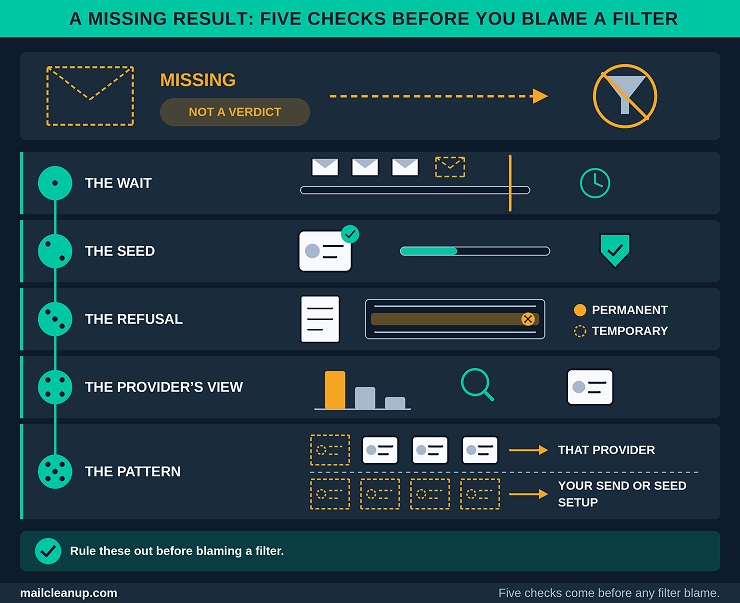
Only when those steps come up empty does a missing copy point to silent filtering. A refusal and a silent discard look different from the sender’s side. A refusal returns a code with a reason, while a silent discard returns nothing. Email delivery failure explains how to read those codes. It also separates a delivery failure from a deliverability failure.
Read Inbox Placement Results Provider by Provider
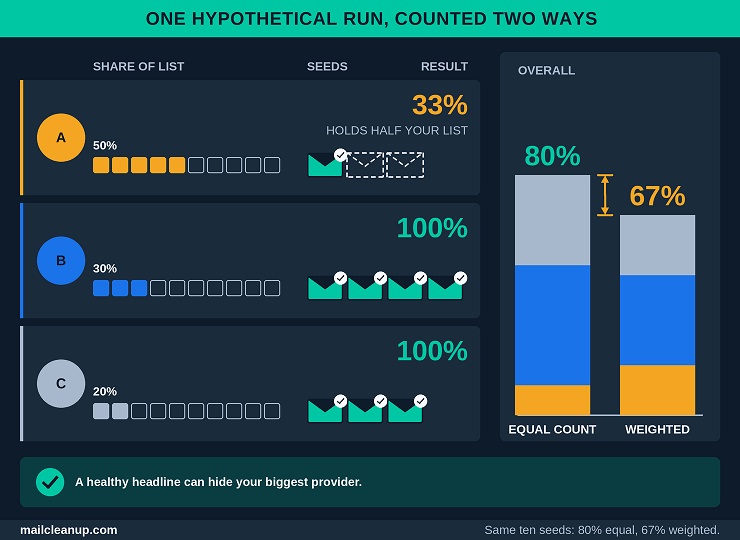
Inbox placement testing reports providers separately because each runs its own filters. A blended number can hide the one provider where your mail is failing. The overall figure also counts every seed equally, which misleads when your seeds are not in proportion to your list. Here is a hypothetical run to show the gap:
| Provider | Share of your list | Seeds | Copies in the inbox | Provider result |
|---|---|---|---|---|
| A | 50% | 3 | 1 | 33% |
| B | 30% | 4 | 4 | 100% |
| C | 20% | 3 | 3 | 100% |
Counted equally, 8 of 10 seeds reached the inbox, an overall 80%. Weighted by share of your list, the result is about 67%, because the provider holding half your list placed only one of three copies. The headline looked healthy while the biggest part of your audience was not.
- Small samples: with three seeds at a provider, one copy moves that provider’s result by 33 points. Read a single copy as a hint, and look for the same result across runs before you act.
- Your own baseline: compare each provider with its own previous runs of the same message type, using the same seed list. A change from last time tells you more than a number measured against another sender.
Published placement figures rarely line up with your seed percentage. Sources divide by different bases, such as all mail sent or only mail delivered, so the same inbox count can give different rates. Your seed percentage has a base of its own, the seeds. How each source defines the rate, with the formulas and the benchmarks, is laid out in email deliverability rate.
A provider’s own rating is a different kind of evidence. It summarizes your history at that provider, while a seed copy shows one message at one moment. A clean seed result beside a poor rating means your history is still weighing on you. A poor seed result beside a good rating points at this message or this moment. Email deliverability score compares how each provider rates a sender and why the scales differ.
Consumer and Business Mailboxes in Inbox Placement Results
A consumer test mailbox and a company mailbox can give different results for the same message, so read the two groups separately. A company mailbox can sit behind a mail gateway and the company’s own rules, and a consumer test mailbox meets neither. Inbox placement testing with consumer seeds alone therefore speaks for consumer mailboxes.
- Label each seed: record whether it is a consumer or a company mailbox, so you can split the report. A single blended list hides the difference.
- Read the groups against each other: if consumer seeds reach the inbox and company seeds do not, suspect company-level handling first. Some company systems hold suspect mail in a quarantine that only an administrator can release, which a test sees as a missing copy.
- Use the mailbox you already have: your own work mailbox is a business seed. It reflects your company’s gateway and policies, not every company’s, so treat it as one example.
If business addresses make up a large share of your list, give that group its own pass rule. Consumer results cannot clear a business audience, because they do not pass through the layer that matters most there.
When an Inbox Placement Result Is Not Evidence
A result is not evidence when the test did not match the real send, had not finished or was too small to mean much. Check which of these applies before you act on a surprise:
- An unfinished run: copies still arriving are pending, not missing. Read the report after the window your service states has closed.
- A changed seed list: adding or dropping seeds moves the percentage even when your mail has not changed. Compare runs made with the same seeds, and note any change to the list in your record.
- A different route: a copy sent through a test path, a different domain or a send-test button describes that path, not the real one.
- A single run: one run is one sample. In email deliverability testing, repeat a surprising result before you act on it.
- Two services that disagree: each uses its own seeds and rules, so one email deliverability testing tool can contradict another. Compare within one service, and use your own mailboxes to break a tie.
- A seed that behaves oddly: one seed that lands differently from its siblings at the same provider needs a look at the mailbox itself. Check its filters and its storage.
Repeat an inbox placement test when a result surprises you, but do not repeat a failure that already has a known cause. A failed authentication result needs a fix, not a second send. Inbox placement testing earns trust through repetition: a result that holds across runs is evidence, and one that appears once is a question.
Turn Inbox Placement Testing Results Into a Send Decision
How to test email deliverability ends in a decision, and the decision has three outcomes: go, fix or hold. Inbox placement testing supplies the evidence, but the rule you wrote before the test makes the call. That keeps you from bargaining with a result you do not like.
The Go, Fix or Hold Rule
A run ends in one of three decisions: go, fix or hold. Two questions drive the decision: was a pass rule broken, and can you fix the cause before the send is due? These are the four situations you will meet:
- Go: every check passes and every provider meets its pass rule. Send, and log your run.
- Fix: a check fails and you can correct it before the send. The same goes for spam or missing at a provider that one of the five checks accounts for. Correct that check, then re-run it and every check after it.
- Hold: a provider shows spam or missing and none of the five checks explains it. A failure whose known cause cannot be fixed in time also lands here. Your send waits, and the rule does not move.
- Repeat once: a provider drops under its own range while no pass rule is broken. Repeat the inbox placement test, and if the drop holds, decide fix or hold on the cause you find.
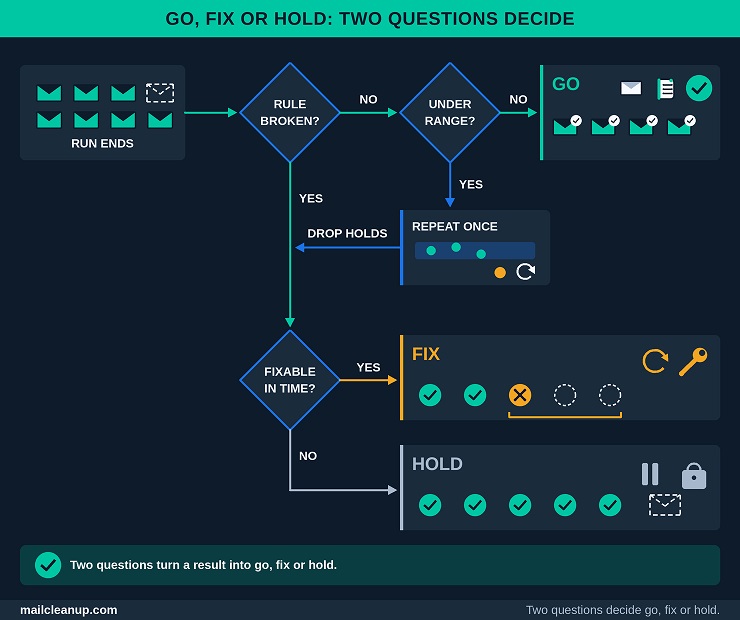
Fix and hold differ in one thing: whether the cause is known and fixable in time. A hold is not a failure of the routine. It is the routine doing its job, which is to stop a send you cannot yet vouch for.
Your own range in inbox placement testing is the baseline that tells you what counts as a real drop. After three runs of the same stream, note the highest and lowest result for each provider. A result inside that range is normal swing, and a result under it is a change worth acting on. A first run has no range yet, so apply only the absolute rules and treat every other result as the start of your record.
Three habits keep the rule honest:
- Name an owner: give every hold an owner and a date for the next run, or it turns into a quiet cancellation.
- Change the rule between runs: if you loosen a rule to let a send go, record the change and the reason. Make the change before the next run, not in the middle of one.
- Move the send, not the rule: when a date is fixed, a smaller send to your most engaged segment can protect it. That is a new send with its own pass rule, not a way around the old one.
A published average is not a pass mark. Benchmarks come from different methods, such as seed tests and commercial sending volume, and from different formulas, so their percentages differ widely. They also describe other senders, not your last run. The benchmarks themselves, by provider, industry and region, sit in state of email deliverability.
Which Check to Repeat After Each Result Pattern
In email deliverability testing, a pattern is a clue. Inbox placement testing tells you where the trouble sits. Because providers filter on their own, the shape of a result points at one check. An email deliverability testing tool that reports each provider separately makes that shape easy to see. Match the pattern you see to a row, repeat that check, and leave the rest until it is settled.
| Result pattern | First check to repeat | What it points to |
|---|---|---|
| Spam at every provider | Authentication, then blocklists | An identity or listing problem |
| Spam at one provider | That provider’s dashboard | That provider’s view of your sender |
| Missing at every provider | Seed setup, then platform log | A setup fault or a refusal |
| Missing at one provider | That provider’s errors and your log | A block or throttle there |
| Tab instead of inbox | Message check, then pass rule | How the message reads, or a wrong rule |
| Clean seeds, then bounces or complaints | The list check | Risk the seeds could not see |
| Worse everywhere, no check failing | Last passing message, same route | The message or the route changed |
The first two rows show why provider spread matters. A problem at every provider usually sits in something every provider sees, such as your identity or a listing. A problem confined to one provider is about that provider’s own view of you. Postmaster Tools, SNDS and Sender Hub are where each provider shows its side.
Two rows need care. A tab is a placement, not a fault, so judge it against your pass rule before you touch the message. A clean seed result followed by bounces or complaints is the list at work. The seeds could not see it, which is why the list check is part of the routine.
Each provider builds its view of your sending from complaints, bounces, engagement and history, and that view recovers slowly. One provider’s problem therefore needs a fix aimed at that provider. A fix aimed at Gmail does not automatically clear a problem at Yahoo, because the two keep separate records. For the mechanics of how a damaged view recovers, read email sender reputation.
Last-passing-message test: send the last message that passed through today’s route to the same seeds. If it now fails, the route or your standing has changed. If it passes, the message is the cause.
When two rows fit at once, repeat the check that comes first in the routine. Repeating a check means running it again on the same message and route after you fix something. Resending the whole test in the hope of a different answer proves nothing. Dashboards lag by a day or more, so a fix to your reputation signals needs a wait before it shows.
When the fix is a change to your program, order matters. The routine here orders checks for a single send. Building or repairing a program follows a different order: authentication, then warm-up, then list quality, then sending behavior, and monitoring last. Why each layer depends on the one before it is the argument made in ways to improve email deliverability.
Keep a Dated Test Record
Write each run down on the day you run it, because the record is what turns separate tests into a baseline. The entry takes a few minutes and answers the question that comes up when a result changes: what was different last time? These are the fields to fill:
| Field | What to write |
|---|---|
| Date and message | Date, message name and version |
| Stream and route | Stream, sending domain, IP or pool, platform account |
| Seed list | List version, seeds per provider, company mailboxes marked, your own Gmail inbox setting |
| Timing | Pre-campaign or in-line |
| Check results | Pass or fail for the five checks, with notes |
| Results by provider | Inbox, tab, spam and missing counts |
| Decision | Go, fix or hold, and the reason |
| Next | What you changed, and the next run date |
Each field answers a way a run goes wrong. The seed list version explains a percentage that moved when your mail did not. The route explains a result that describes the wrong path. The decision line explains, even months afterwards, why a send went out or waited.
- One change at a time: log what you changed between runs, and change only one thing. Two changes make the result impossible to read.
- Failures and fixes together: keep a failed check, its fix and the retest in the same entry. Then the pattern behind repeat problems shows up.
- Old entries stay: drift shows only in a long record, so do not clear old runs when a new baseline forms.
- One shared place: keep the record where everyone who sends can read it. A shared sheet or document is enough.
An email deliverability testing tool may keep its own history, but keep your own record as well. A tool’s history does not hold your route, your seed changes or your decision. Inbox placement testing becomes a baseline only when the entries can be compared. A direction that holds across three runs is a trend, while a single dip is a question.
Choosing Inbox Placement Tools Without a Roundup
You do not need a product list to choose tools for inbox placement testing. Email deliverability testing draws on four kinds of tool, and what matters is what each kind reads and what it cannot see. Inbox placement tools vary in coverage, detail and workflow, so compare them on those criteria, not on brand.
Four Kinds of Email Deliverability Test Tools
Inbox placement testing uses one of four kinds of email deliverability test tools, and each kind reads something different. A pass from one kind answers a question the others cannot, which is why you need to know which kind you are holding. These are the four kinds:
| Kind | What it reads | What it cannot see | Where it fits |
|---|---|---|---|
| Message and header readers | The received copy: authentication results, route, headers | Folder, your list, your reputation | Authentication check |
| Spam-score tools | Content, links and setup | Folder, reputation, recipient behavior | Message check |
| Seed-list placement tools | The folder each copy reached, by provider | List risk, recipient history, company filtering, cause | Placement test |
| Reputation sources | Blocklist status and provider reports on your sending | Where one message landed | Reputation check |
Gmail’s Show original and Google’s header analyzer belong to the first kind. Postmaster Tools, SNDS and Sender Hub belong to the fourth. A set of seed mailboxes you own is the third kind in miniature. Some services in the third kind add panel data from real people’s mailboxes. A panel carries recipient history that seeds lack, but it covers the people who joined it, not necessarily your subscribers.
Many email deliverability test tools bundle two or more kinds in one report. Label each tab by kind before you read it, because a tab called deliverability can hold any of the four. A quick test helps. A result that names a folder comes from the third kind. A record points to the first, a score to the second, and a list or a status to the fourth. Treat a result from one kind as evidence for its own question only.
- The first two kinds run on one test message and cost little beyond your time.
- The third kind usually spends a seed send, and it is the only one that shows a folder at several providers.
- The fourth kind looks backward at how you have sent, so it cannot judge a message you have not sent.
List verification is not one of the four. It checks addresses, not messages, so it sits in the list check.
What to Ask Before Trusting an Inbox Placement Tool
Before you rely on an email deliverability testing tool for inbox placement testing, put these seven questions to it. A vendor that answers them plainly has told you more than a long provider list can:
- Coverage: which providers and company mailboxes does its seed list include, does it add panel data, and can it report by your audience mix?
- Route: can it test through your real sending route, or only through a test path of its own?
- Counting rules: how does it treat tabs, pending copies and missing copies, and which base does it use for your percentages?
- Cause detail: does the report add authentication and content findings to the folder, or give the folder alone?
- History: does it keep runs you can compare and export, by provider and by message?
- Timing: does it support pre-campaign tests, in-line tests or both?
- Cost of a re-run: what does a repeat test cost you, given that the routine repeats tests after every fix?
Counting rules are the question to press hardest. Two tools can report different percentages for the same send. One may count a tab as inbox and the other not, or divide by a different base. A tool that answers plainly earns more trust than one with a longer provider list. Comparing named products against these questions is the job of [best email deliverability tools compared].
When Free Email Deliverability Checks Are Enough
Free checks are enough for inbox placement testing when your audience sits on a few providers you can cover with your own mailboxes. They also need a steady, low-risk sending pattern. Four things cost nothing: your own mailboxes and their header view, free spam-score tests, blocklist lookups and the provider dashboards. The dashboards cost nothing after you register. How to test email deliverability on a small, steady stream often needs nothing more than these four. The seed-list kind is where free options are thinnest, so a few mailboxes you own serve as your free seed list.
| Free checks are enough | A paid tool earns its cost | |
|---|---|---|
| Audience | A few providers you can mirror | Many providers, or company mailboxes you cannot mirror |
| Tests | A few, on a steady rhythm | Frequent, as in a ramp |
| Streams | One or two, one route | Several, different routes |
| Cost of a miss | Low and recoverable | High, or visible to customers |
Coverage is the usual tipping point. Your own mailboxes cover the providers where you hold accounts, and the gap is everything else, especially company mailboxes. A paid tool fills that gap. It also saves the hours a hand test takes, which matters most during a ramp or after a change. Start free, record what you cannot see, and buy coverage only for that gap.
Either way, the routine and the record stay the same. An email deliverability testing tool changes how much you can see, not the order of the checks or the decision rule. Cost is also more than the fee. A hand test costs your time on every run, and that time grows with each provider and stream you add.
How Often to Repeat Email Deliverability Testing
How to test email deliverability well is partly a question of when, and the answer is a risk decision, not a calendar rule. Test when something that affects your placement has changed or is about to change. Add a calendar floor so slow drift does not go unseen. Inbox placement testing is most useful at moments of change, and a fixed schedule alone either wastes your tests or misses those moments.
Test Triggers: Before a Send, After a Change, When Numbers Move
Test before every send, after any change you make that affects placement, and whenever a key number moves. A calendar floor keeps inbox placement testing running through quiet periods, when no trigger fires. These are the triggers:
| Trigger | What to run | Why |
|---|---|---|
| Before a send | The six checks | The message and list change |
| After a change to your setup | Authentication check, then a placement test | Each change alters what providers see |
| After a long gap | List check, then a placement test | Dormant lists and idle senders look new |
| When a key number moves | Reputation, list and placement checks | A moving figure is the earliest warning |
| A new stream or segment | The full routine, fresh target | A new route brings new risk |
| On a calendar floor | A placement test per stream | Drift shows only on a schedule |
Setup here means your domain, DNS records, sending platform, route, tracking domain, template and list source. Any of them can change what a provider sees. That is why a change calls for a test even when the send looks routine. A gap in sending works the same way, because a dormant list and an idle sender can both look new to a provider afterwards.
A key number is any figure in your reports that moves outside its normal range. Examples are complaint rate, bounce rate, a dashboard status, or clicks and replies. Write each trigger into your record, so the next person knows why a test ran.
Choose the calendar floor by risk, and set it for each stream you run. Cold or high-stakes streams need a shorter floor than steady, expected mail. A floor you keep is worth more than a tighter one you drop. Log the floor test like any other, so a quiet month still leaves a dated entry.
Not a trigger: a drop in open counts. Apple’s Mail Privacy Protection inflates opens, so watch clicks, replies and the provider dashboards instead.
A list decays whether or not you send, so the list check has its own clock. A rising bounce or complaint figure in your reports should bring that check forward. The cadence by list type, and the thresholds that bring a pass forward, are set out in email list hygiene.
This routine tests one send at a time. A run of clean sends can still hide slow drift across domains and streams. Drift shows in trends across runs, such as one provider’s result sliding a little each time, and no single send flags it. A scheduled review across streams, domains and tools looks for that drift, and [a full email deliverability audit] describes how.
Testing During a Warm-Up or IP Change
During a warm-up or an IP change, test at the start of every volume step. Do not take the next step until each provider passes at the current one. That is how you see where your mail is landing as the ramp proceeds. You learn it step by step, not after the full volume has gone out. Inbox placement testing fits a ramp well, because a ramp is a sequence of small, controlled sends.
- Mark the send as a ramp: write the step in your target. Each result is then read against the step before it, not against a range you do not have yet.
- Test each step at its start: run the six checks and an inbox placement test on the first send of the step. Add the seeds in-line to the remaining sends of that step, so you keep a record of how they went.
- Read each provider on its own: a ramp can look healthy at one provider and stall at another. Each provider forms its own view of a new sender.
- Hold the step on spam or missing: if any provider shows spam or missing, stay at the volume that last passed everywhere. Match the pattern to the check to repeat, fix the cause, and test again before you go on.
- Log each step: record the step, the provider results and the decision, so the ramp leaves a baseline behind.
What changes depends on what you changed. A new IP address changes the address record and leaves the domain’s record where it was. A new domain, or a new subdomain, starts without a record of its own, so treat every provider as new.
On a shared pool: a result can move because of another sender. If a result drops while nothing changed on your side, ask your platform about the pool before you change your own mail.
The test cadence sits on top of a volume schedule, and the two do different jobs. The schedule says how fast to raise volume, which segments to send to first and how long the ramp runs. The routine says whether each step passed. The schedule itself belongs to email warmup.
A move to a dedicated IP starts with no history on that address. Providers also differ on price, conditions and pool quality, which is why the choice is not a volume number. Whether a dedicated IP suits you at all is worked through in dedicated IP vs shared IP.
Your Next Step: Run One Baseline Inbox Placement Test This Week
How to test email deliverability is easiest to learn on one real send. Pick the next message you were going to send anyway. Write its target down before you touch anything: the stream, the route, the mailboxes and the pass rule.
Then run checks one to five on that message and fix whatever fails. When all five pass, send it through the real route to your seeds as a pre-campaign inbox placement test. If you have no email deliverability testing tool yet, your own mailboxes at the providers you use are enough for a first run.
Treat the first result as a baseline. At this stage it can justify only the absolute rules: authentication passes, no copy lands in spam and none goes missing. Log it the same day, with the date, the route and the seed list version, so the next run has something to compare with.
Start today: choose the send, write its target in your record, and book the second run.
Book the second and third runs before you finish the first, because a range needs three. Inbox placement testing starts to pay back at that point. Your best and worst result at each provider show how much your results normally move. Set your calendar floor then, and share the record with anyone else who sends on the stream.
FAQs on Inbox Placement Testing
What is inbox placement testing?
Inbox placement testing sends your real message to mailboxes you control, or that a service supplies. It reports the folder each copy reached at each provider: inbox, tab, spam or missing. It is one step in how to test email deliverability, alongside authentication, reputation, list and message checks. It shows where a message landed, not why.
How accurate is an inbox placement test?
An inbox placement test is accurate about the test copies at the moment of the run, and directional beyond that. It cannot see your real list, recipient history, personal or company filters, or anything that changes afterwards. Panel data from real mailboxes can narrow that gap without closing it. Repeat runs show your normal range, which is what makes a drop meaningful.
How often should you run an inbox placement test?
How to test email deliverability on a schedule comes down to triggers. Test before a send, after a change to your setup, and when a key number moves. Set a calendar floor per stream, so a slow decline still gets caught. A fixed schedule alone wastes tests or misses changes.
Can you test inbox placement for free, or do you need a paid tool?
Yes, you can start free. Your own mailboxes, header reading, spam-score tests, blocklist lookups and provider dashboards cost nothing. A paid email deliverability testing tool earns its cost when your audience spans many providers or company mailboxes. It pays when you test often or a miss is expensive. Begin free, note what you cannot see, and pay only to close that gap.
What is the difference between an inbox placement test and a spam test?
A spam test scores a message’s content, links and setup. It cannot tell you where the mail landed. An inbox placement test observes where each copy landed at each provider, but it does not explain why. Email deliverability testing uses both, plus authentication, reputation and list checks, because each answers a different question.
What does “missing” mean in inbox placement test results?
Missing means no copy was observed at that mailbox by the end of the test window. It is not a verdict. Check the wait first, because a copy that has not arrived is pending, then the seed address, then your platform’s log for a refusal. Only when those come up empty does an inbox placement test point to silent filtering.
Does the Promotions tab count as the inbox or as spam?
Promotions is a category inside the Gmail inbox, where Google puts deals and offers. It is not a spam result. Whether it passes depends on the stream and on your pass rule. In inbox placement testing, a promotional send can pass there, while an account message there can count as a miss. With categories switched off, the same message shows in the main inbox.
What is a good inbox placement rate?
There is no universal pass mark, because published rates come from different methods and divide by different bases. Judge your own inbox placement testing against your own range: the best and worst result per provider across three runs. Results within that range are ordinary variation. Spam or a missing copy at any provider is a fail.