
Your list might show 18,000 subscribers. Your ESP is billing you for all 18,000. But if 5,000 of those contacts have not clicked anything you have sent in the past six months, they are not subscribers in any meaningful sense. They are weight. They lower your average engagement, inflate your costs, and signal to inbox providers that a significant share of the people receiving your emails have no interest in them. The addresses that bounce get caught and filtered quickly. The addresses that receive every email and do nothing are the harder problem, and they do not disappear on their own.
Email list scrubbing is the process that deals with those contacts. The email scrubbing meaning is specific: it is the engagement-layer pass on your list, focused on identifying and removing subscribers who are technically reachable but behaviourally inactive.
This is a separate process from the technical verification pass that removes invalid, bounced, and non-existent addresses. A list can pass a full verification check and still carry thousands of dormant contacts. Email list scrubbing is what removes them.
TL;DR on Email List Scrubbing
- Email list scrubbing is the process of identifying and removing unengaged subscribers from your active sending pool. It operates on the engagement layer of list management and is a separate process from technical email address verification.
- Carrying unengaged subscribers on your active list damages sender reputation, reduces inbox placement, distorts engagement metrics, and increases your ESP costs if you are billed by subscriber count or send volume.
- Open rates are not a reliable signal for scrubbing decisions. Apple Mail Privacy Protection pre-fetches tracking pixels at delivery, generating phantom opens across a significant share of most lists. Clicks are the correct primary signal for identifying inactive subscribers.
- Your inactivity threshold should be based on your sending frequency, not a generic industry default. A daily sender can define inactivity in 60 to 90 days. A monthly sender may need 150 to 180 days to accumulate enough sends to make a fair judgement.
- Before removing dormant subscribers, run a structured win-back sequence of two to three emails. A click on any link counts as re-engagement. An open alone does not.
- A sunset policy is a structured, three-phase process: reduce send frequency to dormant contacts, run a win-back sequence, then suppress those who do not respond. Suppression keeps the address on record but stops future sends.
- Email list scrubbing cannot fix technical invalids, authentication failures, or a broken acquisition funnel. Those problems require separate interventions at their source.
- Run a scrubbing pass every three to six months, or when your click rates fall below the baseline you have established for your engaged segment.
What Is Email Scrubbing and What It Is Not
What is email list scrubbing, exactly? Email list scrubbing is the process of identifying contacts on your active list who have stopped engaging with your campaigns and removing them from your sending pool. These are subscribers whose addresses are valid and deliverable. Your emails reach their inboxes. They do not open them. They do not click. They have not interacted with your sending programme in a defined period of time.
The email scrubbing meaning is engagement-focused: email list scrubbing does not target addresses that fail technical checks. It targets addresses that pass every technical check and return nothing in response to the emails you send.
This is the distinction that separates email list scrubbing from technical list cleaning. The technical verification pass, covered in detail in our guide to how to clean email lists, removes contacts that cannot receive your emails at all: invalid syntax, expired domains, non-existent mailboxes, disposable addresses, hard bounces.
Verification answers the question of whether an address can receive email. Email list scrubbing answers a different question: of the addresses that can receive your emails, which ones have stopped engaging? Both questions matter. Both passes are necessary. They operate on different layers of the same list, and one does not substitute for the other.
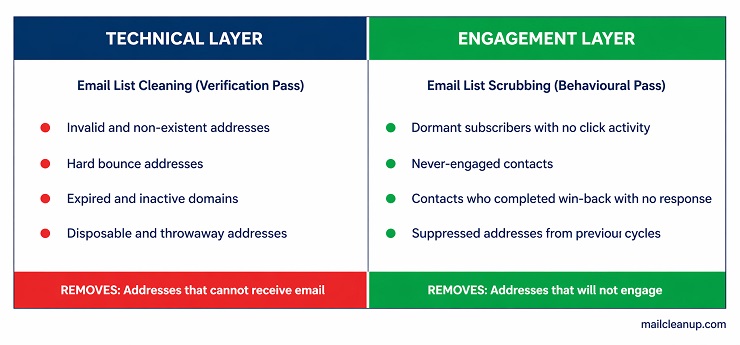
Email list hygiene is the broader, ongoing programme that ties both layers together over time, encompassing double opt-in practices, bounce management, regular verification passes, and scrubbing cadence. Email list scrubbing is one specific practice within that programme. Its scope is precise: identifying behavioural inactivity and removing those contacts from active sending. Understanding that scope prevents two common mistakes. The first is running a scrubbing pass instead of a verification pass, which leaves technical invalids on the list. The second is running only a verification pass and considering the job done, which leaves dormant but technically deliverable contacts in your active pool indefinitely.
Why Carrying Unengaged Subscribers Damages Your Sending Programme
The damage from keeping unengaged subscribers on an active list is not always visible in a single campaign. It builds across sends. Email list scrubbing exists to interrupt that build before it reaches the point where it is affecting the performance of emails going to your genuinely engaged contacts. The damage shows up in three specific places, each working through a different mechanism.
- Sender reputation decay: Inbox providers assess your sending behaviour across every campaign. Low click rates, weak interaction signals, and high inactivity ratios all factor into how trustworthy your domain looks to Gmail, Outlook, and Yahoo. A list heavy with dormant contacts produces weak engagement signals at scale. Over time, that erodes your email sender reputation and affects where your emails land, including for the subscribers who are actively reading and clicking your campaigns.
- Deliverability loss: A weakened sender reputation translates directly into inbox placement. More of your campaigns end up in the promotions tab or the spam folder. This does not only affect your dormant segment. It affects placement for everyone on your list. Your most engaged subscribers begin seeing your emails less frequently, which compounds the engagement problem further and accelerates the decline in your sending metrics.
- ESP billing waste: Most email service providers charge by subscriber count, send volume, or both. Every dormant contact on your list is a line item you are paying for without any return. At scale, this is not a trivial cost. A list of 50,000 subscribers with 30% dormancy means 15,000 contacts receiving every campaign, generating no engagement, and producing no revenue, while still counting toward your billing threshold.
The three problems compound each other. Reputation decay leads to worse inbox placement, which reduces engagement signals further, which pushes your domain score lower. Email list scrubbing interrupts that cycle by removing the contacts whose inactivity is driving the signal down in the first place.
The Problem With Using Open Rates to Decide Who to Scrub
The most common approach to identifying inactive subscribers for email list scrubbing is straightforward: find everyone who has not opened an email in 90 days and mark them as dormant. The logic is intuitive. If someone is not opening, they are not engaging. The problem is that open rates stopped being a reliable engagement signal in September 2021, when Apple introduced Mail Privacy Protection across its Mail app on iOS 15 and macOS Monterey.
Apple Mail Privacy Protection works by pre-fetching remote content, including tracking pixels, at the moment an email is delivered to an Apple Mail client. This registers as an open in your ESP regardless of whether the recipient has ever looked at the email. Apple Mail accounts for approximately 58% of all email opens globally according to Litmus data. That means a large share of the opens your ESP is reporting for a significant portion of your list may be machine-generated rather than human-generated.
If you are making email list scrubbing decisions based on open activity alone, you are working with a signal that is partially or substantially corrupted depending on your list composition. Genuinely engaged subscribers on Apple Mail may be getting flagged as inactive because their clicks are being overlooked in favour of open history. Meanwhile, contacts who have gone completely dark may be staying off the scrub list because occasional phantom opens are keeping them alive in your segments.
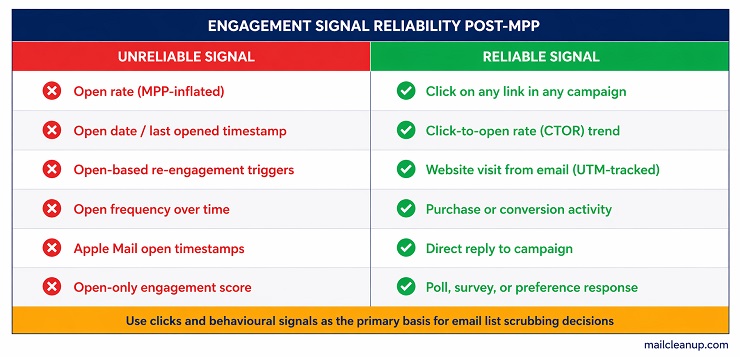
The primary signal for email list scrubbing decisions is clicks. A click requires a deliberate human action and is not affected by any privacy protection layer. Supporting signals that can reinforce or supplement click data include the following.
- Clicks on any link in any campaign: This is the baseline engagement indicator. If a subscriber clicks, they are active. Track clicks as your first scrubbing filter.
- Click-to-open rate (CTOR) trends: CTOR removes the distortion of inflated opens from the engagement picture. A declining CTOR over time points to genuine disengagement even when open rates look stable.
- Website visits from email: If a subscriber arrives on your site via a UTM-tagged email link, that is engagement, even if no tracked link click registered in your ESP.
- Purchase or conversion activity: A subscriber who has transacted recently is not dormant, regardless of their open history or click frequency.
- Replies to your emails: A reply is the strongest engagement signal available. It requires deliberate action and is not influenced by any automated prefetch behaviour.
Build your inactivity definition around clicks first, supported by conversion and behavioural data where available. If a subscriber has received your campaigns across a defined window and not clicked anything, treat them as dormant for email list scrubbing purposes. The opens in your dashboard may not reflect human intent. The clicks do.
Setting Your Scrubbing Threshold
One of the most common sources of confusion in email list scrubbing is the question of when a subscriber officially qualifies as inactive. Industry guidance tends to converge on a number, typically 90 days or six months, and present it as a general rule. That number is not wrong exactly, but it is incomplete. A subscriber who has received three emails in six months and not clicked is a different proposition from a subscriber who has received 60 emails in six months and not clicked. The elapsed time is the same. The amount of evidence is very different.
The principle behind the Scrubbing Threshold Framework is that inactivity should be measured in sends received, not calendar days alone. Time is a proxy for send count, and send count is what determines how much signal you have collected on a given subscriber. A contact who has received 12 to 15 campaigns without clicking once has given you enough information. A contact who has received two campaigns in the same window has not.
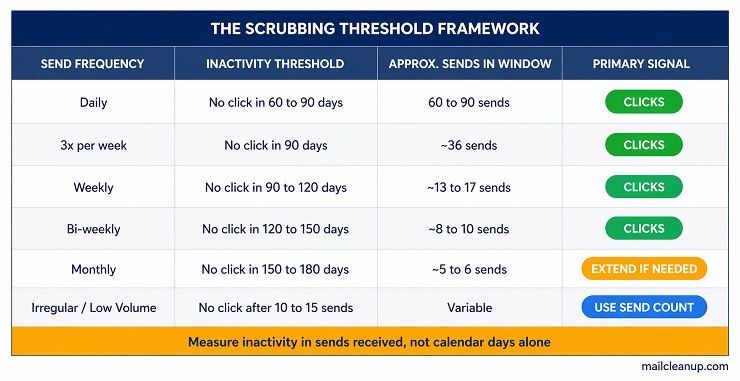
The table below translates this principle into practical thresholds for different sending programmes. Use it as a starting point and adjust based on your specific list composition and industry context.
| Send Frequency | Click-Based Inactivity Threshold | Approx. Sends in Window | Notes |
|---|---|---|---|
| Daily | No click in 60 to 90 days | 60 to 90 sends | High volume; signal accrues fast |
| 3x per week | No click in 90 days | ~36 sends | Standard B2C programme |
| Weekly | No click in 90 to 120 days | ~13 to 17 sends | Balanced threshold |
| Bi-weekly | No click in 120 to 150 days | ~8 to 10 sends | Confirm at 10 sends minimum |
| Monthly | No click in 150 to 180 days | ~5 to 6 sends | Consider extending to 10 months |
| Irregular / low volume | No click after 10 to 15 sends | Variable | Use send count as the primary measure |
Two rules apply across all rows in this framework. First, use clicks as the primary inactivity signal, not opens, for the reasons covered in the previous section. Second, apply the threshold consistently. Adjust your criteria once per year if your sending pattern changes, but do not shift the goalposts mid-cycle. Inconsistent thresholds produce inconsistent scrubbing results and make it harder to evaluate whether your email list scrubbing cadence is working.
One additional consideration for the threshold decision: if a substantial share of your list uses Apple Mail, your click rate is a cleaner benchmark than your historical open rate for gauging where engagement actually stands. Set your inactivity threshold against a baseline built from click data, not open data, so your email list scrubbing criteria reflect real human behaviour.
Step 1: Segment Your List by Engagement Tier Before Scrubbing
Before any contacts are removed, email list scrubbing requires segmentation. The reason is practical: not every inactive subscriber is equally inactive, and treating them all the same produces the wrong outcomes. Some contacts are in a natural engagement dip that a well-timed campaign could recover. Others have been silent for so long, across so many sends, that re-engagement is unlikely. Sending the same message to both groups wastes budget and risks spam complaints from those who have genuinely moved on.
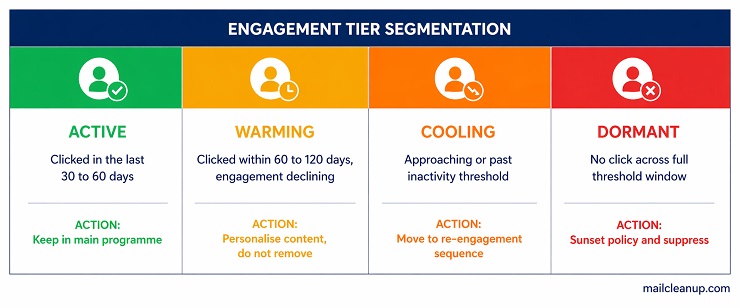
Segment your list into four engagement tiers before you begin the scrubbing process.
- Active (Green): Clicked at least one link across the last 30 to 60 days. These subscribers are engaged. No action needed. Keep them in your main sending programme and continue monitoring their activity.
- Warming (Yellow): Clicked within the last 60 to 120 days but engagement is declining. They are still technically active but showing signs of drift. These subscribers benefit from slightly more personalised campaigns or content refreshes, not removal.
- Cooling (Amber): No click across the last 60 to 150 days, depending on your threshold. These contacts have crossed or are approaching your defined inactivity line. They are the primary target for the re-engagement sequence before any scrubbing decision is made.
- Dormant (Red): No click across the full threshold window with no purchase, conversion, or reply activity in the same period. Some in this group will have never engaged at all since joining the list. These are the contacts your email list scrubbing process is designed to remove.
The segmentation itself is done inside your ESP. Most platforms allow you to filter contacts by last click date, last click across the last N campaigns, or custom date ranges. Export each segment so you have a clear record before any changes are made. If you are using an email list scrubbing service or a third-party tool for this process, verify that the tool is segmenting on click data, not open data, before relying on its output.
Run a verification pass on your Cooling and Dormant segments before attempting re-engagement. Addresses in these groups may have accumulated invalid or bounced contacts that a verification pass would catch. There is no point running a re-engagement sequence to addresses that cannot receive your emails. Use the best email list cleaning service to handle the verification step cleanly before the scrubbing work begins.
Step 2: Run a Re-Engagement Campaign Before You Remove
Removing contacts without giving them a final opportunity to re-engage is a missed recovery chance. For every 100 dormant subscribers, a well-structured win-back sequence typically recovers a small but meaningful number who had simply gone quiet, and that recovery is worth capturing before the scrub. More importantly, the re-engagement process surfaces the contacts who are genuinely done. When someone receives a clear, direct message asking whether they still want to hear from you and they do not respond, you have your answer. Email list scrubbing after a completed re-engagement sequence is a clean, defensible removal.
The structure that works is a three-email sequence. Keep each email short, direct, and specific. The goal is not to sell anything. The goal is to prompt a deliberate click.
Email 1 (Send Day 1): The low-pressure check-in
Subject line framing: “Have we lost you?” or “We have noticed you have been quiet.”
Content: Acknowledge the silence without making it a big deal. Remind them of the value they signed up for. Include one clear CTA link: “Yes, keep me on the list” or “See what you have been missing.” Keep the email brief.
Email 2 (Send Day 7): The direct question
Subject line framing: “Do you still want to hear from us?” or “We are tidying our list.”
Content: Be straightforward. Tell them you are reviewing your list and you want to keep the right people on it. Give them a clear binary option: stay or go. The unsubscribe link should be prominent, not hidden. A subscriber who clicks unsubscribe is doing you a favour.
Email 3 (Send Day 14): The final send
Subject line framing: “This is our last email if you do not let us know” or “Last chance to stay on the list.”
Content: Keep it short. One sentence of context, one CTA, one unsubscribe link. The finality of the message is part of what prompts action from subscribers who are still interested but have been passive.
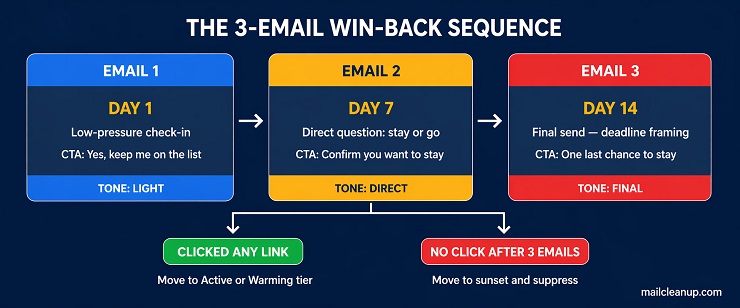
Success in this sequence is defined by a click on any link across any of the three emails. This includes clicking the unsubscribe link, which is a form of engagement that removes the contact cleanly. What does not count as re-engagement is an open with no subsequent click. Post-MPP, that open may not represent a human reading the email, and basing your email list scrubbing decisions on it would reintroduce the same signal problem you are trying to avoid.
Contacts who click any link move back into the Active or Warming tier. Contacts who complete the full three-email sequence with no click move into the sunset phase. Do not extend the sequence beyond three emails. A fourth or fifth re-engagement attempt directed at contacts who have already ignored three sends is unlikely to recover anyone and increases your spam complaint risk.
Step 3: Build a Sunset Policy and Suppress, Not Just Delete
A sunset policy is a structured process for withdrawing sending from subscribers who have reached the end of the re-engagement sequence without responding. It is the formal mechanism that turns an email list scrubbing decision into a defensible, repeatable system rather than an ad hoc removal. Most email programmes that struggle with recurring deliverability problems either have no sunset policy, or they have a deletion habit rather than a suppression habit. Both create problems.
The sunset process runs in three phases.
- Phase 1: Reduce frequency – Before moving dormant contacts into the re-engagement sequence, reduce how often they receive your campaigns. Move them from your main sending schedule to a reduced-frequency track: one email per month, or one email per fortnight if you send daily. This accomplishes two things. It reduces the volume of unengaged sends going to your dormant segment, which protects your engagement metrics for the active sends. It also gives the dormant segment time to re-surface naturally if their inactivity was situational rather than permanent.
- Phase 2: The win-back sequence – Run the three-email re-engagement campaign described in the previous section. This is the formal last engagement attempt. Contacts who click rejoin the active pool. Contacts who complete the sequence with no click move to Phase 3.
- Phase 3: Suppression – Suppress contacts who did not re-engage. Add them to your suppression list. This is the mechanism your email list scrubbing process should land on, not deletion. Suppression means the contact will not receive future sends. The address stays in your system, marked as suppressed, which prevents it from being re-imported accidentally in a future list upload or ESP migration.
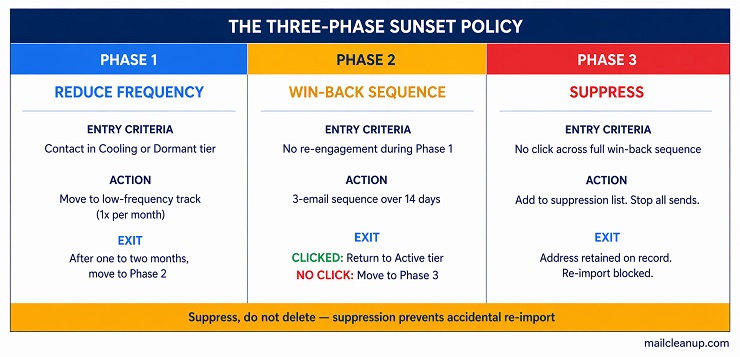
The suppression versus deletion distinction matters in practice. If you delete a contact and then import a refreshed list that contains the same address, that address re-enters your active sending pool as if it were new. You may have just re-added a contact who unsubscribed, complained, or confirmed they had no interest. Suppression prevents that re-entry. A suppressed address is a permanent record that the contact should not receive your campaigns, and that record survives list imports.
Nearly 59% of senders do not use a sunset policy, according to Mailgun’s State of Email Deliverability. That means the majority of email programmes are either deleting contacts outright or carrying them indefinitely in an active pool. Both approaches produce worse deliverability outcomes than a structured email list scrubbing process with a formal sunset and suppression mechanism. An email scrubbing service that supports suppression list management as part of its workflow is worth prioritising when evaluating your tooling options.
What Email List Scrubbing Cannot Fix
Understanding the scope of email list scrubbing is as important as understanding how to run it. The three-phase process of segmentation, re-engagement, and suppression is specific to the engagement layer of your list. It addresses behavioural inactivity. It does not address problems that sit on other layers, and applying an email list scrubbing pass to a problem that requires a different solution produces no improvement and can create a false sense that the issue has been handled.
Three categories of problems sit outside the scope of what email list scrubbing resolves.
Technical invalids, hard bounces, and spam traps
Email list scrubbing targets contacts who are deliverable but unengaged. Addresses that fail technical checks, including invalid syntax, non-existent mailboxes, expired domains, and disposable addresses, are not engagement problems. They are deliverability infrastructure problems that require a verification pass (often carried out by email list cleaning services) before any scrubbing work begins. Running a re-engagement sequence to an address that hard-bounced is pointless. Run the technical pass first. The guide to how to clean email lists covers the full verification process and result-category decisions in detail.
Authentication and infrastructure failures
A well-scrubbed engagement layer will not rescue inbox placement if your SPF, DKIM, or DMARC records are misconfigured or missing. Inbox providers evaluate authentication signals independently of engagement signals. If your email authentication setup is broken, emails sent to even your most engaged subscribers will face placement problems that no scrubbing pass can address. Authentication and scrubbing operate on different layers and both need to be in order.
A broken acquisition funnel
This is the most important limitation and the one most frequently overlooked. If your list is consistently growing through low-quality channels, including purchased lists, incentivised sign-ups, giveaway entries, or co-registration sources, you will scrub the same dormant pool repeatedly without resolving the underlying problem. Every quarter, a fresh cohort of disengaged contacts enters the list through the same acquisition path. Scrubbing removes the last cohort while the next one builds. The dormancy problem is structural, not behavioural, and it requires fixing the acquisition source, not running more scrubbing passes.
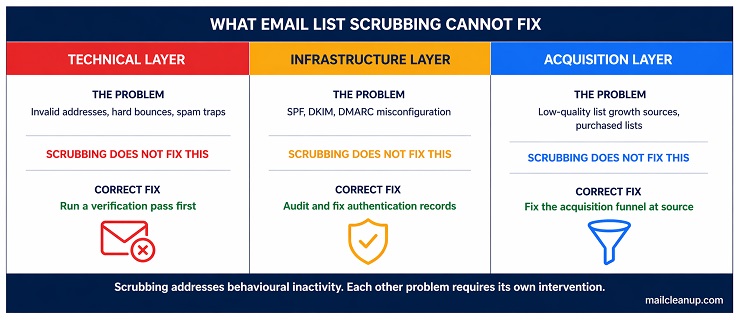
Email list scrubbing is a powerful and necessary practice within its scope. The engagement layer it addresses is real, the damage from ignoring it is real, and the improvement from running it correctly is measurable. Recognising where its scope ends ensures you apply the right intervention to each layer of the list management problem rather than treating scrubbing as a catch-all fix.
Scrubbing Is Not a One-Time Fix. It Is How Your List Earns the Right to Stay Healthy.
Email list scrubbing is not a remediation task you run once when things get bad and then set aside. It is a regular, scheduled practice within the broader email list hygiene programme that keeps your sending infrastructure functioning at its intended level. The engagement layer of your list is in a constant state of change. Subscribers who were active six months ago may have drifted. Contacts who joined during a campaign may never have engaged at all. New dormancy accumulates with every send cycle, and the compounding effect of unaddressed inactivity builds faster than most senders expect.
The practical approach is straightforward. Set your scrubbing cadence based on your sending frequency and stick to it. Run the verification pass first to clear the technical layer. Segment by engagement tier before making any removal decisions. Run the three-email win-back sequence for contacts in the cooling and dormant tiers. Suppress everyone who completes the sequence without clicking. Review your threshold criteria once a year and adjust if your sending frequency or list composition has changed. An email list scrubbing service that supports suppression list management, click-based segmentation, and integration with your ESP makes the process repeatable at scale without manual overhead on every cycle.
The senders who maintain strong deliverability over time are not the ones who run the most aggressive scrubbing passes. They are the ones who run consistent passes, act on the right signals, and treat the engagement layer as a permanent part of their sending programme rather than an emergency measure. Your list is a sending asset. Email list scrubbing is how you protect it.
FAQs on Email List Scrubbing
What is email list scrubbing?
Email list scrubbing is the process of identifying and removing unengaged subscribers from your active sending pool. It operates on the engagement layer of your list, targeting contacts whose addresses are technically valid and deliverable but who have stopped interacting with your campaigns. It is a separate process from technical email address verification.
What is the difference between email list scrubbing and email list cleaning?
Email list cleaning removes contacts that cannot receive your emails: invalid addresses, hard bounces, expired domains, and disposable addresses. Email list scrubbing removes contacts that can receive your emails but are not engaging with them. Both passes are necessary. They operate on different layers of the same list and neither substitutes for the other.
How often should you scrub your email list?
Most sending programmes benefit from a scrubbing pass every three to six months. The right frequency depends on how quickly your list grows and how often you send. Faster-growing lists and higher-frequency senders accumulate dormant contacts more quickly and benefit from quarterly scrubbing. Watch your click rate trend as the clearest signal that a scrub is overdue.
How do you identify unengaged subscribers for scrubbing?
Use click activity as your primary signal. Segment contacts who have received your campaigns across your defined threshold window without clicking any link. Do not rely on open rates alone, as Apple Mail Privacy Protection generates phantom opens that inflate engagement figures. Supporting signals include purchase activity, website visits from email, and direct replies.
What is a sunset policy in email marketing?
A sunset policy is a structured three-phase process for withdrawing sending from unengaged subscribers. Phase 1 reduces send frequency to dormant contacts. Phase 2 runs a win-back sequence. Phase 3 suppresses contacts who do not re-engage. Suppression keeps the address on record to prevent accidental re-import without continuing to send campaigns to that contact.
Can you use open rates to decide who to scrub from your list?
Open rates are not a reliable signal for scrubbing decisions. Apple Mail Privacy Protection pre-fetches tracking pixels at delivery, registering opens that no human generated. Apple Mail accounts for approximately 58% of all email opens globally. Use clicks as your primary inactivity signal. A subscriber who has not clicked across your threshold window is inactive regardless of their open history.
What should a re-engagement campaign include before scrubbing?
A re-engagement campaign should consist of three emails sent over 14 days. The first is a low-pressure check-in. The second asks directly whether the subscriber still wants to hear from you. The third is a final send with a clear deadline framing. Success is defined by a click on any link. Remove contacts who complete the sequence without clicking.
Does email list scrubbing hurt your deliverability in the short term?
Your list size will reduce after a scrubbing pass, which can feel counterintuitive. Deliverability typically improves within one to two sending cycles as your engagement ratios strengthen and inbox providers register the improved signal quality from your domain. A smaller, actively engaged list consistently outperforms a large list carrying significant dormant weight.