
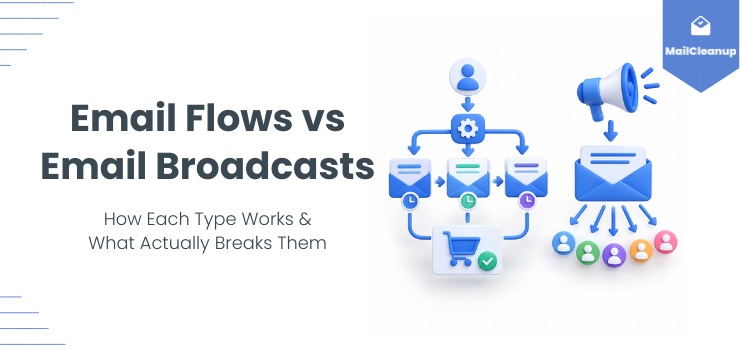
Most marketers don’t get email flows vs email broadcasts wrong because they misunderstand what each term means. The definitions are simple enough to grasp in one sentence. Where teams actually go wrong is more specific. They don’t know what makes a flow convert instead of just running, or what makes a broadcast get opened instead of ignored. And most of them have never identified what quietly breaks each one before it gets the chance to work at all.
That gap matters more than the definitional question most guides stop at. A flow built on the right trigger can still misfire if the list behind it is unreliable. That failure looks like a strategy problem when it’s actually a data problem underneath. A broadcast sent to a segmented, engaged list behaves completely differently than the same email blasted to everyone on file. That difference has nothing to do with the copy.
This guide covers the difference between email flows and email broadcasts, but it doesn’t stop there. We’ll walk through what actually makes each type of flow and broadcast work, and what breaks them. Then we’ll cover how to build a program that uses both without one undermining the other.
TL;DR
- Email flows are automated sequences triggered by a subscriber’s action; email broadcasts are one-off, manually scheduled sends to a list or segment.
- Flows generate 60 to 70 percent of email revenue in many ecommerce programs, with broadcasts making up the remaining share.
- Building flows first is the more common sequencing, since a flow compounds indefinitely once built while a broadcast converts once and is done.
- Each channel fails in predictable ways, from untested triggers on the flow side to full-list blasting on the broadcast side.
- A dirty list corrupts a flow’s trigger logic quietly, one misfire at a time, but hits a broadcast as one reputation-damaging spike.
- Either channel built on an unverified list turns a data problem into what looks like a strategy problem.
What Is an Email Flow?
An email flow is an automated sequence of emails triggered by something a subscriber does, or doesn’t do. Someone signs up, abandons a cart, completes a purchase, or goes quiet for two months. That action alone sets a pre-built sequence in motion, without anyone on your team pressing send.
The mechanism behind every flow, regardless of what it’s for, breaks down into three parts:
- A trigger event: a specific, measurable action or inaction, a signup, a cart abandonment, a purchase, a stretch of inactivity, that starts the sequence.
- Timed follow-ups: a series of emails released at set intervals after the trigger fires, not sent all at once.
- Personalization drawn from the trigger itself: each email reflects what the subscriber actually did, not a generic message sent to everyone in the sequence.
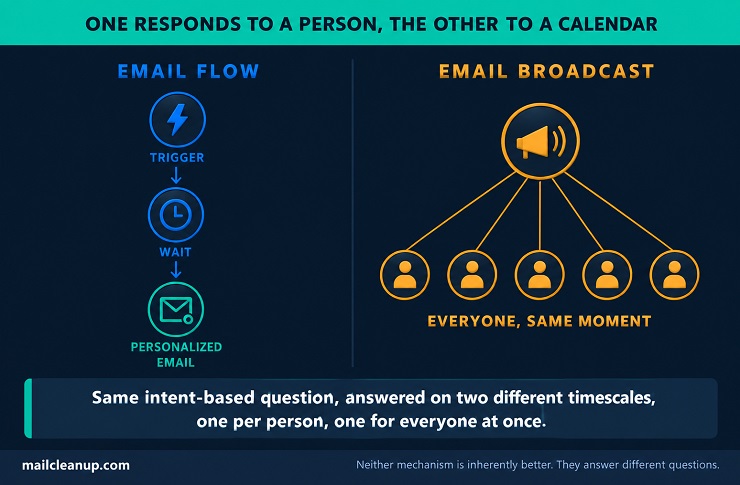
That third part is what separates a flow from a scheduled series of unrelated emails. Say a subscriber adds a $60 jacket to their cart at 2pm and leaves without checking out. Two hours later, an abandoned-cart flow fires automatically. The reminder references that exact jacket, triggered by the action itself, not because it happened to be Tuesday. That’s the core of the email flows vs email broadcasts comparison: one channel responds to individual behavior, and the other doesn’t.
Flows sit inside the broader category of email marketing automation, which covers a wider set of triggers and workflow types than flows alone. If you want the fuller picture of how automation works across an email program, our guide to email automation goes deeper into that taxonomy. This guide stays focused on flows specifically, and on how they stack up against broadcasts. That’s really the difference between email flows and broadcasts in one sentence.
What Is an Email Broadcast?
An email broadcast is a single email sent to an entire list, or a chosen segment of it, at one specific time you set. Nobody’s individual behavior decides who gets it or when. You build the message, pick the audience, and schedule the send, and everyone in that audience receives the identical email at the identical moment. Picture a retailer deciding to run a weekend sale: they don’t wait for any individual signal. They pick Friday at 9am, write one email, and send it to the full list or a chosen segment at that exact moment. What any single subscriber did the day before has no bearing on it.
That’s the defining trait broadcasts share, regardless of what they’re used for: one message, one send, uniform content across every recipient. A newsletter, a product launch announcement, and a flash-sale email are all broadcasts by this definition, even though their content and purpose differ completely.
The distinction that matters most, when you’re weighing email flows vs email broadcasts, comes down to what decides the timing and the audience. A flow is triggered by something a specific subscriber did. A broadcast is triggered by a decision you made on your own calendar. Neither approach is inherently better, they solve different problems, which is exactly why most email programs eventually need both. Some marketers call this an email flow vs broadcast question, though the mechanics stay identical no matter which words are used for it.
Types of Email Flows
Not every flow in this email flows vs email broadcasts comparison serves the same purpose, and treating them as interchangeable is a common mistake. Here’s what triggers each type, and how the timing and structure differ, so you can match the flow to what you’re trying to do.
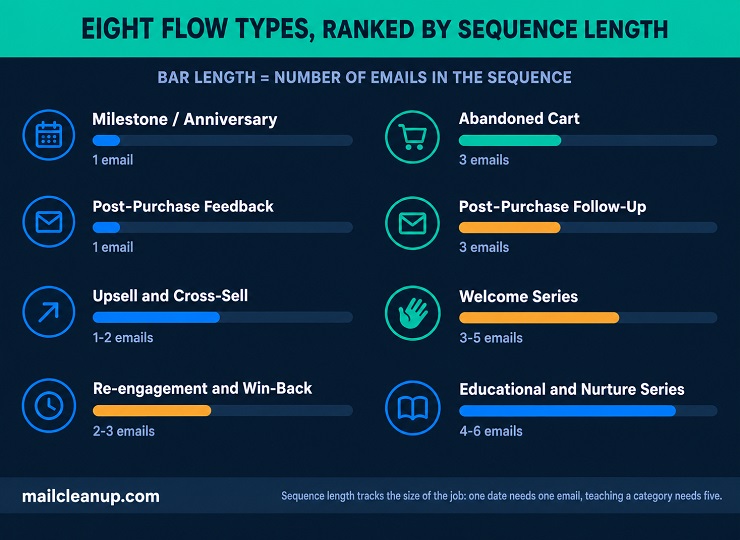
1. Welcome Series
A welcome series triggers the moment someone opts in. That could mean signing up for your list, downloading a lead magnet, or creating an account with a first purchase. It typically runs three to five emails across the first one to two weeks:
- Email one, sent immediately: introduces the brand and sets expectations for what’s coming and how often.
- Email two, one to two days later: delivers on a specific promise, a discount code, your best content, or real social proof.
- Email three, around day five to seven: goes deeper into what makes the brand different, sometimes with a first soft conversion nudge.
This flow gets more attention from mailbox providers than almost any other type in the email flows vs email broadcasts comparison. A brand-new subscriber relationship is exactly what Gmail and Outlook use to start forming an opinion about you as a sender. A welcome series with strong early engagement helps that opinion form in your favor before you’ve sent a single broadcast.
Take a $40 skincare brand as an example. Email one lands within minutes of signup with a 15% code and a short brand story. Email two arrives two days later, built around bestsellers and real customer reviews. Email three, five days in, tells the founder’s story and reminds the subscriber their code expires soon. That structure is common enough to treat as a starting template, though the timing and offer should reflect your own product and price point.
Conversion rates on a well-built welcome series often land between 30 and 50 percent, higher than any other single flow type. That range depends heavily on the offer and the traffic source feeding the list. The full sequence, including which offer to lead with, deserves its own complete guide to the welcome email series rather than a quick summary. Some call this an email flows vs email campaigns question instead, depending on which platform’s terminology they learned first.
2. Abandoned Cart
A subscriber adds something to their cart and leaves without completing checkout. That single action triggers an abandoned cart flow, one of the highest-converting flows in ecommerce, since it targets someone already close to buying. Recovery rates on a well-built sequence typically land between 5 and 15 percent, revenue a broadcast could never reach the same way. Few examples make the email flows vs email broadcasts distinction clearer: a scheduled broadcast can’t catch this moment, only a real-time trigger can.
The typical structure runs three emails:
- First email, around one hour after abandonment: a simple reminder showing the exact item left behind.
- Second email, at 24 hours: a reason to come back if the first got no response, product benefits, reviews, or a limited-time note.
- Third email, at 48 to 72 hours: introduces urgency or a small incentive, since interest fades fast after that window.
The weakest point in this flow usually isn’t the copy or the timing. It’s the address the cart was captured against in the first place. Guest checkout, common on most ecommerce platforms, is the least-verified point in the entire funnel. There’s no account creation and no email confirmation step, just whatever the shopper typed into a field before abandoning. Making the reminder show the exact item, not a generic cart icon, requires the flow to pull live product data: name, image, and price. That data has to tie back to the specific cart the address triggered from.
Without that connection, the flow can only send a generic nudge, which converts at a meaningfully lower rate than one showing the actual product. Our dedicated guide to abandoned cart email covers the full sequence and the reachability problem in more depth.
3. Post-Purchase Follow-Up
A completed purchase triggers this flow, and it does more work than most programs give it credit for. It typically runs three emails:
- Immediate: an order confirmation and thank-you.
- Three to five days later: usage tips or care instructions specific to what was bought.
- Seven to fourteen days after that: a review request or cross-sell, once there’s been time to actually use the product.
Where this flow differs from a plain receipt is the middle email. Most brands skip straight from confirmation to asking for a review, missing the chance to reduce buyer’s remorse with a useful tip in between. That middle step is often the difference between a one-time buyer and a repeat one. It’s also a good test of the whole email flows vs email broadcasts idea. A completed purchase is specific to one person. No broadcast could replicate that individual timing across an entire list. That gap is the difference between email flows and broadcasts this whole guide keeps returning to.
The care-tip email works best when it’s tied to the specific product category: brewing instructions for coffee, sizing or care instructions for apparel. A generic “thanks for your order” with no product-specific content gets treated like a receipt and ignored the same way. Our guide to post-purchase email walks through the full three-email build, including how to time the cross-sell without it feeling like an upsell.
4. Re-engagement and Win-Back
When a subscriber stops opening or clicking for 60 to 90 days, a re-engagement flow takes over. It typically runs two to three emails:
- A check-in email: asking if anything’s changed since they went quiet.
- An incentive-driven nudge: sent if the check-in gets no response.
- A final preference or sunset email: that either wins them back or removes them from active sends.
What counts as “inactivity” matters more than it sounds. An open-only definition gets distorted by Apple Mail Privacy Protection, which pre-loads tracking pixels and logs an open the subscriber never actually made. A stricter definition, no clicks in 60 to 90 days, gives a cleaner signal of who’s genuinely gone quiet. This flow does two jobs at once, and most teams only think about one of them. The obvious job is revenue recovery, bringing dormant subscribers back to active buying.
The less obvious job matters just as much: reputation protection. It means identifying who’s genuinely gone quiet, so they can be suppressed before their non-engagement drags down open rates for your entire list. That protective function is easy to overlook in any quick email flows vs email broadcasts comparison, since it’s not about revenue at all. Reactivation rates on these flows are usually modest, often five to fifteen percent. That’s exactly why the reputation side of the job often matters more than the revenue side.
Knowing when to stop trying and suppress a contact for good is the hardest part of any [re-engagement email campaign] to build correctly.
5. Milestone and Anniversary Emails
A milestone email triggers off a date tied to one specific subscriber: a birthday, a signup anniversary, or the anniversary of their first purchase. Unlike most flows, it needs no new data collection beyond what you already have. Signup and purchase dates are already in your system, and a birthday field is a common, low-friction addition to any signup form.
The structure is usually a single email, sometimes paired with a small offer or a loyalty-tier acknowledgment. Volume stays low by design, since it only fires for whoever’s date happens to be today, which keeps deliverability risk minimal. What makes this flow stand out in any email flows vs email broadcasts comparison is how personal it feels without reading as promotional. One overlap worth planning for: a subscriber’s signup anniversary and their birthday can land in the same week by coincidence. Sending both without checking creates two milestone emails days apart, which reads as noise rather than two genuine occasions.
A simple suppression rule, skip a second milestone email within 14 days of the first, avoids the collision. A subscriber who joined on March 3rd gets an automatic note next March 3rd. It reads like a brand actually kept track, not like a marketing calendar entry.
Not every milestone works the same way. A birthday needs a data field most signup forms don’t ask for by default. It usually gets collected later, through a post-signup preference update, since adding one more field at signup measurably hurts conversion. A signup anniversary and a purchase anniversary need no extra collection, since both dates already sit in your system the moment the action happens. Timing matters too. A birthday email tied to a physical reward works better sent three to five days ahead, giving the gift time to arrive. A purely digital thank-you can go out the same day instead. That’s a small version of the same email flow vs broadcast question this guide keeps returning to.
6. Educational and Nurture Series
An educational series triggers off a specific interest signal: a lead-magnet download, a webinar signup, or simply finishing the welcome series. It runs on a schedule rather than a single event. A typical structure spans four to six emails over four to six weeks. Each one teaches something relevant to your product category, without asking for a sale.
Entry into this flow should branch by what triggered it, not funnel everyone into one identical series. A subscriber who downloaded a beginner’s guide needs a different arc than one who registered for an advanced webinar, even though both showed interest. Both are automated email sequences, but what separates a nurture series from a welcome series is timing and purpose.
A welcome series makes a first impression in days. A nurture series builds authority and trust over weeks, often running in parallel with or right after the welcome flow ends. A SaaS company might send five emails, one per week, each covering a single feature or use case a new user hasn’t tried yet. A wellness brand might run the same structure as a five-part series on building a daily routine.
This flow earns its place in a genuine email flows vs email broadcasts comparison. It’s the clearest example of playing a long game a single broadcast schedule can’t replicate. No one broadcast could teach five distinct lessons, spaced a week apart, to the exact subscribers who need each one. Choosing what to teach in each email matters just as much as the schedule itself. That’s one more place where the difference between email flows and broadcasts changes what gets built, not just what it’s called.
The strongest nurture series map their topics to the objections a prospect would raise before buying, one email per objection, not picked at random. Engagement typically drops with each email in the series. Watching where that drop gets steeper than usual points to which specific lesson isn’t landing, not just whether the whole series is working.
7. Upsell and Cross-Sell
An upsell or cross-sell flow triggers off a purchase or a usage milestone. It offers something that complements or upgrades what the subscriber already has. A coffee subscriber who’s ordered pre-ground coffee for two months might get offered a grinder. A software user who logs into a specific feature ten times in a month might get offered the tier that unlocks its advanced version.
The trigger logic also needs to check what’s already in the current order, not just purchase history. Otherwise the flow might pitch a grinder to someone who bought one in the same checkout as the coffee. Timing decides whether this flow reads as helpful or pushy to your subscriber. An offer that arrives right after the original purchase looks like an upsell disguised as a receipt.
The same offer, timed against the customer’s actual usage pattern two or three purchase cycles in, reads as a brand that’s paying attention. That distinction matters more than the offer itself. This is one of the flow types most email flows vs email broadcasts comparisons skip entirely. It’s still a genuine flow, with its own trigger logic and timing rules.
Cross-sell and upsell aren’t quite the same move, even though they get grouped together. A cross-sell offers something different that complements the original purchase, the grinder alongside the coffee. An upsell offers more of the same category, a bigger bag size or a higher subscription tier. Most programs need trigger logic built around purchase history or usage data to know which move actually applies.
A generic “you might also like” block, sent to everyone regardless of purchase, is closer to a one-off email campaign than a real flow. It defeats the purpose of building this with trigger logic in the first place. That’s the difference between email flows and broadcasts showing up inside a single flow type, not just between the two channels.
8. Post-Purchase Feedback Requests
A feedback request flow triggers a set number of days after purchase or delivery, commonly seven to fourteen days. For a physical product, the trigger should key off delivery confirmation, not the order date, since shipping time varies. A digital product can trigger straight off the purchase timestamp instead, since there’s no transit time to account for. That gap gives the subscriber enough time to actually use what they bought before you ask what they think of it. It’s usually a single email, sometimes with a small incentive attached to boost the response rate.
The version worth building as a flow is different from a general survey blast, covered later in this guide. A triggered request references the specific item purchased and arrives at a specific, recent moment in that subscriber’s experience. A list-wide survey blast asks a generic question of everyone at once, regardless of what, or whether, they bought anything recently. The triggered version consistently gets a higher response rate, because the ask is concrete and the timing is relevant. That’s exactly the distinction a genuine email flows vs email broadcasts comparison should draw out, not blur. The contrast is really a triggered email vs broadcast email question, applied to two different survey styles.
What you actually ask changes the response rate as much as the timing does. A single star-rating tap gets far more responses than an open text box, since it asks almost nothing of the subscriber. It also gives you less to work with in return. Product type should decide the window, too. A consumable used within days can be asked about at seven. A durable good needs closer to three weeks before the subscriber has a real opinion to share. What comes back is also worth routing deliberately.
A strong rating can trigger a public review request. A weak one is better routed straight to support, before it becomes a public complaint instead. The table below recaps all eight at a glance, alongside which ones already have their own full guide.
| Flow Type | Trigger | Typical Timing |
|---|---|---|
| Welcome Series | Signup or first purchase | 3-5 emails over 1-2 weeks |
| Abandoned Cart | Cart filled, checkout not completed | 3 emails: 1hr, 24hr, 48-72hr |
| Post-Purchase Follow-Up | Purchase completed | 3 emails over 1-2 weeks |
| Re-engagement / Win-Back | 60-90 days of inactivity | 2-3 emails |
| Milestone / Anniversary | Birthday or account anniversary | 1 email |
| Educational / Nurture Series | Interest signal or lead magnet | 4-6 emails over 4-6 weeks |
| Upsell and Cross-Sell | Purchase or usage milestone | 1-2 emails |
| Post-Purchase Feedback Requests | 7-14 days after purchase | 1 email |
Looking at the table as a whole, timing is the one variable that swings hardest. Most of these flows resolve within one to three weeks. A milestone email is the outlier: it might not fire for another 11 months if a subscriber just missed their date. That’s worth remembering when you’re deciding which flow to build first. The ones with a fast trigger-to-send cycle show results, and problems, much sooner than the ones running on a calendar.
Types of Email Broadcasts
The difference between email flows and broadcasts isn’t just about automation. It shows up again inside broadcasts themselves, since not every one-off send serves the same purpose. Here’s what triggers each one, and why lumping them all together undersells what a good email flows vs email broadcasts comparison should actually cover.
One quick terminology note before the list: some platforms, Klaviyo and Mailchimp among them, call a one-off send a campaign instead of a broadcast. The mechanics are identical, only the label changes. If you’ve seen email flows vs email campaigns elsewhere, that’s the same comparison this guide makes, with a different word for the manual side. That’s a small version of the difference between email flows and broadcasts, playing out inside a single broadcast type.
1. Newsletters
A newsletter goes out on a fixed schedule, usually weekly or monthly, to your full list or a broad segment. It’s not tied to any individual action, just the calendar.
Weekly versus monthly is a real trade-off, not just a preference. Weekly keeps the brand in front of subscribers more often, but demands enough real content to fill 52 sends a year without repeating yourself. Monthly is easier to sustain, though it means fewer chances to catch declining engagement before it compounds.
This is the broadcast type most likely to survive being sent to a stale, unverified list without any visible damage, at least at first. Open and click rates dip quietly rather than crashing. The content itself is rarely offensive or unwanted the way an aggressive sales push can be. That’s exactly why deliverability erosion here goes unnoticed the longest. A newsletter can keep going out to a list full of dead addresses for months before anyone connects declining inbox placement back to it.
A strong newsletter mixes genuine updates with curated content: a product note, a useful tip, a customer story. That’s different from reading like a running press release. Readers who open a newsletter every month are some of your most engaged subscribers. Apple Mail Privacy Protection means some of those opens are pre-fetched rather than genuine, so it’s not a perfect measure on its own. That makes this list a useful early-warning signal. If engagement here starts sliding, the same decline in this email flows vs email broadcasts comparison is likely happening across other broadcasts too.
2. Announcements and Product Launches
An announcement broadcasts a specific piece of news, a new product, a feature release, a company update. It goes to a list or segment on a date you choose. This is one of the clearer email flows vs email broadcasts distinctions: nothing about any individual subscriber decides when a launch goes out.
This is one of the clearer email automation vs email campaign trade-offs. Automation could theoretically tell every new subscriber about the launch eventually, as they join or hit some qualifying action. A campaign tells everyone right now, which is the whole point of a launch. Announcing a new integration to an entire list generates more unsubscribes than sending the same news only to accounts already using that specific tool. Most of the full list will never use it anyway.
Segmenting by prior purchase category or engagement level still matters here. A launch email sent to your entire list regardless of relevance is one of the most common triggers for spam complaints. An announcement that doesn’t apply to the recipient reads as noise, not news.
3. Promotional and Seasonal Offers
A promotional broadcast carries a time-bound offer, a discount, a limited-run product, a seasonal sale like Black Friday or back-to-school. It’s built around a deadline, which is what separates it from a newsletter’s ongoing cadence.
Frequency is where this type does the most damage if it’s mismanaged. Two to three targeted promotional sends a week is a reasonable ceiling for most programs. Push past five, and complaint rates climb in a way that’s directly traceable to the volume, not the offer itself. This is where the email flows vs email broadcasts comparison gets practical for your own calendar, not just theoretical. That’s the email flows vs email campaigns terminology point again, just applied to a single sale. Non-openers and engaged subscribers shouldn’t necessarily see the same promotional cadence.
Sending five promotions a week to someone who hasn’t opened in months just accelerates their path to marking the sender as spam. The same frequency to an engaged buyer might be exactly right. Segmentation by purchase history or engagement recency also matters more here than on almost any other broadcast type. A discount on something a subscriber already owns reads as careless, not generous.
4. Event Invitations
An event invitation promotes a webinar, workshop, or in-person event with a registration link as its main call to action. It’s still fundamentally a broadcast, sent on your schedule to a chosen audience, not triggered by anything the subscriber did.
Where it differs from a single promotional send is structure. A short sequence, invite, reminder a few days out, and a last-chance note the morning of, outperforms a single invitation sent once and forgotten. This is a good example of where the email flows vs email broadcasts line gets blurry, even though it’s still entirely broadcast-driven underneath. Showing genuine capacity limits, seats remaining, or a registration count that’s visibly climbing, gives the reminder something the first invite didn’t have.
That’s real urgency, instead of a repeated ask. That sequence is still three separate broadcasts, not a flow. It’s a good example of the email flow vs broadcast line blurring without actually moving. Each one goes out on a date you pick, not in response to what any individual subscriber does with the previous email.
5. Seasonal Greetings
A seasonal greeting is a goodwill message tied to a holiday or time of year, with no sales angle attached. A simple “happy holidays” note or a year-in-review thank-you both count.
Sending this one to your entire list, including long-dormant addresses, is more defensible than most broadcasts. There’s no offer to waste on someone who won’t convert anyway. It’s still worth excluding anyone already flagged as invalid, since even a goodwill message counts as a send against your reputation. Commercial intent here is close to zero, which makes this broadcast type an unusually clean read on genuine list health. If open and click rates on a pure goodwill send are weak, the problem probably isn’t the offer, since there isn’t one. It’s more likely the list itself.
Dead addresses and disengaged contacts dilute a send that should, by rights, be the easiest one all year to get a positive response from. Few broadcast types make the email flows vs email broadcasts comparison this clean: there’s no offer, no trigger, just a message and a moment.
6. Industry Updates and Thought Leadership
This broadcast shares commentary or insight relevant to your audience without selling anything directly. A take on a trend, a lesson from your own data, a response to industry news, all count.
An email marketing platform sharing its own send-time-optimization data with subscribers, real numbers, not a generic “best practices” recap, is thought leadership. The same platform reposting a generic listicle everyone’s already seen isn’t, even though both technically “share insight.” It’s also usually the first thing cut when a program trims its sending frequency, and that’s often the wrong cut to make. A promotional send asks for something. A thought-leadership send gives something, and it’s often what keeps a subscriber opening your emails during the stretches between offers they actually want.
Cutting the sends that build trust to protect the ones that ask for money gets the priority backwards. That’s the same mistake as running an email flows vs email broadcasts comparison and only measuring broadcasts by immediate sales. It’s the email flow vs broadcast question again, this time about which kind of value a send provides.
7. List-Wide Feedback and Survey Requests
A list-wide survey asks a broad question of your subscribers, satisfaction, product feedback, content preferences, without being tied to any one subscriber’s recent action. That’s what separates it from the triggered feedback request covered earlier, which fires off a specific purchase and references a specific item. This is another spot where a real email flows vs email broadcasts comparison earns its keep: the same question, asked differently, produces different data. It’s the same email flow vs broadcast logic in miniature.
A single, specific question, “how likely are you to recommend us,” gets a higher response than an open “tell us what you think” box. Both are technically feedback requests, but they collect very different data. Segmenting to your engaged subscribers first, rather than blasting the entire list, changes both the response rate and the quality of what comes back. Someone who opens every email has a real opinion worth collecting. Someone who hasn’t engaged in eight months is unlikely to respond at all. If they do, their answer probably says more about why they’ve gone quiet than about the question you actually asked.
8. Emergency and Time-Sensitive Notices
An emergency notice covers anything that must reach everyone right now: a service outage, a security incident, or a compliance deadline. It’s also the one broadcast that should bypass normal send-throttling and quiet-hours rules most programs otherwise respect. A genuine emergency doesn’t wait for a more convenient sending window.
An emergency notice is the clearest case of triggered email vs broadcast email thinking working in the broadcast’s favor. Everyone needs the same message, right now, regardless of what any single subscriber has or hasn’t done. This is also the one broadcast type where an invalid address isn’t just a metric problem sitting in a report somewhere. If a critical notice never lands because the address was already dead, the business has no way of knowing that. It proceeds as though the recipient saw it, when they never had the chance.
If you only remember one thing from this email flows vs email broadcasts comparison, make it this. Your emergency notices are only as reliable as the list you’re sending them to.
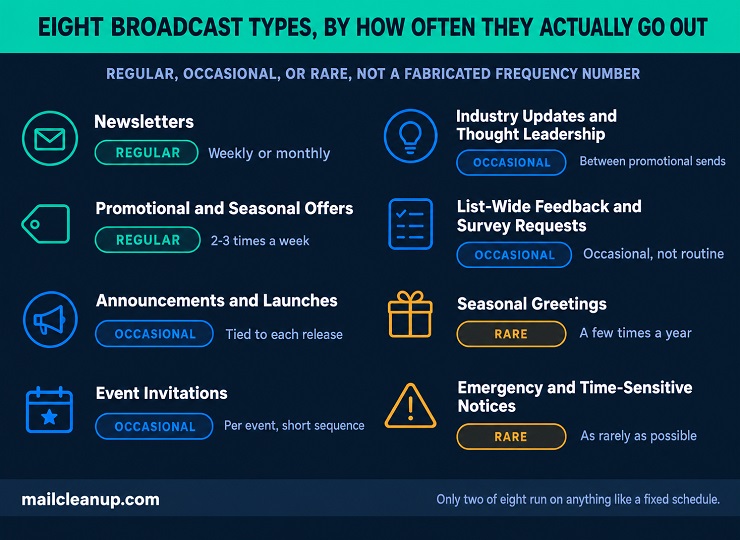
The table below summarizes all eight, including what typically decides how often each one goes out.
| Broadcast Type | Ties To | Typical Cadence |
|---|---|---|
| Newsletters | Calendar, not an event | Weekly or monthly |
| Announcements and Product Launches | A specific news event | As needed, tied to the release |
| Promotional and Seasonal Offers | A deadline or sale window | 2-3 per week, ceiling before complaints climb |
| Event Invitations | A registration deadline | Short invite-reminder-last-chance sequence |
| Seasonal Greetings | A holiday or season | A few times a year at most |
| Industry Updates and Thought Leadership | No fixed trigger, editorial calendar | Between promotional sends |
| List-Wide Feedback and Survey Requests | A business need for input | Occasional, not routine |
| Emergency and Time-Sensitive Notices | An urgent, unscheduled event | As rarely as possible, but must be reliable when it happens |
Reading down the “Ties To” column, only two of these eight have anything resembling a fixed schedule, newsletters and seasonal greetings. The rest are genuinely event-driven, which is worth remembering the next time someone claims broadcasts are just the “scheduled” side of email marketing. Scheduling is one use case, not the definition.
What Makes Email Flows Work (and What Breaks Them)
The Ingredients of a Flow That Actually Converts
Every flow type in this email flows vs email broadcasts guide shares the same underlying requirements, whether welcome series or milestone email. Get these right and the flow converts. Get them wrong and it just runs, technically working while quietly doing nothing.
Trigger precision. The trigger itself needs to reflect genuine intent, not just any measurable action. A cart-add is a strong intent signal. A single product page view is a much weaker one. Plenty of programs fire an entire flow off page views alone. Then they wonder why performance lags behind what a properly triggered sequence should deliver. Every ingredient here traces back to the same difference between email flows and broadcasts: one responds to a person, the other to a calendar.
Timing works best when it’s built from your own data, not copied from a generic guide, this one included. The 1-hour, 24-hour, 48-hour cadence common across abandoned cart flows is a reasonable starting point. The actual median time between cart abandonment and purchase varies by product price point and audience. A $15 impulse buy and a $1,500 furniture purchase don’t share the same decision timeline. A flow copied wholesale from a blog post won’t know that.
An exit condition. This is the ingredient that gets skipped more than the first two combined. A well-built flow removes someone the moment they complete the goal action, whether that’s finishing checkout mid-sequence or replying to a re-engagement check-in. Without that logic, a subscriber who already bought the item keeps getting reminded to buy it. That reads as either careless or slightly unsettling. Neither helps the relationship this flow was supposed to build.
What Breaks a Flow Before It Converts
Even a well-designed flow in this email flows vs email broadcasts comparison fails in predictable ways. List quality is only one of several genuine causes.
Untested trigger logic is the most common. A trigger set up incorrectly can fire far too often, effectively spamming the same subscriber, or silently never fire at all. A flow runs quietly in the background, not under the same launch-day scrutiny a broadcast gets. A broken trigger can sit undetected for months.
Stale creative causes a slower kind of failure. A welcome series built 18 months ago might still reference a promotion that ended a year ago, or a discontinued product line. It keeps converting at whatever rate it converted at when someone last checked. That number is often lower than anyone realizes, since flows rarely get revisited once they’re live.
Weak segmentation gets skipped too. Treating a subscriber who arrived through a discount ad the same as one who found you organically is a mistake. At least one of those two is getting the wrong message.
The list itself causes a different kind of damage. A flow’s trigger fires off whatever data exists for that subscriber. If the underlying address is invalid, or the data behind it is stale, the trigger can fire accurately while the send goes nowhere. This same mechanism shows up on the personalization side too. A flow that references a subscriber’s last purchase is only as accurate as the data connecting that purchase to a real, reachable inbox. A broken connection here creates a flow that looks built right but performs like it isn’t.
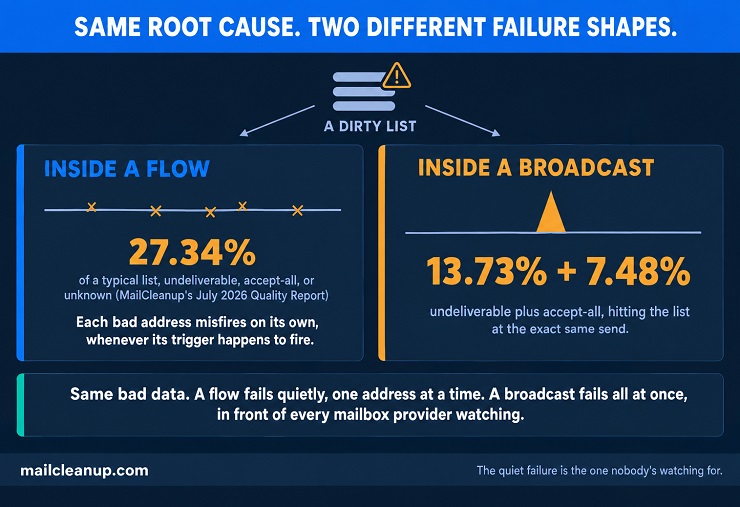
That’s the exact failure our email personalization guide documents from the other side. MailCleanup’s Quality Report puts 27.34% of a typical list into undeliverable, accept-all, or unknown categories. Those are addresses that behave unpredictably, no matter how well the trigger and timing are built around them.
What Makes Email Broadcasts Work (and What Breaks Them)
The Ingredients of a Broadcast That Doesn’t Get Ignored
A broadcast in this email flows vs email broadcasts comparison fails differently than a flow, usually within hours of sending. That timeline makes its ingredients easier for you to spot, and harder to excuse.
Segmentation beats a full-list blast almost every time. A promotion sent only to subscribers who’ve purchased that category before converts at a higher rate than the same email sent to everyone. It also generates far fewer complaints along the way.
Subject line specificity carries more weight here than in a flow, since a broadcast earns attention cold, without the context a trigger provides. A specific subject naming the actual offer or news outperforms a vague, curiosity-driven one, even though the vague version sometimes wins on opens alone. That’s a metric Apple Mail Privacy Protection has made less reliable than it used to be.
Send-time optimization is a smaller lever than segmentation, but a real one. It times each recipient’s send to when they individually tend to engage, rather than picking one blanket time for the whole list. That’s really an email flow vs broadcast question in miniature: does the moment decide the message, or does the calendar? That matters more for a list spanning multiple time zones.
A clean list underneath it all. None of that matters if the list receiving the broadcast is unreliable. A perfectly segmented, well-timed send to a list full of dead addresses still produces a spike in bounces the moment it goes out. That’s exactly why checking list health before a major promotional push belongs in this list of ingredients, not as an afterthought.
What Breaks a Broadcast Before It Gets Opened
A broadcast in this email flows vs email broadcasts comparison fails differently. The damage often lands all at once, instead of trickling in, and you’ll notice far faster than you would with a flow.
Full-list blasting, sending to everyone regardless of relevance, is the most common cause. A targeted send outperforms a blanket one, as already covered above. The reverse is just as true: an irrelevant broadcast reads as noise and gets treated accordingly.
Over-mailing compounds the problem. Two to three targeted sends a week is sustainable for most lists. Push well past that, and complaint rates climb in a way that’s directly traceable to frequency, not content quality.
Misleading subject lines cause a subtler kind of damage. A subject that promises something the email doesn’t deliver gets opens in the short term and complaints in the long term. The mismatch between promise and content breeds distrust. That’s exactly what makes a subscriber stop opening future sends, or start marking them as spam instead.
The list itself causes the most concentrated damage of the four, and this is where flows and broadcasts diverge most sharply. A flow’s bad addresses trigger individually, spread across days or weeks as different subscribers hit different triggers. A broadcast sends to every bad address in the list at the exact same moment. MailCleanup’s Quality Report shows 13.73% of a typical list as outright undeliverable, and another 7.48% as accept-all. Those accept-all addresses take the message and then bounce or complain later, invisible at send time. Hit send to a full list carrying that composition, and the bounce and complaint signal arrives as a single spike.
Mailbox providers read that very differently than the same volume spread across a month of individual flow triggers. That’s not just a metrics problem. It’s the difference between a broadcast that protects sender reputation and one that quietly erodes it, one send at a time. This is the email flows vs email campaigns distinction doing real work here too, not just swapping labels.
Email Flows vs Email Broadcasts: Side-by-Side
Every difference covered in this email flows vs email broadcasts guide condenses into six practical rows, side by side. Reading it is really reading the difference between email flows and broadcasts, laid out row by row. It’s a clean email flow vs broadcast reference for anyone who only needs the six-row version.
| Dimension | Email Flows | Email Broadcasts |
|---|---|---|
| Trigger | Individual subscriber action or inaction | A date or decision you choose |
| Timing | Real-time or near-real-time | Scheduled, same moment for everyone |
| Personalization | High, built from individual behavior | Uniform across the send |
| Typical revenue share | 60-70% in many ecommerce programs | 30-40%, varies by list size and cadence |
| Volume per send | Rolling, a handful at a time | All at once, to a list or segment |
| Failure mode on a dirty list | Fails quietly, one misfire at a time | Fails loudly, a concentrated spike |
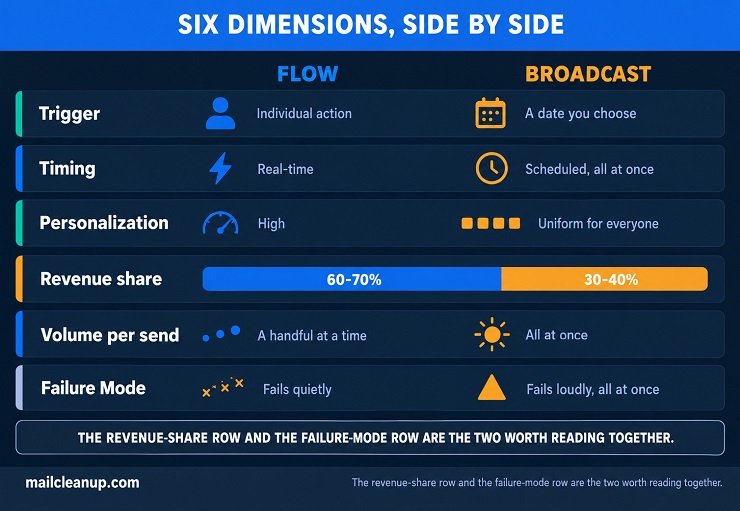
The revenue-share row and the failure-mode row are worth reading together, not separately. That table would look the same under an email flows vs email campaigns label too, since the mechanics don’t change with the word choice. Flows generate the majority of email revenue in most ecommerce programs. They’re also the harder failure to spot, since a quiet, one-at-a-time breakdown doesn’t show up the way a bounce spike does.
That combination, most of the revenue riding on the least visible failure mode, is exactly why flows deserve the same list-quality scrutiny broadcasts get. This sequencing question is really an email flows vs email campaigns question for teams using that terminology instead. It’s also an email automation vs email campaign question in the exact sense covered earlier in this guide.
Building a Program That Uses Both
The email flows vs email broadcasts decision isn’t really the decision most programs need to make. Nearly every mature email program runs both, which makes the real question sequencing and allocation, not either-or.
Build flows first. An automated email sequence, once built and left alone, keeps converting new subscribers and new customers indefinitely without additional work. A one-off email campaign converts once, for the audience it was sent to, and then it’s done. That compounding effect is why the flows-first order shows up consistently. Broadcasts still matter, but they’re easier to add to an existing flow foundation than the reverse.
Match the revenue split to your list size, not a fixed rule. The 60 to 70 percent flow-revenue figure from the comparison table holds for many ecommerce programs. A smaller list leans more heavily on broadcasts instead, with less flow-eligible traffic, lower cart-abandonment volume, and fewer repeat purchases. There simply isn’t enough flow-triggering activity yet to carry that share. Most ESPs break down revenue by flow versus campaign in their own reporting. That’s the fastest way to see where your program actually sits against that range.
Coordinate cadence so the two don’t collide. A subscriber actively in a high-priority flow, an abandoned cart sequence in particular, shouldn’t also land a competing promotional broadcast the same day. Picture someone adding a jacket to their cart Tuesday afternoon, now inside that flow’s three-email sequence. A weekend-sale broadcast going out Wednesday morning, promoting an entirely different category, gives that same subscriber two competing asks in under 24 hours. A simple suppression window, holding broadcast sends for 24 to 48 hours after someone enters a priority flow, handles this cleanly. It prevents a subscriber from getting two conflicting emails at once.
Every piece of this – the sequencing, the allocation, the suppression logic – assumes the underlying list is reliable enough for any of it to matter. A flow built well and a broadcast timed perfectly both depend on the same foundation this whole guide keeps returning to.
Email Marketing Tools for Managing Both
Most major platforms in this email flows vs email broadcasts comparison handle both, though each leans into a different strength.
- Omnisend: built around ecommerce integration first, connecting directly to store data for both flow triggers and broadcast segmentation.
- Klaviyo: popularized “flows” as the industry term itself, its dashboard literally separates Flows from Campaigns, and its behavioral segmentation goes deeper than most alternatives.
- Brevo: keeps both simple, a reasonable starting point for a small team building its first sequences without a steep learning curve.
- GetResponse: bundles email with webinars and landing pages, useful if flows and broadcasts are only part of a wider marketing stack.
- ConvertKit: built for individual creators, with automation that’s intentionally simpler than an ecommerce-focused platform needs.
- Mailchimp: the most broadly flexible option, handling both flows and broadcasts across business sizes from solo operations to larger teams.
Klaviyo’s own naming makes the email flows vs email campaigns framing unavoidable, but the same logic applies no matter which platform runs it. Whichever platform is in use, the underlying email flow vs broadcast decision doesn’t change.
None of that matters much if the list behind whichever platform you choose is unreliable. A well-chosen platform still sends flows off bad trigger data and broadcasts into bounce spikes if the underlying list was never verified. [Our full roundup of the best email marketing tools] goes deeper into feature-by-feature comparisons than this guide needs to.
Where to Start: Verify the List Before You Build Either One
Everything in this guide, the trigger mechanics, the timing windows, the revenue split, the failure modes, comes back to the same underlying dependency. A flow can be perfectly designed and still misfire on bad data. A broadcast can be perfectly segmented and still spike bounces the moment it reaches an unverified address. Neither problem looks like a data problem from the outside. Both get misdiagnosed as a strategy or copywriting issue, which sends whoever’s troubleshooting looking in the wrong place entirely.
Building either channel on a list that’s never been checked means every other decision in this guide rests on an untested assumption. That’s sequencing, allocation, cadence, and timing, all resting on it. Our email list hygiene guide covers the ongoing discipline of keeping a list clean once it’s already in decent shape. For a list inherited from a previous team, or one untouched in a while, running it through bulk verification is the better starting point. Running it clears out the addresses causing both problems before either flows or broadcasts touch them.
Start there, and the email flows vs email broadcasts decision this whole guide walks through actually means what it’s supposed to mean. It won’t rest on data nobody’s verified. Every recommendation here, and the difference between email flows and broadcasts underneath all of them, only holds if the list behind it is real. That’s the same triggered email vs broadcast email logic this guide opened with, just arriving at its natural conclusion. However someone frames it, an email flows vs email campaigns question or this guide’s own broadcasts framing, the answer starts in the same place.
Frequently Asked Questions
What is the difference between an email flow and an email broadcast?
An email flow is an automated sequence triggered by something a subscriber does, like abandoning a cart or signing up. An email broadcast is a one-off email sent to a list or segment on a schedule you choose. The core difference is what decides the timing: individual behavior for flows, your own calendar for broadcasts.
Are email flows and drip campaigns the same thing?
Yes, largely. “Drip campaign” and “automated sequence” are older, more generic terms for the same thing. Most platforms now call it a flow, an automated series of emails triggered by a subscriber’s action. The mechanics are identical regardless of which term a given guide uses.
What percentage of email revenue should come from flows versus broadcasts?
Many ecommerce programs see 60 to 70 percent of email revenue come from flows, with broadcasts making up the rest. That’s close to what’s sometimes called the 70/30 rule elsewhere. Smaller lists with less flow-triggering activity typically lean more heavily on broadcasts instead.
How does a messy email list affect automated flows?
A flow’s trigger fires off whatever data exists for a subscriber. If the address is invalid, or the behavioral data is stale, the trigger can fire accurately while the send goes nowhere. MailCleanup’s Quality Report shows 27.34% of a typical list falling into undeliverable, accept-all, or unknown.
Can a single broadcast damage my sender reputation?
Yes, more directly than a flow can. A broadcast sends to every address at the same moment. An invalid share, or a spam trap, creates one concentrated bounce and complaint spike. Mailbox providers read that as a stronger warning sign than the same volume spread across weeks.
Do I need a large list before broadcasts are worth sending?
Not strictly, but very small lists change the math. Industry data suggests broadcasts start paying off more clearly once a list crosses roughly 4,000 engaged profiles. Below that, flows alone often carry more of the workload, since there isn’t enough audience yet to justify frequent one-off sends.
Which should I build first, flows or broadcasts?
Flows, in most cases. A flow keeps converting new subscribers indefinitely once it’s built, while a broadcast converts once for whoever received it and is then done. That compounding effect is why a flow foundation is easier to add broadcasts to later than the other way around.
Can flows and broadcasts run at the same time without conflicting?
Usually, yes, with one caution. A subscriber actively inside a high-priority flow, an abandoned cart sequence especially, shouldn’t also receive a competing broadcast the same day. A short suppression window, holding broadcast sends for 24 to 48 hours after entering a priority flow, avoids sending two conflicting messages at once.