
Email normally arrives in seconds, so a message that turns up an hour late looks like trouble. So does a delivery log that says to try again later. The usual reactions make things worse. You retry faster, you stop mailing an address that was fine, or you start changing infrastructure that was never broken. A password reset link can expire while it waits, and a verification check can label a mailbox that exists as Unknown.
Email greylisting is one established cause, and it is easy to misread: it looks like a rejection but behaves like a pause. A real block judges who you are, while greylisting mainly checks whether you come back. Servers greylisting email from unfamiliar senders work this way, so the sender’s own retry decides the outcome.
You will learn how it works, how long it lasts, and how to tell it from the temporary failures it resembles. You will also see why one sender can get stopped again and again, what to do, and what it does to verification results. Along the way we cover what separates greylisting from blacklisting, which refuses a known bad sender outright, and whether it still works today. We give you a three-signal check to run on a message that arrives late, so you can name the cause instead of guessing. Once you can read one delayed message correctly, the rest gets easier, and it starts with what the server is actually asking for.
TL;DR
- Email greylisting makes a receiving server turn away an unfamiliar sender’s first message with a try-again-later reply, then accept it when the sender retries.
- The delay lasts until a retry arrives once the receiver’s required wait is over, so the usual response is to let the retry run.
- Three signals separate greylisting from other temporary failures: try-again-later wording, acceptance on a later retry, and a pattern tied to first contact.
- Repeated greylisting usually means each retry looked new: the sending server, the sender details or the message changed, or the record expired.
- Greylisting asks an unfamiliar sender to wait, while blacklisting refuses a sender on a list of known bad sources; some receivers combine the two.
- A greylisting server can stop a verification check from confirming a mailbox, so a valid address may be marked Unknown, not Deliverable.
What Is Email Greylisting?
Email greylisting is a way for a receiving server to handle a sender it has no record of. The server refuses the message with a temporary error, a reply that asks the sender to come back later. It accepts the message when the sender returns after a short wait. A properly built sending system holds the message in its queue and tries again by itself, so you usually have nothing to do. From your side it is a delay rather than a failure, unless the sending server gives up before a retry gets through.
We use the term only for this deliberate test, not for every temporary error a server can return. It runs on the server that receives the mail, so you do not set anything up as the sender. So what is email greylisting protecting against? It protects the receiver from bulk-sending software that gives up after one refusal, which a legitimate sending server does not.
The name makes sense once you see where the technique sits. An allowlist waves known senders through, a blocklist (often called a blacklist) refuses known bad ones, and greylisting handles the stranger who is neither. The idea dates to a 2003 proposal by Evan Harris, who described it as a cross between the two. It was documented in 2012 as RFC 6647, a standards-track memo from the Internet Engineering Task Force, the body that publishes internet standards.
One word, several meanings: Outside email, it also names financial watch lists and security rules for newly registered domains. We cover only the email meaning here.
How Email Greylisting Works
At its core, email greylisting is a lookup and a clock. The receiving server notes who is connecting and refuses that first attempt with a temporary error. It then checks whether the same sender comes back after enough time has passed. You do not see the lookup, but you feel its result as a delay, so it helps to know what the server writes down.
The Three Details a Greylisting Server Remembers
When a sender is new to it, a server doing email greylisting writes down three details. Together they form a triplet, which is how the server tells a retry from a new stranger.
- The IP address you send from: The numeric address of the machine that connects. The receiver knows it before any message is offered. Some receivers match a block of neighboring addresses instead of one, so a sender with several servers in the same block counts as one.
- The envelope sender: The return address your sending system announces for the message. The envelope is the handoff information that servers exchange, and it is separate from the From line you see in the inbox.
- The envelope recipient: The address you are writing to, announced in that same handoff. Matching on the first recipient alone is usually enough, since legitimate servers keep the same recipient order between attempts.
A retry that carries the same triplet is recognized. One that carries different details looks like a new stranger and starts the process again.
The Four Steps From First Attempt to Accepted Message
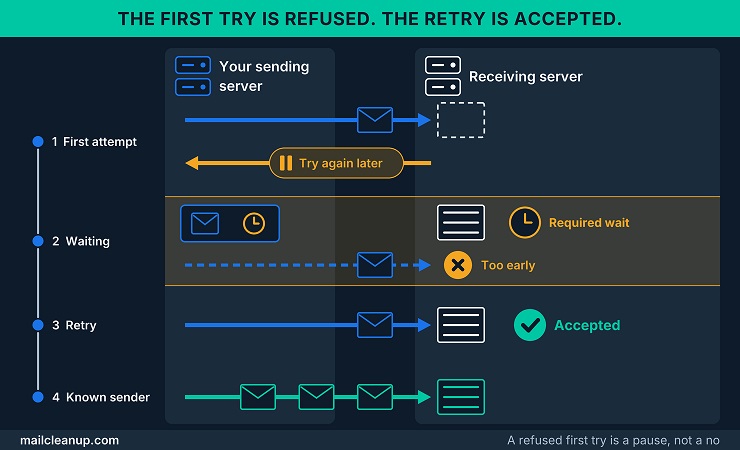
In its basic form, email greylisting runs in four steps, and your message does its waiting in the second.
- First attempt: Your sending server connects and offers the message. The receiving server looks up the triplet, finds no record, stores it with the time, and answers with a temporary error.
- Waiting: Your sending server sets the message aside and schedules a retry. The message is not lost, only waiting.
- Retry: Your sending server connects again with the same details. If the receiver’s required wait has passed, it accepts the message. If the retry comes too early, it can refuse it again.
- Known sender: The receiver marks the sender as known, so later messages pass without the delay until that record expires.
The wait is usually counted from the first attempt. A retry that comes too early is refused again, so retrying faster does not shorten the delay. Your sending server’s own schedule decides when the next try comes.
Why Email Greylisting Targets Unfamiliar Senders
It is easy to read email greylisting as a verdict on your reputation, and it is not one. In its plain form the test asks whether the receiver has seen this combination of server, sender and recipient before. A sender with a spotless record can be delayed on first contact just as an unknown one is.
A receiver has a reason to treat a stranger differently, and it is not suspicion. If your server has never connected before, the receiver has no record of it, good or bad, and no basis for judging it yet. Greylisting buys time: the receiver asks the stranger to come back, and a retry shows that the sender behaves like a real mail server.
It is also cheap. In its usual form the test runs before the receiver accepts the message, so there is nothing to scan. A failed test costs the receiver little. Once your server has passed, its later messages usually go through, so the delay mostly lands on first contact.
What this means for you: A delay says the receiver does not know your server yet, not that it thinks badly of you.
What Each Receiving Server Gets to Decide
Email greylisting is a technique, not a product with fixed settings, so every receiving server decides how to apply it. A server greylisting email makes four choices that change what you experience:
| Decision | What a receiver can choose | What it means for you |
|---|---|---|
| What counts as the same sender | One IP address, or a block of nearby ones | A retry from a neighboring server may still be recognized |
| Whom to test | Every new sender, or only suspicious ones | A sender with a clean record may skip the delay |
| Who is exempt | Allowlisted networks and signed-in users | Known senders pass without waiting |
| When it acts | At connection, sender, recipient, or after the message body | Later checks can weigh the message itself |
These choices explain why the same message can wait at one receiver and arrive at once at another. One open-source greylisting server tests every new triplet unless an allowlist exempts it. One open-source spam filter greylists the messages it already scores as suspicious and skips signed-in users by default. It also treats every address in a block of 8,192 neighbors as the same server.
Two more choices matter: how long a new sender must wait, and how long the receiver remembers it. Together they set the length of your delay and how often you are tested again.
How Long Does Email Greylisting Delay a Message?
Email greylisting usually holds a message back for minutes, and sometimes for a few hours. Two clocks set the length: how long the receiver makes a new sender wait, and when your sending server retries. Each side usually cannot see the other’s clock, so the delay can look very different from one receiver to the next.
The Receiver’s Minimum Wait and the Sender’s Retry Schedule
The first clock belongs to the receiver. Receivers greylisting email accept a retry once a required wait has passed, and each one sets that wait itself. The second clock belongs to your sending server, which decides when each retry happens and how long it keeps trying. Both are settings, and the documented defaults show what they look like in practice:
| Clock | Who sets it | Documented default |
|---|---|---|
| Required wait | The receiving server | 5 minutes, in one open-source greylisting server and in one open-source spam filter |
| Retry gap | Your sending server | Starts at 5 minutes and doubles after each attempt, up to 4,000 seconds (about 67 minutes), in one open-source sending server |
| Give-up time | Your sending server | 5 days, in that same sending server |
With email greylisting, a message arrives at the first retry that lands after the required wait. Suppose the receiver requires 5 minutes and your server retries at 10 minutes: the message arrives at about 10 minutes. Now suppose the receiver requires 30 minutes and your server tries again at 10, 20 and 40 minutes. The first two tries are refused as too early, and the message lands at about 40 minutes. In the usual design the clock runs from the first attempt, so your retry schedule often sets the final delay.
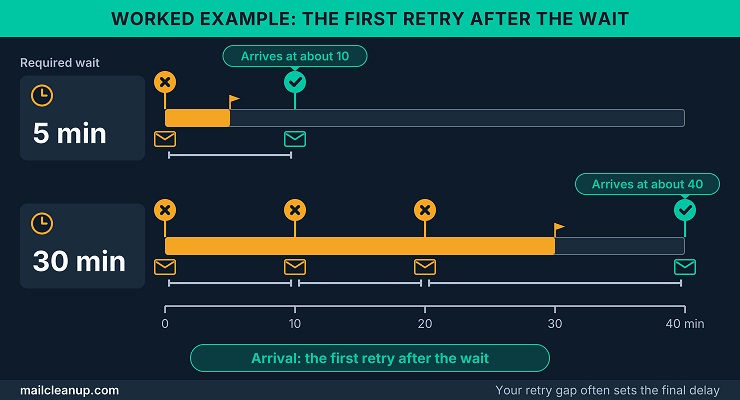
Some servers skip retries entirely, and some popular ones wait an hour or more between tries. A gap of an hour or more can turn a short required wait into a long delay. A sender that does not retry gives up on your message.
What the Standard and Early Measurements Report
For email greylisting, the recommended default window in RFC 6647 opens one minute after the first attempt and closes 24 hours after it. A retry that arrives after the window closes counts as a new message, so a very slow sender starts over. Idle records are kept for at least a week by default, and receivers gain little by lengthening the minimum wait.
Two early measurements give you real numbers, and both are more than twenty years old. The 2003 design started from a one-hour wait. In a test of about six weeks, 39.2% of the 85,745 messages it passed had been delayed first. Almost all of those were mailing-list traffic with a different sender address each time. Leaving out triplets that delivered a single message, which removes that traffic, cut the delayed share to 4.1%.
We can compare that with a 2005 log study of one operator’s two mail servers, which covered 715,000 delivery attempts over seven weeks. Of those, 20% were greylisted, and only 16% of the greylisted addresses retried successfully. Most successful retries came within a few minutes, bunched around 400 and 900 seconds, which probably matches the retry timers of common sending servers.
Read these as history: They show the shape of the delay, mostly short with a slow tail, not what receivers do today.
When a Delay Matters: Reset Links and One-Time Codes
A delay of minutes is harmless for a newsletter and costly for a message with a clock of its own. A password reset link or a one-time login code is only useful until it expires, and the system that sends it sets that expiry. If email greylisting and your retry gap push arrival past that moment, the message arrives too late to use.
- Expiry shorter than the delay: The message can land after the link or code has expired, so the recipient needs a new one.
- First contact with a receiver: A receiver that has never seen your server knows nothing about it, so the first message is exposed.
- A receiver that knows your server: The delay usually does not apply, because later messages pass until its record of you expires.
Receivers are advised to weigh the consequences where delivery must be timely, such as payments, account security and other transactions (RFC 6647). They can exempt specific sources from the test. Whether your server is exempt is the receiver’s call, not yours. Keeping time-critical mail dependable end to end is the subject of the dedicated post on [transactional email deliverability].
How to Recognize Email Greylisting
Three signals point to email greylisting: a reply asking for a retry, a retry that succeeds, and a delay that began at first contact. One temporary error on its own proves little, because a server can return one for many reasons, such as a local resource issue. You can check each signal in your own logs.
What a Greylisting Reply Looks Like
The receiver’s refusal arrives as an SMTP reply, the short coded answer one mail server gives another. For email greylisting that reply starts with 4 (a 4xx reply), which marks a temporary error. Two codes are reasonable for the job: 421, when the server wants to end the connection at once, and 450 otherwise (RFC 6647). Real systems also use 451, and some add a second code that adds detail (4.7.1 in the 2003 example). The wording after the code is the receiver’s choice, so it varies:
| Where the reply comes from | Documented example |
|---|---|
| The 2003 proposal | 451 4.7.1 Please try again later |
| An open-source greylisting server, by default | Greylisted, followed by a help-page address built from the recipient’s domain |
| An open-source spam filter, by default | Try again later |
Only one of the three examples uses the word greylisted, so the wording alone will not tell you what you are looking at. The code class does: all three are 4xx replies that invite a retry. That class also appears when a server has a resource problem of its own, so a 4xx reply alone does not settle it. The remaining reply codes are explained in SMTP error codes.
The Three-Signal Check for Greylisting
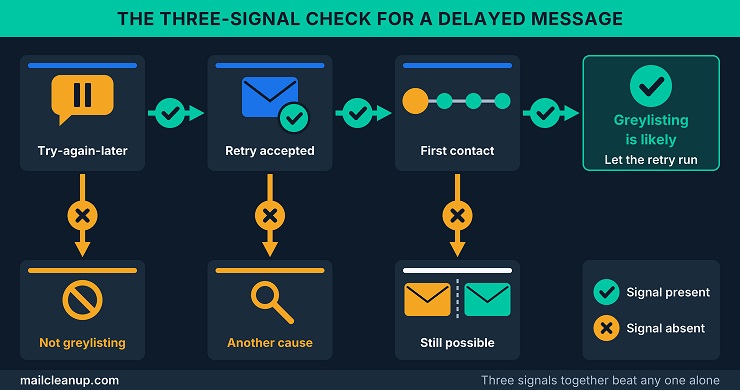
We check three signals before calling a delay email greylisting, because no single one is enough. Check them in order on a delayed message:
- Try-again-later wording: The reply is a 4xx temporary error that asks your server to try again; a permanent refusal is not greylisting.
- Acceptance on a later retry: Your server sends the same message again after a wait, and the receiver accepts it without any change.
- A pattern tied to first contact: The delay hit your first message to a receiver, or your first after a long silence.
What the signals add up to decides your next move:
- All three present: Greylisting is the likely cause, so let the retry run.
- Wording but no acceptance: If the same error keeps returning after the receiver’s window closes, suspect another cause, such as a resource problem.
- Wording and acceptance, no first-contact pattern: Greylisting is still possible, because receivers choose whom to test; compare your delayed and undelayed messages.
A sending server is not told why a temporary failure was returned. A resource problem on the receiving side looks the same from outside as a deliberate delay. If the signals do not line up, the cause is probably one of the many other reasons mail is delayed or bounced. The many other causes of a delayed or bounced message are laid out in why emails bounce back.
Where Greylisting Email Delays Show Up for Senders
Receivers greylisting email leave traces in two places you can check. The first is your own sending system. An open-source sending server files mail it could not deliver on the first attempt in a deferred queue. It also records why the mail is delayed, so a deferred entry followed by a delivered one is the pattern to look for. Until your server gives up, that is a delay and not a bounce, and soft bounce vs hard bounce explains how the two differ.
The second place is the delivered message. Compare the time you sent it with the time it arrived, and the gap is the delay. Some receivers doing email greylisting also add a header, a short line of technical detail attached to the message, that states the delay outright. An open-source greylisting server can prepend a line that begins X-Greylist and gives the number of seconds the message was delayed. Reading header lines closely is a skill of its own, and [email headers] is the place to start.
The practical tell: A message deferred once and then delivered without any change is a strong sign of greylisting.
Greylisting vs Blacklisting: How the Two Differ and Work Together
Greylisting delays a sender that is new to the receiver, while blacklisting refuses a sender that appears on a list of known bad sources. The two answer different questions, so a receiver can use both on the same connection. Knowing which one you face tells you whether to wait or to investigate. Greylisting vs blacklisting is less a contest than a division of labor, with email greylisting as the cautious half.
Greylist vs Blacklist at a Glance
A greylist vs blacklist comparison comes down to what each one measures. Email greylisting measures behavior: does your server come back? Blacklisting measures reputation: is your address on a list of unwanted senders? That difference shapes every row of the table:
| Greylisting | Blacklisting | |
|---|---|---|
| Question it asks | Does this sender retry? | Is this address on a list of known bad senders? |
| What it relies on | The receiver’s own record of first contact | A shared list that a third party usually maintains |
| Typical result | A temporary error, then delivery if the sender retries | The connection is rejected |
| What the sender sees | A try-again-later reply in the receiver’s own words | A rejection that often states the reason and a web page |
| Who sets the clock | The receiver’s required wait, then your own retry schedule | The list’s own policy for adding and removing entries |
Read down the first row and the rest follows. Greylisting can delay a sender whose record is excellent, and a blocklist can refuse mail the receiver would have wanted. Neither one checks the other’s question. If your address is on a blocklist, the lookups, usual causes and removal steps are worked through in email blacklist check and removal.
How Greylisting, Blocklists, and Allowlists Work Together
These tools are layers more than rivals, and a receiver greylisting email can run all three on the same connection. Mail servers typically check their lists on every incoming connection (RFC 5782). A common pattern is to accept a sender on an allowlist and refuse one on a blocklist. You can expect legitimate mail to appear on neither list, and that is where email greylisting does its work:
- On an allowlist: Your mail skips the test, because the receiver has already decided it trusts your server.
- On a blocklist: The receiver can refuse your mail outright or, to be cautious, greylist it and see whether your server retries (RFC 6647).
- On neither list: Your server faces the retry test, and one that keeps passing is eventually remembered as known.
Greylisting is the softer response to a blocklist match, and that softness matters because a blocklist can catch legitimate mail. A listed sender that retries still gets through, which is the point of the softer response. The documented open-source tools show the layering too. The greylisting server adds a client to its allowlist automatically after five successful deliveries. The spam filter skips greylisting when specific results from its other checks are present. How receivers build and maintain allowlists, and how your server gets onto one, belongs to [email whitelisting].
Why Email Greylisting Keeps Hitting the Same Sender
Email greylisting keeps hitting the same sender when retries look like strangers or the receiver’s record of the sender has expired. Three things cause that: details that change between attempts, long gaps between messages, and receivers that do not share what they learn. You can influence the first two, and the third is the receiver’s own setup.
What Changes Between Attempts
Email greylisting recognizes a retry when it carries the same triplet as the first attempt. A change in any of the three details can restart the test. Three changes do it, and each traces back to how mail leaves your system:
- A different sending address: When several outbound servers share one queue, the retry can leave from another server (RFC 6647). An address that changes between attempts has the same effect.
- A different return address: Some systems give every message its own return address to track bounces, so each of your messages looks new.
- A changed message: Receivers that greylist on message content can treat an edited message as new. Some mail systems reformulate parts of a message for each attempt, so the attempts can differ.
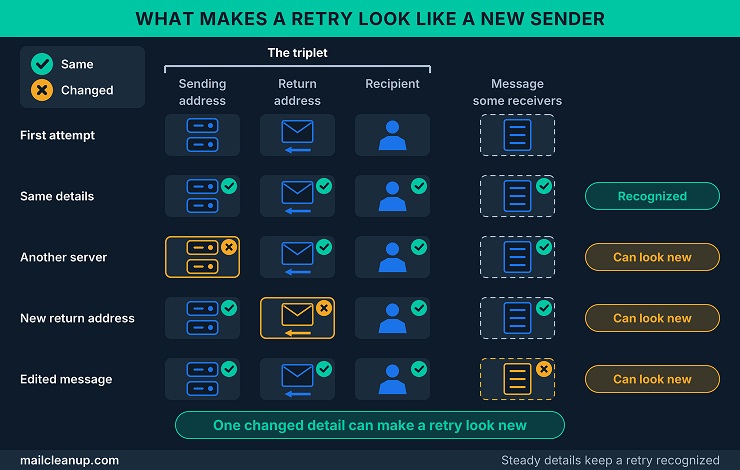
Receivers that allow a whole address after one successful retry are not troubled by changing return addresses (RFC 6647). Receivers that key on the full triplet are. Whether your mail leaves from one address or a shared pool affects how stable the first detail stays. Dedicated IP vs shared IP for email weighs the two options.
Low-Volume Senders and Long Gaps
Receivers running email greylisting do not remember senders forever. A record that goes unused eventually expires. If you write to a receiver less often than its record lasts, you may start from first contact each time. A host that mails a destination infrequently may see a large share of its mail greylisted, even when it is legitimate (RFC 6647).
Record lifetimes vary widely, and that decides what infrequent means for you. The 2003 design kept a passed sender for 36 days and refreshed the record on each delivery, so a monthly mailing stayed known. By default, one documented greylisting server deletes a record after 35 days without a sighting. One documented spam filter lets its stored records expire after one day.
A steady cadence helps: The 2003 design and the documented greylisting server both refresh a record when the sender is seen. Regular sending keeps your server known.
Receivers That Do Not Share Their Records
A domain greylisting email on several servers keeps a separate record on each unless it shares one. Here is how email greylisting plays out for one message when two servers do not share records:
- First attempt: Your server connects to the first receiving server, which has no record of you and greylists the attempt.
- Waiting: Your server queues the message and tries again later.
- Retry: The retry reaches the second server, either because the first is unavailable or because the domain’s servers take turns.
- Second refusal: The second server has no record either, so it greylists the attempt again.
A domain that adds servers to speed up its mail can end up amplifying the delay for legitimate senders. Receivers are advised to let all of a domain’s receiving servers share one database and one policy (RFC 6647). You cannot change how a receiver is built, but you can recognize the pattern. If one receiving domain greylists you again and again while others do not, the cause may be that domain’s setup and not your sending.
What to Do When Email Greylisting Delays Your Mail
Usually the right move is to do nothing, because email greylisting clears when your sending system retries. The work is to confirm it, avoid anything that restarts the clock, and spot the cases that point to a deeper problem.
Start With Nothing: Let the Retry Run
Your sending system already knows how to handle email greylisting: it retries the held message on its own schedule. Your job is to check that this is happening and leave it alone. Four steps cover it:
- Confirm the signals: Check that the reply asked for a retry, then see whether a later retry is accepted.
- Leave the queue alone: Your sending system makes the next attempt without help.
- Check after the next scheduled retry: A message that now shows as delivered was delayed, not lost, and needs nothing further.
- Note the receiving domain: Record which receiver delayed you and for how long, so a pattern is easy to see later.
Until your system gives up, a greylisted message is delayed, not failed. How long your system keeps trying is a setting you control. Set it long enough to cover a slow retry plus a receiver’s required wait. A detailed study on retry limits and when to stop mailing an address has been discussed in the dedicated post on email bounce management.
What Not to Do: Retry Faster, Suppress Early, or Assume a Block
Three reactions to email greylisting feel productive and do harm. Each one restarts the clock, suppresses a working contact (stops all mail to it), or sends you after a problem you do not have:
- Retrying faster: A retry that arrives before the receiver’s required wait is refused again, so extra attempts do not shorten the delay. A resend by hand can be worse, because it is a new message. If your system stamps each message with a unique return address, the resend starts first contact over. Aggressive retrying can also make the delays worse.
- Suppressing early: Suppressing an address means you stop mailing it. Greylisting delays a message rather than rejecting it, so one temporary refusal is no reason to do it. Retrying forever and suppressing too quickly are both mistakes.
- Assuming a block: The greylist vs blacklist distinction decides which response applies. A blocklist rejects the connection, while a greylist asks you to try again and clears on retry. Hunting for a listing that does not exist wastes time.
When your system’s retry limit ends with the message still undelivered, the delay has become a failure worth investigating.
How to Make Retries Easier to Recognize
A receiver recognizes a retry by the details it recorded on the first attempt, which makes steadiness your goal. Five habits keep email greylisting from mistaking a retry for a stranger:
| Detail | Keep it steady by | Why it matters |
|---|---|---|
| Sending address | Retrying from the same address, or the same block | Receivers match an address or a nearby block |
| Return address | Reusing one return address per recipient | A new one looks like a stranger to full-triplet receivers |
| Message | Leaving it unchanged between attempts | Content-level receivers treat a changed message as new |
| Cadence | Writing to each receiver regularly | Records refresh when a sender is seen and expire when idle |
| Retry timing | Retrying within a day of the first attempt | A retry after the window closes counts as new |
These habits do not exempt a sender from the first test, because first contact is still first contact. They stop your retries and later messages from being mistaken for strangers. A brand-new sending address starts with no history anywhere, and email warmup lays out how to build that history in stages.
When Greylisting Points to a Deeper Issue
A first-contact delay from email greylisting usually clears once a sender has passed. A delay that keeps returning at receivers that already know you is a different signal. Receivers greylisting email selectively aim at senders with a negative record rather than at every newcomer (RFC 6647). Two signals deserve a look:
- An address on a blocklist: Some receivers greylist a listed address instead of blocking it outright. A delay can then be the mild first sign of a listing, which is where greylisting vs blacklisting blurs.
- A dynamic-looking hostname: Receivers can greylist a host whose reverse DNS name, the hostname its address resolves to, looks dynamic. Check what your sending address resolves to.
A single delay proves nothing, but a pattern is worth acting on. If either signal applies, the delay is a symptom, and the fix lies in how you send and in your reputation. Reputation is built from many signals, and email sender reputation shows how to check it and rebuild it.
Email Greylisting and Email Verification
What is email greylisting doing to a verification check? It can stop your check from reaching an answer, because the check looks like a stranger to the receiving server. A temporary refusal from email greylisting tells the check nothing about whether the mailbox exists.
What a Greylisted Verification Check Gets Back
An address check connects to the receiving server and simulates a delivery. It goes as far as the step where the recipient is named, then stops without sending a message (RFC 6647). A receiver greylisting email at that step answers like this:
- Connection: Your check connects from an address the receiver has not seen before.
- Recipient step: The check names the recipient, and the receiver replies with a temporary error, not an acceptance or a refusal.
- No verdict: Your check has no confirmation either way, so it cannot say whether the mailbox exists.
To the receiver, a legitimate address check and an address-harvesting probe look alike, so greylisting treats them alike. Email greylisting may disrupt both kinds of probe, and the legitimate one bears the cost (RFC 6647). A repeat with the same details after the required wait can look like a retry. How a full verification run works, from the syntax check to the SMTP step, is walked through in what is email verification.
Why a Greylisted Check Returns Unknown
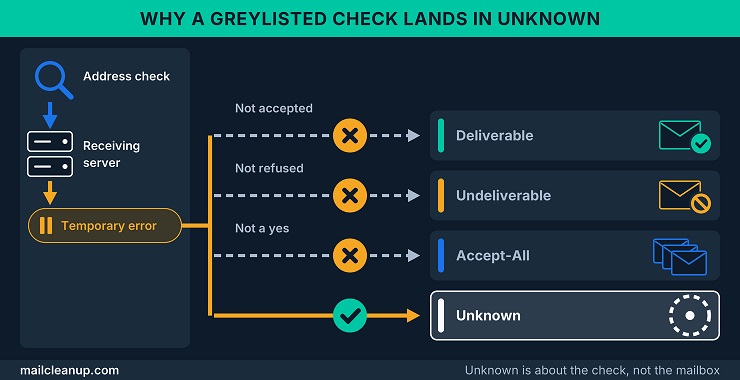
Our reports sort every checked address into one of four labels: Deliverable, Undeliverable, Accept-All (also called catch-all) or Unknown. Unknown covers the addresses the check could not settle as any of the other three. Email greylisting produces it because a temporary refusal fits none of them:
- Not Deliverable: The server did not accept the address.
- Not Undeliverable: The server did not refuse it either; it asked your check to come back.
- Not Accept-All: An accept-all domain says yes whether or not the mailbox exists, and a temporary refusal is not a yes.
That is why a greylisted address lands in Unknown and not in a verdict on your list. The label describes the check, not the mailbox: it does not say the address is bad, only that this check could not settle it. Catch-all email addresses explains how accept-all domains work and why their yes proves little.
Does Email Greylisting Still Work Today?
Yes, but it catches less than the early tests suggested, and you should treat it as one layer among several. Email greylisting still stops spam software that does not retry, and the newest measurement we found shows it failing against software that does.
What Greylisting Still Catches and What It Misses
The evidence comes from three decades, so we read it in order:
| Year | Evidence | What it shows |
|---|---|---|
| 2003 | The original test of the design | About 97% of first-seen triplets never came back to pass |
| 2012 | The IETF standard | Still useful, though some spamware routes around it |
| 2016 | An academic study of 11 botnet samples | Stopped three of four tested families and failed against the fourth, which retried |
| Today | Documentation for a current open-source spam filter | Applies greylisting to messages that score past a suspicion threshold |
Email greylisting beat the software that skips the retry, and the spam that learned to retry is the spam it misses. By the study’s estimate, it stopped about 43% of spam at the time. What it cannot catch is a patient sender. A bad actor that mails often enough to keep its records alive slips through after the first pass (RFC 6647). So you should not count on it alone. What is greylisting email doing for receivers today? It filters out software that gives up, cheaply and early, and leaves the rest to other layers. For you as a sender, the effect that matters is still the first-contact delay.
Where It Fits Beside Authentication and Content Filtering
Three checks look at your mail from different angles, and a receiver can stack them on one message:
- Greylisting: Asks whether the sender retries as a real mail server should, and usually acts before the message is accepted.
- Authentication: Asks whether the sender is entitled to use the domain on the message, using SPF, DKIM and DMARC, three standard identity checks.
- Content filtering: Asks what the message itself looks like, and combines signals such as the addresses in its headers and links into a score.
Email greylisting does not replace the other two. It screens out senders that give up, and everything else, including your mail, still has to pass the identity and content checks. For the senders that slip through, the suggested answer is to pair greylisting with a reputation service (RFC 6647). Email authentication walks through how the three identity checks combine. How receivers weigh content signals into one score is the subject of [spam filters explained].
Email Greylisting Next Step: Read the Reply, Then Watch the Retry
Start with the reply that email greylisting leaves in your log, because it holds more than the code. The 4xx class says the refusal is temporary, and the wording is the receiver’s own choice. The step the reply answered says what the receiver is matching on. A refusal at the recipient step points to address-based records, so keep your addresses steady. One that arrives after the message body suggests a receiver that may also read content, so keep the message unchanged (RFC 6647). If your log shows the step, write it down.
Then watch the retry with a clock. Write down when the first attempt happened and when the message was accepted, because the gap is your delay. Say the receiver requires five minutes and your first retry comes at fifteen. The message is accepted fifteen minutes in, and ten of those minutes came from your retry gap. Keep one line per receiving domain. After a few messages you have a baseline. A first-contact delay that shrinks to nothing on later messages is email greylisting doing its ordinary work.
Let the log decide: A delay that appears once per receiver and then disappears needs nothing. One that returns at a receiver that already knows you is worth escalating.
Take the reply text, the step and the times to whoever runs your sending system, because an investigation needs them. If a teammate asks what is greylisting email, show them the reply and the retry log, because together they answer it. Greylisting is one factor among many that shape whether mail arrives. What is email deliverability maps the factors you can and cannot control.
FAQs About Email Greylisting
What is greylisting email?
Greylisting email, also called email greylisting, is a receiving server’s test of whether a new sender will come back. The server turns the first attempt away with a temporary error. A real mail system retries on its own after a short wait, and the server then accepts the message.
How long does email greylisting delay a message?
Email greylisting usually delays a message by minutes, and sometimes by a few hours. The delay runs until the first retry that follows the receiver’s required wait, so your own retry schedule matters too. Two documented tools both default to a five-minute wait, and a retry that arrives early is refused again.
Is email greylisting the same as a soft bounce?
Not by itself. Email greylisting is a temporary refusal that your sending system answers by retrying, so the message is delayed, not returned. It becomes a failure when the sender gives up first, for example after its retry limit runs out. One documented sending server keeps trying for five days by default.
What is the difference between greylisting and blacklisting?
For you, the greylisting vs blacklisting difference is behavior versus reputation. Greylisting asks a stranger to wait and lets it through if it retries. Blacklisting turns away an address that a list marks as a known source of abuse. Some receivers soften a blocklist match into a greylist delay.
Can email greylisting cause lost mail?
Email greylisting does not lose mail by itself, but your sending setup can. Greylisting holds a message back rather than discarding it, yet a sending system that does not retry fails the delivery at once. One that treats a temporary error as fatal can return the message or drop a subscriber from a mailing list (RFC 6647).
Does email greylisting delay password reset emails and login codes?
It can. A reset link or login code is useful only until it expires, and email greylisting adds the receiver’s required wait plus your retry gap. The delay lands mostly the first time a receiver meets your server. Later codes to that receiver usually arrive without it until the receiver’s record of your server expires.
Can email greylisting make a verification check return unknown?
Yes. Email greylisting can stop a check at the recipient step, where the receiver sends back a temporary error rather than a yes or no. The check then has no confirmation, so the address reads as Unknown, which means inconclusive and not bad. A repeat from the same address once the wait is over can still get through.
Do I need to do anything when my email is greylisted?
Usually not. Email greylisting resolves through your sending system’s own retry. Check that the reply invites a retry, wait for the next scheduled attempt, and avoid forcing early retries or suppressing the address. Investigate if the message is still undelivered when your retry limit ends, or if the delay recurs at a receiver that knows you.