
In time, an email list picks up a quiet group. These are people who signed up, read for a while, and then stopped clicking, buying or replying. A common fix is a single “we miss you” email sent to all of them at once. It feels like a rescue. In practice, it treats all quiet subscribers alike, and they are not alike.
That shortcut has a price. Some of those addresses no longer work, so your mail bounces, which means the receiving server rejects it and sends it back. Others belong to people who lost interest, and they delete your messages unread or mark them as spam. Mailbox providers, the companies that run people’s inboxes, can count both against you. Few guides separate the two groups. In one client’s tracked list, most of the addresses that went bad had a deleted mailbox, a disabled mailbox or an expired domain. A domain is the part of the address after the @ sign, and no reminder email repairs any of these failures.
The way out is a re-engagement email campaign that does its real work before anything is sent. You check which addresses can still receive mail, then send to the most recently active people first, in capped batches. Two or three emails make the ask, and each one has a single job. You count a return when a person acts, you measure it against everyone you emailed, and you plan how each person leaves. Done in that order, the campaign wins back the readers who can be won back and gives you an honest picture of the rest. The check that decides how it goes is the one most guides skip.
TL;DR
- A re-engagement email campaign is two or three emails to formerly engaged subscribers who stopped clicking, buying or replying and can lawfully be emailed.
- Silence can mean lost interest or an address that no longer works, so each quiet address is checked before the first send.
- A re-engagement email sequence gives each email one job: a check-in, an offer or choice that fits the silence, then a last notice.
- Sending to quiet subscribers starts with the most recently active, caps each batch and pauses when bounces or spam reports pass a preset limit.
- A subscriber counts as returned after a click, purchase, reply or preference update, and the reactivation rate divides those people by everyone emailed.
- The campaign ends with three planned exits: responders get a lighter schedule, requests to leave are honored, and silent addresses stop receiving mail.
What Is a Re-Engagement Email Campaign?
A re-engagement email campaign is a short series of emails sent to subscribers who have gone quiet. Its job is to get one of them to act again. If that fails, the job is to end the attempt cleanly, so you stop mailing someone who is no longer there. A subscriber is quiet when they stop clicking, buying or replying for longer than your usual sending rhythm suggests.
The series itself is small, usually two or three emails, and each re-engagement email has one job. Together the emails ask one question: is this person still here? When the series ends, each address is either back in your regular stream or off your mailing list.
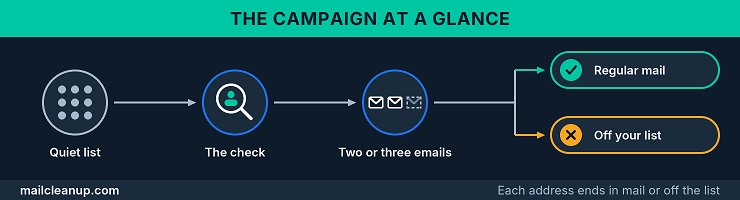
Losing an address that never answers is not a failure. A list that tells you the truth about who is listening is worth more than a bigger one that does not. A re-engagement email marketing strategy therefore treats the campaign as much a way to keep your list honest as a way to earn revenue.
What Counts as Re-Engaged
In a re-engagement email campaign, a subscriber counts as re-engaged when they do something that shows a person is paying attention. Four actions qualify, and each proves something slightly different, so know what each tells you before you decide which to track.
- Click: A click on a link in a re-engagement email is the usual proof of life, because the reader wanted a next step. Some security software follows the links in a message the moment it arrives, before anyone reads it. A click that lands the instant an email arrives proves less than one that comes after a pause.
- Purchase: A purchase is the strongest signal, because money changed hands. If you run a store, it is the clearest line between a customer who came back and one who only looked. It is also a signal that security tools and mail apps do not produce, because they do not place orders.
- Preference update: Your preference page is where subscribers choose which emails they get and how often. A subscriber who picks fewer emails or different topics there has answered your question, even when the answer is “less.” They are still here, and now you know how to mail them without losing them. Treat that choice as a return, not a consolation prize.
- Reply: A reply is usually rarer than a click but unmistakable, and it can tell you why the person went quiet. Answer every one personally, because a subscriber who replies to a re-engagement email has just told you they are still reading. Treat each reply as a conversation to continue, not a number to count.
An open on its own does not belong on that list. Once someone switches on Apple’s Mail Privacy Protection, an email’s remote content, such as images, is fetched automatically on arrival. An open can therefore be recorded for a message nobody has read. A click on the unsubscribe link is an answer too, but it is an exit, not a return.
Re-Engagement Email Campaign vs Win-Back, Sunset and Preference Emails
The four emails differ by the job each one does and the question each one asks. A re-engagement email asks whether a quiet subscriber is still there. A win-back email goes to customers who stopped buying. A sunset email retires addresses that stay silent, and a preference update email asks what a subscriber wants. The names overlap, and one email can do two jobs at once. This is the split we use when planning a re-engagement email marketing strategy.
| The job it does | The question it asks | |
|---|---|---|
| Re-engagement email | Checks whether a quiet subscriber is still there | Are you still with us? |
| Win-back email | Recovers revenue from customers who stopped buying | Do you want to buy again? |
| Preference update email | Learns what a subscriber wants now | What would you like from us? |
| Sunset email | Retires addresses that stay silent | Do you want to stay on this list? |
Read the last column and the pattern is plain. A re-engagement email checks for presence, while the others ask about buying, wanting or staying. That is why they work as steps in one story. A preference update email can serve as the choice inside a re-engagement series, and a sunset email is often the last notice of one. If you are unsure which email you are writing, ask what you want the reader to do: buy, answer, choose or opt to stay.
Zoom out and a re-engagement email campaign is one short sequence inside a wider email marketing program. That program also holds the goals, segmentation and compliance choices that shape each email you send. Seen that way, the four emails are not rival tactics. They are four answers to four different questions about the same subscriber.
Why Run a Re-Engagement Email Campaign?
A re-engagement email campaign recovers revenue from subscribers who are still interested and clears out the ones who are not. Those two results bring four benefits. Each one works through its own mechanism, and knowing the mechanism tells you what to measure.
Revenue from people who still care: Some quiet subscribers never decided to leave. They got busy, missed a few messages or stopped seeing anything relevant. A single re-engagement email with a timely reminder or a better-matched offer can bring them back. Because they already know your name, a reminder starts from familiarity that a first message to a stranger lacks.
A list you can trust: Once the campaign ends, the people left on your list have shown a recent sign of life. Your click rates then describe real readers, and your list size describes a real audience. Decisions about how often you send and what you test rest on better information.
Stronger signals to mailbox providers: Removing silent addresses raises the share of recipients who respond. Providers publish guidance that points the same way. Asking inactive subscribers to confirm they still want your mail is one suggestion in Yahoo’s own sender recommendations. Taking people who ignore your messages off your list is another, in Google’s own sender guidelines.
Less waste on silence: A send to someone who does not respond still has a cost. If your email platform bills by contact count or by sends, you pay for the silence as well. Even on a flat plan, those contacts drag down the averages you report. A campaign gives each of them one fair chance to stay and then lets you stop paying for it.
Why Subscribers Go Quiet
Subscribers go quiet for ordinary reasons, and five of them are worth telling apart. Each leaves a different signal and calls for a different fix, so one “we miss you” email cannot suit them all. A re-engagement email campaign can solve some of these problems and has no effect on others.
- Too many emails: Engagement fades gradually instead of stopping overnight. Spam complaints, meaning people pressing the spam button, can creep up as readers tire of seeing your name. The signal is a slow slide in clicks across several sends. Sending less is the first fix, and letting subscribers choose how often they hear from you is the second.
- The wrong topic: The person clicks on one kind of message and ignores the rest, or clicked once at signup and never again. That pattern points to a mismatch between what you send and what they wanted. A choice of topics speaks to the cause, which a discount does not.
- A changed address: People move jobs, switch providers and abandon old inboxes, and the address stays on your list long after anyone reads it. The signal is total silence, followed by a bounce once the old mailbox is closed. While the mailbox still works, an update link in a re-engagement email can reach the person who glances at it now and then. Once it is closed, no email can reach it.
- Filtered mail: Mailbox filters can send your messages to a spam folder or a rarely checked tab, so the person may not see them. The signal to look for is silence concentrated at one mailbox provider while subscribers elsewhere respond. The fix usually lives in your sending setup and content, not in a reminder email, so check where your mail lands first.
- Plain busyness: Some quiet subscribers are simply busy. They liked your emails, fell behind and stopped thinking about them. The signal is a long gap after steady engagement. A short, well-timed message with one clear action can be enough to bring them back without a discount.
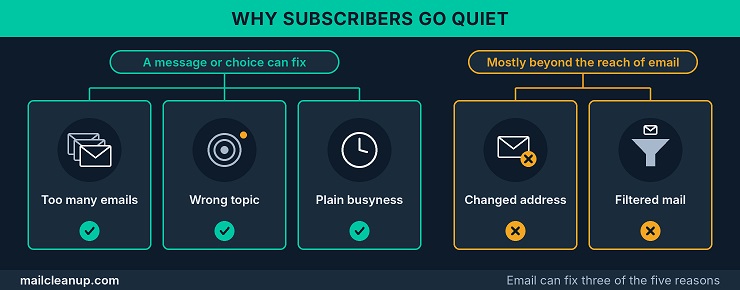
A better message, or a choice of what to receive, solves three of these five problems. The other two mostly sit outside an email’s reach: a closed mailbox cannot receive mail, and a filtered message may go unseen. Part of your quiet group is out of reach before you write a single word.
What a Quiet Segment Costs a Sender
A quiet segment is the group of subscribers who have gone silent. It costs you in four ways: bounces, complaints, weaker signals to mailbox providers and misleading reports. A re-engagement email campaign shrinks each cost at its source. Together they make a silent group more expensive than it looks.
- Bounces: When a mailbox no longer exists, the receiving server rejects your message. Invalid addresses should come off the list promptly, according to Yahoo’s own sender recommendations. Dead addresses are also the ones a reminder email cannot help, so mailing them is cost with no upside.
- Complaints: A subscriber who no longer remembers signing up may hit the spam button instead of hunting for your unsubscribe link. Frequent spam reports make future mail from the same domain likelier to land in the spam folder, according to Google’s own sender guidelines. Keeping the share of mail marked as spam low is also a requirement for senders at both Google and Yahoo. A quiet segment can push that share the wrong way.
- Weaker signals: Mailing people who don’t read your messages drags down your delivery results and your reputation, according to Yahoo’s sender best practices. Reputation is the track record a mailbox provider keeps for a sending domain. A campaign gives the quiet group one fair chance to show a sign of life. After that, your regular sends reach people who are still reading.
- Misleading reports: A silent segment dilutes the averages you report. Your click rate looks lower than your real readers’ behavior would justify. A test between two subject lines can look flat because many recipients never act on either. Your list size also flatters an audience that has already left.
Add the four costs together and the quiet segment stops looking like harmless baggage. A sound re-engagement email marketing strategy deals with it early, because it drags down the rest of your list. One re-engagement email to the right people is a small cost beside the habit of mailing a segment nobody checks.
Who Belongs in a Re-Engagement Email Campaign
A subscriber belongs in a re-engagement email campaign when they once engaged, went quiet by your definition, and can still lawfully receive marketing. Everyone else needs a different email or no email at all. Sending to the wrong people means nagging active readers and mailing addresses that should no longer hear from you.
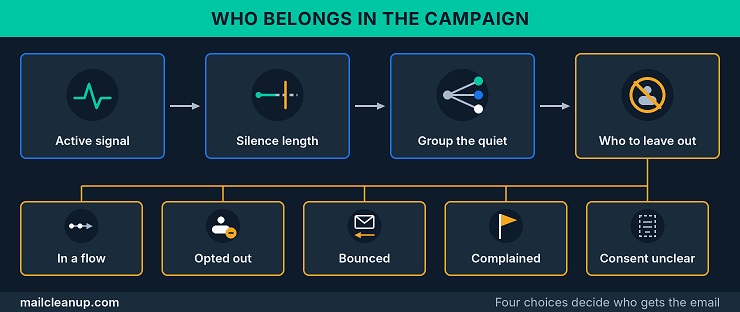
Four decisions build that audience. First comes the signal that proves someone is active, then the length of silence that makes them quiet. After that you group the quiet people and decide who to leave out. Each choice changes who receives your first re-engagement email, so settle all four before you write a word of copy.
Pick the Signal That Defines a Quiet Subscriber
A re-engagement email campaign rests on one definition: what a subscriber has to do to count as active. That choice sets the size of your quiet segment, and with it how many people you email by mistake. Opens look like the obvious choice, but they make a weak signal. Apple’s Mail Privacy Protection can record an open for a message no person has read, so opens prove less than they seem to.
- Purchases and replies: These need a person, so they carry the most weight. A subscriber who bought or wrote back is active, however old their last click is, and stays out of your re-engagement email campaign. Pull purchases from your store and replies from your inbox, because your email platform may not record either.
- Clicks and preference updates: A click shows interest, and a preference update shows that a person made a choice. Security tools can click a link for the recipient before anyone reads the message, so weigh a click seconds after delivery lightly. Count clicks as your everyday signal, and let the other actions confirm them.
The hygiene signal stack applies similar thinking at list level, so your campaign and your cleanup rules agree. Define quiet by actions that need a person, and the rest of the campaign becomes easier to judge. That consistency keeps a subscriber from being quiet in one report and active in another.
Decide How Long a Subscriber Can Stay Quiet
A subscriber is quiet enough for a re-engagement email campaign when their silence outlasts the pauses your own list shows before people return. That makes the line something you measure, not something you copy from another sender’s rule. A gap that is normal for a monthly newsletter would be a warning sign for a daily one.
- Collect your comebacks: List the subscribers who went quiet and then clicked, bought or replied again. Their stretches of silence are your best evidence, because they come from your own audience and your own emails. If you have no comebacks yet, start with a cautious line and revise it after your first send.
- Find where most comebacks cluster: Sort your stretches from shortest to longest and note where most of them end. Set the line just past that point, and write it down so your team uses one definition. A shorter line catches people who would have returned on their own, and a longer one leaves quiet readers unattended.
- Count missed emails, not days: State your line in missed sends, because the same silence means different things at different send rates. The same calendar gap can mean many missed weekly emails or a single missed quarterly one. That way a weekly sender and a quarterly sender each get a line that fits their own rhythm.
- Recheck the line after each campaign: If many recipients answer a plain check-in, your line is probably too early. Those people were probably still reading, so the campaign reached them before it needed to. If very few answer, the line may be too late, or the segment may hold addresses that no longer work. Adjust the line a little at a time.
Once you have a number, compare it with the scrubbing thresholds by send frequency, which give click-based limits for each rhythm. Treat them as a cross-check on your own history, not a replacement for it. A threshold that disagrees sharply with your own data is a reason to look closer, not to follow either one blindly.
Split the Quiet Segment Before You Write Anything
A quiet segment is not one audience, so it should not get one email. Split it before you write, because each group needs a different first message in your re-engagement email campaign. Three splits are enough to start, and each uses data you already have.
- How long they have been quiet: A recently quiet subscriber needs a light reminder, and a long-silent one needs a clearer reason. Measure the gap from the last click, purchase or reply. Keep the groups few enough that you can write a different email for each.
- How deeply they engaged before: A subscriber who clicked often before going quiet has a history you can build on. Someone who joined for a download and stopped clicking has no such history, so ask whether they still want your mail. The first subscriber deserves a warmer message than the second.
- How they joined: Signup source says why someone subscribed. A person who joined at checkout expects different mail from one who joined for a webinar replay or a discount code. Match the first email to that original promise, because a message that ignores it feels like it came from a stranger.
These three splits are a small, quiet-segment version of email segmentation, the practice of dividing a list into groups that get different messages. Starting small keeps the work realistic: three groups with three first emails beat a dozen groups you have no time to write for.
Customer Re-Engagement Email: Buyers Who Stopped Buying
A customer re-engagement email goes to buyers who stopped ordering. For them, quiet means a missed reorder, not a missed click. A store can anchor its re-engagement email campaign on what a customer bought, which gives you more than click data alone.
Measure against the buyer’s own pattern: Compare the time since a customer’s last order with their reorder gap. The reorder gap is the usual time between one order and the next for that buyer. A buyer who reorders often is quiet far sooner than one who buys rarely. One store-wide line would flag your rare buyers too early and your frequent buyers too late. Typical win-back windows for stores vary by purchase frequency, so use them as a starting range and adjust to your own reorder data.
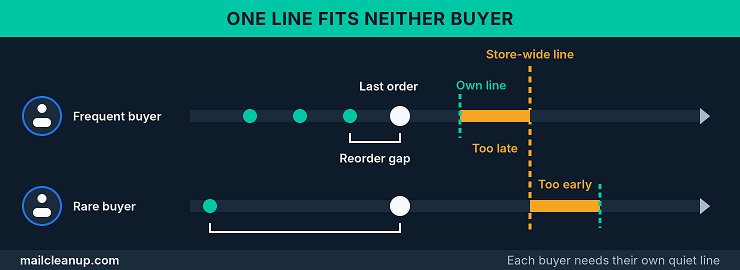
Hand off from the flow: A post-purchase flow is the series of automated emails a store sends after an order. When a buyer finishes it without ordering again, the flow should hand them to your campaign. That handoff is where a customer re-engagement email begins. Build the rule in the post-purchase flow itself so the buyer does not receive two emails at once.
Fit the message to the lapse: A recently lapsed buyer often answers a plain reminder, such as a restock note. A long-lapsed buyer needs a stronger reason to return, and an incentive earns its cost more often there. Hold your incentive for the buyers who need it, because offering one to recent buyers can teach them to wait.
Who to Leave Out and What Consent Allows
Leave out anyone you have no right or no way to email, however quiet they are. A re-engagement email campaign is marketing mail, so it needs the same legal footing as the rest of your marketing. Five groups stay out of the send, whatever their last click says.
- Buyers still inside a flow: A customer who just ordered already gets automated emails, so a re-engagement email adds a second message. Hold them until their flow ends, then judge them by their next sign of life. Two series landing together also blur the results you try to measure.
- Unsubscribed addresses: Anyone who opted out stays out, however long ago they left. These addresses belong on your suppression list, the record of addresses that must not receive your mail. Apply it before the first email goes out, because one message to an opted-out address can become a complaint or a legal problem.
- Addresses that bounced: A bounced address belongs to a mailbox that rejected your mail, so a re-engagement email has nowhere to land. Skip addresses that bounced for good, meaning the mailbox is closed or does not exist, and add them to your suppression list. Sending again repeats the failure and wastes a send.
- Subscribers who complained: Anyone who marked your mail as spam has told their mailbox provider they do not want it. Add them to your suppression list, because a re-engagement email to someone who complained invites a second complaint. Treat a complaint as a final answer, not a quiet subscriber waiting for a reminder.
- Anyone whose consent record is unclear: A consent record is a stored note of who agreed to hear from you, when and how. If a quiet subscriber has no record, leave them out until you can show where their permission came from. Long-quiet subscribers deserve the closest look, since their signups are the oldest.
Which rules apply depends on where your subscribers live. CAN-SPAM, the United States law for commercial email, requires you to honor opt-outs but not to collect consent first, according to the FTC. An opt-out is a person’s request to stop getting your emails. Canada’s anti-spam law, CASL, requires consent before you send commercial email and puts the burden of proving it on the sender. Under GDPR, the European Union’s data protection law, you must be able to show a subscriber consented wherever consent is your basis.
Implied consent usually rests on an existing relationship rather than an explicit yes. Under CASL it typically expires after a limited period, so a long-quiet signup that relies on it is the likeliest to have lapsed. Keep each consent record where your team can find it, and check it before the campaign sends. The details differ by region, so read our guide to email compliance for the basics and ask a lawyer about your markets. These are principles, not legal advice.
Verify the Dormant Segment Before the First Re-Engagement Email
Verify the quiet segment before your re-engagement email campaign starts, so each email reaches an address that still works. Verification checks whether an address can receive mail without sending it a message. A quiet segment holds readers who lost interest and addresses that stopped working. Even the best re-engagement email examples can win back the readers but not the addresses. Sorting the two groups first keeps your bounce numbers low and shows you how many people you can really reach.
Why Silence Has Two Causes
- A reader who lost interest: This person still has a working mailbox and simply stopped paying attention. A better message in your re-engagement email campaign can win them back, because the email reaches them. Your offer, your wording and your timing are all aimed at this group.
- An address that stopped working: The mailbox is deleted or switched off, or its domain, the part after the @ sign, has lapsed. No message, however good, can reach an address like this. Left in the segment, it adds a bounce to your numbers and tells you nothing about anyone’s interest.
Silence alone can’t tell you which is which, because a reader who stopped caring and an address that stopped working both go quiet. One client’s list shows you how the second cause plays out. MailCleanup re-verified the same addresses monthly for a year and recorded why each one stopped working. Three causes that no email can fix stood out, and each share is a percentage of the addresses that stopped working.
- Deleted mailbox (55.31%): The mailbox no longer exists on the receiving server. Mail sent to it comes back rejected, and no reminder can change that. This was the largest single cause in that list. You learn nothing about the person’s interest from this silence, so a re-engagement email sent there just adds a bounce.
- Disabled mailbox (14.97%): The mailbox exists but has been switched off, so it no longer accepts mail. From your side, it looks the same as a subscriber who stopped reading, because both stay silent. A check of the address is what shows the difference, which is why verification comes before the first re-engagement email.
- Expired domain (10.56%): The registration of the domain has lapsed, so all the addresses at that domain stop working at the same moment. Several contacts at one company can go quiet together this way, and one verification run can catch all of them at once. Without a check, each of them would come back to you as a separate bounce.
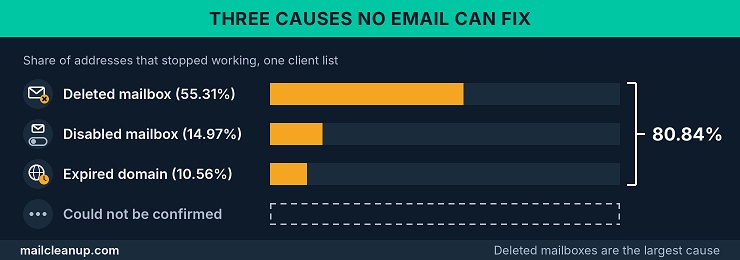
Together, these three causes account for 80.84% of the addresses that stopped working. The rest could no longer be confirmed. Some were reclassified as Accept-All, meaning their domains accept mail for any address, and some returned unresolved server responses. This is one client’s list, so read the shares as an illustration of how addresses fail, not as a forecast for yours. Read the email list decay report for the full year of monthly data behind them.
What to Do With Each Verification Result
Each verification result gets one action in a re-engagement email campaign. Run your segment through a bulk email verification service, which checks each address without emailing it, and sort the output by result. MailCleanup uses four result labels, and each one has its own job in your campaign.
| Result | What it means | Action |
|---|---|---|
| Deliverable | The mailbox accepts mail | Send in your main batch |
| Undeliverable | The address can’t receive mail | Remove from your segment |
| Accept-All | The domain accepts any address | Keep out of your main batch; mail separately |
| Unknown | The server gave no clear answer | Hold out and check again |
Deliverable and Undeliverable results are simple: you send to the first group and drop the second. Accept-All results, also known as catch-all, need more care. Because these domains accept mail for any address, the check can’t confirm that a given mailbox exists. Some of these addresses are live and some will bounce. Mailed with the main batch, the dead ones raise your bounce numbers. Keep this group apart and send to it as a smaller batch of its own. The post on catch-all addresses explains how to handle them over time.
An Unknown result means the receiving server gave no clear answer, so the address may be fine or may be dead. Hold those addresses out of the first send and check them again before you decide anything about them. For the full routine, follow cleaning the list step by step.
How Fresh the Verification Needs to Be
A verification result goes stale, so run it close to the start of your re-engagement email campaign. A result describes an address on the day of the check, and addresses keep failing after that day. In one client’s list, decay did not run at a steady pace, so you can’t predict how quickly a result goes stale.
- Before the first email: Run verification as close to the send as you can, because addresses keep failing after the list is built. Then send the Deliverable group in the main batch and handle the rest by result. A segment pulled long before the send may already hold addresses that have failed.
- Before a repeat run: Verify again before a repeat run, because addresses that passed the first check may have failed since. Treat each run as a new send with its own check, so verification becomes routine rather than a one-off cleanup. Unknown results in particular need this second check, since the first one gave no answer.
- After a long gap: We advise verifying any list left uncontacted for 12 months or more before you mail it again. Once a list passes four months without contact, add an extra pass outside your usual schedule. A long gap lets addresses fail without notice, so the longer a segment sits unmailed, the more the check matters.
Re-Engagement Email Sequence: How Many Emails and How Far Apart
Send two or three emails, give each one a single job, and space them by your own sending rhythm. That short set is a re-engagement email sequence, and it is the core of a re-engagement email campaign. Plan it as one set rather than as separate messages. Four decisions shape it: run it once or keep it running, how many emails, how far apart, and when to start. Together they form the sending side of your re-engagement email marketing strategy.
Campaign or Flow: Run It Once, Then Keep It Running
Run your first re-engagement email campaign once to clear the backlog of quiet subscribers, then keep an ongoing series for each new lapse. A one-off campaign sends the re-engagement email sequence once, to everyone who is quiet on the day you send it. A flow is the automatic option: you build it once, and a subscriber’s action, or silence, sets the emails going. Pairing the two gives your re-engagement email marketing strategy both a cleanup and a safeguard.
- One-off campaign: It clears the backlog you have today, because each quiet subscriber gets the sequence once. It helps just the people who received it, so a new backlog starts building as soon as you finish. That is why a campaign alone can’t be your whole plan, however well it performs.
- Ongoing flow: It starts by itself for each person who newly goes quiet, so each new lapse gets handled as it happens. Its trigger, the rule that starts the series, is the quiet stretch itself. Once it is live, you don’t have to remember to run it, and it is one of the jobs a drip campaign can do.
A re-engagement flow has two jobs: it brings sales back from subscribers who drifted away, and it keeps your sender reputation healthy. Our automation risk ladder sorts automated emails by how likely each type is to miss the inbox. The score tracks how out of date the addresses usually are by the time the email goes out. Re-engagement sits in the Highest tier, because silence starts it and the addresses involved have gone a long time without a check. So re-check your segment ahead of each send, since a single early pass can’t vouch for the rest. To weigh automated series against single sends beyond re-engagement, compare flows and broadcasts.
Two or Three Emails and One Job for Each
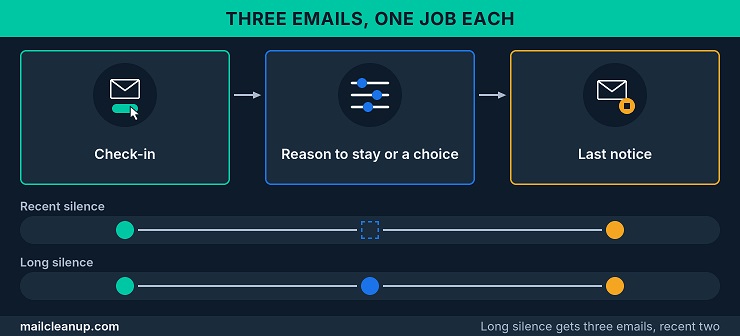
Send two or three emails, each with one job: a check-in, a reason to stay or a choice, and a last notice. Each job in a re-engagement email sequence builds on the one before it, so order the emails as carefully as you word them. Give each re-engagement email one job, because an email that does all three leaves your reader nothing clear to answer.
- Check-in: Ask whether the person still wants your emails, and make the answer a single click. Remind them in one line of what they get, and keep the rest short. This email tests whether the person still wants to hear from you, so keep it simple.
- Reason to stay or a choice: Use this email for long-quiet subscribers, after the check-in goes unanswered. Pick one idea for this group. That can be a useful reason to stay, an incentive, or a choice of how often and what you send. Either way, staying should feel like the person’s own decision.
- Last notice: Say plainly that this is the last email and what happens if the person doesn’t answer: you stop sending. State the consequence in one calm sentence, with no pressure beyond that. The goal is a clear ending, and a person who wants to stay can still say so with one click.
We use two emails, the check-in and the last notice, when the silence is recent, and add the middle email when it is long. A long silence gives you more to overcome, so the middle email adds a reason to stay before the last notice. A recent silence may not need that step. If your subscribers differ in how long they have been quiet, tailor your re-engagement email campaign to each group.
How Far Apart to Send Each Email
Space a re-engagement email sequence by your own sending rhythm and the time a person needs to act. We don’t claim an ideal gap for a re-engagement email campaign, because spacing depends on your list and your normal rhythm. The gap is a judgment call, not a fixed number.
- Start from your normal rhythm: Match the gaps to the pattern your subscribers already know, so a weekly sender stays weekly. A sudden burst of daily emails from a sender who is normally quiet can read as pressure. Your usual [email frequency] gives the sequence its beat.
- Leave time to act: The first email needs time to be seen and answered before the second arrives. Someone busy or away should still be able to reply to the check-in before your reminder lands. A gap that is too short turns a reminder into a nag.
- Keep it one conversation: Don’t stretch the gaps so far that the person forgets the first email. The last notice works best when the person remembers the check-in. Close gaps let the sequence read as one thread, while wide gaps make each email feel like a separate mailing.
One worked example, with its own day counts, appears in the three-email win-back schedule, which you can adapt to your own rhythm. Whatever gaps you choose, fix them before the first email goes out, so you judge results against a plan, not a guess.
When to Run a Re-Engagement Email Campaign
Run a re-engagement email campaign before a peak season, not during one, after your segment is verified and before you raise your volume. A peak season is a stretch when you send noticeably more email than usual, such as Black Friday. Timing is part of your re-engagement email marketing strategy, because the answers should arrive while you can still act on them.
Our Black Friday email timeline has several milestones. Three of them bear on this campaign: when the offer is settled, when the list check starts, and when heavier sending starts. We fit the campaign between the second and the third of these.
| Milestone | Weeks before Black Friday | What it means for your campaign |
|---|---|---|
| Offer terms settled | 10 to 12 | Know what you can offer before you write |
| List check starts | 8 | Verify your quiet segment, then start |
| Heavier sending starts | 1 to 2 | Finish before your volume climbs |
Send the first re-engagement email once your quiet segment is verified, because verification comes first. Finish before heavier sending starts, so the answers decide who receives the extra volume. If a segment ignores the campaign, treat that silence as an answer and keep it out of your full peak volume. People who became customers in a Black Friday sale, then went quiet, are the riskiest group to win back, so verify them first.
Re-Engagement Email Ideas: What to Offer a Quiet Subscriber
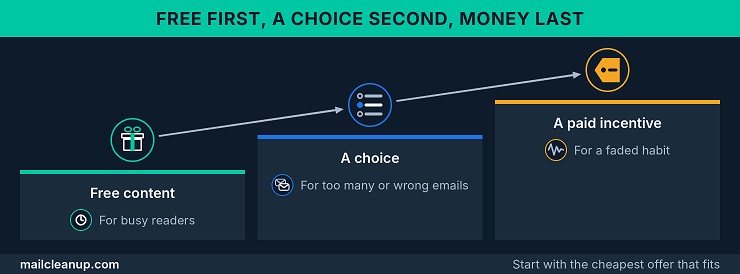
Match what you offer in each re-engagement email to the reason the person went quiet, and start with the cheapest offer that fits. These re-engagement email ideas fall into three groups: free content, a choice of what and how often you send, and a paid incentive. Busy readers need a nudge. Readers who get too many emails, or the wrong ones, need a choice. Readers whose habit has faded after a long gap may need a stronger reason.
No offer reaches a closed mailbox, and a filtered message may go unseen, so an offer can’t fix those two causes. In a re-engagement email campaign, move up a group when the cheaper one doesn’t fit the reason, not before. Together the groups give your re-engagement email marketing strategy a clear order: free first, a choice second, money last.
Content-Led Ideas That Cost Nothing
Four content-led ideas cost you nothing but writing time: a best-of roundup, a what-changed note, a new feature or topic, and a plain check-in. They suit readers who drifted away more than readers who decided to leave. They also show you whether a reminder was all the group needed, before you spend anything on an incentive. Each of these re-engagement email ideas fits almost any re-engagement email campaign.
- Best-of roundup: Collect the strongest pieces you have sent since the person last responded, in one short email. It suits readers who fell behind and now face a pile of your unread mail. The highlights save them effort and show what they missed, which is a reason to return in itself.
- What changed: Tell the person what is different since they last paid attention, such as a redesigned product or a new category. Change gives a lapsed reader something concrete to check, which makes it a natural reason to look at your emails again. Keep the email to one change and one link so the next step stays clear.
- A new feature or topic: Introduce something the person hasn’t seen, such as a new topic series or a new product feature. This speaks to the wrong-topic reason directly, because it offers content that may fit better than what you were sending. Link to one place, and explain in a line why it might suit them.
- A plain check-in: Ask one short question and offer one click as the answer. It costs nothing, and it suits busy readers who need a nudge more than an offer. A check-in also shows you who answers, which guides what you send to the rest of the group next.
Lead with a reason before you reach for a coupon. A good reason is something the person gets from reading, such as the highlights, the news or a topic that fits. Pick the idea that matches why the person went quiet, not the one that is quickest to write.
These re-engagement email examples show how you can combine the ideas. A store might send one re-engagement email that rounds up its best sellers since the last order, with one button to browse them. That one message is a best-of and a check-in together. A software company might announce one new feature and ask whether the person still uses the product. That pairs a new feature with a check-in.
Let Subscribers Choose Frequency and Topics
Offer a choice, because a choice is an offer too: the person decides how often you email and which topics they receive. This answers two of the reasons for silence, too many emails and the wrong topic, and a discount does little for either. In a re-engagement email campaign, the choice can sit in the middle email as a reason to stay, on terms the person sets. A simple menu has five options: three frequency tiers, a pause and a topic list.
- Full stream: Everything you send, at your normal rhythm. It is the right setting for people who like your emails as they are and simply lost the thread. Keep it on the menu so a person who wants no change can say so with one click instead of leaving.
- Digest: A single email that bundles the period’s best items into one message, sent less often than your regular mail. It suits readers who like the content but find the volume heavy. One roundup replaces several separate sends, so it keeps them in touch at a lighter load on their inbox.
- Quiet tier: A light track that carries the biggest announcements and little else. It keeps the relationship going for people who prefer to hear from you rarely, such as at launches and major changes. The tier gives a clear alternative to leaving, because the person still hears the important things without the regular stream.
- Pause: The person picks a break of 30 or 90 days, and the message that confirms the choice says when emails return. Marketing and automated emails pause, while service messages keep arriving, meaning transactional mail such as order confirmations. A pause needs an end date, because without one it is really an exit under a gentler name.
- Topics: A short list of the subjects you cover, with a checkbox beside each. The person keeps what they want and drops the rest, which answers the wrong-topic reason directly. A subscriber who keeps two of five topics has told you what to send, which is worth more than another guess.
A re-engagement email that invites preference updates differs from a check-in. A check-in asks whether the person still wants your emails, while the invitation asks what they would like to receive. Send that invitation once before you remove anyone, so a quiet subscriber gets one last way to stay on terms that suit them. The page where subscribers set these choices is a preference center, and the email preference center guide shows how to build one.
Incentives That Cost Money and When to Use Them
Use a paid incentive last, and mostly for long-lapsed customers. Of all the re-engagement email ideas, these cost the most, because each one gives up margin or other value. Margin is the share of a sale you keep. Four are worth weighing. A coupon takes money off an order, and free shipping removes the delivery fee. An extended trial gives a lapsed software user more free time, and early access offers something new before others see it.
| Incentive | What it costs you | When it fits |
|---|---|---|
| Coupon | Margin on each order that uses it | A store whose customers buy repeatedly |
| Free shipping | The carrier fee on each order | A store where delivery cost holds buyers back |
| Extended trial | More free service time, plus the support it brings | A software product with a free trial |
| Early access | Little cash, but you need something new to release | A brand with a launch coming |
Cost is half the choice. The other half is how long the customer has been quiet. A recently lapsed customer often needs just a clear message. A discount there gives away margin on a sale you might win anyway. A long-lapsed customer may need more, so that is where an incentive in a customer re-engagement email earns its cost. Three ground rules keep the spend under control.
- Lead with value: Keep the first re-engagement email free of any offer, so you learn what a plain message can do. Hold the incentive back until the person has had reason to trust your emails again. In a re-engagement email campaign, that puts it in the middle email, after the free ideas and the choice.
- Set a ceiling first: Decide the most you would pay to win one customer back, and keep each incentive inside that limit. An offer that costs more than a returning customer is worth turns a win-back into a loss. Work the figure out before you write the email, so the offer doesn’t drift upward under pressure.
- Offer one thing at a time: Put a single incentive in an email, so a click is a clear answer. Two offers in one message give the reader a decision to make before the click. A single offer also lets you see which incentive moved the person.
Re-Engagement Email Templates and Subject Lines
Use three re-engagement email templates, one per job in the sequence, and pair each with re-engagement email subject lines that fit its job. A preheader, the preview text that sits beside the subject line in your reader’s inbox, extends what the subject line starts. Each bracketed field marks a detail you supply, such as a first name or a product. Treat these re-engagement email examples as a starting point, and rewrite the wording in your own voice before you send. Each template makes one ask, because each email in a re-engagement email campaign has one job.
Re-Engagement Email 1: The Check-In Template
The check-in template reminds the person what they get and asks one question that a single click answers. It leads the sequence because a short re-engagement email with an easy question suits a drifting reader better than an offer does. These re-engagement email templates all share one shape: a subject, a preheader and a few short lines.
Keep the reminder to one line about what you send and how often, and make the button the one thing to click. A second link, such as a preferences page, gives a quiet reader two decisions in place of one. Save choices for the middle email, where the choice is the point of the message. In a re-engagement email campaign, this first message earns its place by being easy to answer.
Subject: Should we keep sending you [what you send]?
Preheader: One click tells us, and that is all we need.
Hi [First name],
It has been a while since you clicked one of our emails, so we are checking before we send more. We send [what you send], about [how often].
Button: Yes, keep them coming
Thanks, [Your name]
Re-Engagement Email 2: The Choice or Offer Template
Of the three re-engagement email templates, the second carries your chosen idea: a choice, a piece of content or an incentive. Send this re-engagement email to long-quiet subscribers whose check-in went unanswered, and let the one idea carry the whole message.
The version here uses a choice. To send a content offer or an incentive instead, swap the middle lines and the button text, and keep the rest. Name the idea in the subject line, because the email has to deliver whatever that line promises. In a re-engagement email campaign, this second message should make its one idea easy to see.
Subject: Choose how we stay in touch, [First name]
Preheader: Fewer emails, other topics or a pause: your call.
Hi [First name],
We would rather send what you want than add to the noise. Tell us what suits you, and we will follow your lead.
Button: Choose my emails
Talk soon, [Your name]
Re-Engagement Email 3: The Last Notice Template
The last notice tells the person plainly that the emails will stop on a date you name, unless they say otherwise. This re-engagement email ends the series, so it has to be completely clear about what happens next. Say what happens, on which date, and what one click does.
A real date keeps the urgency honest, because the deadline is true. Skip pressure and guilt, and thank the reader for the time they spent with you. Of the three re-engagement email templates, this one makes a promise, so keep to the date you name. In a re-engagement email campaign, the notice also gives the person a last, easy way to stay.
Subject: We will stop emailing you on [date] unless you say otherwise
Preheader: One click keeps you on our list, and nothing else is needed.
Hi [First name],
You have not clicked one of our emails for a long time, so we are about to stop sending them. If you want to keep hearing from us, one click before [date] is all it takes.
Button: Keep my emails
If we do not hear from you, we will take you off our list on [date]. After that, you will not get another message from us. Thank you for reading.
[Your name] at [Brand name]
Re-Engagement Email Subject Lines and Preheaders
Write each subject line for the job your re-engagement email does. Ask in the check-in, name the idea in the middle email, and give the date in the last notice. No single length is right. Fit your lines to the tightest inbox your readers actually use, because a long line can be cut off. These re-engagement email subject lines work as re-engagement email examples for you to adapt, each with the rule behind it.
| Subject line | Rule behind it | |
|---|---|---|
| Check-in | A quick question about your emails from us | Promise what the email delivers |
| Check-in | Is this still the right inbox for our updates? | Ask what one click can answer |
| Choice or offer | Fewer emails, different topics or a pause? | Name the choice plainly |
| Choice or offer | Our best pieces since you last visited | Build on what the person did |
| Last notice | A final note before we stop emailing you | Call it final when it is |
| Last notice | Your emails from us end on [date] | Give the real date |
Three rules sit behind these lines. A subject line should promise what the email actually delivers, because a misleading one wears down your sender reputation as it repeats. Personalization works when you build on something the person did, since a name alone has lost its effect. Urgency is fair when your deadline is real, which a stop date in a last notice is. The email subject line rules cover length and testing for any email, so these lines focus on what changes for a quiet reader.
Write your preheader as the second half of the subject line. The subject pulls the reader in, and the preheader backs it up, so repeating the subject wastes your space. When you write no preheader, many inboxes show a bit of your footer as the preview, and that rarely helps. In a re-engagement email campaign, use your preheader for the plain fact the person needs next, such as how a click works.
Spam word lists are mostly out of date. A modern filter gives more weight to the sender’s track record and how readers respond than to any single word. Stacked exclamation points make a message look like low-quality bulk mail. Lettering in all capitals comes across as aggressive, so skip both in your lines. A dedicated post on [email spam trigger words] goes through the words that filters flag in detail.
Test your lines like any other: Change one element at a time. Judge the result on clicks, because some mail apps load your message before anyone reads it.
Re-Engagement Email Examples by Business Type
Keep the same three jobs for each business. Change what counts as quiet, what your first re-engagement email leads with, and what your middle email offers. These re-engagement email examples cover a store, a software product and a newsletter, and each reuses the re-engagement email templates with new details. The examples are invented to show a pattern, so no example names a sender or reports a list size or a result.
| Business | Quiet means | First email |
|---|---|---|
| Online store | A missed reorder by your buyer | The last product bought |
| Software or app | A missed action in your product | What changed in the product |
| Newsletter or publisher | A missed click on your issues | The best recent pieces |
Each example assumes you have verified the quiet segment and removed the people you must leave out. Keep the order fixed in your re-engagement email campaign. A check-in comes first, a reason to remain or a choice comes second, and the last notice closes the series. Read each row as a recipe: the signal decides who enters the series, and the first email decides what the reader sees. Skip the middle email when the silence is recent.
Online Store: A Customer Re-Engagement Email Series
A store defines quiet by missed orders, so its customer re-engagement email series starts when a buyer passes their usual reorder gap. Picture a store that sells coffee beans, where each bag runs out and the next order falls due. Of these re-engagement email examples, the store’s signal is a missed reorder, and its re-engagement email campaign runs three emails with one job each.
First email, a restock reminder: Lead with the product from the last order and add one button to reorder. A buyer who lapsed recently may need nothing more, so your first email carries no discount.
Middle email, a stronger reason: If the buyer stays silent, offer a reason with more weight, such as a new arrival. Free shipping is another option you can use, if its cost stays inside the ceiling you set beforehand.
Last notice: Say plainly that you will stop promotional emails on a date unless the buyer clicks to stay. Order confirmations and shipping updates keep arriving, so the notice ends the marketing and nothing else.
Software or App: A Re-Engagement Email Sequence for Inactive Users
A software product defines quiet by use, so its re-engagement email sequence starts when an account stops doing its key action. The key action is the step that shows the product is working for the person, and you choose it to fit your product. Among the re-engagement email examples, a note-taking app calls a user quiet once they stop creating notes. Its re-engagement email campaign also runs three emails, with one job each.
First email, what changed: Lead with one real change since the person last used the product, and link straight into it. A full feature tour gives a quiet user several things to decide, so name one change that fits how your user worked.
Middle email, a pause choice: Offer a pause on product emails, so a user who finds them heavy can pause instead of leaving. Your tips and announcements stop for the stretch the person picks, while billing and security notices still arrive.
Last notice: Tell the person which emails you will stop and on what date, and make clear the account itself is untouched.
Newsletter or Publisher: Re-Engagement Email Ideas for Readers
A newsletter defines quiet by clicks, so its series starts when a reader stops clicking through your issues. Your re-engagement email ideas lean on content: a best-of with a topic choice, a lighter rhythm, then the last notice. Of the three re-engagement email examples, this one leans hardest on choices, since the reader can steer what arrives and how often. Your re-engagement email campaign follows the same three-email order.
First email, a best-of with a topic choice: Send your strongest pieces since the reader’s last click, with one link per topic. The click then doubles as an answer, because it shows which topic brought the reader back.
Middle email, a frequency choice: Offer a digest or a quiet tier to readers who find your schedule heavy. A lighter track can keep a reader who would otherwise unsubscribe.
Last notice: Say which issues stop, and when, and that one click keeps readers on the list. Link your archive, so readers who leave can still find the writing.
Re-Engagement Campaign Best Practices for Copy, Design and Testing
Apply three craft rules to each email in your re-engagement email campaign. Give it one ask, build it on what the person did, and change one thing per test. These re-engagement campaign best practices hold for two emails or three. They also keep your re-engagement email marketing strategy consistent from first email to last notice.
Copy, Design and Mobile Layout for Each Re-Engagement Email
Give each re-engagement email in your re-engagement email campaign one ask, short copy and an exit link that is easy to find. Among re-engagement campaign best practices, design comes down to one idea: make the next step obvious for your reader. Check that your re-engagement email subject lines, the preheader and the button all promise the same single thing.
One ask: A call to action has one job, so give each of your emails one button and one reason to click it. Each of the re-engagement email examples makes a single ask: reorder, return to the product or keep reading. Competing links bury that ask, and your quiet reader may click nothing. Two copy formulas can shape your message. AIDA moves a reader through attention, interest, desire and action, and PAS runs problem, agitate and solution. The email copywriting formulas set out the steps of each, so you can pick the one that fits.
A phone-friendly layout: Keep your subject line brief enough for a phone screen. Put the words that matter early. Size and color your button so a reader can find it at a glance. Arrange the layout so the eye travels to that one button. Label the button with what happens next, such as “Reorder my beans”, not “Click here”.
An exit link that is easy to find: Put a plain exit in each of your emails. A person who struggles to find one may report the email as spam instead, which hurts your sender reputation. A one-click unsubscribe is a button in the inbox that ends a subscription the moment a reader presses it. The inbox shows it beside the sender’s name, so a reader can leave without reading your message. By contrast, a footer link relies on the reader getting that far.
Personalize From What the Subscriber Did
Build each re-engagement email you send on the last thing the person did, not on a name alone. Within your re-engagement email campaign, a first name is one merge field, a placeholder that fills in a detail about the person. It tells you little about what the person cared about, while a last purchase or last click does.
Last purchase: In a customer re-engagement email, name the product from the last order, so your message stays relevant without a generic discount.
Last click: Where nothing was bought, build on the topic or feature behind the person’s last click. That ties your email to something the person chose, which a general broadcast lacks.
Check for stale data: Old data can undo personalization. A buyer who stopped ordering long ago may still be listed as a current customer, so the message treats them like a loyal regular. Confirm the last-activity field in your data before each send. Give each merge field a fallback, the default text that shows when a field is empty, such as “there” for a missing name. You will find more on the data behind these steps in the email personalization guide.
Test One Change at a Time
Change one element per test, and judge the result by clicks. In a re-engagement email campaign, start with your re-engagement email subject lines for the first email, because that email reaches the whole segment. Keep the rest of the re-engagement email templates fixed, so any difference comes from the one line you changed.
Click-through rate: Judge your subject-line tests on click-through rate, the share of recipients who click a link. Mail Privacy Protection is an Apple feature that loads a message’s tracking images before anyone reads it, so open counts run high.
Split at entry: To test inside a running sequence, copy your sequence and change the one step under test. Then assign each person to one version when they enter, and leave them there, because moving people midway muddies the result.
Small-list limit: A small segment proves little, so treat each result as a direction for your next test, not a verdict. Repeat the test over several sends before you act on it. For the full method, including the limits of a small list, follow the A/B testing guide.
Launching a Re-Engagement Email Campaign Without Hurting Deliverability
Launch a re-engagement email campaign with three controls in place: send the safest addresses first, cap each batch, and set a stop rule. A stop rule is the set of bounce and complaint limits at which you pause the send. The quiet segment on your list is where abandoned mailboxes gather. Some become recycled spam traps, which are old addresses that a mailbox provider has turned into traps for senders who still mail them.
Gmail and Yahoo also limit the share of your mail that recipients may report as spam. A re-engagement email to people who stopped reading carries some complaint risk of its own. Our email automation risk ladder rates re-engagement as the riskiest workflow to automate, since its trigger is an absence of activity. Re-engagement campaign best practices for deliverability, meaning how reliably your mail reaches the inbox, come down to control. A sturdy re-engagement email marketing strategy puts that control in place before your first send.
Send to the Most Recently Active First
Order your send from the most recently active contacts to the longest silent, so the safest addresses go first and trouble shows early. Sort your quiet segment by the date of each person’s last qualifying action, then send the first re-engagement email to the newest. For a re-engagement email campaign, a recent action proves the address worked not long ago. The first batches therefore give you a clean read on bounces and complaints.
Send the longest-silent addresses last, once the first batches have come back clean. A contact who has been quiet for a long stretch is the likeliest to have abandoned the mailbox. Providers can turn abandoned mailboxes into traps, which makes long-silent contacts the group where spam traps concentrate. A single hit on a recycled trap rarely does immediate damage on its own, but repeated hits wear your sender reputation down.
Cap the Volume and Ramp Up
Send the campaign in batches, and enlarge a batch once the previous one stayed inside your stop rule. A re-engagement email campaign sent to the whole quiet segment at once leaves you little room to react. Volume is earned: a healthy batch earns the next, larger one.
Your least active contacts should wait longest. A warmup is a schedule that raises sending volume in steps. In that schedule, the least active contacts join in week four, once your sending reputation has settled. A quiet segment deserves the same patience, so hold your most doubtful addresses until the first batches show healthy numbers. Our email warmup guide sets out the full schedule.
If your records hold no activity history for a contact, start with the newest signups and work back by signup date. The oldest signups have had the longest to go stale. Run a fresh verification on any address last verified more than six months ago before a re-engagement email goes to it.
Set a Stop Rule Before the First Send
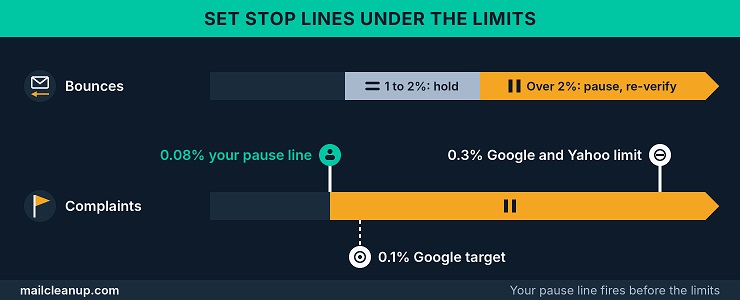
Write the stop rule for your re-engagement email campaign before the first batch goes out, with lines for bounces and complaints. Among re-engagement campaign best practices, a written rule is the one that turns a bad batch into a pause instead of a debate. Set the lines under the limits that Gmail and Yahoo give senders, so your own rule fires first.
Bounces over 2 percent of a batch: Pause and re-verify the part of the segment you have not yet mailed. A batch that bounces at this level shows the segment has gone stale, so each further re-engagement email adds to the damage.
Bounces between 1 and 2 percent: Hold the batch size where it is until the rate settles. This band is a warning, not a stop, so the next batch stays the same size and gets closer attention.
Complaints over 0.08 percent: Pause, add everyone who complained to your suppression list, and re-verify the unsent part of the segment. The line sits under the 0.1 percent target that Google sets for senders, which leaves room for the delay in the provider’s figures.
Gmail and Yahoo set the outer limits. Google’s spam rate is the share of your mail that readers report as spam. Google’s target is a rate under 0.1 percent, and it asks senders to stay clear of 0.3 percent or more. Postmaster Tools, Google’s dashboard for senders, refreshes the figure each day. Yahoo draws the line for that rate at 0.3 percent.
For bulk senders, it works that rate out from the mail that reaches the inbox. A rate worked out over everything sent reads lower than one over inbox-delivered mail, so keep your own lines well under the limits. Work out your own spam complaint rate the same way for each batch, because the usual ways of dividing complaints give different results.
How to Measure a Re-Engagement Email Campaign
Measure a re-engagement email campaign with three separate numbers: the reactivation rate, the full set of outcomes, and a target of your own. The reactivation rate is the share of everyone you emailed who took a qualifying action. A single blended figure hides the exits and the bounces, so each number answers a different question.
Reactivation is one measurement beside the others in your email reporting, such as bounces, complaints and unsubscribes. Report the numbers for the whole series, with each re-engagement email feeding the same count. Your re-engagement email marketing strategy should keep it apart from program-wide numbers, because it judges one quiet segment, not the whole list. The email marketing KPIs guide lays out those wider numbers.
Calculate the Reactivation Rate on Everyone You Emailed
Divide the people who took a qualifying action inside your window by everyone who was sent the first email. Set the window before the send, and use the same one for each campaign. The window is the stretch of days you allow for a return, counted from the first send. A qualifying action is a click on a link, a purchase, a reply or a preference update. Count a person once, whichever re-engagement email prompted the action.
Everyone sent the first email of your re-engagement email campaign stays in the count, including bounced addresses and people you suppressed. Dividing by delivered mail alone would hide the bounces and make a poor list score better than it deserves. A longer window also catches at least as many returns as a shorter one, so figures from different windows are not comparable. Write the definition down before the first send, so the number means the same thing each time you report it.
Report Every Outcome of the Send
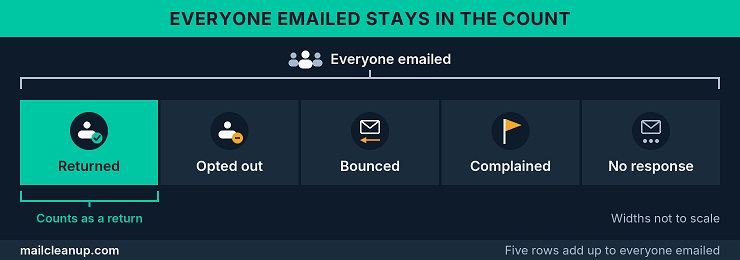
Report five outcomes for each re-engagement email campaign: returned, opted out, bounced, complained and no response. Give each person one row, so the five rows add up to everyone you emailed. A person who clicked and then unsubscribed belongs in the row for where they ended up. Record counts first and convert them to shares of everyone emailed, so the rows stay comparable between campaigns.
| Outcome | Who goes in it | Counts as a return? |
|---|---|---|
| Returned | Clicked, bought, updated preferences or replied | Yes |
| Opted out | Unsubscribed or asked to leave | No |
| Bounced | Message not delivered | No |
| Complained | Marked the message as spam | No |
| No response | Delivered, no action | No |
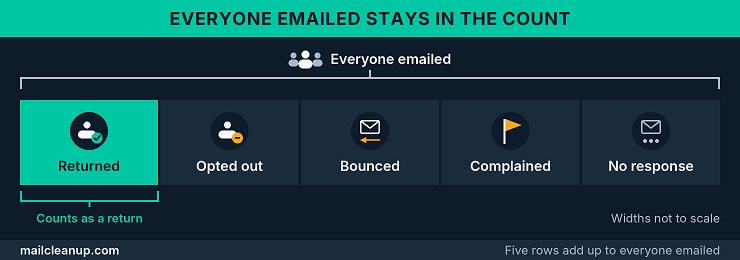
Read the rows together instead of hunting for one good number. A high return share beside a high opt-out share means the re-engagement email reached people who had a view. Each opt-out is a clear answer you can act on. A high bounce share points back to the list, and a complaint share over your limit points to the send. The reactivation rate leaves unsubscribe clicks out, because the person has asked to leave.
Set Your Own Target
Set the target for a re-engagement email campaign by comparing it with your own past sends to a similar quiet segment. Your own past sends share your list, your audience and your definition, so they are the fairest comparison you can make. A re-engagement email to a recently lapsed segment can look better than one to a long-silent segment, so compare like with like.
Keep a simple log with one line per campaign: the segment, the window, the reactivation rate and the five outcomes. Treat the first run as your baseline and judge the second against it. After a few runs, the range in your log becomes your target, and a result outside that range tells you something changed. Your re-engagement email marketing strategy then runs on your own numbers, not on someone else’s.
Outside benchmarks: Rates published beside re-engagement email examples often leave out who was counted and over what window. Without that detail, a published rate is not comparable with yours. Leave it out of your target until its source states the definition in full.
What Happens After the Last Email in a Re-Engagement Email Campaign
A re-engagement email campaign ends with three exits, and each person takes one. Responders go back to your regular mail, people who ask to leave come off the list, and everyone who stays silent is suppressed. Decide the exits while you write your re-engagement email sequence, because the last re-engagement email tells a quiet reader that mail will stop. Each of the re-engagement email examples by business type ends with a last notice that names what stops and when. A campaign with no planned exits fades out, and its unanswered contacts remain on the list to be mailed again at the next send.
Responders Return in Stages
Remove a responder from the re-engagement email campaign at once, then return that person to your regular mail in two steps. A single click shows interest on one day, not a lasting change, so a returned reader starts on a lighter schedule than usual. Staging keeps your volume in step with how far the person has really come back.
First stage, a lighter schedule: Stop any further re-engagement email in the series the moment the person takes a qualifying action. Then send a lighter stream than your regular mail until a second qualifying action arrives. A roundup in place of separate emails is one way to do that. If the person chose a frequency through a preference update, use that choice instead.
Second stage, the regular stream: A second qualifying action on a different day suggests the person has a habit, not just a passing interest. Move the person to your regular mail at that point, and note the date of the first return in the record. That date starts the count for judging the next stretch of silence.
Opt-Outs and Preference Changes
Honor an opt-out before your next send goes out, and apply it to all your lists and series, including mail already scheduled. An opt-out is any request to stop receiving your mail, whether it arrives through the unsubscribe link, a reply or a spam report. Check the queue of your re-engagement email campaign too, because a message scheduled before the request arrived must not go out.
A spam report is an opt-out made without your link, and it needs the same speed. Suppress the address on the day the report arrives, and do not add it back yourself. A fresh signup from that address is a new event, but the complaint on record still counts.
Treat a preference change with the same speed as an opt-out. A person who chooses less and then receives the old schedule learns that the choice did nothing. A reader who answers a re-engagement email with “too many emails” has asked for fewer, which is different from asking to leave. Offer a pause or a lower frequency before you treat the reply as an exit. Show the pause and frequency options that your preference center holds. Confirm the person’s choice with the date your emails will start again, and keep a stop-all choice beside the options.
No Answer Means Suppress and Record
Suppress an address that gives no answer to the last re-engagement email, and keep it on file instead of deleting it. A suppressed address carries a flag that keeps it out of all your future sends. An address you delete can come back when someone imports a file that still holds it, and it is then mailed as new.
End the series for people who stay silent instead of stretching it, and do not recycle them into another re-engagement email campaign. A reader who ignored the whole series has already given you an answer. Each extra send to a silent contact adds risk for the whole list. A clear stop protects the readers who still want your mail.
Record the date, reason and series: Log when you suppressed the address, that it gave no answer, and which series it came from. Keep the consent record next to it: who signed up, when, which wording they saw, the form they used and the choices they made. Together the two records show that you had permission to mail the address and that you stopped when the person went quiet.
Write your thresholds and day schedule into a sunset policy. Such a policy is a standing rule for cutting back the mail a quiet contact gets and then ending it. Treat suppression as a planned result, not a failure, within your re-engagement email marketing strategy.
Your Next Step: Run a Pre-Send Check on Your Re-Engagement Email Campaign
Your next step is a pre-send check on your re-engagement email campaign, and it fits on one page. Write down five answers ahead of the first send. Each one fixes a decision that is hard to change once the send is under way. Together they turn your re-engagement email marketing strategy into something you can verify.
The five answers: Name the segment you verified and the date you verified it. State what counts as a qualifying action and how long the window runs. Write out your stop rule with its bounce and complaint lines. Give each re-engagement email its single ask. Say where each person goes after the last message: back to your regular mail, off the list or onto suppression.
Do the check this week, before you schedule anything or adapt any of the re-engagement email examples. If an answer is missing, the campaign is not ready, so fill that gap before anything else. A campaign with all five answers written follows the re-engagement campaign best practices that protect your sender reputation. The first batch then goes out with its limits already set.
FAQs on the Re-Engagement Email Campaign
How many emails should a re-engagement email campaign include?
Two or three emails are plenty for a re-engagement email campaign. Send a check-in, a message that offers a choice or a reason to stay, and a last notice saying you will stop. By the third message, silence is the answer, and each extra send adds bounce and complaint risk.
How long should you wait between re-engagement emails?
Set the gaps from how often you normally send and how long a reader needs to respond. A weekly sender keeps weekly gaps, and a monthly sender keeps monthly ones. Fix the spacing of your re-engagement email sequence before the first send, and leave it alone while the series runs.
When is a subscriber considered inactive?
A subscriber is inactive once the silence since their last qualifying action outlasts the usual comeback gap on your own list. Count that gap in missed sends rather than days, and set the line before you build the re-engagement email campaign. A click, a purchase or a reply resets the count.
Should you delete subscribers who ignore a re-engagement email?
Suppress them rather than deleting them. Once the last re-engagement email goes unanswered, a suppression record keeps the address out of your sends and shows you dealt with it. Deleting the address can backfire, because an old import file may put it straight back on your mailing list.
What makes a good re-engagement email subject line?
Good re-engagement email subject lines promise what the message delivers and build on something the reader did. Put the words that matter first, because a small screen can cut a long line short. Test any line you find in re-engagement email examples on your own readers before you rely on it.
What is a good reactivation rate for a re-engagement campaign?
A good reactivation rate is one that beats your own baseline for a similar quiet segment. Published rates rarely say who was counted or over what window, so they make a weak target. Build your re-engagement email marketing strategy on your own log of the segment, the window, the rate and the five outcomes.
Do re-engagement emails hurt your sender reputation?
They can when the send is careless, because a quiet segment holds abandoned mailboxes and readers who may report spam. Verify the segment, send the most recently active first and follow your stop rule. Run that way, a re-engagement email campaign clears out dead addresses before they drag your reputation down. Google’s guideline is to hold your spam rate under 0.1 percent.
Should you verify your email list before a re-engagement campaign?
Yes. Silence has two causes: a reader who tuned out or a mailbox that no longer works. A reminder wins back the reader but not the mailbox. Verify the quiet segment ahead of your re-engagement email campaign, then sort the four result labels. Drop Undeliverable addresses, mail Deliverable ones first, send Accept-All ones as a smaller batch, and recheck Unknown ones.