
Type “best practices for email subject lines” into Google and you’ll get a dozen different answers about how long a subject line should be, whether emojis help or hurt, and which words will get you sent to spam. Read five of those answers back to back and you’ll notice something else: they don’t agree with each other. One source says thirty characters. Another says fifty. A third says ninety performs best. None of them are lying. They’re measuring different audiences, different goals, and rarely telling you which.
We’ve spent years inside the list cleaning side of email marketing, which gives us a different vantage point on this topic than most people writing about it. We see what happens when the data behind a subject line test is corrupted before anyone opens a campaign report. In this guide, we’ll walk through what actually drives subject line performance, where the popular advice breaks down, and why none of it holds up if the list you’re sending to can’t be trusted.
TL;DR on Email Subject Lines
- Subject line length recommendations contradict each other because they measure different audiences and different goals, not because anyone is wrong.
- A subject line’s job is to get opened without misleading the reader, since a misleading open that doesn’t convert can damage sender reputation over repeated sends.
- Spam trigger word lists are largely outdated; modern filters weigh sender reputation, authentication, and engagement far more heavily than individual words in a subject line.
- Device and email client display limits range from roughly 33 characters on some mobile Gmail apps to no hard limit on desktop browsers, so “ideal length” depends on where your audience actually reads email.
- Personalization in subject lines works best when it reflects real behavioral data, not just a first name inserted into a template.
- A subject line A/B test only produces a trustworthy winner when the underlying list is clean, since Apple Mail Privacy Protection inflates opens regardless of whether the email was actually read.
- Every conclusion in this guide depends on one assumption holding: that the open rate measuring it came from a verified list, not a dirty one.
What Email Subject Lines Actually Need to Do Before You Optimize Anything
Most advice on email subject lines treats the job as singular: write something that gets opened. That’s true, but incomplete. A subject line is actually being asked to do several things at once, and most best practices for email subject lines only optimize for one of them while quietly working against the others.
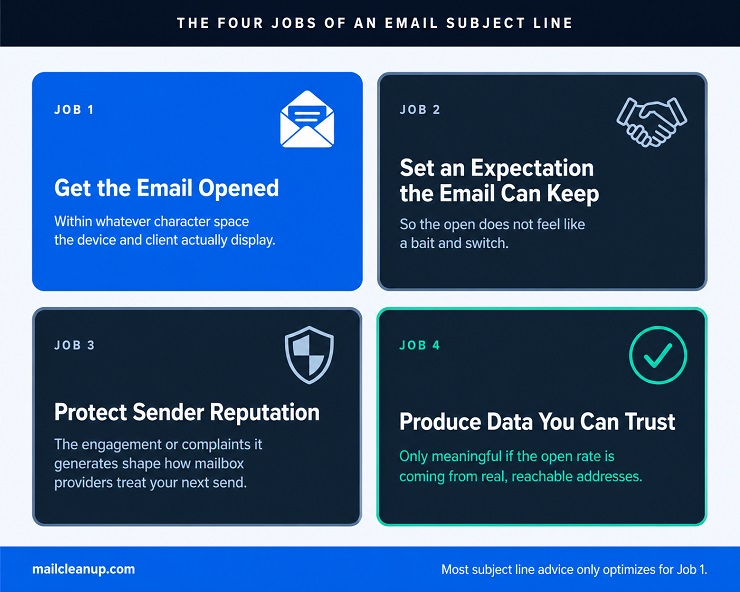
Here’s what a subject line is actually responsible for:
- Getting the email opened, within whatever character space the recipient’s device and client actually display.
- Setting an expectation the email content can honestly deliver on, so the open doesn’t feel like a bait and switch.
- Not damaging your sender reputation, since the engagement or complaints a subject line generates feeds directly into how mailbox providers treat your future sends.
- Producing performance data you can actually trust, since the open rate you use to judge a winning subject line is only meaningful when it’s measuring real, reachable addresses rather than dead ones or Apple Mail Privacy Protection’s pre-fetched pixels.
Two examples show what happens when you optimize for the first job alone. A curiosity gap line like “You won’t believe what happened to our biggest customer” can pull people in for a week or two. But if the email never pays off that curiosity, the reader remembers feeling tricked more than they remember your brand, and the next send to that same list tends to perform worse, not better, because you’ve spent down the trust that made the open rate mean anything in the first place.
The second example runs the opposite direction: a perfectly honest, well written subject line tested against a list with a meaningful share of dead or catch-all addresses can look like it underperformed when the real problem was never the copy at all, it was that a third of the addresses receiving it were never going to register an open regardless of what the subject line said. Both examples produced misleading data. Neither failure was visible from the open rate alone.
We’ll come back to all four of these jobs as a structured framework next, but hold onto this list as you read the rest of this guide: nearly all of the subject line advice you’ll find online optimizes for job one and quietly ignores jobs two through four.
Why Best Practices for Email Subject Lines Give You Contradictory Numbers
Search for length guidance and you’ll run into a wall of numbers that don’t agree with each other. Here’s a sample of what’s actually circulating right now:
| Source | Claimed ideal length |
|---|---|
| Backlinko’s outreach data analysis | 36 to 70 characters |
| Adestra’s analysis of over a billion sends | 90+ characters performed best; the 30 to 90 character range was the weakest |
| Performance data segmented by goal | Under 25 characters for opens and clicks; 25 to 35 for conversions |
| Device testing across major email clients | 33 characters to display in full everywhere tested |
| General industry consensus | 30 to 50 characters |
| Braze’s published guidance | Maximum 35 characters, or 6 to 10 words |
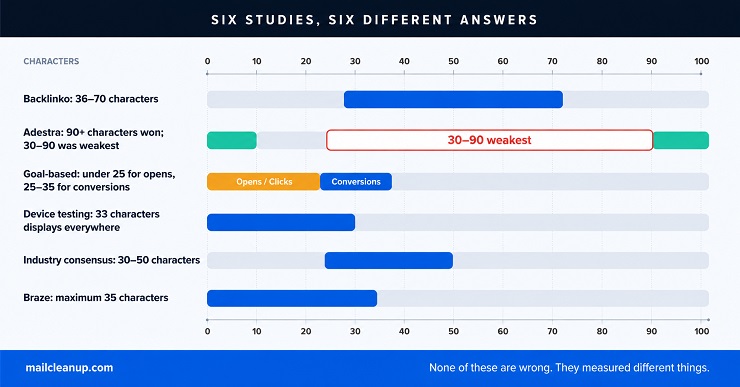
None of these sources are wrong. They split into three causes that rarely get named out loud. The first is goal: a line optimized purely for getting opened behaves differently than one optimized for what happens after the open, which is exactly why the goal-segmented data above lands shorter for opens and longer for conversions.
The second is device: a subject line that displays in full on a desktop browser can get cut off mid-sentence in the Gmail app on Android, where testing has found a hard limit as low as 33 characters before truncation, so a study weighted toward mobile-heavy audiences will naturally favor shorter numbers than one weighted toward desktop readers.
The third is what’s actually being measured, since raw open rate, click-through rate, and downstream conversion rate don’t move together, and a study that reports “ideal length” without saying which of the three it optimized for is reporting an incomplete answer dressed up as a complete one.
So if you’re looking for a single number that counts as one of the best practices for email subject lines, you won’t find one that holds up everywhere. What you can do instead: check your own analytics for the device split your list actually reads on, decide upfront whether you’re optimizing for the open or for what happens after it, and treat any “ideal length” you read online as a hypothesis to test against your own list rather than a rule to follow blindly.
The Subject Line Reliability Stack: A Framework for Good Email Subject Lines
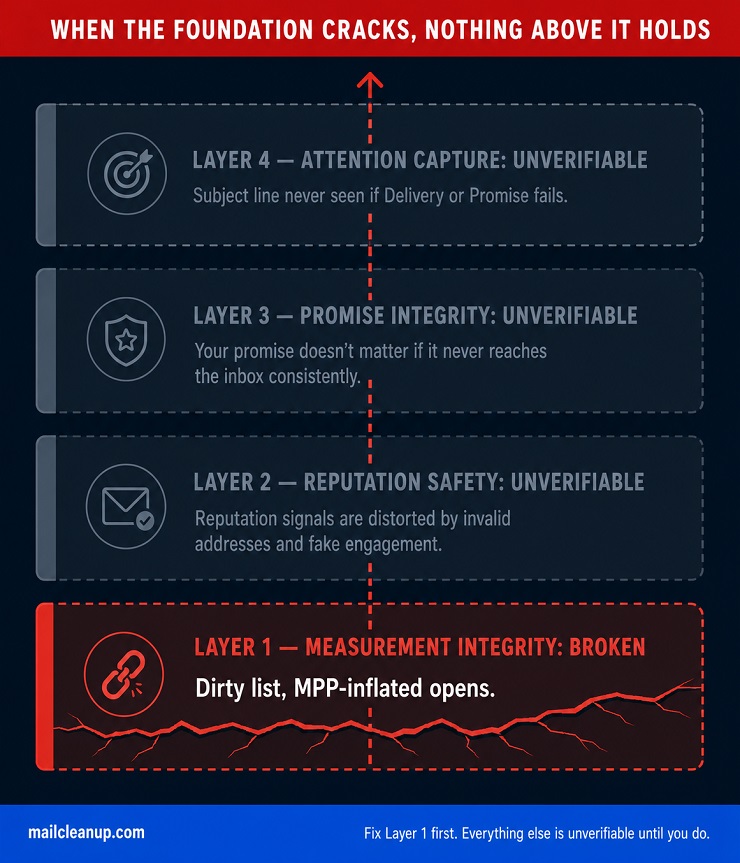
The four jobs from the first section aren’t equally weighted, and they don’t sit side by side. They stack, with each one depending on the layer below it actually holding. We call this the Subject Line Reliability Stack, and it’s the lens that separates genuinely useful best practices for email subject lines from advice that only works until someone checks the data behind it.
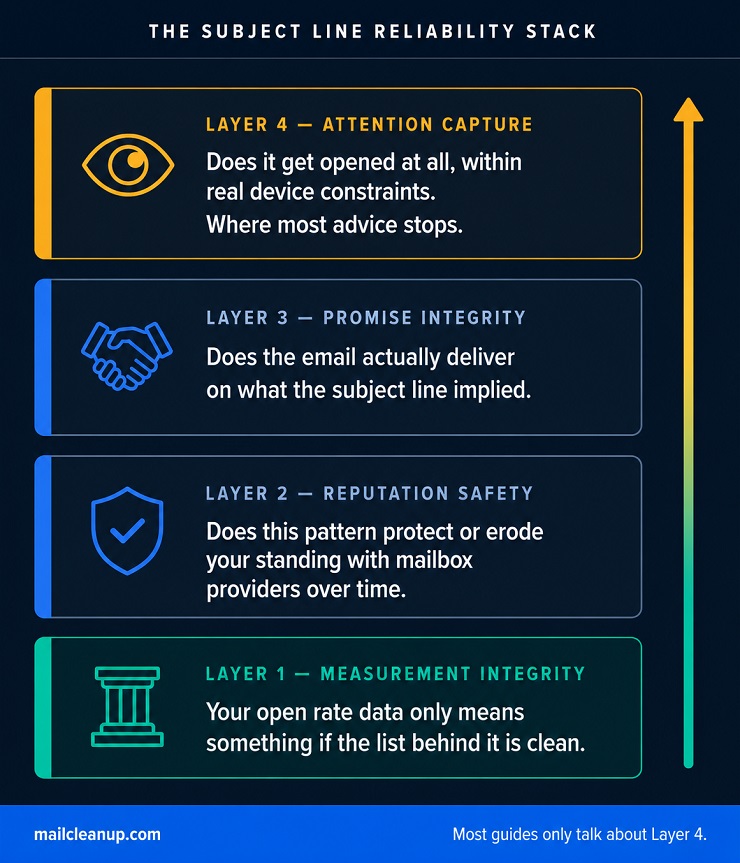
Layer 1: Measurement Integrity, Why Email Subject Lines Data Needs a Clean List
This is the foundation, and it’s checked first regardless of which other layer you’re focused on, because every conclusion above it depends on the data this layer either makes trustworthy or quietly corrupts. Open rate is the metric most subject line advice is built on, and it has two well documented problems we cover in full in our guide to email marketing KPIs.
Apple Mail Privacy Protection pre-fetches images for a large share of Apple Mail users, which registers as an open whether or not a human ever saw the email, inflating the reported number for any list with a meaningful share of Apple Mail subscribers. Open rate should never be treated as a reliable verdict on a subject line without that caveat attached. The second problem is dirtier in a literal sense: dead addresses, spam traps, and disposable addresses sitting on your list don’t open emails at all, and keeping them off your list in the first place is most of what we mean by email list hygiene.
Signs your subject line data isn’t trustworthy yet:
- A meaningful share of your list uses Apple Mail and you’re still deciding winners by raw open rate instead of click-through rate.
- You haven’t verified the list in the last few months, or it grew through an import, a co-registration source, or a merge.
- Engagement has been declining steadily and you haven’t checked whether that’s a copy problem or a list decay problem.
- The list includes addresses collected before a re-engagement or sunset policy existed.
A subject line test run against a list carrying any of these isn’t measuring the subject line. It’s measuring the list, and every layer above this one inherits whatever distortion this layer introduces.
Layer 2: Reputation Safety for Email Subject Lines
Assuming the data is trustworthy, the next question is whether a given subject line pattern helps or hurts your standing with mailbox providers over time, not just on one send. A single use of urgency language or an emoji won’t sink your sender reputation. A repeated pattern will, and the specific patterns worth watching are:
- Subject lines that consistently overpromise relative to the content, which raises your complaint rate even when your open rate looks healthy.
- Urgency language used on every send regardless of whether anything is actually time bound, which trains engaged subscribers to stop trusting your urgency cues and trains disengaged ones to mark you as spam instead of unsubscribing.
- A pattern of low post-open engagement, since mailbox providers increasingly weight what subscribers do after opening, not just whether they opened, when scoring your future inbox placement.
- Subject lines that vary wildly in tone or format from send to send, which can read as inconsistent enough to trigger filtering algorithms trained on sender consistency.
None of these get you flagged because of a specific word. They get you flagged because of what they do to engagement and complaints over repeated sends, which is the actual signal mailbox providers are scoring. We cover this mechanism in full a few sections down.
Layer 3: Promise Integrity in Good Email Subject Lines
This is the layer most curiosity-gap and clickbait-style advice skips entirely. A subject line that promises something the email doesn’t deliver might win the open, but it loses the reader’s trust, and that trust determines whether they open your next email at all. Compare “We found something concerning in your last campaign” leading into an email that actually names the concerning finding and what to do about it, against the same subject line leading into a generic newsletter with no specific finding mentioned anywhere. The first builds trust for the next send. The second spends it.
The diagnostic signs of a promise-integrity problem show up in the data even when open rate looks fine: a high open rate paired with a low click-through rate, a high open rate paired with an unsubscribe rate that climbs immediately after the open, or a spam complaint rate that rises even while open rate holds steady. Good email subject lines set an accurate expectation, even when that expectation is built around curiosity rather than a direct statement.
Layer 4: Attention Capture, How to Write Subject Line in Email That Actually Gets Opened
This is the layer most published advice focuses on exclusively: the words, length, formatting, and timing choices that determine whether the email gets opened in the first place. It depends on four levers, each developed in its own section ahead in this guide: working within the real character limits of your audience’s actual devices and clients, choosing techniques like personalization and urgency that move opens without misleading the reader, avoiding the spam-filtering mistakes that are still commonly believed but no longer accurate, and testing your choices against your own list rather than someone else’s benchmark.
It matters enormously. But it’s the top of the stack for a reason, not the foundation, and none of these tactics mean anything if the three layers underneath aren’t holding first.
Email Subject Line Character Limit by Device and Email Client
There’s no single email subject line character limit, because there’s no single device or client your subscribers are reading on. What actually displays depends on where the email gets opened, and the gap between the tightest and most generous constraints is larger than most best practices for email subject lines guides let on.
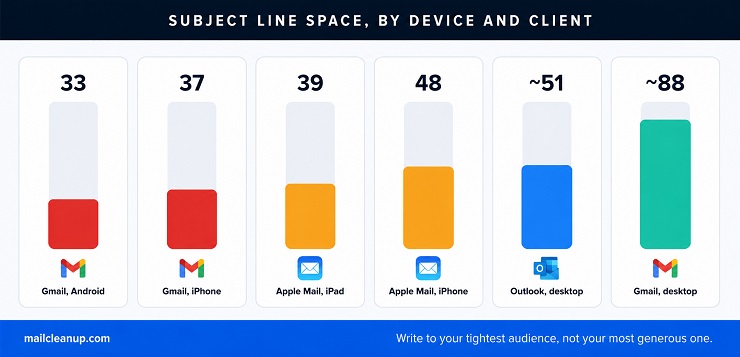
| Device/client | Subject line visible before cutoff | Preheader visible before cutoff |
|---|---|---|
| Gmail app, Android phone | ~33 characters | ~37 characters |
| Gmail app, iPhone | ~37 characters | ~39 characters |
| Apple Mail, iPhone or smaller screen | ~48 characters | ~99 characters |
| Apple Mail, iPad or larger screen | ~39 characters | ~75 characters |
| Gmail, desktop browser | No hard cutoff; roughly 88 characters before visual truncation at typical inbox width | Varies with inbox pane width |
| Outlook, desktop browser | No hard cutoff; roughly 51 characters before visual truncation at typical inbox width | Varies with inbox pane width |
Mobile Gmail is the tightest constraint in this table by a meaningful margin, and it’s also one of the most common ways email gets read. Write a 60 character subject line for a list that opens mostly on the Gmail Android app, and more than half of it sits invisible until someone taps to expand, by which point you’ve already lost the chance to make the case for opening.
Length isn’t only a device question; it’s also a goal question, and the two compound. Length recommendations shift again depending on what you’re actually trying to move:
| What you’re optimizing for | Length that performs best |
|---|---|
| Raw open rate | Under 25 characters |
| Click-through rate | Under 25 characters |
| Downstream conversion | 25 to 35 characters |
| Triggered or automated sends specifically | 25 to 35 characters |

Treat “optimizes for raw open rate” in that table as a description of what the underlying research measured, not a recommendation to chase open rate as your own decision metric. Apple Mail Privacy Protection inflates that number before you ever get to compare it against length, which is exactly the Layer 1 problem from the Reliability Stack earlier in this guide.
The pattern in the goal table still makes sense once you see it: a very short line creates curiosity without giving anything away, which wins the open and the click, while a conversion-focused send benefits from a few more characters of setup, since a reader who’s already decided to click through responds better to a subject line that frames what they’re about to see.
Putting a number on the best practices for email subject lines around length means doing three things your own analytics can tell you that no external guide can: check which device and client combination makes up the largest share of your list’s opens, decide whether this particular send is optimizing for the open itself or for what happens after it, and write to the tightest constraint that matters for your actual audience rather than a number from a study run on someone else’s list. The studies above aren’t wrong. They’re each correct for the audience and goal they measured, and your list is its own audience with its own answer.
How to Write Good Subject Lines for Emails That Actually Get Opened
Once you know your character constraint, the next decision is which technique to use inside it. The five techniques below show up across nearly every best practices for email subject lines guide in some form, but most get covered as a flat tip, use personalization, create urgency, without saying when the technique works, when it backfires, and what it actually looks like written out.

| Technique | What it looks like | Best used when | Risk if overused or done badly |
|---|---|---|---|
| Behavioral personalization | “Your list still has 340 risky addresses we flagged last week” rather than “John, check your list today” | You have real behavioral or transactional data to reference, not just a name field | Name-only personalization on stale or mistyped data reads as more impersonal than no personalization at all |
| Genuine urgency | “Your verification credits expire in 48 hours,” when the deadline is real and verifiable | The deadline, limited availability, or time sensitivity is actually true | Manufactured urgency on every send trains engaged subscribers to ignore it, and trains disengaged ones toward the spam button instead of unsubscribe |
| Specific numbers | “11% of your list is bouncing. Here’s why.” rather than “Improve your bounce rate today” | You have a real, specific figure relevant to the reader | A vague or rounded number used as filler reads as marketing noise, not a credibility signal |
| Questions | “Is your bounce rate quietly damaging your sender reputation?” | The question matches a problem the reader plausibly already has | An obvious-answer question, or one disconnected from real stakes, reads as clickbait |
| A single relevant emoji | One warning icon on a deliverability risk alert, used to aid scanning rather than decorate | Sparingly, when it adds genuine scannable meaning the words alone don’t | Multiple emoji, or emoji unconnected to content, look low effort at best and spam-adjacent at worst |
Behavioral personalization deserves a second look, since it’s the technique most often done badly. Inserting a first name into a template is the version every ESP makes easiest, and it’s also the version that’s stopped moving the needle the way it once did, since subscribers have seen “Hi [First Name]” enough times that it no longer signals genuine attention. What still works is personalization built on something the subscriber actually did, a list they uploaded, a feature they used, a threshold they crossed. That requires accurate underlying data, which means the technique’s effectiveness is downstream of the same list quality question running through this entire guide.
We cover how personalization depth scales from simple to advanced in our full email personalization guide, including what data each level requires and what breaks when that data is wrong.
The common thread across all five techniques: each works by creating a specific, honest reason to open, and each backfires the moment it becomes a formula applied to every send regardless of whether the underlying claim is true. A reader can’t tell the difference between your third “48 hours left” subject line this month and your first one. Your engagement data can, and it shows up exactly as the reputation pattern from Layer 2 of the Reliability Stack: declining response to a technique that hasn’t actually changed, because the technique was never the variable. Believability was.
Do Spam Trigger Words Still Hurt Email Subject Lines?
This is one of the most repeated pieces of advice in every best practices for email subject lines guide, and it’s also one of the most outdated. The common version: avoid words like “free,” “guarantee,” “cash,” and “buy now,” because spam filters scan for them and route your email straight to junk. That version was true a decade ago, when filtering was largely keyword based. It is not how modern filtering works now.
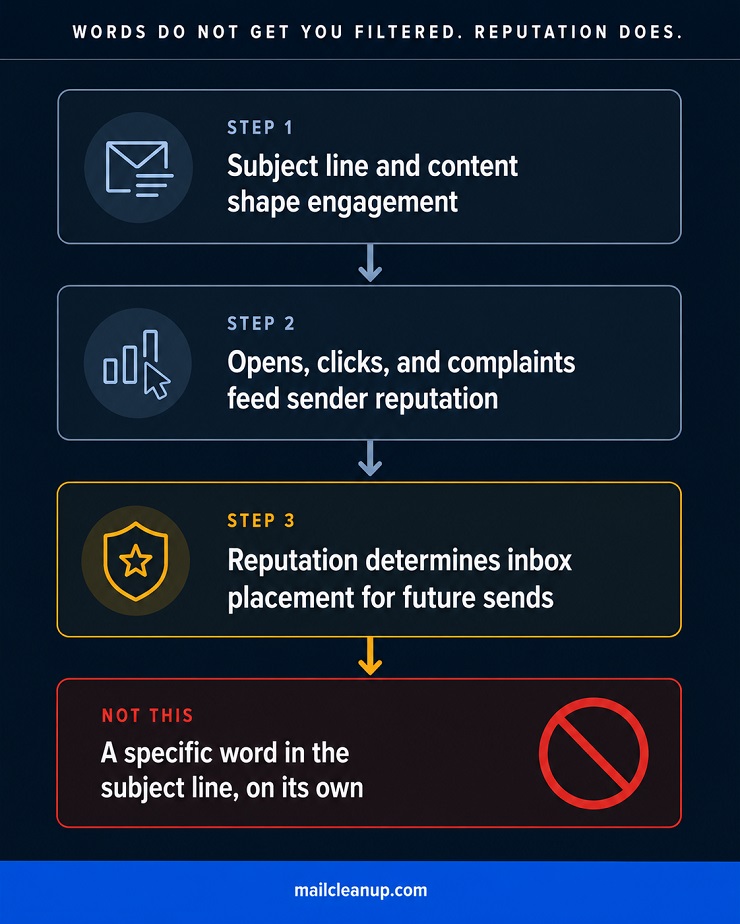
Mailbox providers like Gmail, Outlook, and Apple Mail now weigh sender reputation, domain authentication, and recipient engagement history far more heavily than the literal words in your subject line. A handful of specific words appearing once does not flip a switch that sends your email to spam. The mechanism runs differently: your subject line and content shape how recipients engage, that engagement, or the complaints it generates, feeds your sender reputation, and reputation is what mailbox providers actually use to decide where your future emails land.
The word “free” used in a subject line to an engaged, opted-in list that regularly opens and clicks will not get you filtered. The same word used repeatedly to a purchased or unverified list generating high complaints and low engagement will, not because of the word, but because of what that list’s response pattern does to your reputation over time.
A few formatting patterns still correlate with spam complaints even though no specific word is doing the damage on its own:
- Excessive punctuation, especially multiple exclamation points or question marks stacked together, which pattern-matches to low-quality bulk sending regardless of the words around it.
- ALL CAPS subject lines, which read as aggressive and are disproportionately associated with spam in both human perception and filtering models trained on flagged mail.
- Deceptive “RE:” or “FWD:” prefixes added to a subject line that was never actually part of a reply or forward, which several mailbox providers now specifically flag as a manipulation pattern.
- A subject line with nothing to do with the email’s actual content, which doesn’t trigger a filter directly but reliably produces the complaint and low-engagement pattern that does.
None of these get you filtered because of a single trigger word. They get you filtered, slowly, because of what they do to engagement and complaints across repeated sends, the exact Layer 2 reputation mechanism from the Reliability Stack earlier in this guide. The real best practices for email subject lines on this topic isn’t a list of forbidden words to memorize. It’s understanding that your subject line’s job is to earn engagement honestly, because engagement, not word choice, is what your reputation is actually built from.
Personalized Email Subject Lines and Where AI Fits In
Personalized email subject lines split the data more than almost any other technique in this guide. Some research reports open rate lifts in the 20 to 26% range. Other studies, often run on smaller or more specific audiences, claim lifts as high as 50%. Both can be true at once, because the studies are measuring different depths of personalization on different lists, and depth is the variable that actually matters here, not the act of personalizing itself. It’s the same lesson nearly every other section of this guide to best practices for email subject lines keeps surfacing: the number people repeat with confidence usually isn’t wrong, it’s just incomplete.
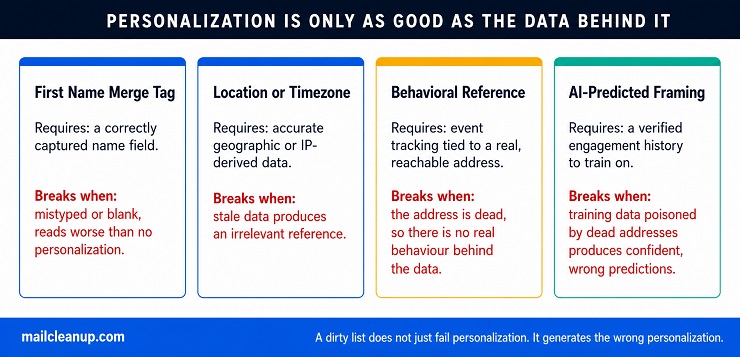
| Personalization tactic | Data it requires | What breaks it on a dirty or unverified list |
|---|---|---|
| First name merge tag | A name field, correctly captured | A mistyped or missing name renders as blank or wrong, reading as worse than no personalization |
| Location or timezone reference | Accurate geographic or IP-derived data | Stale or incorrectly inferred location data produces an irrelevant or jarring reference |
| Behavioral reference (recent action, browse history) | Event tracking tied to a real, reachable address | If the address is dead or disposable, there’s no real behavior behind the data, and the reference is fabricated rather than personalized |
| Predictive or AI-suggested send framing | A verified engagement history to train on | Training data poisoned by dead addresses and disposable signups produces confident-sounding predictions built on noise |
We cover how personalization scales from a name field to fully predictive AI-driven sends, what each level requires, and exactly where it breaks, in our full email personalization guide. The short version that matters for subject lines specifically: personalization only works as well as the data behind it, and a dirty list doesn’t just fail to help personalization, it actively generates personalization that’s wrong.
AI subject line generators raise the same question in a new form. They’ll happily produce twenty plausible-sounding variants in seconds, but a tool can’t know your audience’s actual response history unless you’ve fed it accurate data, and it has no way of flagging whether a suggestion violates your own deliverability standing. Before using an AI-generated subject line, run it through the same checks you’d apply to one you wrote yourself:
- Does it fit your audience’s actual device constraints, not just a generic “good length” the tool assumes?
- Does it promise something the email genuinely delivers, or did the tool optimize purely for an attention-grabbing phrase?
- Would you be comfortable sending the same framing to this list every week, or does it rely on manufactured urgency that wears out fast?
- Is the personalization in it backed by real data you actually have, or did the tool insert a placeholder that assumes data you don’t?
Treat AI output as a fast first draft, not a finished decision. The tool can generate options. It cannot tell you whether your list is the kind of list those options will work on.
How to A/B Test Email Subject Lines the Right Way
Testing is how you find out whether any of the best practices for email subject lines covered so far actually hold up on your specific list, rather than on whatever audience a study happened to measure.
Subject lines sit at Level 1, Inbox Entry, of the Email A/B Testing Priority Stack, covered in full in our email A/B testing guide, the framework we use across this entire email marketing cluster for deciding what to test and in what order. That guide covers the complete six-step testing methodology: diagnosing your metric gap, writing a falsifiable hypothesis, calculating the right sample size for your baseline, and building a test log that compounds learning over time. We won’t repeat that process here.
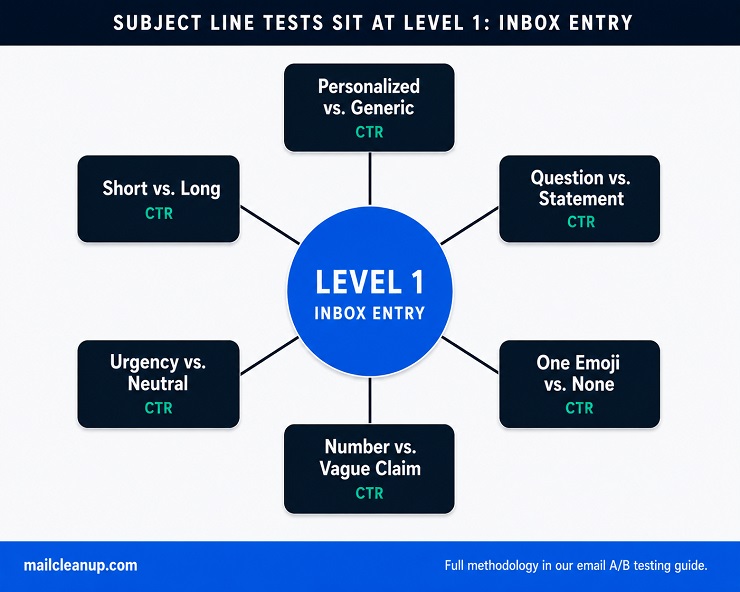
| Test idea | What it isolates | Evaluation metric |
|---|---|---|
| Personalized vs. generic | Whether real behavioral data outperforms a template | CTR, not open rate |
| Short (under 25 characters) vs. longer (35+) | Whether brevity or context serves this specific audience | CTR for opens and clicks, conversion rate if testing for downstream action |
| Question vs. statement | Curiosity framing vs. direct value statement | CTR |
| Urgency framing vs. neutral | Whether genuine time pressure moves this audience | CTR, and unsubscribe rate as a guardrail metric |
| One emoji vs. none | Whether visual differentiation helps or reads as noise | CTR |
| Specific number vs. vague claim | Specificity as a credibility signal | CTR |
Every row in that table says CTR, not open rate, and that’s deliberate, not a stylistic preference. If a meaningful share of your list uses Apple Mail, Apple Mail Privacy Protection pre-fetches the tracking pixel before anyone actually opens the email, which means open rate tells you which variant a random sample of devices happened to land in, not which subject line a human actually preferred. Click-through rate requires a real action a privacy feature can’t fake.
One more layer worth checking before you trust any subject line test result: was this test run on a list that’s been recently verified? If you don’t already have a tool you use for an email subject line checker style readiness check before a send, the gap usually isn’t a missing feature, it’s a missing verification pass on the list itself. A subject line checker can flag length and obvious spam patterns. It can’t tell you that a third of the addresses in your test cohort were never going to register an open in the first place, which is the actual problem the next section covers in full.
Why Email Marketing Subject Lines Best Practices Mean Nothing Without a Clean List
Every claim in this guide about best practices for email subject lines rests on the same unstated assumption: that the open rate, click-through rate, or conversion rate you’re using to judge it came from real, reachable subscribers. When that assumption fails, the technique doesn’t get a fair test. It gets evaluated against noise, and noise can declare a winner just as confidently as a genuine signal can.

| List condition | Effect on subject line test data |
|---|---|
| 2% invalid address rate (verified list) | Minimal distortion; most test results remain trustworthy |
| 8% invalid address rate (average unverified list) | Moderate distortion; smaller effect sizes become unreliable to detect |
| 15%+ invalid address rate (aged or degraded list) | Significant distortion; declared winners are as likely to reflect address composition as subject line quality |
| Meaningful Apple Mail share with no MPP adjustment | Open rate is structurally inflated regardless of address quality, corrupting the metric itself, not just the sample |
This is the same mechanism we cover in depth in our guide to email A/B testing: a dirty list doesn’t fail loudly. It fails quietly, by suppressing or inflating both sides of a comparison unevenly, so the result still looks like a clean win for one variant. You apply that “winning” subject line pattern forward, and you’ve built your next campaign on a conclusion that was never really about the subject line at all.
Email marketing subject lines best practices, the length guidance, the personalization tactics, the spam filtering facts, all of it, only produce trustworthy results once this precondition is met. List verification isn’t a separate workstream from subject line optimization. It’s the part of subject line optimization that happens before you write a single word, because it determines whether anything you measure afterward means what you think it means.
The Best Subject Line Still Can’t Fix a Dead Address
We started this guide pointing out that best practices for email subject lines contradict each other, and by now it should be clear why: most of them are true for the audience and goal they were measured on, and silent about the data quality underneath them. None of the four techniques, the device-specific length constraints, or the deliverability facts in this guide are wrong. They’re each correct for a list of real, reachable people who can actually register the engagement the advice is trying to earn.
That’s the part worth sitting with before your next send. A subject line can be honest, well-targeted, and perfectly sized for your audience’s device, and it still won’t tell you anything true if a meaningful share of the list it’s sent to was never going to open it regardless of what it said. The open rate will report a number either way. Only one of those numbers means what you think it means.
Verify your list before you test your next subject line, not after the results look strange. The techniques in this guide work. They just need real addresses behind them to prove it.
FAQs on Best Practices for Email Subject Lines
How many characters should an email subject line be?
There’s no single right number. Studies report ideal lengths anywhere from under 25 characters to over 90, because they measure different audiences, devices, and goals. The safest universal target is around 33 characters, the shortest cutoff found across major mobile email clients, with anything beyond that treated as a bonus rather than a requirement.
Does personalization in a subject line really increase open rate?
Usually, but the exact lift varies enormously across studies, from around 20% to as much as 50%, because they sample different industries and personalization depths. The more reliable pattern: personalization built on real behavioral data outperforms a first name alone, and a clean, accurately matched email address is what makes that data trustworthy in the first place.
Do emojis help or hurt email subject line open rates?
It depends on context more than most advice admits. One emoji used to aid scanning, like a single warning icon on an alert, can help. Stacking multiple emojis, or using one unrelated to the content, tends to read as low effort and can suppress engagement. Test sparingly, and never let an emoji substitute for an actual specific reason to open.
Are spam trigger words still real, and which ones should I avoid?
Mostly not in the way older advice suggests. Modern filters weigh sender reputation, authentication, and recipient engagement far more heavily than individual words like “free” or “guarantee.” What still hurts: excessive punctuation, all caps, and fake “RE:” prefixes, not because of the words themselves, but because of the complaint and disengagement patterns they tend to produce.
What’s the difference between a subject line and a preheader?
The subject line is the headline; the preheader is the short preview text that follows it in most inboxes, typically pulled from the email’s first line unless you set it manually. They function as one unit: the subject line creates the hook, and the preheader either reinforces it or wastes the chance by repeating the same words.
Should I use the recipient’s name in the subject line?
This is contested. Some research shows name personalization lifts open rates significantly. Other usability research found subscribers grow wary of name-only personalization, recognizing it as a template rather than genuine attention. The safer middle ground: personalize with something specific to the recipient’s actual behavior or data, not just their name dropped into a generic template.
How do I A/B test my email subject lines?
Write two versions that differ in exactly one element, split your list randomly into equal halves, send both at the same time, and measure by click-through rate rather than open rate if a meaningful share of your list uses Apple Mail. Run the test for at least 48 hours before declaring a winner, and only on a verified, clean list.
Can AI write better email subject lines than I can?
AI tools generate options quickly and can be useful for first drafts or to break writer’s block, but they don’t know your audience’s actual behavior. Treat any AI-generated subject line as a hypothesis to test against your own list, not a finished answer, and run it through the same character-limit and promise-integrity checks you’d apply to one you wrote yourself.