
You send a campaign. It doesn’t bounce. Your dashboard says delivered. And still, fewer people are opening it, and you have no idea why.
Every guide that talks about what is email deliverability hands you the same list: authentication, sender reputation, engagement, list quality, content, infrastructure. What almost none of them tell you is that these six factors don’t move on the same clock. Authentication is a one-time setup. Get SPF, DKIM, and DMARC right once, and that piece of the puzzle mostly stays solved.
Sender reputation and subscriber engagement move over months: one bad send doesn’t sink you, and one good send doesn’t fix you either. List quality sits in a different category entirely. It’s the one lever you can pull today, before your next send, and actually see the difference on the campaign right after. That distinction, one-time setup, slow-moving signal, and immediate lever, is what this guide is built around. Instead of listing the same six factors in the same order every other guide uses, this one is organized around a single question. Which factor should you work on first, given where your own program actually stands right now?
TL;DR on Email Deliverability
- Email deliverability measures whether a message actually reaches the inbox, while email delivery only measures whether a mail server accepted it.
- Authentication and sending infrastructure are largely one-time setup, while sender reputation and subscriber engagement shift gradually over months.
- List quality is the one deliverability factor a sender can improve before their very next send.
- Since February 2024, Google and Yahoo’s bulk sender requirements have made authentication, sub-0.3% complaints, and one-click unsubscribe mandatory for senders of 5,000+ daily emails.
- Published benchmarks for a “good” deliverability rate disagree with each other because they measure delivery, inbox placement, and overall reputation as different things.
- Seed-list testing and first-party tools like Google Postmaster Tools reveal symptoms like spam placement, not the underlying causes the factors above actually control.
- Landing in Gmail’s Promotions tab isn’t a deliverability failure on its own, since the message still avoided spam filtering entirely.
What Is Email Deliverability?
So, what is email deliverability, exactly? It’s the ability of an email you send to actually land in the recipient’s inbox. Getting accepted by their mail server somewhere along the way isn’t the same thing.
That gap matters more than it sounds like it should. A campaign can show 100% delivered in your sending platform’s dashboard and still perform terribly. “Delivered” and “reached the inbox” are two different claims. Getting a real answer to what is email deliverability starts with separating those two claims from each other.
Email Deliverability vs. Email Delivery
The confusion between these two terms is common enough that it’s worth settling before anything else. Email deliverability vs email delivery isn’t a matter of splitting hairs. The distinction changes what you should actually be measuring.
| Metric | What It Actually Measures | Why It Matters |
|---|---|---|
| Email delivery | Whether the recipient’s mail server accepted your message | Confirms the address exists and the server didn’t reject you, nothing about where the message went after that |
| Email deliverability | Whether that accepted message actually reached the inbox | The only version of “success” a subscriber can actually act on |
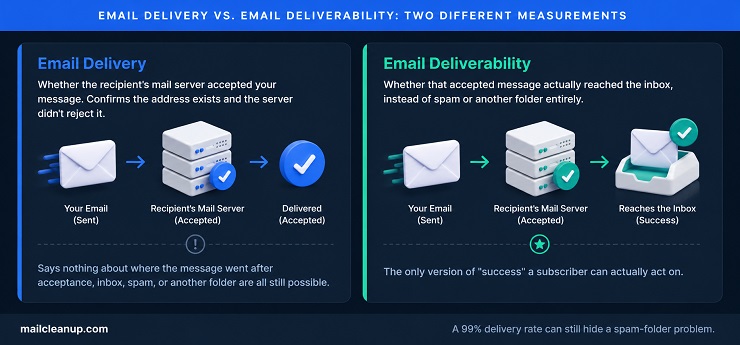
A 99% delivery rate tells you almost nothing about deliverability on its own. Your mail server can accept a message and then route it straight to spam. Your sending platform will still report it as delivered. As far as the receiving server is concerned, it did its job. That’s exactly the failure mode we cover in more diagnostic detail in our guide to email delivery failure. It walks through the specific signals that tell you which side of this gap you’re actually on.
That’s the real answer to what is email deliverability, stripped of theory: it’s inbox placement, not server acceptance. The two numbers can tell very different stories about the same campaign.
The practical consequence: track delivery rate to catch technical failures, but track deliverability, inbox placement specifically, to know whether your program is actually working.
Why Email Deliverability Matters
Email deliverability isn’t a vanity metric sitting next to open rate and click rate. So why does it matter this much? Because what is email deliverability, fundamentally, is the gate every other email metric has to pass through first.
Think about what happens when deliverability breaks down. Your subject line testing, your send-time optimization, and your personalization work all depend on the same precondition. None of it matters if the message never reaches an inbox to be judged on its own merits. A brilliant campaign that lands in spam performs identically to a terrible one: not at all.
The stakes compound too. Mailbox providers build a running picture of how recipients treat your mail. A stretch of poor deliverability makes the next campaign’s deliverability worse, not neutral. That’s why this isn’t something to check once and move on from. It’s an ongoing condition of your program. It either keeps improving on its own momentum, or keeps eroding on that same momentum in the other direction.
The Deliverability Control Spectrum: The Factors That Determine Email Deliverability
Every deliverability guide lists roughly the same six factors: authentication, sender reputation, subscriber engagement, list quality, content and spam filters, and sending infrastructure. That includes the competing guides you’d find searching this exact question. Almost none of them tell you the one thing that actually matters: where to spend your time first. These six factors don’t operate on the same clock. They don’t answer to the same amount of effort, either.
Some of them are technical work you do once and mostly forget. Others are reputational signals that accumulate slowly, over months, and can’t be rushed by working harder this week. And one of them, list quality, is different from both. It’s the factor that responds almost immediately to direct action, before your very next send.
Answering what is email deliverability well means treating it as six separate questions, not one. That’s the organizing idea behind what follows. Instead of a flat list in no particular order, here’s where each factor actually sits.
| Factor | Speed of Change | Practical Takeaway |
|---|---|---|
| Authentication (SPF, DKIM, DMARC, BIMI) | One-time setup | Get it right once; it mostly stays solved |
| Sending infrastructure | One-time setup, then a multi-week ramp | Warmup takes weeks, then it’s largely stable |
| Sender reputation | Shifts over months | Builds or erodes slowly; resistant to quick fixes |
| Subscriber engagement | Shifts over months | Feeds directly into reputation, same slow clock |
| Content and spam filters | Re-evaluated every send | Each campaign starts its own new evaluation |
| List quality | Changes before your next send | The one factor you can act on immediately |

The rest of this section walks through all six, but with different amounts of depth. Authentication, sender reputation, and sending infrastructure already have full, dedicated guides on this site, so what’s here stays brief. Each links to the deeper version. List quality gets the real depth, since it’s the one factor where more detail actually changes what you do this week.
Authentication: The Baseline Email Deliverability Requirement
Authentication is the clearest example of a one-time factor in the whole list. SPF, DKIM, and DMARC each give a receiving server a way to confirm a message claiming your domain actually came from you. Set these three correctly, and you’ve closed off the most common way spammers impersonate real senders. That’s exactly the kind of behavior every major mailbox provider watches for.
What is email deliverability without authentication? Effectively capped. Google and Yahoo’s current bulk sender requirements make SPF and DKIM mandatory, and DMARC close to it, for anyone sending meaningful volume. This isn’t optional infrastructure anymore. It’s a baseline you clear before anything else on this list matters.
This guide won’t repeat the full setup process here. Our complete authentication guide covers SPF, DKIM, DMARC, and BIMI working together. Each protocol also has its own dedicated deep dive: SPF, DKIM, and DMARC. BIMI adds your verified logo to the message once the other three are solid.
Sender Reputation and Long-Term Email Deliverability
Sender reputation is the mailbox provider’s running score of how trustworthy your sending domain and IP address have been. It factors in your complaint rate, how many recipients mark your mail as spam, and your bounce history. It also weighs how consistently people actually open and engage with what you send.
Reputation answers a version of what is email deliverability that authentication alone can’t answer. It tells a mailbox provider whether to trust you enough, right now, to grant inbox placement. Unlike authentication, you can’t fix reputation in an afternoon. A single clean campaign doesn’t erase months of poor sending, and a single bad one doesn’t undo months of good sending either. It moves on its own schedule.
Our full guide to sender reputation covers exactly what factors into that score and how to rebuild it if it’s slipped.
List Quality: The Fastest Lever for Email Deliverability
Of the six factors, list quality is the odd one out, and it’s worth understanding exactly why.
Authentication is a setup task. Sender reputation and engagement move over months. List quality is different. Every send is a fresh opportunity to improve it: it either adds new signals about your list’s health, or confirms what you already knew.
This is the most direct answer to what is email deliverability, in practical terms: the factor you can act on today. Every list accumulates dead weight over time, in a few predictable forms:
- Hard-bounced addresses: the inbox no longer exists, but the address is still sitting in your list
- Dormant inboxes: technically valid, but nobody has opened mail there in months or years
- Spam trap addresses: never real subscribers at all, planted specifically to catch senders who don’t verify their lists
Mailbox providers watch how many of your sends hit these dead addresses. A rising bounce rate, or a spike in spam-trap hits, reads as a sign you’re not managing your list. That’s true no matter how good your content or authentication setup is. That’s the mechanism, and it’s why list quality moves the needle faster than anything else on this page. Clean a list before a send, and you remove the addresses most likely to bounce or complain before they ever get the chance. The next campaign’s numbers reflect that improvement immediately, not in three months.
This is also where verification tools like MailCleanup fit in specifically. Running a list through verification before a send catches invalid, risky, and trap addresses before they ever leave your sending infrastructure. That’s different from finding out after a bounce or complaint has already dented your reputation. It’s not a replacement for the other five factors on this page. Authentication still needs to be correct, and reputation still needs to be earned over time. But of the six, it’s the one you can act on today and see reflected in tomorrow’s numbers.
Two related, more specific reads: our guide to what spam traps actually are and our full guide to email list hygiene. The second covers the actual process of cleaning and maintaining a list, not just why it matters.
Subscriber Engagement and Its Effect on Email Deliverability
Engagement and reputation move together, but they’re not identical. Reputation is the mailbox provider’s overall trust score. Engagement, opens, clicks, replies, and time spent reading, is one of the biggest inputs into that score. Gmail and Yahoo both openly weigh recipient behavior heavily.
Engagement is where what is email deliverability gets tested most directly: mailbox providers are watching whether real people actually want your mail. High engagement signals a wanted sender. Low engagement, especially alongside rising deletes-without-reading, signals the opposite, even without a single formal complaint.
Like reputation, engagement moves slowly. A single re-engagement campaign won’t undo months of a disengaged segment sitting in your list. We cover the specific tactics, subject line strategy, send-time optimization, and win-back sequencing, in [our dedicated guide to boosting email engagement].
How Content and Spam Filters Affect Email Deliverability
Spam filters read more than just your reputation and authentication. They also evaluate your message itself: word choice, the ratio of text to images, and whether the links inside it point to reputable domains. Formatting patterns that resemble known spam templates matter too.
None of this determines what is email deliverability on its own. Content is one input among six. But it’s the one factor that resets with every single send. Get authentication and reputation right, and a genuinely spammy-looking email from your list can still land in the junk folder on its own merits.
Two related reads worth knowing about: [what actually counts as a spam trigger word in 2026] and [how spam filters actually score a message]. The list of trigger words has changed more than you’d expect.
Sending Infrastructure’s Role in Email Deliverability
Infrastructure covers the technical foundation your emails send from: your IP address, whether it’s shared or dedicated, and whether it’s been properly warmed up. A brand-new IP or domain has no sending history at all. Mailbox providers treat unfamiliar senders with more suspicion than established ones. That’s what warmup solves: a gradual, scheduled ramp-up that lets you build a track record before you need to rely on it.
This is closer to a one-time factor than an ongoing one. Once an IP or domain is properly warmed and established, it mostly stays that way, provided sending stays consistent. Our full guide to email warmup covers the actual week-by-week schedule.
The dedicated-versus-shared IP decision matters for a specific reason relevant to what is email deliverability. On a shared IP, other senders’ bad behavior can drag your own placement down, even if your own sending is clean. That gets its own full treatment in our guide to dedicated vs shared IP addresses.
Google and Yahoo’s Bulk Sender Requirements: Why They Changed Email Deliverability
In February 2024, Google and Yahoo stopped treating authentication, low complaint rates, and easy unsubscribing as optional best practices. For anyone sending 5,000 or more emails a day to personal Gmail or Yahoo addresses, these became requirements, enforced at the mail server level. Microsoft followed with its own version for Outlook, Hotmail, and Live.com addresses, effective May 2025.
This matters for what is email deliverability specifically, not just delivery, because non-compliance doesn’t bounce your mail. It gets accepted, then filtered, rate-limited, or rejected outright depending on the severity. Google escalated its own enforcement in November 2025, moving from temporary delays to permanent rejections for repeat non-compliance. In practice, these requirements turned deliverability best practices most senders were already loosely following into a hard technical gate.
Here’s what actually changed, and what crossing the bulk-sender threshold specifically requires:
| Requirement | Applies To | The Threshold |
|---|---|---|
| SPF and DKIM authentication | Every sender | Both must pass |
| DMARC with alignment | Bulk senders (5,000+/day) | Policy published and aligned |
| One-click unsubscribe | Bulk senders | Honored promptly, no login required |
| Spam complaint rate | Bulk senders | Stay under 0.3%; Google’s own guidance targets below 0.1% |
| Valid forward and reverse DNS | Every sender | PTR records must resolve correctly |

The 5,000-per-day threshold is measured per sending domain, against personal inbox addresses specifically. Internal mail between accounts on the same Google Workspace organization doesn’t count. Cross it even once, and the stricter requirements apply going forward, not just on days you happen to send at that volume.
One detail worth flagging on its own: DMARC’s underlying standard itself changed in May 2026. RFC 9989 and its companion RFCs formally replaced the original 2015 DMARC specification. That elevated DMARC from an informational document to a Proposed Standard and tightened alignment expectations. It doesn’t change what Google and Yahoo require day to day, but DMARC advice written before 2026 may already use outdated terminology.
For the full compliance walkthrough, see our dedicated guide to Google and Yahoo’s bulk sender requirements.
How to Measure Email Deliverability
Once the six factors above are in reasonable shape, the natural next question is what is email deliverability doing right now for your program. That’s a measurement question, and it splits into two parts: knowing what a healthy number looks like, and knowing how to check your own.
What’s a Good Email Deliverability Rate?
Ask what is email deliverability in terms of a single passing number, and you’ll find a real problem: published sources don’t agree. One says 85% is acceptable and 98-99% is the real target. Another cites 98-99% for delivery specifically, but only 95% or higher for inbox placement, a different number entirely. A third publishes a full four-tier table across six separate metrics, with different bands for each.
None of these sources is wrong, exactly. They’re measuring different things and calling the result by the same name:
- Delivery rate: messages the receiving server accepted, out of everything sent
- Inbox placement rate: the share of those accepted messages that actually reached the inbox instead of spam
- Overall deliverability: sometimes reported as one of the above, sometimes as a composite that folds in complaint rate and bounce rate too
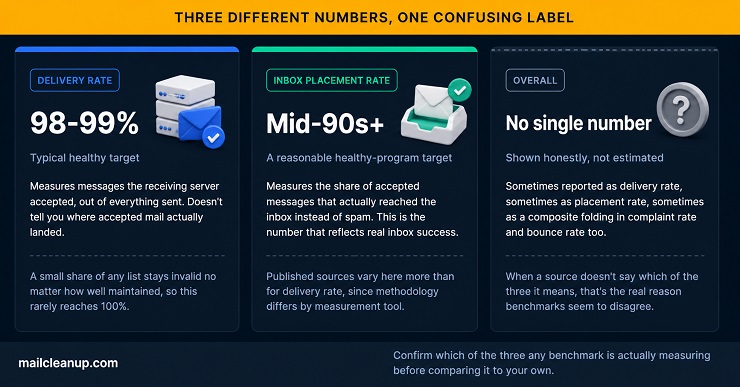
When a benchmark doesn’t specify which of these three it means, treat the number with real caution.
If you want one figure to hold onto, inbox placement in the mid-90s or better is a reasonable target for a healthy program. Delivery rate itself tends to run closer to 98-99%, since a small share of any list stays invalid no matter how well maintained. What matters more than hitting an exact number is knowing which of the three you’re actually looking at.
Two related, more specific reads: our guide to email deliverability score and our guide to email deliverability rate. Each goes deeper into calculating and interpreting your own numbers.
How to Test Email Deliverability
Knowing what is email deliverability in theory doesn’t tell you what your own number actually is right now. That’s where testing comes in.
The most direct method is seed-list testing. You send a real message to a set of test inboxes spread across major providers, Gmail, Yahoo, Outlook, and a few smaller ones. Then you check exactly where each copy lands: inbox, promotions, or spam. Tools built for this purpose report back placement rates, and some flag which specific content or authentication issue likely caused a spam placement.
Free options exist too, and they’re worth using even without paid email deliverability tools:
- Google Postmaster Tools: first-party visibility into your domain’s reputation, spam rate, and authentication pass rate, direct from Google
- Microsoft SNDS: the equivalent first-party view for domains sending to Outlook, Hotmail, and Live.com addresses
One honest limitation worth stating plainly: how to test email deliverability well means testing regularly, not once. A single test tells you where you stood for that one send, at that one moment. Reputation and engagement shift over weeks, so a testing cadence that only happens after something breaks catches the symptom well after the cause.
For the full testing methodology, including a complete pre-send checklist, see [our dedicated guide to email deliverability and inbox placement testing]. For a broader, periodic health check rather than a per-send test, see [our guide to running a full email deliverability audit]. For a roundup of the tools themselves, see [our guide to the best email deliverability tools available].
Email Deliverability Best Practices
Everything above answers what is email deliverability and why it works the way it does. This section is the shorter, practical version: a checklist to work from, not a re-explanation of the mechanics behind each item.
- Verify your list before every send: catch invalid, risky, and trap addresses before they ever leave your sending infrastructure, not after a bounce or complaint has already happened.
- Get authentication fully correct, once: SPF, DKIM, and DMARC set up properly is the baseline every mailbox provider now checks first.
- Warm up new domains and IPs gradually: a scheduled ramp-up builds the sending history mailbox providers look for before trusting real volume.
- Watch your complaint rate specifically: staying under Google and Yahoo’s 0.3% threshold matters more than almost any other single number.
- Segment and suppress instead of sending to everyone: reaching only people who actually want the message protects engagement, which protects reputation.
- Make unsubscribing genuinely easy: a one-click option keeps a disengaged subscriber from hitting “report spam” instead, which costs you far more.
- Test before you rely on the result: a single seed-list test tells you where you stood for that one send, not where you’ll stand next week.
- Recheck all of the above periodically: reputation, engagement, and list quality all drift over time, so a one-time setup pass doesn’t stay accurate indefinitely.
None of these email deliverability best practices work in isolation from each other. A perfectly authenticated domain with a neglected list still lands in spam, and a beautifully clean list sent through unauthenticated infrastructure fares no better. For the deeper walkthrough of how to execute each of these, especially list hygiene and warmup, see our full guide to improving email deliverability.
Where to Go Next With Your Email Deliverability
Everything above is the full picture, but you likely came here with one specific factor in mind. Here’s where to go based on what’s actually happening in your program right now:
- If your list hasn’t been verified recently: start with our full guide to email list hygiene, since list quality is the fastest factor to fix.
- If you’re not sure your authentication is set up correctly: our complete authentication guide walks through SPF, DKIM, DMARC, and BIMI together.
- If your emails are landing in spam despite clean lists and authentication: the answer is usually sender reputation or engagement, both covered in the factors section above, worth checking against your actual metrics before assuming which one it is.
- If you haven’t tested where your mail actually lands recently: [our dedicated guide to email deliverability and inbox placement testing] walks through the full pre-send checklist once it’s live.
- If you’re running cold outreach specifically: see our guide to cold email deliverability, since cold sending carries a different risk profile than opt-in mail and needs its own approach to list quality and infrastructure.
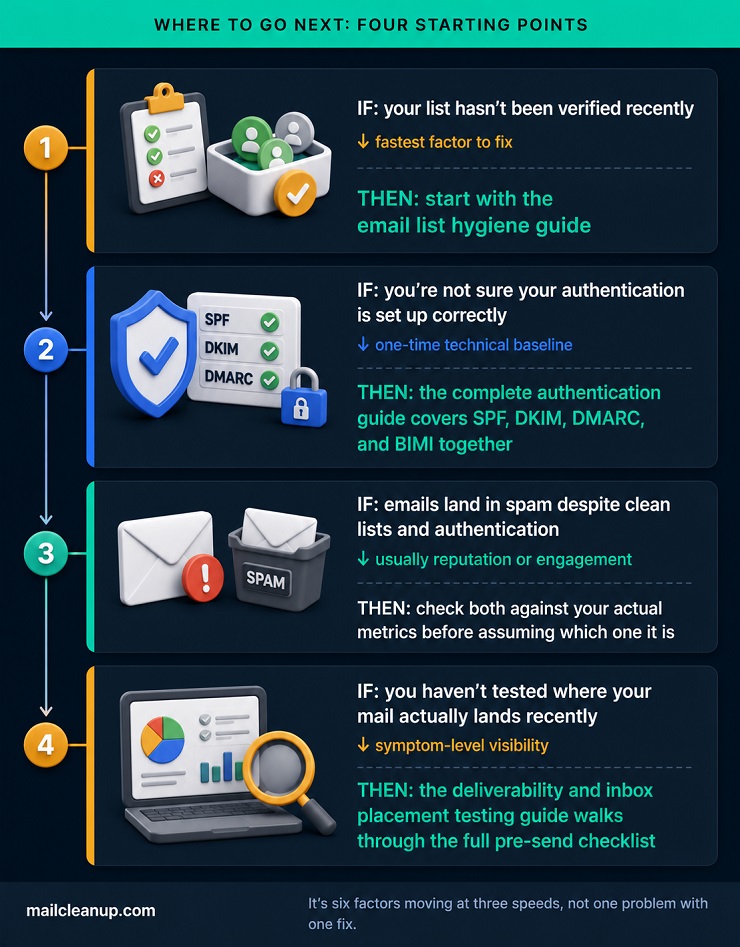
There’s no single fix that answers what is email deliverability once and for all, because it isn’t one problem. It’s six factors, moving at three different speeds, that all have to hold at the same time. Knowing which one needs your attention this week is most of the work.
FAQs on Email Deliverability
What is email deliverability?
Email deliverability is whether an email you send actually reaches the recipient’s inbox, not just whether their mail server accepted it. A message can be delivered without ever reaching the inbox, since it can still get filtered into spam after acceptance. Deliverability measures that final outcome specifically.
What’s the difference between email deliverability and email delivery?
Email deliverability vs email delivery comes down to what each one measures. Delivery means a mail server accepted your message. Deliverability means that accepted message actually reached the inbox rather than spam. A high delivery rate can still hide poor deliverability if messages land in spam after acceptance.
What is a good email deliverability rate?
Published benchmarks for a good email deliverability rate vary because they measure different things. If you want one number to hold onto, inbox placement in the mid-90s or better is a reasonable target. Confirm which of the two any benchmark you’re reading is actually measuring.
Why are my emails going to spam instead of the inbox?
Usually one of six email deliverability factors is at fault: missing authentication, weak sender reputation, or low subscriber engagement. Other common causes include invalid or trap addresses on your list, spam-trigger content, or unwarmed sending infrastructure. Checking authentication and list quality first usually narrows down the cause quickly.
Does landing in Gmail’s Promotions tab hurt my email deliverability?
Not on its own. The Promotions tab still counts as the inbox for email deliverability purposes, since the message avoided spam filtering entirely. It may lower your open rates if subscribers check that tab less often, but it isn’t a deliverability failure like landing in spam.
How do I test my email deliverability?
Seed-list testing checks your email deliverability directly. You send a real message to test inboxes across major providers and see where each copy actually lands. Free first-party tools like Google Postmaster Tools and Microsoft SNDS add ongoing visibility into your domain’s reputation and spam rate too.
Does sending from a new domain or IP address hurt my email deliverability?
Yes, at least temporarily, since it directly affects email deliverability. A brand-new domain or IP has no sending history, and mailbox providers treat unfamiliar senders with more caution than established ones. A gradual, scheduled warmup period builds that history before you rely on it for real volume.
Can one bad campaign permanently damage my email deliverability?
Not permanently, but email deliverability isn’t instantly reversible either. Sender reputation and subscriber engagement shift gradually over weeks and months, in both directions. A single poorly-targeted send can dent your standing, but consistent, well-targeted sending afterward will rebuild it over time.