
Your cold email can be perfectly authenticated, properly warmed up, and sent at a textbook-safe volume. It can still land in spam if the list behind it is dirty. That’s the piece most cold email deliverability guides bury three sections deep, if they mention it at all. Infrastructure is the part you configure once and forget. List quality gets one bullet point, buried between personalizing your subject line and avoiding spam trigger words.
That ordering has it backward for cold email specifically. An opt-in sender has a relationship with every address on their list. A bad one gets forgiven because the good ones vouch for the domain. A cold sender has no such relationship anywhere on the list. A dirty address there doesn’t just bounce, it actively damages the trust every other send on that domain is trying to build.
This guide covers the full stack: authentication, warmup, volume, Gmail and Outlook’s behavior, and how to diagnose a problem once you have one. But it treats list quality as the load-bearing factor it actually is for cold email, not a footnote. That’s the one place where the standard playbook, built for opt-in senders, quietly stops working when applied to cold outreach unchanged.
TL;DR on Cold Email Deliverability
- Cold email deliverability depends more on list quality than opt-in deliverability does, since there’s no existing opt-in signal to offset a bad address.
- Authentication (SPF, DKIM, and DMARC) is table stakes, but alignment across multiple sending domains is where cold-specific setups actually break.
- Cold email should never run from the same domain as everyday business mail, since a burned reputation damages everything else that domain sends.
- Safe daily-send limits vary widely across sources, roughly 20 to 200 emails per mailbox per day, depending on domain age, list quality, and engagement.
- Gmail and Outlook evaluate cold email differently enough that the same fix can help one and do nothing for the other.
- Modern spam filters weigh behavioral patterns more than specific trigger words, which means genuine personalization matters more than avoiding a word list.
- Most deliverability problems have a specific, diagnosable cause. A bounce spike, a complaint spike, and a single-provider drop each point somewhere different.
- MailCleanup’s own verification data shows roughly 137 invalid or risky addresses sit in every 1,000 in a typical unverified list.
What Makes Cold Email Deliverability Different From Regular Email Deliverability
Cold email deliverability behaves differently from the deliverability rules you already know. Most guides skip straight past that difference into a checklist of technical fixes.
Every opt-in list carries something cold email doesn’t: the recipient asked for the message. That single fact changes everything about how forgiving your infrastructure gets to be. A stale address on a permission-based list is less likely to bounce hard. Someone who signed up recently tends to check the inbox they gave you. A too-frequent send is more likely to get opened than reported, because the relationship already exists. And a domain with real opt-in history has engagement data backing its reputation before you run a single new campaign.
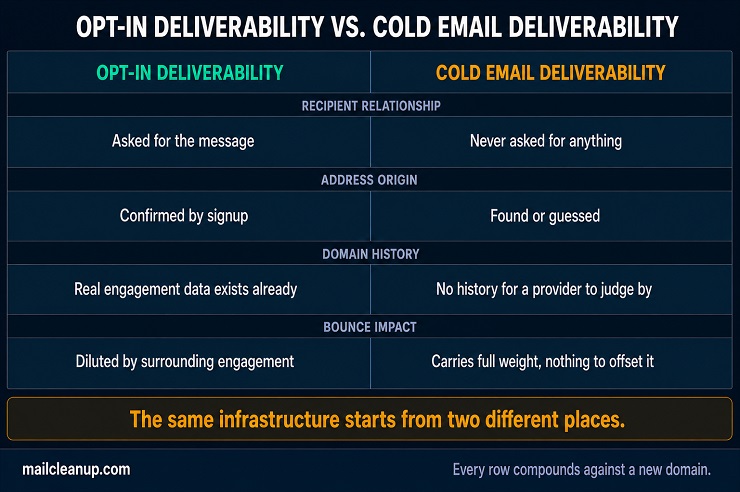
Cold email deliverability starts every send already behind where opt-in deliverability starts.
None of that exists when you’re sending cold. The recipient never asked for anything from you. The address you’re emailing was found or guessed, not confirmed by a signup. Your sending domain, more often than not, is new enough that mailbox providers have no history to judge you by.
You’ll feel that gap most clearly in how failures compound. A dirty address on an opt-in list produces a bounce, and the list owner cleans it out. Send to the same dirty address from a cold domain and you get the identical bounce. But nothing offsets it for you. There’s no prior engagement pulling the other way. That one bounce carries more weight against a domain with nothing else vouching for it yet.
Address quality isn’t one factor among several here. It’s the factor that decides how much room everything else, your authentication, your warmup, your sending volume, actually has to work with. That’s the starting point for how to fix cold email deliverability, covered throughout the rest of this guide.
Authentication: SPF, DKIM, and DMARC for Cold Email Deliverability
Authentication is where every deliverability guide starts, and for good reason. Without it, mailbox providers have no way to confirm you’re actually who your domain says you are. Getting SPF, DKIM, and DMARC right once is easy. Getting them right across several sending domains at once is where cold email deliverability breaks down for most cold senders. Getting all three right the first time is one of the simplest cold email deliverability best practices to follow. It’s also one of the most commonly skipped when a domain launches in a hurry.
SPF for Cold Email Deliverability
Copying a record doesn’t work. Cold outreach almost never runs from one domain, and SPF has to be configured separately for each one. Copying a working SPF record from your primary domain onto every new sending domain feels efficient. It can quietly break anyway. The copied record often depends on infrastructure that new domain doesn’t share, a shared IP block, an ESP include tied to a different account.
Each domain has its own lookup limit. Each domain also gets its own 10-lookup budget under SPF’s own rules. A record that includes your ESP, your warmup tool, and a forwarding service can climb toward that limit fast. Going over it causes a permerror, and that fails the SPF check entirely, regardless of whether your actual sending source was legitimate. Check each new sending domain’s record against the limit on its own. A record that worked fine on domain one can fail domain five simply because domain five’s include list looks different.
The practical fix for cold email deliverability at scale is building one clean SPF record per domain from what that domain actually sends through. Don’t copy a record built for a different setup and hope it still applies. If you’re setting up SPF for the first time, our walkthrough covers the record syntax and testing steps in full.
DKIM for Cold Email Deliverability
DKIM’s signature has to match the domain you’re actually sending from, and that’s exactly where a fast-moving cold setup trips itself up. Spin up a new sending domain, connect it to your platform, and start a campaign the same day. There’s a real chance DKIM never got configured on that specific domain at all. The platform might sign outgoing mail with its own shared default instead. That technically authenticates something, just not the domain your recipients actually see.
That mismatch doesn’t always throw an obvious error. Mail can still go out. It just goes out without the alignment DMARC checks for later, and that quietly weakens every other authentication signal riding alongside it. Cold email deliverability depends on DKIM being verified per domain, not assumed from whatever worked on the last one you set up.
Before a new domain sends its first cold email, confirm the DKIM record actually lives in that domain’s own DNS. Don’t rely on a template you copied and never checked. If you haven’t configured DKIM before, our DKIM setup guide walks through generating and publishing the key.
DMARC for Cold Email Deliverability
A brand new sending domain has no track record. That makes the DMARC policy you start with more important than the one you eventually want. Set a strict policy, quarantine or reject, before you’ve confirmed SPF and DKIM are actually passing cleanly across every sending domain. Do that too early, and you risk blocking your own legitimate cold email before it ever reaches an inbox.
Start new domains at p=none instead. That policy monitors what’s happening without acting on it, so you can catch a misconfigured domain early before it costs you anything. From there, the progression has three stages:
- p=none. Watch DMARC reports without affecting delivery. Confirm SPF and DKIM alignment is solid across every sending domain.
- p=quarantine. Move here once you’ve seen clean reports for a few weeks straight.
- p=reject. Move here only once you’re confident every sending domain under that policy is actually passing.
This staged approach matters more for cold email deliverability than it does for an established domain with years of consistent sending behind it. A new domain has nothing built up yet to fall back on if a policy change goes wrong. New to DMARC policy syntax? The full policy breakdown covers reporting setup too.
Domain and Infrastructure Strategy for Cold Email Deliverability
Authentication proves you are who you say you are. Infrastructure decides how much risk that identity can absorb before cold email deliverability actually breaks down. Get the domain and account setup wrong, and even perfect SPF, DKIM, and DMARC records won’t save your sender reputation. Infrastructure mistakes are also where how to fix cold email deliverability gets complicated. A bad domain setup often looks identical to a bad list until you check both separately. Getting the domain layer right the first time is one of the cold email deliverability best practices that’s cheapest to apply early. Retrofitting it later costs far more.
Why You Need a Separate Domain for Cold Email Deliverability
Sending cold email from the same domain you use for support tickets, invoices, and everyday business correspondence puts all of it at risk. Mailbox providers judge a domain’s reputation as a whole, not send by send. A run of cold campaigns that trigger spam complaints doesn’t just hurt future cold sends. It can push legitimate transactional mail into spam too, the password resets and order confirmations your actual customers are waiting on.
A dedicated sending domain contains that risk. If a cold campaign burns the domain’s reputation, your primary domain, and everything that depends on it, stays untouched. Most companies build these as subdomains or close variations of their brand, something like trymailcleanup.com alongside mailcleanup.com. The goal is a name recognizable enough to trust, distinct enough that trouble on one domain doesn’t touch the other.
One thing to avoid: a secondary domain that looks nothing like your brand. It might protect your primary domain’s reputation, but it also looks exactly like a phishing attempt. That costs you trust with the recipients you’re actually trying to reach.
How Many Domains You Need for Cold Email Deliverability
Start with your target daily volume and work backward. Say you want to send 300 cold emails a day, keeping each mailbox around 30 to 40 sends. That works out to roughly eight to ten mailboxes running at once. Exactly how conservative that per-mailbox number should be is its own question, covered in full further down this guide.
Domains and mailboxes aren’t the same unit. A single domain can host several mailboxes, sarah@domain and james@domain, for example. Most cold email setups do exactly that rather than buying a new domain for every individual sender. What matters is spreading volume across enough sending identities that one bad address doesn’t sink your entire operation at once.
A common starting setup for a small team is two to three domains, three mailboxes each. That’s enough separation to isolate a problem without the overhead of managing a dozen domains for a campaign that doesn’t need that scale yet.
How Domain Age and Rotation Affect Cold Email Deliverability
Domain age matters because mailbox providers have no reason to trust a domain that appeared last week. If yours starts sending hundreds of emails to strangers immediately, that looks exactly like a spammer moving fast. Reputation has to build gradually, which is the entire premise behind warmup, covered next.
Rotation is the other half of the equation. Even a domain you’ve warmed carefully eventually accumulates enough spam complaints and blocklist hits that its reputation is genuinely damaged, not just dipped. At that point, no amount of pausing or cleaning up fixes it quickly. Retiring that domain and warming up a replacement is usually faster than trying to rehabilitate one mailbox providers have already learned to distrust.
The mistake to avoid is rotating too aggressively in the other direction. A domain that never gets the chance to build sustained history never earns the benefit of the doubt a mature domain gets. Rotate when your domain shows real damage, not on a fixed schedule regardless of how it’s actually performing.
Cold Email Deliverability and Your Daily Sending Limit
Search for a safe daily sending number and you’ll find a different answer everywhere you look. One guide says 40. Another says 100. A third says 200 is fine for an established domain. None of them are lying to you. They’re just each describing a different domain, a different list, and a different starting reputation, then presenting the result as a universal rule.
The honest answer is that safe volume isn’t a fixed number. It’s a function of three things: your domain’s sending history, your list quality, and how warmed up each mailbox already is. A brand-new domain sending to a dirty list might struggle at 20 emails a day. A domain with eighteen months of clean sending history, a verified list, and a fully warmed mailbox can often push past 150 without trouble. Same infrastructure, wildly different safe ceiling, because the underlying trust each one has actually earned is different.
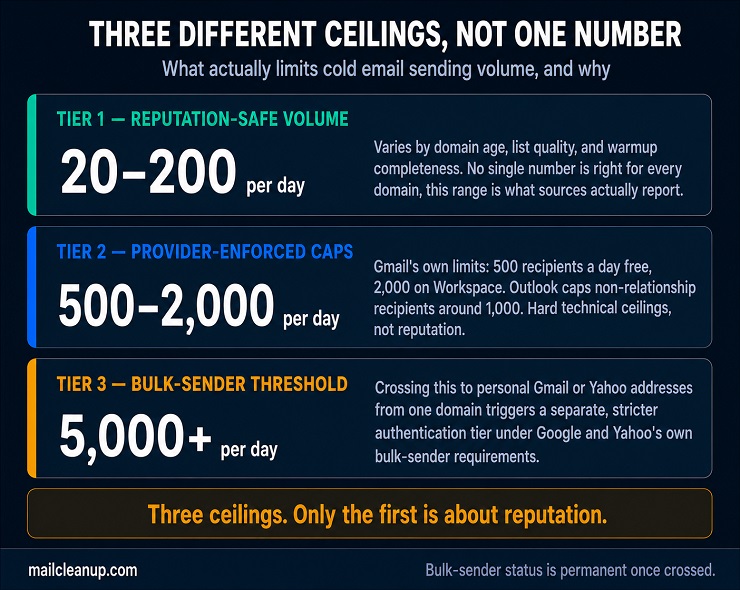
That’s separate from the hard caps mailbox providers themselves enforce, caps you can’t push past no matter how good your reputation is.
| Provider | Account Type | Daily Cap | What Counts |
|---|---|---|---|
| Gmail | Free | 500 | Recipients across To, Cc, and Bcc |
| Gmail | Google Workspace | 2,000 | Recipients across To, Cc, and Bcc |
| Outlook | Non-relationship recipients | Roughly 1,000 | New contacts you’ve never emailed |
Outlook’s non-relationship figure is the one that actually governs cold email deliverability there. Cold recipients are non-relationship by definition, so that number matters more than the account’s general daily cap.
There’s a third number worth knowing, and it’s not really about safety at all. Cross roughly 5,000 emails a day to personal Gmail or Yahoo addresses from one domain, and you become a bulk sender permanently. Google and Yahoo’s own requirements add a stricter authentication tier at that point. Most cold outreach never gets near that volume from a single domain. If yours is scaling toward it, that’s a different compliance question than anything covered here.
Start conservative on a new domain, watch your bounce rate and spam complaints closely, and increase volume only as those numbers stay clean. The number you land on will be specific to your setup. No guide, including this one, can hand you a single figure that’s actually right for every domain reading it. Starting conservative and scaling slowly is one of the oldest cold email deliverability best practices for exactly this reason. This cold email deliverability guide comes back to that same conservative instinct in nearly every section.
Domain and Inbox Warmup for Cold Email Deliverability
A brand-new domain built for cold email deliverability starts with zero engagement history. Mailbox providers treat that absence as a reason for caution, not neutrality. Warmup exists to build a track record before you ask a domain to carry real volume. That means sending a small number of emails daily to addresses that actually engage, then increasing volume as the domain earns trust.
Warmup for cold sending carries one wrinkle a single-domain guide won’t cover: you’re rarely warming just one domain. If you’re running the multi-domain setup covered above, each new domain needs its own warmup on its own timeline. That means staggering domain launches rather than spinning up your entire infrastructure and sending cold on day one. Most cold senders see reasonable results after two to four weeks of warmup. The honest range across the industry runs closer to two to eight weeks, depending on target volume and how aggressive the ramp-up is.
If you haven’t warmed a domain before, our full warmup walkthrough covers the day-by-day schedule and what a warmup tool actually does. This cold email deliverability guide treats warmup as necessary but not sufficient on its own. The section that follows covers the variable that determines whether all that patient work actually pays off.
List Quality: The Variable Cold Email Deliverability Depends On Most
Every factor covered so far, authentication, domain strategy, sending volume, warmup, works to build trust with mailbox providers. List quality determines how fast that trust erodes. Get everything else right and send to a dirty list anyway, and you’re spending real effort building a reputation. A handful of bad addresses can undo it in a single campaign.
Why Cold Email Deliverability Needs Cleaner Lists Than Opt-In
An opt-in list carries a built-in buffer a cold list doesn’t have. Most addresses on a permission-based list actually open and click. That steady stream of positive engagement gives mailbox providers a strong signal to weigh against the occasional bad address. A few bounces or spam complaints barely move the needle when they’re surrounded by genuine opens.
Cold email starts without that buffer. Engagement is inherently lower across an entire cold list, since nobody asked to hear from you. That means there’s less positive signal diluting whatever negative signal a bad address generates. The same risky addresses that would barely register on an engaged opt-in list carry more weight against a cold list’s thinner base of engagement.
That’s the real reason cold email deliverability depends on list quality more than opt-in deliverability does. It isn’t that a bad address behaves differently depending on how it was collected. It’s that cold sending has far less good behavior around it to absorb the damage. Understanding that mechanism is the real foundation for how to fix cold email deliverability problems that trace back to the list itself.
Address Types That Damage Cold Email Deliverability
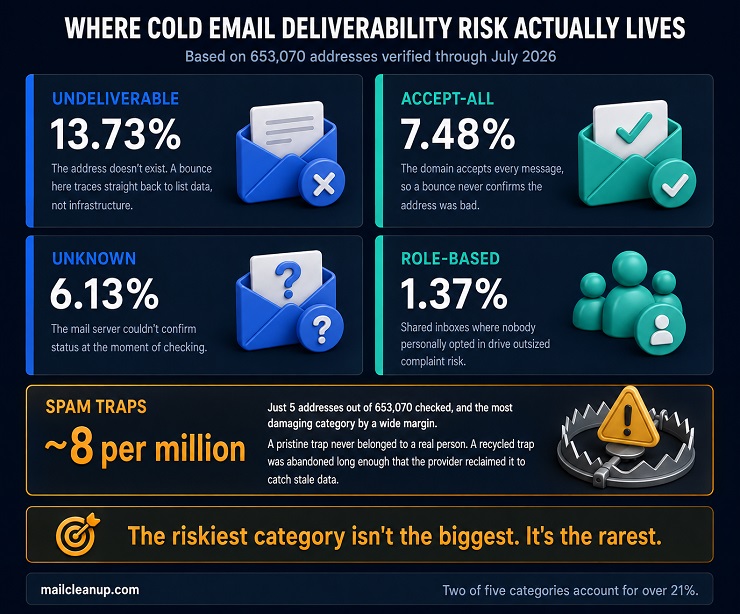
Not every risky address on your list behaves the same way, and the differences matter more for cold sending than they do elsewhere. MailCleanup’s own verification data, drawn from 653,070 addresses, breaks list risk into categories most guides lump together.
| Category | Share of Verified Addresses |
|---|---|
| Undeliverable | 13.73% |
| Accept-all | 7.48% |
| Unknown | 6.13% |
| Role-based | 1.37% |
| Spam traps | Roughly 8 per million |
Accept-all domains are the riskiest category specifically for cold outreach. They accept every message regardless of whether the actual mailbox exists, so a bounce never tells you the address was bad. You find out later, usually through a spam complaint or a spam trap hit, once the damage to your domain’s reputation is already done.
Role-based addresses, info@, sales@, support@, sit in shared inboxes where nobody personally opted in to hear from you. Whoever happens to open that message decides whether it’s spam, not the person your campaign was actually written for. That single-digit-percentage category punches well above its weight in complaint volume for exactly this reason.
Spam traps are the smallest category by far and the most damaging by a wide margin. A pristine trap is an address that never belonged to a real person. A recycled trap is a real address abandoned long enough that the provider reclaimed it specifically to catch senders still mailing stale data. Cold lists built from scraping or enrichment carry more of both types, since nobody’s confirming those addresses are live before you send to them. Email verification is the process that catches all five categories before a single message goes out. It checks against the mail server directly, rather than guessing from list source alone.
How List Quality Feeds Cold Email Deliverability Over Time
Everything you’ve covered so far in this cold email deliverability guide is an investment with a payoff that arrives later. Authentication builds trust, a dedicated domain isolates risk, and warmup earns sending capacity over weeks. List quality is the one variable that can undermine all three at once. It does its damage earliest, right when a new domain has the least accumulated trust to absorb it.
Send a dirty list through a domain you’re still warming up, and the bounces it generates don’t read as noise to a mailbox provider. They read as exactly the pattern warmup is designed to distinguish from: a new sender behaving badly. The warmup period that should be building your trust instead confirms the provider’s initial suspicion. Recovering from that first impression takes far longer than avoiding it would have.
MailCleanup’s own data puts a number on the risk that typically sits in an unverified list, before this even becomes a warmup problem. Through July 2026, that’s roughly 137 invalid or risky addresses per 1,000 verified. The ratio works out to just over 2.6 deliverable addresses for every 1 that’s undeliverable or risky. Verifying a list before it goes near a new domain is the one piece of this chain you control completely before your first send. The alternative is discovering the damage in a bounce report weeks into warmup.
Content and Copy Signals That Affect Cold Email Deliverability
Domain reputation and list quality set the ceiling on what’s possible for cold email deliverability. Content signals decide whether your message actually reaches that ceiling. A perfectly warmed, perfectly authenticated domain still won’t save a message that reads like a mass blast.
Spam Trigger Words and Cold Email Deliverability
Older spam filters worked mostly off keyword blocklists. They’d flag specific words like “free” or “guarantee” almost automatically. That’s not how modern filtering works anymore. Gmail and Outlook both rely on machine learning trained on billions of messages, weighing patterns over any fixed word list.
That shift matters more for your cold email than for opt-in marketing. A salesy, urgency-heavy tone reads as normal marketing voice when a recipient already expects promotional content from you. The same tone in your first cold touch has nothing to soften it. There’s no prior relationship telling the filter you’re probably legitimate.
Chasing a spam-word checklist misses the real signal. Write your message the way you’d write to someone you’re genuinely trying to reach. The pattern-matching problem mostly solves itself once you do. Following that instinct is one of the most durable cold email deliverability best practices there is. Filters change what they weigh far more often than good writing habits change.
Plain Text vs. HTML for Cold Email Deliverability
Heavily designed HTML, embedded images, custom fonts, reads as marketing mail to both mailbox providers and recipients. That’s exactly the signal you need to avoid in your first touch. A message that looks like something you actually typed carries less of the bulk-sender pattern filters are trained to catch.
This isn’t an absolute rule against any formatting. A signature block and one clean paragraph break isn’t the problem. The risk climbs with template complexity and nested tables in your HTML source, nothing a real person composes by hand.
Plain text also protects the relationship you’re trying to start. A recipient who gets what looks like a personal note responds differently than one who gets a campaign. That’s true regardless of what any filter does with either message.
How Links and Images Affect Cold Email Deliverability
Link density is one of the clearer signals filters weigh, and it interacts directly with your domain’s trust level. A brand-new sending domain packed with links in its first messages looks exactly like a phishing pattern. An established domain with real history can absorb more links without the same suspicion.
Keep your first touch link-light. Ideally one link at most, and hold images out of it entirely. Images add little when a recipient is deciding whether to reply to a stranger. They add real weight to the spam signal your new domain can least afford early on.
Later touches can carry more. Once your domain has some sending history and some real replies behind it, later touches in the same sequence can carry a bit more. The constraint is heaviest exactly when your domain has the least trust to spend.
Personalization as a Cold Email Deliverability Signal
A merge tag dropping a first name into a template isn’t personalization in any way that matters here. Real personalization means referencing something specific to the recipient’s role, company, or situation. That’s what actually changes how your message gets treated.
The mechanism runs through replies, not opens. Apple’s Mail Privacy Protection makes open rates unreliable for any list with a meaningful share of Apple Mail users. It can register an open whether or not someone actually read your message. Reply rate doesn’t have that problem, and a reply is one of the strongest positive signals a mailbox provider can see.
Personalization works at a different level than everything else in this cold email deliverability guide. Authentication, your domain strategy, and warmup all build trust in aggregate, across every message you send. Personalization is the one lever that works message by message. It’s why two emails from the same domain can perform completely differently.
Unsubscribe Language and Cold Email Deliverability
A common misconception is that CAN-SPAM doesn’t apply to your B2B cold outreach the way it applies to newsletters. It does. The law makes no exception for business email. A single personalized message from an SDR still counts as commercial email once it makes a pitch.
That means every cold email you send has to clear a short list of requirements:
- A truthful sender name and subject line
- A real physical mailing address
- A working opt-out, honored within 10 business days
The opt-out doesn’t need to say “unsubscribe,” a word that reads oddly on a message nobody subscribed to. A short, human line offering to stop future emails satisfies the same requirement.
The deliverability reason to include one has nothing to do with the legal requirement itself. A recipient with no easy way to opt out has exactly one option left: marking your email as spam. That single click does far more damage to your domain’s reputation than an honored opt-out ever would.
Cold Email Deliverability: Gmail vs. Outlook
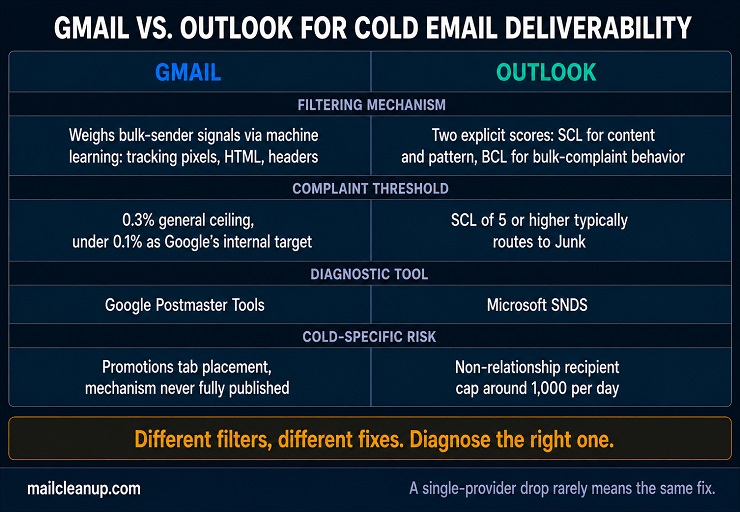
Everything in this guide applies broadly across mailbox providers. But Gmail and Outlook evaluate your cold email differently enough that the same fix can help one and do nothing for the other. Knowing which provider is actually dropping your mail changes what you check first.
Gmail and Cold Email Deliverability
The real risk is the Promotions tab, not the spam folder. Gmail’s biggest deliverability question for cold senders usually isn’t spam folder placement. Google has never published exactly what share of email lands in Promotions, and third-party estimates vary too widely to trust any single number. What’s well established is the mechanism: Gmail’s classifier weighs bulk-sender signals like tracking pixels, heavy HTML, and List-Unsubscribe headers.
Cold email built the way this guide recommends, plain text, minimal links, no tracking pixels, avoids most of those signals as a side effect. That’s not a coincidence. The advice that keeps your cold email reading as personal correspondence is largely the advice that keeps it out of Promotions too. [Our dedicated guide to the Gmail Promotions tab] covers the classifier’s other signals in full.
Gmail’s own spam complaint thresholds apply here: 0.3% as the general ceiling, with Google targeting under 0.1% internally. A cold email deliverability Gmail problem almost always traces back to one of these two thresholds once authentication is confirmed clean. Check Google Postmaster Tools for your own domain reputation, spam rate, and authentication status on Gmail specifically, rather than guessing from reply patterns alone.
Outlook and Cold Email Deliverability
Outlook’s filtering runs on two separate scores that behave differently. Spam Confidence Level (SCL) rates how spam-like your message’s own content and pattern look. A score of 5 or higher typically routes to Junk. Bulk Complaint Level (BCL) is a separate score built around bulk mail likely to generate complaints. It matters less for most cold senders, since so few reach bulk-sender volume.
That split means your Outlook problems usually trace back to SCL, content and pattern, not BCL. BCL is built around bulk-sending behavior most cold programs never reach. Checking SCL before BCL is one of the simpler cold email deliverability best practices for anyone troubleshooting Outlook specifically. If a message keeps landing in Junk on Outlook specifically, while performing fine elsewhere, check it against SCL thresholds first. Don’t assume your whole domain has a reputation problem.
Microsoft’s own guidance notes that current cloud filtering weighs SCL alongside other signals, so a borderline score isn’t necessarily a lost cause for you. A cold email deliverability Outlook problem that clears SCL but still lands in Junk is usually a BCL issue instead, not a content problem. Microsoft SNDS is the diagnostic tool worth checking for your cold email deliverability on Outlook, the same role Postmaster Tools plays for Gmail. Checking the right dashboard first saves time when a domain is underperforming on one provider specifically:
| Provider | Diagnostic Tool | What It Shows |
|---|---|---|
| Gmail | Google Postmaster Tools | Domain reputation, spam rate, authentication status |
| Outlook | Microsoft SNDS | SCL/BCL trends, sending IP reputation |
How to Fix Cold Email Deliverability by Symptom
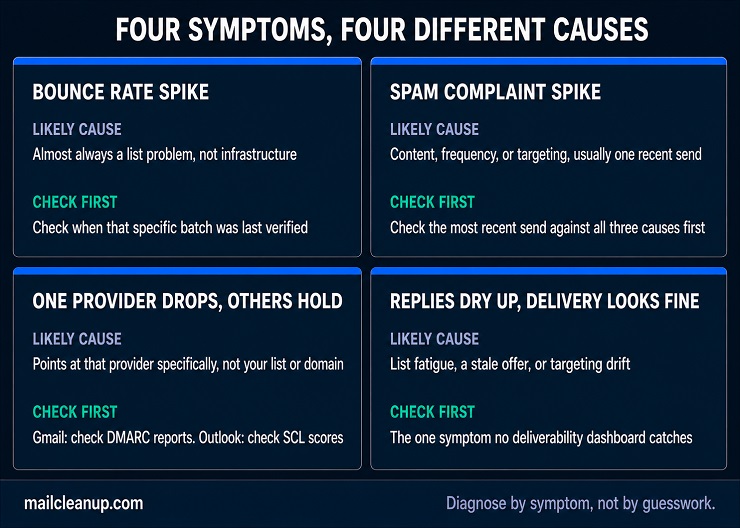
Most cold email deliverability problems have a specific, diagnosable cause. The symptom you’re seeing points to where to look first. Guessing at a fix without diagnosing wastes time you don’t have, while your domain keeps taking damage. This cold email deliverability guide takes each symptom in turn. Knowing how to fix cold email deliverability starts with knowing which problem you actually have.
Running a Cold Email Deliverability Test With Seed Addresses
A seed test tells you where your mail actually lands before a real prospect ever sees it. Run one before you scale a new domain, and again any time a symptom below sends you looking for answers. Running a cold email deliverability test like this before scaling a new domain catches problems seed addresses can reveal early.
- Build a seed list. Include addresses across Gmail, Outlook, and at least one other major provider, since placement varies by provider.
- Send your actual campaign email, not a stripped-down test version, so the result reflects what a real prospect gets.
- Check each seed inbox after a few hours: primary, promotions, or spam.
- Note the pattern, not just the outcome. A drop on one provider only points somewhere different than a drop across all of them.
A seed test has a real limitation worth knowing. Seed inboxes have no sending or engagement history of their own. Results can look better than what an aged, engaged recipient list actually experiences. Treat it as a first check, not the final word on your own list’s real performance. A seed test is one piece of a fuller testing approach. [Our dedicated guide to email deliverability and inbox placement testing] covers the complete pre-send checklist.
What a Bounce Rate Spike Means for Cold Email Deliverability
Hard bounces mean the address doesn’t exist. A spike here almost always traces back to your list, not your infrastructure. Pull the batch that triggered the spike and check when it was last verified.
Soft bounces are usually temporary, a full inbox or a server hiccup, and a small amount is normal. A sustained soft-bounce spike is different. It can signal a receiving server actively throttling your domain.
Either way, check whether the spike is isolated to one recent send or spread across your whole list. An isolated spike points to that specific batch. A spread-out spike points to your domain’s reputation more broadly, and that’s a bigger problem to fix.
What a Spam Complaint Spike Means for Cold Email Deliverability
A complaint spike usually traces back to one of three things:
- Content that reads as pushy or irrelevant to the specific recipient
- Frequency, too many follow-ups landing too close together
- Targeting, a list segment that never matched the offer in the first place
Check your most recent send against all three before assuming it’s a domain-wide reputation problem. A complaint spike tied to one specific campaign usually means the campaign, not your infrastructure, needs the fix.
Complaints do more damage than bounces ever do. A bounce tells a mailbox provider an address was bad. A complaint tells them a real person didn’t want your message. That carries more weight against your domain’s reputation than almost anything else covered in this guide.
When Cold Email Deliverability Drops on Just One Provider
A Gmail-specific drop usually traces back to authentication or a recent bulk-sender threshold change, since Gmail’s classifier weighs those signals heavily. Check your DMARC reports for that domain first, before touching your content or your list.
An Outlook-specific drop points somewhere different. Check your SCL scores in the message headers Outlook returns, since Outlook’s filtering runs on content and pattern signals your Gmail placement doesn’t share.
A drop that’s specific to one provider rules out your list and your domain’s general reputation as the cause. Both would show up everywhere at once, not just on one side. A cold email deliverability Gmail drop and a cold email deliverability Outlook drop rarely share the same root cause. That’s exactly why checking both separately matters here.
When Replies Dry Up but Cold Email Deliverability Looks Fine
This is the hardest symptom to diagnose. Your bounce rate, spam rate, and inbox placement can all look healthy while replies still fall off. A few causes show up more than others:
- The list has been contacted before, by you or by someone using the same data source, and the audience is fatigued
- The offer or copy has gone stale, even though nothing about your infrastructure changed
- Targeting has drifted, and the list no longer matches who the message was actually written for
None of these show up in a deliverability dashboard, since your mail is still landing. That’s exactly why replies matter as their own signal, covered earlier in this guide. They catch problems bounce rate and spam rate can’t see at all.
Monitoring Cold Email Deliverability Over Time
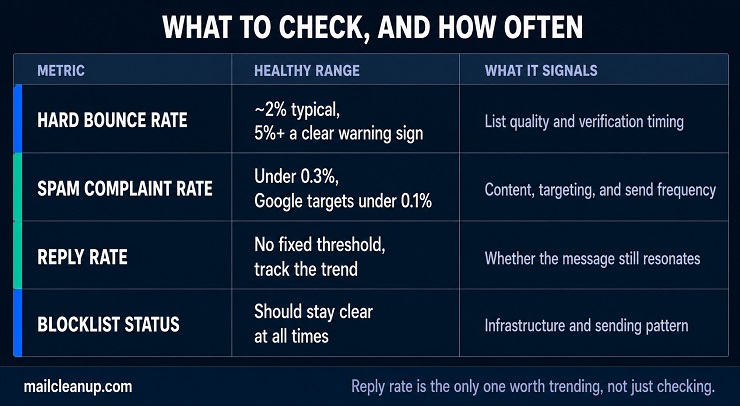
Checking these numbers regularly catches a cold email deliverability problem while it’s still small, rather than after it’s cost you a domain. Running a cold email deliverability test occasionally, not just once at launch, keeps these numbers honest as your setup ages. Reading them correctly is as much a part of how to fix cold email deliverability as any single tactic covered earlier.
| Metric | Healthy Range | What It Signals |
|---|---|---|
| Hard bounce rate | Commonly cited around 2%, with 5%+ a clear warning sign | List quality and verification timing |
| Spam complaint rate | Under 0.3%, with Google targeting under 0.1% internally | Content, targeting, and frequency |
| Reply rate | No fixed threshold, track the trend | Whether your message still resonates |
| Blocklist status | Should stay clear at all times | Infrastructure and sending pattern |
Reply rate belongs on this list even though it has no universal threshold the way bounce and complaint rates do. A rising or falling trend tells you something the other three metrics can’t. It’s the only one measuring whether anyone still wants to hear from you. Checking all four regularly, not just when something feels wrong, is one of the simpler cold email deliverability best practices to actually stick to.
Where to Start Fixing Cold Email Deliverability
If you take one thing from this cold email deliverability guide, verify your list before you touch anything else. Which list, and when, depends on where you’re actually starting from. Knowing how to fix cold email deliverability starts with knowing which situation you’re actually in.
Setting up cold outreach for the first time? Verify before your very first send, not after a bad batch burns a brand-new domain that has no reputation yet to spend. MailCleanup’s bulk email verification catches the accept-all, role-based, and spam-trap addresses covered earlier in this guide, before they ever reach a mailbox provider.
Already sending, and something’s gone wrong? Work through the diagnostic steps above first, since they matter more right now than a fresh verification pass does. Verify once you’ve identified the actual cause, not before. Either way, the same argument holds for cold email deliverability. Address quality is what every other factor in this guide actually depends on. It’s cheapest to fix before it costs you a domain, not after.
FAQs on Cold Email Deliverability
Why does my cold email go to spam even with SPF, DKIM, and DMARC set up?
Authentication proves your identity, it doesn’t guarantee inbox placement. Mailbox providers still weigh sender reputation, list quality, content patterns, and engagement history independently of whether SPF, DKIM, and DMARC pass. A domain with clean authentication but a dirty list, no warmup, or spammy content still lands in spam. Authentication is table stakes for cold email deliverability, not the whole picture.
How many cold emails can I send per day?
There’s no single safe number, sources commonly cite anywhere from 20 to 200 emails per mailbox per day. The real answer depends on domain age, list quality, and how warmed up each mailbox is. Provider-enforced caps are a separate, higher ceiling. Gmail allows 500 to 2,000 recipients daily depending on account type, well above what’s actually safe for cold email deliverability.
How long does it take to fix or improve cold email deliverability?
Most fixes take two to four weeks to show up in cold email deliverability. Mailbox providers need to observe consistent, clean sending behavior before adjusting placement. A blocklist issue or severely damaged domain reputation can take longer. List problems fix faster: verifying and removing risky addresses helps almost immediately, while authentication and warmup issues need that observation window to actually resolve.
Is cold email deliverability different on Gmail vs. Outlook?
Yes. Gmail relies on machine learning that weighs engagement and pattern signals heavily. Outlook’s filtering combines a content-based Spam Confidence Level with a separate bulk-complaint score. A domain can perform well on one provider and poorly on the other at the same time. That’s why diagnosing a cold email deliverability problem means checking which provider is actually affected first.
Do I need to warm up a domain before sending cold email?
Yes, especially for a brand-new domain with no sending history. Warmup builds the engagement signals mailbox providers use to trust a domain before it carries real volume. That typically takes two to eight weeks, depending on target volume. Skipping it is one of the most common causes of cold email deliverability problems on domains that are otherwise correctly set up.
What’s a good cold email deliverability rate, and how do I test it?
There’s no universal cold email deliverability benchmark, since inbox placement depends on your specific domain and list. A seed test is the practical way to check. Send your actual campaign to addresses across Gmail, Outlook, and one other provider. Check where each one landed after a few hours to see the real pattern.
Does list verification actually improve cold email deliverability?
Yes, directly. MailCleanup’s own verification data, through recent past 2 months, shows roughly 137 invalid or risky addresses per 1,000 typically sit in an unverified list. Each one damages sender reputation before a single reply ever comes back. Removing those addresses before sending reduces bounce rate and spam complaints, the two signals that matter most for cold email deliverability.
What’s the difference between cold email deliverability and regular email deliverability?
Regular deliverability benefits from an existing relationship: the recipient asked for the message, which gives mailbox providers a baseline of trust to work from. Cold email deliverability starts without that relationship on every single send. The same technical setup has to work harder to earn the same trust a permission-based sender gets for free.