
Search “what is email verification” and you’ll land on two different topics wearing the same name. Half the results explain the confirmation link a website emails you after signup, the one you click to prove the account is really yours. The other half explain something else: checking a list of addresses you already have to find out which ones will actually accept a message.
If you’re about to email a list, you want the second meaning, not the first.
This guide covers that one specifically, bulk email verification: the process of checking addresses you already hold. Maybe that’s a newsletter list, a cold outreach list, or a customer database nobody has touched in a year. It isn’t the sign-up confirmation flow. That mix-up costs real time. If your campaign is bouncing and you’re trying to figure out why, you don’t need activation tokens explained to you. You need to know what a syntax check catches and what an SMTP handshake confirms.
You need to know what to do with an address that comes back “catch-all” instead of a clean yes or no. Landing on the wrong half of the topic means reading past the actual answer you came for.
Even once you’re reading the right kind of guide, the confusion doesn’t fully clear up. Every verification run sorts your list into categories, and here’s the part almost nothing explains clearly: those categories aren’t all answering the same question. Some tell you whether an address can receive mail at all. Others tell you whether you should send to it even though it can. Treat every category as one flat list and you’ll delete addresses that were fine, or keep ones quietly damaging your sender reputation. We untangle that properly further down, it’s the part most guides get closest to right and still land on differently from each other.
TL;DR on Email Verification
- Email verification checks whether an email address can actually receive mail before a message is sent to it, a different process from the account sign-up confirmation link many people mean by the same term.
- The process runs an address through layered checks: syntax, domain and MX records, an SMTP mailbox check, and intelligence checks covering disposable, catch-all, and spam trap detection.
- Bulk verification and real-time verification are the two methods, cleaning an existing list versus checking addresses as they’re collected.
- A verification run sorts every address into a result category, and each category answers one of two different questions: can this address receive mail, or is sending to it still a bad idea even though it can.
- In MailCleanup’s own dataset, 27.34% of a typical unverified list falls into a risky-or-worse category, more than one address in four.
- Benefits split by category: bounce reduction comes from removing Invalid addresses, reputation protection comes from catching spam traps and role-based addresses, and cost savings come from not paying to send to addresses that were never going to convert.
- Catch-all handling, tested in small batches rather than blanket-accepted or blanket-rejected, is the practice that separates careful senders from careless ones.
- MailCleanup runs bulk verification as a pay-per-order service, from $5 for 1,000 addresses to $500 for 1,000,000, with no account or subscription required.
What Is Email Verification, Exactly?
What is email verification, in the sense this guide means it? It’s the process of checking whether an email address is real, active, and able to receive a message, before you send anything to it. A verification service takes an address, or more commonly an entire list of them, and confirms three things about each one:
- The address is formatted correctly.
- The domain behind it is actually set up to receive mail.
- There’s a real mailbox on the other end that will accept a message.
The core test is whether a specific mailbox exists and accepts mail, not whether the address merely looks correctly formatted.
That last part is the piece a lot of people miss. An email address can look completely normal: correct spelling, a real domain, no typos, and still be dead. The person who owned it might have left the company two years ago. Maybe the domain stopped accepting mail at that specific address. Or the account itself got deleted. None of that shows up when you just look at the address on a screen. It only shows up once something actually attempts to contact the mail server behind it, and that contact is exactly what email verification does.
This is different from email validation, a term the industry uses inconsistently. We’ve written a full breakdown of exactly where the two genuinely differ and where they overlap. The short version: validation typically stops at the syntax and domain checks, confirming an address looks right. Verification goes a step further and confirms a live mailbox is on the receiving end. Every verification run includes validation as part of it, though not every validation run goes as far as verification does.
It’s also worth being direct about what this isn’t. Have you ever signed up for an app and had to click a link in an email before your account activated? That’s a real process too, and plenty of people call it “email verification” as well. It’s a different product entirely, one that confirms you, the account holder, actually control the inbox tied to your new account. This guide is about the other kind, checking addresses you already have, at scale, before you send to them. That’s what MailCleanup actually does. What is email verification service worth paying for, in that specific sense, gets covered later in this guide.
The Email Verification Process: How It Actually Works
Every explanation of what is email verification has to answer a harder question: how does the email verification process actually confirm any of it? You’re not running one check. You’re running several, in sequence, each one filtering out a specific kind of bad address before the next, more demanding check even runs.
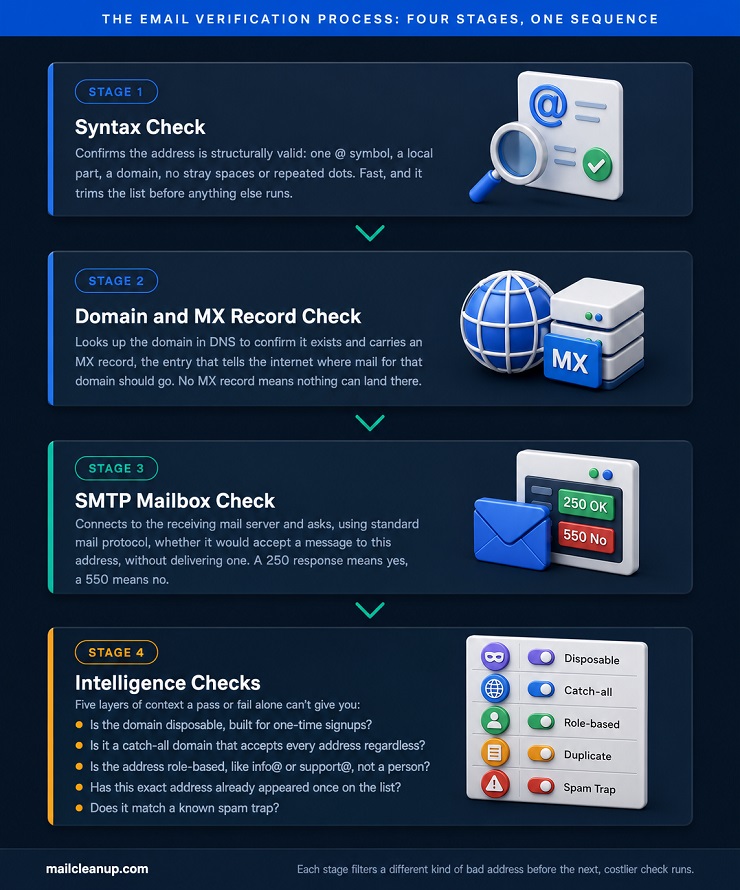
- Syntax check: A verification tool looks at the raw structure of your address. Is there exactly one @ symbol, a local part in front of it, a domain after it, no stray spaces or repeated dots? This step is fast, and it’s usually the first thing that trims your list down.
- Domain and MX record check: Addresses that pass syntax move to a domain check. The tool looks up the domain in DNS to confirm it actually exists. It also checks for an MX record, the entry that tells the internet where mail for that domain should go. No MX record means nothing can land there, even if the address in front of it looks perfect to you.
- SMTP mailbox check: This is the step that actually confirms a mailbox is real. The tool connects to the receiving mail server and, using standard mail protocol, asks whether it would accept a message to your specific address. It never actually delivers one. A 250 response means yes, this mailbox exists. A 550 means no, it doesn’t. This is the check that catches addresses looking fine on paper but belonging to an inbox nobody uses anymore.
- Intelligence checks: Everything that clears SMTP still gets screened for context a pass or fail alone can’t give you:
- Is the domain disposable, built for one-time signups?
- Is it a catch-all domain that accepts every address, whether a specific mailbox is real or not?
- Is the address role-based, like info@ or support@, rather than a person?
- Has this exact address already appeared once on your list?
- Does it match a known spam trap?
Each layer catches a different kind of risk, and you’ll notice the checks get more demanding as they go. That’s exactly why they run in this order instead of all at once. You’ll find exactly what each check catches and what to do with each result in our deep dive on verification features. Consider this section the short version of a genuinely long answer.
Email Verification Methods: Bulk vs. Real-Time
Knowing what is email verification doesn’t tell you when the process runs, or how many addresses go through it at once. Syntax, MX, SMTP, the intelligence checks: all of it describes what happens to one address, not when or how often across your list. That’s what email verification methods actually means: not a different set of checks, but a different way of applying the same ones.
There are two methods in real use.
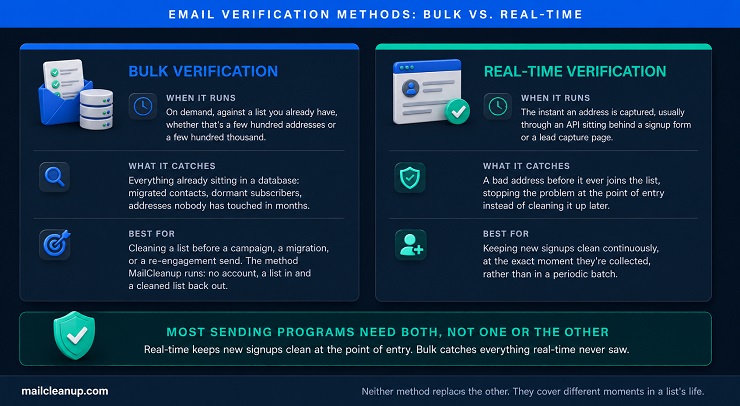
Bulk verification takes a list you already have. Maybe it’s a few hundred addresses, maybe a few hundred thousand. Every one runs through the full check sequence in a single pass. You upload the list and the checks run. You get back a categorized file: which addresses are safe to send to, which aren’t, and which fall somewhere in between. This is the method built for cleaning a list before a campaign, a migration, or a re-engagement send. It’s also the method MailCleanup runs: no account, no ongoing integration, a list in and a cleaned list back out.
Real-time verification solves a different problem: keeping bad addresses out of your list in the first place, rather than cleaning them out afterward.
Real-time verification runs the same checks against one address at a time. It happens the moment that address is captured, usually through an API sitting behind a signup form or a lead capture page. Instead of cleaning a list after the fact, it stops a bad address from ever joining the list at all. Our dedicated guide to real-time email verification covers the tradeoffs in full. That’s different enough from bulk verification that folding it in here would shortchange both.
Most sending programs eventually want both methods, not one or the other. Real-time verification keeps new signups clean at the point of entry. Bulk verification catches what real-time can’t: addresses already sitting in your database, lists inherited from a migration, contacts nobody has touched in months. Neither method replaces the other, and both protect the same email verification benefits, just at different points in a list’s life.
The Two-Question Verification Model: Email Verification Types, Reconciled
A complete answer to what is email verification has to include what its own results actually mean, not just how they get produced. Every verification tool on the market sorts your list into categories. Compare guides on what those categories actually are, though, and you’ll get a different answer every time. One resource lists seven categories. Another lists five. A third folds several together and calls it three. None of them is simply wrong, and you shouldn’t assume the shortest list is the sloppy one.
Each is choosing what to include and what to fold together, without ever explaining the choice. The result is that email verification types reads like an unsettled question when it isn’t one. It’s just being described from a flat list instead of from the structure underneath it.
Here’s that structure. Every result your verification run produces answers one of two completely different questions, or neither.
The first question is whether the address can receive mail at all. That’s a pure deliverability fact, checkable and either confirmed or not. The second question is whether you should send to it even if it can. That’s a risk judgment, and it only applies to addresses that already cleared the first question. A handful of results answer neither question. They’re a list-hygiene issue, not a fact about the address itself.
| Category | Answers | What It Means | Share of a Typical List* |
|---|---|---|---|
| Valid | Can it receive mail: yes | Passed every technical check, safe to send | 72.66% |
| Invalid | Can it receive mail: no | Failed syntax, domain, or SMTP; remove it | 13.73% |
| Catch-all | Can it receive mail: unconfirmed | Domain accepts everything, this specific mailbox can’t be isolated | 7.48% |
| Unknown | Can it receive mail: unconfirmed | Greylisting, a timeout, or rate limiting blocked a clear answer | 6.13% |
| Role-based | Should you send anyway: your call | A real mailbox, but shared or functional, not a named person | 1.37% |
| Disposable | Should you send anyway: usually no | Real right now, built to be abandoned within days | 0.27% |
| Spam trap | Should you send anyway: no | Actively monitored to identify senders with poor list hygiene | roughly 8 per million |
| Duplicate | Neither, it’s a list issue | The same address appearing more than once, not a fact about the address | not tracked as a rate |
*Figures from MailCleanup’s 2026 verification dataset, 653,070 addresses processed across recent two months.
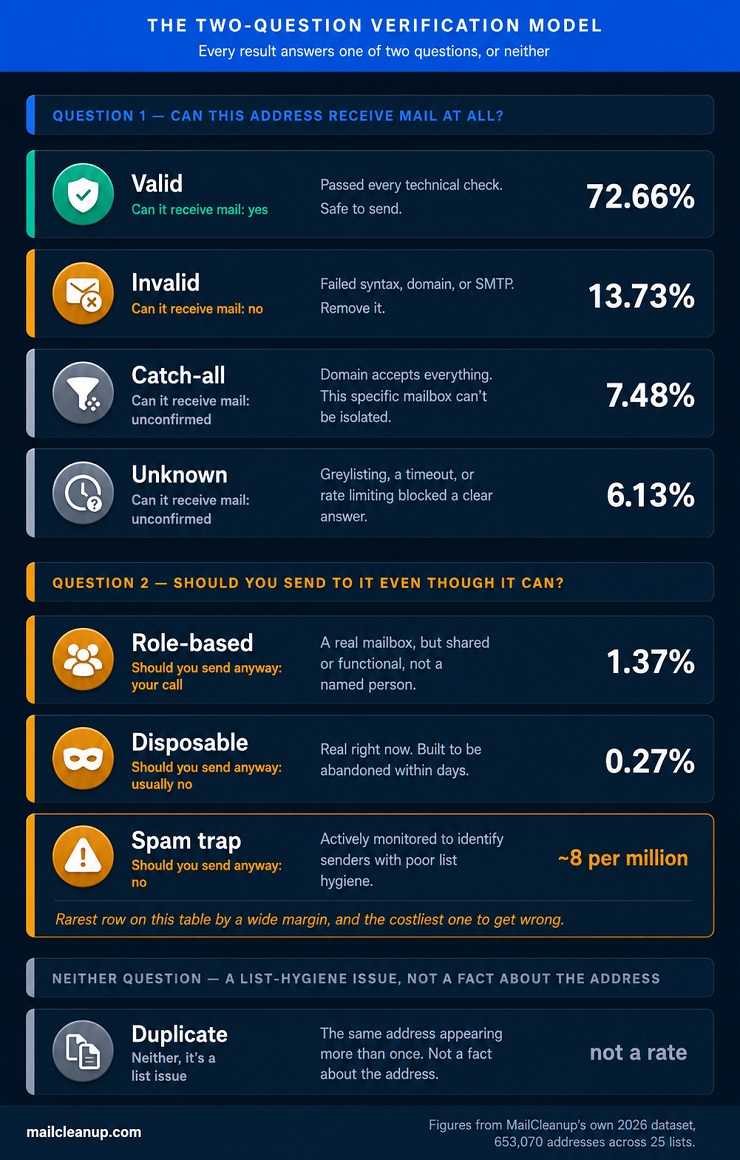
The first four rows come from the same question. They add up to the whole list, which is exactly what you’d expect from a genuinely exhaustive question. The next three don’t touch that question at all. An address can be a confirmed Valid and still be Role-based. It can still be Disposable. It can still turn out to be a Spam Trap. Most explanations of email verification types treat the whole set as one flat list of eight equal options. That’s exactly what causes you to delete addresses that were actually fine, or keep ones quietly hurting your sender reputation. It’s the same problem this guide opened with.
The catch-all row is worth sitting with a bit longer, since it’s the one you’re most likely to get wrong in either direction. A catch-all result isn’t a rejection. It’s an admission that you can’t confirm the specific mailbox either way, which is a genuinely different thing from Invalid.
Every category in that table gets its own full treatment elsewhere in this roadmap. Here’s where to find each one.
Catch-all email addresses get their own full breakdown of how to handle that decision. Role-based addresses cover more ground than the info@ and support@ examples above suggest. Two specific patterns within that family get their own dedicated treatment here too. [Abuse email addresses] often need to be preserved and monitored rather than simply suppressed, for compliance reasons a generic role-based rule would miss. [No-reply email addresses] raise a different question: not whether to include one on your list, but why it’s there at all.
Disposable addresses get their own full breakdown, and spam traps get the same treatment in our guide to what spam traps actually are. Both results confirm a real mailbox exists. The reasoning behind why each one matters is different enough that folding them together would cost you a distinction that actually protects your reputation.
Email Verification Benefits: Which Result Actually Delivers Each One
Understanding what is email verification only matters if it changes what you do with your list, and the benefits are where that shows. Both email verification methods, bulk and real-time, exist to capture these same benefits, just at different points in a list’s life. Every guide to email verification benefits lists roughly the same six things: fewer bounces, better deliverability, sender reputation, lower cost, better ROI, easier compliance. None of that is wrong.
What’s missing is which specific result actually drives which specific benefit. The two-question split from the last section applies here too. A confirmed Invalid address and a flagged Spam Trap protect you in completely different ways. Treating every benefit as one undifferentiated pile obscures which check is doing the actual work.
Start with the number that matters most. In MailCleanup’s own dataset, 27.34% of a typical unverified list falls into a risky-or-worse category the moment you check it: undeliverable, accept-all, or unknown. That’s more than one address in four, sitting in your list right now, risking your reputation or wasting your send budget. You’d have no way to know which ones without running the checks.
1. Bounce reduction comes almost entirely from one category: Invalid.
Removing confirmed-dead addresses is what actually moves your hard bounce rate. A hard bounce is, by definition, a message sent to an address that was never going to accept it. Catch-all and Unknown results don’t drive this benefit the same way. They’re uncertain, not confirmed bad, so suppressing them wholesale trades bounce protection for reach you might not have needed to give up.
2. Sender reputation protection comes from a smaller, riskier group.
Spam traps make up a tiny fraction of any list, roughly 8 per million in MailCleanup’s own data. Their reputation cost is completely out of proportion to their count. A handful of trap hits can do more damage to your standing with Gmail or Yahoo than thousands of ordinary soft bounces. Role-based addresses contribute here too, from a different angle. They’re more likely to generate spam complaints, since whoever reads info@ rarely opted in personally.
3. Cost efficiency is the most literal benefit, and the easiest to calculate.
Every Invalid and Duplicate address on your list is one you paid to store, segment, or send to for no return. Removing them before a send means fewer wasted sends and fewer ESP fees spent on addresses that were never going to convert.
4. The benefit that gets the least attention is the one that compounds: knowing how your list is decaying, not just how it looks today.
A single verification run tells you a list’s condition at that moment. Watching how the categories shift between runs tells you something one check can’t. It tells you whether your acquisition sources are getting worse, or whether a segment is aging out. It tells you whether a list that was clean six months ago still is. These benefits map directly onto the email verification types covered above, not onto a vague notion of “clean” versus “dirty.” Our full breakdown report of email list decay covers exactly how fast that shift tends to happen and what to do about it.
Email Verification Best Practices That Actually Change What You Do
What is email verification worth in practice comes down to what you actually do with a result, not just whether you ran the check. These practices assume you already understand the email verification process itself; they’re about what to do with a result, not how the checks work. Most lists of email verification best practices read the same way: verify before sending, use real-time checks at capture, clean your list regularly. All of that is true. None of it is specific enough to change what happens on a Tuesday when a send actually goes out. Here’s a version tied to the categories from the last two sections, not a generic checklist.
- Don’t apply one suppression rule to every non-Valid result. Invalid and confirmed spam traps should come off your list without exception. Catch-all and Unknown deserve different handling: segment them, watch how they perform on a smaller send, and let real engagement decide whether they stay. One blanket rule applied to results answering different questions costs you reach you didn’t need to give up. Or it keeps risk you didn’t need to accept.
- Treat catch-all as a segment to test, not a verdict to accept or reject. This is the practice that separates a careful sender from a careless one. Even strong verification tools only confirm a fraction of catch-all addresses one way or the other. Most stay genuinely ambiguous no matter how good the check is. Send to catch-all addresses in small batches. Watch the bounce rate on that specific batch, not your list-wide average. Promote addresses that engage, and suppress the ones that don’t after a couple of tries.
- Re-verify before every major send, not on a fixed quarterly calendar. A list verified once tells you nothing about six months from now. Addresses decay continuously as people change jobs, domains lapse, and inboxes get abandoned. Re-verify before any major send, especially one going to a list that’s been sitting for a while. A calendar date has no real relationship to when your specific list actually aged.
- Run real-time and bulk verification together, not as a choice between them. New signups stay clean at the point of entry when real-time is running. Bulk verification catches everything real-time never saw. Think of the list you inherited from a migration, the contacts nobody’s touched since last year, a segment that’s decayed since your last check. Running only one leaves the other method’s blind spot completely uncovered.
- Never send to a purchased or scraped list without a full bulk pass first. A purchased or scraped list carries a much higher share of role-based, catch-all, and invalid addresses than a list built through genuine opt-in. Run a full bulk pass before you send a single message to one, not as a formality. The risk profile is different enough that skipping the check is closer to sending blind.
Verification is one part of a broader email list hygiene practice. The two work best on the same schedule, not as separate, disconnected habits. Applied consistently across both email verification methods, not just one, these five practices are what actually capture the email verification benefits described earlier.
What Is Email Verification Used For? How Often You Actually Need to Run It
Knowing what is email verification doesn’t tell you when to actually run it. What is email verification used for, in practice, is as much about timing as it is about technique. Every list needs verification at some point, but “regularly” isn’t specific enough to act on. A few concrete triggers matter more than a fixed calendar, and choosing between email verification methods often comes down to which trigger you’re facing.
1. Before a first send to any list you didn’t personally watch grow: A purchased list, an inherited list from a colleague, a list scraped from somewhere less careful than a signup form. You have no idea what’s actually in it until you check.
2. After any platform or CRM migration: Exports and imports corrupt data more often than people expect: truncated fields, duplicated rows, addresses that picked up stray characters somewhere in the pipeline. Verify right after a migration, not months later when the damage is already showing up in your bounce reports.
3. Before a single high-stakes send: A product launch announcement, a webinar invite to your whole list, anything where the entire reputation cost lands in one send. That’s different from spreading the same risk across a normal sending cadence. One bad batch on a high-visibility send does more damage than the same batch spread across routine mail.
4. Before reactivating anything dormant: A list that hasn’t been mailed in six months or more has decayed further than it looks. The addresses that were fine when you stopped sending aren’t all still fine now.
5. On an ongoing basis for anything actively growing: Signups, lead forms, and gated content all add new addresses continuously. Real-time verification at the point of capture, covered in the methods section above, handles most of this automatically once it’s in place. Timing decisions like these are as much a part of email verification best practices as the technical checks themselves.
Our full breakdown of real-world email verification use cases walks through these scenarios and several more, matched to what each one specifically calls for.
What Is Email Verification Service Worth Paying For?
Understanding what is email verification technically is only half the picture. What is email verification service actually worth paying for is the more practical half. It comes down to a short list of things that genuinely differ between providers, once you know what to actually check. Every provider claims high accuracy, and on straightforward checks, most of them deliver it. Syntax, domain, and basic SMTP confirmation are largely solved problems across the market. What actually separates providers is catch-all handling specifically, the exact distinction this guide has come back to twice already. Ask any service what percentage of catch-all addresses they can actually resolve. Don’t just take their word for how they claim to detect it.
Pricing model matters as much as accuracy, and it should match how you actually plan to use the service. A subscription or credit-based plan makes sense if you’re running real-time checks continuously through an API. A pay-per-order model fits better for a one-off cleanup, since you’re not paying for capacity that sits unused between runs. Matching the pricing model to your actual usage pattern is itself one of the more overlooked email verification best practices.
Bulk and real-time aren’t interchangeable, and not every provider genuinely offers both well. Confirm which method you actually need, covered in full above, before comparing providers on price alone.
MailCleanup runs the pay-per-order model specifically, and it’s worth being direct about what that does and doesn’t fit.
No account, no subscription, no ongoing credit balance to manage. You upload a list and get a cleaned one back, priced per order rather than per month. That fits a straightforward cleanup better than it fits a continuous real-time integration. That’s a genuine limitation worth naming directly rather than glossing over. Our full roundup of the best email list cleaning services compares providers side by side if you want the wider picture. Our guide to cleaning an email list from start to finish covers what to actually do once your results come back.
Which Question Are You Actually Trying to Answer?
This guide opened by pointing out that email verification means two different things. Even the correct meaning gets sorted into categories that don’t agree from guide to guide. Both of those should be resolved by now. What’s probably still open is a narrower version of the question that actually brought you here. What is email verification used for varies from one reader to the next.
- Wondering what this actually looks like day to day, not just in theory? That’s covered in a dedicated walkthrough of real-world verification scenarios, not just the mechanics.
- Specifically weighing real-time verification for a signup form or lead capture flow? The real-time verification guide covers that integration and usability decision in full.
- Trying to figure out one specific address type, not the whole taxonomy? Dedicated breakdowns exist for catch-all addresses, [abuse addresses], and [no-reply addresses], each covering one type in full.
- Just need to verify a list right now? That’s the direct version of the question, and it’s the one MailCleanup answers: upload a list, get a cleaned one back, no account or subscription required.
The email verification benefits and email verification best practices covered above apply regardless of which specific question brought you here.
Whichever version of what is email verification brought you here, you now have a clearer answer than a flat category list ever gave.
FAQs on Email Verification
A few common questions about what is email verification, gathered from where people actually get stuck.
How much does email verification cost?
Pricing varies by provider and by model. MailCleanup’s own bulk verification runs pay-per-order, from $5 for 1,000 addresses up to $500 for 1,000,000, with no subscription or account required. Other services charge monthly credits or per-lookup API fees instead, better suited to ongoing real-time integration than a one-off cleanup.
Is email verification necessary if I already use double opt-in?
Double opt-in confirms someone wants your emails. It doesn’t confirm the address still works. Domains expire and inboxes get abandoned well after a confirmation click happens. Verification catches the decay double opt-in can’t see, especially on a list that’s been collecting confirmed subscribers for months without a fresh check.
How accurate is email verification?
Most reputable tools claim 95 to 99 percent accuracy on standard checks like syntax, domain, and SMTP confirmation. Accuracy drops meaningfully on catch-all domains specifically, where even strong tools resolve only a fraction of addresses either way. Ask any provider how they handle catch-all before trusting one blended accuracy number.
Is email verification GDPR compliant?
Yes, when handled correctly. Verification itself doesn’t collect new personal data, it checks addresses you already legitimately hold. The real compliance question is about your provider’s data handling. How long do they retain your list, do they reuse it, and does processing happen under a proper data agreement?
Does email verification delete bad addresses or just flag them?
It flags them. A verification run returns a categorized result for every address rather than removing anything automatically. You decide what to do with each category. Remove Invalid outright, suppress Spam Traps immediately, and make your own judgment call on Catch-all and Role-based based on risk tolerance.
Why would a verified email address still bounce?
Verification confirms a mailbox exists and accepts mail at the moment of the check, not that it will next week. Addresses decay continuously between a verification run and a send. Content-based spam filtering, full mailboxes, and server-side blocks can also stop delivery even when an address was genuinely valid when checked.
Do I need email verification for a small email list?
Size doesn’t change the risk, only the scale of it. A 200-address list with a handful of spam traps can damage your sender reputation just as fast as a much larger one. Reputation systems weigh rate and pattern, not raw count. Small lists are also cheap to verify, so skipping it saves little.
How long does email verification take?
Bulk verification on a list of a few thousand addresses typically finishes in minutes. Larger lists in the hundreds of thousands can take longer, depending on the provider’s processing capacity. Real-time verification returns a result in one to three seconds per address, since it checks one address rather than a batch.