
Most companies that publish a DMARC record never actually turn it on. They set up monitoring, collect the reports, and stop there, sometimes for years, sitting at zero real protection while believing the box is checked. Roughly three out of every four domains with a DMARC record are stuck in exactly this spot. Business email compromise, the exact fraud category DMARC’s enforcement is built to stop, cost US companies $3.05 billion in reported losses last year alone.
That gap matters more now than it did even two years ago. Since 2024, Google and Yahoo have required DMARC for any domain sending more than 5,000 emails a day. It’s part of their bulk sender requirements, which Microsoft joined in 2025. The bar to actually clear is technically low: a published record at p=none satisfies it. What it doesn’t do is protect you. Yahoo’s own guidance is direct about it: if you have a spoofing problem, you should be enforcing regardless of what the minimum requires.
This guide covers what DMARC actually is and exactly how DMARC works with SPF and DKIM. It walks through what a real DMARC record looks like and what each policy option does. Then it lays out what we call the DMARC Readiness Ladder, the four-stage path to full enforcement that most guides skip. The question worth asking right now is simpler: what is DMARC, and is yours actually doing anything? For most domains, the honest answer is: not yet.
TL;DR on DMARC
- DMARC is an email authentication protocol that adds domain alignment checks and reporting to SPF and DKIM.
- A DMARC record is a DNS TXT record published at _dmarc.yourdomain.com that tells receiving mail servers what to do with messages that fail authentication.
- DMARC has three policy options: none, quarantine, and reject, and only quarantine and reject provide real enforcement.
- A DMARC record at p=none satisfies Google, Yahoo, and Microsoft’s bulk-sender requirement but provides no real protection against spoofing.
- Most domains that publish a DMARC record never move past monitoring mode, which means they collect data but get zero actual protection from spoofing.
- DMARC works by checking SPF and DKIM alignment against the domain a recipient sees, then applying your policy and logging the result.
- DKIM alignment tends to survive email forwarding better than SPF alignment, which is a common source of confusing report data.
- RFC 9989 replaced the older DMARC specification in May 2026, retiring the pct tag in favor of a simpler t tag for staged rollouts.
- The DMARC Readiness Ladder moves a domain through four stages: deploy, diagnose, fix and align, and enforce.
- Google and Yahoo have required DMARC for bulk senders sending over 5,000 emails a day since 2024.
- DMARC reports come in two types: aggregate reports summarizing activity over time and forensic reports detailing individual failures.
- DMARC protects domain identity, but it doesn’t check list quality, so pairing authentication with clean sending lists is what closes the full deliverability picture.
What Is DMARC?
What is DMARC, in plain terms? It’s the protocol that gives domain owners a real say in what happens to email that fails authentication. Without it, that decision is left entirely to whichever receiving server happens to get the message. Before DMARC existed as a shared standard, SPF and DKIM already did real authentication work. Neither one closed the loop back to the domain owner. DMARC adds three things neither check offers alone: a published decision, a reporting channel, and a way to verify the decision is actually followed.
This guide covers DMARC specifically and in full depth. It’s one part of the complete picture in our guide to email authentication, which walks through SPF, DKIM, DMARC, and BIMI together.
What Is DMARC Authentication?
DMARC stands for Domain-based Message Authentication, Reporting, and Conformance. Each word describes a real piece of what it does, not marketing language stacked onto an acronym. Domain-based means protection is tied to a sending domain, not an individual mailbox or a single IP address. Message Authentication means it checks whether a message is genuinely from that domain, building directly on what SPF and DKIM already verify. Reporting means the domain owner gets told what’s happening, pass or fail, at scale, not just when something goes wrong. Conformance means the domain owner sets an actual policy. Receiving servers are expected to follow it, not decide independently what a failed message deserves.
That last point is the one earlier approaches never solved. Reputation-based systems that predate DMARC were built around a sending IP’s history rather than a domain. That approach ran into a structural problem as email infrastructure consolidated. Once dozens of unrelated senders shared the same IP ranges through cloud platforms, an IP’s reputation stopped meaning much about any one sender. Tying protection to the domain name instead solves that specific problem. A domain name doesn’t get diluted by however many other companies happen to route mail through the same infrastructure provider.
What is DMARC authentication actually accomplishing then? It’s converting SPF and DKIM’s separate pass-or-fail checks into one combined decision. That decision is tied to the exact domain name a recipient sees, with a policy and a paper trail attached to it. Business email compromise is the fraud category DMARC’s alignment check most directly targets.
The FBI’s Internet Crime Complaint Center, IC3, tracked $3.05 billion in reported US losses from it in 2025 alone. That’s up from $2.77 billion the year before. IC3 started tracking BEC as its own category in 2015, the same year DMARC’s original RFC was formally published. Reported losses since then have topped $17 billion. That’s not a hypothetical risk DMARC addresses. It’s an active, growing, well-documented one.
What Is DMARC Authentication’s History?
DMARC didn’t start as a finished standard. It started as one company’s workaround for a specific, expensive problem, and grew from there over nearly two decades:
- 2007: PayPal was losing serious money to phishing emails that impersonated its brand. PayPal worked with Yahoo Mail, and later Gmail, to build a private system. It told these providers exactly how to handle mail that failed to authenticate as genuinely from paypal.com.
- 2012: The results were dramatic enough that other companies wanted the same protection. Engineers from Microsoft, PayPal, Yahoo, and Google formalized the approach into an open specification anyone could adopt: DMARC.
- 2015: The original specification was published as RFC 7489, which most of the internet ran on for over a decade. The FBI’s IC3 began tracking business email compromise as its own reported crime category the same year.
- 2026: The IETF replaced RFC 7489 with RFC 9989 in May. It’s the first time DMARC has had formal IETF standards-track status, rather than just an informational document.
Adoption has kept accelerating this whole time. Recent tracking puts new domains publishing DMARC records for the first time at over 100,000 a month. That figure alone tells you something about where the rest of this guide is headed: a lot of domains are starting the process. What the DMARC Readiness Ladder later in this guide is built to address is how few of them actually finish it.
What Does DMARC Do?
What does DMARC do that SPF and DKIM couldn’t already do on their own? It closes three specific gaps that existed even after both were widely adopted.
Before DMARC, a domain could publish SPF and DKIM records. Even so, receiving servers had no consistent instructions for what to do when a message failed one or both checks.
A real example of the gap: Say a company’s marketing platform sends a newsletter that fails SPF because of how the platform relays mail. DKIM is misconfigured too. One receiving provider might reject the message outright. Another might deliver it straight to the inbox anyway. A third might quietly send it to spam. The company has no way to know which of these happened, or how often, because nothing reports back to them. Multiply that uncertainty across every mailbox provider a domain sends to, and the domain owner is left managing their sender reputation almost entirely blind.
DMARC fixes this by tying SPF and DKIM together through a single alignment test. It gives domain owners an explicit policy to publish. It also builds in a reporting channel so they can see exactly what’s happening to their mail, broken down by sending source and provider. That combination, a rule plus visibility, is the real answer to what is DMARC and why it exists.
That protection has a floor and a ceiling worth knowing: A record published at p=none, the bare minimum most bulk-sender rules actually require, still gives you the reporting half of what DMARC does. It just enforces nothing. Getting real protection, and unlocking BIMI’s brand logo display, which needs DMARC enforced at quarantine or reject, means moving past that starting point. BEC alone accounted for over $3 billion in reported US losses last year. DMARC’s alignment check is specifically designed to stop the domain-spoofing variant of that fraud. The gap between publishing a record and actually enforcing one isn’t a technicality. The DMARC Readiness Ladder later in this guide covers exactly how to close it.
How DMARC Works With SPF and DKIM
How DMARC works with SPF and DKIM comes down to one requirement. At least one of them has to pass, and pass in alignment with the domain in the message’s visible From address. DMARC doesn’t replace SPF or DKIM. It sits on top of them.
A domain can technically run DMARC with only SPF configured, or only DKIM. Most security teams recommend configuring both anyway, for a few concrete, mechanically distinct reasons:
- Each one covers a failure mode the other doesn’t. SPF breaks when a message is forwarded through a third party, since the forwarding server usually isn’t authorized in the original sender’s SPF record. DKIM’s signature travels inside the message itself, so it usually survives that trip intact.
- SPF has a hard ceiling: 10 DNS lookups per check. Exceed it and the entire SPF record gets disregarded, not just the excess lookups past ten. DKIM has no equivalent limit, since it doesn’t depend on a chain of DNS queries the same way.
- The two checks verify genuinely different things, not the same thing twice. SPF only confirms the sending server was authorized to send on the domain’s behalf. DKIM confirms the message content wasn’t altered in transit, using a cryptographic signature rather than a server allowlist. Configuring only one means giving up one of those two guarantees entirely, not just accepting a smaller version of the same protection.
The full mechanics of that alignment check, and what happens when it fails, are covered in the next section. Without at least one of them configured, what is DMARC left to do? Nothing. There’s no alignment to test and no policy that can act, regardless of what the DMARC record itself says.
How Does DMARC Work?
How does DMARC work, mechanically, once a message actually hits a receiving mail server? The short version: five checks run in sequence, in a fraction of a second. Together they decide whether a message reaches the inbox, the spam folder, or gets blocked outright. What is DMARC doing during that sequence that SPF and DKIM don’t do alone? It’s making the actual decision and recording what happened.
How DMARC Works: The Evaluation Sequence
Here’s the sequence a receiving mail server runs for every incoming message, start to finish:
- Read the visible From address: The server pulls the domain out of the address the recipient actually sees, not any hidden technical sender address.
- Look up the DMARC record: It queries DNS for _dmarc.yourdomain.com to find your published policy and reporting addresses.
- Check SPF and DKIM: The server runs both standard checks independently first, exactly as it would for a domain with no DMARC record at all.
- Test alignment: It compares the domain that passed SPF or DKIM against the domain in the visible From address.
- Apply the policy: If alignment passes, the message is delivered normally. If it fails, the server does whatever your published policy says: nothing, quarantine, or reject.
- Send the report: The server logs the outcome and includes it in the next aggregate report sent to your rua address.
A message only needs to pass one of SPF or DKIM in alignment to pass DMARC overall. That sequence, start to finish, answers what is DMARC actually doing behind the scenes every time a message claims to be from your domain.
What Does DMARC Do If the Lookup Fails?
A DMARC lookup doesn’t just succeed or fail in a binary sense. DNS returns a specific response code for every query. Which code comes back changes what happens next, and how you’d even go about diagnosing it.
NXDOMAIN: This is DNS’s way of saying the query completed successfully and definitively found nothing. For a DMARC lookup, this typically means the _dmarc subdomain itself doesn’t exist in your zone at all. It’s not that the subdomain exists but is empty; that’s a different case covered next. Because NXDOMAIN is treated as an authoritative, final answer rather than an error, a receiving server won’t retry the query. It moves straight to whatever its default handling is for a domain with no DMARC record.
NOERROR with no TXT answer: A different, more specific case: the _dmarc subdomain exists, DNS resolved it fine, but there’s genuinely no TXT record sitting there. Functionally, this lands in the same place as NXDOMAIN: no record to evaluate. The underlying DNS mechanics differ though, which matters if you’re troubleshooting why a record you thought you published isn’t showing up.
SERVFAIL: This one differs in kind, not just in name. NXDOMAIN and an empty NOERROR are DNS successfully telling you nothing exists. SERVFAIL is DNS telling you it couldn’t complete the query at all. The two most common causes are lame delegation and a broken DNSSEC chain. Lame delegation means your registrar’s nameserver records point to servers that don’t actually serve your zone. A broken DNSSEC chain means a signature has expired or gone invalid somewhere in the validation path. Both are genuinely different problems from “no DMARC record published,” and neither gets fixed by touching your DMARC record itself.
You can check which of these you’re dealing with yourself, from a terminal, with dig TXT _dmarc.yourdomain.com. NXDOMAIN and SERVFAIL both show up explicitly in the response status. An empty answer section with a NOERROR status means the subdomain resolves but nothing’s published there.
What a receiving server actually does with each of these varies more than most guides let on:
Microsoft’s own DNS documentation confirms a definitive negative response like NXDOMAIN doesn’t trigger a retry or failover; the resolver treats it as final. A hung or unresponsive server, by contrast, produces a timeout rather than a clean error code. That’s what triggers the retry-then-fallback behavior most people actually picture when they think ‘DNS is slow right now.’ Different receiving providers run different resolvers, with different DNSSEC policies and different timeout thresholds.
A fragile DNS setup, one that’s borderline but technically working, can fail intermittently for one provider’s infrastructure without failing for another’s. That’s exactly the kind of inconsistency that makes lookup-stage problems harder to diagnose than an outright missing record.
None of these outcomes get logged in a DMARC aggregate report the way an alignment failure does. There’s no policy evaluation to report on if the record was never successfully read in the first place. If your reports look thinner than expected and you’ve confirmed the record itself is correctly published, check for SERVFAIL specifically. Don’t just check whether anything’s there at all before assuming the problem is somewhere else.
How DMARC Works: Alignment Explained
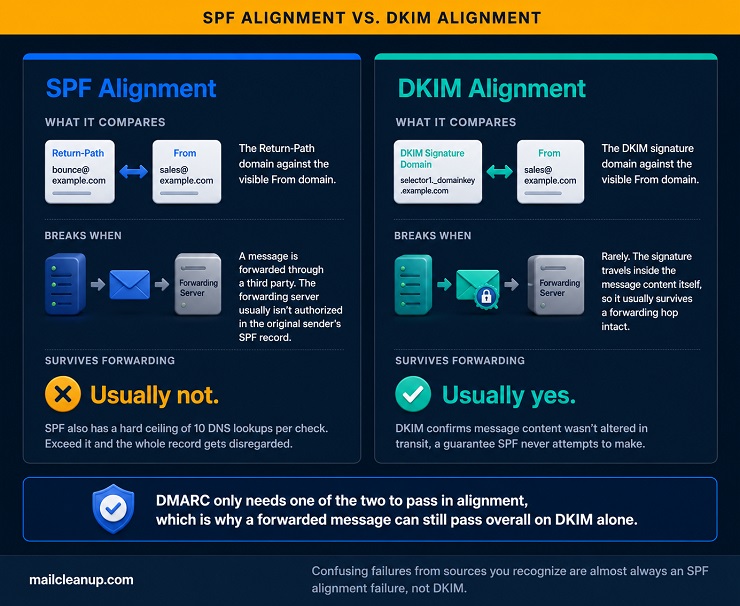
It’s not enough for SPF or DKIM to pass on their own. The domain that passed has to match the domain the recipient sees. That matching happens two different ways, depending on which check you’re looking at.
| SPF Alignment | DKIM Alignment | |
|---|---|---|
| What it compares | Return-Path domain vs. visible From domain | DKIM signature domain vs. visible From domain |
| Breaks when | A message is forwarded through a third party | Rarely, the signature travels with the message |
| Survives forwarding | Usually not | Usually yes |
This is what is DMARC really doing underneath both SPF and DKIM: forcing them to agree on the same domain, not just individually pass.
There’s a second layer to alignment worth understanding: how closely the domains actually need to match. DMARC supports two alignment modes, relaxed and strict, set independently for SPF and DKIM through the aspf and adkim tags covered earlier.
Relaxed mode, the default for both checks, passes as long as the two domains share the same organizational domain. A message authenticated as mail.yourdomain.com aligns with a visible From address of billing.yourdomain.com under relaxed mode, since both roll up to the same yourdomain.com.
Strict mode requires an exact match. Under strict SPF alignment, mail.yourdomain.com would not align with yourdomain.com itself, full stop.
Most domains are better off leaving both at relaxed. Testing found no meaningful protection gain from strict mode, only more configuration to get wrong. It also tends to fail legitimate mail sent through subdomains that are still genuinely yours. Where strict does show up deliberately, it’s usually strict DKIM paired with relaxed SPF. SPF is the harder of the two to keep aligned once third-party senders and forwarding are involved. Tightening the check that’s already reliable is a safer place to add precision than tightening the one that breaks under normal use.
What Is DMARC Alignment in a Real Report?
Say your marketing team uses a third-party platform to send a newsletter from [email protected]. The platform relays the message through its own servers, so it forwards along the way to some subscribers whose mailbox providers redirect mail.
Here’s what typically happens to that message at a receiving server:
- DKIM checks out fine: The platform signed the message with a key tied to yourdomain.com. That signature travels inside the message content, so it survives the forwarding hop intact.
- SPF fails: The forwarding server isn’t listed as an authorized sender in your SPF record, so the Return-Path domain doesn’t match.
Because DKIM passed and aligned, and DMARC only needs one of the two checks to align, the message still passes DMARC overall. If your policy is at reject and you saw this exact scenario reported as a DMARC failure instead, that’s worth investigating. Either DKIM signing broke somewhere in the forwarding chain, or the signature wasn’t configured to align with the visible From domain.
If your DMARC reports show confusing failures from sources you recognize as legitimate, forwarded mail is one of the most common explanations. It’s almost always an SPF alignment failure, not a DKIM one, for exactly this reason.
DMARC Failure: What Happens Next?
What happens when DMARC fails comes down entirely to your published policy. A DMARC failure doesn’t automatically mean a message gets blocked. It means the message failed the alignment test covered above, and now your policy decides what happens next.
Under a policy of none, nothing happens to the message itself. It’s delivered normally, and the failure just gets logged in your next report. Under quarantine, the message is typically routed to the recipient’s spam folder. Under reject, the message is refused outright, similar to a hard bounce.
A DMARC failure isn’t automatically evidence of an attack, either. Beyond the forwarding scenario covered above, legitimate senders fail DMARC for a few other common reasons:
- A sending source was never added to your SPF record: a marketing tool, a transactional provider, an internal system nobody thought to register.
- A DKIM key was configured but never actually turned on for that sending platform, which happens more often than most teams expect.
- A subdomain is sending mail under a policy that doesn’t match what its actual senders are set up to pass.
- Sending infrastructure recently changed or migrated without updating SPF to match. Switching email service providers or adding a new CRM integration are the two most common triggers.
Getting clear on what is DMARC’s actual response to failure matters. Knowing whether it’s monitor, quarantine, or reject is what separates a domain that’s protected from one that just looks protected on paper. That’s exactly why the Diagnose stage of the DMARC Readiness Ladder, covered later in this guide, matters as much as it does.
What Is a DMARC Record?
What is a DMARC record, physically? It’s a single line of text, published in your domain’s DNS. A receiving mail server reads it before doing anything else in the sequence above. Before getting into the syntax, it’s worth answering a more basic question. What is DMARC actually publishing when it publishes a record? The answer: a set of instructions, not just a marker that DMARC exists. Most DMARC records follow the same basic shape, whether they’re bare-minimum or fully configured.
What Is DMARC Record Syntax?
DMARC records are built from tag-value pairs separated by semicolons. Only two tags are strictly required to make a record valid: v and p. Those two alone answer whether DMARC is active. What is DMARC actually configured to do beyond that baseline? That requires looking at the full set.
What Does DMARC Do With Each Tag?
Here’s the complete, current set of DMARC record tags under RFC 9989. For each one: what it does, whether it’s required, and what happens if you leave it out:
| Tag | Purpose | Required? | Default If Omitted |
|---|---|---|---|
| v | Marks the record as DMARC. Must always be v=DMARC1. | Yes | None, the record is invalid without it |
| p | Sets your policy: none, quarantine, or reject. | Yes | None, the record is invalid without it |
| rua | Where aggregate reports get sent. | Recommended | None, you simply get no reports |
| ruf | Where forensic (failure) reports get sent. | Optional | None, you simply get no reports |
| sp | Sets a separate policy for subdomains. | Optional | Inherits the p value |
| np | Sets a policy specifically for subdomains that don’t send mail at all. | Optional | Inherits sp, or p if sp isn’t set |
| adkim | Sets DKIM alignment mode: relaxed or strict. | Optional | r, relaxed, per RFC 9989 Section 4.7 |
| aspf | Sets SPF alignment mode: relaxed or strict. | Optional | r, relaxed, per RFC 9989 Section 4.7 |
| fo | Controls when forensic reports get generated. | Optional | 0 |
| t | Testing mode, softens your policy by one level while you confirm it’s safe. | Optional | n, full enforcement, off |
| psd | Marks the domain as a public suffix, relevant only to registry-level operators. | Optional | Not applicable for most domains |
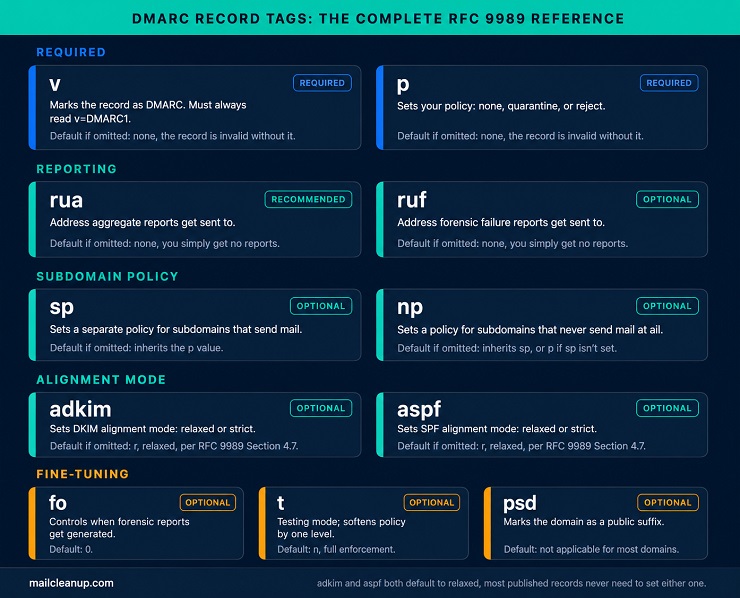
The tags that matter for almost every domain are p and rua. Everything else fine-tunes behavior you’ll likely leave at default until you have a specific, documented reason not to. The adkim and aspf defaults are worth calling out specifically. Relaxed alignment is what most domains actually want, and it’s already the default. Most published DMARC records never need to mention either tag at all. Every tag exists to answer part of what is DMARC supposed to do once the record is live. Which policy applies, where reports go, how strict alignment needs to be, it’s all in there.
What Does DMARC Do Differently Under RFC 9989?
RFC 9989 mostly cleans up parts of the spec that different mail providers had been implementing inconsistently for a decade. Six tags changed under the new spec:
| Change | Tag | What Happened |
|---|---|---|
| Removed | pct | Only worked reliably at 0 or 100 percent across different receivers; replaced by t. |
| Removed | rf | Specified a report format with only one valid value ever used, making it redundant. |
| Removed | ri | Requested a reporting interval that most receivers ignored, sending daily reports regardless. |
| Added | t | Testing mode. Softens your published policy by one level while you confirm it’s safe. |
| Added | np | Sets policy specifically for subdomains that never send mail at all. |
| Added | psd | Marks a domain as a public suffix, relevant only to registry-level operators. |
The np tag is the most broadly useful addition of the three. It closes a real gap: an unused subdomain with no record of its own could be spoofed freely, with nothing in DMARC covering it.
If your record still uses pct, nothing breaks. Existing v=DMARC1 records remain fully valid, and receivers simply ignore tags they don’t recognize. There’s no urgency to change anything today. The next time you touch your DNS, it’s worth removing pct and adopting t instead. Run t=y for a week or two to confirm nothing breaks, then remove it once you’re confident.
One more change is worth knowing about, even though it rarely affects day-to-day setup. Receivers no longer rely on the external Public Suffix List to figure out where your domain’s policy actually applies. They now walk up your DNS hierarchy directly, checking for a record at each level. This matters most for domains on multi-part suffixes like .co.uk or .com.au. The last two labels of a domain name aren’t actually anyone’s organization there, they’re a shared registry suffix. Getting that boundary wrong used to mean depending on an external list staying current. The tree-walk method removes that dependency entirely.
What Is DMARC’s DNS Location?
A DMARC record lives at one predictable location in DNS: a TXT record at _dmarc.yourdomain.com. When a receiving server wants to check your policy, it queries exactly that spot.
If nothing’s published there, DMARC evaluation stops, as covered earlier in this guide. This is also why a subdomain generally needs its own record unless sp or np on the root domain covers it.
One practical note follows from the DNS Tree Walk change described above. A receiving server on the updated spec checks progressively higher DNS levels if it can’t find a record at the exact subdomain sending mail. If you run a complex subdomain structure, publishing an explicit record at every domain and subdomain you actually send from is the safest approach. It removes any ambiguity about which policy applies, regardless of which version of the spec a given receiver is running.
Common DMARC Record Mistakes That Cause DMARC Failure
A few mistakes account for most of the DMARC records that don’t actually work the way their owner thinks they do. Here are the ones that show up most often:
- Publishing two DMARC records for the same domain: DNS allows it technically, but most receiving servers treat both as invalid the moment they find more than one. That means zero protection despite having a record published. Check for this first if reports have gone quiet.
- An SPF record that exceeds the 10-lookup limit: This isn’t a DMARC mistake directly, but it silently breaks DMARC’s ability to use SPF for alignment at all. A receiver that hits the limit disregards the SPF record entirely. We cover SPF’s own lookup mechanics in a dedicated guide, but it’s worth checking here too. It’s one of the most common reasons DMARC reports look worse than expected.
- DKIM configured but never actually turned on: One real audit found a domain running at a 61 percent DMARC pass rate for eighteen months. DKIM signing had been set up in the admin console but never activated. Every message had been authenticating on SPF alone, and anything forwarded was failing outright.
- Forgotten parked or inactive domains: A domain that never sends mail is still a domain someone could spoof from. Without its own DMARC record, it has zero protection, even though it represents your organization just as much as your active domains do.
- Forgotten subdomains: Subdomains inherit the root domain’s policy by default, but only if the root domain’s sp tag or the newer np tag actually covers them. A subdomain nobody remembered to account for can end up with weaker protection than anyone realized.
- A malformed or missing rua address: If the report destination is wrong, or missing the required mailto: prefix, you’ll never see the data. That data is what tells you whether it’s safe to move forward on the Readiness Ladder.
- Mixing up sp and np: sp still applies to subdomains that do send mail. np is specifically for the ones that don’t. Setting np on a subdomain that’s actually active blocks its legitimate mail using a tag that was never meant to cover it.
Each of these mistakes has the same result. On paper, what is DMARC set up to do looks fine. In practice, none of it actually functions the way the domain owner assumes.
What Is a DMARC Policy?
What is DMARC policy? It’s the actual instruction your record gives receiving servers. It tells them what to do when SPF and DKIM alignment fails. Everything about DMARC up to this point, the checks, the alignment logic, has been building toward this one decision point.
What Is DMARC Policy? The Three Options Explained
DMARC gives you exactly three policy options, set with the p tag. They’re genuinely different in what they do, not just three points on a severity scale.
| Policy | What Happens | What the Receiver Actually Does |
|---|---|---|
| none | Nothing to the message itself | Delivers normally, logs the result in the next report |
| quarantine | Treated as suspicious | Usually routed to spam or junk, though exact handling varies by provider |
| reject | Refused outright | Blocked at the SMTP level before delivery, with a permanent rejection code |
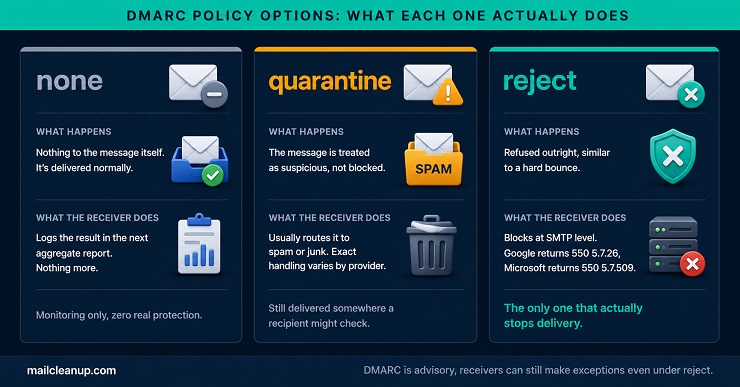
What is DMARC actually accomplishing with reject that the other two don’t? It’s the only one of the three that stops a spoofed message from reaching an inbox at all. None and quarantine both still deliver it somewhere, monitoring in one case, a spam folder in the other. A spam folder is still a folder a determined recipient might check.
The rejection itself has a real, visible signature. Google returns 550 5.7.26, with the specific reason “unauthenticated email is not accepted due to the domain’s DMARC policy.” Microsoft returns 550 5.7.509, citing the sending domain by name and stating it has a DMARC policy of reject. These aren’t soft bounces that retry later. They’re permanent 5xx rejections the sending server won’t attempt again.
One nuance worth knowing before you assume reject means absolute:
DMARC is advisory, not mandatory. Your record states a preference, and receivers decide whether to honor it. In practice, major providers do honor a reject policy for direct mail, but forwarded mail is a documented exception. Gmail can use signals from ARC, a separate protocol that lets a forwarding server vouch for a message’s original authentication. That can lead to a judgment call on forwarded mail, even under a reject policy. That’s a narrow exception, not a loophole worth planning around, but it explains why “reject” and “zero chance of delivery” aren’t always perfectly synonymous.
What Does DMARC Do During a Staged Policy Change?
What is DMARC’s actual behavior during a staged rollout, not just once fully enforced? That’s the real question this section answers. What does DMARC do if you skip straight to a stricter policy instead? It quietly starts blocking legitimate mail, which is exactly why staging matters. The safer path uses the t tag, covered earlier in this guide. It softens a stricter policy by one level while you confirm nothing breaks.
A realistic staging timeline runs 8 to 12 weeks end to end. That’s not because the mechanics are slow. It’s because you need real sending patterns to show up in your reports first. Weekly newsletters, monthly billing runs, and quarterly campaigns all need at least one full cycle to appear. A domain is generally ready to advance to the next stage once unauthenticated traffic from legitimate sources stays under about 1 percent. That threshold needs to hold for 30 consecutive days.
Here’s what that looks like in practice, stage by stage:
- Publish p=quarantine with t=y. This behaves like p=none at the receiver, since t=y softens quarantine down to no real enforcement. Your reports now reflect what would happen under quarantine specifically.
- Watch reports for 2 to 4 weeks. Confirm every legitimate source is passing in alignment. Fix anything that isn’t before moving on.
- Remove t=y, running p=quarantine at full strength. Confirm the unauthenticated-traffic threshold holds for 30 days.
- Repeat the same pattern for reject: p=reject with t=y first, confirm, then remove t=y.
Skipping the t=y step and jumping straight to full enforcement is the single most common way a staging attempt turns into a support incident. Legitimate mail starts bouncing with no warning.
What Is DMARC Policy for Subdomains?
What is DMARC policy for a subdomain if nothing’s explicitly set? It inherits from the root domain automatically. sp and np, both covered in the record syntax section earlier, exist to override that default deliberately. Both deserve a closer look at how they actually behave once set.
sp overrides the root domain’s policy for any subdomain that sends mail but doesn’t have its own explicit DMARC record. A common real setup is p=reject on the root domain with sp=quarantine on subdomains still being brought up to full enforcement. That lets the main domain run at full strength while newer subdomains catch up. np does something different: it targets subdomains that never send mail at all. That closes off the specific spoofing path where an attacker sends from a subdomain nobody’s actively using. Setting np=reject on every subdomain you don’t actively send from is close to a zero-cost security improvement. There’s no legitimate traffic on that subdomain to accidentally block.
The two tags can coexist on the same record. A typical mature setup looks like this: p=reject; sp=reject; np=reject, with every category covered explicitly rather than relying on inheritance to catch everything correctly.
The DMARC Readiness Ladder: How DMARC Works in Practice
What is DMARC without a plan to actually reach enforcement? Just a record collecting reports forever. The four stages ahead move a domain from a freshly published record to full enforcement. Each stage has a genuine prerequisite of the one before it, and skipping ahead is exactly what turns a staging attempt into a support incident.
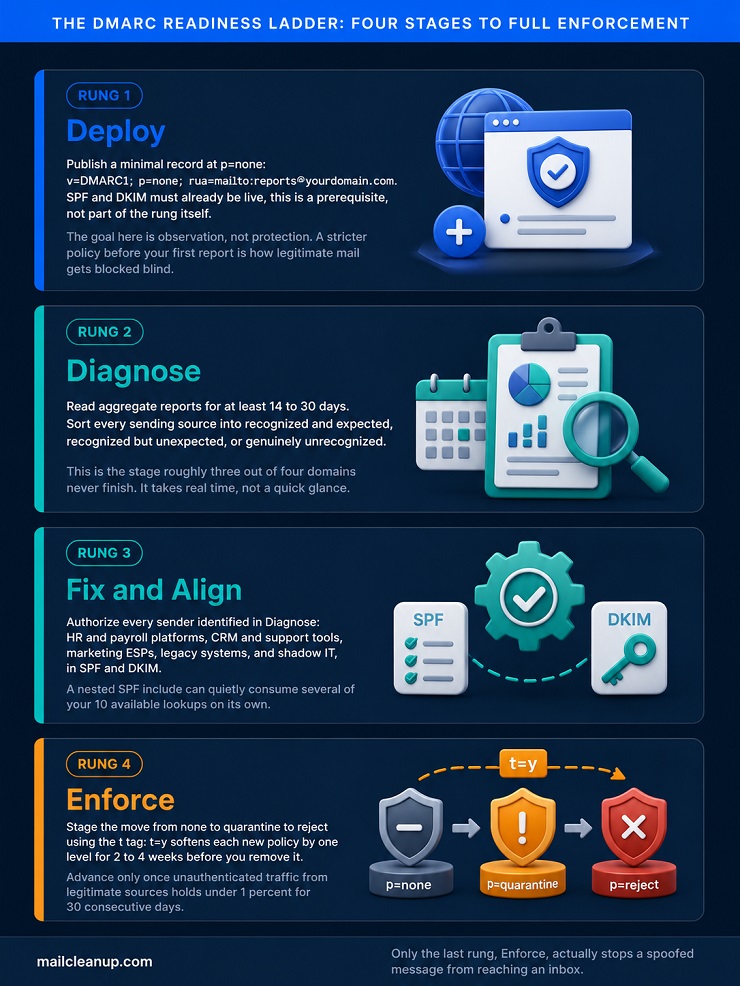
1. Deploy
Deploy means getting a valid record published, nothing more yet, before answering what is DMARC actually going to do once enforcement starts. SPF and DKIM need to already be live before this step, since DMARC has nothing to evaluate without them.
What Is DMARC’s First Record Supposed to Contain?
A minimal, genuinely useful first record needs exactly three tags:
v=DMARC1; p=none; rua=mailto:[email protected]
v and p are required by the spec. rua isn’t technically required, but a record without it is close to useless. You’d have a policy with no visibility into what it’s actually doing. p=none specifically, not quarantine or reject, is the correct starting policy regardless of how confident you are in your SPF and DKIM setup. The point of this stage is observation, not protection yet. Publishing at a stricter policy before you’ve seen a single report is how legitimate mail gets blocked. You won’t even know what’s sending on your behalf yet.
2. Diagnose
Diagnose is where most of the real work happens, and where most domains quietly stall out. What is DMARC accomplishing if nobody actually reads what these reports say? Nothing. This is the stage the enforcement gap in this guide’s intro is actually describing.
What Does DMARC Do in Your First Reports?
Give it real time before drawing conclusions. Aggregate reports need at least 14 to 30 days to capture weekly newsletters, monthly billing runs, and any sending pattern that doesn’t happen daily. A report reviewed after three days will miss half your legitimate senders simply because they haven’t sent anything yet in that window.
What you’re actually looking for, without needing the full XML-level detail covered in the dedicated report-reading guide, breaks into three categories:
- Sources you recognize and expect: Your ESP, your transactional email provider, your own mail servers. Confirm these are passing in alignment, not just appearing in the report.
- Sources you recognize but didn’t expect to see: A CRM, a support tool, an HR platform sending on your domain’s behalf without anyone flagging it to whoever manages DNS. This is normal. It’s also exactly why this stage takes real time.
- Sources you don’t recognize at all: These need real scrutiny. Some are genuinely malicious spoofing attempts. Others are legitimate services using generic infrastructure that doesn’t identify itself clearly in a report. Don’t assume either way without checking.
A domain is ready to move to Fix and Align once you can account for every regularly appearing source in your reports, not before.
3. Fix and Align
Fix and Align is where the sources identified in Diagnose actually get authorized. That’s the step that determines what is DMARC going to look like in your reports going forward. This stage is more work than Deploy or Diagnose. It means touching SPF and DKIM configuration for every legitimate sender, not just DMARC itself.
Third-Party Senders Most Domains Forget: A DMARC Failure Cause
The same categories show up across almost every domain doing this for the first time:
- HR and payroll platforms: Tools like BambooHR, Gusto, or Workday send onboarding notices, payslips, and benefits communications. IT often isn’t looped in when the tool was first adopted.
- CRM and support tools: Salesforce, Zendesk, and similar platforms frequently send transactional mail directly from your domain as part of their normal function, not as an edge case.
- Marketing and transactional ESPs: The obvious one, but still commonly incomplete, especially when a team runs more than one platform for different campaign types.
- Legacy or on-premises systems: Older internal servers and applications have quietly sent mail the same way for years. Nobody’s left who remembers they need to be in the SPF record.
- Shadow IT: Someone in sales or marketing signs up for a tool that sends as your domain, without DNS access or awareness that authentication records exist.
Two details worth knowing while you work through this list. First, a nested SPF include can itself consume several lookups internally. include:spf.protection.outlook.com alone uses 2 to 4 of your 10 available lookups. That matters if you’re already close to the ceiling. Second, some third-party senders use their own Return-Path domain and won’t ever provide SPF alignment no matter what you add to your record. For those, DKIM alignment is the only path to passing. Confirm the sender actually supports DKIM signing before assuming SPF alone will cover it.
4. Enforce
Enforce is the payoff for the work done in Diagnose and Fix and Align, not a separate technical challenge on its own. It’s the stage where what is DMARC finally does its actual job.
How DMARC Works When You Move to Enforcement
By this stage, the mechanics are already covered: the t=y staging approach from the policy section earlier in this guide. It’s applied here to a domain that’s actually ready for it. What’s different at this point in the journey is the confidence behind the decision. You’re not staging a policy change speculatively. You’re staging one against a domain where every regular sender has already been identified and authorized in Fix and Align.
That’s what actually separates a safe move to enforcement from a risky one. The staging mechanism is identical either way. Trying to enforce before Diagnose and Fix and Align are genuinely done, not just started, is a real risk. That’s the version of this step that generates support tickets instead of protection.
Reading Your First DMARC Report: What Is DMARC Telling You?
Once reports start arriving, what is DMARC actually handing you? Raw data about every source sending mail as your domain, not a verdict. This section covers enough to make that data useful without duplicating the full field-by-field walkthrough in our guide to reading a DMARC report.
What Does DMARC Do With Aggregate vs Forensic Reports?
What is DMARC actually sending in each case? Two genuinely different documents, not two formats of the same one. DMARC defines two report types, and they answer different questions. Aggregate reports, sent to the address in your rua tag, summarize authentication results over a period, typically daily, across every sending source DMARC saw. Forensic reports, sent to your ruf tag, cover individual failures in more detail, though far fewer receivers actually send these than send aggregate reports.
Both report types now have their own dedicated IETF specification. RFC 9990 covers aggregate reporting and RFC 9991 covers failure reporting, both published alongside RFC 9989 in May 2026. For almost every domain, aggregate reports are where the real signal lives. Forensic reports are useful but inconsistent. Many major receivers choose not to send them at all, citing privacy concerns around forwarding full message content.
What Is DMARC Telling You at a Glance?
What is DMARC’s report actually built to show you, structurally? An aggregate report, in XML form, breaks down into three broad pieces. First, metadata about the reporting window and receiver. Second, the policy your domain actually published, as the receiver understood it. Third, a record for each sending source showing volume, pass or fail status, and the underlying SPF and DKIM results. You don’t need to parse the XML by hand to get value from it. Most DMARC monitoring tools translate this into a readable table automatically.
What matters most on a first read isn’t the format, it’s the pattern. A handful of sources with consistent, high volume and clean passes are your core senders. Anything appearing once or twice, at low volume, deserves a second look before you assume it’s noise. That distinction is most of what Diagnose, covered earlier in this guide, actually is.
DMARC and Your Broader Deliverability: What Is DMARC Missing?
What is DMARC’s actual scope, honestly? DMARC protects one specific thing: your domain’s identity. It has nothing to say about whether the people you’re sending to actually want your mail. It’s equally silent on whether your list is full of addresses that bounce, complain, or were never valid to begin with.
That’s the piece list hygiene covers instead. A domain can run p=reject with a spotless authentication setup and still land in spam. That happens if its sending list is riddled with invalid addresses and low engagement. Sender reputation depends on both authentication and list quality, not either alone, the exact relationship is covered in our guide to sender reputation. We cover the list-cleaning side of that equation in our guide to cleaning an email list; this one has been about authentication.
Where You Actually Stand on the Ladder: What Does DMARC Do Next?
Everything in this guide comes down to one practical question now: what is DMARC actually doing for your domain right now? The answer depends entirely on where you’re starting from.
If You Haven’t Set Up SPF or DKIM Yet
Stop here before touching DMARC at all. What is DMARC supposed to evaluate if neither SPF nor DKIM exists yet? Nothing. Get SPF and DKIM configured and confirmed working first, using our dedicated guides for each. Then come back to Deploy.
If You’re at p=none With No Diagnosis Done
What is DMARC doing for you right now, at this exact stage? Collecting data, nothing more. You’re in the largest group of domains covered in this guide, the roughly three out of four that publish a record and stop. Move to Diagnose next. Give it the full 14 to 30 days this guide recommends before drawing conclusions, and resist the urge to skip straight to enforcement.
If You’re Ready to Enforce
What is DMARC waiting on at this point? Nothing except you actually flipping the switch. Every regular sender is identified and authorized, and you’ve confirmed it through real report data, not assumption. Use the t=y staging approach from the policy section, one level at a time, none to quarantine to reject. Check the 30-day threshold before each step. That’s what actually finishes the job most domains never get to.
FAQs on DMARC
What is DMARC?
DMARC, Domain-based Message Authentication, Reporting, and Conformance, is an email protocol. It tells receiving mail servers what to do when a message fails SPF or DKIM authentication. It builds on those two checks by adding domain alignment, a policy, and a reporting channel, closing gaps neither protocol solves alone.
What is DMARC mandatory for?
Not universally, but it’s required in specific, well-documented cases. Google, Yahoo, and Microsoft all require it for domains sending over 5,000 emails daily. US federal agencies have needed p=reject since 2017 under BOD 18-01, and PCI DSS v4.0 has mandated it for payment processors since March 2025.
How does DMARC work?
A receiving server checks whether SPF or DKIM passed, then tests whether the passing domain aligns with the visible From address. If at least one check passes and aligns, DMARC passes. If neither does, the server applies your published policy, none, quarantine, or reject, and logs the outcome in a report.
What is a DMARC record?
A DMARC record is a DNS TXT record published at _dmarc.yourdomain.com. It contains tag-value pairs specifying your policy, where reports get sent, and how strictly SPF and DKIM alignment gets checked. Only two tags, v and p, are actually required; everything else fine-tunes behavior most domains can leave at default.
What is DMARC policy, and how do the three options differ?
None does nothing to a failing message except log it. Quarantine routes it toward spam, though exact handling varies by provider. Reject blocks it outright at the SMTP level with a permanent rejection code. Google returns 550 5.7.26, Microsoft returns 550 5.7.509, and it’s the only one that actually stops delivery.
What does DMARC do to stop phishing and spoofing?
No. DMARC specifically stops exact domain spoofing, someone sending mail that claims to be from your exact domain. It doesn’t stop lookalike domains like examp1e.com, phishing from unrelated domains, or inbound threats targeting your organization. It’s one layer in email security, not a complete defense against every attack type.
What is DMARC compared to SPF and DKIM?
SPF authorizes which servers can send on your domain’s behalf. DKIM adds a cryptographic signature confirming message content wasn’t altered. Neither reports back to the domain owner or tells receivers what to do on failure. DMARC ties both together, requiring alignment with the visible From address and adding a policy plus reporting.
How does DMARC work toward full enforcement over time?
Done safely, expect 8 to 12 weeks per stage, roughly several months total to move from p=none through quarantine to reject. Each stage needs real sending patterns, weekly, monthly, and quarterly, to show up in reports before advancing. Rushing straight to reject is the most common cause of legitimate mail getting blocked.