
Most Sender Policy Framework records don’t fail because someone typed the syntax wrong. They fail because a team added a fourth or fifth sending tool well after the record was set up. Nobody recounted what that now costs in DNS lookups, so the record quietly crossed a limit that has nothing to do with spelling. The mail that stops arriving looks like a mystery until you know exactly where to look.
We read through ten of the pages currently ranking for this topic before writing a word of this one. Most of them split the same material across three or four separate URLs. One page covers what Sender Policy Framework is, another covers the record syntax, and a third covers how to set it up. Occasionally there’s even a fourth page just for the lookup limit on its own. The single page that kept everything together skipped the lookup limit entirely. That’s the exact problem behind more real-world SPF failures than bad syntax ever causes.
This guide keeps all of it in one place:
- What is Sender Policy Framework and where it came from
- How it works end to end, including every result code
- Its complete record syntax, mechanism by mechanism
- Real setup examples for the stack you’re actually running
- A repeatable way to manage your lookup budget before it manages you
TL;DR on Sender Policy Framework
- Sender Policy Framework (SPF) is an email authentication protocol. It lets a domain publish, in its DNS, exactly which mail servers can send email on its behalf.
- SPF works by having the receiving mail server check the DNS record for a domain. It compares the sending server’s IP address against the authorized list.
- Every SPF record is capped at 10 DNS lookups. Mechanisms like include, a, and mx each count against that limit, while ip4, ip6, and all cost nothing.
- Exceeding the 10-lookup limit returns a PermError, which causes legitimate mail to fail authentication silently, with no obvious syntax error to point to.
- SPF checks the envelope sender in the Return-Path, not the visible From address a recipient sees. That’s one reason SPF alone can’t stop every form of spoofing.
- SPF breaks by design when a message is forwarded through a server outside the original SPF record. The two real fixes are DKIM, which survives forwarding, and SRS or ARC on the forwarding side.
- A domain can only have one SPF record. Publishing a second one causes a PermError and breaks authentication for every sender in either record.
- SPF was first proposed in 2000, under the name “Sender Permitted Form.” It reached its current specification, RFC 7208, in 2014, superseding an earlier 2006 version, RFC 4408.
What Is Sender Policy Framework?
Sender Policy Framework, or SPF, is a DNS-based email authentication protocol. It lets a domain owner publish a list of the mail servers authorized to send email on that domain’s behalf. That way, a receiving mail server has something concrete to check an incoming message against.
Here’s the problem SPF was actually built to solve. The Simple Mail Transfer Protocol, still the standard every mail server uses, was never built to confirm a sender’s identity. Anyone can stand up a mail server and send a message claiming to be from your domain. Until SPF and its companion protocols existed, a receiving server had no reliable way to check. That gap is exactly what spammers and phishers exploit when they spoof a trusted domain’s name. It’s the reason SPF, along with DKIM and DMARC, exists at all. We cover how all three protocols fit together in our complete guide to email authentication; this guide goes deep specifically on SPF.
Get this right, and you’re not just blocking spoofed mail. A consistently valid SPF record is one of the concrete signals mailbox providers weigh when deciding how much to trust your domain. That feeds directly into your sender reputation over time.
Type what is Sender Policy Framework into a search bar, and most answers stop at a one-line definition. Here’s the fuller version: SPF turns “anyone can claim to send email from this domain” into “only these specific servers can.” Everything else in this guide is really just detail on how that gets enforced.
The History of Sender Policy Framework
Answering what is Sender Policy Framework in full means knowing where it came from. A few of its odder design choices today only make sense in light of that history.
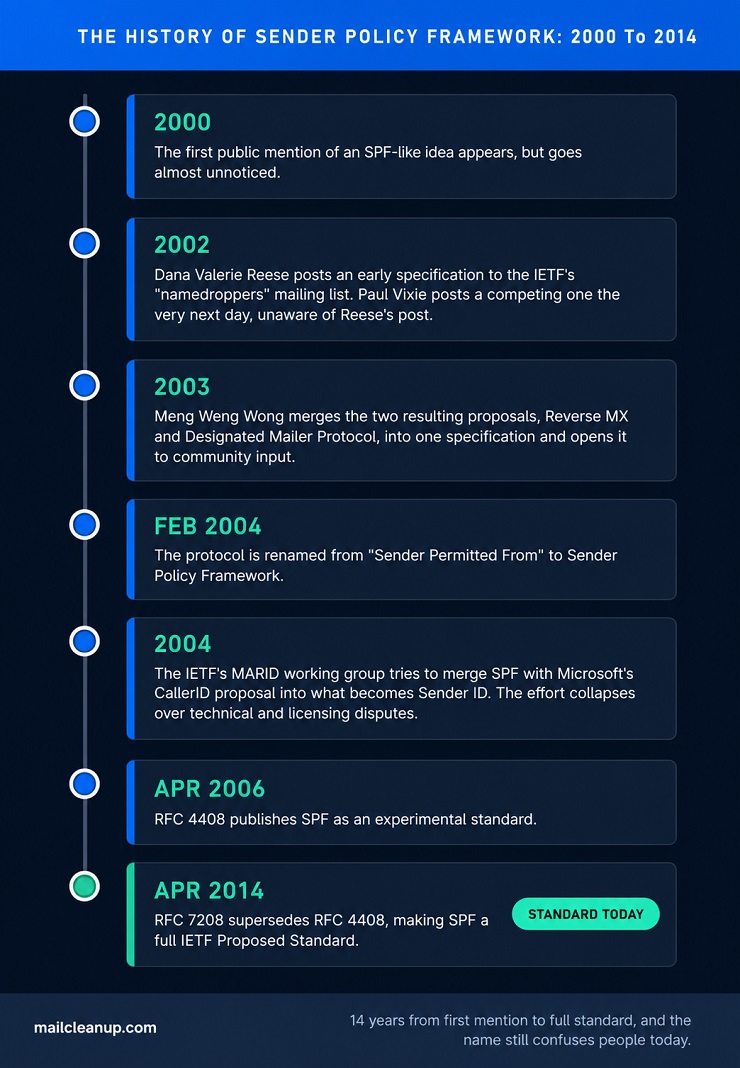
| Year | What happened |
|---|---|
| 2000 | The first public mention of an SPF-like idea appears, but goes almost unnoticed |
| 2002 | Dana Valerie Reese posts an early specification to the IETF’s “namedroppers” mailing list; Paul Vixie posts a competing one the very next day, unaware of Reese’s post |
| 2003 | Meng Weng Wong merges the two resulting proposals, Reverse MX and Designated Mailer Protocol, into one specification and opens it to community input |
| Feb 2004 | The protocol is renamed from “Sender Permitted From” to Sender Policy Framework |
| 2004 | The IETF’s MARID working group tries to merge SPF with Microsoft’s CallerID proposal into what becomes Sender ID; the effort collapses over technical and licensing disputes |
| Apr 2006 | RFC 4408 publishes SPF as an experimental standard |
| Apr 2014 | RFC 7208 supersedes RFC 4408, making SPF a full IETF Proposed Standard, the status it holds today |
Two details from that table are worth carrying into how you configure a record today. The name change means the “SPF” in every sender policy framework record was never really an acronym for what most people assume. You’ll occasionally see confused references to “Sender Permitted Form” in older documentation describing the same protocol. More practically, SPF briefly had its own dedicated DNS record type, separate from TXT. The two-format approach caused enough confusion that support for it was formally dropped when RFC 7208 published. TXT records are the only correct format now.
If you come across setup instructions recommending the standalone SPF record type, treat that as a sign the documentation predates 2014. It probably isn’t safe to trust for anything else either.
How Sender Policy Framework Works
Once a domain has an SPF record published, the checking process happens automatically on every message. Neither the sender nor the recipient has to do anything by hand. This is the part that turns the one-line answer to what is Sender Policy Framework into something that actually protects your domain.
Here’s the sequence, from the moment a message is sent to the moment it’s accepted or rejected:
- A sending server transmits an email, and as part of that SMTP conversation, it includes a Return-Path address. This is sometimes called the envelope sender or MAIL FROM address, a different, less visible address than the “From:” line a recipient sees.
- The receiving mail server takes the domain from that Return-Path address and looks up its DNS TXT record. Specifically, it’s looking for the one starting with v=spf1.
- If a record exists, the receiving server checks the arriving message’s IP address against the authorized senders it lists. It evaluates the record’s mechanisms in the exact order they’re written.
- The first mechanism that matches determines the result. If nothing matches by the end, the all mechanism decides what happens by default.
That fourth step is worth sitting with, because it’s where most of the real decisions in an SPF record actually live. Everything before all is a specific exception, and all is the domain owner’s answer to “what happens to everyone else.”
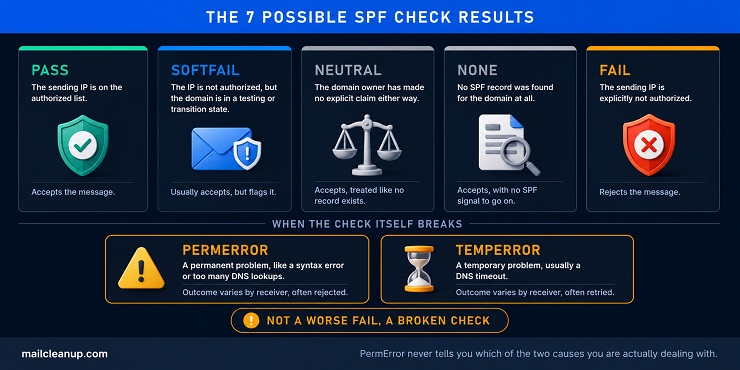
What is SPF record doing, concretely, at the exact moment a message arrives? One thing only: it gives the receiving server a list to check, and a default to fall back on. An SPF check doesn’t return a simple pass or fail. It returns one of seven distinct results, and the difference between them matters when you’re troubleshooting.
| Result | What it means | What the receiving server typically does |
|---|---|---|
| Pass | The sending IP is on the authorized list | Accepts the message |
| Fail | The sending IP is explicitly not authorized | Rejects the message |
| SoftFail | The IP isn’t authorized, but the domain is in a testing or transition state | Usually accepts, but flags it |
| Neutral | The domain owner has made no explicit claim either way | Accepts, treated like no record exists |
| None | No SPF record was found for the domain at all | Accepts, with no SPF signal to go on |
| PermError | The record has a permanent problem, like a syntax error or too many lookups | Outcome varies by receiver, often rejected |
| TempError | A temporary problem occurred, usually a DNS timeout | Outcome varies by receiver, often retried |
PermError deserves special attention, because it’s the result behind the lookup-limit failures this guide keeps coming back to. A syntax error causes it too, but so does a technically perfect record that simply asks for more than 10 DNS lookups. Nothing about a PermError tells you which of the two you’re dealing with, so you have to go check.
One mechanism worth knowing, even though it rarely comes up: SPF can also validate the HELO or EHLO identity a sending server announces. This happens separately from the Return-Path check, at the very start of an SMTP connection. This matters most for bounce messages and other automated replies, which have an empty Return-Path. There’s no domain there for a normal SPF check to use, so checking the HELO identity gives the receiving server something to validate anyway.
Sender Policy Framework Record Syntax: Mechanisms, Qualifiers, and Modifiers
Every sender policy framework record is a single line of text, published as a DNS TXT record. It always starts the same way.
v=spf1That version tag has to come first, and it’s non-negotiable. There’s only one version of SPF in active use, so every valid record you’ll ever see starts with exactly this string.
What is SPF record in email terms, once you strip away the DNS jargon? Exactly what you’re about to read: a single, structured line telling receiving servers who’s allowed to send on your behalf. What is Sender Policy Framework actually built from, once you get past that opening tag? Three kinds of building blocks, stacked together: mechanisms, qualifiers, and modifiers.
The SPF Mechanisms
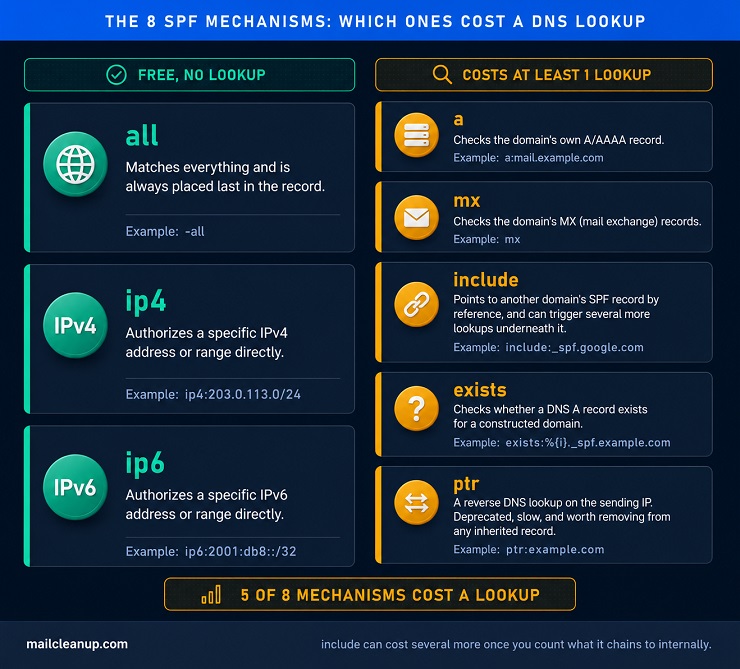
A mechanism is an instruction that tells the receiving server what to check for. Mechanisms are the actual working vocabulary behind what is Sender Policy Framework in practice. There are eight of them, evaluated left to right until one matches.
| Mechanism | What it checks | Costs a DNS lookup? | Example |
|---|---|---|---|
| all | Matches everything; always placed last | No | -all |
| ip4 | A specific IPv4 address or range | No | ip4:203.0.113.0/24 |
| ip6 | A specific IPv6 address or range | No | ip6:2001:db8::/32 |
| a | The domain’s own A/AAAA record | Yes | a or a:mail.example.com |
| mx | The domain’s MX (mail exchange) records | Yes | mx |
| include | Another domain’s SPF record, by reference | Yes | include:_spf.google.com |
| exists | Whether a DNS A record exists for a constructed domain | Yes | exists:%{i}._spf.example.com |
| ptr | A reverse DNS lookup on the sending IP; deprecated, avoid it | Yes | ptr:example.com |
That “costs a lookup” column is doing most of the real work in this table. It’s the single most important thing to internalize about SPF syntax. ip4, ip6, and all are pure values, so the receiving server doesn’t need to ask a DNS server anything extra to evaluate them. Every other mechanism triggers at least one additional DNS query. include in particular can trigger several more underneath it, since the domain it points to might itself use include again. That’s the entire reason a record with only three or four sending sources can still blow through a 10-lookup ceiling. It’s the foundation for the lookup-budget system later in this guide.
One quick, practical note on ptr: it reverses the sending IP into a hostname. It then checks that the hostname resolves back to the same IP. It’s slow, unreliable, and explicitly discouraged in SPF’s own specification, RFC 7208. If you inherited a record that still uses it, removing it is close to a free win. It costs a lookup for very little real protection.
SPF Qualifiers
A qualifier is an optional prefix in front of a mechanism, and it decides what happens when that mechanism matches. This is where what is Sender Policy Framework stops being abstract and starts making an actual accept-or-reject decision. There are four qualifiers in total.
| Qualifier | Result | What happens on a match |
|---|---|---|
| + (or none written) | Pass | The message is authorized; this is the default when no qualifier is written |
| – | Fail | The message is explicitly not authorized, and should be rejected |
| ~ | SoftFail | The message isn’t authorized, but is typically accepted and flagged rather than rejected |
| ? | Neutral | No claim is made either way |
In practice, almost every production record you’ll see ends in either -all or ~all. A hard fail tells receiving servers to reject anything not explicitly listed. A soft fail is the safer choice while you’re still confirming a record is complete. It flags unauthorized senders without outright rejecting real mail you might have missed. The common, sensible path: launch a new or changed record with ~all, then watch your DMARC reports for anything unexpected. Move to -all once you’re confident the record is genuinely complete.
SPF Modifiers
Modifiers are used far less often than mechanisms. Only two exist, and knowing them is part of understanding what is Sender Policy Framework in full. Each can appear only once in a record, and only at the end.
The redirect modifier points evaluation at another domain’s SPF record entirely. It effectively says “use that domain’s policy instead of writing my own.” It’s meant for domains under common ownership that genuinely want to share one policy. It’s easy to confuse with include, so it’s worth being precise about the difference. include checks another domain’s record as one mechanism among several of your own. redirect replaces your entire record with someone else’s instead. If a record uses all and redirect together, most implementations just ignore the redirect. That’s why the two aren’t meant to be combined.
The exp modifier lets a domain owner specify a custom explanation string, shown to a sender when their mail fails an SPF check. It’s rarely used in practice, mostly because most sending infrastructure never surfaces that explanation to anyone who’d act on it. It exists if you need to give failing senders a specific, actionable reason rather than a generic rejection.
That’s Sender Policy Framework explained end to end: history, mechanics, and every piece of syntax it’s built from. What’s still missing is what these pieces look like assembled into a real, working record. That’s exactly where the setup examples ahead come in.
SPF Record Examples for Common Sending Setups
Every SPF explanation eventually needs a real record to point at, not just the abstract shape of one. Answering what is Sender Policy Framework only in the abstract leaves out the part people actually need: real, working examples. These show how Sender Policy Framework works once it’s live on an actual domain. Here are six sender policy framework record example setups you’ll actually run into. Each one is verified against the provider’s own current documentation, not copied from an aggregator.
Google Workspace
If Google Workspace is your only sender, this is the complete record:
v=spf1 include:_spf.google.com ~allGoogle manages the IP addresses behind _spf.google.com on its own. It updates them without you touching your record. That convenience has a cost, though. This single include chains through Google’s own nested sub-records. That chain has actually been getting simpler recently, not more complex. Treat the real cost as 3 to 4 lookups, not 1. Recheck it occasionally, since Google has quietly trimmed this exact chain before.
Microsoft 365
For a domain sending only through Microsoft 365:
v=spf1 include:spf.protection.outlook.com ~allThis include typically costs 2 to 3 lookups. Hybrid Exchange setups or extra Microsoft connectors can push that higher. Microsoft’s own documentation makes one thing explicit: never flatten this particular include into static IPs. Microsoft’s sending infrastructure rotates too often for a hand-maintained list to stay accurate.
A Multi-Sender Stack
Real domains rarely send from just one place. Take a domain using Google Workspace for staff mail and SendGrid for transactional email, receipts and password resets. Both includes combine in one record:
v=spf1 include:_spf.google.com include:sendgrid.net ~allAdd a third platform, and you add a third include: before the final qualifier. That’s the same pattern every time, and it’s exactly how lookup costs stack up quietly, which the next section covers.
A genuine exception worth knowing: skip Mailchimp’s SPF include entirely. The standard advice for years was adding include:servers.mcsv.net. Current guidance from multiple independent deliverability sources says otherwise. Mailchimp sends using its own bounce domain, not yours, so your SPF record is never actually the one being checked for Mailchimp’s mail. Adding that include costs a lookup for zero real benefit. DKIM is what actually authenticates Mailchimp mail under DMARC, so configure that instead and leave Mailchimp out of your SPF record.
IP-Based Sending
Say you run your own mail server on a fixed IP, rather than through a third-party platform. ip4 or ip6 mechanisms authorize it directly, at no lookup cost at all:
v=spf1 ip4:203.0.113.10 ip4:203.0.113.11 -allThis is also the mechanism to reach for whenever a vendor publishes stable, documented IP ranges. Trading their include for your own ip4 entries is called SPF flattening. It removes a lookup, and a dependency on their record staying reachable, in one move.
A Parked or Non-Sending Domain
A domain that never sends email still needs an SPF record. It’s the simplest one there is:
v=spf1 -allThis tells every receiving server that no mail should ever come from this domain, full stop. Skipping this step is a common gap. An unused or parked domain with no SPF record is an easy spoofing target. Nothing on record contradicts a forged message claiming to be from it.
Subdomain Segmentation
Once a root domain’s record is genuinely full, a dedicated subdomain gives you a fresh 10-lookup budget instead. A company might keep example.com for corporate mail, while routing marketing sends through mail.example.com on its own separate record:
v=spf1 include:sendgrid.net ~allEach subdomain evaluates independently. That’s the whole trick: instead of one record straining against a single ceiling, every subdomain gets its own fresh one.
The SPF Lookup Budget
Knowing the mechanisms is only half of what is Sender Policy Framework in daily practice. The other half is managing the 10-lookup ceiling before it manages you. That takes an actual process, not just an awareness that the limit exists. Four steps, in this order:
- Count what your record spends right now.
- Trace what’s quietly driving that number up.
- Trim what you can.
- Expand your budget only once trimming is genuinely exhausted.
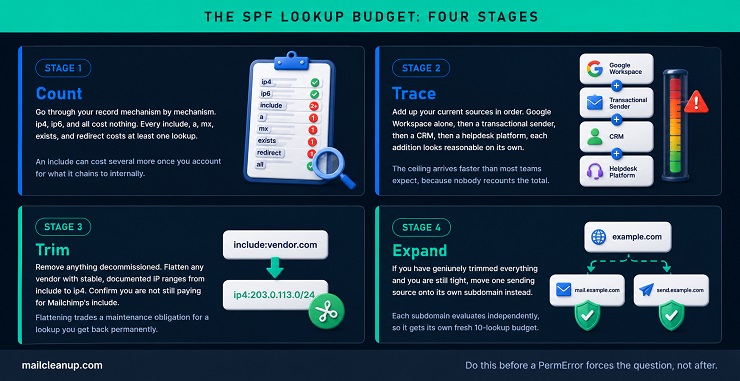
1. Count
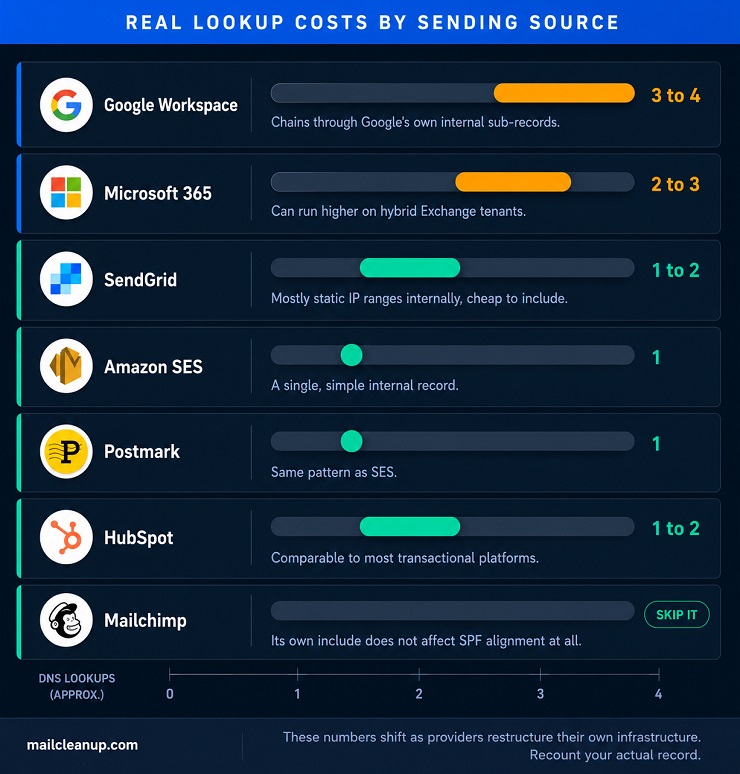
Go through your record mechanism by mechanism. ip4, ip6, and all cost nothing. Every include, a, mx, exists, and redirect costs at least one lookup. An include can cost several more, once you account for what it chains to internally.
| Sending source | Typical lookup cost | Why |
|---|---|---|
| Google Workspace | 3 to 4 | Chains through Google’s own internal sub-records |
| Microsoft 365 | 2 to 3 | Can run higher on hybrid Exchange tenants |
| SendGrid | 1 to 2 | Mostly static IP ranges internally, cheap to include |
| Amazon SES | 1 | A single, simple internal record |
| Postmark | 1 | Same pattern as SES |
| HubSpot | 1 to 2 | Comparable to most transactional platforms |
| Mailchimp | 0 | Skip the include entirely; it doesn’t affect SPF alignment |
That table is worth rereading with one thing in mind: these numbers aren’t fixed forever. Google alone has changed its own internal chain more than once. Recount your actual record with a real SPF-checking tool. Don’t just trust a number you read somewhere, including this one, since providers restructure their own infrastructure on their own schedule.
2. Trace
Add up your current sources, and the ceiling arrives faster than most teams expect. Start with Google Workspace alone: 3 to 4 lookups, comfortably under 10. Add SendGrid for transactional mail: 4 to 6, still fine. Marketing adopts a CRM that also sends on your domain’s behalf: 5 to 8, getting close. A support team later adds a helpdesk platform needing its own include: 6 to 10. You’re now one addition away from a PermError nobody sees coming. Nobody added a fifth tool maliciously. Each addition was reasonable on its own, and each one was approved without anyone recounting the total.
3. Trim
Three genuine ways to claw back lookups, roughly in order of how much they save. First, remove anything decommissioned. A marketing tool nobody uses anymore still costs a lookup on every message, until its include is actually deleted. Second, flatten what you safely can. Any vendor with stable, documented IP ranges, and most transactional senders qualify, can be swapped from include to ip4. That trades an ongoing maintenance obligation for a lookup you get back permanently. Third, confirm you’re not still paying for Mailchimp’s include, or any other integration whose SPF entry never actually helped.
Flattening comes with one real caveat, and it’s worth taking seriously. A flattened ip4 entry goes stale the moment that vendor changes its sending infrastructure, and nothing will warn you when that happens. That’s exactly why Microsoft recommends against flattening its own include specifically. Microsoft 365’s sending IPs rotate often enough that a hand-copied list would break faster than it would save you lookups.
4. Expand
If you’ve genuinely trimmed everything and you’re still tight, subdomain segmentation is the real answer. It’s not a workaround to feel guilty about. Move one sending source onto its own subdomain, and its lookups stop competing with everything else for the same 10. Do this before you’re forced into it by a PermError, not after.
Why Forwarding Breaks Sender Policy Framework
SPF has one limitation that no amount of careful record-writing fixes. Part of what is Sender Policy Framework in practice is knowing this exact limit. It breaks the moment a message is forwarded, and it breaks by design, not misconfiguration.
Here’s why. When someone forwards your email, whether through a mail client’s rule or a mailing list, the forwarding server becomes the one transmitting the message. The receiving server’s SPF check looks at the IP address of whoever sent the message last. That’s now the forwarding server, not your original one, and that IP was never in your SPF record. You had no way to know in advance who might forward your mail. The check fails, even though the message is completely legitimate.
Two real fixes exist, and they work in genuinely different ways.
Sender Rewriting Scheme, or SRS, is something the forwarding server does, not something you configure on your own domain. A compliant forwarder rewrites the envelope sender to its own domain before passing the message along. The next SPF check then runs against the forwarder’s own record, and it passes. The tradeoff: SRS only fixes SPF itself. The visible From address a recipient sees is still yours, so DMARC alignment can still fail unless DKIM also passes.
DKIM is the far more reliable fix, because it doesn’t depend on which server sent the message last. DKIM signs the message content and headers cryptographically the moment your server sends it. As long as a forwarder doesn’t alter what was signed, that signature still verifies correctly, no matter how many hops the message takes afterward. This is the real reason DKIM, not SPF, is treated as the resilient half of email authentication.
For the technically curious: Authenticated Received Chain, or ARC, is a newer mechanism worth knowing too. It preserves the original authentication results as a message passes through forwarders. A receiving server can then see the message genuinely passed SPF and DKIM at its first hop, even if a direct check now fails. We cover exactly how ARC preserves that chain, and how it fits alongside DMARC’s own policy decisions, in our complete guide to DMARC.
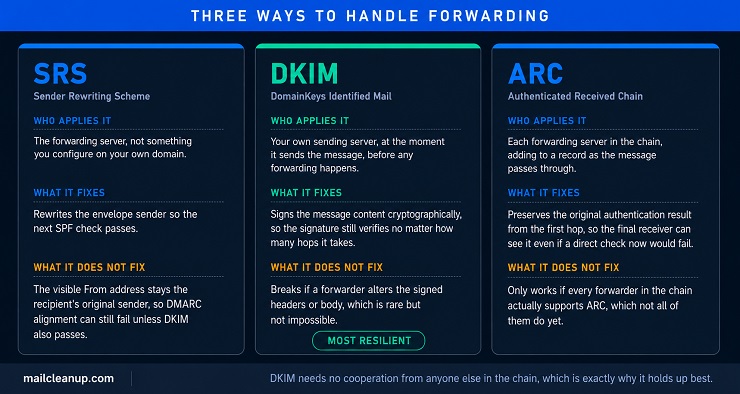
The practical takeaway, with Sender Policy Framework explained down to its actual limits now: don’t fight the forwarding problem by adding more SPF mechanisms. Make sure DKIM is properly configured for every domain that sends mail likely to be forwarded, and let DKIM carry that weight instead.
Why an SPF Record Alone Isn’t Enough
Answering what is Sender Policy Framework honestly means admitting what it can’t do by itself. SPF proves one thing: which servers are authorized to send using your envelope address. That’s real and useful, but it’s a single, narrow signal.
Even a domain with a flawless SPF record can still be spoofed in the address a recipient actually sees. SPF never checks that address at all, only the technical envelope sender behind the scenes. That’s exactly why SPF, DKIM, and DMARC exist as a set, not as competing options. DKIM signs the actual message content, so it survives forwarding in a way SPF can’t. DMARC then ties SPF and DKIM together with a real enforcement policy, aligning both to the visible From address SPF alone ignores.
DKIM’s own signing mechanism gets its full treatment in our dedicated DKIM guide. BIMI’s brand-logo requirements, which depend on DMARC enforcement, get theirs in our dedicated BIMI guide. For now, the practical point matters more than the detail: authentication is one layer of deliverability, not the whole stack. Our breakdown of all five layers that actually drive deliverability treats authentication and list quality as genuinely separate, non-substitutable layers. Getting SPF perfect doesn’t make up for a dirty list, any more than a clean list makes up for missing authentication.
Common SPF Record Mistakes
Most SPF problems trace back to a handful of repeat offenders, not exotic edge cases. Getting what is Sender Policy Framework right mostly means avoiding these repeat mistakes, tied to what you’ve already read here.
- Publishing a second SPF record: This usually isn’t one single mistake. It’s two reasonable actions that never talked to each other. An old record from a previous setup and a new one added later, with nobody checking for the first. The fix is always the same. Merge every mechanism into one record, then delete the duplicate entirely.
- Using +all: This qualifier explicitly authorizes anyone as a valid sender, which defeats SPF’s entire purpose. It’s rarely intentional. It usually happens when someone loosens a restrictive record to “fix” a delivery problem. They don’t realize +all doesn’t just relax the rule, it removes it completely. If a checker ever flags +all in your record, treat that as urgent.
- Leaving ptr in an inherited record: It’s deprecated for a real reason. It’s slow, and it adds little genuine protection, since a determined spoofer can often make reverse DNS agree with forward DNS anyway. If you inherited a record that still has it, removing it is close to a free lookup back.
- Not recounting lookups after a vendor changes on their end: A record that worked fine for months can start failing with zero changes on your side. That happens when a vendor quietly restructures their own internal chain and pushes your total over 10. This is exactly the kind of silent failure our full diagnostic guide to delivery failure helps you trace back to its actual cause.
What to Do After You Publish Your SPF Record
Publishing the record isn’t the finish line. Confirming it actually works is, and that’s the part of what is Sender Policy Framework most guides skip.
Start by checking it’s live. A command like dig TXT yourdomain.com, or any SPF checker tool, confirms the record you published is the one DNS is actually serving. Then shift from assuming to watching. Over the following one to two weeks, your DMARC aggregate reports show real pass and fail results across every sender using your domain. That’s the actual signal, not a guess about what should happen. Our guide to reading those reports walks through exactly what to look for.
Only once you’ve seen every legitimate sender genuinely passing should you consider moving from ~all to -all. Tightening a record before you’ve confirmed it’s complete is how legitimate mail starts getting rejected.
FAQs on SPF Record
What is Sender Policy Framework (SPF)?
Sender Policy Framework (SPF) is a DNS-based email authentication protocol. It lets a domain publish, in a DNS TXT record, exactly which mail servers are authorized to send email on its behalf. Receiving servers check that record against the sending server’s IP address, so spoofed mail gets identified and rejected.
What does an SPF record example look like?
A basic SPF record reads v=spf1 include:_spf.google.com ~all. It starts with the version tag v=spf1, lists authorized sources like include for a provider’s mail servers, and ends with a qualifier like ~all or -all deciding what happens to everyone else.
Why does SPF fail when an email is forwarded?
Forwarding puts a new server between the original sender and the final recipient, and that forwarding server’s IP was never listed in the original domain’s SPF record. The receiving server checks the most recent sending IP, sees an unauthorized one, and the check fails, even though the message is completely legitimate.
What is the SPF 10-lookup limit?
Every SPF record is capped at 10 DNS lookups during evaluation. Mechanisms like include, a, mx, exists, and redirect each cost at least one lookup, while ip4, ip6, and all cost nothing. Exceeding 10 lookups returns a PermError, which can silently fail authentication for legitimate mail with no visible syntax error.
What’s the difference between SPF’s -all and ~all?
-all, a hard fail, tells receiving servers to reject any mail from a source not listed in the SPF record. ~all, a soft fail, flags unauthorized mail as suspicious but typically still accepts it. Most domains start with ~all while confirming a record is complete, then move to -all once confident.
Is SPF enough on its own, or do I need DKIM and DMARC too?
Sender Policy Framework alone isn’t enough. It only checks the envelope sender, not the visible From address a recipient actually sees, so it can’t stop every form of spoofing by itself. DKIM adds a cryptographic signature that survives forwarding, and DMARC ties both together with an enforcement policy. All three work as a set.
How do I check or test my SPF record?
Query your domain’s SPF record directly with a command like dig TXT yourdomain.com, or use a dedicated SPF checker tool that also counts your current DNS lookups. After publishing a new or changed record, watch your DMARC aggregate reports over the following one to two weeks to confirm every legitimate sender is actually passing.
Can a domain have more than one SPF record?
No. A domain can only ever have one SPF record. Publishing a second one, often left over from an earlier setup nobody removed, causes a PermError and breaks authentication for every sender listed across both records, not just the newer one. Merge every source into a single record instead.