
Most deliverability problems have an obvious trigger. A bounce rate spike after a bad import. A sudden drop in inbox placement after a campaign to an old segment. An authentication failure showing up in the bounce report. You investigate, find the cause, fix it, and move on.
But some deliverability problems do not have an obvious trigger. Your list is clean. Your authentication is passing. Your content has not changed. And your emails are still landing in spam or getting filtered at rates you cannot explain by looking at any single campaign. This is almost always a reputation problem, and it is the hardest kind to diagnose because the cause is not in the current campaign. It is in the accumulated history of every campaign you have sent before it.
Email sender reputation is the trust score that ISPs assign to your sending infrastructure based on that accumulated history. It is not a fixed number on a dashboard somewhere. It is a dynamic assessment that updates with every send you make, at every ISP independently, and it is the first filter your email passes through before any content evaluation happens. No subject line optimisation, no send time testing, and no content improvement can override a poor email sender reputation. It is the gatekeeper that sits above everything else.
This guide covers what email sender reputation actually is and how ISPs calculate it, the specific mechanism by which different bounce types damage it at different rates, how reputation varies across Gmail, Outlook, and Yahoo in ways that matter practically, and how to check your email sender reputation with the right tools in the right order. It also covers the recovery framework with realistic timelines, because “it takes time” is not the same as knowing what to do in weeks one through twelve.
For the context on how bounces connect to the broader deliverability picture, our email bounce management guide covers the operational system, and what causes email bounces explains the bounce categories that feed into reputation damage.
TL;DR — Email Sender Reputation: What You Need to Know
- Email sender reputation is the trust score ISPs assign to your sending domain and IP address. It determines whether your emails reach the inbox, filter to spam, or get rejected entirely before any content is evaluated.
- Since 2024, domain reputation has become the dominant signal for inbox placement at Gmail and Outlook. Switching ESPs does not reset your domain reputation. It travels with your domain to every new sending platform.
- Bounces damage email sender reputation differently depending on their cause. Authentication failure bounces damage reputation faster and more broadly than list quality bounces because they signal an infrastructure problem affecting every send, not just the contacts that generated the bounce.
- Apple Mail Privacy Protection inflates open rates artificially. Senders who use open rate as their primary engagement signal are monitoring reputation health with distorted data. Click rate, reply rate, and conversion rate are more reliable reputation proxies.
- Each major ISP calculates email sender reputation independently. Strong standing at Gmail does not guarantee good standing at Outlook or Yahoo.
- Recovery from a damaged email sender reputation takes two to twelve or more weeks depending on severity. Resuming full sending volume too quickly during recovery is the single most common mistake that extends the timeline.
What Is Email Sender Reputation and How Is It Calculated?
Email sender reputation is the trust score that ISPs assign to your sending infrastructure based on your historical sending behaviour. Every email you send generates data points. Positive signals, such as opens, clicks, replies, and recipients moving your email out of the spam folder, build trust. Negative signals, such as spam complaints, hard bounces, and spam trap hits, erode it. ISPs aggregate these signals continuously and use the resulting assessment as the primary filter for every incoming message from your domain and IP.
Think of it as a credit score for your email domain. Good reputation means your emails pass the filter and reach the inbox. Poor reputation means they route to spam or get rejected before any human ever sees them. That analogy is useful up to a point. Where it breaks down is in the implication that there is a single universal score. There is not. Each ISP runs its own assessment independently, weighted by its own signals and its own user behaviour data. Your email sender reputation at Gmail is a different measurement from your reputation at Outlook, which is different again from Yahoo. That independence has significant practical consequences for how you diagnose problems and how you monitor recovery.
The Credit Score Analogy and Where It Breaks Down
The 0 to 100 scoring scale used by tools like Sender Score is a useful benchmark for thinking about IP reputation health. Scores above 80 generally indicate good deliverability. Scores between 70 and 80 suggest some risk. Scores below 70 indicate active problems.
But here is what the score on a single tool does not tell you.
First, the score in Sender Score reflects IP reputation, not domain reputation. Since 2024, domain reputation has become the dominant filtering signal at major providers. A sender with an IP score of 90 and a damaged domain reputation will still land in spam at Gmail. The IP score looks fine on the tool. The email delivery problem is real.
Second, reputation is real-time and per-provider. Your current score at any tool represents a snapshot of a specific pool of data at a specific moment. The ISP filtering your mail right now may be working from entirely different signals than what any third-party tool captures.
Third, and this is the point most guides miss entirely: a good email sender reputation cannot be manufactured through technical fixes alone. Authentication passing, blacklists clean, bounce rate low. All of that is necessary but not sufficient. ISPs also factor in engagement history. If your recipients are consistently ignoring your emails, not opening them, not clicking, and occasionally marking them as spam, that pattern erodes email sender reputation even when every technical signal looks healthy.
The practical implication is that you need to think about your email sender reputation as a living system with technical inputs and behavioural inputs. Both have to be maintained.
Domain Reputation vs IP Reputation: The 2024 Shift That Changed Everything
Until relatively recently, IP reputation was the dominant signal that ISPs used to evaluate incoming mail. If your sending IP had a clean history, your email was likely to get through. If your IP had a poor history, you could often start fresh by switching to a new IP or moving to a different ESP.
That dynamic has shifted significantly since Gmail and Yahoo’s 2024 bulk sender requirement changes and Microsoft’s enforcement in May 2026.
Domain reputation is now the primary signal at all three major providers. Here is why this matters more than most senders realise.
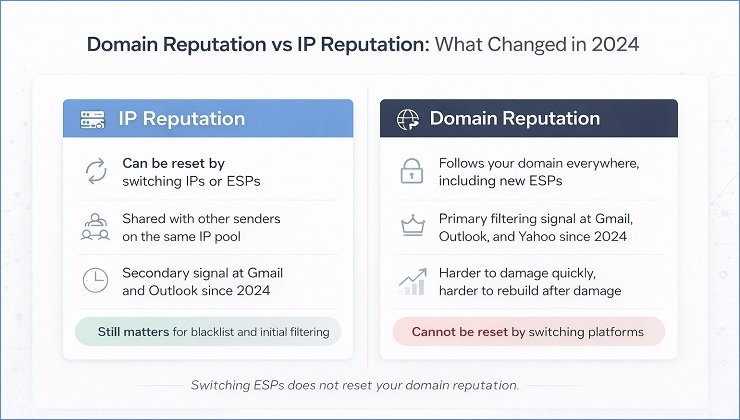
Domains are harder to change than IPs. A sender can rotate to a new IP in minutes. Changing a domain means abandoning an established brand identity, rebuilding domain authority from scratch, and losing years of positive sending history. ISPs recognised that domain identity is a more stable and meaningful indicator of sender behaviour than IP identity, and they shifted their weighting accordingly.
Domain reputation travels everywhere. If you build a damaged domain reputation using one ESP and then switch to another hoping for a fresh start, the domain reputation comes with you. The new ESP does not know your history, but Gmail does. Outlook does. Yahoo does. The filtering you experienced at your old ESP will follow you to the new one because the domain has not changed.
A clean IP does not compensate for a damaged domain. This is the practical reality that catches most senders off guard. You can be on a pristine shared IP pool, have a perfect Sender Score, and still have 70 percent of your sends to Gmail landing in spam because your domain reputation band in Google Postmaster Tools is sitting at “Low” or “Bad.”
IP reputation is still relevant. A blacklisted IP can override a healthy domain reputation and block delivery entirely. But once you are off blacklists and your IP is clean, domain reputation is the variable that determines where in the inbox your email lands, or whether it gets there at all.
For the full setup process that protects your domain reputation from authentication-driven damage, our email authentication guide covers SPF, DKIM, and DMARC in depth.
How ISPs Calculate Email Sender Reputation: The Signals That Matter Most
ISPs do not publish their exact algorithms. What is known comes from their own published guidelines, their postmaster documentation, and the consistent correlation between specific metrics and observable reputation outcomes across thousands of senders.
The signals that carry the most weight, across all three major providers, are as follows.
Spam complaint rate is the most damaging single signal. Gmail publishes a 0.10% daily threshold for warning-level enforcement and 0.30% for hard enforcement action. Yahoo operates at similar thresholds, though less publicly documented. Microsoft weighs complaint rate heavily in its SmartScreen filtering. A complaint rate spike on a single campaign can produce reputation damage that takes weeks to recover from even if subsequent campaigns perform cleanly.
Hard bounce rate is a strong signal of list quality, but the reputation mechanism is more nuanced than most guides suggest. Hard bounces from invalid addresses (5.1.x SMTP codes) signal poor list hygiene. Hard bounces from authentication failures (5.7.x SMTP codes) signal infrastructure problems. The two types damage reputation through different mechanisms and at different speeds. This distinction is covered in detail in the next section, because it is one of the most practically important things to understand about email sender reputation damage.
Spam trap hits carry significant weight, particularly at Spamhaus and the internal trap networks maintained by Gmail and Yahoo. A pristine trap hit is the most serious single negative event a sender can generate. Recycled trap hits accumulate damage over time. For the full breakdown of trap types and their reputation implications, our what are spam traps guide covers the topic in depth.
Engagement signals are positive reputation inputs: opens, clicks, replies, and the “move to inbox” or “not spam” action that some recipients take. These positive signals are what ISPs use to confirm that a sender is wanted. Low engagement alone does not immediately damage email sender reputation, but sustained low engagement over time does, because ISPs interpret it as evidence that the sender’s emails are not genuinely desired.
Authentication alignment signals that a sender has properly configured their infrastructure. SPF passing, DKIM signing with the sender’s own domain, and DMARC aligned and enforced are the three elements ISPs look for. Missing or failing authentication is not just a delivery risk. It is a trust signal in itself.
Sending consistency is a secondary but meaningful factor. Erratic volume patterns, long dormancy periods followed by large sends, and sudden spikes all look suspicious to ISP filtering systems. Consistent, predictable sending cadence builds reputation more effectively than sporadic high-volume campaigns.
Here is how these signals compare across the three major providers:
| Signal | Gmail Weight | Outlook Weight | Yahoo Weight |
|---|---|---|---|
| Spam complaint rate | Very high | High | Very high |
| Hard bounce rate | High | High | Medium |
| Authentication alignment | Very high | High | High |
| Engagement rate | Very high | Medium | Medium |
| Spam trap hits | High | High | High |
| Sending consistency | Medium | Medium | Low |
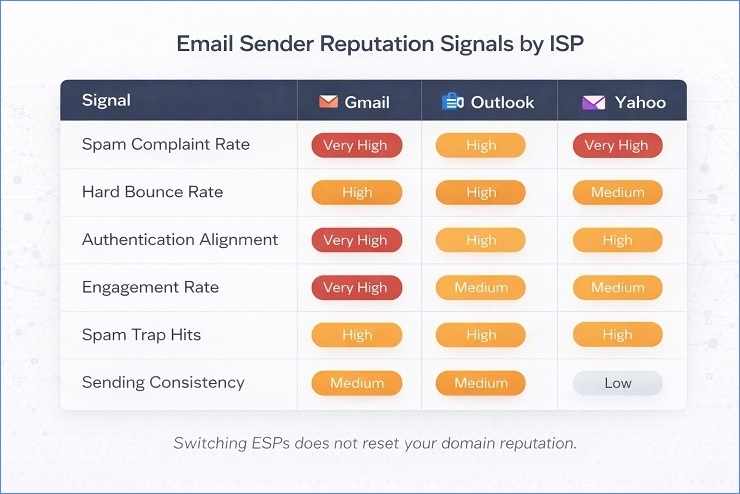
The engagement weighting at Gmail is particularly important and worth understanding clearly. Gmail places more emphasis on engagement signals than the other major providers, which is both an opportunity and a complication. The opportunity is that consistently high engagement can sustain email sender reputation even when other metrics are imperfect. The complication is that Apple Mail Privacy Protection has made open rate, the most commonly tracked engagement signal, significantly less reliable as a reputation monitoring input.
How Different Bounce Types Destroy Email Sender Reputation
Not all bounces damage email sender reputation equally. The type of bounce matters as much as the rate, and understanding the difference is what makes the fix specific rather than generic. Most guides tell you to keep your bounce rate low and leave it there. What they do not tell you is that a 2% bounce rate from authentication failures is a completely different problem from a 2% bounce rate from invalid addresses, even though both numbers look identical on your campaign dashboard.
The mechanism behind each type of damage is different. The speed at which each type accumulates reputation harm is different. And critically, the fix for each type is different. Applying the list quality fix to an authentication bounce problem produces no improvement. Applying the authentication fix to a list quality bounce problem does the same. Identifying which type is generating your reputation damage is the diagnostic step that most senders skip because they are looking at the total bounce rate number rather than the breakdown behind it.
Authentication Failure Bounces: The Most Damaging Type
Authentication-related hard bounces are the most reputation-damaging bounce category available, and they are damaging for a specific reason that sets them apart from every other bounce type.
When your email generates a 5.7.x SMTP code, the receiving server is not telling you that a specific address is invalid or that a specific mailbox is full. It is telling you that your entire sending infrastructure failed a policy or authentication check. The bounce is not about the recipient. It is about you.
ISPs interpret 5.7.x patterns very differently from 5.1.x patterns. A stream of 5.1.1 bounces (user unknown) tells an ISP that your list has some bad addresses. That is an email list hygiene signal. A stream of 5.7.26 bounces (DMARC failure) tells an ISP that every message you are sending is failing authentication. That is an infrastructure trust signal. The second interpretation is significantly more damaging because it applies to your entire sending programme, not just the contacts that generated the specific bounce.
The compounding factor is that authentication failure bounces damage email sender reputation at the domain level, which then affects delivery for every subsequent campaign regardless of list quality. You could have a perfectly clean list of verified, engaged contacts, and if DMARC is failing, your domain reputation will continue deteriorating with every send you make to that clean list.
The order of operations matters here. Before any list cleaning, before any engagement segmentation, before any re-engagement sequences, fix the authentication first. Every send through broken authentication is actively deepening the reputation damage that the subsequent list work is trying to repair. Our email authentication guide covers the full setup and repair process. For the specific SMTP codes that indicate authentication failures and what each one requires, our SMTP error codes guide has the complete reference.
The most common authentication bounce codes and their reputation implications:
| SMTP Code | What It Signals to ISPs | Reputation Impact |
|---|---|---|
| 550 5.7.1 | Policy rejection, authentication failure or reputation block | High, domain-level |
| 550 5.7.26 | DMARC failure specifically at Gmail | Very high, domain-level |
| 554 5.7.9 | Authentication not passing at all, both SPF and DKIM failing | Very high, infrastructure-level |
| 550 5.7.606 | Outlook IP range block | High, IP-level |
List Quality Bounces: The Gradual Reputation Erosion
Hard bounces from invalid addresses operate through a slower but still significant mechanism. Where authentication failure bounces signal infrastructure problems that damage email sender reputation at the domain level immediately, list quality bounces signal poor list hygiene and accumulate reputation damage over multiple campaigns.
The mechanism works like this. When a receiving server returns a 5.1.1 (user unknown) response to your sending infrastructure, it is recording that your domain sent mail to an address that does not exist. A handful of these on a campaign of 50,000 sends is noise. ISPs expect some level of natural address decay. But a sustained pattern of hard bounces across multiple campaigns tells a different story. It tells ISPs that your list management practices are poor, that you are not verifying addresses before sending, and that the addresses you are mailing have not been maintained or cleaned.
That pattern feeds directly into email sender reputation scoring as a negative list quality signal. And list quality signals, unlike individual campaign performance signals, tend to accumulate rather than reset between campaigns.
The threshold effect is important to understand:
- Below 0.5% hard bounce rate per campaign: Minimal reputation impact. Within the range ISPs expect from normal address decay.
- 0.5% to 2% hard bounce rate: Gradual reputation signal degradation. Spam filter scrutiny increases over time. Not immediately catastrophic but unsustainable.
- Above 2% hard bounce rate: Active email sender reputation damage. Some ISPs begin throttling delivery. Inbox placement rate starts declining measurably.
- Above 5% hard bounce rate: Serious reputation damage. Blacklisting risk increases significantly. ISPs at this level are treating the sending infrastructure as a risk source, not just a poorly managed one.
For the full framework of what constitutes an acceptable bounce rate and how the thresholds interact with reputation signals at each major provider, our acceptable email bounce rate guide covers the benchmarks in depth. And for the specific bounce causes that generate these invalid address bounces, what causes email bounces covers every category.
Soft Bounce Accumulation: The Hidden Reputation Risk
Soft bounces get less attention than hard bounces in most deliverability discussions because they are temporary failures rather than permanent ones. Your ESP retries them automatically, many resolve on their own, and the conventional wisdom is that they are mostly harmless to your email sender reputation.
That is partially true. A single soft bounce on a single address in a single campaign is genuinely low risk. But soft bounces interact with email sender reputation in a specific way that becomes significant when they accumulate on the same addresses across multiple campaigns.
When the same address produces a soft bounce repeatedly, across three or more separate campaigns, it is no longer a signal of a temporary server issue. It is a signal that the address is progressively becoming unreachable. Full mailbox that never clears. Server that is consistently unavailable for a specific domain. These patterns indicate contacts who have stopped using their inbox, which in many cases means the account is heading toward deactivation. And the progression from inactive to deactivated means the progression from soft bounce to hard bounce.
The reputation risk is not the soft bounces themselves. It is what happens when you keep sending to addresses in this progression. Each send to an actively decaying address adds a soft bounce to your sending history, suppresses your engagement rate for that send (because the contact is not receiving or engaging), and eventually produces a hard bounce when the account deactivates.
The practical rule to apply: if the same address has soft bounced across three or more separate campaigns, it should trigger list action. Move it to a re-engagement sequence or suppress it. Do not keep sending to it in the expectation that it will eventually resolve. For the full process of managing recurring soft bounces and their relationship to your overall bounce rate, our guide on reducing your email bounce rate covers the specific suppression thresholds and re-engagement sequence.
The Reputation Death Spiral: How Damage Compounds
This is the mechanism that most guides describe in one sentence and then move on from. It deserves more attention because it is the dynamic that turns a manageable reputation problem into a serious one, and understanding it is what makes the recovery process make sense.
The reputation death spiral works like this. Poor email sender reputation leads to spam folder placement. Spam folder placement means fewer recipients see the email. Fewer recipients seeing the email means lower engagement rates, because many of the people who would have opened or clicked never get the chance. Lower engagement rates generate further negative reputation signals. Further negative reputation signals produce even more aggressive spam folder placement. The cycle accelerates.
What makes this spiral genuinely dangerous is that it is self-sustaining without any new negative behaviour from the sender. You do not need to generate new spam complaints or new bounce spikes to continue deteriorating. The reduced engagement from continued spam placement does the damage on its own.
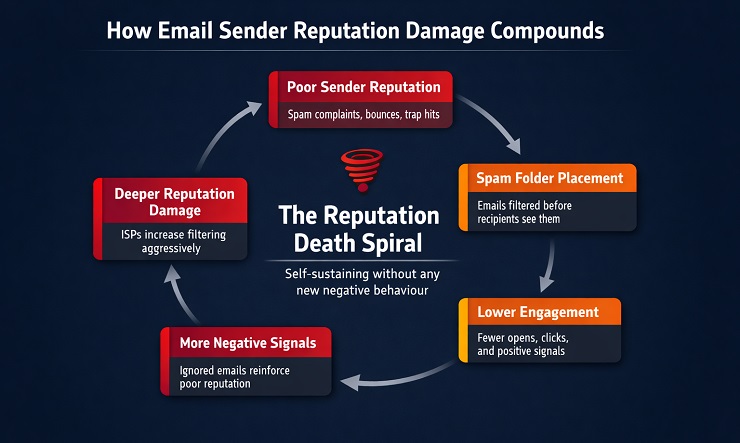
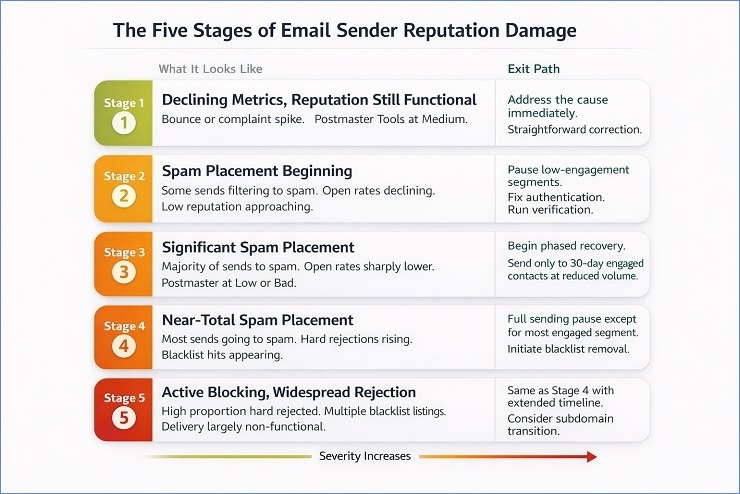
Here is how the five stages of the spiral present in practice, and what the exit path looks like at each one:
Stage 1: Declining metrics, reputation still functional
What it looks like: Bounce rate or complaint rate has spiked on one or two recent campaigns. Open rates are starting to soften. Google Postmaster Tools shows reputation moving from High to Medium.
What it does not look like yet: No major spam placement. Most emails still reaching the inbox. The metrics look slightly worse than usual but not alarming.
Exit path: Address the cause of the spike immediately. If it was a list quality bounce spike, run verification and suppress the problem segment. If it was a complaint rate spike, suppress the high-complaint segment and review the unsubscribe process. At this stage, the correction is relatively straightforward because reputation has not yet crossed into the damage zone.
Stage 2: Spam placement beginning, engagement declining
What it looks like: A noticeable proportion of sends to one or more providers landing in spam. Open rates dropping across campaigns. Click rates declining. Postmaster Tools showing Low reputation band or approaching it. Complaint rate remaining elevated despite fixes.
What it does not look like yet: No hard rejections. No blacklist listings. The email is getting through, just not to the inbox.
Exit path: Pause sends to low-engagement and unverified segments immediately. Prioritise sending only to contacts who have engaged in the last 30 days. Fix any authentication issues if present. Run bulk verification on the full active list. The goal at Stage 2 is stopping the negative engagement signal accumulation before it deepens further.
Stage 3: Significant spam placement, engagement collapsing
What it looks like: The majority of sends to one or more major providers landing in spam. Open rates have declined sharply from baseline. Postmaster Tools showing Low or Bad reputation. Complaint rate elevated. Some throttling appearing in sending logs.
What it does not look like yet: Not necessarily blacklisted on public databases. Hard rejection rate not extremely high. But inbox placement is significantly compromised.
Exit path: This is where the phased recovery protocol described later in this guide becomes necessary. Normal sending must be paused for low and medium engagement segments. Sending continues only to the most engaged contacts at reduced volume. The reputation signals need positive engagement input, not more volume through a damaged domain.
Stage 4: Near-total spam placement, throttling and rejections appearing
What it looks like: Most sends going to spam across multiple providers. Hard rejection rate rising. Some blacklist hits appearing. ISP throttling slowing down delivery. Postmaster Tools at Bad. Complaint rate remains high.
Exit path: Full sending pause except for the smallest, most engaged segment. Authentication must be verified and repaired before any sending resumes. Blacklist removal should be initiated through the process covered in our email blacklist check and removal guide. Recovery at this stage requires sustained effort over eight to twelve or more weeks.
Stage 5: Active blocking, widespread hard rejection
What it looks like: A significant proportion of sends producing hard rejections. Multiple blacklist listings. Postmaster Tools at Bad. Delivery to major providers largely non-functional.
Exit path: Same as Stage 4 but with longer timeline expectations. At Stage 5, the question of whether to attempt domain reputation recovery or transition high-value contacts to a new sending subdomain also becomes worth considering. The transition option is not giving up. It is a pragmatic decision about whether the accumulated negative history on the primary domain is recoverable within an acceptable timeframe.
The most important insight from the death spiral framework is this: the earlier you identify the stage you are in, the faster and cheaper the recovery. A Stage 1 problem addressed promptly stays a Stage 1 problem. A Stage 1 problem ignored for two or three months becomes a Stage 3 or 4 problem with a recovery timeline measured in weeks to months rather than days to weeks. Monitoring email sender reputation proactively is what makes early identification possible.
How Email Sender Reputation Differs by ISP
Email sender reputation is not a single score that applies uniformly across all inboxes. It is calculated independently by every major ISP using different signals, different weightings, and different data sources. Your reputation at Gmail is a separate measurement from your reputation at Outlook, which is separate again from Yahoo. A sender can have excellent standing at one provider and be actively filtered by another at the same time, with no indication in their overall campaign metrics that the problem is provider-specific.
This independence has a practical consequence that most guides skip over. When you are investigating a deliverability problem, the first diagnostic question is not “is my reputation bad?” It is “is my reputation bad at a specific provider, or across all of them?” The answer determines the entire investigation path. A problem affecting all providers points toward a public blacklist or a sending infrastructure issue. A problem concentrated at one provider points toward that provider’s specific internal reputation system.
Understanding what each major ISP weights most heavily is what makes that diagnosis specific rather than generic.
Gmail: Domain Reputation Is the Primary Signal
Gmail’s reputation system is the most extensively documented of the three major providers, primarily because Google publishes detailed postmaster guidelines and because Google Postmaster Tools provides direct visibility into how Gmail is evaluating your domain.
The domain reputation band in Google Postmaster Tools, High, Medium, Low, or Bad, is the single most important indicator of your email sender reputation health with Gmail. Here is what each band means in practice:
| Reputation Band | What It Means | Typical Inbox Placement |
|---|---|---|
| High | Gmail trusts your domain consistently | Most emails reach the inbox |
| Medium | Some filtering occurring, trust is conditional | Variable inbox placement |
| Low | Significant filtering active | Most emails landing in spam |
| Bad | Gmail has very low trust in your domain | Near-total spam placement or rejection |
What Gmail weights most heavily:
Gmail’s primary signal is spam complaint rate from Gmail users. Google publishes a 0.10% daily threshold as the warning level and 0.30% as the hard enforcement threshold. These are not campaign averages. They are rolling daily calculations, and a single campaign that generates elevated complaints can produce a measurable reputation band shift that persists for weeks.
The second major Gmail signal is DKIM-authenticated engagement. This is a detail that most guides miss entirely. Gmail does not count all engagement equally when calculating email sender reputation. It specifically weights engagement from messages that were authenticated via DKIM. A sender whose DKIM is misconfigured or not aligned with the visible From domain is essentially sending engagement signals that Gmail discounts. Getting the DKIM alignment right is not just an authentication requirement. It is directly tied to how effectively positive engagement feeds into your reputation score.
The Apple Mail Privacy Protection problem with Gmail monitoring:
Apple’s Mail Privacy Protection, introduced in 2021 and now widely adopted, automatically prefetches email content when an Apple Mail user receives a message. This prefetch registers as an open in your ESP’s tracking, regardless of whether the recipient actually read the email.
For senders with a significant proportion of Apple Mail users in their Gmail list, this inflates open rate data meaningfully. A sender reporting a 40% open rate may have a genuine human open rate closer to 20% or 25%, with the remainder being automated prefetch opens.
The reputation monitoring problem this creates is specific and practical. If you are using open rate as your primary signal for gauging engagement-driven email sender reputation health, you are working from data that overstates actual engagement. The positive reputation signals you think you are generating from those “opens” are, in a significant proportion of cases, not being generated at all because no human interaction occurred.
What to use instead of open rate for reputation monitoring:
- Click rate: Humans click. Prefetch does not. Click rate is the most reliable engagement signal that survives MPP.
- Reply rate: For transactional or one-to-one emails, reply rate is a strong positive reputation signal that is completely unaffected by prefetch.
- Conversion rate from email traffic: If your email drives to a specific landing page or action, conversion rate is a real engagement measure.
- The “not spam” action: When a Gmail recipient moves your email from spam to inbox, or explicitly marks it as “not spam,” this is a strong positive reputation signal. Tracking this through your ESP’s bounce and delivery logs can surface evidence of reputation recovery.
Outlook and Microsoft 365: IP Reputation Still Carries More Weight Here
Microsoft’s reputation system differs from Gmail’s in a meaningful way. While domain reputation has become the dominant signal at Gmail, Microsoft still places significant weight on IP reputation alongside domain-level signals. A sender who focuses exclusively on domain-level fixes while ignoring IP health will have a better experience recovering reputation at Gmail than at Outlook.
What Microsoft weights most heavily:
The primary signals for Microsoft are junk email complaint rate from Outlook users, sending IP history as tracked through SNDS, and authentication status. Microsoft’s SmartScreen filter uses a composite authentication signal called compauth, which evaluates SPF, DKIM, and DMARC together alongside other sending behaviour signals. You can see the compauth result in the Authentication-Results header of emails delivered to Outlook addresses. A compauth=pass result means Microsoft accepted your authentication. A compauth=fail result means Microsoft has doubts about your sending identity regardless of whether individual authentication records are technically passing.
The JMRP data source:
Microsoft’s Junk Mail Reporting Programme is separate from SNDS and provides something SNDS does not: individual complaint notifications when Outlook users mark your email as junk. This complaint data is per-message rather than aggregate, which makes it far more useful for diagnosing which specific campaigns or segments are generating Microsoft-specific reputation damage.
Enrolling in JMRP before a reputation problem appears is more valuable than enrolling after, because by the time you have a Microsoft reputation problem serious enough to investigate, the complaint data you needed to diagnose it weeks ago is no longer available. Consider JMRP enrolment alongside SNDS setup as baseline monitoring infrastructure, not reactive troubleshooting tools.
The practical difference from Gmail:
At Gmail, a sender can sometimes maintain reasonable inbox placement with a slightly imperfect IP history if their domain reputation and engagement signals are strong. At Microsoft, poor IP history is more likely to produce delivery problems even when the domain looks healthy. If you are experiencing Microsoft-specific delivery failures that are not responding to domain-level fixes, investigating your IP reputation through SNDS is the next diagnostic step.
Yahoo and AOL: Complaint Rate Is the Dominant Signal
Yahoo operates the mail infrastructure for Yahoo Mail, AOL, and several other Verizon Media properties. Its reputation system is the most complaint-rate-sensitive of the three major providers. Where Gmail has published thresholds and a visible reputation band, Yahoo’s internal reputation system is less transparent but consistently responds more aggressively to elevated complaint rates than either Gmail or Microsoft.
What Yahoo weights most heavily:
Complaint rate from Yahoo recipients is Yahoo’s primary reputation signal. The enforcement is less publicly documented than Gmail’s 0.10% threshold, but the practical observation from deliverability practitioners is that Yahoo begins filtering more aggressively at complaint rates that Gmail would still tolerate. A 0.15% daily complaint rate that produces a mild Gmail warning may produce significant Yahoo spam placement simultaneously.
The second factor is sending consistency. Yahoo’s filtering responds poorly to irregular sending patterns, particularly long gaps followed by large volume sends. This is worth noting for senders who batch campaigns or send infrequently, because the irregularity pattern itself creates a reputation risk at Yahoo independent of complaint rate or bounce rate.
The Yahoo FBL:
Yahoo’s complaint feedback loop gives enrolled senders individual complaint notifications when Yahoo recipients mark mail as junk. Unlike SNDS, which shows aggregate data, the FBL provides message-level complaint data. This makes it possible to identify not just that complaints are occurring but which specific campaigns, subject lines, or sending streams are generating them.
Enrolling in Yahoo Sender Hub and activating the FBL is the single most useful step a sender can take before a Yahoo-specific reputation problem appears. The complaint data it provides is not available through any other channel.
The practical implication for multi-provider reputation management:
Because each provider calculates email sender reputation independently, a sender experiencing simultaneous problems across all three providers is almost certainly dealing with a global sending infrastructure issue. A problem concentrated at Yahoo specifically, while Gmail and Outlook look healthy, points toward Yahoo’s complaint rate sensitivity and warrants looking at the Yahoo-specific complaint data before drawing broader conclusions.
How to Check Your Email Sender Reputation?
A sender reputation check is not a single lookup. It is a set of lookups across multiple tools that each give visibility into a different part of your overall email sender reputation picture. Running only one tool and concluding you have a clean reputation is one of the most common diagnostic mistakes in email deliverability. You might have a perfect Sender Score and a damaged Gmail domain reputation simultaneously. You might be clean on MXToolbox and actively filtered by Yahoo’s internal system with no public blacklist hit to show for it.
Understanding what each tool measures, what it does not measure, and what its limitations are is what makes a sender reputation check genuinely diagnostic rather than superficially reassuring.
The Tools for a Complete Email Sender Reputation Check
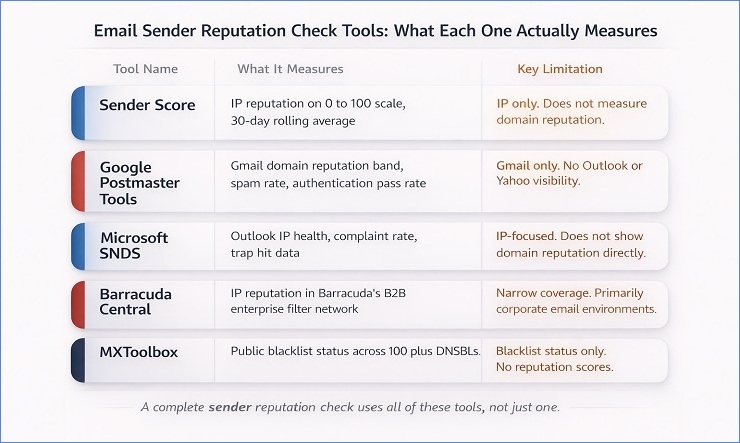
Here is each major tool evaluated for what it actually tells you and where its coverage ends.
Sender Score
Sender Score is a free service by Validity that assigns your sending IP a score from 0 to 100 based on a 30-day rolling window of IP reputation data from Validity’s data network.
What it tells you: how your sending IP is performing relative to other senders in Validity’s network. Scores above 80 generally indicate good IP health. Scores between 70 and 80 indicate some risk. Scores below 70 suggest active problems.
What it does not tell you: anything about your domain reputation. Sender Score is an IP-level tool. A perfect Sender Score with a damaged domain reputation still produces Gmail spam placement. If you use Sender Score as your primary email sender reputation check, you are checking half the picture.
Additional limitation: the 30-day rolling window means recent improvement takes time to show, and recent damage also takes time to appear fully. A campaign that generated significant reputation damage last week may not be fully reflected in this week’s Sender Score.
Google Postmaster Tools
Free, requires domain verification, and essential for any sender whose audience includes Gmail addresses.
What it tells you: your domain reputation band with Gmail specifically (High, Medium, Low, or Bad), daily spam rate, authentication pass rate for Gmail recipients, delivery errors, and IP reputation data for your sending IPs as observed by Gmail.
What it does not tell you: anything about your reputation at Outlook, Yahoo, or any other provider. Postmaster Tools is Gmail’s view only.
This is the most important free tool available for email sender reputation monitoring. The domain reputation band is the single most actionable data point. If your band is at Low or Bad, that is the starting point for understanding a Gmail-specific delivery problem. If it is at High, you can rule out domain-level reputation as the cause of any Gmail issues you are experiencing and look elsewhere.
One important note on reading Postmaster Tools data: a single-day spike in spam rate or a single-day reputation band dip is not always significant. ISPs see fluctuations in daily data. What you are looking for is trends across multiple consecutive days. A reputation band that has been sitting at Medium for three weeks and has now moved to Low on back-to-back days is a meaningful signal. A single day at Low surrounded by High readings is probably noise.
Microsoft SNDS
Free, requires enrolment with each sending IP you want to monitor.
What it tells you: your sending IP’s status in Microsoft’s infrastructure, presented as a colour-coded signal (Green, Yellow, Red), complaint rate data from Outlook users, and trap hit data for your IPs as observed by Microsoft.
What it does not tell you: domain reputation specifically. An IP showing Green in SNDS does not guarantee inbox placement at Outlook if your domain reputation or content signals are problematic.
The combination of SNDS and JMRP gives you the most complete picture of your email sender reputation health with Microsoft. SNDS shows aggregate IP health and trap data. JMRP shows individual complaint events. Together they cover the two primary signals Microsoft uses to assess sender trustworthiness.
Barracuda Central
Free to check, widely used in enterprise B2B mail environments.
What it tells you: whether your sending IP is listed in Barracuda’s reputation network, and broadly whether your IP is categorised as Good or Poor by Barracuda.
Why it matters for B2B senders specifically: Barracuda’s filtering is used heavily in corporate email environments. A sender with a primarily consumer list may have minimal Barracuda impact. A sender whose list is heavily corporate email addresses will find that Barracuda reputation has a significant effect on their B2B delivery rates. Running a Barracuda check as part of your email sender reputation check routine is particularly important for any B2B-oriented sending programme.
MXToolbox
Free, widely used.
What it tells you: whether your sending domain or IP appears on any of over 100 public DNS-based blacklists simultaneously.
What it does not tell you: reputation scores, domain reputation health, ISP-specific standing, or any private blacklist status. MXToolbox is specifically a blacklist check tool. Clean MXToolbox results mean you are not on a public blacklist. They do not mean your email sender reputation is healthy. A sender can be entirely clean on MXToolbox and have a Bad domain reputation at Gmail at the same time.
For the full blacklist check process and what to do when a listing is found, our email blacklist check and removal guide covers the complete process.
Here is the full comparison to use as your email reputation lookup reference:
| Tool | What It Measures | ISP Coverage | Key Limitation | Best Use Case |
|---|---|---|---|---|
| Sender Score | IP reputation, 0 to 100 | Validity network, not ISP-specific | Does not measure domain reputation | IP health benchmarking |
| Google Postmaster Tools | Domain reputation band, spam rate, delivery errors | Gmail only | No Outlook or Yahoo visibility | Gmail reputation monitoring |
| Microsoft SNDS | IP health, complaint rate, trap hits | Microsoft only | Does not show domain reputation directly | Outlook IP health and complaint data |
| Barracuda Central | IP reputation in Barracuda network | B2B enterprise filters | Narrow coverage, primarily corporate environments | B2B sender reputation check |
| MXToolbox | Public blacklist status | 100 plus DNSBLs | No reputation scores, no private blacklists | Blacklist status check |
Reading Reputation Signals in Your Campaign Data
The tools above tell you what your email sender reputation looks like from the outside. Your campaign data tells you what it looks like from the inside, in real time, with every send you make. The two sources together give you a more complete picture than either one alone.
Here are the campaign metrics that signal email sender reputation problems before the tools catch them.
1. Inbox placement rate declining across consecutive campaigns.
If you have access to inbox placement testing through a tool like GlockApps or Litmus, a consistent downward trend across three or more sends is a leading indicator of reputation deterioration. Inbox placement declines before domain reputation bands shift in Postmaster Tools.
2. Open rates dropping without content or subject line changes.
Allowing for the MPP caveat covered in the Gmail section, a genuine trend of declining open rates across multiple campaigns, particularly when click rates are also declining, suggests that fewer emails are reaching engaged recipients. That pattern often reflects increasing spam folder placement.
3. Bounce rates rising in the 5.7.x code range.
Authentication-related bounce codes appearing in your bounce report signal reputation-relevant infrastructure problems. These codes are the fastest-acting reputation damage signals available because they show up in real time, campaign by campaign, rather than as lagging indicators in reputation tools. Our SMTP error codes guide covers every code that signals reputation damage and what each one requires.
4. Provider-specific delivery failures.
All bounce codes concentrated at Gmail addresses while Outlook and Yahoo look normal. Or all throttling messages from Yahoo while Gmail delivery is clean. Provider-specific patterns are the clearest early signal of a private ISP reputation problem rather than a global sending infrastructure issue.
5. Engagement rate suddenly lower for a specific acquisition source or segment.
If one segment of your list produces notably worse engagement than others, that segment may be generating disproportionate reputation damage. Segment-level engagement analysis is one of the fastest ways to identify the specific part of your list or sending behaviour that is driving overall email sender reputation deterioration.
How to Rebuild a Damaged Email Sender Reputation
Rebuilding email sender reputation requires a staged approach. The actions that help in the early phases are different from the actions that help in the later phases, and doing them in the wrong order is the most common reason recovery takes longer than it needs to.
The single most important thing to understand before starting recovery is this: email sender reputation cannot be rebuilt by stopping bad behaviour alone. Pausing sends, cleaning your list, and fixing authentication are all necessary. But they are not sufficient on their own. ISPs use rolling averages that weight recent behaviour heavily. To move the reputation band upward, you need to generate positive engagement signals, not just reduce negative ones. Recovery is an active process, not a passive one.
The second most important thing to understand is the timeline expectation. Reputation recovery is measured in weeks to months, not days. Senders who expect to see Google Postmaster Tools move from Low to High within a week of cleaning their list are going to lose patience and resume full-volume sending before the repair is complete, which is the single most common mistake that extends recovery timelines significantly.
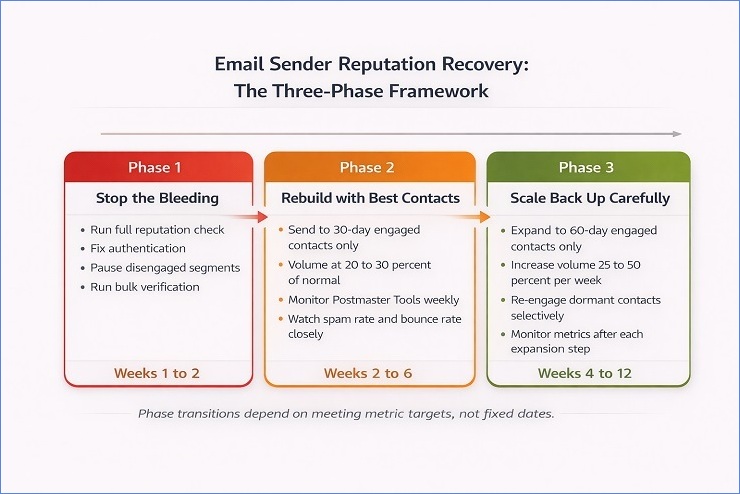
With those two principles established, here is the staged recovery framework.
Phase 1: Stop the Bleeding (Weeks 1 and 2)
The goal of Phase 1 is not to start recovering. It is to stop the accumulation of negative signals that are actively driving email sender reputation downward. Until those negative inputs are removed, any positive signals you generate are fighting an uphill battle against ongoing damage.
Actions in Phase 1, in order:
First, run a complete email sender reputation check across all tools. Google Postmaster Tools for Gmail domain reputation, Microsoft SNDS for Outlook IP health, Sender Score for IP benchmarking, and MXToolbox for blacklist status. Establish your baseline before touching anything else. You need to know which providers are affected, how severely, and whether a blacklist listing is contributing to the problem.
Second, fix authentication before anything else. Check that SPF, DKIM, and DMARC are all passing and aligned. Run a test send to Gmail, Outlook, and Yahoo addresses and check the Authentication-Results header in each. If any show auth=fail or dmarc=fail, that is the first fix. Sending more email through broken authentication during a reputation recovery deepens the damage with every campaign.
Third, pause sends to any segment that has not engaged in the past 60 days. Do not suppress these contacts permanently at this stage. Just stop sending to them while Phase 1 is in progress. The goal is removing the low-engagement, high-complaint-risk contacts from your active sending while you rebuild.
Fourth, run bulk verification on your full active list. Identify and suppress all invalid, risky, and unverified addresses. The addresses generating 5.1.x hard bounces need to come off the list before Phase 2 begins.
Fifth, if any blacklist listings were identified in the reputation check, initiate the delisting process through the appropriate channel for each blacklist. Do not resume normal sending volume until delisting is confirmed.
What Phase 1 does not include: re-engagement campaigns, win-back sequences, or any attempt to send to contacts who have not recently engaged. Those come later. At this stage, any send to a low-engagement or unverified contact is a potential complaint or bounce that resets the recovery clock.
Phase 2: Rebuild with Your Best Contacts (Weeks 2 to 6)
Phase 2 begins once authentication is confirmed passing, the active list is verified, and you have paused sends to disengaged segments. The goal of Phase 2 is generating the positive engagement signals that move your email sender reputation band upward.
What your sending looks like in Phase 2:
Send only to contacts who have engaged within the last 30 days. Opened, clicked, replied, or converted within the past month. These are your highest-trust contacts, the ones most likely to generate the positive engagement signals your reputation needs and least likely to generate the complaints or bounces that are still damaging it. This is practically rewarming your email and domain.
Volume in Phase 2 should be 20 to 30 percent of your normal campaign size. This feels uncomfortable for most senders because it means reaching a much smaller portion of the list than usual. But the goal is not reach during Phase 2. The goal is generating consistent positive engagement signals at a volume that does not overwhelm your current reputation standing.
Send consistently during Phase 2. Two or three times per week at lower volume is more effective for reputation recovery than once per week at higher volume. ISPs weight sending consistency as a positive signal. Regular, predictable sending from an engaged audience generates compounding positive reputation inputs.
What to monitor weekly in Phase 2:
Google Postmaster Tools domain reputation band – You are looking for the band to stabilise first, then to show upward movement. A band that was at Bad moving to Low is progress. Low moving to Medium is more significant progress. Do not expect movement every week. Two to three weeks of stable consistent sending often precede the first measurable band improvement.
Spam rate in Postmaster Tools – This is the daily percentage of your Gmail sends that recipients marked as spam. Target below 0.05% during recovery. If it spikes above 0.10% on any campaign during Phase 2, pause that campaign type and investigate the segment before the next send.
Hard bounce rate per campaign – Target below 0.5% during Phase 2. Any campaign producing above 1% hard bounces should prompt a re-examination of the specific segment before the next send.
Microsoft SNDS complaint rate trend – Watch for week-over-week improvement in the complaint rate data. A consistent downward trend in SNDS complaint data alongside Postmaster Tools improvement is the signal that Phase 2 is working.
Phase 3: Scale Back Up Carefully (Weeks 4 to 12)
Phase 3 begins when specific conditions are met, not on a fixed date. Moving to Phase 3 too early is one of the most common mistakes in reputation recovery. The conditions to look for before beginning Phase 3:
- Google Postmaster Tools domain reputation band at Medium or above for at least two consecutive weeks.
- Spam rate in Postmaster Tools consistently below 0.05% per day.
- Hard bounce rate consistently below 0.5% per campaign.
- Microsoft SNDS complaint rate in the Green range for at least one week.
- No new blacklist listings in the most recent MXToolbox check.
If all five conditions are met, you are ready to begin expanding your sending audience and increasing volume.
How to scale in Phase 3:
Expand the engagement window from 30 days to 60 days. You are now sending to contacts who engaged within the last two months rather than the last month. Monitor the reputation metrics for one week after this expansion before increasing volume.
Increase volume by 25 to 50 percent per week as long as metrics stay within target ranges. Not per campaign. Per week. If you send three campaigns per week, each one should see a proportional volume increase, not a single campaign that doubles.
Watch specifically for the first sign of metric deterioration after each expansion step. A complaint rate that was stable at 0.04% and suddenly jumps to 0.09% after expanding to a new segment means that segment should be paused and investigated before the next expansion step.
Re-engaging dormant contacts during Phase 3:
Contacts who have not engaged in 60 to 180 days can be introduced to a re-engagement sequence during Phase 3, once reputation metrics are stable. This is not a standard campaign send to dormant contacts. It is a single, clearly framed re-engagement email with a simple yes or no prompt: “We have not heard from you in a while. Still interested in hearing from us?” Contacts who engage from this go back into the active sending pool. Contacts who do not engage within seven days are suppressed before Phase 3 continues.
Do not attempt to re-engage contacts who have been dormant for more than 180 days during Phase 3. These contacts carry a high risk of complaint generation and spam trap hits that can reverse Phase 3 progress. Wait until the primary domain reputation is fully recovered and stable at High for at least four weeks before considering any dormant re-engagement beyond the 180-day mark.
Realistic Recovery Timelines
Setting accurate expectations about how long email sender reputation recovery takes is one of the most practical things this guide can offer. “It depends” is technically accurate but not useful. Here are realistic timelines based on damage severity.
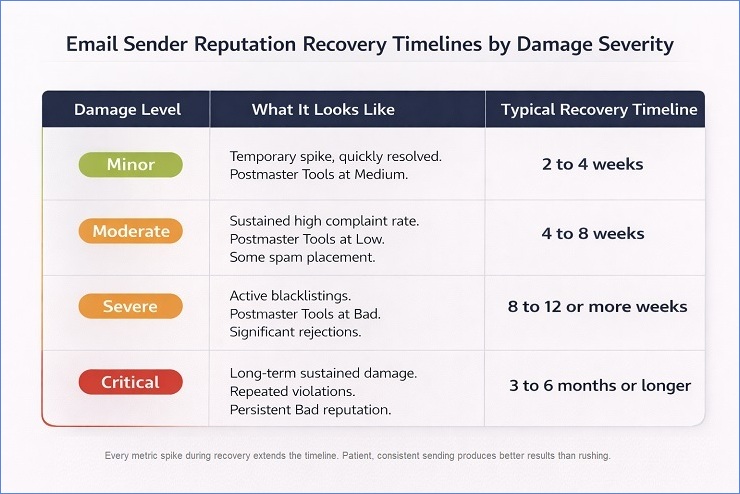
| Damage Level | What It Looks Like | Typical Recovery Timeline |
|---|---|---|
| Minor | Temporary bounce or complaint spike, quickly resolved. Postmaster Tools at Medium, no blacklistings. | 2 to 4 weeks |
| Moderate | Sustained high complaint rate or significant list quality issues. Postmaster Tools at Low. Some spam placement. | 4 to 8 weeks |
| Severe | Active blacklistings, domain reputation at Bad in Postmaster Tools. Significant spam placement or rejections. | 8 to 12 or more weeks |
| Critical | Long-term sustained damage, repeated violations, persistent Bad reputation. | 3 to 6 months or longer |
A few important caveats on these timelines –
- Recovery is not linear: You will often see several weeks of stable metrics with no visible band improvement in Postmaster Tools, followed by a sudden shift upward. This is normal. ISPs use rolling averages that require sustained positive behaviour before they register improvement, and the improvement often appears in a step rather than a gradual slope.
- Every metric spike during recovery extends the timeline: A single campaign that generates a 0.20% complaint rate during Phase 2 can set back two weeks of progress. This is why the phased approach emphasises small, controlled sends to highly engaged contacts rather than attempting to accelerate recovery through higher volume.
- IP reputation recovers faster than domain reputation: Minor IP reputation issues can often be resolved within two to four weeks of clean sending. Domain reputation, particularly domain reputation at Gmail, responds more slowly because it reflects longer-term sending history. A damaged domain reputation from six months of poor practices will not be fully repaired in two weeks of good ones.
When to consider a new sending subdomain:
If your primary domain has been at Bad reputation in Postmaster Tools for more than three months without measurable improvement despite following the phased recovery protocol, transitioning to a subdomain for bulk sending is worth considering.
A subdomain (for example, news.yourcompany.com or campaigns.yourcompany.com) starts with a clean reputation history. It builds its own reputation independently from the primary domain. This allows you to establish positive sending history on the subdomain while the primary domain’s reputation continues its slower recovery, and it separates the reputation risk of bulk sending from the transactional mail and direct outreach that use the primary domain.
This is not a workaround or a shortcut. The subdomain still needs to be warmed up properly, authenticated correctly, and used with clean lists and good sending practices. But it is a pragmatic tool for senders whose primary domain reputation damage is severe enough that recovery through that domain alone would take longer than the business can sustain.
Protecting Email Sender Reputation: The Ongoing Practices
Email sender reputation is not a problem to solve once. It is an ongoing asset to manage consistently. The senders who maintain strong email sender reputation over years are not doing anything dramatically different from the recovery process described above. They are doing the same things consistently before a problem develops rather than reactively after one appears.
The Metrics to Monitor Every Week
Building a weekly monitoring habit around these five metrics is the most time-efficient way to catch email sender reputation problems before they compound into something requiring a full recovery protocol.
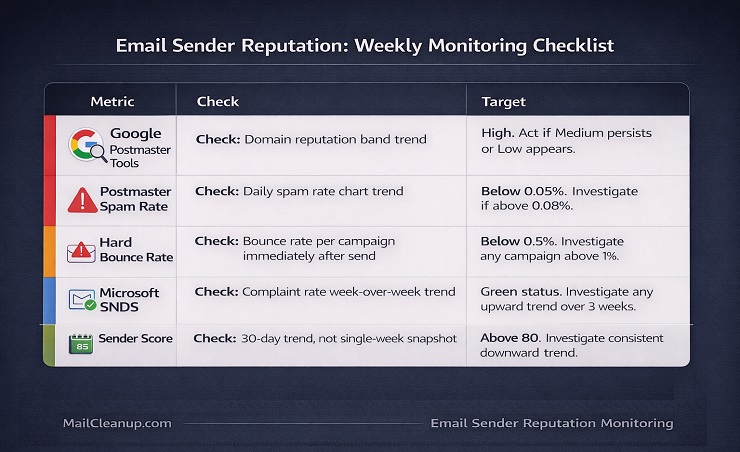
- Google Postmaster Tools domain reputation band: Five minutes per week. Look for the trend, not individual-day fluctuations. A band that has been steady at High for months and shifts to Medium on two consecutive days warrants investigation. A single-day dip surrounded by High readings is likely noise.
- Daily spam rate in Postmaster Tools: The chart is more useful than the number. A spam rate that has been flat at 0.03% and ticks up to 0.07% across several consecutive days is an early warning signal worth acting on before it reaches 0.10%.
- Hard bounce rate per campaign: Reviewed immediately after every send. Target below 0.5%. Any campaign above 1% should prompt a segment-level review before the next send to that list or segment.
- Microsoft SNDS complaint rate: Reviewed weekly for senders with significant Microsoft-hosted audience. Watch for week-over-week trends rather than absolute numbers. A consistent upward trend over three weeks is more meaningful than a single elevated week.
- Sender Score trend over 30 days: Useful as a slow-moving benchmark rather than a real-time signal. A consistent downward trend in Sender Score over several weeks, even if still above 80, is a signal worth cross-referencing against the other metrics to identify whether IP-level reputation is deteriorating.
The Sending Behaviour Practices That Protect Reputation Long-Term
These are not the same as a recovery checklist. Recovery is reactive. These practices are what make recovery rarely necessary.
1. Send consistently
Regular, predictable sending volume builds email sender reputation over time. Irregular patterns, particularly long gaps followed by large sends, look suspicious to ISP filtering systems and erode the consistency signal that contributes positively to reputation scoring. If your sending cadence needs to change significantly, increase or decrease volume gradually across several sends rather than in a single step.
2. Prioritise engagement every time
Every campaign, before you look at list size or reach, ask whether the segment you are sending to is likely to engage. Sending to a large segment with known low engagement to maximise reach is a trade-off that most senders underweight. Each send to a disengaged segment is a potential complaint, a potential ignore-and-delete pattern, and a missed opportunity to generate the positive signals that build email sender reputation.
3. Suppress disengaged contacts on a rolling basis
Contacts who have not engaged in six months should not be receiving regular campaign sends. They are not generating positive signals. They are potential complaint sources. They are candidates for spam trap recycling as their accounts continue to age. Removing them from active sends on a rolling basis is the practice that prevents the list quality problems that damage email sender reputation from accumulating in the first place.
4. Verify before every significant import
Any third-party import, trade show list, lead generation import, or CRM sync involving contacts collected outside your own opt-in forms should be verified before the first send. Unverified imports are the single most common introduction point for invalid addresses, spam trap risk contacts, and data quality problems that produce the bounce rates and complaint rates that damage email sender reputation.
5. Maintain authentication continuously
Authentication records need periodic checking because DNS changes, ESP migrations, and configuration updates can inadvertently break SPF, DKIM, or DMARC records without generating an obvious alert. A quarterly authentication audit, running your domain through MXToolbox’s SPF and DKIM lookups and checking the DMARC record directly, catches these drift issues before they produce the authentication failure bounces that damage email sender reputation most quickly.
6. Enrol in feedback loops proactively
Yahoo’s FBL and Microsoft’s JMRP both provide complaint data that no other source gives you. Enrolling before a problem appears means you have the data to diagnose a complaint rate spike the moment it starts, rather than noticing it three campaigns later when the reputation damage has already accumulated.
Your Email Sender Reputation Is a Long-Term Asset. Treat It Like One.
Most of the senders who end up in serious email sender reputation recovery situations got there the same way: they treated reputation as a background condition rather than an active system, noticed the problem later than they should have, and then discovered that reversing months of accumulated damage takes significantly longer than causing it did.
The framework in this guide, the bounce-type damage mapping, the per-ISP differences, the staged recovery phases, the monitoring cadence, is not complicated. What it requires is consistency. Running the weekly checks. Suppressing contacts who have stopped engaging. Verifying imports before they go live. Fixing authentication before it produces 5.7.x bounces rather than after.
The two variables that account for most email sender reputation damage are list quality and authentication. List quality problems introduce the invalid addresses, spam trap risk contacts, and unverified imports that generate the bounce rates and complaint rates that erode reputation gradually. Authentication failures introduce the infrastructure trust signals that erode reputation quickly and broadly across every send. Both are addressable. MailCleanup is built specifically for the list quality side, processing lists of any size and returning a risk-scored output that identifies the addresses generating your bounce rate and reputation damage before they get the chance to do it.
Once list quality is addressed and authentication is clean, the ongoing practices in this guide are what keep the system healthy.
FAQs on Email Sender Reputation
What is email sender reputation?
Email sender reputation is the trust score that ISPs assign to your sending domain and IP address based on your historical sending behaviour. It determines whether your emails reach the inbox, filter to spam, or get rejected entirely before any content is evaluated. Every email you send generates data points. Positive signals like opens, clicks, and replies build trust. Negative signals like spam complaints, hard bounces, and spam trap hits erode it.
What is the difference between domain reputation and IP reputation?
Domain reputation is tied to your sending domain and follows it everywhere, including to new ESPs. IP reputation is tied to the specific server IP address used to send your email and can be reset by switching IPs or providers. Since 2024, domain reputation has become the dominant filtering signal at Gmail, Outlook, and Yahoo. Switching ESPs does not reset your domain reputation. A damaged domain reputation will follow you to every new platform you move to.
How do I check my email sender reputation?
A complete sender reputation check requires multiple tools because each one covers a different part of the picture. Google Postmaster Tools shows your domain reputation band with Gmail specifically, ranging from High to Bad. Microsoft SNDS shows your IP reputation and complaint rate with Outlook’s infrastructure. Sender Score by Validity gives your IP a 0 to 100 score based on a 30-day rolling average. MXToolbox checks your public blacklist status. Running all four gives you the most complete view of your email sender reputation across major providers.
What is a good email sender reputation score?
On the Sender Score scale of 0 to 100, scores above 80 generally indicate good IP reputation health, scores between 70 and 80 suggest some risk, and scores below 70 indicate active problems. In Google Postmaster Tools, the domain reputation bands are High, Medium, Low, and Bad. High means Gmail rarely filters your mail. Bad means near-total spam placement or rejection. These two tools measure different things, so a good Sender Score does not guarantee a good domain reputation band and vice versa.
How do bounces damage email sender reputation?
Different bounce types damage email sender reputation through different mechanisms. Authentication failure bounces, identified by 5.7.x SMTP codes, are the most damaging because they signal an infrastructure problem affecting every send, not just individual contacts. List quality bounces from invalid addresses signal poor list hygiene and accumulate reputation damage gradually over multiple campaigns. Recurring soft bounces on the same addresses signal that contacts are becoming unreachable, suppressing engagement rates and adding bounce noise to your reputation signals over time.
How long does it take to rebuild email sender reputation?
Recovery time depends on the severity of the damage. Minor issues like a temporary complaint or bounce spike typically resolve in two to four weeks of consistent clean sending. Moderate damage with sustained elevated complaint rates and some spam placement usually takes four to eight weeks. Severe damage with active blacklistings and Bad domain reputation in Postmaster Tools requires eight to twelve or more weeks. Critical long-term damage can take three to six months or longer. Resuming full sending volume too quickly is the most common mistake that extends every one of these timelines.
Does switching ESPs fix a damaged email sender reputation?
No. Switching ESPs changes your sending IP, which can reset IP-level reputation, but it does not reset your domain reputation. Domain reputation is calculated by ISPs based on your sending domain, not your infrastructure. Gmail, Outlook, and Yahoo track your domain history regardless of which platform sends your email. A sender who moves to a new ESP hoping for a fresh start will find that the same domain reputation problems follow them because the domain itself has not changed.
What are email sender reputation best practices?
The core practices that protect email sender reputation long-term are consistent sending cadence without sudden volume spikes, engagement-led sending that prioritises contacts who have recently opened or clicked, rolling suppression of contacts who have not engaged in 90 to 180 days, bulk email list cleaning & verification before any significant import or third-party acquisition, proper SPF, DKIM, and DMARC authentication with DMARC at p=reject, and weekly monitoring through Google Postmaster Tools and Microsoft SNDS. Enrolling in Yahoo’s feedback loop and Microsoft’s Junk Mail Reporting Programme gives you complaint data before reputation damage accumulates.