

Six different companies each compute something they call an email deliverability score, and none of them agree with each other.
- Google Postmaster Tools: rates your domain Bad, Low, Medium, or High.
- Validity’s Sender Score: a number from 0 to 100.
- Microsoft’s SNDS: green, yellow, or red.
- Yahoo’s Sender Hub: no rating at all, just raw numbers.
Each system looks at a different thing, a domain, one specific IP, a DKIM signature, on its own scale, built from its own inputs. None of these providers has ever confirmed reading any of the others’ numbers. That gap matters for you in practice, not just on paper. You can hold a Sender Score of 95 while Gmail quietly routes half your mail to spam. Sender Score and Gmail’s own domain reputation come from different evidence and answer different questions.
This guide walks through what each major system actually measures, as one piece of the broader email deliverability picture. It covers which system is worth checking first, given who you send to. It also covers the one input, list quality, that moves several of these scores at once, even though no dashboard names it directly.
TL;DR on Email Deliverability Score
- Email deliverability score isn’t one number. It’s a name for at least six different, incompatible measurements, each run by a different company, on a different scale.
- Google Postmaster Tools rates domains and IPs as Bad, Low, Medium, or High. A planned retirement of this rating was announced, then postponed, and it remains live.
- Validity’s Sender Score rates a sending IP from 0 to 100, with 80 and above generally read as healthy; neither Gmail nor Outlook has confirmed using it.
- Microsoft’s SNDS reports sending IPs as green, yellow, or red and requires a registered dedicated IP. Yahoo’s Sender Hub gives no rating at all, only a raw complaint rate and delivered volume.
- Third-party checkers like Warmy, MailReach, and GlockApps simulate a test send across providers, a genuinely different check than any of the official systems above.
- List quality feeds several of these systems at once, through bounce and unknown-user signals, even though no single score names it directly.
- Raising a score comes down to a short list: authentication, complaint rate, list verification, IP warmup, and engagement segmentation, not chasing one number.
What Is an Email Deliverability Score?
A score predicts. A rate reports. An email deliverability score is a provider’s own composite rating of how trustworthy your sending looks to them. It’s computed from their own data, before your next message even goes out. A deliverability rate is a different kind of number, the share of already-sent email that actually reached the inbox, measured after the fact. That’s the real line to hold onto, and it’s also the line between this guide and email deliverability rate.
There’s no universal answer to what is a good email deliverability score, because there’s no universal score to grade in the first place. Validity calls 80 and above good on its 0-to-100 scale. Google’s scale skips numbers entirely and runs Bad to High. Microsoft’s SNDS shows a color instead of either. Yahoo skips the rating step altogether and hands you raw numbers.
Most third-party tools built to check email deliverability score results actually check only one of these systems, not all of them together. That’s not necessarily a flaw in the tool. It’s a gap in how the phrase gets used. “Your deliverability score” implies one answer. The honest answer is “which one do you mean?” Picking the right system to watch, and reading it correctly once you have, depends on who actually opens your mail. A Yahoo-heavy list and a Gmail-heavy list point toward two completely different dashboards, covered next.
The Email Deliverability Score Map
Six systems currently use some version of the term “email deliverability score.” None of them share a scale, an identifier, or, as far as any of them has disclosed, any actual data with each other.
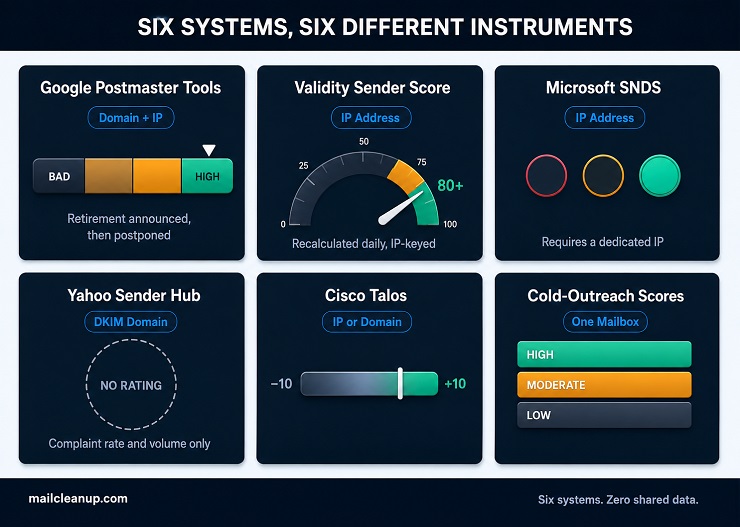
| System | Keyed To | Scale | What “Good” Looks Like |
|---|---|---|---|
| Google Postmaster Tools | Domain and IP, separately | Bad, Low, Medium, High | Medium or High |
| Validity Sender Score | IP address | 0 to 100 | 80 and above |
| Microsoft SNDS | IP address | Green, Yellow, Red | Green |
| Yahoo Sender Hub | DKIM domain | No rating, just raw numbers | Complaint rate well under 0.3% |
| Cisco Talos | IP or domain | -10 to +10 | A positive score, grouped as “Good” |
| Cold-outreach mailbox scores | Individual mailbox | High, Moderate, Low | High |
Someone who says check my email deliverability score could mean any of six systems. The table above is how to tell which one actually applies. Pick the row that matches who actually opens your mail, not the row with the most familiar name. A B2B sender with a Yahoo-heavy list gets almost nothing useful from watching Sender Score alone, since Yahoo has never confirmed reading it.
Your Email Deliverability Score on Gmail
Google Postmaster Tools rates your domain and your sending IP separately, on a four-band scale: Bad, Low, Medium, or High. High is what you want. Bad means Gmail is actively filtering your mail before it reaches the inbox. This is the dashboard behind almost every email deliverability score Gmail question, even when the person asking doesn’t know its name yet.
Google announced plans to retire this exact rating, then postponed that change after senders pushed back. No new retirement date has been announced. The Bad-to-High rating is still live right now.
Domain reputation and IP reputation aren’t the same reading. A shared sending platform can carry a decent IP reputation from other senders’ behavior, while your own domain reputation stays weak, or the reverse. A dedicated post on sender reputation covers how each one actually gets built and repaired, and what to do when they disagree.
Your Email Deliverability Score on Outlook and Microsoft
Microsoft’s version of this is called SNDS, Smart Network Data Services. It reports each sending IP as green, yellow, or red. It only works for a dedicated IP address you’ve registered yourself; shared IPs don’t show up in it at all. SNDS is what most people actually mean by an email deliverability score Outlook question, whether or not they know its name. Repairing a damaged IP reputation works the same way here as it does on Gmail.
Complaint rate feeds SNDS directly. Microsoft also tracks complaints through a separate, more specific score: the Bulk Complaint Level. It’s a 0-to-9 scale most senders never see mentioned outside their ESP’s own dashboard. A dedicated post on spam complaint rate covers exactly how that threshold works and what happens once you cross it.
If SNDS shows yellow or red with no obvious spike in bounces, check your complaint rate first. It moves faster than almost anything else on this list, and Microsoft weighs it heavily.
Your Email Deliverability Score on Yahoo
Yahoo doesn’t publish a rating at all. No letter grade, no color, no 0-to-100 number. Sender Hub, Yahoo’s own postmaster tool, reports two things instead: your complaint rate and how much of your mail actually got delivered. Both are tied to your DKIM-signing domain, not an IP address. That’s the real substance behind any email deliverability score Yahoo question: there isn’t a score, just those two numbers. That reporting lives inside a feature called Insights, added to Sender Hub only recently, newer than Google’s or Microsoft’s equivalents.
Yahoo tracks complaint rate for the same reason Google does. Both providers adopted bulk sender requirements that made authentication and low complaint rates a condition of reliable delivery, not just a best practice. A guide on bulk sender requirements covers exactly what those requirements are and how to meet them. Yahoo’s own guidance keeps complaint rate well under 0.3%. Cross that line consistently and Insights is where you’ll see it first, usually before delivered volume drops.
Apple’s iCloud offers even less. There’s no postmaster tool at all, no complaint feedback loop, nothing to check. If your list skews toward iCloud addresses, engagement and list quality are the only signals you actually have.
Sender Score: The One Third-Party Number Most Guides Mention
Sender Score is the email deliverability score most content on this topic actually means. It’s worth understanding well, since it’s also the most commonly misapplied. Validity calculates it daily for your sending IP, once it sends enough volume to register, a rating from 0 to 100.
That rating is built from:
- Complaint rates
- Unknown-user rates, mail sent to addresses that don’t exist
- Spam trap hits
- How often you send to people who’ve stopped engaging
- Whether your IP appears on major blocklists
80 and above is generally considered healthy. If your Sender Score sits below 70, something is actively wrong, not just borderline.
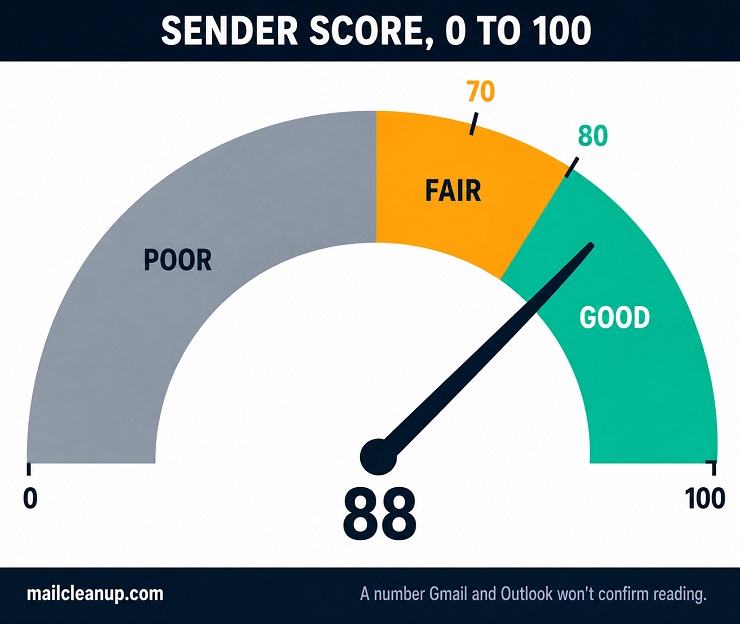
Here’s the part most competitor pages skip: neither Gmail nor Outlook has ever confirmed using Sender Score as an input to their own filtering decisions.
Both run their own internal reputation systems, the ones covered above, built from data no outside company has access to. Sender Score tends to matter most for ISPs and mailbox providers that don’t run that kind of internal system themselves. Think mid-size providers without Google or Microsoft’s engineering resources behind their spam filtering. That’s also why your Sender Score can read 95 while Gmail is still routing you to spam, and neither number is wrong.
Sender Score is IP-keyed, watching one address’s behavior, while Gmail increasingly weighs domain-level signals and real engagement data Validity never sees. You can check it for free through Validity’s own lookup tool. Improving your score means addressing whichever input is actually driving it down, usually complaint rate or sends to long-unengaged addresses, not the score itself.
Third-Party Deliverability Score Checkers
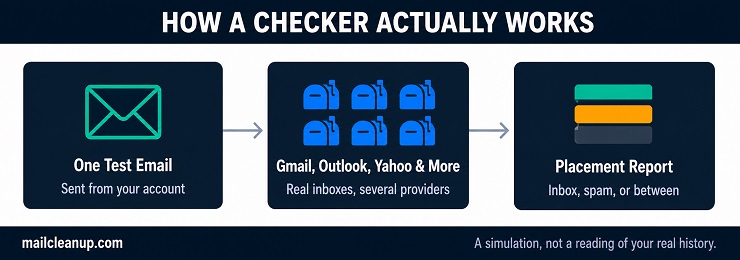
Everything covered so far is a system one company runs on its own mail, using its own hidden inputs. A different category of tool sits alongside them, often called an email deliverability score checker: send-and-test services like Warmy, MailReach, and GlockApps. Each works roughly the same way. Send a message to a panel of seed addresses across several major providers, the same ones your subscribers actually use. The tool reports back where it actually landed: inbox, spam, or somewhere in between.
Folderly rolls that kind of result into its own single number. It’s a 0-to-100 score built from best-practice checks plus separate spam-trigger detection for Gmail and Outlook. That’s a genuinely different kind of number than anything in the table above. Postmaster Tools, Sender Score, SNDS, and Sender Hub each report what one provider already thinks of you, built from your real sending history over time. A checker estimates what’s likely to happen to one message, right now, based on a simulated test send, not your actual history.
[The guide on best email deliverability tools] compare these and others side by side in more depth. The distinction worth carrying from here: a clean checker result doesn’t override a Bad rating in Postmaster Tools or a low Sender Score. A strong provider-side reputation, in turn, doesn’t guarantee a checker won’t flag a spam-trigger phrase in that day’s subject line. Both are worth running, for different reasons.
What Actually Feeds a Deliverability Score
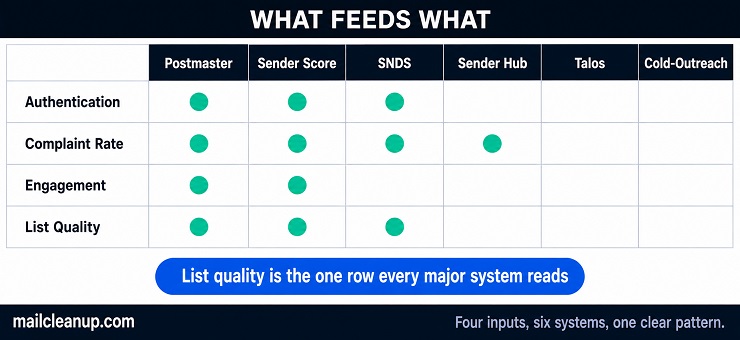
Strip away the differences in scale and identifier, and the six systems above are mostly reacting to the same handful of things. Authentication failures show up almost everywhere. A missing or broken SPF, DKIM, or DMARC record drags down Postmaster Tools’ reputation bands, Sender Score, and SNDS alike. Complaint rate is the fastest-moving signal across all of them, and the one Microsoft and Yahoo both built dedicated tracking around. Engagement matters too: opens, clicks, replies, and how long it’s been since a recipient did any of those. It feeds Gmail’s and Sender Score’s judgment of whether you’re wanted mail or just tolerated mail.
One input runs through nearly all of it and rarely gets named on any dashboard: the quality of the list itself.
List Quality: The Input Every System Counts, But No Score Names
None of the six systems above has a field called “list quality.” What they have instead are bounce rates, unknown-user rates, spam trap hits, and complaint rates. Every one of those is downstream of whether your addresses are still real, still yours to email, and still willing to receive it.
We track this directly across our own verification data. Per MailCleanup’s Quality Report (corrected 28 July 2026), our most recent twelve-month window broke down like this:
- Deliverable: 73.27%
- Undeliverable: 16.98%
- Accept-All: 7.32%
- Unknown: 2.43%
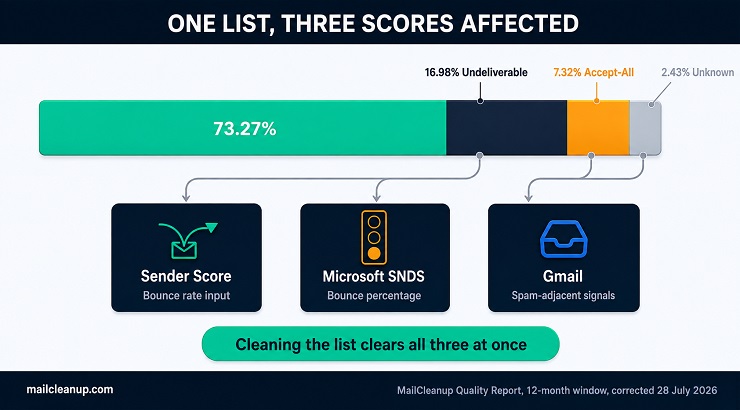
The Undeliverable share is the one worth sitting with. Those addresses generate hard bounces the moment you send to them. Hard bounces feed Sender Score’s calculation directly and show up in SNDS’s bounce percentage. They also add to the kind of sending pattern Gmail treats with more suspicion over time.
Accept-All and Unknown addresses cause a quieter version of the same problem. Neither one bounces immediately, so nothing rejects cleanly. What they do instead is raise your odds of hitting a spam trap, or landing on a stale mailbox that never opens anything. Both erode Sender Score and Gmail’s engagement-based judgment slowly, in a way that’s hard to trace back to any one send. A dedicated guide on email list hygiene covers how to catch these before they accumulate. A report on verification statistics has the fuller breakdown behind the figures above.
The list is always upstream of the score. None of the six systems will tell you that directly. They’ll show you the symptom, a falling Sender Score, a yellow SNDS reading, a climbing complaint rate, without ever pointing at the list itself. Verify a list before it goes anywhere near a send, and you remove the Undeliverable share along with much of the Accept-All and Unknown share. None of it ever reaches a provider’s own scoring.
There’s no single named score for this either, which is its own small irony given how much it feeds every score you’ve just read about. Some people call the working version of this an email health checklist:
- Authentication set up correctly
- Complaint rate watched weekly
- List verified before major sends
- Engagement segmented so long-unengaged addresses don’t quietly drag on the rest
It won’t show up as a number on any dashboard, but it keeps your numbers on the other six from drifting.
How to Improve Your Email Deliverability Score
Most people check email deliverability score only after something’s already gone wrong, when a proactive weekly glance would have caught it earlier. Raising whichever number applies to you comes down to a short list, not a long one.
- Fix authentication first. SPF, DKIM, and DMARC, all three, aligned and enforced. It’s the one input every system covered here checks in some form, and usually the fastest, cheapest fix available.
- Watch complaint rate weekly, not monthly. It’s the fastest-moving signal on this whole list. By the time SNDS or Postmaster Tools reflects the damage, the pattern that caused it is already a week old.
- Verify your list before every major send, not just once a year. This is where the Undeliverable and Accept-All shares get caught before they ever reach a provider’s own scoring.
- Warm up new IPs and domains gradually. A sudden volume jump from a cold IP or domain reads as suspicious to nearly every system covered here. That’s true no matter how clean the list behind it actually is.
- Segment out long-unengaged addresses instead of mailing your full list every time. Gmail and Sender Score both weight engagement directly, and one large unengaged segment drags on both.
- Check the dashboard that matches your audience. Gmail-heavy means Postmaster Tools first. Outlook-heavy means SNDS. Yahoo-heavy means Sender Hub. A mixed audience is exactly when a broad checker earns its keep.
None of these is a fast fix for a score that’s already fallen. Each one is a rate of improvement, not a switch.
Where to Check Your Email Deliverability Score Next
Start with whichever system matches where your subscribers actually live. Gmail-heavy list: Google Postmaster Tools first. Outlook-heavy: Microsoft SNDS. Yahoo-heavy: Sender Hub’s Insights. Mixed or business-to-business across providers, an email deliverability score checker is often the faster read than any single provider dashboard. Sender Score is worth checking too, with the caveat that Gmail and Outlook won’t confirm reading it. None of this is the single “check my email deliverability score” moment a credit-score check would be. It’s six separate places, and which one matters depends entirely on the list in front of you.
Wherever you check email deliverability score, look at complaint rate and list quality before assuming the number itself is the problem. A falling score is almost always downstream of one of those two, and neither shows up as its own line on any dashboard covered here.
If verification hasn’t been part of your routine before a send, that’s the one change most likely to move several of these numbers at once. It’s rarely just the one you happened to be watching.
FAQs on Email Deliverability Score
What is an email deliverability score?
It’s a provider’s own composite rating of how trustworthy your sending looks, used to predict whether your next message reaches the inbox. No single email deliverability score exists across the industry. Google, Microsoft, Yahoo, and Validity each calculate their own version, on different scales, from different data.
Is a good Sender Score the same as good email deliverability?
Not necessarily. Sender Score rates one IP address from 0 to 100, but Gmail and Outlook have never confirmed using it. A high Sender Score can coexist with a Gmail spam-folder problem. Gmail’s own email deliverability score weighs domain-level and engagement signals Sender Score never sees.
What is a good email deliverability score?
There’s no single good email deliverability score, since it depends entirely on which system. Validity calls 80 and above good on its 0-to-100 Sender Score. Google’s Postmaster Tools runs Bad to High instead of numbers. Yahoo skips a rating altogether, so “good” there just means a low, stable complaint rate.
Do Gmail and Outlook use Sender Score?
No, not as far as either has confirmed. Both run their own internal reputation systems, built from data no outside company can see: Google’s Postmaster Tools domain and IP reputation, and Microsoft’s SNDS. Sender Score, one popular third-party email deliverability score, tends to matter more for smaller providers without that kind of internal system.
How do I check my email deliverability score for free?
Google Postmaster Tools, Microsoft SNDS, and Sender Score’s own lookup tool are all free once you register a domain or IP with them. Yahoo’s Sender Hub is free too, though it reports a complaint rate rather than an email deliverability score. Free checkers like Warmy and MailReach cover the rest.
Why did my deliverability score drop when nothing changed?
Usually something did change in your email deliverability score, just not on your side. Gmail and Outlook update their internal reputation models continuously. A filtering-sensitivity shift, a complaint spike in one segment, or stale addresses hitting a trap can all move a score for no obvious reason.
How often should I check my email deliverability score?
It depends which system, and none of them update on the same clock. What’s reliable is this: complaint rate moves faster than any email deliverability score built from it. It’s worth checking weekly, regardless of which dashboard you’re watching. A monthly glance at the underlying scores themselves usually catches a real trend without chasing daily noise.
Does list quality affect my email deliverability score?
Yes, directly, and it’s one of the biggest hidden inputs into your email deliverability score. Undeliverable addresses generate hard bounces that feed Sender Score and SNDS. Accept-All and Unknown addresses raise your odds of hitting a spam trap or a disengaged mailbox. Both erode Gmail’s and Sender Score’s judgment more slowly, but just as surely.