
You did everything the setup checklist told you to do. SPF passes. DKIM passes. DMARC sits at p=reject. You published a BIMI record with a valid logo and a certificate from a real issuer. And the logo still isn’t showing up next to your emails. Maybe it shows in Gmail but never in Apple Mail. Maybe it worked for six months and then quietly stopped.
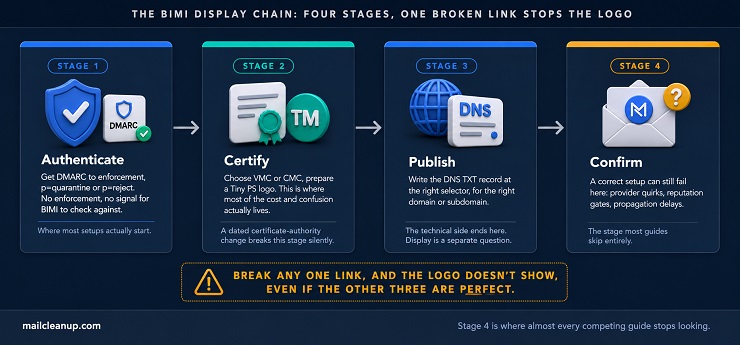
That gap between “I did the setup correctly” and “the logo actually appears” is where most BIMI guides stop being useful. Most cover what is BIMI, the DNS record, and the certificate types, and call it done. What they miss is that BIMI isn’t one requirement. It’s a chain of them. Your DMARC policy, your certificate, your DNS record, and the mailbox provider’s own reputation and engagement thresholds all have to hold at once. Break any single link, and the logo doesn’t show, even when everything else is textbook-perfect.
This guide walks through what BIMI actually requires, link by link. That includes a certificate-authority change from late 2024 that’s quietly broken BIMI for domains still following outdated setup guides. It also includes the reason Gmail, Yahoo, and Apple Mail don’t actually agree on what “verified” means.
TL;DR on BIMI Record
- BIMI lets a verified brand logo appear next to authenticated emails in supporting inboxes, including Gmail, Yahoo, and Apple Mail.
- BIMI has nothing to display or check unless the domain’s DMARC policy already enforces, not just monitors.
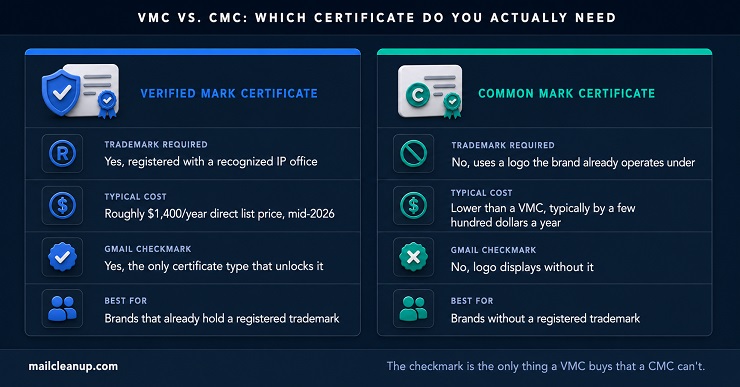
- A Verified Mark Certificate (VMC) requires a registered trademark and is the only certificate type that unlocks Gmail’s checkmark.
- A Common Mark Certificate (CMC) skips the trademark requirement and typically costs less, but doesn’t unlock that checkmark.
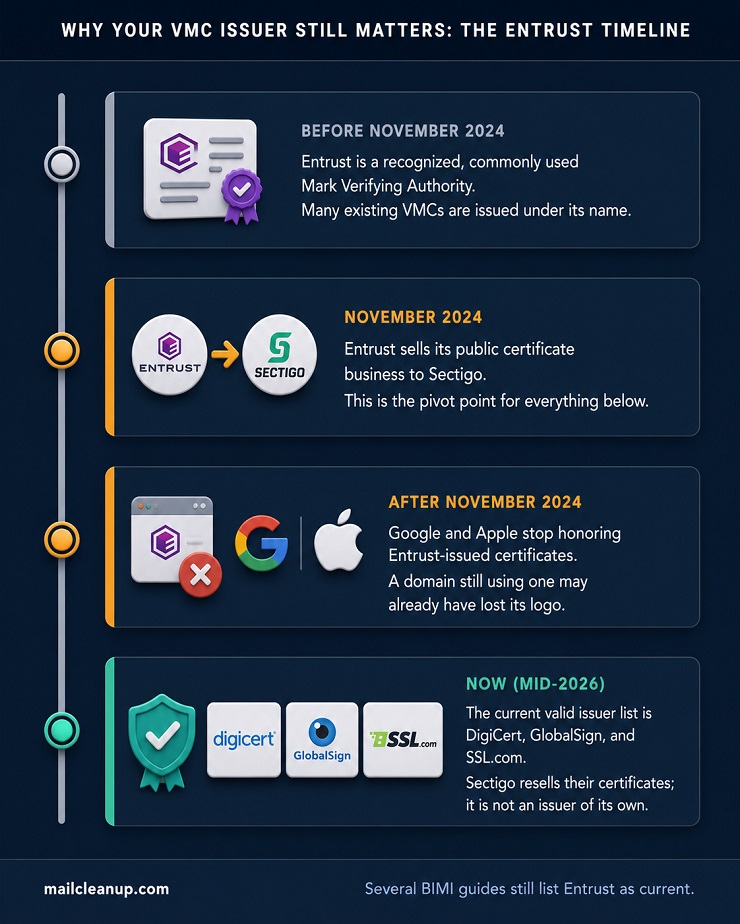
- Google and Apple stopped honoring Entrust-issued certificates in November 2024, after Entrust sold its certificate business to Sectigo.
- The BIMI record is a DNS TXT record at a default._bimi subdomain, with different mechanisms for multiple brands versus multiple subdomains.
- Apple Mail requires a VMC specifically and also depends on the recipient’s own mailbox provider supporting Apple’s headers.
- Outlook and Microsoft 365 don’t render BIMI logos for recipients as of mid-2026, regardless of setup.
- A technically correct setup can still fail to display if a mailbox provider’s reputation or engagement thresholds aren’t met.
- Keeping the logo visible long-term depends on DMARC enforcement staying intact, which regular aggregate report monitoring helps catch before it slips.
What Is BIMI? How It Sits on Top of Email Authentication
What is BIMI? BIMI stands for Brand Indicators for Message Identification. It’s a DNS-based standard that lets your brand’s verified logo appear next to your emails in supporting inboxes. Think of it like the verified badge next to an account on social media.
BIMI isn’t a fifth authentication protocol sitting next to SPF, DKIM, and DMARC. It’s closer to a reward layer than a new form of BIMI email authentication. Mailbox providers built BIMI as a reason to finish the work our email authentication guide covers, not as a new check of its own. If your domain doesn’t pass DMARC, BIMI has nothing to display and nothing to check.
The logic behind it is straightforward. Phishing emails spoof a trusted brand’s name constantly. What they can’t forge is a logo tied to a certificate and a DNS record they don’t control. When your logo appears, it’s a visible signal that the message actually passed authentication. When it doesn’t, a careful recipient has one more reason to look twice.
Adoption numbers get thrown around constantly in BIMI content, and they rarely agree with each other, because different trackers are measuring different things.
| Source | BIMI domains counted | As of |
|---|---|---|
| dmarc.org research | ~35,000 | Mid-2024 |
| URIports analysis | 9,661 | January 2025 |
| SSL Store scan of the top 10 million domains | 22,631 | September 2024 |
The gap between those figures isn’t a contradiction, it’s scope. dmarc.org’s number looks broader and less bounded. URIports appears to track a narrower, actively-monitored set. SSL Store scanned specifically within the top 10 million domains rather than the open internet. None of the three is wrong. The takeaway that survives all three: adoption is still small, and growing steadily rather than explosively.
Authenticate: DMARC Enforcement Behind BIMI Email Authentication
Understanding what is BIMI conceptually is one thing. Getting a domain eligible for it is another, and that starts with DMARC, not with BIMI’s own record.
Enforcement means your DMARC policy tag reads p=quarantine or p=reject, not p=none. A domain sitting at p=none is still in monitoring mode. It’s watching and reporting on its mail, but it hasn’t told any receiver what to actually do with a message that fails. Without that instruction, BIMI has no enforcement signal to hook into. Our DMARC guide covers the full path from p=none to full enforcement, including how to read your aggregate reports before making that move.
Google’s own BIMI setup documentation adds a second, more specific condition on top of enforcement. Your DMARC record’s percentage also needs to be set to 100, applied to all outgoing mail rather than a partial rollout. If you’ve read anything about DMARC’s most recent update, that instruction should raise a question.
DMARC’s governing specification changed in May 2026. RFC 9989 replaced the original 2015 spec and formally removed the old pct tag, along with two others. Here’s what actually changed for the tag BIMI’s own setup guides still reference:
| Old model (RFC 7489) | Current model (RFC 9989) | |
|---|---|---|
| Full enforcement | pct=100, or the tag left out (100 was always the default) | t tag left out, or t=n (the default) |
| Testing or partial rollout | pct set below 100 | t=y |
| What changed | Partial pct values were implemented inconsistently across receivers | t is a single on/off signal, no partial values |
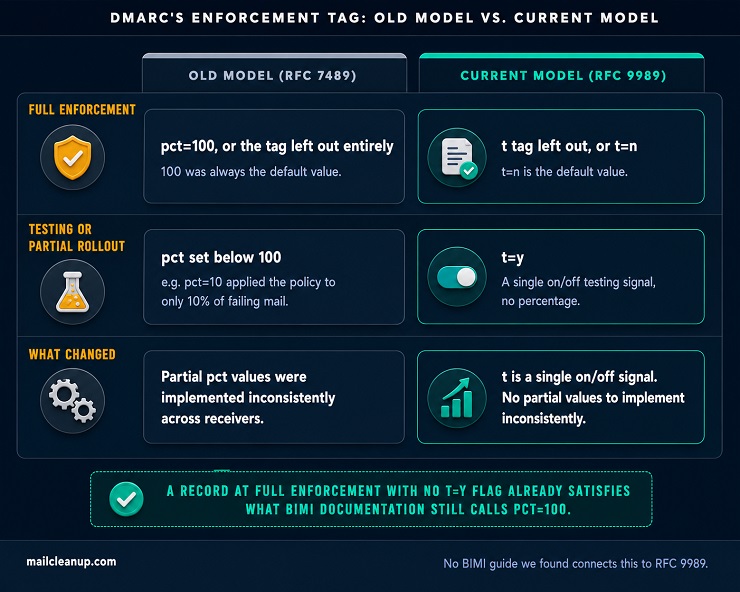
A record at full enforcement with no t=y testing flag satisfies the exact same condition Google’s documentation is describing as pct=100. You don’t need to add a deprecated tag to a new DMARC record just to satisfy BIMI. You need your policy actually enforcing at full strength. A clean p=reject or p=quarantine record without a testing flag already delivers that. An existing record that still carries pct=100 from before the update isn’t broken; RFC 9989 has receivers ignore tags they no longer recognize. It’s just worth clearing out at your next DNS edit rather than treating it as something BIMI still needs you to keep.
The other half of enforcement is alignment, and that’s where SPF and DKIM come back in. DMARC doesn’t inspect your mail directly. It checks whether SPF or DKIM passed, and whether the domain behind that pass matches what your recipient actually sees in the From field. Our SPF and DKIM guides cover the full mechanics behind getting each of those aligned. For BIMI specifically, the requirement is narrower. At least one of the two has to pass and align. Your policy has to sit at enforcement, with no partial rollout tag in the way.
Clear those, and your domain has closed the first link in the chain. The remaining links are about the certificate and the logo, not the DMARC record itself.
Certify: Your Certificate, Your Logo, and BIMI Logo Requirements
Understanding what is BIMI is one thing. Actually qualifying for it, certificate in hand, is another. That’s where most of the cost and most of the confusion in BIMI setup actually lives.
Verified Mark Certificate (VMC)
Coming back to what is BIMI at its core: a visible signal of authenticated mail. A VMC is the strongest version of that signal available. It requires a registered trademark with a recognized intellectual property office. The USPTO, EUIPO, and WIPO are the common ones. Getting a trademark registered, if you don’t already have one, typically takes six to twelve months. That timeline has nothing to do with BIMI or your certificate provider. It’s the trademark office’s own process, worth starting early if BIMI is on your roadmap for later this year.
Once the trademark exists, a VMC is issued by one of a small number of accredited Mark Verifying Authorities.
As of now, that list is DigiCert, GlobalSign, and SSL.com, and Entrust doesn’t belong on it anymore. That’s worth being specific about, since a lot of BIMI content still lists Entrust as current. It sold its public certificate business to Sectigo in late 2024, and Google and Apple stopped honoring Entrust-issued certificates from that point on. If your domain still has a VMC from Entrust, that’s not just outdated paperwork, it likely means your logo has already quietly stopped displaying. Sectigo itself isn’t an independent Mark Verifying Authority. It’s a reseller for the accredited issuers instead, worth knowing before treating a Sectigo purchase as a fourth, separate path.
So what is BIMI verified sender status actually worth? With a VMC behind it, quite a lot. It’s the only certificate type that unlocks Gmail’s blue checkmark, the strongest visual trust signal BIMI currently offers.
Pricing moves around by reseller and term length, so treat any single number as a starting point, not a locked figure. Direct list pricing for DigiCert’s mark certificate sits at roughly $1,400 a year as of mid-2026. Authorized resellers publish figures in a similar range. Promotional and multi-year bundles advertise considerably less, sometimes under half that. We’d suggest getting a current quote rather than budgeting off the first number you see.
Common Mark Certificate (CMC)
The trademark requirement behind a VMC is exactly where what is BIMI’s certificate options split in two. A Common Mark Certificate exists specifically for domains that don’t have a registered trademark, using a logo you’ve genuinely been operating under instead.
CMC is a newer addition to the BIMI ecosystem, introduced to widen access beyond trademark holders. It’s typically priced lower than a VMC, generally by a few hundred dollars a year depending on issuer. It skips the trademark evidence entirely in favor of a lighter validation process. The tradeoff is specific: a CMC gets your logo displayed in Gmail and several other supporting inboxes, just not the checkmark itself. That distinction, not overall inbox support, is the real gap between the two certificate types.
Which mailbox providers accept a CMC, require a VMC specifically, or need no certificate at all varies enough by provider. It deserves its own comparison, covered later in this guide.
Your Logo File: BIMI Logo Requirements
Neither certificate changes what is BIMI expects from the logo file itself. Both VMC and CMC point to the same narrow specification: SVG Tiny Portable/Secure, usually written as SVG Tiny PS. That’s not the full SVG format your design software exports by default.
The practical restrictions matter more than the format name.
- No embedded scripts: anything interactive gets the file rejected outright.
- No external references or linked assets: the file has to be fully self-contained.
- No animation: a static mark only.
- Square canvas, solid background recommended: transparent backgrounds render inconsistently across different inbox themes.
Most logo generators built specifically for BIMI validate these constraints automatically. We’d recommend running your file through one of those before treating a logo as done. A general-purpose SVG export from standard design software fails Tiny PS validation more often than it passes on the first attempt.
Publish: Writing a BIMI Record Setup That Actually Works
Certificate chosen, logo file validated. What is BIMI’s DNS side comes down to a single TXT record, published at a specific, predictable location.
The default location is default._bimi.yourdomain.com, holding a record in this shape:
v=BIMI1; l=https://yourbrand.com/assets/bimi-logo.svg; a=https://yourbrand.com/assets/vmc-certificate.pemThe v= tag identifies the record version. The l= tag points to your validated SVG logo. The a= tag points to your certificate file. That’s the full answer to what is BIMI record actually contains: three short tags doing all the work. Some providers allow a self-asserted record with no certificate at all. That version drops the a= tag entirely and carries only the logo location.
This is the entire BIMI record setup most single-brand domains ever need. Multi-brand domains, and domains sending from multiple subdomains, work differently, and the two cases are easy to conflate even though they’re solved differently.
| Same domain, multiple brands | Multiple subdomains | |
|---|---|---|
| Mechanism | Named selector plus a BIMI-Selector header on the message | A separate default._bimi record on each subdomain |
| Does it inherit automatically? | No, the header has to be added to the message | No, BIMI doesn’t inherit down from a parent domain the way DMARC can |
| Certificate | Can usually share one VMC or CMC | Can usually share one VMC or CMC |
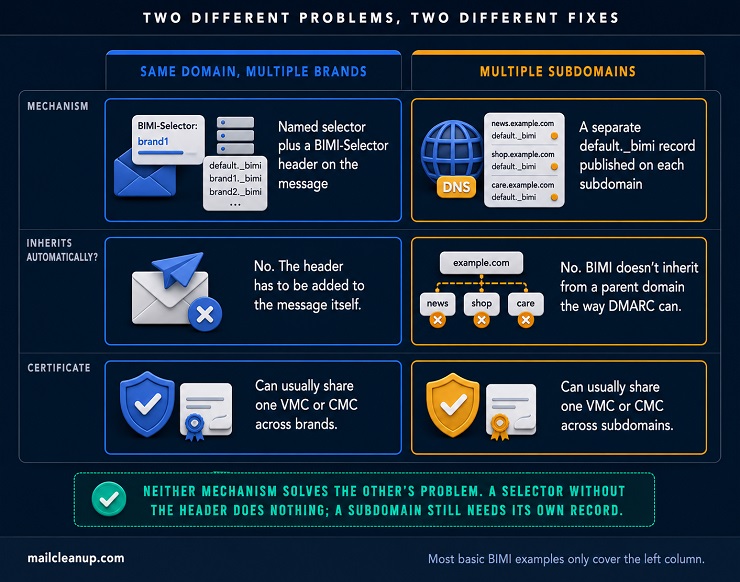
Neither problem is solved by the other’s fix. A selector without the header does nothing. A subdomain without its own record stays logo-less, no matter how solid the parent domain’s setup is.
Say your organization sends marketing under one brand and support under another, from the same From domain. You’d publish an additional record at a named selector instead of default, something like promo._bimi.yourdomain.com. The outbound message itself carries a header, BIMI-Selector: v=BIMI1; s=promo, telling the receiving server which record to fetch. Almost every basic BIMI record example online stops at the single-brand case and never mentions this.
Subdomains are a different mechanism entirely, not a variation on selectors. A subdomain sending its own mail generally needs its own separate default._bimi record published at that subdomain. That’s not a policy inherited from the parent the way DMARC allows. The certificate itself is more forgiving than the DNS side. A single VMC or CMC often covers multiple subdomains under one domain, even though each still needs its own record pointing back to it.
This is how to add BIMI record entries correctly, in the right sequence:
- Validated logo file first.
- Issued certificate, or a deliberate self-asserted decision, second.
- The DNS record itself, at the right selector, for the right domain.
Get that sequence right, and the technical side of BIMI is done. Whether the logo actually shows up is a separate question, covered next.
Confirm: Why a Correct BIMI Record Still Might Not Display
Getting here means what is BIMI actually requires technically is done: DMARC enforcement, a certificate if needed, a correctly published record. None of that guarantees the logo actually shows up. The gap between a correct setup and a visible logo is where this section lives.
What Each Mailbox Provider Actually Requires
Every provider that supports BIMI starts from the same baseline: DMARC at enforcement, no exceptions. Past that baseline, what is BIMI actually asking for splits by provider, and conflating them is where a lot of setup guides go wrong.
| Provider | Certificate needed | What you get | Worth knowing |
|---|---|---|---|
| Gmail | VMC or CMC | Logo either way; checkmark only with a VMC | Requires DMARC enforcement like every provider here |
| Yahoo | None, self-asserted is accepted | Logo, no checkmark | Also gated by sending reputation and bulk-mail volume |
| Apple Mail | VMC specifically | Logo | Also depends on the recipient’s own mailbox provider supporting Apple’s specific headers, not just your setup |
| AOL | None, self-asserted is accepted | Logo, no checkmark | Runs on the same infrastructure family as Yahoo |
| Fastmail | None, self-asserted is accepted | Logo | One of the few providers that also meets Apple’s own receiving-side requirement |
| Outlook / Microsoft 365 | Not applicable | No display, regardless of setup | Confirmed directly by Microsoft; not supported as a receiver as of mid-2026 |
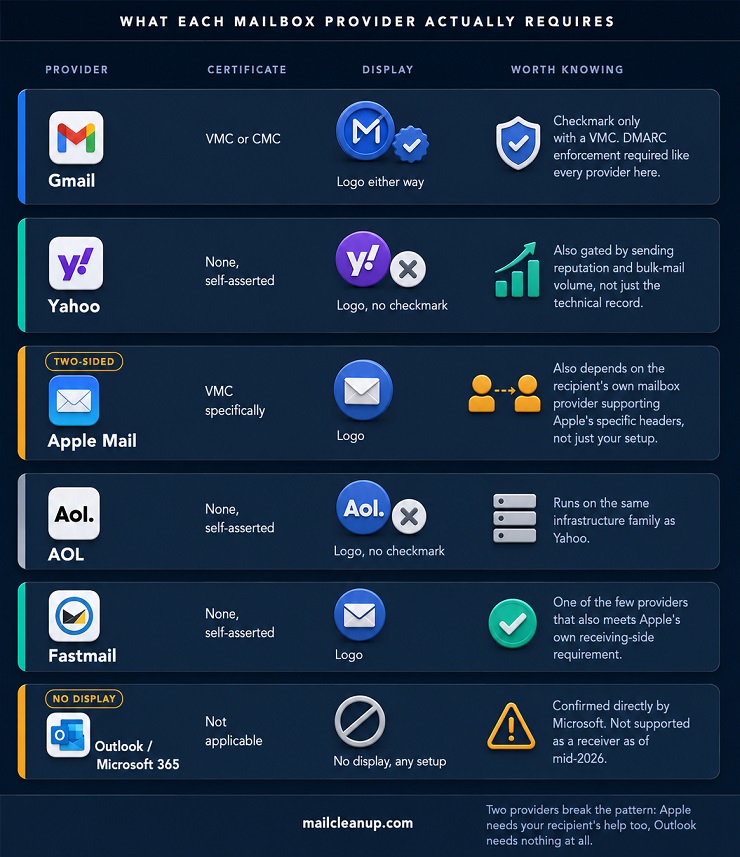
Apple Mail deserves a second look, because it’s the one entry in this table that isn’t just about your own setup. Apple’s own documentation requires both the sender and the recipient’s mailbox provider to meet its BIMI requirements. In practice, that has meant a smaller set of providers actually render a logo inside the Apple Mail app. Even a sender doing everything right depends on the recipient’s own provider supporting the specific headers Apple checks for.
Microsoft is worth a specific note too, since it’s the most-asked question in this space. Outlook, Outlook.com, and Exchange Online don’t render BIMI logos for recipients, and Microsoft has said so directly on its own support channels. Microsoft does support BIMI as a sender, through a separate product built for its own marketing platform. That has no effect on what Outlook itself displays to a recipient.
Common Reasons the Logo Doesn’t Appear
By this point, what is BIMI actually requires technically is done: DMARC enforcement, a certificate, a correct DNS record. A handful of other causes account for most remaining cases where the logo still doesn’t show.
1. Reputation and engagement, not just technical correctness.
Yahoo has said directly that logo display also depends on a domain’s reputation, not just the technical record. For bulk senders, it also depends on meeting Google and Yahoo’s own bulk sender requirements, a related but separate authentication bar. This is the part most setup guides skip entirely. It’s also the hardest part to fix directly, since there’s no dashboard that tells you your reputation score crossed some threshold. The closest lever available is the same one that drives deliverability generally: list quality. An unengaged or invalid list drags reputation down no matter how correct your BIMI record is, while a clean list supports that same signal.
2. Certificate-provider mismatch.
A CMC satisfies Gmail and several others, but Apple Mail specifically checks for a VMC. Choosing a CMC to save money doesn’t mean the logo shows everywhere. It’ll display in Gmail and similar providers but not in Apple Mail, and that’s a certificate mismatch, not a broken record.
3. DNS or hosting accessibility.
The logo file has to be reachable over HTTPS at the exact URL the record points to, with no redirects and no authentication wall. A certificate issue on the hosting side, not the BIMI certificate itself, can quietly break this.
4. Propagation and caching.
DNS changes typically take effect within 24 to 48 hours. Some mailbox providers also cache a “no logo” result for a domain, though, and don’t immediately re-check it once the record is fixed.
Before troubleshooting BIMI specifically, it’s worth ruling out whether mail is reaching the inbox at all. A domain fighting broader delivery problems has bigger issues than a missing logo.
Your Logo Is Live. Here’s What Actually Keeps a BIMI Record Working.
Getting the logo to appear once feels like the finish line. What is BIMI’s real finish line, though, is different: it isn’t a set-and-forget project. Its entire display depends on your DMARC policy staying at enforcement, and that’s a state, not a one-time event. A new sending source gets added and breaks alignment. Someone loosens the policy to troubleshoot an unrelated issue and forgets to tighten it back. Either one silently pulls the enforcement out from under BIMI, and the logo disappears with it, usually with no warning at all.
The mechanism for catching this early already exists, and it’s the same one that got your domain to enforcement in the first place. Regularly reading your DMARC aggregate reports surfaces a slipping policy or unaligned sender long before it becomes a support ticket about a missing logo. We’d treat the logo’s continued presence as a signal worth checking occasionally, not proof the underlying authentication will hold on its own.
FAQs on BIMI
What is BIMI and how does it work?
BIMI, Brand Indicators for Message Identification, lets a domain publish a verified logo next to its authenticated emails in supporting inboxes. It builds on DMARC, SPF, and DKIM. Once a domain reaches DMARC enforcement, it can publish a BIMI record pointing to a logo, optionally backed by a certificate.
Do I need a VMC to use BIMI?
Not for every provider. Gmail requires a VMC or CMC before it will display a logo, and only a VMC unlocks Gmail’s checkmark. Yahoo, AOL, and Fastmail accept a self-asserted BIMI record with no certificate at all. Apple Mail is the strictest: it specifically requires a VMC.
Why isn’t my BIMI logo showing up in Gmail?
Most Gmail display failures come down to three things: DMARC not yet enforced, a certificate mismatch, or reputation the provider hasn’t recognized yet. Any one of those, even with a technically correct BIMI record, is enough to keep the logo from displaying.
What’s the difference between a VMC and a CMC?
A VMC requires a registered trademark and is the only certificate type that unlocks Gmail’s blue checkmark. A CMC skips the trademark requirement, using a logo a brand has genuinely operated under instead. It typically costs less, but it doesn’t carry Gmail’s checkmark. Both still have to meet the same BIMI logo requirements once issued.
Does Outlook support BIMI?
No, not as of mid-2026. Microsoft has confirmed directly that Outlook, Outlook.com, and Exchange Online won’t display a BIMI record’s logo for recipients, regardless of setup. Microsoft does support BIMI as a sender through a separate product, Dynamics 365 Customer Insights, which doesn’t affect Outlook’s own inbox display.
How long does it take for a BIMI logo to appear?
Once DNS propagates, typically within 24 to 48 hours, a correctly configured BIMI record can start showing its logo quickly. In practice it often takes longer. Mailbox providers also weigh sending reputation before displaying a logo, and that signal can take weeks to establish for a newer domain.
Can I use BIMI without a registered trademark?
Yes, on providers that accept it. A Common Mark Certificate lets a domain without a registered trademark still get a certificate-backed logo. Several providers, including Yahoo and Fastmail, will display the logo from a self-asserted BIMI record with no certificate at all. Gmail’s checkmark specifically still requires a VMC.
Does BIMI improve email deliverability?
Not directly. BIMI is a display feature, not a deliverability mechanism. Even a correctly configured BIMI record doesn’t change whether a message reaches the inbox or the spam folder. It can help indirectly by requiring the DMARC enforcement that genuinely does support deliverability, and a visible logo may lift engagement once mail arrives.