

Search “does Gmail have a feedback loop” and you will find dozens of guides confidently answering no. That is not quite right. Gmail runs a feedback loop, just not the kind Yahoo or Microsoft run. This is not a small detail. It is the reason so many setup guides send you looking for a Gmail registration form that does not exist. What you actually need from Gmail is a header in your outgoing mail and a Postmaster Tools account, nothing you apply for.
An email feedback loop notifies you when a recipient marks your message as spam. Every major mailbox provider offers some version of this, but “some version” is doing a lot of work in that sentence. Three genuinely different formats sit behind that phrase. Which one a provider uses decides what data you get, what you set up first, and whether registering even applies to you. We walk through all three, then each provider, starting with what an email feedback loop actually is underneath the marketing language.
TL;DR on Email Feedback Loop
- An email feedback loop notifies a sender when a recipient marks their mail as spam, using the ARF format RFC 6449 defines.
- Feedback loops come in three different formats, Traditional, Aggregated, and Domain-based, and most providers use more than one.
- Gmail’s feedback loop is Aggregated, not absent, reporting spam-rate data through Postmaster Tools rather than individual complaints.
- Yahoo’s Complaint Feedback Loop is Domain-based and requires DKIM signing, and its current enrollment page is not the one many guides still link to.
- Microsoft runs two separate programs under one name, JMRP, which is Traditional, and SNDS, which is Aggregated.
- Microsoft’s JMRP now redacts the complaining recipient’s email address, limiting the identify-and-suppress workflow older guides still describe.
- Microsoft migrated its SNDS portal in mid-2026 and drops spam-trap-hit counts from reports starting July 22, 2026.
- Senders on a shared ESP like Klaviyo or Mailchimp almost never register for any of this directly, since their platform already holds it.
- RFC 9477, published in 2023, proposes an automated header that would let senders skip manual registration with each provider.
- A mailbox provider can start sending unsolicited feedback loop data before a sender ever applies, under guidelines RFC 6449 lays out.
- Registering generally requires the sender to prove domain or IP ownership, plus a working abuse@ or postmaster@ address.
- RFC 6449’s own guidance is direct: suppress a complaining address immediately and never re-add it, then track which campaign or list produced the complaint.
- Disengaged recipients are more likely to mark mail as spam than to unsubscribe, exactly the risk MailCleanup’s own Decay Report shows compounding over time.
What Is an Email Feedback Loop?
An email feedback loop is a mechanism a mailbox provider uses to tell a sender when a recipient marks their message as spam. It is not a bounce. The message was delivered and opened. The recipient just did not want it, and their mailbox provider passes that rejection back to you. Not every provider offers this. The ones that do give you a real second chance. Pull that address before it damages your reputation with everyone else on the same provider.
That notification runs through three roles, and knowing them makes every provider’s setup page easier to parse. RFC 6449, the operational recommendations document behind most of this, names them as follows. We are using its own terms here, not a paraphrase, since the actual roles matter once you start comparing providers.
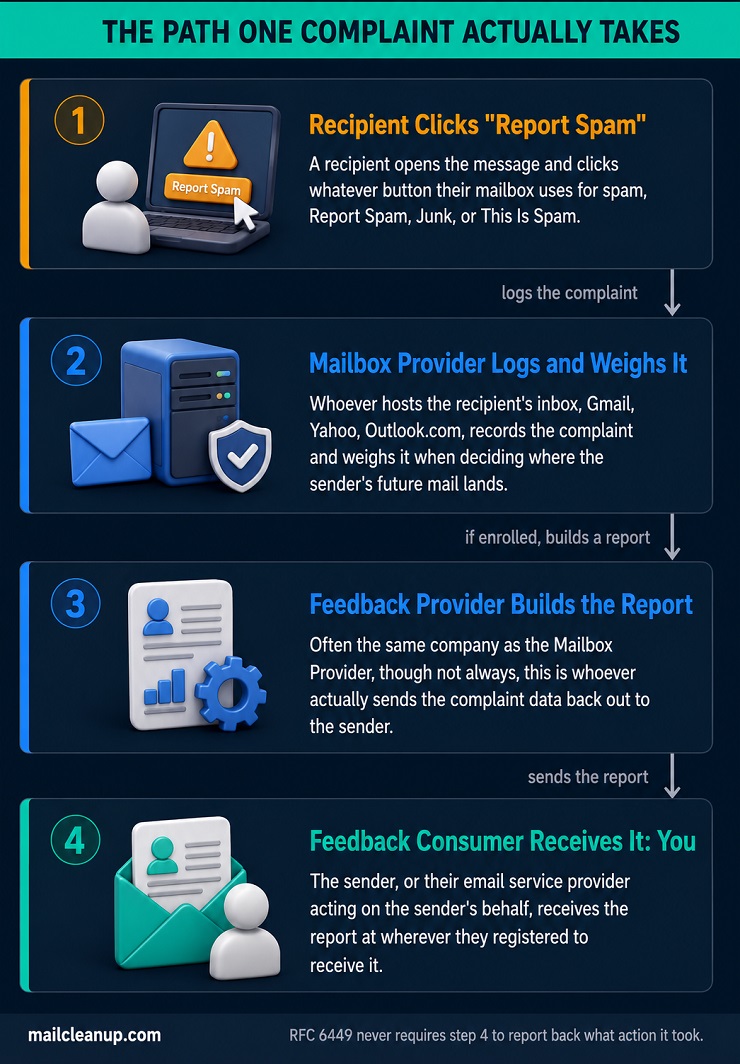
- The Mailbox Provider: whoever hosts the recipient’s inbox, Gmail, Yahoo, Outlook.com.
- The Feedback Provider: whoever actually sends the complaint data back out, often the same company as the Mailbox Provider, though not always.
- The Feedback Consumer: you, or your email service provider acting on your behalf.
Here is the full path a single complaint takes. A recipient opens your email and clicks whatever button their mailbox uses for spam: Report Spam, Junk, This Is Spam. Their Mailbox Provider logs that as a complaint. Separately, it weighs that complaint when deciding whether your future mail lands in the inbox or the spam folder. If you are enrolled in that provider’s feedback loop, the Feedback Provider builds a report. It sends that report wherever you registered to receive it. What you do with that report next is entirely up to you. RFC 6449 does not require you to report back what action you took, and in practice almost nobody does.
This is the same signal that feeds your sender reputation, just delivered as a raw, per-message stream instead of a rolled-up score. Google and Yahoo both fold feedback loop data into the bulk sender requirements they started enforcing in 2024. That is one reason getting this right matters beyond your own suppression list.
How an Email Feedback Loop Report Is Structured
Most email feedback loop reports use a format called ARF, Abuse Reporting Format, defined in RFC 5965 and referenced throughout RFC 6449. An ARF report is not just a forwarded copy of your email. It has three distinct parts, and most setup guides collapse them into one.
- The human-readable summary: plain text explaining what happened, meant for someone processing complaints by hand rather than by script.
- The machine-readable metadata: the ARF protocol version, a report-type label, and often the time the original message was received.
- The original message: the actual email that was reported, sometimes with the recipient’s address stripped out before it reaches you.
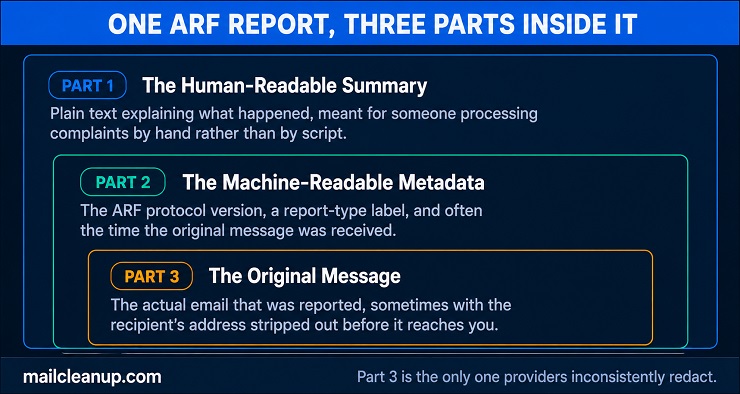
That third part is where things get inconsistent. Some providers redact the recipient’s address entirely, on privacy grounds RFC 6449 itself endorses. Others leave it intact so you can suppress that exact address directly. Microsoft, as the next section covers, recently moved from the second approach to the first.
One more distinction is worth knowing before comparing providers directly. RFC 6449 separates a Feedback Message, the per-complaint report above, from what it calls a Report Card. A Report Card is a periodic summary of your overall complaint trend, not a single incident. Not every provider sends both. Gmail sends almost nothing but the aggregate version, and the next section explains why.
The Three Complaint Feedback Loop Formats
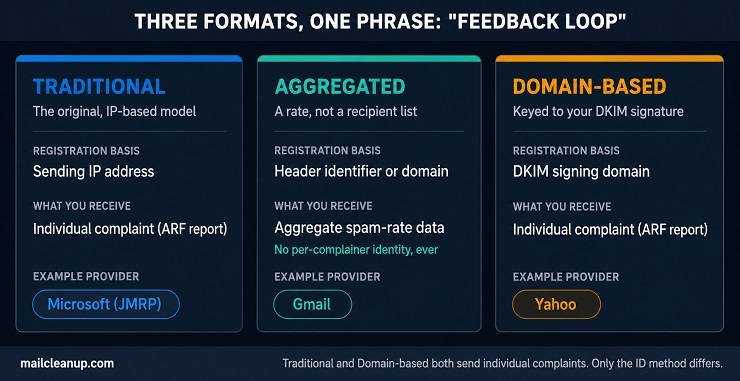
Every provider’s email feedback loop falls into one of three formats. The format decides what you register and what you get back. It also decides whether Gmail’s total absence from most “how to sign up” guides is actually accurate. It is not.
| Format | Registration Basis | What You Receive | Example Provider |
|---|---|---|---|
| Traditional | Sending IP address | Individual complaint (ARF) | Microsoft (JMRP) |
| Aggregated | Header identifier or domain | Aggregate spam-rate data | Gmail |
| Domain-based | DKIM signing domain | Individual complaint (ARF) | Yahoo |
We built this comparison around RFC 6449 and M3AAWG’s own current documentation, not how most existing guides simplify it. Two patterns are worth pulling out of that table before going provider by provider. First, Traditional and Domain-based formats send you the same kind of report: an individual complaint, tied to a specific person. They differ only in how the provider identifies you as the legitimate recipient of that data, by sending IP or by DKIM domain. Second, Aggregated is a genuinely different output. You get a rate, not a list. That is why suppressing individual complainers is never an option under this format, on any provider that runs it.
The Traditional, IP-Based Email Feedback Loop
This is the original email feedback loop format, the one RFC 6449 was written to formalize. The provider identifies you by your sending IP address. You apply once per IP. Every complaint tied to mail from that IP gets forwarded to you as an ARF report, usually within minutes of the recipient clicking spam.
The catch sits right in the name. Change IP addresses, migrate to a new ESP, add a second sending server, and you have to re-register every time. Microsoft’s JMRP runs this format, and its own documentation is explicit that a new feed has to be created whenever your IP inventory changes. If you send through a shared pool at a platform like Klaviyo or Mailchimp, this format is largely invisible to you. You do not own the IPs, so you cannot register them, and your ESP is the one actually enrolled on your behalf.
Aggregated Email Feedback Loop Data: The Format Gmail Actually Uses
Aggregated feedback loops trade individual complaints for a rate. Instead of forwarding each spam click as its own report, the provider rolls complaints up by whatever identifier you choose. It hands back a percentage instead.
Gmail is the clearest example. Add a Feedback-ID header to your outgoing mail: a short string identifying the campaign, customer, or mail type. Gmail’s Postmaster Tools then reports a spam rate for each value you used, once volume and complaint counts clear its own reporting threshold. You never learn which specific recipient complained, only that this campaign’s spam rate crossed a line worth investigating.
This is also, structurally, why Gmail cannot offer what Yahoo and Microsoft offer. There is no way to aggregate your way back to an individual complainer’s identity. Gmail’s own email feedback loop reports a rate on purpose, not as a limitation someone forgot to fix.
Domain-Based Email Feedback Loop Registration: Why DKIM Is Required
Domain-based is the newest of the three formats, and it solves a real problem with the original, IP-based version. A DKIM signing domain, unlike an IP address, does not change every time you migrate infrastructure or add a sending server. Register once against your DKIM d= value, and the provider keeps forwarding complaints no matter how your sending IPs shift underneath it.
Yahoo runs the clearest version of this domain-based email feedback loop. Every message has to carry a valid DKIM signature before Yahoo will even consider it for feedback loop reporting. The domain in that signature is the only thing the loop is actually keyed to. The full Yahoo walkthrough, including its own registration steps, comes next. For now, the operational point is durability. An IP-based registration breaks the moment your infrastructure changes. A domain-based one does not, as long as your DKIM setup stays consistent.
The Gmail Feedback Loop: How Aggregated Data Actually Works
Gmail’s email feedback loop runs on the Aggregated format the earlier framework named, which means the setup looks nothing like Yahoo’s or Microsoft’s. There is no application form. Instead, you change what you send.
Add a Feedback-ID header to every outgoing message, in the form a:b:c:SenderId. The first three fields are optional identifiers you choose, campaign, customer, mail type, whatever you want broken out separately. The SenderId field is mandatory and should stay consistent across your mail stream. Google’s own documentation is specific about what has to be true underneath that header before any data comes back:
- A valid DKIM signature: from a domain you actually control.
- Domain verification: that same domain added and verified inside Gmail’s own Postmaster Tools.
- SPF and PTR records: your sending IPs listed in that domain’s SPF record, with working PTR records resolving to a valid hostname.
Verify your domain in Postmaster Tools, then add the header. Gmail starts building a spam-rate report against each identifier you used, once your volume and complaint counts clear a threshold Google has never published. This is a genuinely different kind of Google feedback loop than what Yahoo or Microsoft run. You get a rate per identifier, not a list of who complained.
That rate gets measured against a published ceiling. Getting the actual number right, along with what to do once you are close to it, is [its own subject]. What matters here is the practical consequence: since Gmail never tells you which specific recipient complained, suppression by individual address is not an option. Segmenting by engagement, pruning addresses that have not opened in months, does the same job from the other direction.
The DKIM signature your Gmail feedback loop depends on is the same signature Yahoo requires too, just used differently. Gmail checks it to verify who you are. Yahoo uses it as the actual registration key. We cover Yahoo’s full registration process next, starting with why that key matters so much more there.
The Yahoo Complaint Feedback Loop: Why DKIM Is Mandatory
The Yahoo Complaint Feedback Loop is the cleanest version of the domain-based format covered earlier, and it is explicit that DKIM is not optional. Yahoo’s own current documentation states plainly that enrollment only supports DKIM-signed mail. The DKIM domain is how Yahoo determines who actually sent a message. No DKIM signature means no enrollment, regardless of anything else about your sending setup.
Getting registered follows three steps on Yahoo’s own Sender Hub.
- Create your sender profile.
- Add and verify your sending domain.
- Enroll that domain in the program. Yahoo emails a verification code to confirm you control it before enrollment finishes.
One correction to save you time: several existing guides still point readers to feedbackloop.yahoo.net for this. That is not where Yahoo’s current enrollment lives. The live page, checked directly against Yahoo’s own Sender Hub, sits at senders.yahooinc.com/complaint-feedback-loop/. Worth checking directly if a bookmarked link stops working.
This email feedback loop program now covers AOL traffic too, folded in after Yahoo and AOL’s mail infrastructure merged. If your DKIM setup is not consistent across every sending source, including AOL-bound mail, gaps show up here first. Inconsistent signing is the single most common reason a Yahoo enrollment stops receiving reports.
The Microsoft Email Feedback Loop: Two Programs, Two Different Formats
Microsoft’s setup confuses people for a specific reason: it bundles two genuinely different formats under one brand.
| JMRP | SNDS | |
|---|---|---|
| Full name | Junk Mail Reporting Program | Smart Network Data Services |
| Format | Traditional, IP-based | Aggregated |
| What you receive | Individual ARF complaints | Reputation and complaint-rate data per IP |
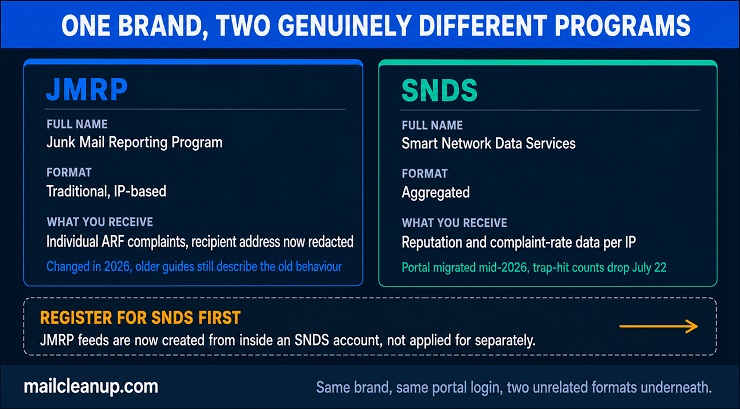
They are not two names for the same thing. The two are linked administratively now, not just conceptually. JMRP feeds have to be created from inside an SNDS account, so registering for SNDS comes first regardless of which data you actually want.
Two things changed recently enough that we want to flag them here, since a lot of existing guides have not caught up. Microsoft now strips the complaining recipient’s email address from JMRP reports, breaking the old identify-and-suppress workflow many guides still describe. It also moved the entire SNDS portal in mid-2026. The old sendersupport.olc.protection.outlook.com address now redirects, and spam-trap-hit counts drop from reports starting July 22, 2026.
The Microsoft email feedback loop setup is also IP-based, specifically through JMRP. That creates a real wall for anyone sending through a shared ESP pool. A feedback loop in email marketing platforms like Klaviyo or Mailchimp is typically handled for you automatically, without registration on your end. This works precisely because you do not own the sending IPs. Your platform is the one enrolled, and its own complaint and reputation data is the closest thing you get to JMRP or SNDS visibility.
Setting Up Your Email Feedback Loop: What Every Provider Actually Requires
Every provider’s email feedback loop requirements differ, but a real baseline sits underneath all three formats covered so far. We have not seen a single provider skip these, regardless of format:
- Proof of ownership: a domain or IP address you can actually verify controlling, not just claim.
- A working abuse address: abuse@ or postmaster@ on your sending domain, monitored, not a placeholder.
- A dedicated report endpoint: wherever complaints land, a specific inbox or API, not your general support queue.
Setting up a feedback loop in email infrastructure you fully control is one thing. Doing it through a platform is another entirely. If you send through an ESP like Klaviyo, SendGrid, or Mailchimp, that platform almost certainly already holds these registrations on your behalf. You inherit its reputation and its feedback loop enrollment along with everything else about sending through shared infrastructure.
If you run your own mail servers, or a dedicated IP through your ESP, the registrations above are yours to make. Nobody else is going to make them for you.
Unsolicited Complaint Feedback Loop Enrollment
Not every email feedback loop starts with an application. RFC 6449 also describes the opposite case. A provider can start sending you data before you have ever asked for any. This can happen based on mail volume or complaint patterns it already sees from your sending domain.
This is not common, and it is not something you can request. When it happens, treat the reports the same way you would treat ones you registered for. RFC 6449 is explicit about why this complaint feedback loop practice exists. A provider can start correcting a reputation problem before a sender even knows one exists. It is not a courtesy extended only to senders who filled out a form.
Processing Email Feedback Loop Reports: From Complaint to Suppression
Processing an email feedback loop report is not the end of the work once it arrives. RFC 6449’s own guidance for senders is direct. Suppress the complaining address, and do it close to immediately, not on your next scheduled list-cleaning pass.
- Suppress on receipt: add the address to your suppression list the same day, before your next scheduled send.
- Never re-add it: a complainer who resubscribes later is a different event; the original complaint stands regardless.
- Track the source, not just the address: which list, campaign, or acquisition channel produced this complaint matters as much as the address itself.
That third point is where most senders stop too early. A single complaint tells you about one address. A pattern of complaints clustered against one acquisition source, one list purchase, one specific campaign, tells you where your actual problem lives. RFC 6449 frames this explicitly as a diagnostic tool, not just a cleanup queue.
Privacy considerations run through all of this. Some providers, Microsoft’s JMRP among them now, strip the complaining address before you ever see it. That is specifically so you cannot build a workflow that depends on having it. A Google feedback loop never included that address to begin with, since Gmail’s aggregated format was never built to carry one. Where you do receive the address, treat it the way any other personal data in your systems gets treated. A feedback loop in email marketing operations touches recipient data, whether or not marketing was the intent behind that particular send.
What’s Next: RFC 6449, RFC 9477, and Automating Feedback Loop Registration
Everything covered so far assumes manual email feedback loop registration: you find each provider’s page, prove ownership, wait for approval. RFC 9477, published in 2023, proposes a way around that entirely.
| RFC 6449 (2011) | RFC 9477 (2023) | |
|---|---|---|
| Status | The model this guide covers throughout | Experimental, not a finished standard |
| Mechanism | Manual registration with each provider | A header carried inside every message |
| What it takes | One form, one relationship, per provider | Nothing extra, if the provider supports it |
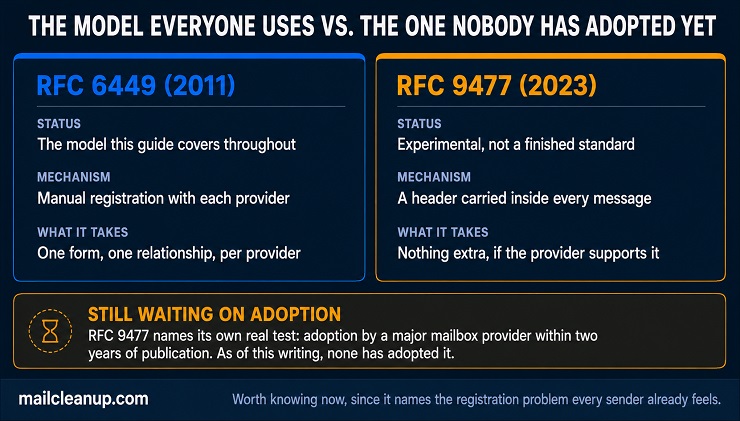
The idea behind RFC 9477 is a new email header, CFBL-Address, carrying your complaint feedback loop address directly inside every message you send. A mailbox provider that supports the header could start routing complaints back to you automatically, the first time it sees your mail. No application would be required from either side.
RFC 9477 draws its own comparison to a mechanism you may already know. List-Unsubscribe headers under RFC 8058 work the same way: a machine-readable signal carried in the message itself, not a separate registration step.
We should be honest about where this actually stands. RFC 9477 is Experimental status, not a finished standard. Its own text names one real test: adoption by a major mailbox provider within two years of publication. As of this writing, no major provider has adopted it. The idea is worth knowing about now. It is the clearest sign that the current one-form-per-provider model is a widely recognized problem, not an inconvenience senders complain about informally.
Why an Email Feedback Loop Is the Reactive Half of List Quality
Everything an email feedback loop tells you is reactive by design. A complaint has already happened by the time any format, Traditional, Aggregated, or Domain-based, tells you about it. The recipient already decided your mail did not belong in their inbox.
Disengaged recipients are more likely to mark mail as spam than to unsubscribe. Unsubscribing takes an extra click past the spam button, and plenty of people skip it. A stale or genuinely unwanted address sitting on your list is not a neutral risk. It is a future complaint waiting for whichever campaign reaches it next.
This is where list hygiene and list decay become the proactive half of the same equation for you. MailCleanup’s own Decay Report tracked a single client’s list across 12 months. It found that 23.79% of addresses that passed initial verification had decayed by the end of that window. A feedback loop in email marketing catches what already went wrong, one complaint at a time. Regular re-verification catches what is about to.
Common Email Feedback Loop Mistakes
Most email feedback loop mistakes come from treating three genuinely different systems as one. A few show up even for senders who know the formats cold.
- Treating Gmail like Yahoo or Microsoft: no form exists to fill out for the Gmail feedback loop. There is no registration step, only a header and a Postmaster Tools account.
- Confusing SNDS data with a real-time alert: SNDS reports reputation trends, not individual events as they happen.
- Letting a registered IP go stale after an ESP migration: this Microsoft email feedback loop format does not follow a new IP automatically. JMRP is Traditional and IP-based, so every migration needs a fresh registration.
- Comparing your own complaint rate to a published threshold without matching the denominator: the math behind that comparison is its own subject (check our detailed guide on spam complaint rates). Getting it wrong skews every conclusion that follows.
- Signing some sending sources with DKIM and not others: a Yahoo complaint feedback loop keyed to your DKIM domain goes quiet fast. The moment any part of your sending infrastructure signs inconsistently, reports stop.
- Ignoring an unsolicited feedback loop enrollment as spam: a provider that starts sending data before you applied is not phishing you. Those reports deserve the same treatment as ones you registered for.
Your Email Feedback Loop Setup Checklist
Everything covered in this guide comes down to a short list of concrete actions. Work through these in order, and the format differences stop being confusing.
- Register with Yahoo first: DKIM has to be consistent before anything else works. Fix your signing setup, then enroll your verified domain through Yahoo’s Sender Hub.
- Register for Microsoft SNDS, then JMRP: SNDS comes first now, and JMRP feeds get created from inside that same account.
- Add a Feedback-ID header for Gmail: no application exists. Verify your domain in Postmaster Tools and start reading the reports it gives you.
- Build a suppression process before you need one: a report that arrives with nowhere to go is the same as no report at all.
None of this replaces the other half of the work. An email feedback loop tells you who already complained. Keeping your list clean in the first place is what keeps that number small.
FAQs on Email Feedback Loop
What is a feedback loop in email?
An email feedback loop is a mechanism a mailbox provider uses to notify a sender when a recipient marks their message as spam. It uses the ARF format RFC 6449 defines, so you can act on a complaint instead of never learning about it.
Does Gmail have a feedback loop?
Yes, but not the kind Yahoo or Microsoft run, so you will not find an application form. Gmail’s feedback loop is Aggregated. It reports a spam rate per Feedback-ID header value through Postmaster Tools, not individual complaints tied to a specific recipient.
Why does Yahoo require DKIM for its complaint feedback loop?
Yahoo’s format is Domain-based, meaning it identifies the legitimate recipient of complaint data by DKIM signing domain rather than sending IP. Without a valid DKIM signature, Yahoo has no way to route a complaint back to you.
What is the difference between Microsoft’s JMRP and SNDS?
JMRP forwards individual complaints and is tied to your sending IP; SNDS reports aggregate reputation and complaint-rate data for that same IP. They are administratively linked now, with JMRP feeds created from inside an SNDS account.
What format do feedback loop reports use?
Most use ARF, the Abuse Reporting Format, which packages a human-readable summary, machine-readable metadata, and the original message into one report, per RFC 6449. That structure is why a well-built report gives you more than just a forwarded copy of your email.
Do I need to register for feedback loops if I send through an ESP like Mailchimp or Klaviyo?
No. Your ESP almost certainly already holds these registrations, since you are sending through its shared infrastructure and its IPs, not your own.
What should I do when I receive a feedback loop complaint?
Suppress that address from your list immediately, and do not re-add it later even if the recipient resubscribes. Track which list or campaign produced the complaint, since a pattern across many complaints usually points to a real problem worth fixing.
Can a mailbox provider send feedback loop data without my applying first?
Yes. RFC 6449 explicitly allows unsolicited enrollment. A provider can start sending complaint data based on mail volume or complaint patterns it already sees, without any application from you.