
Most existing coverage of email verification use cases picks one angle and stops there. Some sort by industry. Others sort by job title. A newer batch of vendor pages covers exactly one persona each: an agency page here, a founder’s guide there. Each exists because a product team needed a landing page. None of them map the whole picture for you.
This post does. It covers nine email verification use cases, and you’ll likely recognize your own situation in at least one of them. Each one names the result category behind the risk too: undeliverable, accept-all, unknown, role-based, or another. Every figure comes from our own verified data, not the unsourced “20 to 30 percent” range used almost everywhere else.
One scope note first. Every use case below is about cleaning a list you already have. It’s bulk work, done before you act on that list. Checking a single address the instant someone types it into your form is a different job entirely, covered on its own page. Most mature programs run both.
TL;DR
- Email verification needs differ sharply by who’s asking, spanning sales, agencies, founders, recruiters, PR, financial services, nonprofits, event organizers, and AI-driven workflows.
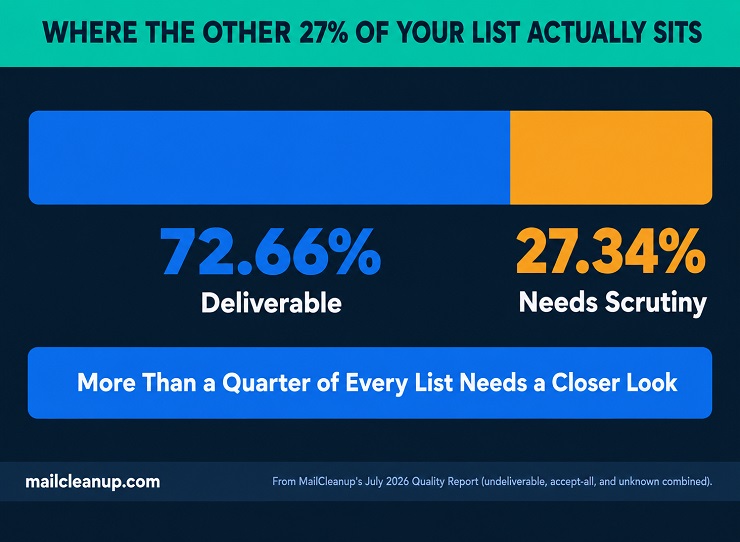
- Undeliverable, accept-all, and unknown results together make up 27.34% of a typical list in MailCleanup’s data, a figure financial services teams can’t treat casually.
- Recruiting lists carry more unknown results than almost any other use case, since the risk with a resume-sourced address is time, not origin.
- Role-based inboxes like press@ or editor@ can pass every check and still never reach a specific person, a different problem than an invalid address.
- Disposable addresses are rarer overall than most people assume, roughly 0.27% in MailCleanup’s data, but the rate climbs on one-time forms like event registrations.
- An AI agent working a list autonomously has no equivalent to a person’s ambient attention, making pre-cleaning matter more, not less.
Real-World Email Verification Use Cases
Ask who needs email verification, and the honest answer is anyone sending outbound email at real volume. That answer isn’t very useful to you alone. Your real risk, and your real fix, depends on where your list came from and who’s about to use it.
Most coverage picks one way to sort that out and stops. Sort by industry alone, and a sales team’s cold-outreach list ends up filed next to a hospital’s appointment-reminder list. Nothing about that sorting says the two carry different risks for you. Sort by job title, and an agency running six client accounts looks the same as a solo founder testing outbound for the first time. Their actual failure modes are nothing alike.
Some of this really is a matter of email verification by industry. Some comes down to role instead, or to team structure. The nine use cases below use whichever lens actually fits, so find yours and read that one first if you’d rather skip ahead. Forcing every scenario through the same category doesn’t describe how any of them actually break. Each one names the specific result category creating most of its risk, checked against our own verified data. That’s what makes these nine email verification use cases different from a generic benefits list: real data, matched to a real scenario.
1. Email Verification for Sales Teams and Cold Outreach
If you’re building a cold outreach list, it rarely comes from a clean source. A few common starting points:
- A scraped database, pulled together in an afternoon
- A list a previous hire built two years ago and nobody’s touched since
- Access to a third-party dataset nobody on your current team has actually verified
Each source decays the moment nobody’s watching it, and none arrive pre-checked.
The stakes are higher here than almost anywhere else on this list. A newsletter that bounces on a handful of stale subscribers is an inconvenience. A cold email domain that bounces at scale on day one can get flagged before your campaign proves itself. Sending reputation forms early, and it’s hard to rebuild. A Hunter.io survey found how common that is: about 28% of sales respondents said their lead lists had never once been scrubbed. That means a real share of cold outreach runs on addresses nobody has checked since the list was built. This is exactly where email verification for cold outreach earns its keep: catching a dead or mistyped address before it reaches a prospect.
Email verification for sales teams solves that front half of the problem. It confirms an address exists and can receive mail before your sequence goes out. It doesn’t answer why list quality specifically determines whether a cold domain survives its first few sends. You can find that deeper argument, built on our own verification data, in cold email deliverability.
Catch-all addresses deserve a separate call too. A catch-all domain isn’t invalid, but treating it like a confirmed inbox in a cold sequence is its own mistake. Catch-all email addresses walks through that handling by context, cold outreach included. This is one of the email verification use cases where reputation damage compounds fastest. A sales team inside an agency setup runs straight into email verification for agencies too, not just the cold-outreach risk covered here.
2. Email Verification for Agencies Managing Multiple Clients
If you’re running campaigns for six clients, you’re not managing six separate reputations. Ask who needs email verification across an agency’s roster, and the honest answer is every client, not just the difficult ones. Not if those campaigns share sending infrastructure: one domain, one IP pool, one shared warmup history. Share infrastructure like that, and it’s one reputation with six sources of risk feeding into it. A single client handing over an unverified, years-old list can drag down deliverability for every other account on that infrastructure, spotless ones included.
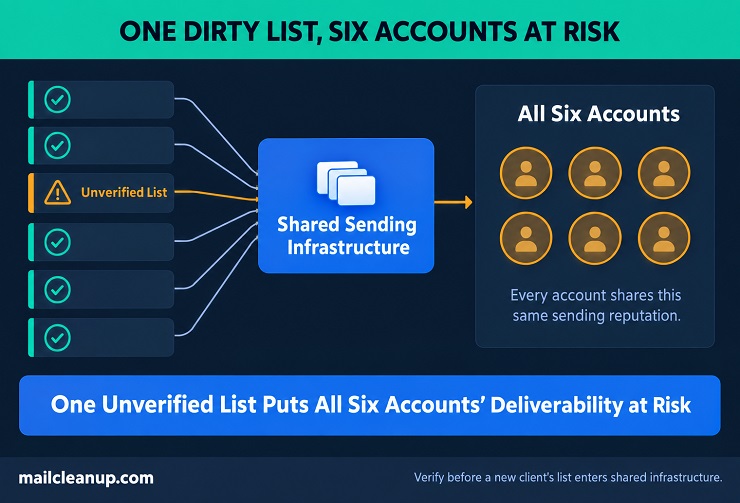
That risk compounds because you rarely control what you’re handed. A client’s list arrives in whatever state the client left it:
- Scraped from a previous tool nobody fully retired
- Exported from a CRM nobody’s touched in years
- Built from sign-up forms with no hygiene practice behind them at all
You inherit that history along with the account. Agencies serving nonprofit clients run into email verification for nonprofits from both directions at once.
The core risk in one line: shared sending infrastructure means a client’s dirty list doesn’t stay that client’s problem alone.
Email verification for agencies has to solve a coordination problem the sales-team version of this task doesn’t. Checking one list once isn’t enough. Every new client list needs the same pass before it enters your shared sending environment. Every account team needs visibility into which of their lists have actually cleared that check. A tool built around one shared login across your whole agency makes that visibility harder to enforce, not easier.
This is also where our own pay-per-order structure fits agency work better than a subscription does. Agencies running outbound campaigns face the same email verification for sales teams risk, just multiplied across every client account. Client lists don’t arrive on a predictable schedule. A subscription sized for one month’s onboarding volume sits oversized the next month it isn’t. Uploading a client’s list, verifying it, and paying only for that job matches how your agency actually moves. It’s client by client, not a fixed monthly cadence.
One more thing worth naming honestly. A list that clears verification the week it’s handed over doesn’t stay clean for a whole retainer. We’ve tracked exactly how fast that happens, using our own data, in email list decay. The same logic applies to a client’s list sitting in your system just as directly as it does to a company’s own list. This is one of the email verification use cases where damage spreads past its original source fastest.
3. Email Verification for Founders and Early-Stage Startups
Ask who needs email verification most urgently, and a brand-new domain sits near the top of that list, for a reason worth spelling out. If yours is one, here’s why. If you’re juggling your own hiring on top of everything else, you’ll run straight into email verification for recruiters too. That’s not just the founder-specific risk covered here. An established company with years of clean sending behind it can absorb an occasional bad campaign. Its domain has a track record. A single rough send is noise against years of good signal, and inbox providers have plenty of history to weigh it against.
A brand-new domain doesn’t have that cushion. If you’re just starting out, your first sends are also your only sends. Founders face one of the tightest email verification use cases on this list: almost no room for a first mistake. A high bounce rate on day one isn’t one data point among thousands for you, the way it might be for a bigger company. Testing cold outreach for the first time, or emailing an early batch of investors and beta users, means building your sender reputation from zero. The stakes for getting it wrong are highest at exactly that moment.
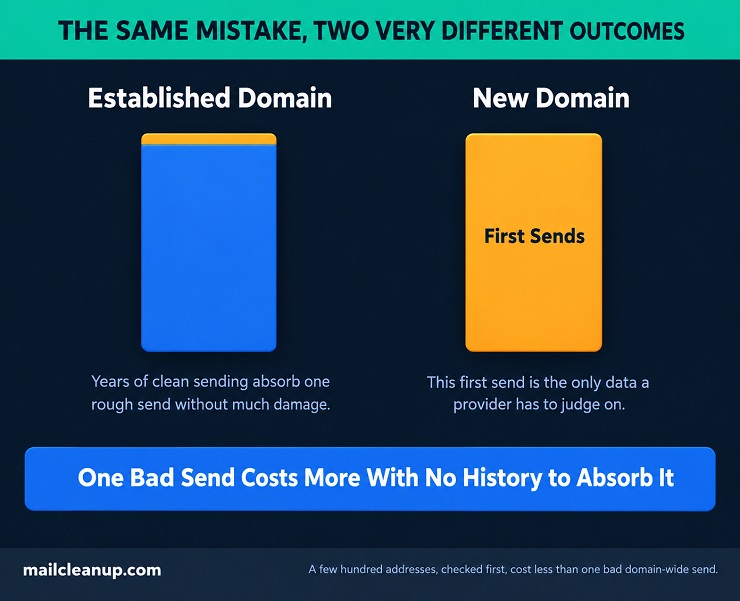
Why the timing makes this worse: a bounce-heavy first campaign is most of what a mailbox provider has to judge your whole domain on. It isn’t one bad result buried among years of good ones.
The domain question compounds it. You’ll likely send that first campaign from the same domain running your product email, billing notices, and investor updates. A separate sending domain isn’t usually the first item on a pre-launch checklist. A bounce-heavy campaign on that shared domain doesn’t just risk the campaign itself. It risks whether a password-reset email or an investor update reaches anyone at all. Providers judge domain reputation as a whole, not campaign by campaign.
Email verification for founders matters most exactly here, before that first real send. Your list at this stage is usually small, something like:
- A handful of investor contacts
- A batch of early users
- Names pulled from LinkedIn or a personal network
Checking a few hundred addresses first costs very little.
Even a list this small usually isn’t spotless. Across our own verified data, roughly 7.48% of addresses land in the accept-all category, and another 6.13% come back unknown. That’s the ambiguous middle ground what is email verification walks through in detail. Neither result is automatically bad, but neither is automatically safe, and a founder’s list is too small to absorb guessing wrong on either one.
That upfront check removes the single biggest controllable risk to a domain with no reputation buffer at all. A founder building an AI-driven product runs into email verification for AI agents from day one, not just the domain risk covered above. Our own per-order pricing means that check costs exactly as much as your list actually is. That matters more here than at almost any other point in your company’s life.
4. Email Verification for Recruiters and Hiring Teams
If you’re sourcing candidates for a role, most of the emails on your list came from the candidates themselves, not from you. Ask who needs email verification before a big hiring push, and the answer is anyone sourcing candidates at volume. A resume, a LinkedIn message, a job board application. Each one hands you an address the candidate typed in themselves, at whatever job they held when they typed it.
That’s different from a purchased or scraped list in one specific way. The address was probably real when you got it. The problem is time, not origin. A candidate’s resume email might be a work address from a job they left two years ago. Or it’s a personal inbox they’ve since abandoned for a newer one.
That timing problem shows up differently depending on where the address actually lives:
| Where the address lives | How cleanly it resolves |
|---|---|
| An active corporate domain | Usually a clean valid or invalid |
| A personal provider like Gmail or Yahoo | Less consistent, especially on an old address |
| A company domain that’s since shut down or changed hands | Often comes back unknown |
That last row is why unknown results show up more here than almost anywhere else on this list. A resume sitting in your database for two years has had two years to land in any of these three states. You won’t know which one until you check.
Email verification for recruiters earns its keep before a big push, not after. Reach out to two hundred candidates for one role and rack up forty bounces, and you’ve just wasted an afternoon for nothing. It’s the same reputation hit a sales team takes on a bad cold list, just with resumes instead of a CRM export. The address was genuinely real once. That’s what makes this one of the trickier email verification use cases: the risk isn’t a fake address, it’s an abandoned one.
5. Email Verification for PR and Media Outreach
If you’re building a media list, you’re not just checking whether an address exists. Journalism is a genuine case of email verification by industry too, with its own specific address type to watch for. You’re checking whether it’s the right kind of address to begin with.
Journalists and editors often publish a general inbox instead of a personal one: press@, tips@, editor@. A standard check confirms that inbox receives mail, which it does. It doesn’t tell you whether a pitch sent there gets read by anyone, or filed straight into a folder nobody opens.
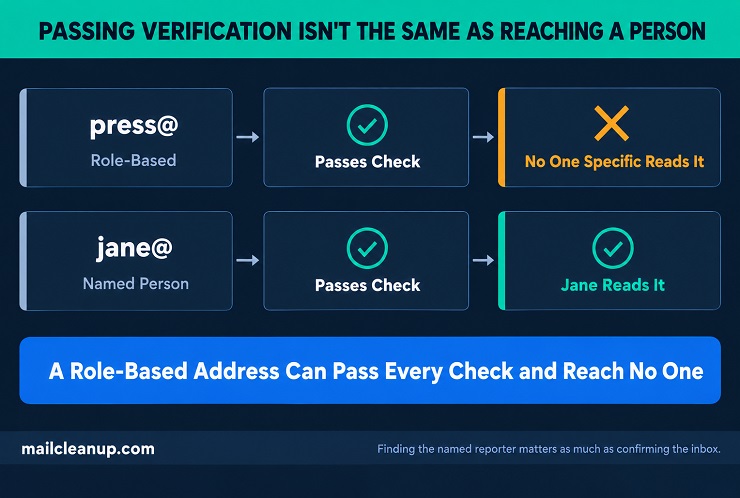
Deliverable and reachable aren’t the same thing. A role-based inbox can pass every check and still never put your pitch in front of the person who could actually run it.
That’s a role-based address, and it’s a different problem from an invalid one. A closer look at role-based addresses specifically covers what that distinction actually means for outreach. Building a genuine media list usually means finding the named reporter behind that general inbox, not just confirming the general inbox itself works. A media push tied to an actual event runs into email verification for event organizers on the same list.
Email verification for journalists has to do both: confirm the address is real, and flag when it’s a shared inbox rather than one person’s. Skip that second part, and your pitch has just as much chance of reaching a shared folder as a specific byline. This is one of the email verification use cases where “deliverable” and “actually read” are two different questions entirely.
6. Email Verification for Event Organizers and Community Managers
A registration form for a one-time event behaves differently than a list you build over months. Someone signs up once, gets a confirmation, and might never interact with your organization again after that single event.
That one-time nature changes what shows up in the results. A list you build slowly through an ongoing relationship tends to have real people using addresses they check regularly. A registration form filled out in the thirty seconds before someone closes a tab picks up more typos. It also picks up more addresses used specifically to dodge follow-up messages. A few reasons that specific combination shows up so often on this exact kind of form:
- The relationship is one-time by design, so there’s nothing to lose by giving a burner address
- The whole interaction happens under time pressure, with no second look at what was typed
- Nobody’s checking the address against a longer history the way your ongoing list would
Disposable addresses are rarer than most people assume. Our own data puts the overall rate at 0.27%, but event registration is exactly the kind of low-commitment form where that rate climbs. Someone who wants the content behind your registration wall has no real interest in hearing from you again. That’s a specific reason to reach for a burner address instead of a real one.
Email verification for event organizers does its most useful work in the gap between registration and the event itself. Confirmation emails, reminders, last-minute changes for your event: all of it depends on addresses collected once, under time pressure. There’s no second chance to fix a typo before the event happens. Few email verification use cases hinge this much on timing. There’s no window left to catch a bad address once the event has happened.
7. Email Verification for Financial Services and Compliance Teams
If you work in financial services, not every email you send is optional. This is email verification by industry at its most literal: financial services carries different stakes than a typical marketing list. A promotional offer bouncing costs you a conversion. A fraud alert or a required account disclosure bouncing costs you something else entirely. It means a customer was never actually notified, on a message you may have been obligated to send.
That distinction changes how much risk you can tolerate in a list, and where:
| Type of email | What a bad address actually costs |
|---|---|
| Marketing offer or newsletter | A lost engagement, nothing more |
| Fraud alert or security notice | A customer exposed to risk they were never warned about |
| Required account disclosure or statement | A compliance gap, not just a missed message |
The bottom row is why financial services teams can’t apply a marketing team’s usual tolerance for a few percent of bounces. Undeliverable, accept-all, and unknown results together make up 27.34% of a typical list in our own data. On a promotional list, that’s a number to manage down over time. On a list carrying required notices, it’s 27.34% of your customers you can’t actually confirm you reached.
Email verification for financial services matters here for a reason beyond deliverability. It’s the difference between sending a required notice and being able to show you sent it. A verified address at the point you send is the closest thing you have to proof the notice went somewhere real. This is one of the email verification use cases where the cost of getting it wrong isn’t measured in engagement metrics at all.
8. Email Verification for Nonprofits and Fundraising Teams
If your organization runs on donations, your donor list rarely grows evenly. Nonprofit fundraising is its own case of email verification by industry, shaped by burst growth rather than steady acquisition. It grows in bursts, tied to specific moments:
- A giving-day campaign that brings in hundreds of new donors to your list in a single afternoon
- A gala or fundraising event where names get typed into a tablet between courses
- A year-end tax-deduction push, when someone gives once in December and nothing else all year
Each of those moments adds addresses to your list fast, under conditions nobody’s optimizing for accuracy. A name typed into a tablet at your gala gets less scrutiny than one entered on a quiet Tuesday. A December giving surge doesn’t leave you much room to check each new address as it comes in either.
That’s what makes this one of the email verification use cases where decay looks different than it does for an ordinary marketing list. The full year-long breakdown of how fast a cleaned list decays comes from a separate, dedicated dataset, but the same pattern holds here. An address that was good the day someone gave doesn’t stay good indefinitely. Your list is also disproportionately full of one-time givers you’ll only ever email a handful more times.
Email verification for nonprofits matters most right after one of those burst moments, not on some ongoing schedule that assumes steady growth. A list that just tripled overnight after a giving-day campaign carries different risk than the same list six months into steady growth. Checking it once, right after the burst, catches the specific damage that moment did before it spreads into your next appeal.
9. Email Verification for AI Agents and Automated Workflows
If you’re running any kind of automated workflow, outreach, lead qualification, CRM updates triggered by a new contact, here’s something worth sitting with. When someone on your team works through a list by hand, something odd occasionally catches their eye. A name that doesn’t look right, a domain nobody’s heard of, an address formatted strangely. Nobody’s actually checking those things formally. It’s just human attention, working ambiently in the background.
Your AI agent working the same list doesn’t have that ambient check. An agent running email verification for cold outreach at scale has even less room for that kind of check than a human does. It either has explicit verification built into its process, or it doesn’t. There’s no gut feeling standing in as a backup either way.
Why spam traps are the sharpest version of this problem: a spam trap address looks completely ordinary. Nothing about it would catch a human’s eye either, so the usual argument that “a person would probably notice” doesn’t even apply here. Our own data puts spam trap hits at roughly 8 per million addresses. That’s rare enough that most humans running a campaign would never personally encounter one. Your agent running thousands of campaigns doesn’t personally encounter anything either way. It just acts.
That action doesn’t stop at one bad send. Logging a contact attempt, advancing a lead, scheduling a follow-up: your agent does all of it off whatever address it started with. Bounce or not, the work still happens. A single bad address doesn’t cause one failed email anymore. It causes a small chain of automated decisions built on a contact that was never real to begin with.
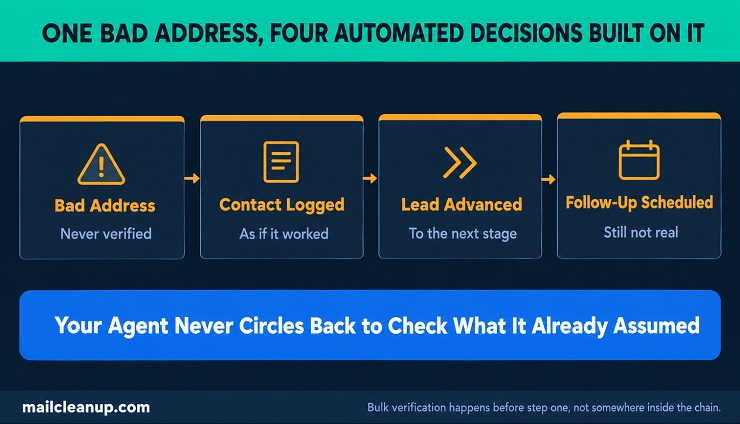
Email verification for AI agents means cleaning your list in bulk before an agent ever touches it. It’s not about building a check into the agent’s own workflow after the fact. The same logic applies wherever else automation touches sensitive communication, email verification for financial services included. What actually makes an address one covers spam traps specifically, worth understanding given how little warning they give. This is one of the newest email verification use cases on this list. It’s also one of the clearest arguments for cleaning before automation touches your list, not during.
Across Every One of These Email Verification Use Cases, the List You Already Have Comes First
Nine email verification use cases, and one common thread running under all of them. The list you already have is where the real risk sits, not the next address someone hasn’t typed in yet. A sales team’s scraped database, a recruiter’s two-year-old resume file, a nonprofit’s post-gala rush of new donors, an agency’s shared sending infrastructure. Whether it’s email verification for sales teams chasing a cold list, or a nonprofit checking a donor list, the same principle applies. Each looks different on the surface. Every one of them comes down to the same question: does this list, right now, actually reach the people you think it does.
That question has one honest starting point, whatever your specific situation looks like. Upload the list you already have, and see what’s actually in it. Do that before you build anything else on top of it: an automated agent, a fundraising campaign, an outbound sequence. MailCleanup’s own bulk verification runs against exactly the categories this post has walked through, no account or subscription required. You pay for the list you actually check, not a monthly plan sized for whoever you were six months ago.
Maybe what actually brought you here is the other half of this picture. That’s checking an address the instant someone types it into a form, not cleaning a list you already have. Real-time email verification covers that mechanism on its own terms. Most of the use cases above eventually need both. Email verification for journalists looks nothing like email verification for founders on the surface, but both come down to who’s actually behind an address. The list sitting in your system right now is the one place to start. It’s the one risk you can check today, before any of these nine scenarios plays out again.
FAQs on Email Verification Use Cases
Is email verification necessary for a small business?
Yes. A small list is proportionally just as exposed. One spam complaint on a list of a thousand people can already push a sender toward the spam-rate threshold providers enforce. This is one of the nine email verification use cases where a smaller operation carries more risk, not less.
How often should you verify an email list?
It depends on the use case, not a fixed calendar. A recruiter checks before a big candidate push. A nonprofit checks right after a giving-day surge. An agency checks with every new client handoff. There’s no single interval that fits every one of these email verification use cases equally well.
Does email verification catch every bad address?
No single check is perfect. Catch-all domains, greylisting delays, and brand-new disposable services can all slip past a check built to catch something else. That’s exactly why periodic bulk verification and point-of-entry checks are meant to run together, not as substitutes for each other.
What’s the difference between email verification and email validation?
The two terms are mostly used interchangeably. Where people do draw a line, validation sometimes means format and syntax checks only. Verification refers to the fuller process that confirms the mailbox itself exists. The distinction isn’t consistent across providers, so it’s worth checking what a specific tool actually means by either term.
Do I still need to verify my existing list if I already check addresses at signup?
Yes. A check at signup only covers addresses going forward. It does nothing for contacts already sitting in your database: resumes, donor records, event registrations. Those were collected before that check existed, or have simply gone stale since they were entered.
Can email verification catch spam traps?
It can flag many of them, but not with certainty. A spam trap address looks completely ordinary, which is exactly what makes it dangerous. Bulk verification against an updated trap list catches far more than a human ever would. Nothing about a trap address gives anyone a visual warning.
Does email verification help with regulatory compliance?
It helps, though it isn’t the whole compliance picture on its own. For financial services and other regulated industries, a verified address is closer to proof that a required disclosure reached someone real. That matters more than deliverability alone once a notice is legally required, not just useful.
Is email verification worth it for a list you’ll only use once, like an event or a one-time campaign?
Yes, and possibly more than for an ongoing list. A one-time registration or a single fundraising push collects addresses fast, under time pressure, with no history to check them against. That’s exactly the kind of list most likely to carry typos and disposable addresses nobody catches otherwise.