
Email verification and email validation are two of the most interchangeably used terms in email marketing, and the confusion is entirely understandable. Search either term and you will find tools that call themselves email verification services, tools that call themselves email validation platforms, and comparison posts that contradict each other on which does what. The terminology has never been standardised across the industry, and that makes a straightforward question genuinely difficult to answer.
There is a real technical distinction between the two, and it matters for how you approach list quality and deliverability. But there is also a practical layer that almost no explanation covers: at the bulk list level, verification, validation, and list cleaning all refer to the same workflow. The label a tool puts on its product page does not change what it does to your list. Understanding where the terms actually differ and where they overlap will help you choose the right process for your situation and stop second-guessing whether you are doing enough.
This post covers both layers of email verification vs email validation. It explains what validation and verification each do at the technical level, how the industry uses these terms in practice, what a full bulk verification run actually checks, and how to decide which approach your sending programme needs.
TL;DR: Email Verification vs Email Validation
- Email validation checks whether an address is correctly formatted and points to a real domain. It answers the question: does this address look like it could work?
- Email verification goes deeper. It checks whether the mailbox actually exists and can receive mail by running SMTP-level checks against the receiving server. It answers the question: is there a real, active inbox here?
- At the technical layer, verification includes validation. Every verification run performs format and domain checks as part of its process.
- In practice, the industry uses “email verification,” “email validation,” and “email list cleaning” interchangeably at the bulk list level. Different tools use different names for the same workflow.
- Real-time email validation via API is a distinct product category. It checks addresses at the point of entry, before they reach your list. Bulk list verification checks addresses you already have.
- If you have a list and need to clean it before sending, you need bulk email verification. If you want to stop bad addresses entering your system at the moment of signup, you need real-time API validation.
- Most senders need bulk verification first. Real-time validation is an additional layer, not a replacement.
Why These Two Terms Cause So Much Confusion
Search for any tool in this space and you will find the same pattern. One product calls itself an email verification service. Another calls itself an email validation platform. A third uses both terms on the same page. The comparison posts that are supposed to explain the difference often contradict each other, because the market has never standardised how these words are used.
This is not a gap in your knowledge. It is a genuine inconsistency in how the industry has named these processes, and it has existed since bulk email checking tools first appeared.
The confusion runs deeper than naming. At the technical level, there is a real distinction between what validation does and what verification does. But at the product level, most tools that call themselves email verification services are performing both operations as part of a single process. The label on the product tells you little about which checks are actually being run under the hood.
Understanding email verification vs email validation clearly requires separating two questions. The first is the technical question: what does each operation actually check? The second is the practical question: how does the industry use these terms, and what does that mean for the tool you need? This post answers both, in that order.
What Email Validation Means at the Technical Layer
Email validation is the first and fastest layer of email address checking. It examines an address on its own, without contacting any external server, and determines whether it is correctly structured and points to a domain that can receive mail.
What Email Validation Checks
At its core, email validation runs through a set of structural and domain-level tests. These are the specific checks a validation process performs:
- Syntax check: The address is checked against standard formatting rules. It must contain exactly one @ symbol, a local part (the username before the @), and a domain. Invalid characters, spaces, or double dots fail this check.
- Domain existence check: The tool confirms the domain in the address actually exists and has DNS records. An address at a non-existent domain cannot receive mail regardless of how the local part is formatted.
- MX record check: MX (Mail Exchange) records tell the internet where to deliver email for a given domain. Validation confirms that the domain has at least one MX record present. Without MX records, the domain cannot receive mail.
- Disposable address detection: Many validation tools maintain lists of known temporary email providers and flag addresses from those domains. Disposable addresses are single-use by design and have no value in a long-term sending list.
- Role-based address flagging: Addresses structured around functions rather than people, such as info@, support@, or admin@, are technically valid but carry deliverability risk. Validation flags these for the sender to decide how to handle.
What Email Validation Cannot Tell You
The boundary of email validation is important to understand. It can tell you that an address is correctly formatted and points to a domain configured to receive mail. It cannot tell you whether the specific mailbox exists.
A perfectly formatted address at a real domain with valid MX records might point to a mailbox that was deleted three months ago. Validation will pass that address without issue. The problem only becomes visible when the email bounces.
This is the gap that email verification closes.
What Email Verification Means at the Technical Layer
Email verification includes everything validation does and goes one step further. After confirming the address format and domain configuration, verification contacts the receiving mail server directly to check whether the specific mailbox exists and is capable of receiving messages.
The SMTP Handshake: What Verification Actually Does
The core of email verification vs email validation is this step: the SMTP handshake. SMTP (Simple Mail Transfer Protocol) is the communication protocol email servers use to send and receive messages. A verification tool uses this protocol to have a conversation with the receiving server without ever delivering an actual email.
The sequence works like this:
- The verification tool identifies the mail server for the domain using its MX records.
- It opens a connection to that server and introduces itself.
- It declares a sender address and then asks the server whether the target mailbox can receive mail.
- The server responds with a status code.
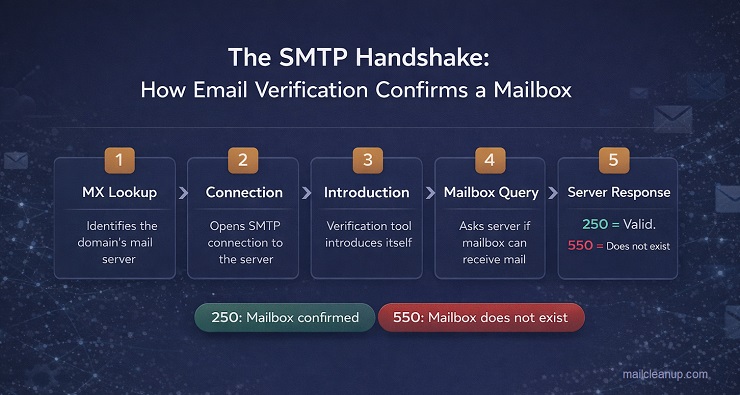
A 250 response means the mailbox exists and is accepting mail. A 550 response means the mailbox does not exist. Other codes indicate temporary failures, greylisting, or servers that refuse to answer the question at all.
Additional Checks Verification Runs
Beyond the SMTP handshake, a thorough email verification run performs several additional checks that validation cannot:
- Catch-all domain detection: Some domains are configured to accept all incoming mail regardless of whether the specific mailbox exists. These are called catch-all or accept-all domains. Verification identifies them and flags the result, because the SMTP check cannot give a definitive answer for individual addresses on these domains.
- Spam trap detection: Spam traps are addresses maintained by ISPs and anti-spam organisations to identify senders with dirty lists. They are real addresses that accept mail, which means they pass validation. Verification tools cross-reference known spam trap databases to flag these before you send. For more on how spam traps work and how they end up in lists, see our post on what are spam traps.
- Risk scoring: Verification tools assign risk levels to addresses based on the combination of checks run. An address might be technically valid but carry elevated risk due to its domain type, behaviour pattern, or proximity to known problematic address ranges.
- Duplicate removal: A verification run typically identifies and removes duplicate entries, ensuring you are not sending the same address multiple times from a single list.
What Verification Cannot Guarantee
Verification confirms that a mailbox exists and is accepting mail at the moment of the check. It cannot confirm that someone is actively monitoring that inbox, that the recipient is engaged, or that the address will still be valid in three months. Email lists decay at roughly 2 to 3% per month as people change jobs, abandon inboxes, and shut down domains. A verified list from six months ago needs to be verified again before you send to it.
Verification also cannot prevent spam complaints. A verified address is a real address. Whether the person behind it considers your email welcome is a permission question, not a verification question. For how bounce rates and list quality feed into your broader email sender reputation, that is a separate layer of your sending programme.
How the Industry Actually Uses These Terms
This is the part most explanations skip. They define verification and validation cleanly, draw a neat line between them, and leave you wondering why every tool you look at seems to use the terms differently. The reason is straightforward: the market never agreed on standard terminology, and two genuinely distinct use cases ended up with overlapping names.
At the bulk list level, email verification, email validation, and email list cleaning all describe the same process. You bring a list of addresses. The tool runs each one through a sequence of checks covering format, domain, MX records, SMTP-level mailbox confirmation, disposable address detection, catch-all identification, and risk scoring. You receive back a cleaned file with each address categorised. Whether the tool calls this process verification or validation makes no difference to what happens to your list.
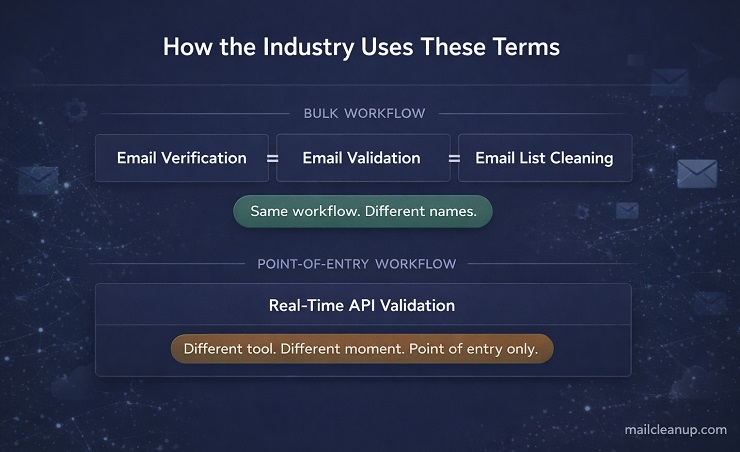
This is why searching for “email verification vs email validation” returns contradictory results. One source says verification is the deeper check. Another uses validation to describe the same deep check. Both are describing the same bulk workflow under different names. If you are cleaning a list before a send, the term on the product page is not the thing to focus on. The checks being performed are.
Where the Terms Do Point to Something Different
Real-time email validation via API is a genuinely separate product category, and this is where the distinction becomes meaningful.
Rather than processing a list you already have, real-time validation sits inside your lead acquisition workflow. It checks an address at the moment it is entered, before it ever reaches your list. A form submission, a CRM integration, a signup page. The check happens instantly, inline, and either flags the address or allows it through. This requires an API integration between the validation service and your acquisition source, and it is a different type of tool to a bulk list cleaner.
The practical summary for email verification vs email validation is this. Bulk list verification and bulk list validation are the same thing. Real-time API validation is a distinct product category that operates at the point of entry rather than the point of send. Most senders need the bulk workflow first. Real-time validation is an additional layer that prevents bad addresses from entering the list in the first place, rather than removing them after they have accumulated.
MailCleanup operates in the bulk workflow. You upload a list, each address is checked across multiple layers, and your cleaned results are delivered to your inbox. If you are looking to clean a list before a campaign, that is the process this post covers in detail.
What a Full Bulk Verification Run Actually Checks
Understanding what email verification vs email validation involves at the processing level helps you evaluate what a tool is actually doing to your list. Not all bulk verification services run the same depth of checks. A surface-level tool might only confirm syntax and domain existence. A thorough verification run covers several distinct layers.
Layer 1: Syntax and Format
Every address is checked against standard formatting rules before anything else. The address must contain exactly one @ symbol, a valid local part, and a properly structured domain. Invalid characters, consecutive dots, spaces, and malformed domain extensions all fail at this layer. Syntax checking is fast because it requires no external lookup.
Layer 2: Domain Validity
The tool confirms the domain in the address actually exists and has active DNS records. Domains that have expired, been abandoned, or never existed cannot receive mail. Any address at a non-existent domain is invalid regardless of how well the local part is formatted.
Layer 3: MX Record Verification
MX records tell the internet which mail server handles incoming email for a given domain. A domain can exist without having MX records configured, which means it cannot receive mail even if the domain is live. Verification confirms that at least one valid MX record is present and responsive.
Layer 4: SMTP-Level Mailbox Confirmation
This is the layer that separates thorough email verification from basic validation. The tool connects to the domain’s mail server using SMTP protocol and asks whether the specific mailbox can receive messages. A valid response confirms the mailbox exists. A rejection response confirms it does not. This step catches addresses that pass every format and domain check but point to a mailbox that no longer exists, whether because the account was deleted, the person left the organisation, or the inbox was deactivated.
Layer 5: Disposable Address Detection
Disposable email addresses are generated by temporary inbox services specifically to avoid giving away a real address. They pass syntax checks and often have valid domains. They are worthless in a sending list because they are single-use by design and abandoned immediately. Verification tools maintain databases of known disposable providers and flag any address belonging to one. For more on what disposable addresses are and how they enter lists, see our post on what is a disposable email address.
Layer 6: Catch-All Domain Identification
Some domains are configured to accept all incoming mail, whether or not the specific mailbox exists. These are called catch-all or accept-all domains. When a verification tool pings the mail server of a catch-all domain, the server responds positively to every address, so SMTP confirmation cannot tell you whether the individual mailbox is real. Verification identifies catch-all domains and flags those addresses separately so you can make an informed decision about how to handle them rather than treating them as confirmed valid.
Layer 7: Spam Trap Detection
Spam traps are addresses maintained by ISPs and blocklist operators to identify senders who are not managing their lists properly. They look like real addresses, they accept mail, and they pass every format and domain check. The only way to identify them is by cross-referencing against known spam trap intelligence. A verification run that includes spam trap detection flags these addresses before they do damage to your sender reputation.
Layer 8: Duplicate Removal
A verification run identifies duplicate entries across your list and removes them from the clean output. Duplicates inflate your list size, cause the same address to receive multiple sends, and produce unnecessary bounces if the address is invalid. Removing them before the send is a basic list hygiene step that a thorough verification service handles automatically.
Understanding Your Verification Results
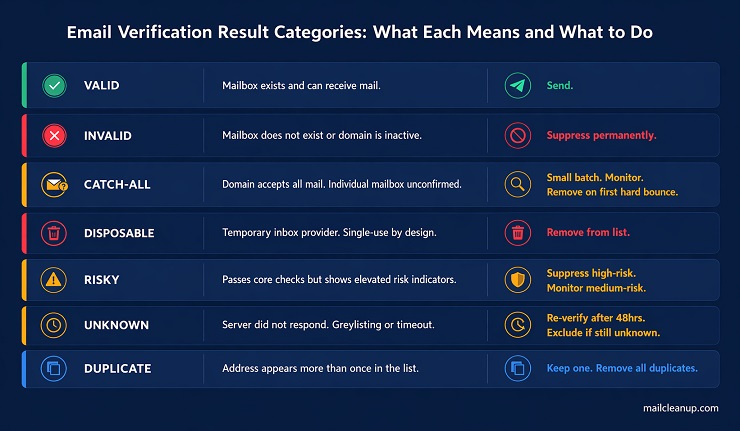
A bulk email verification run does not return a simple clean or dirty label for each address. It returns a set of result categories, and knowing what each one means determines what you do next. Most senders understand the two obvious outcomes. The categories in between are where decisions actually matter.
The Full Result Category Map
| Result Category | What It Means | Recommended Action |
|---|---|---|
| Valid | The mailbox exists, the domain is configured correctly, and the address can receive mail. | Send. Include in your active list. |
| Invalid | The mailbox does not exist, the domain is inactive, or the address fails a critical check. | Suppress permanently. Never send to an invalid address. |
| Catch-all | The domain accepts all incoming mail. The individual mailbox may or may not exist. | Send in small batches. Monitor bounce rates closely. Remove on first hard bounce. |
| Disposable | The address belongs to a known temporary inbox provider. | Remove from your list. Disposable addresses have no long-term value. |
| Risky | The address passes core checks but shows elevated risk indicators. | Assess by risk level. Suppress high-risk addresses. Treat medium-risk with caution and monitor. |
| Unknown | The verification tool could not get a clear response from the mail server due to greylisting, rate limiting, or server timeout. | Re-verify after 24 to 48 hours. If still unknown, treat as risky and exclude from primary sends. |
| Duplicate | The address appears more than once in your list. | Keep one instance. Remove all duplicates before sending. |
The Grey Zone: Catch-All and Unknown Results
The valid and invalid categories are straightforward. The catch-all and unknown categories require a decision, and most senders either ignore them entirely or delete them out of caution. Both approaches lose value.
Catch-all addresses represent a meaningful portion of most B2B lists, particularly lists built from company domains. The domain is real, the company is real, and the address may well be valid. The issue is that verification cannot confirm the specific mailbox. Sending to catch-all addresses in a controlled batch, with close monitoring of what bounces, is a more productive approach than suppressing them wholesale.
Unknown results most often occur because the receiving server uses greylisting, which temporarily rejects verification pings, or rate limiting, which blocks repeated checks within a short window. These are not negative signals about the address itself. Re-verifying them after a gap of 24 to 48 hours resolves the majority. Those that remain unknown after a second attempt should be excluded from primary sends and treated as unconfirmed.
Understanding this result map is part of what good email list hygiene looks like in practice. Verification gives you the data. The decisions you make with each category determine the actual quality of the list you send to.
Which One Do You Need? A Practical Decision Guide
The right answer to the email verification vs email validation question depends entirely on your situation. The definitions matter less than knowing which process fits where you are in your sending programme. These scenarios cover the most common cases.
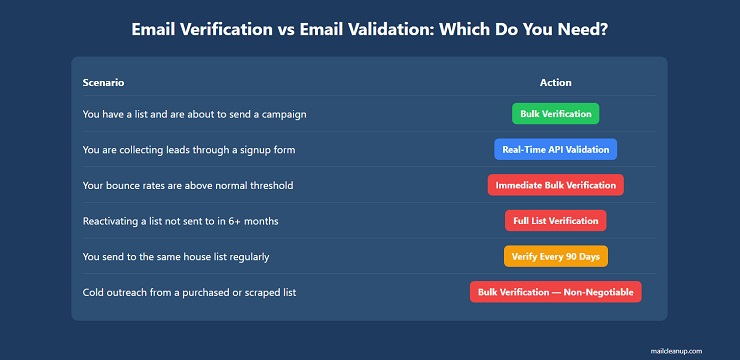
You have a list and you are about to send a campaign
You need bulk email verification. Run your list through a verification service before the send, regardless of where the list came from or when it was last used. This applies to your own house list, a list from a previous platform migration, a list collected through events or lead generation, or any list that has not been verified within the last 90 days. Lists decay at roughly 2 to 3% per month. A list that was clean six months ago has measurable degradation. Sending without verifying first is the most common cause of bounce rate spikes. For a detailed look at how high bounce rates develop and what to do about them, see our post on what causes email bounces.
You are collecting email addresses through a signup form or lead source
You need real-time API validation at the point of entry. This catches formatting errors, disposable addresses, and obvious invalids before they enter your list. It does not replace bulk verification before sends, but it reduces the rate at which bad addresses accumulate in your list over time. This is a separate product category to bulk verification and requires an API integration with your form or CRM.
You are seeing bounce rates above your normal threshold
You need immediate bulk verification of the list segment that generated the bounces, followed by suppression of all invalid results. Then review your acquisition sources, because elevated bounce rates on a previously clean list usually signal a list quality problem at the point of entry rather than normal decay. For a step-by-step approach to diagnosing and fixing elevated bounce rates, see our post on how to fix email bounce rate.
You are reactivating a list that has not been sent to in six months or more
You need bulk verification before any send. Dormant lists accumulate invalid addresses at a faster effective rate than active lists because normal suppression processes have not been running against them. Sending to an old list without verifying first is one of the fastest ways to damage your email sender reputation, because the proportion of invalid, expired, and trap addresses is likely to be significantly higher than in an actively maintained list.
You send to the same house list on a regular cadence
You still need periodic bulk verification, even for a well-maintained list. Monthly for high-frequency senders. Every 90 days at a minimum for lower-frequency programmes. Hard bounce suppression handles addresses that fail after a send, but it does not catch addresses that have become invalid since your last verification run but have not yet been sent to. Regular verification closes that gap. Pairing this with consistent email list hygiene practices between verification runs keeps your sender reputation stable across campaigns.
You are doing cold outreach from a purchased or scraped list
You need bulk verification before any send, and you need to treat catch-all results with particular care. Purchased and scraped lists typically contain a higher proportion of catch-all domains, role-based addresses, and aged contacts than permission-based lists. Verification is not optional for this use case. It is the minimum step before a single email goes out.
Your List Quality Is Only as Strong as the Process Behind It
Email verification and email validation are terms the industry has never standardised, but the discipline they point to is consistent and non-negotiable. Every address on your list was valid at some point. The question is whether it still is, and whether you are checking before you send or finding out through bounces after the damage is done.
Bulk verification gives you a clear picture of your list before a campaign goes out. Real-time API validation gives you a cleaner list before it even needs verifying. Used together as part of a structured sending programme, they reduce bounce rates, protect your sender reputation, and ensure that your engagement metrics reflect real recipients rather than list noise. The senders who treat email verification vs email validation as an ongoing operational question, rather than a one-time setup task, are the ones who maintain deliverability stability across months and campaigns, not just after a single clean.
Run a verification pass before your next send. Build the cadence into your programme. And if your bounce rates or engagement metrics are already showing strain, start with a full list verification and work backwards from the results to find where the quality problem entered.
FAQs on Email Verification vs Email Validation
Is email verification the same as email validation?
At the bulk list level, the two terms are used interchangeably across the industry, and for practical purposes they refer to the same workflow: running a list through multi-layer checks to identify and remove invalid, risky, and undeliverable addresses. The technical distinction is that validation covers format and domain-level checks, while verification adds SMTP-level mailbox confirmation on top. Most bulk verification services perform both as part of a single process. When you upload a list to a tool that calls itself either an email verifier or an email validator, the checks being run are typically the same.
What is the difference between bulk email verification and real-time email validation?
Bulk email verification processes a list you already have. You upload a file, each address is checked across multiple layers, and you receive back a categorised clean list. Real-time email validation operates at the point of entry, checking addresses as they are submitted through a form, API, or CRM integration before they reach your list. The two serve different moments in your workflow. Bulk verification cleans what you already have. Real-time validation prevents bad addresses from accumulating in the first place. Most senders need bulk verification. Real-time validation is an additional upstream layer.
Can I just use email validation without verification?
For inbound signup forms with double opt-in, validation alone is often sufficient because subscribers are confirming their own addresses at the point of entry, which filters out most input errors. For bulk lists, purchased lists, cold outreach lists, or any list built without real-time checks at the acquisition stage, validation alone is not enough. It catches formatting errors but cannot confirm whether a mailbox actually exists. Only SMTP-level verification can do that. Relying on format checks alone is the most common reason senders experience bounce rate spikes on lists they believed were clean.
How often should I verify my email list?
Verify before every major campaign as a baseline practice. Beyond that, the cadence depends on your sending frequency and list sources. High-frequency senders with actively maintained lists should verify every 30 to 60 days. Lower-frequency programmes should verify every 90 days at minimum. Any list that has not been sent to in six months or more should be treated as a dormant list and verified in full before reactivation, regardless of when it was last checked. Email addresses decay at roughly 2 to 3% per month, which means a list verified six months ago carries 12 to 18% degradation by the time you send to it again.
What happens to catch-all addresses in a verification result?
Catch-all domains are configured to accept all incoming mail regardless of whether the specific mailbox exists. This means SMTP verification cannot give a definitive answer for individual addresses on these domains: the server says yes to everything. A thorough verification run identifies catch-all domains and flags those addresses separately rather than marking them as valid. The recommended approach is to send to catch-all addresses in small controlled batches, monitor bounce rates closely after each batch, and remove any address on its first hard bounce. Suppressing all catch-all results without testing them is overly conservative for most B2B lists, where catch-all domains represent a large proportion of company email infrastructure.
Does verifying my email list prevent spam complaints?
Catch-all domains are configured to accept all incoming mail regardless of whether the specific mailbox exists. This means SMTP verification cannot give a definitive answer for individual addresses on these domains: the server says yes to everything. A thorough verification run identifies catch-all domains and flags those addresses separately rather than marking them as valid. The recommended approach is to send to catch-all addresses in small controlled batches, monitor bounce rates closely after each batch, and remove any address on its first hard bounce. Suppressing all catch-all results without testing them is overly conservative for most B2B lists, where catch-all domains represent a large proportion of company email infrastructure.
What is a risky email address and should I send to it?
A risky address is one that passes core format and domain checks but shows elevated risk indicators that suggest it may cause deliverability problems. Risk indicators vary by tool but typically include proximity to known spam trap ranges, domain behaviour patterns associated with high complaint rates, role-based address structures, and addresses that exhibit catch-all characteristics at the mailbox level rather than the domain level. Whether to send to risky addresses depends on the risk level assigned and your tolerance for deliverability exposure. High-risk addresses should be suppressed. Medium-risk addresses can be retained in a monitored segment with close attention to bounce and complaint rates after the first send.
Is email verification enough on its own to maintain good deliverability?
Verification is a critical foundation but not a complete deliverability programme on its own. It protects you from the bounce rate damage that comes from sending to invalid addresses, and it removes known spam traps before they trigger blocklist incidents. What it does not address is engagement quality, acquisition hygiene, authentication setup, or sending behaviour. A verified list built from low-quality acquisition sources will still produce complaint rates. A verified list sent without proper SPF, DKIM, and DMARC configuration will still face inbox placement issues. And a verified list that is not re-verified on a regular cadence will degrade back toward the same problems over time.