
Every guide about email verification tells you the same thing. There is a syntax check, an MX record lookup, and an SMTP handshake. The pipeline runs in sequence, invalid addresses get removed, and your bounce rate goes down. That much is consistent across every tool on the market.
What most guides skip is the part that actually matters to you as a sender: what each feature is specifically checking for, what result it assigns to an address, and what that result means for your sending decisions. Knowing that a check exists is not the same as knowing what to do when an address comes back as “Catch-All” or “Risky” after a verification run completes.
This post covers email verification features explained at the level of practical use. Each feature is broken down by what it checks, what signal it uses to make its assessment, and what result category it produces. By the end, you will have a complete picture of how the verification pipeline works and a clear framework for acting on every result your next run returns.
TL;DR on Email Verification Features
- Email verification features explained means understanding not just the checks that run but the specific result each check assigns to every address on your list.
- The email verification flow runs in sequence: syntax check, domain and MX record lookup, SMTP mailbox check, then intelligence checks including disposable detection, catch-all classification, and risk scoring.
- Syntax and format checks remove structurally broken addresses before any network-level checks are attempted, saving processing time and ensuring only valid-format addresses proceed through the pipeline.
- MX record checks confirm whether a domain is configured to receive email at all, catching expired domains, closed business addresses, and domains that exist as websites but have never been set up to receive mail.
- SMTP mailbox verification confirms whether a specific inbox exists on the mail server, without delivering any message content and without exposing your sending domain.
- Disposable email detection, catch-all domain classification, and role-based address detection are the features that separate a surface-level clean from a verification run that genuinely protects sender reputation.
- Risk scoring combines signals from multiple checks into a single verdict for each address, giving you an actionable decision signal rather than a set of separate flags to interpret manually.
- Understanding what to do with each result category is as important as running the verification itself: Valid, Catch-All, Risky, and Disposable all require different handling decisions.
What Email Verification Actually Does
The most important thing to understand about what is email verification is that it is not a single check. It is a coordinated sequence of independent features, each targeting a different class of problem, each producing a labelled result for the address it evaluates. When a verification run completes, every address on your list has been assessed by multiple features, and each feature has contributed either a pass signal, a failure signal, or a caution flag to the final verdict.
This matters because different result categories require different actions. An address that fails the syntax check is structurally broken and should be removed immediately. An address that returns a catch-all classification is technically reachable but carries delivery uncertainty that needs to be evaluated against your programme’s risk tolerance. Treating every non-Valid result as simply “remove it” leads to over-suppression. Treating every non-Invalid result as “keep it” leaves risky addresses on lists that needed more careful handling.
Email verification features explained at this level means treating each check as a decision-making tool rather than a background technical process. Understanding what each feature is doing gives you the ability to interpret your results accurately and act on them with confidence.
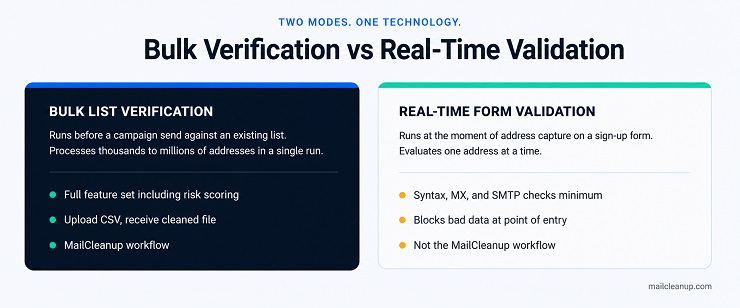
| Bulk List Verification | Real-Time Form Validation | |
|---|---|---|
| When it runs | Before a campaign send, against an existing list | At the moment of address capture, on a sign-up form |
| Address volume | Thousands to millions processed in a single run | One address evaluated at a time |
| Primary purpose | Clean an existing list and reduce pre-send bounce risk | Block invalid addresses at point of entry |
| Checks typically run | Full feature set including risk scoring and catch-all detection | Syntax, domain, MX, and SMTP at minimum |
| MailCleanup model | Upload a CSV, receive a cleaned file delivered to your inbox | Not the MailCleanup workflow. See email verification vs email validation for the distinction. |
The Email Verification Flow
Email verification features explained as a sequential system is what distinguishes a useful technical guide from a surface-level overview. The checks do not run in parallel. Each one runs in order, and an address that fails at an early stage does not continue through subsequent checks. This sequencing is deliberate: it prevents expensive network-level operations from running on addresses that are already disqualified by basic structural failures.
The email verification flow runs in the following order:
- Syntax and format check
- Domain existence and MX record lookup
- SMTP mailbox verification
- Intelligence checks: disposable email detection, catch-all domain classification, role-based address detection, duplicate identification, and spam trap detection
- Risk scoring: a combined verdict applied to addresses that passed all prior checks but carry compounding caution signals
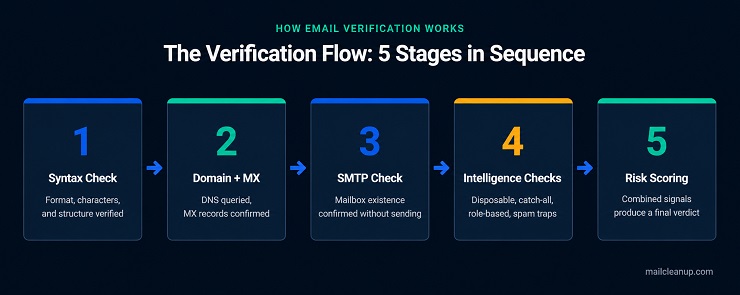
Understanding this sequence helps you read your results correctly. An address that fails at step 2 will not have an SMTP result, because there is no live mail server to query. An address that passes steps 1 through 3 but is flagged at step 4 is technically deliverable but carries risk the SMTP check alone could not have surfaced. How email verification works as a sequence is the foundation for understanding what each individual feature is responsible for.
The Core Email Verification Features
This section covers each email verification feature in turn: what it checks, how it makes its determination, and what result category it assigns. This is email verification features explained at the depth that bulk senders actually need.
Syntax and Format Check
The syntax check is the first filter in the email verification flow and the most straightforward. Email verification features explained at a basic level almost always begin here because syntax failure is unambiguous: the address is structurally broken and cannot receive email under any circumstances.
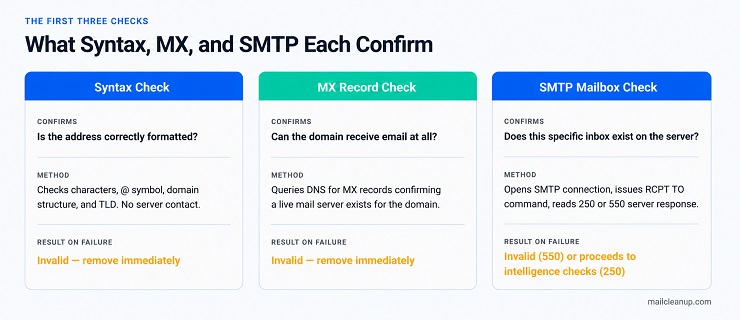
The check evaluates the local part (everything before the @ symbol), the @ symbol itself, the domain name, and the top-level domain. It also checks for invalid characters, consecutive dots, leading or trailing spaces, and formatting violations that would cause the address to be rejected at the sending level before any server is contacted.
An address that fails the syntax check is assigned the Invalid result and should be removed from your list.
Domain and MX Record Check
Once an address clears the syntax check, the domain and MX record check runs. This feature queries the Domain Name System to confirm that the domain is real, active, and configured to receive email.
How email verification works at this stage is a two-part query. First, the system confirms the domain exists in DNS. Second, it checks for MX records, which are the DNS entries pointing to the mail servers responsible for receiving email on that domain. A domain with no MX records cannot accept email regardless of whether specific addresses on it are real.
This check catches several common problems that email verification features explained correctly must surface: domains that have expired and been deregistered, businesses that have closed and let their domain lapse, and domains that exist as web addresses but were never configured for mail receipt. Every address on an MX-failed domain is assigned the Invalid result.
SMTP Mailbox Verification
The SMTP mailbox check is the most technically significant feature in the email verification flow. It moves from domain-level confirmation to address-level confirmation. An address can exist on a valid domain with functioning MX records and still not correspond to a real inbox.
The verification system opens a connection to the recipient’s mail server using the SMTP protocol and issues a RCPT TO command with the target address. The server responds with a status code: a 250 response confirms the mailbox exists and can receive mail; a 550 response indicates it does not. This entire exchange happens without delivering any message content. No email is sent. Your sending domain is not exposed during the handshake.
An address returning a 550 at the SMTP stage is assigned the Invalid result. An address returning 250 proceeds to the intelligence checks. This is the layer that catches what email verification features explained as dead mailboxes: addresses that once belonged to real people, passed domain checks, but are no longer active on the mail server.
Disposable Email Detection
Disposable email addresses are temporary inboxes generated through services that create a working address for single use. They pass syntax checks. Their domains carry valid MX records. They return 250 responses at the SMTP level. Without a dedicated detection feature, they clear all three prior checks and land on your clean list.
Disposable email detection works by matching each address domain against a continuously updated database of known disposable and temporary address providers. When a match is found, the address is assigned the Disposable result regardless of how it performed on earlier checks.
The deliverability implication for email verification features explained in the context of bulk sending is clear: disposable addresses represent subscribers who deliberately avoided sharing a real inbox. They produce unreliable engagement data, inflate list size without adding genuine reach, and typically become abandoned or deactivated quickly. For a full breakdown of what these addresses are and how they enter lists, see the guide on what is a disposable email address.
Catch-All Domain Detection
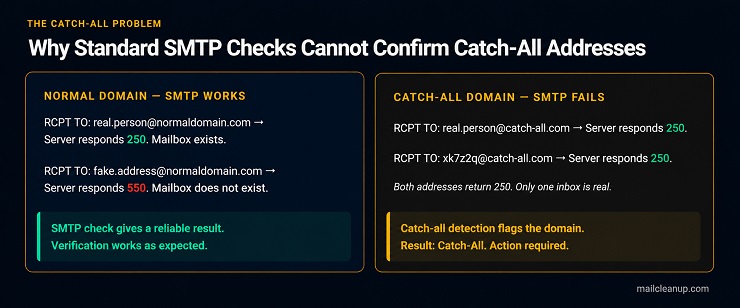
Catch-all domains are configured to accept every email sent to them, regardless of whether the specific inbox in the address actually exists. That configuration is what makes a Catch-All result different from every other result on this list. It isn’t a pass or a fail. It’s an honest admission that the specific mailbox cannot be confirmed either way.
The catch-all detection feature identifies domains with this configuration and flags every address on them with the Catch-All result, signalling that deliverability cannot be confirmed through standard verification methods.
The practical implication for bulk senders is that Catch-All addresses are not automatically invalid. Many legitimate business addresses sit on catch-all domains. What to do with a Catch-All result depends on your list source, your sending frequency, and your programme’s risk tolerance. The Verification Result Action Map in the next section covers this in detail.
Exactly how much risk a Catch-All result carries, and how to prevent one from reaching your list, is its own question. It has been discussed in the dedicated post on catch-all email addresses.
Role-Based Address Detection
Role-based addresses are inboxes assigned to a function rather than an individual: info@, support@, admin@, hello@, sales@, noreply@. They are structurally valid, their domains carry functioning MX records, and they pass SMTP checks. Email verification features explained at the level of risk assessment, however, treat these addresses as a distinct category requiring their own flag.
The reason role-based addresses carry deliverability risk is that they are typically monitored by multiple people, not a single subscriber who opted in to your list. Sending to role-based addresses increases the probability of manual spam complaints from staff members who did not personally subscribe. They also frequently route to shared inboxes where engagement is low and complaint thresholds are easily crossed.
The feature works by matching the local part of each address against a reference list of known role-based prefixes. A matched address is assigned the Role-Based result. Removal is the standard recommendation for permission-based marketing lists, though some transactional programmes retain them where the functional inbox is genuinely the correct recipient.
Duplicate Removal
Duplicate removal is one of the email verification features that senders underestimate until they encounter the deliverability and engagement measurement problems it prevents. When a list contains the same address multiple times, every send to that list delivers multiple copies of the same message to the same inbox. This produces spam complaints from recipients who interpret repeat delivery as a technical error or an aggressive sending practice.
The duplicate detection feature identifies every instance where the same address appears more than once, normalises capitalisation differences (since email addresses are case-insensitive at the domain level), and flags all repeated occurrences for removal, retaining one clean instance of each address. The result assigned to duplicates is Duplicate, and the action is straightforward: remove all but one instance before sending.
Duplicate inflation also distorts your campaign metrics. Open rates, click rates, and unsubscribe rates calculated against a list with duplicates misrepresent actual subscriber behaviour, making it harder to evaluate deliverability health accurately.
Spam Trap Detection
Spam traps are email addresses maintained by ISPs, blocklist operators, and anti-spam organisations specifically to identify senders with poor list hygiene. They do not belong to real users and will never generate a legitimate open, click, or reply. Hitting one signals to inbox providers that your list acquisition or maintenance practices are problematic, and the consequences range from filtering to full blocklisting.
Spam trap detection within the email verification features set works by cross-referencing addresses against known trap databases and applying pattern recognition against address constructions commonly associated with trap seeding. It is not a perfect filter, because trap addresses are deliberately hard to identify, but it removes the highest-risk known trap addresses before they trigger a reputation event.
The result assigned is Spam Trap, and the action is immediate removal. Unlike Catch-All or Role-Based results, there is no risk-tolerance calculation involved. For a complete breakdown of how different trap types work and what each type signals about your programme, the guide on what are spam traps covers this in full.
Risk Scoring
Risk scoring is the final feature in the email verification flow and the one that ties the entire pipeline together. Where earlier checks produce binary or categorical results for specific failure types, risk scoring evaluates each address holistically: it takes all the signals generated by every preceding check and combines them into a single risk verdict for addresses that did not fail any individual check outright.
An address can pass syntax validation, return a functioning MX record, receive a 250 SMTP response, and still carry a combination of signals that indicate elevated delivery risk. It might sit on a domain with a history of high complaint rates. It might share characteristics with addresses that have generated bounces in large-scale verification datasets. It might have passed technical checks but exhibit patterns associated with low engagement or list decay.
Email verification features explained with risk scoring included gives you something that individual pass-or-fail checks alone cannot: a graduated output that distinguishes between clean addresses, addresses with a specific identifiable problem, and addresses that are technically valid but statistically likely to cause delivery friction. The Risky result category is produced by the risk scoring feature and represents the addresses your programme needs to evaluate rather than automatically act on.
The Verification Result Action Map
This is where email verification features explained becomes practically useful. The checks above tell you what each feature does. This section tells you what to do with every result category your verification run will return. No competitor provides this mapping, and the absence of it is why senders regularly either over-suppress by removing everything that is not clearly Valid, or under-suppress by ignoring Catch-All and Risky flags they do not know how to interpret.
| Result | What It Means | What Caused It | Recommended Action |
|---|---|---|---|
| Valid | Address is real, the inbox exists, and delivery is expected | Passed all checks: syntax, MX, SMTP, and intelligence checks | Send. Include in your active list. |
| Invalid | Address cannot receive email under any circumstances | Failed syntax, MX, or SMTP check | Remove immediately. Do not send. |
| Catch-All | Inbox existence cannot be confirmed. Server accepts all addresses by design | Domain is configured as catch-all. SMTP check returns 250 for all addresses | Segment and evaluate. For warm, engaged lists from known sources: retain and monitor. For cold or purchased lists: suppress. |
| Disposable | Address is a temporary inbox from a disposable email service | Domain matched against known disposable provider database | Remove from marketing lists. Suppress permanently. |
| Role-Based | Address belongs to a function, not an individual | Local part matched against role-based prefix list (info@, admin@, support@, etc.) | Remove from permission-based marketing sends. Retain only if the functional inbox is genuinely the correct recipient for your programme. |
| Duplicate | Address appears more than once on the list | Same address submitted multiple times, with or without capitalisation variation | Remove all but one instance before sending. |
| Spam Trap | Address is maintained to identify senders with list hygiene problems | Matched against known trap database or trap-pattern indicators | Remove immediately. Do not send under any circumstances. |
| Risky | Address passed individual checks but carries compounding risk signals | Risk scoring feature flagged elevated delivery risk from combined signals | Evaluate against list source and programme type. Suppress from cold campaigns. Test cautiously on warm engaged lists before full inclusion. |
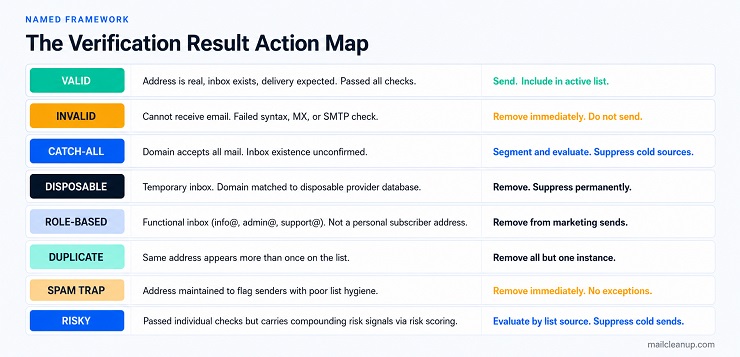
The most operationally important distinction in this table is between Invalid and Risky. Invalid means the address will never receive email and must be removed. Risky means the address might receive email but is statistically likely to generate friction. Treating Risky addresses as Invalid leads to unnecessary suppression. Treating them as Valid exposes your sender reputation to avoidable damage.
Which Email Verification Features Matter Most for Bulk Sending
Not all email verification features carry equal weight in every programme, and understanding which ones matter most for your specific use case is part of what email verification features explained at the operational level requires. For bulk list verification, the priority order is different from real-time form validation, because the problems bulk senders face are different in nature and scale.
At bulk scale, the features that have the greatest direct impact on sender reputation are SMTP mailbox verification, spam trap detection, and catch-all domain classification. SMTP mailbox verification is the single highest-value check for bulk senders because lists decay continuously. An address that was valid twelve months ago may belong to a closed inbox today. Running SMTP checks against an aged list removes the dead mailboxes that generate hard bounces, and hard bounces at scale are the fastest route to deliverability damage.
Spam trap detection matters disproportionately at bulk scale because trap hits do not scale linearly with list size. A handful of trap addresses buried in a large list causes the same reputation signal as hitting the same traps on a small list, and the reputation consequence falls across your entire sending programme, not just the campaign that triggered it.
Catch-all classification and risk scoring become increasingly important as list sources become less controlled. For in-house opt-in lists with recent acquisition, catch-all and risky addresses are a manageable segment. For older lists, lists acquired through co-registration, or lists that have not been verified recently, the proportion of catch-all and risky addresses tends to be high enough to warrant suppression before sending.
Effective email list hygiene means running the full feature set on a schedule, not only before a single campaign, because the result categories shift over time as addresses age. For a step-by-step guide to acting on your verification results as part of a cleaning run, see the guide on how to clean your email list.
The email verification features that matter least to prioritise in isolation are duplicate removal and role-based detection. Not because they are unimportant, but because their impact is contained. Duplicates affect your metrics and recipient experience. Role-based addresses affect complaint probability on specific addresses. Neither carries the system-wide sender reputation risk that spam traps, hard bounces from dead inboxes, or bulk trap hits generate. They belong in every verification run, but they are not the features to focus on when interpreting risk.
Feature priority for bulk senders:
- Critical: SMTP mailbox verification, spam trap detection, catch-all domain classification, risk scoring
- High: Disposable email detection, MX record check
- Standard: Duplicate removal, role-based address detection, syntax check
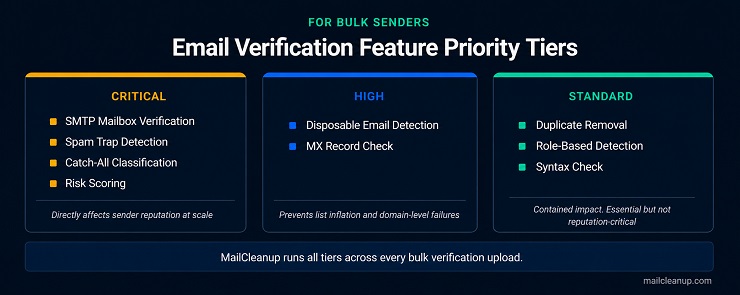
MailCleanup runs the full feature set across every bulk verification upload. You upload your list as a CSV, the entire email verification flow runs against it, and your cleaned results are delivered directly to your inbox with no account required.
Your Verification Results Are Only Useful If You Know What to Do With Them
Most senders treat email verification features explained as a pre-send checklist item. Run the tool, download the clean file, send the campaign. That approach captures most of the value, but it misses the part that compounds over time: interpreting your results as diagnostic data about the health of your list and the quality of your acquisition sources.
When a verification run returns a high proportion of Invalid addresses, that is a signal about list age or acquisition quality, not just a set of addresses to remove. When Catch-All results account for a significant share of your list, that is a signal about the industry or audience segment you are reaching, because certain sectors run catch-all configurations as standard. When Risky results cluster around a specific acquisition source or sign-up period, that is a signal worth investigating before you scale that channel further.
Email verification features at their most useful are not just a cleaning mechanism. They are a feedback loop on your list health that gets more valuable the more consistently you run them. To understand how this connects to ongoing bounce rate reduction, your verification cadence and your bounce monitoring belong in the same programme, not separate processes.
The senders who get the most from email verification features explained at this level are those who read the full result distribution after every run, not just the Valid count, and use it to make decisions upstream about acquisition, re-engagement timing, and suppression thresholds. Running the verification and acting only on the obvious removals leaves the most actionable information on the table.
FAQs on Email Verification Features
What does email verification features explained mean in practice?
Email verification features explained means understanding each check in the pipeline as a decision-making tool, not just a technical step. Each feature runs a specific test and assigns a result category to the address. That result tells you what action to take. Knowing what each feature does is the foundation of acting on your results correctly.
What is the difference between a syntax check and an SMTP check?
A syntax check tests whether an email address is correctly formatted: valid characters, an @ symbol, and a legitimate domain structure. It does not contact any server. An SMTP check connects to the recipient’s mail server and confirms whether the specific mailbox exists. Syntax checks catch structural errors. SMTP checks catch dead or inactive inboxes.
What does a catch-all result mean and should I send to those addresses?
A catch-all result means the domain accepts every email sent to it, so verification cannot confirm whether your specific address leads to a real inbox. Whether to send depends on your list source and risk tolerance. For cold or unknown sources, suppress catch-all addresses. For warm lists from known contacts, retain and monitor bounce rates.
How does disposable email detection work?
Disposable email detection works by matching each address domain against a continuously updated database of known temporary email providers. When the domain matches, the address is flagged as Disposable regardless of its syntax, MX, or SMTP results. These addresses pass technical verification but belong to inboxes created specifically to avoid sharing a permanent, reachable email address.
What is risk scoring in email verification?
Risk scoring is the final feature in the verification pipeline. It evaluates addresses that passed all individual checks and combines their signals into a single risk verdict. An address can pass syntax, MX, and SMTP checks and still receive a Risky result if its combined signals indicate an elevated likelihood of delivery friction, complaints, or bounce generation.
How does the email verification flow work step by step?
The email verification flow runs in sequence: syntax check first, then domain and MX record lookup, then SMTP mailbox verification, then intelligence checks covering disposable detection, catch-all classification, role-based detection, duplicate removal, and spam trap matching. Risk scoring runs last, combining all prior signals into a final verdict for addresses that cleared the earlier checks without a specific failure.
What is a role-based email address and why does it affect deliverability?
A role-based email address is assigned to a function rather than a named individual: info@, support@, admin@, sales@, and noreply@ are common examples. These inboxes are typically monitored by multiple staff members who did not personally subscribe to your list. Sending to them increases the probability of spam complaints, which directly damages your sender reputation and deliverability.
How often should I run email verification on my list?
Run email verification features on your full list before every major campaign send. For actively growing lists, run a verification pass every 90 days at minimum, since email lists decay at 23.79% percent annually (as per MaiCleanup’s email list decay report). For lists dormant for six months or more, always verify before re-engaging, regardless of when the previous verification run completed.