
You’ve probably emailed a support@ or sales@ address without thinking twice about it. Maybe you got a helpful reply, maybe your message disappeared into a queue nobody was watching. Either way, you weren’t writing to a specific person. You were writing to a role, a function some team is responsible for covering, whoever happens to be staffing that inbox that day.
That’s what role-based email addresses are: inboxes organized around what they do, like support, sales, or billing, rather than who’s behind them. It’s a simple idea, but it has real consequences. Spam filters, email service providers, and verification tools all treat these addresses differently from a personal inbox. That’s precisely because nobody specific is on the other end to say yes or no to what lands there.
Not every prefix that gets called “role-based” carries the same weight, though. A real technical standard, RFC 2142, defines a specific, fairly short list of official role names. Everything else on a typical examples list, hr@, billing@, legal@, careers@, is common business practice, not something any standard actually requires. That difference runs through the rest of this post.
We’ll look at which addresses are genuinely standardized versus just conventional. We’ll also cover why that changes how risky an address is to email, and how a verification tool like MailCleanup’s actually tells the two apart. In MailCleanup’s own verification data, role-based addresses make up about 1.37% of everything checked. That’s a small share, but one that still has to be classified correctly every time.
TL;DR
- Role-based email addresses belong to a function, like support or sales, not to one specific person, and stay reachable even as staff change.
- RFC 2142, the real standard behind role-based email types, names just fourteen mailboxes: info@, sales@, support@, postmaster@, and ten others. Everyday role-based email address examples like hr@, billing@, and legal@ are common convention, not standard.
- Role-based addresses bounce more, draw more spam complaints, and get weaker engagement than personal ones; Mailchimp alone blocks 35 prefixes outright. MailCleanup’s own data puts them at 1.37%.
- Verification tools detect role-based emails by matching an address’s prefix against a maintained list, no mail-server contact required.
- Role-based, disposable, and catch-all answer different questions: who’s behind an address, how long it was built to last, and whether the whole domain accepts anything at all.
- Keep role-based email addresses sourced from a real signup for transactional mail. Remove ones from a purchased or scraped list before a cold marketing send.
What Are Role-Based Email Addresses?
Role-based email addresses are inboxes tied to a business function or department rather than a specific person. Addresses such as [email protected] or [email protected] route to a team, a shared inbox, or a distribution list. They stay in place even as the people behind them change jobs or leave the company entirely. That continuity is the reason they exist: a customer who emails support@ six months from now reaches the same functional inbox, whether or not the person who answered their last message still works there.
You’ll also see role-based emails called generic addresses, shared addresses, or department addresses, depending on the source. The terms overlap enough that most sources use them interchangeably, and we do too. Role-based is the umbrella here, covering any inbox organized around a function rather than a person, whether that function is broad, like info@, or specific, like billing@.
What separates role-based email addresses from personal ones isn’t the domain or the format, it’s ownership. [email protected] belongs to Jane. She reads it, replies to it, and can meaningfully opt in or out of what gets sent to it. [email protected] belongs to whoever’s staffing the support queue that day. Nobody individually consented to what lands there, which is exactly why verification tools and email service providers treat the two differently.
The Standard Behind Common Role-Based Email Types
Most lists of role-based email types online cite no source at all. The handful that gesture at one, usually pointing to “the RFC,” tend to get its scope wrong. One verification guide we checked attributed a mixed list of business and technical prefixes to RFC 2142 that includes several names the actual document never mentions. That folds a long list of common convention in under the standard’s name.
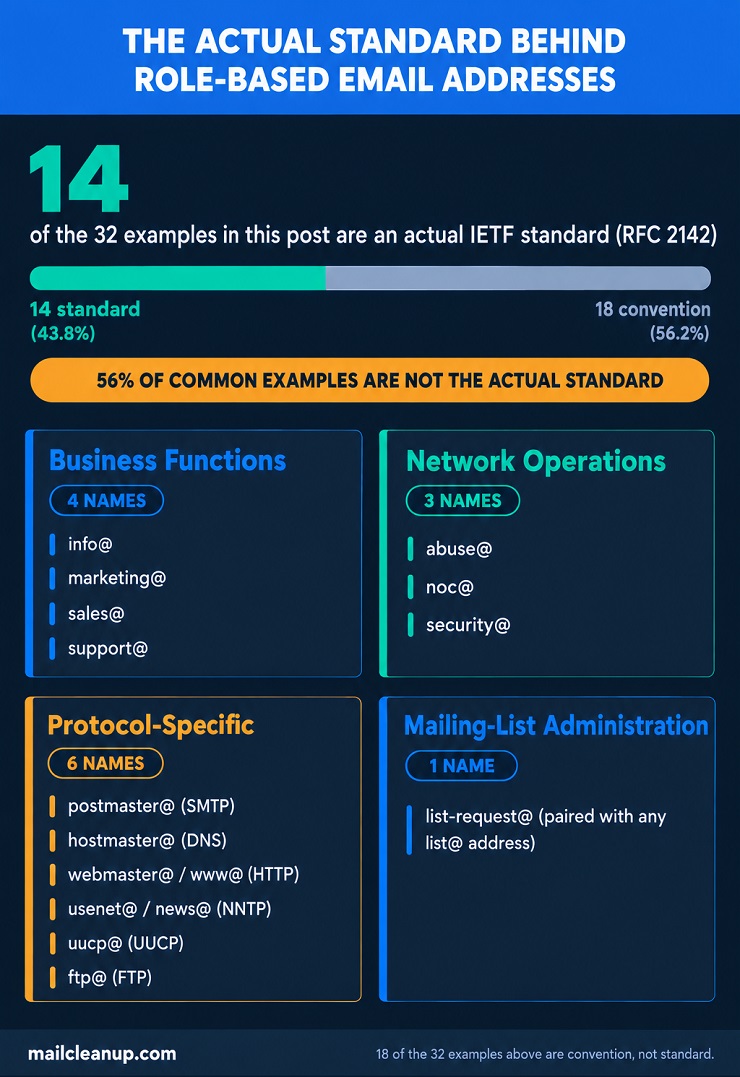
RFC 2142, published by the Internet Mail Consortium in May 1997, is the actual specification. It defines mailbox names an organization is expected to support once the matching service exists, grouped into four categories:
- Business functions: info@, marketing@, sales@, support@
- Network operations: abuse@, noc@, security@
- Protocol-specific addresses, each tied to a named internet service: postmaster@ (SMTP), hostmaster@ (DNS), webmaster@ or its synonym www@ (HTTP), usenet@ or its synonym news@ (NNTP), uucp@, ftp@
- Mailing-list administration: list-request@, paired with whatever list@ address a mailing list already uses
That’s the complete list. Fourteen names, and nothing else.
Everything else on a typical role-based email address examples list, hr@, billing@, careers@, legal@, press@, accounts@, is real and genuinely common, but it’s convention, not standard. Companies adopted these prefixes because they’re intuitive, not because any specification required them. Even admin@, probably the single most commonly assumed “standard” address, isn’t in RFC 2142 at all. The difference matters once you’re deciding how strictly to treat role-based email addresses on your own list: a mailbox a domain is formally expected to support behaves differently, in practice, from one that exists purely by local habit. The table below breaks down exactly which is which.
Role-Based Email Address Examples: Standard vs. Common Convention
The table below lists role-based email address examples in two groups: the fourteen names RFC 2142 actually specifies, and the wider set of business-convention prefixes that show up constantly in practice but were never part of any formal standard. Synonym pairs are noted in the same row rather than listed twice. However they’re grouped, these are the actual role-based email addresses turning up across the sources we checked for this post, not an invented sample.
| Prefix | Category | Typical Function |
|---|---|---|
| info@ | RFC 2142 | General information about the organization, products, or services |
| marketing@ | RFC 2142 | Product marketing and marketing communications |
| sales@ | RFC 2142 | Product purchase inquiries |
| support@ | RFC 2142 | Problems with a product or service |
| abuse@ | RFC 2142 | Reports of inappropriate public behavior |
| noc@ | RFC 2142 | Network infrastructure issues |
| security@ | RFC 2142 | Security bulletins or vulnerability reports |
| postmaster@ | RFC 2142 | Required contact for any domain running an SMTP server |
| hostmaster@ | RFC 2142 | DNS zone administration contact |
| usenet@ (or news@) | RFC 2142 | NNTP service contact |
| webmaster@ (or www@) | RFC 2142 | Website or HTTP service issues |
| uucp@ | RFC 2142 | UUCP mail interchange contact |
| ftp@ | RFC 2142 | FTP service contact |
| list-request@ | RFC 2142 | Administrative address for a paired mailing list |
| contact@ / contactus@ | Convention | General inquiry, alternate to info@ |
| hello@ / hi@ | Convention | Informal general inquiry, alternate to info@ |
| help@ / helpdesk@ | Convention | Broader “help” function alongside support@ |
| admin@ | Convention | General administrative contact |
| billing@ | Convention | Invoices and payment questions |
| accounts@ / payments@ | Convention | Account and payment administration |
| hr@ | Convention | Employee and human-resources inquiries |
| careers@ / jobs@ | Convention | Job applications and hiring |
| legal@ | Convention | Legal correspondence |
| compliance@ / privacy@ | Convention | Regulatory and privacy inquiries |
| press@ / media@ | Convention | Media and public-relations inquiries |
| partnerships@ / bizdev@ | Convention | Partnership and business-development inquiries |
| office@ | Convention | General office contact point |
| events@ | Convention | Event coordination |
| social@ | Convention | Social media team contact |
| reception@ | Convention | Front-desk contact |
| unsubscribe@ | Convention | Opt-out requests |
| feedback@ | Convention | General feedback collection |
Line up the two groups and the pattern is immediate: the everyday role-based email address examples every “common examples” list leads with, billing@, hr@, legal@, careers@, are almost entirely convention. RFC 2142’s own list skews toward addresses a personal user rarely emails directly, postmaster@, hostmaster@, noc@, plus a small core of business functions, info@, sales@, support@, marketing@, that happen to also carry the highest cold-outreach and marketing volume.
That overlap isn’t a coincidence worth worrying about, but it does mean the “is this standard” question and the “is this risky to email” question barely correlate. admin@ isn’t in the RFC at all, yet it sits among the most consistently blocked prefixes across the ESP policies we checked in research for this post.
Why Role-Based Email Addresses Are a Deliverability Risk
Knowing which role-based email addresses are standard and which are convention doesn’t tell you how much risk any single one carries. That’s a separate question, and the answer comes down to four factors, covered one at a time below.
- Bounce risk: Role-based inboxes get abandoned more often than personal ones. When an employee leaves, their personal address usually gets a forwarding rule or an out-of-office reply for a while. A role-based address from a campaign that ended two years ago, oldproject@ or eventsupport2024@, often just stops being checked. No bounce message warns you until the domain quietly retires it and it starts hard-bouncing.
- Spam complaints: Nobody personally opted in to a role-based inbox the way an individual opts in to their own address. Whoever happens to be reading support@ or info@ that week didn’t ask for your newsletter, and several different people may see the same message over time. Any one of them can hit “report spam,” and role-based inboxes give more people that chance.
- Engagement drag: Email service providers track opens and clicks per recipient to judge sender reputation. A shared inbox rarely produces that kind of individual signal, since no one person is consistently reading and acting on what arrives there. Low engagement from a chunk of your list drags down how mailbox providers treat your sending domain as a whole, not just those specific addresses.
- Platform-level blocking: Some tools skip the risk assessment and just refuse to send. Mailchimp maintains an explicit list of 35 blocked prefixes, including admin@, sales@, and info@, and won’t attempt delivery to them at all. Pipedrive and several other platforms keep similar lists. If your list has role-based addresses on it, some of your intended sends may never leave the platform in the first place.
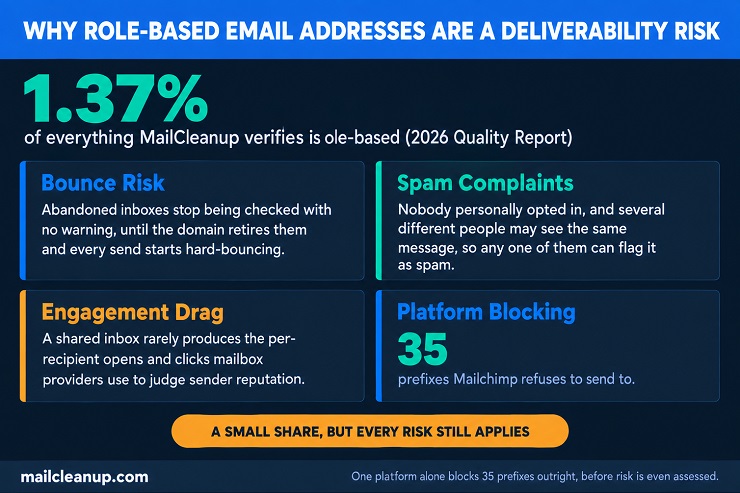
In MailCleanup’s own verification data (2026 Quality Report), role-based addresses account for about 1.37% of everything checked in a typical 2-month window. That’s roughly 14 out of every 1,000 addresses. That’s not a large share of a list, but it’s a consistent one. None of the four risks above go away just because the count is small. An address that’s been abandoned long enough can also end up recycled by its domain or a security vendor into an actual spam trap. That’s one of the more expensive things to hit on a list, a different and more severe category than a plain role-based flag. It’s covered in more depth in a dedicated post on what are spam traps.
How Verification Tools Detect Role-Based Emails
Detecting a role-based address doesn’t require contacting the mail server at all. That sets it apart from most of what a verification tool does. Confirming a mailbox actually exists means having a real conversation with the receiving mail server. Confirming a domain is a catch-all means probing a second, made-up address at the same domain and comparing the response. Flagging role-based emails needs neither. It only looks at the text before the @ sign.
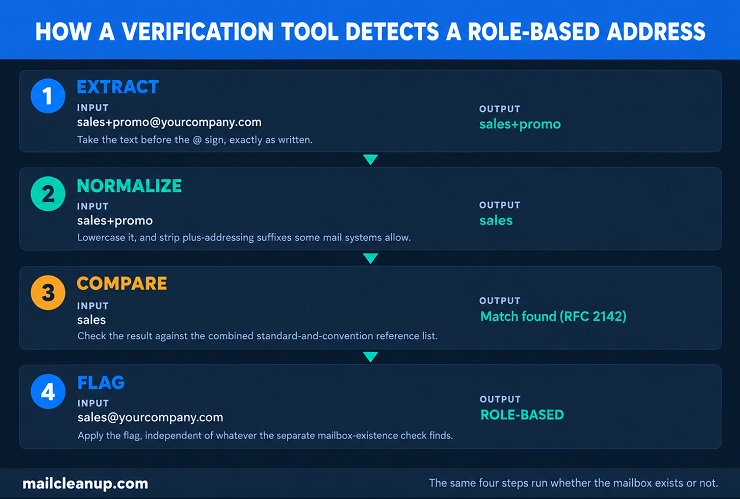
The process itself is simple:
- Extract the local part. From [email protected], that’s “sales.”
- Normalize it. Lowercase it, and strip variations some mail systems allow, like a plus sign for sub-addressing (sales+promo@ still reads as “sales”).
- Compare it against a maintained reference list, combining RFC 2142’s fourteen official names with the wider set of business-convention prefixes covered earlier in this post.
- Flag it as role-based on a match, independent of whatever the separate mailbox-existence check finds.
That independence matters. A role-based flag isn’t the same as an invalid one. [email protected] might be a completely real, actively monitored inbox that receives mail perfectly well. Being role-based describes who’s behind the address, not whether the address works. A good verification result keeps the two separate: one flag for whether the address can receive mail, another for whether you should treat it like a named individual.
The comparison list itself isn’t static. RFC 2142’s fourteen names haven’t changed since 1997, but the convention side keeps growing. success@ and onboarding@ barely showed up a decade ago; they’re common now as customer-success teams became standard at SaaS companies. A verification tool’s role-based list needs periodic review for exactly this reason. The standard half is fixed, but the convention half reflects whatever prefixes businesses are actually adopting.
This is the same kind of category-based classification MailCleanup’s own verification process applies to role-based email addresses and seven other result types. Role-based sits alongside Valid, Invalid, Catch-All, Disposable, Duplicate, Spam Trap, and Risky, sorted by two separate questions: can the address technically receive mail, and should you send to it anyway. Role-based answers the second question, not the first. We have a dedicated post on email verification that explores the fuller framework behind that sorting.
Role-Based Email Addresses vs. Disposable and Catch-All Emails
Role-based, disposable, and catch-all all get lumped together as “risky” address types, but they’re not the same kind of risk. It’s worth being precise here. What are role-based emails, exactly, versus disposable or catch-all ones? Each one answers a completely different question about an address, and knowing which question you’re actually asking changes what you do about it.
| Type | What It Actually Answers | Typical Example |
|---|---|---|
| Role-based | Does this address represent a function or a specific person? | [email protected] |
| Disposable | Was this address built to last, or built to be thrown away? | [email protected] |
| Catch-all | Does the domain accept mail sent to any address at all? | [email protected] |
These questions don’t overlap the way they might seem to. Take [email protected], one of the role-based email address examples covered earlier in this post. It can sit on a completely ordinary, non-catch-all domain, and most role-based email addresses do. A catch-all domain will accept mail sent to a role-based address and to a random string of letters with equal indifference. Being a catch-all is a property of the domain, not of any individual address on it. A disposable address is never role-based; it exists to serve exactly one person for exactly one signup, then get abandoned. That’s a different lifespan problem entirely from what a shared, ongoing role-based inbox has.
These role-based email types get the full treatment in this post because the fix looks different for each one. A disposable address is usually a straightforward remove, since it was never built to receive mail on an ongoing basis the way role-based email addresses are. A catch-all domain calls for a different kind of handling entirely. Because the domain says yes to everything, no single address there, role-based or otherwise, can be confirmed the normal way. The fix is about flagging the whole domain as uncertain, not judging one address in isolation.
Disposable addresses get the full breakdown in a dedicated post on what is a disposable email address. Catch-all domains, including how verification tools handle that domain-wide uncertainty, also get their own coverage in their dedicated post on catch-all email addresses.
Deciding What to Do With Role-Based Email Addresses on Your List
Once you’ve identified role-based emails on your list, the actual decision isn’t a single rule. It depends on how each of these role-based email addresses got there and what you’re about to send it.
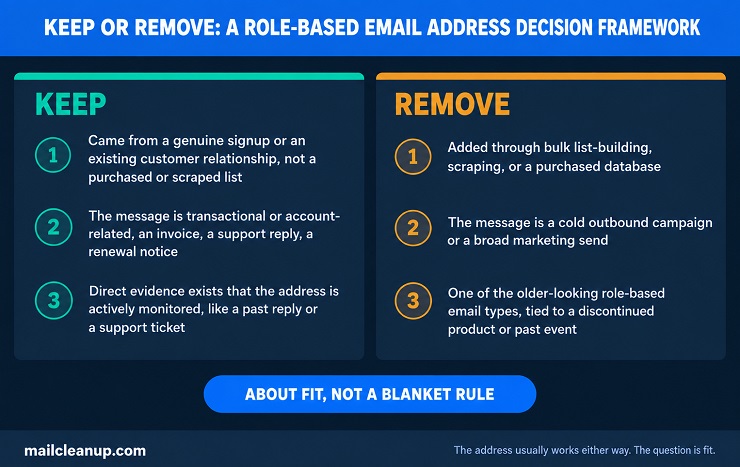
Keep and send to role-based email addresses when:
- The address came from a genuine signup or an existing customer relationship, not a purchased or scraped list
- The message is transactional or account-related, an invoice, a support reply, a renewal notice, rather than promotional
- You have direct evidence the address is actively monitored, like a past reply or a support ticket that came from it
Treat role-based email addresses as a real risk, and consider removing them, when:
- They were added through bulk list-building, scraping, or a purchased database
- The message is a cold outbound campaign or a broad marketing send
- The address is one of the older-looking role-based email types, tied to a discontinued product or a past event, with no recent activity behind it
Role-based email addresses aren’t inherently bad data the way a disposable or a genuinely invalid address is. The address usually works fine. The real judgment call is about fit, between how you got a given role-based email address and what you’re actually about to send it, not about whether to purge every info@ and support@ from every list on principle.
Your Next Step With Role-Based Email Addresses
What are role-based emails, in practice, once you’ve gone through all of this? Addresses tied to a function rather than a person, split between a narrow, genuinely standardized set and a much wider set of common convention. Either way, they carry a real deliverability risk whenever they turn up on your list. The next step is straightforward: look at your own list and find out how many role-based email addresses are actually on it, and where they came from.
Doing that by hand means checking each address’s prefix against RFC 2142’s fourteen names plus the much longer convention list, one row at a time, for every address you have. At any real list size, that’s not a realistic manual process. A bulk verification tool like MailCleanup runs that same comparison automatically across an entire list at once, flagging role-based email addresses alongside catch-all, disposable, and invalid results, so the decision framework from earlier in this post has actual data behind it rather than guesswork.
Once you know which role-based email addresses you’re working with and how they got onto your list, the keep-or-remove call gets a lot easier to make.
FAQs on Role-Based Email Addresses
What is a role-based email address?
A role-based email address represents part of an organization, like a support team or a sales department, instead of one named employee. Several people can share responsibility for it, and it keeps working even as individual staff come and go. Common role-based email types cover general inquiries, billing, HR, and technical contacts, plus a narrower set RFC 2142 officially standardizes.
Is it safe to send emails to role-based email addresses?
It depends on the message and how the address was sourced. Transactional emails, like receipts or support replies, sent to role-based email addresses a customer gave you directly are fine. Cold marketing sent to scraped or purchased role-based email addresses carries real bounce and spam-complaint risk, and some platforms won’t even attempt delivery.
Why do role-based email addresses bounce more than personal ones?
These shared inboxes go unwatched more often than an individual’s own address does. A departing employee’s inbox is usually forwarded or watched for a while first. An address tied to a wound-down campaign or a discontinued function, though, often goes unchecked for months, with nothing alerting anyone, until the mail server eventually stops accepting it and every send starts failing.
Can I send marketing campaigns to role-based emails?
You can, but it’s risky without care. Role-based emails weren’t personally opted in the way an individual subscriber’s address was, so complaint rates run higher. Many marketers reserve role-based email addresses for transactional or account-related messages and keep them out of broad promotional sends, or verify and monitor them separately first.
How do I remove role-based email addresses from my list?
Verification software compares the text before each address’s @ sign against a running list of standard and conventional role names, marking any match as role-based. Once every address carries that flag, you can strip role-based email addresses from a list entirely, or just hold them out of one specific campaign, whichever fits how the list came together.
Is info@ or admin@ a valid email address?
Usually, yes. Being flagged as role-based describes who’s behind an address, not whether it works. info@ and admin@ are typically real, monitored inboxes that receive mail normally. A role-based flag is a separate signal from an invalid one, reported differently in most verification results, including MailCleanup’s own named categories.
Do all email platforms block role-based email addresses?
No. Mailchimp keeps a published list of 35 prefixes it won’t send campaign mail to at all. Other platforms are more permissive, letting a send through but tagging the recipient as role-based for your own review rather than stopping it outright. The safest approach is checking your specific provider’s own documented policy instead of assuming they all match.
What’s the difference between a role-based and a personal email address?
A personal address, like [email protected], has one owner who decides what’s welcome in that inbox. A role-based address, by contrast, is staffed by whoever’s covering that function, support, sales, billing, on a given day, so there’s no single person who agreed to receive anything. That missing individual consent is exactly what makes platforms handle the two differently.