
You run a verification pass on your list before a major campaign send and the results come back with a cluster of addresses flagged as disposable. Some have already expired. Others still look technically active. A few passed every check and have never returned a single open across dozens of sends. The label covers more ground than most senders realise.
The term “disposable email address” sits over three distinct categories of address. Each one is created for a different reason, has a different lifespan, and behaves differently when it lands on your list. Treating all three as the same problem with the same fix leads to missed suppressions, misread deliverability signals, and bounce accumulation that compounds quietly with every campaign you send.
This post covers what each type of temporary email address actually is, how each one behaves from the moment it enters your list to the moment your sender reputation takes the hit, why detection is harder than most bulk senders expect, and exactly what action to take for each result type before you send.
TL;DR on Disposable Email Address
- A disposable email address is a temporary address created for a single short-term task, with no intent on the user’s part for ongoing communication with the sender.
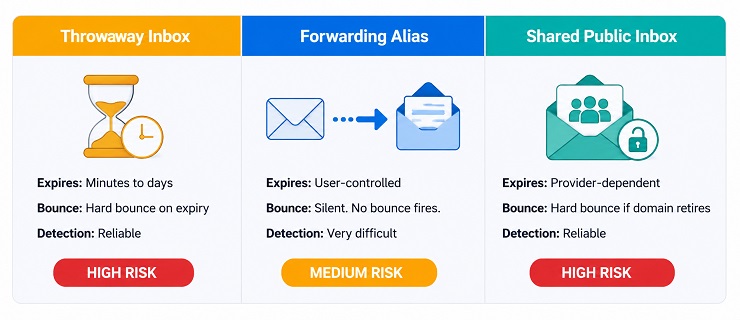
- Three distinct types exist: throwaway inboxes that self-destruct after a fixed window, forwarding aliases that route to a real inbox until the user disables them, and shared public inboxes accessible to anyone who knows the address.
- Throwaway inboxes and shared public inboxes produce hard bounces once they expire, making them the most immediately damaging category for your bounce rate and sender reputation.
- Forwarding aliases from services like Apple Hide My Email look completely legitimate at the point of verification and cause a different problem: silent non-delivery with no bounce signal, quietly pulling down your engagement metrics over time.
- Detection is not a solved problem. New disposable provider domains appear every day, and forwarding aliases from mainstream providers pass standard domain and SMTP verification checks cleanly.
- Flagged disposable addresses should be suppressed before sending. Catch-all and risky results that may include forwarding aliases require a send-once-and-monitor approach instead.
- A pre-send verification pass is the primary tool for bulk senders dealing with an existing list. Real-time verification at signup prevents the most common disposable types from entering in the first place.
- Ongoing engagement monitoring fills the gap that verification alone cannot close, particularly for forwarding aliases that behave identically to valid addresses until the user disables them.
What Is a Disposable Email Address
Understanding what is a disposable email address starts with the user’s intent, not the technical format of the address. A disposable email address is one created for a single short-term task, with no expectation of receiving or engaging with future communications. The person behind it needed to get past a signup form, complete a verification step, or access a piece of gated content without exposing their real inbox to an unknown sender. Once that task is done, the address is either abandoned or automatically deleted.
The mechanism varies by type, but the basic flow is consistent. A user visits a provider, receives an address, submits it to a form, receives the one email they need, and moves on. For most throwaway services, this takes under two minutes. No account setup. No password. No connection back to any real person. For the sender on the receiving end, the address arrives in the database looking identical to a legitimate subscriber.
What makes the practical definition of what is a disposable email address important for bulk senders is that it extends further than the classic one-time throwaway. It also covers forwarding aliases set up specifically to filter promotional mail and shared inboxes used to bypass a verification wall. The technical configuration differs across all three, but the sender-side result is the same: an address that will never generate meaningful engagement regardless of how many times you send to it.
The characteristics that define every type of disposable email address:
- Created for a single task, not an ongoing relationship with the sender
- Not connected to the user’s primary identity or real inbox
- Zero intent to engage with subsequent campaigns
- May expire automatically or may remain technically deliverable while receiving nothing
- Frequently passes surface-level validity checks at the point of collection
What separates a disposable email address from a simple data entry error is that these addresses arrive on your list looking exactly like legitimate subscribers. Syntax is valid. The domain resolves. The address often accepts the confirmation email sent by your onboarding sequence. The damage is invisible at the point of collection and builds from that moment forward.
The Three Types of Disposable Email Address
What is a disposable email address depends significantly on which of the three categories you are dealing with. Each type enters a list differently, survives for a different length of time, and creates a different kind of problem when you send to it. Understanding the difference between the three is what separates a precise suppression decision from a blanket remove-all approach that still leaves one category of risk partially in place.
Type 1: Throwaway Inboxes
The throwaway inbox is the version of what is a disposable email address that most senders picture first. A user visits a provider service such as 10MinuteMail, Guerrilla Mail, Temp Mail, or YOPmail, and receives a randomly generated address under a domain owned by that provider. No registration is required. No password is set. No user identity is attached to the inbox at any point. The user copies the address, submits it to a form, waits for the confirmation email, and either lets the timer run out or closes the tab.
Lifespan is the defining variable. Some providers expire the inbox after 10 minutes. Others allow a few hours or up to several days, and most give the user the option to extend the session manually. Regardless of the window, the intent is always short-term. Once the provider closes the session, the inbox is deleted and any subsequent email sent to that address generates a hard bounce.
What a throwaway inbox looks like when it reaches your list:
- The domain belongs to a known temporary email provider such as guerrillamail.com, mailnull.com, or temp-mail.org
- The username is typically a random string of characters with no recognisable format
- The address passes syntax checks and may pass initial SMTP verification while the inbox is still active
- A hard bounce fires reliably once the provider retires the inbox
The throwaway inbox is the most detectable type of temporary email address. Email verification tools maintain continuously updated databases of known provider domains. A domain match flags the address at the point of verification regardless of when in the inbox’s lifespan the check runs.
Type 2: Forwarding Aliases
Forwarding aliases are where the question of what is a disposable email address becomes significantly more complicated for bulk senders, because they look nothing like a classic throwaway. Services such as Apple Hide My Email, Firefox Relay, Mozilla Relay, SimpleLogin, and addy.io generate a unique alias address that forwards incoming messages to the user’s real inbox. The alias domain belongs to a trusted mainstream provider.
An address from Apple Hide My Email looks like this: [email protected]. That address has a valid domain with a clean reputation, correctly configured MX records, and an SMTP server that confirms delivery. Email sent to it gets delivered. The inbox at the other end is the user’s real Apple inbox. The user chose this approach precisely because they wanted to receive the first email, such as a welcome message or confirmation code, without committing their real address to an ongoing sending relationship.
The problems for bulk senders emerge across two separate stages. The first is at the point of verification. Forwarding aliases pass all standard checks because every technical signal is identical to a legitimate primary address. Domain reputation is clean. SMTP confirms acceptance. There is nothing in the verification result to distinguish this address from a real engaged subscriber.
The second problem emerges after sending begins. The user controls forwarding. At any point, with a single setting change, they can disable the alias. When that happens, future emails stop arriving in their real inbox. Your ESP records the message as delivered. No bounce fires. The address has gone completely dark with no signal visible from your end.
| Characteristic | Throwaway Inbox | Forwarding Alias |
|---|---|---|
| Typical lifespan | Minutes to a few days | Indefinite until user disables forwarding |
| Bounce on expiry | Hard bounce, reliable | No bounce. Silent non-delivery. |
| Detection by domain check | Reliable: known provider domains | Very difficult: trusted mainstream provider domains |
| Initial email delivery | Yes, while inbox is active | Yes, reliably until alias is disabled |
| Engagement likelihood | None | None to very low |
| Primary sender risk | Hard bounce accumulation | Silent engagement degradation |
Type 3: Shared Public Inboxes
Shared public inboxes represent the third answer to what is a disposable email address and the category most closely associated with deliberate bypass behaviour. Services like Mailinator create inboxes for any address entered under their domain. There is no password. There is no user session. Anyone who knows the full address string can open the inbox and read any message in it at any time.
These inboxes are used almost exclusively to pass email verification walls quickly. A developer testing a signup flow, someone redeeming a one-time offer, or a user grabbing a confirmation link with no intention of engaging further. In every case, the person never intended to receive ongoing communications from your programme.
Shared public inboxes are detectable by domain check in the same way as throwaway inboxes. The domain is well-known and present on maintained disposable provider lists. The key difference from a throwaway inbox is that these addresses do not expire automatically on a timer. The address may remain technically deliverable indefinitely, which means a hard bounce is not guaranteed the way it is for a timed throwaway. What is guaranteed is zero engagement, because no individual user monitors a public shared inbox for promotional mail sent days or weeks after the original signup.
The Disposable Address Behaviour Map
Each type of temporary disposable email address presents a distinct risk profile. The table below maps all three types across the dimensions that matter most for a bulk list decision.
| Type 1: Throwaway Inbox | Type 2: Forwarding Alias | Type 3: Shared Public Inbox | |
| Typical lifespan | Minutes to a few days | Indefinite until user disables it | Indefinite, provider-dependent |
| How it enters your list | Signup form without verification screening | Signup form. Passes all standard checks. | Signup form without verification screening |
| Bounce timeline | Hard bounce after inbox expiry | No bounce. Silent non-delivery when disabled. | Hard bounce only if provider retires the domain |
| Detection difficulty | Low: known provider domains on blocklists | High: trusted mainstream provider domains | Low: known provider domains on blocklists |
| Engagement likelihood | None | None to very low | None |
| Bulk sender risk level | High. Guaranteed hard bounce. | Medium. Silent reputation damage over time. | High. Zero engagement confirmed. |
| Recommended action | Suppress immediately | Send once. Monitor. Suppress after 2 sends with no engagement. | Suppress immediately |
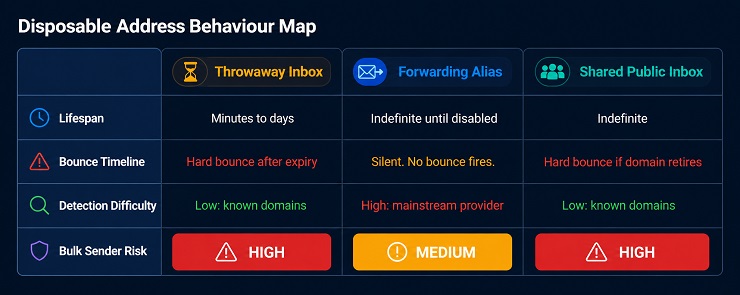
Understanding what is a disposable email address at the type level changes the suppression decision. A throwaway inbox and a shared public inbox require the same immediate action: remove before sending. A forwarding alias cannot be reliably flagged at verification, so the correct response is monitoring-based, not suppression at the point of detection.
Why People Use Disposable Email Addresses
What is a disposable email address to the person creating it is a privacy tool, not a deliberate attack on your programme. All four of the reasons people submit temporary email addresses to signup forms are responses to how email has worked for them historically. Understanding the reasons helps identify which entry points on your own forms are most likely to be accumulating these addresses in your list right now.
- Privacy and spam avoidance: The most common reason and the most defensible one. The person does not know how their address will be used after the initial transaction, does not trust the sender, or simply does not want promotional mail arriving in their primary inbox from an unfamiliar source. A temporary email address gives them access to whatever they need without committing their real inbox to a relationship they did not choose.
- Free trial and promotional offer abuse: When a programme offers a discount code, a free trial, or a new-subscriber incentive tied to email signup, some users create a new throwaway email address each time they want to claim the offer again. The incentive is the entry point. The disposable email address is the mechanism for bypassing the one-per-person restriction.
- Developer and QA testing: Developers testing signup flows, confirmation email sequences, and onboarding automations regularly use disposable addresses to generate test accounts quickly without cluttering their personal inboxes. If a staging environment writes to a production database, or if testing runs directly against a live form, those addresses appear on the active list alongside genuine subscribers.
- Anonymous participation: Forum registrations, competition entries, online surveys, and gated content downloads where the user wants no traceable connection back to their real identity. The form required an email address. A throwaway email address satisfied the requirement without exposing anything personal.
The single most important thing to note is that a list built entirely through organic opt-in still accumulates disposable email addresses through every one of these entry points. The addresses looked valid at the moment of collection. Most passed whatever checks were in place at the time. The problem becomes visible later, when the inbox expires and the hard bounce fires, or when the address records delivery on every campaign but generates no engagement, ever.
What Disposable Email Addresses Do to Your Sender Reputation
Every type of temporary email address on your list creates a deliverability problem, but the mechanism differs by type. Understanding what is a disposable email address in terms of its downstream impact means tracking three separate damage pathways: the hard bounce problem, the engagement drop problem, and the metric distortion problem. Each one feeds into your sender reputation through a different signal, and all three can operate simultaneously on the same list.
The Hard Bounce Problem
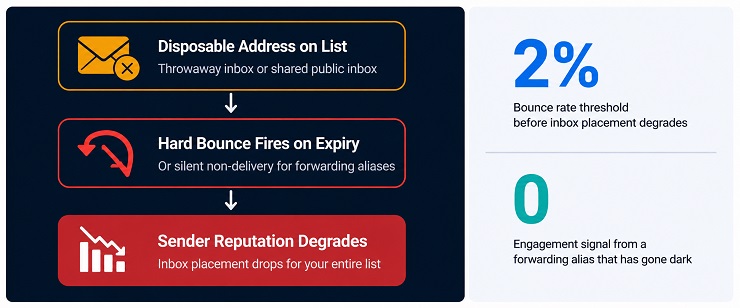
When a throwaway inbox expires or a shared public inbox domain is retired, every email sent to that address after the expiry point returns a hard bounce. From the mailbox provider’s perspective, a hard bounce is evidence of poor list quality. It signals that the sender is either not cleaning their list, collecting addresses with insufficient screening, or sending to contacts who never had real intent to receive communications.
The threshold that matters is 2 percent. Mailbox providers including Google and Microsoft begin degrading inbox placement for senders whose bounce rate crosses that point. The degradation is not immediate account action. It is a quiet, compounding shift: your emails start landing in spam for more recipients, including the legitimate subscribers who opened every campaign you ever sent them. Your deliverability problem becomes a general programme problem, not just a list quality problem.
What makes the hard bounce risk from throwaway inboxes particularly damaging for bulk senders is the timing gap. A throwaway inbox may have been active and receiving email for the first one or two campaigns sent to a list. The contact looked engaged, or at least not bouncing, so it stayed on the list. By the time the third or fourth campaign runs, the inbox has expired. The hard bounce fires. The address was in the list for months, building a false picture of list health.
To understand how bounce accumulation feeds into a broader deliverability problem, the post on how to reduce email bounce rate covers the threshold mechanics and recovery steps in full.
The Engagement Drop Problem
The forwarding alias and the shared public inbox create a different kind of damage. Neither one generates a hard bounce in the normal course of your sending programme. The ESP records delivery. The inbox accepted the message. Your dashboard shows a healthy delivered percentage. What it does not show is that no human being is reading any of those emails.
Mailbox providers do not only monitor bounces. They monitor engagement. Gmail, Outlook, and Yahoo all factor engagement signals into their inbox placement decisions. A domain that consistently sends to large numbers of addresses that never open, never click, and never interact with a message is a domain that the provider begins treating with increasing suspicion. Over time, that suspicion materialises as lower inbox placement rates across your entire list, including the subscribers who genuinely want to hear from you.
The engagement drop compounds further when considering forwarding aliases specifically. When a user disables a forwarding alias, future sends to that address stop reaching their inbox entirely. From your sending infrastructure, the message was accepted by the relay provider. The relay provider simply never forwarded it. No bounce fires. The delivery metric stays green. The address is functionally dead but appears alive in every metric you can observe from your end.
Key signals that a high concentration of disposable email addresses has begun affecting engagement metrics:
- Open rates declining across campaigns without corresponding changes to subject line or send time
- Click rates falling while deliverability metrics appear normal
- Increasing variance between campaigns sent to engaged segments versus the full list
- A growing proportion of contacts with zero opens across more than three consecutive campaigns
Understanding these signals in the context of email list hygiene and the broader programme of ongoing engagement monitoring is what separates reactive list cleaning from the kind of consistent maintenance that keeps these problems from building in the first place.
It is worth noting that the engagement damage from disposable addresses shares a characteristic with the damage caused by spam traps: both problems are largely invisible at the point of collection, build silently over time, and become visible only after the sender reputation has already absorbed a meaningful hit. The difference is that disposable addresses generate engagement decay while spam traps generate specific blacklisting triggers. On a list that has not been cleaned in an extended period, both problems are likely present simultaneously.
The Metric Distortion Problem
The third damage pathway from what is a disposable email address on a bulk list is not about deliverability signals directly. It is about the accuracy of the data you are using to make campaign decisions.
Every disposable address on your list inflates the total contact count without contributing any real engagement, revenue potential, or audience insight. The consequence shows up across several metrics simultaneously:
| Metric | How Disposable Addresses Distort It |
|---|---|
| Open rate | Lower than actual. The denominator includes addresses with zero intent to open. |
| Click rate | Lower than actual. Same denominator problem. |
| List growth rate | Overstated. Signups that look like audience growth are non-engaged addresses. |
| Revenue per contact | Lower than actual. Non-converting addresses dilute the per-contact revenue figure. |
| Segment size | Overstated. Behavioural segments built on total list size include addresses that skew the count. |
When campaign performance looks flat or declining against a backdrop of continued list growth, disposable address accumulation is one of the first causes to investigate. The list is growing. The audience is not.
Why Disposable Addresses Are Harder to Detect Than They Look
Most bulk senders assume that running a verification pass before a send resolves the disposable email address problem cleanly. The pass catches what it catches, the flagged addresses come out, and the remaining list is clean. Understanding what is a disposable email address at the detection level reveals why that assumption has a structural gap that verification alone cannot close.
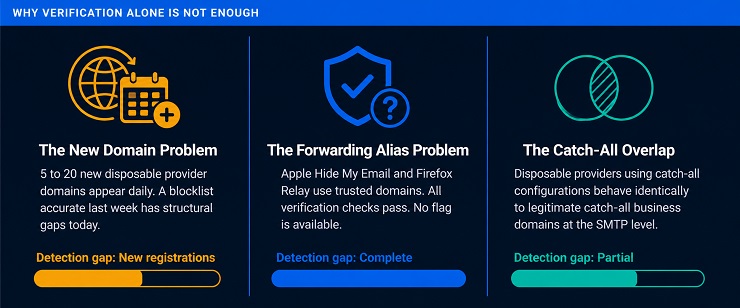
Three separate challenges prevent detection from being a clean solved problem.
The new domain problem: Disposable email providers register new domains continuously to stay ahead of verification blocklists. Some providers rotate their active domains deliberately, retiring a flagged domain and introducing a new one specifically to avoid detection by services that rely on static or infrequently updated domain databases. Estimates from detection services put the volume of new disposable email provider domains appearing daily at between 5 and 20 new providers per day. A blocklist that was accurate last week has structural gaps today. A verification pass run against a database that is updated weekly will always have a window of exposure for addresses registered under domains added since the last update.
The forwarding alias problem: This is where understanding what is a disposable email address at a technical level changes the detection expectation entirely. An address from Apple Hide My Email, Firefox Relay, or SimpleLogin uses a domain with a clean and trusted reputation. The MX records are properly configured. The SMTP server confirms message acceptance. Every signal that a verification tool checks for returns the same result as a legitimate primary address, because the forwarding infrastructure is built on exactly the same technical foundations as a legitimate email provider.
There is no flag available to a standard verification pass for this category of temporary email address. The address passes domain reputation checks, SMTP confirmation, and syntax validation. The only way to identify a forwarding alias that has gone dark is through behavioural observation after sending begins. Zero opens and zero clicks across multiple campaigns is the signal. It is a post-send signal, not a pre-send detection.
The catch-all overlap problem: Some disposable providers configure their domains to accept any address string submitted, returning a positive SMTP response regardless of whether a specific mailbox was ever created. This technical behaviour is identical to a catch-all domain configuration on a legitimate business mail server. A verification tool encountering this pattern cannot definitively classify the address as disposable versus catch-all, because the underlying SMTP behaviour is the same for both.
The result is that a portion of disposable addresses from providers using this configuration may return a “catch-all” or “risky” result rather than a clean disposable flag. These addresses sit in an uncertain bucket rather than being definitively classified.
The practical takeaway for bulk senders is captured in the table below.
| Detection Method | What It Catches | What It Misses |
|---|---|---|
| Domain blocklist matching | Throwaway inboxes and shared public inboxes on known provider domains | New provider domains registered since the last database update |
| MX record analysis | Suspicious or minimal mail server configurations on unfamiliar domains | Forwarding aliases on fully configured mainstream provider domains |
| SMTP confirmation probe | Throwaway inboxes that have already expired at time of check | Active throwaway inboxes checked before expiry; all forwarding aliases |
| Catch-all detection | Domains that accept any address string | Forwarding alias domains: they accept specific addresses, not all strings |
| Behavioural monitoring | Forwarding aliases that have gone dark, over time | Nothing. This is the one detection method with no blind spot for the alias category. |
For a full breakdown of what each verification check does and does not confirm, the post on email verification features explained covers every check type and the result categories it produces.
The combination of these three detection challenges means that the verification result on any list will have three layers: addresses cleanly flagged as disposable, addresses that fall into catch-all or risky buckets that may include undetected forwarding aliases, and addresses that passed cleanly but have never engaged. Each layer requires a different handling decision, which is what we cover in the action framework section.
How Email Verification Catches Disposable Addresses
Running a verification pass before a send is the primary method bulk senders use to identify what is a disposable email address across an existing list. The process works through a layered set of checks, each targeting a different technical signal. No single check resolves the full problem. Understanding what each layer catches and where each one stops is what allows you to interpret your verification results accurately and make the right suppression decision for each result type.
The distinction between what the bulk list verification process does and what real-time form validation does is also worth establishing here. For a complete treatment of how the two processes differ and which your programme needs, the post on email verification vs email validation covers that separation in full. The focus in this section is the verification pass itself and the specific signals it uses to classify a disposable email address.
1. Domain blocklist matching: The most direct detection method. The verification system checks the domain portion of each address against a continuously maintained database of known disposable email provider domains. When the domain matches a known provider such as guerrillamail.com, mailnull.com, or any of the thousands of registered throwaway service domains, the address is flagged. The quality of this check depends entirely on the freshness and coverage of the underlying database. New provider domains appear continuously. A database updated daily performs meaningfully better than one updated weekly, because the gap between updates is the window during which new domains go undetected.
2. MX record analysis: A domain check confirms that the domain appears on a known blocklist. MX record analysis adds a second layer of evidence for domains that are unfamiliar or newly registered. Disposable provider domains often carry minimal or non-standard mail server configurations compared to legitimate email hosts. A domain with an unusual MX record pattern that also lacks an established sending history raises the probability of a disposable classification without requiring a direct blocklist match.
3. Provider behaviour signals: Some disposable providers configure their domains to accept any address string submitted, returning a positive response to an SMTP probe regardless of whether a specific mailbox exists. Verification tools detect this by probing a clearly fabricated address under the domain and observing the response. A server that accepts the fabricated address is exhibiting catch-all behaviour, which is either a legitimate catch-all business domain or a disposable provider using that configuration to appear functional. The result in either case is a “catch-all” or “risky” classification rather than a confirmed disposable flag, which is why this bucket requires a different handling approach.
What the verification result looks like in a MailCleanup output for what is a disposable email address: flagged addresses appear with a disposable classification in the results file. The recommendation is to suppress these addresses from the send segment before the campaign runs. They require no further evaluation. An address that has been identified by domain match as belonging to a known throwaway or shared public inbox provider will not generate engagement regardless of when in its lifespan it was flagged.
The structural limitation of every verification method is the forwarding alias. An address from Apple Hide My Email, Firefox Relay, or SimpleLogin uses a domain with a legitimate, well-maintained reputation. The MX records are fully configured. The SMTP server confirms delivery accurately because messages sent to that address do get delivered, at least until the user disables forwarding. None of the three detection methods above can distinguish this address from a primary inbox. The domain passes the blocklist check. The MX record is clean. The SMTP probe confirms acceptance. The address returns a valid result and enters the send segment without any flag.
The only reliable signal available for forwarding aliases that have gone dark is post-send behavioural observation. Zero opens and zero clicks across two consecutive campaigns is the practical threshold for suppression. This is not a verification decision. It is a list hygiene decision that runs in parallel with verification, not as a substitute for it.
What to Do With Disposable Addresses on Your List
Knowing what is a disposable email address at the type level makes the action decision more precise than a simple remove-or-keep choice. The correct action depends on which result category the address falls into, and whether you are dealing with an existing list or a new acquisition flow. The two scenarios require different approaches.
If you have an existing list
This is the most common situation for bulk senders. The list was built over months or years. Addresses entered through signup forms at different points in time, some with verification screening in place and some without. A proportion of the list is now made up of throwaway inboxes that have expired, shared public inboxes with zero engagement, and forwarding aliases that may or may not still be forwarding.
The process before any significant send:
- Run a full verification pass on the list using MailCleanup. Upload the CSV, run verification, and download the results file with classifications per address.
- Remove all addresses classified as disposable immediately. Do not send to them. Do not attempt a re-engagement sequence first. There is no engagement to recover from an expired throwaway inbox or a shared public inbox that was never monitored by a real person.
- Separate the catch-all and risky segments from the clean valid segment. These buckets may include forwarding aliases that passed verification cleanly alongside legitimate catch-all business domains.
- Send to the catch-all and risky segment once. Monitor opens and clicks for that group across the next two campaign sends.
- Suppress any address in that group with zero opens and zero clicks after two sends. These are the behavioural signals for addresses that either were never engaged or have gone dark since the forwarding was disabled.
For a step-by-step process for handling the full range of address types and result categories in a list cleaning run, the post on how to clean email lists covers the complete execution sequence.
Action decision table by result type
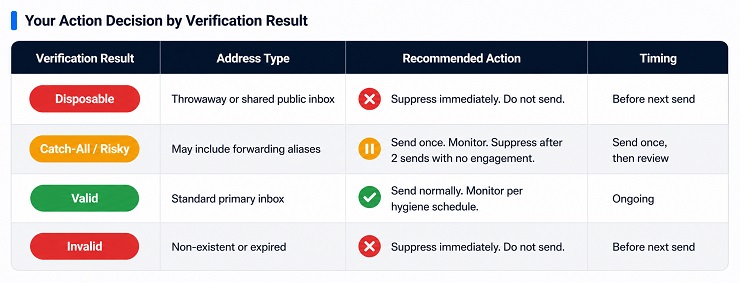
| Verification Result | Most Likely Address Type | Recommended Action | Timing |
|---|---|---|---|
| Disposable | Throwaway inbox or shared public inbox | Suppress immediately. Do not send. | Before next send. |
| Catch-all or Risky | May include forwarding aliases, may include legitimate catch-all domains | Send once. Monitor engagement across two sends. Suppress zero-engagement addresses. | Send once, then review. |
| Valid | Standard address, primary inbox | Send normally. Monitor engagement per standard hygiene schedule. | Ongoing. |
| Invalid | Non-existent or expired address | Suppress immediately. Do not send. | Before next send. |
If you are collecting new addresses through signup forms
The pre-send verification pass resolves the existing list problem. For new contacts entering through forms going forward, the right tool is a real-time verification API integrated at the point of form submission. When a user submits an address, the API checks it against the disposable domain database before the signup is accepted. If the domain matches a known disposable provider, the form returns a prompt asking for a different address. The contact is blocked before they enter the database.
This prevents throwaway inboxes and shared public inboxes from accumulating in the first place. It does not prevent forwarding aliases from mainstream providers, because those addresses pass the API check for the same reasons they pass a bulk verification pass. The real-time API eliminates the most immediately harmful category at the collection point and reduces the volume of catch-all and risky addresses you need to monitor behaviourally after sending.
MailCleanup handles both scenarios. The bulk verification workflow processes an existing list, returns classified results per address, and produces a clean file ready for import to your ESP. Run a pass before any significant send to keep disposable accumulation from compounding between campaigns.
Disposable Addresses Do Not All Behave the Same. Your List Hygiene Strategy Should Reflect That.
The instinct most senders have when they first understand what is a disposable email address is to treat it as a binary problem. Either an address is disposable and gets removed, or it passes verification and stays. That instinct leads to two separate problems. The first is that addresses which pass verification cleanly are assumed to be safe indefinitely. The second is that addresses sitting in the catch-all and risky buckets get either blanket-removed or blanket-kept, when the right answer is somewhere more precise than either extreme.
A throwaway inbox that was active at the point of signup may survive on your list for weeks or months before the inbox expires and the hard bounce fires. A forwarding alias may have been delivering your campaigns successfully for six months before the user disabled it, at which point your ESP continues recording delivery and your engagement metrics quietly erode. Neither problem announces itself. Both require a combination of pre-send verification and post-send engagement monitoring to catch at the point where damage is still limited.
The broader principle is that managing what is a disposable email address on a bulk list is not a one-time clean. It is an ongoing discipline. Lists accumulate new disposable addresses with every signup campaign, every gated content download, every free trial offer, and every form that runs without real-time verification screening. The pre-send verification pass removes the backlog. The real-time API reduces the inflow. The engagement monitoring catches what both tools miss. Running all three as a continuous programme is what keeps disposable accumulation from compounding quietly into a sender reputation problem that takes months to recover from.
FAQs on Disposable Email Address
What is a disposable email address and how does it work?
A disposable email address is a temporary address created for short-term use, with no intent for ongoing communication. A user visits a provider service, receives a randomly generated address, submits it to a form, receives the one email they need, and discards it. The inbox either expires automatically or is abandoned. The address often looks identical to a legitimate subscriber address.
Is a temporary email address the same as a disposable email address?
The terms are used interchangeably but they are not exactly the same. A temporary email address typically refers to a short-lived throwaway inbox that self-destructs after a set period. A disposable email address is the broader term covering forwarding aliases and shared public inboxes as well, which behave differently and carry different risk profiles for bulk senders.
Why do people use disposable email addresses when signing up for services?
Four reasons drive most disposable email signups: protecting a primary inbox from spam, abusing free trials or promotional offers by creating new addresses for each claim, testing software or signup flows as a developer, and participating anonymously in forums or surveys. Privacy protection is the most common reason and the most legitimate one from the user’s perspective.
How do disposable email addresses affect my email bounce rate?
Throwaway inboxes and shared public inboxes generate hard bounces once they expire. A bounce rate above 2 percent triggers deliverability degradation from major mailbox providers including Google and Microsoft, meaning inbox placement drops across your entire sending programme. The damage is not isolated to the bouncing addresses. It affects delivery for every contact on your list.
Can email verification detect all types of disposable email address?
No. Verification tools reliably detect throwaway inboxes and shared public inboxes by matching against known provider domains. Forwarding aliases from services like Apple Hide My Email and Firefox Relay use trusted mainstream domains that pass all standard verification checks. These addresses cannot be flagged at verification and require engagement monitoring after sending to identify once they have gone dark.
What is a forwarding alias and how is it different from a throwaway email address?
A forwarding alias is an address that routes incoming messages to a real inbox without revealing it. Unlike a throwaway inbox that expires on a fixed timer, a forwarding alias remains active until the user disables it deliberately. It passes all verification checks because it uses a legitimate provider domain, making it the hardest category of disposable address to detect before sending.
What should I do with disposable addresses already on my email list?
Run a verification pass before your next send. Addresses flagged as disposable should be suppressed immediately. Addresses returning a catch-all or risky result may include forwarding aliases that passed verification. Send to those once, monitor for opens and clicks across two sends, and suppress any address with zero engagement after both sends. Do not attempt re-engagement before suppressing.
How do I stop disposable email addresses from entering my list in the first place?
Integrate a real-time email verification API at every signup form. This checks submitted addresses against known disposable provider domains at the moment of submission and blocks throwaway inboxes before they enter your database. It does not block forwarding aliases, which pass verification cleanly. For those, ongoing engagement monitoring and a regular pre-send verification schedule remain the primary defences.