
Most guides to reading a DMARC report show a screenshot of a dashboard, or three or four lines pulled from an XML file. Either one gets called a walkthrough. Search enough of them and a pattern shows up. They cover the same aggregate report, from the same angle, and stop the moment forensic reports come up. Of the ten most-read guides on this exact topic, not one shows what a genuine forensic report actually looks like. A few, published even after DMARC’s reporting formats were standardized in May 2026, still teach a policy tag that stopped mattering that same month.
That gap matters more than it looks. A report is only useful if you can read all of it, not just the half that’s easy to screenshot. This guide walks through how to read DMARC reports field by field, aggregate and forensic both, including a complete DMARC report example for each. It also covers what almost nothing else does:
- What a clean-looking report can’t tell you about your actual list quality or sender reputation.
- Why your inbox might still be receiving zero reports, even months after you published a record.
- How to sort every source you see into one of four outcomes, without guessing.
We wrote our guide to DMARC to get a domain to the point where reports actually start arriving. This one picks up from there. If you’re holding your first report right now and it looks like a wall of angle brackets, keep reading. By the end you’ll be able to open any DMARC report, aggregate or forensic, from any provider, and know exactly what you’re looking at.
TL;DR on DMARC Reports
- DMARC reports come in two forms. Aggregate reports (RUA) are daily XML summaries covering every source that sent mail as your domain. Forensic reports (RUF) are sent per failing message, though most large providers no longer send them at all.
- An aggregate report’s XML is built from four blocks: report_metadata, policy_published, record, and auth_results. Learn to read those four and you can read any report from any provider.
- DMARC passes when either SPF or DKIM passes and aligns with the domain in the visible From address. That means a message can pass SPF outright and still fail DMARC, if the SPF-checked domain doesn’t match your From domain.
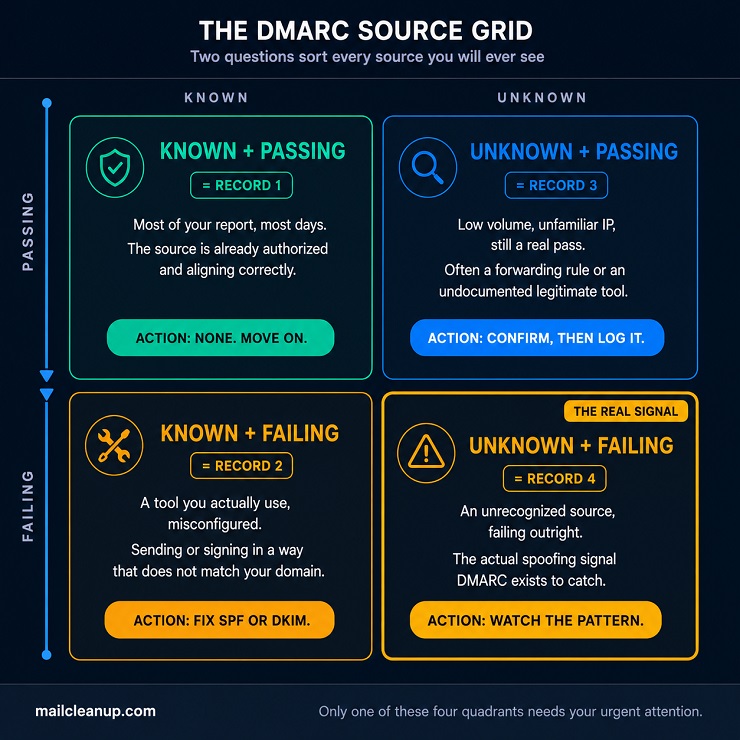
- Every source in a report sorts into one of four outcomes: known and passing, known and failing, unknown and passing, or unknown and failing. Only the last one is a genuine spoofing signal worth acting on immediately.
- Source IPs aren’t self-explanatory on their own. A reverse DNS or ASN lookup on the source_ip field usually identifies the sending service in seconds, without needing a paid tool.
- Forensic reports carry message-level detail an aggregate report never will, including the actual subject line and full headers. That’s exactly why most providers, including Gmail, stopped sending them over privacy concerns.
- RFC 9990 and RFC 9991 formally standardized DMARC’s aggregate and forensic reporting formats in May 2026. That’s the same month RFC 9989 replaced the older pct staging tag with t.
- A DMARC report only measures authentication identity. It says nothing about list quality, sender reputation, or inbox placement, so a domain with a spotless aggregate report can still land in spam.
- Free one-off tools handle a single report in seconds. A self-hosted option costs a few dollars a month in infrastructure instead, and gives full historical control a one-off tool can’t.
- Six specific, checkable causes explain almost every case of a domain publishing a DMARC record and never receiving a single report.
- The fastest way to use a fresh report is to work source by source. Fix every known sender that’s failing before you spend any time on the unknown ones.
- Reading reports is a means to an end. The goal is confirming, with real report data, that it’s safe to move your policy from none to quarantine to reject.
Understanding DMARC Reports: Aggregate vs. Forensic
Learning how to read DMARC reports starts before you even open one. A report only exists because you asked for it. The rua and ruf tags in your DMARC DNS record are literally addresses: rua for aggregate reports, ruf for forensic ones. No tag, no reports, regardless of how your policy is configured otherwise. If neither tag is present, DMARC still evaluates and enforces mail normally; you simply get no visibility into what it’s doing.
Aggregate reports, sent to the rua address, are daily XML summaries. Nearly every receiving mail system that evaluates DMARC sends them. That’s not just Google, Microsoft, and Yahoo, but the corporate mail gateways, universities, and regional providers your recipients happen to use. Each one covers a roughly 24-hour window and lists every source that sent mail claiming to be from your domain during that window. It also shows whether SPF and DKIM passed and aligned for each one.
Forensic reports, sent to the ruf address, work completely differently. Instead of a daily summary, a forensic report fires close to real time, the moment a single message fails authentication. It isn’t XML at all. It’s a message in ARF (Abuse Reporting Format), essentially a wrapped copy of the failing email’s headers. Depending on the receiver’s own privacy policy, it can also include the subject line or partial body content. Because that content can carry personally identifiable information, most major receivers, Gmail included, have stopped sending forensic reports entirely. The tag still exists, and a handful of smaller or specialized providers still honor it. You shouldn’t plan a monitoring strategy around forensic reports arriving reliably, though.
| Aggregate (RUA) | Forensic (RUF) | |
|---|---|---|
| DNS tag | rua | ruf |
| Format | Compressed XML (.zip or .gz) | ARF-style message, not XML |
| Frequency | About once every 24 hours, per reporting organization | Near real time, per failing message |
| Sent by Google, Microsoft, Yahoo | Yes, all three | No, all three have discontinued it |
| Contains | Source IP, message volume, SPF/DKIM results, disposition | Full headers, sometimes subject line or body content |
| Privacy exposure | Minimal, no message content | Real, can include PII |
| Governing spec (2026) | RFC 9990 | RFC 9991 |
| What most domains actually use | This one, almost exclusively | Rarely, and only with a process for handling the data it contains |
That comparison is really an argument for where to spend your time. Aggregate reports are the ones that will actually land in your inbox with any regularity, from every provider you send to. That holds whether your domain sends fifty messages a day or fifty thousand. Forensic reports matter when they arrive, since the detail they carry can’t be reconstructed from an aggregate summary. But you can’t build a monitoring habit around a report type that most of the internet’s largest mailbox providers no longer generate.
A single day’s mail to Gmail, Outlook, and Yahoo recipients alone produces at least three separate aggregate reports.
Each reporting organization sends its own independently. A domain with a broader recipient base, corporate gateways, regional ISPs, smaller providers your customers use, can see that number climb into the dozens. Nothing about that higher count means anything is wrong. The volume of reports reflects how spread out your recipients are, not the health of your domain. A quiet week from one provider usually just means its users didn’t receive much mail from you, not that reporting broke.
Reports also arrive as compressed attachments, typically named along the lines of google.com!yourdomain.com!1784073600!1784160000.xml.gz. That filename alone packs in the reporting organization, your domain, and the start and end of the reporting window, before you even open it. Some mail clients flag these automated, compressed attachments as suspicious by default. If a rua tag is published and nothing has arrived after a full day of sending, check spam or quarantine folders first. Something may be blocking delivery, rather than DMARC itself being broken.
How to Read DMARC Reports on the Aggregate Side: The Four Blocks Inside Every XML File
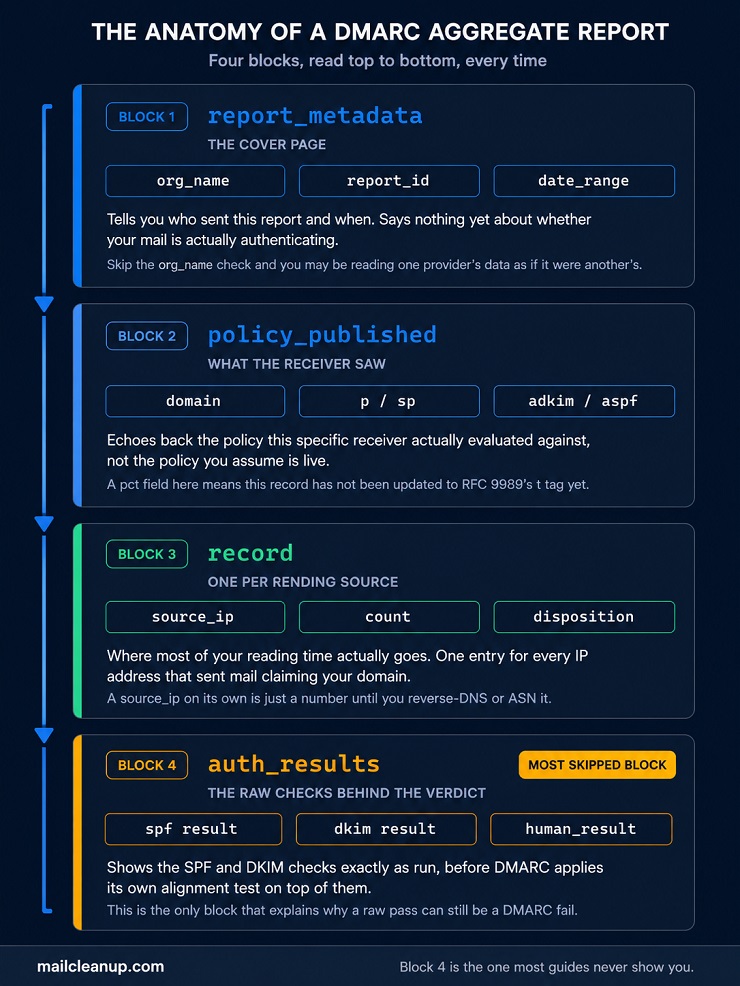
Every aggregate report, regardless of which provider sent it, is built from the same four blocks in the same order. Learning how to read DMARC reports well starts with these four blocks, rather than memorizing any one provider’s formatting quirks. Every report from every sender becomes readable the same way.
1. Report Metadata: Where to Start When You Read DMARC Reports
report_metadata is the report’s cover page. Part of learning how to read DMARC reports is knowing this block says nothing about your domain’s authentication health directly. Skipping it is how people misread everything that follows.
- org_name: the organization that generated the report, for example google.com. This tells you whose view of your mail you’re looking at. Google only reports on mail its own users received, not your entire sending volume.
- email: a contact address for the reporting organization. Rarely useful day to day, but worth having if a report looks malformed and needs flagging.
- report_id: a unique identifier for this specific report, useful mainly for cross-referencing if you’re troubleshooting with a provider or a monitoring tool’s support team.
- date_range, with begin and end sub-fields: the reporting window, given as Unix epoch timestamps, the count of seconds since January 1, 1970 UTC.
Those two timestamps are the part that trips people up, since nothing about 1784073600 looks like a date on sight. You don’t need a dedicated converter. On Linux, date -u -d @1784073600 prints the exact UTC timestamp directly in your terminal. On a Mac, the equivalent command is date -u -r 1784073600. macOS ships the BSD version of date, which reads a fixed timestamp differently than the GNU version does. If a spreadsheet is more your speed, there’s a manual formula. Divide the number by 86,400, the seconds in a day, then add it to January 1, 1970. Most spreadsheet applications also have a built-in epoch-conversion function that does the same job automatically.
2. Policy Published: Understanding DMARC Reports and What Your Policy Actually Looks Like
policy_published is worth checking before anything else in the report. Knowing how to read DMARC reports correctly starts here. This block shows what the receiving server actually saw when it evaluated your mail, not what you assume you published.
- domain: the domain the policy applies to.
- adkim and aspf: the alignment mode, relaxed (r) or strict (s), for DKIM and SPF respectively.
- p: your policy, none, quarantine, or reject.
- sp: the policy applied to subdomains, when one is set separately from the root domain’s policy.
If a report’s policy_published block shows a pct field, that’s not an error. It means the domain’s published record still uses the older staging tag that RFC 9989 removed in May 2026 in favor of t. Records that still use pct keep working exactly as before. A receiver simply disregards a tag it no longer treats as authoritative. Its presence is just a sign that record hasn’t been touched since the change went into effect. If that’s the case for a domain you manage, our guide to DMARC covers the full move from pct to t.
RFC 9990, published the same month as RFC 9989, is what formally standardizes this entire aggregate report format going forward. Before it, the report_metadata, policy_published, and record blocks covered in this guide were governed mostly by informal convention. That convention built on top of DMARC’s original 2015 specification, without a dedicated reporting standard of its own. The practical effect on any one report you open is small. The underlying schema itself didn’t change, and every existing parser keeps working exactly as before.
What it does mean is that report structure should get more consistent across providers over time. Otherwise, each provider’s implementation can keep drifting slightly from the next, based on years of accumulated convention rather than a single shared spec.
3. Records: Where Reading a DMARC Report Actually Gets Interesting
Each record represents everything a single sending source did during the reporting window. This is where you’ll spend most of your time when you’re working out how to read DMARC reports in practice. It’s the block that actually answers whether your domain’s mail is behaving.
- source_ip: the IP address that sent the mail. On its own this is just a number.
- count: how many messages that IP sent during the window.
- policy_evaluated / disposition: the action the receiver actually took, none, quarantine, or reject, based on your published policy.
- policy_evaluated / dkim and policy_evaluated / spf: the DMARC-aligned result for each check. This isn’t the same thing as the raw result covered in the next block.
- identifiers / header_from: the domain shown in the visible From address, the exact thing DMARC exists to protect.
Take the source_ip value in any record, say 192.0.2.10 from a report you’re holding right now. Reading DMARC report data well means turning that number into something you actually recognize, not just noting whether it passed or failed. A reverse DNS lookup does that translation for you. From a terminal, dig -x 192.0.2.10 +short (or nslookup 192.0.2.10 if dig isn’t installed) returns whatever PTR record is published for that address. It often names the sending service directly, something like mail-sor-f10.google.com, or a hostname that clearly belongs to a marketing platform you already use.
If the reverse lookup comes back empty or unhelpful, the next step is a WHOIS or ASN lookup on the same address. Free tools like ipinfo.io do this without any setup and tell you which organization actually owns that block of addresses. That’s usually enough on its own to make a judgment call. An IP block owned by a sending platform you recognize is a different situation entirely. One that traces to a hosting provider, or a country, with no business relationship to you at all, deserves more scrutiny.
4. Authentication Results: The Layer Most Guides to Reading a DMARC Report Skip
auth_results is the block that explains why a record ended up with the disposition it got. It’s also the part of how to read DMARC reports that most competing guides gloss over entirely. It shows the raw SPF and DKIM checks exactly as the receiving server ran them. That’s before DMARC applies its own alignment test on top of those raw results. If SPF and DKIM themselves are still fuzzy, our guide to email authentication covers how each one actually works before you get here.
- auth_results / spf / domain and result: the domain SPF actually checked, and the raw result, pass, fail, neutral, softfail, or a temporary error. It also flags whether that checked domain matches your header_from at all.
- auth_results / dkim / domain, selector, and result: the domain the DKIM signature claims, the exact key used as selector, and whether it validated.
- human_result, when present: an optional plain-text note explaining a failure that isn’t otherwise obvious, for example “no signature found.”
This is the block that makes an otherwise confusing record make sense. A raw SPF or DKIM pass reported against a domain that isn’t your own domain is not the same thing as a DMARC pass. DMARC only credits a check that both passes and aligns with header_from. Skimming auth_results and assuming a “pass” listed anywhere in the record means DMARC passed is the single most common misreading of an aggregate report. The annotated example below is built specifically to show that gap in practice, not just describe it.
A Complete Aggregate DMARC Report Example, Annotated
Everything above explains the pieces individually, the theory behind how to read DMARC reports. This is a single, complete aggregate report covering four records, one for each outcome a source can land in:
- A known sender passing cleanly.
- A known sender failing because of a misconfiguration.
- An unfamiliar sender that still passes.
- An unfamiliar sender that’s the genuine spoofing signal.
Every field carries an inline comment explaining what it means and, where relevant, why it matters for that specific record.
<?xml version="1.0" encoding="UTF-8"?>

<feedback>

  <!-- ============ REPORT METADATA ============ -->

  <report_metadata>

    <org_name>google.com</org_name>                      <!-- Google's own view of your mail, not the full picture -->

    <email>[email protected]</email>

    <report_id>18234571029384756</report_id>

    <date_range>

      <begin>1784073600</begin>                           <!-- July 15, 2026 00:00 UTC -->

      <end>1784160000</end>                                <!-- July 16, 2026 00:00 UTC, a clean 24-hour window -->

    </date_range>

  </report_metadata>

  <!-- ============ POLICY AS THE RECEIVER SAW IT ============ -->

  <policy_published>

    <domain>example.com</domain>

    <adkim>r</adkim>                                      <!-- relaxed DKIM alignment -->

    <aspf>r</aspf>                                        <!-- relaxed SPF alignment -->

    <p>quarantine</p>                                     <!-- this domain is mid-enforcement, past p=none -->

    <sp>quarantine</sp>

  </policy_published>

  <!-- ============ RECORD 1: KNOWN AND PASSING ============ -->

  <!-- Your primary ESP. Both checks pass and align. No action needed. -->

  <record>

    <row>

      <source_ip>192.0.2.10</source_ip>                   <!-- reverse-DNS resolves to your own ESP's mail servers -->

      <count>2140</count>                                 <!-- your normal daily send volume from this source -->

      <policy_evaluated>

        <disposition>none</disposition>                   <!-- nothing to act on, this is a clean pass -->

        <dkim>pass</dkim>

        <spf>pass</spf>

      </policy_evaluated>

    </row>

    <identifiers>

      <header_from>example.com</header_from>

    </identifiers>

    <auth_results>

      <spf>

        <domain>example.com</domain>                      <!-- matches header_from: this is what alignment looks like -->

        <result>pass</result>

      </spf>

      <dkim>

        <domain>example.com</domain>                      <!-- matches header_from here too -->

        <selector>esp1</selector>

        <result>pass</result>

      </dkim>

    </auth_results>

  </record>

  <!-- ============ RECORD 2: KNOWN BUT FAILING ============ -->

  <!-- A CRM tool you actually use, misconfigured. This needs fixing, not blocking. -->

  <record>

    <row>

      <source_ip>198.51.100.55</source_ip>                <!-- reverse-DNS/ASN lookup traces this to your CRM vendor -->

      <count>318</count>

      <policy_evaluated>

        <disposition>quarantine</disposition>              <!-- your p=quarantine policy is now acting on this source -->

        <dkim>fail</dkim>                                  <!-- fails ALIGNMENT, see auth_results below for why -->

        <spf>fail</spf>                                    <!-- same story: fails alignment, not the raw check -->

      </policy_evaluated>

    </row>

    <identifiers>

      <header_from>example.com</header_from>               <!-- this is the domain that must be matched -->

    </identifiers>

    <auth_results>

      <spf>

        <domain>crm-vendor.net</domain>                    <!-- the vendor's OWN domain, not yours: this is the misalignment -->

        <result>pass</result>                              <!-- SPF genuinely passed, just for the wrong domain -->

      </spf>

      <dkim>

        <domain>crm-vendor.net</domain>                    <!-- same issue: valid signature, wrong domain -->

        <selector>default</selector>

        <result>pass</result>

      </dkim>

    </auth_results>

  </record>

  <!-- ============ RECORD 3: UNKNOWN BUT PASSING ============ -->

  <!-- Low volume, unfamiliar IP, but DKIM survives forwarding and still aligns. Verify, don't panic. -->

  <record>

    <row>

      <source_ip>203.0.113.77</source_ip>                 <!-- doesn't match any sending source you'd recognize offhand -->

      <count>4</count>                                     <!-- very low volume: worth a look, not an emergency -->

      <policy_evaluated>

        <disposition>none</disposition>                    <!-- this actually passes DMARC overall -->

        <dkim>pass</dkim>                                   <!-- DKIM's signature travels with the message, survives forwarding -->

        <spf>fail</spf>                                     <!-- SPF breaks on forwarding, exactly as expected -->

      </policy_evaluated>

    </row>

    <identifiers>

      <header_from>example.com</header_from>

    </identifiers>

    <auth_results>

      <spf>

        <domain>example.com</domain>

        <result>fail</result>                               <!-- the forwarding server isn't in your SPF record, as expected -->

      </spf>

      <dkim>

        <domain>example.com</domain>                        <!-- signature still says example.com: this is why DKIM survives -->

        <selector>esp1</selector>

        <result>pass</result>

      </dkim>

    </auth_results>

  </record>

  <!-- ============ RECORD 4: UNKNOWN AND FAILING ============ -->

  <!-- The actual spoofing signal. Both checks fail outright, no legitimate explanation fits. -->

  <record>

    <row>

      <source_ip>198.51.100.201</source_ip>               <!-- no reverse DNS, no known ASN relationship to your business -->

      <count>1</count>                                      <!-- low volume here, but volume isn't what makes this dangerous -->

      <policy_evaluated>

        <disposition>quarantine</disposition>               <!-- your policy is already catching this -->

        <dkim>fail</dkim>

        <spf>fail</spf>

      </policy_evaluated>

    </row>

    <identifiers>

      <header_from>example.com</header_from>                <!-- claiming to be you, with nothing to back it up -->

    </identifiers>

    <auth_results>

      <spf>

        <domain>example.com</domain>

        <result>fail</result>

      </spf>

      <dkim>

        <result>fail</result>

        <human_result>no signature found</human_result>      <!-- not even an attempt at a valid signature -->

      </dkim>

    </auth_results>

  </record>

</feedback>
Record 2 is worth a second look, because it’s the one that actually explains why the Authentication Results block matters. Its auth_results shows spf and dkim both passing for crm-vendor.net. Read that line alone and it looks clean. But policy_evaluated for the same record shows both checks as fail, because neither result aligns with header_from, which is still example.com.
The vendor’s infrastructure is doing everything correctly by its own domain’s standards. It just isn’t signing or sending in a way that matches your domain, which is the only thing DMARC actually checks. The fix here isn’t blocking the CRM. It’s adding its sending range to your SPF record, or configuring its DKIM to sign under your own domain instead, whichever the vendor supports.
Record 3 shows the opposite kind of surprise. An unfamiliar IP with SPF failing looks, on first glance, like exactly the pattern you’d flag as suspicious. But its DKIM signature survived the forwarding hop intact and aligns with example.com, so disposition reads none and this genuinely passes DMARC. Low, unfamiliar volume like this is still worth a quick reverse-DNS check. Most often it turns out to be a forwarding rule or a legitimate third-party service. Either way, a pass here is a real pass, not a gap in your policy.
Diagnosing DMARC reports like this, quadrant by quadrant rather than skimming for a flat pass/fail count, is the actual skill this guide is teaching. The next section turns those four outcomes into a repeatable framework you can run against every report you open from here on.
The DMARC Source Grid: A Faster Way of Reading a DMARC Report
Everything so far has been about understanding individual fields. This section turns that understanding into speed. Once you’re comfortable with the four blocks, sorting speed is what matters. How to read DMARC reports quickly means sorting every source into one of four outcomes and moving on. It doesn’t mean re-deriving the logic record by record.
Two questions, asked about every source: is it known, and does it pass?
That’s the entire grid. Four combinations exist, and each one calls for a different response.
“Passing” here means the same thing established earlier: DMARC evaluated to an actual pass. At least one of SPF or DKIM aligned, regardless of whether the other check also passed. A source can fail SPF outright and still land in the “passing” half of this grid. Record 3 did exactly that.
Before the grid means anything, you need a working answer to “known compared to what.” Build this list once, and it barely needs maintenance:
- Every domain named in your own SPF record’s include: mechanisms is known by definition. You (or whoever manages DNS) already vouched for it.
- Every selector you’ve configured DKIM keys for is known the same way.
- Your transactional email service, marketing platform, CRM, and helpdesk tool are all known, even if a different team set each one up.
- Anything outside those three categories is worth a quick check with other departments before you call it unknown. Shadow tools that one team adopted without telling anyone else are a common, boring explanation for a source nobody expected.
1. Known and Passing
This is most of your report, most days, and it needs nothing from you. The source is one you’ve already authorized, and it’s aligning the way it should. Move on.
2. Known and Failing
A source you recognize, failing anyway. This is Record 2 from the earlier example: a CRM tool sending real mail on your behalf. It just signs or sends in a way that doesn’t match your domain. The fix depends entirely on what the vendor supports. Some let you add their sending range directly to your SPF record. Others offer custom-domain DKIM signing, usually through a CNAME they’ll walk you through setting up. Either one resolves it. Blocking the sender does not, it just breaks a tool you actually use.
3. Unknown and Passing
Low volume, unfamiliar IP, but it passed anyway, the way Record 3 did. Most often this is a forwarding rule someone set up, a legitimate partner nobody documented, or old infrastructure nobody decommissioned. A pass here is a real pass. The only action worth taking is confirming what the source actually is. Then either add it to your known list, or flag it for someone who might recognize it.
4. Unknown and Failing
This is Record 4, and it’s the one worth acting on. An unrecognized source, failing outright, is the actual spoofing signal DMARC exists to catch. If your policy already sits at quarantine or reject, it’s already handling this and there’s nothing urgent to do beyond watching for volume spikes. If your policy is still at none, this exact pattern, repeated across multiple reports, is the evidence you need before moving it higher.
A single low-volume appearance from one unknown, failing source is worth noting, not panicking over. The same source failing across three or more consecutive daily reports is a real pattern. So is a sudden volume spike from any single unknown source. Either one justifies moving faster toward enforcement.
Reading a DMARC Report: The Forensic Side (RUF)
Record 4 from the earlier example, the unknown source failing outright, is exactly what a forensic report exists to explain. If your domain’s ruf tag is set and the sending mailbox provider still honors it, here’s what would arrive for that same message.
Reading a DMARC report’s forensic side means learning a genuinely different format, not more XML. Knowing how to read DMARC reports completely means covering this format too, even though it arrives far less often. A DMARC forensic report is a MIME message in ARF, Abuse Reporting Format. It’s built from three parts: a short human-readable summary, a machine-readable feedback block, and the original message. Depending on the sender’s privacy policy, that last part is either headers only, or the complete message.
Content-Type: multipart/report; report-type=feedback-report; boundary="----dmarc-ruf-boundary"

------dmarc-ruf-boundary

Content-Type: text/plain; charset=utf-8

This is an authentication failure report for a message received

from IP 198.51.100.201 on July 15, 2026, claiming to be from

example.com. Only the message headers are included below.

------dmarc-ruf-boundary

Content-Type: message/feedback-report

Feedback-Type: auth-failure

User-Agent: ReceivingProvider-DMARC/1.0

Version: 1

Original-Mail-From: <[email protected]>

Original-Rcpt-To: <[email protected]>

Arrival-Date: Wed, 15 Jul 2026 09:14:22 +0000

Source-IP: 198.51.100.201

Reported-Domain: example.com

Auth-Failure: dkim

Auth-Failure: spf

Identity-Alignment: none

Delivery-Result: policy

------dmarc-ruf-boundary

Content-Type: message/rfc822-headers

From: "Example Support" <[email protected]>

To: [email protected]

Subject: Your account requires immediate verification

Date: Wed, 15 Jul 2026 09:14:20 +0000

Message-ID: <[email protected]>

Authentication-Results: mx.receiver.example; dkim=fail; spf=fail

 smtp.mailfrom=suspicious-sender.example; dmarc=fail

 (p=QUARANTINE sp=QUARANTINE dis=none) header.from=example.com

------dmarc-ruf-boundary--
A few fields are worth naming directly. Feedback-Type is always auth-failure for a DMARC forensic report, that’s how a receiving system knows what kind of report it’s looking at. Original-Mail-From and Original-Rcpt-To are envelope-level addresses, the ones used during the SMTP conversation itself. They aren’t necessarily the same as the visible From and To headers a recipient sees. Auth-Failure names which check or checks actually failed. Identity-Alignment confirms neither one aligned with header_from. Delivery-Result of policy means your own DMARC policy is what acted on the message, not a spam filter or some other unrelated rejection.
Notice what this report adds that the aggregate record never could. It shows an actual subject line built to create urgency, a fabricated sender name, and a message-ID pointing at unrelated infrastructure. That’s the entire point of forensic reports, and also exactly why most large providers stopped sending them. The same header block that helps you diagnose a spoofing attempt is, for a different message, someone’s real subject line and address. It’s sitting in a third party’s inbox.
A single forensic report is a data point, not a verdict: The aggregate reports are still where the real pattern lives, showing whether this source_ip sent one message or one thousand. Cross-reference the two whenever both are available, rather than reacting to a forensic report in isolation.
Privacy isn’t the only reason forensic reports became rare. At real internet scale, honoring every failed-authentication report creates a real problem. Anyone could trigger reports back to a domain just by spoofing mail that fails and gets rejected. That’s a real abuse vector, and it’s the other half of why most large providers walked away from RUF entirely.
RFC 9991, published alongside RFC 9989 and RFC 9990 in May 2026, does for forensic reporting what RFC 9990 did for aggregate. It takes a format that already existed as informal, ARF-based convention and gives it a real, dedicated specification. Existing forensic reports and the tooling built around them keep working exactly as before. The practical difference is that a format multiple RFCs used to gesture at from the outside now has its own authoritative source.
Understanding DMARC Reports: What They Don’t Tell You
Every field covered so far is part of how to read DMARC reports at the field level. Understanding them well also means knowing what they never will tell you, no matter how carefully you read them.
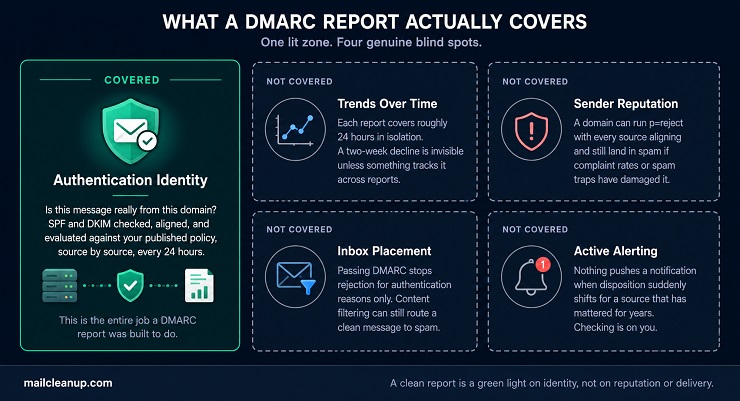
1. A report has no memory beyond its own reporting window
Each one covers roughly 24 hours in isolation. A gradual decline across two weeks is invisible on its own. It takes something to track it across time, a monitoring tool, or just a habit of comparing reports side by side.
A report carries no reputation score. DMARC measures whether a message’s identity is authentic, nothing about whether recipients actually want it. A domain can run p=reject with every single source aligning, and still land in spam. That happens if sender reputation is damaged by high complaint rates or spam trap hits elsewhere. That relationship between authentication and reputation is covered in full in our guide to sender reputation.
A report says nothing about inbox placement either. Passing DMARC keeps a message from being rejected or quarantined for authentication reasons. It does nothing to stop content filtering, engagement-based spam folder placement, or any other reason a properly authenticated message still misses the inbox. Where a message ends up once DMARC clears it is a genuinely different failure mode. We cover it directly in our guide to diagnosing delivery failure.
2. A report also doesn’t alert you to anything
Nothing pushes a notification when disposition suddenly shifts from none to reject for a source that’s mattered for years. Checking, or having something check for you, is still on you.
None of this makes DMARC reports less useful. It just means a clean report answers one specific question well: is this domain’s identity being spoofed. It was never built to answer whether the underlying list sending that mail is actually healthy. That’s a question our own guide to cleaning an email list exists to answer instead.
How to Read DMARC Reports at Scale: The Tools That Help
Reading one report by hand, the way this guide has done so far, teaches you the format. It doesn’t scale past a handful of domains or a real volume of daily mail. At that point, how to read DMARC reports efficiently stops being about XML literacy and starts being about which tool parses it for you.
| Tool | Free tier | Paid starting price | Best fit |
|---|---|---|---|
| dmarcian | 2 domains, 1,250 emails/month | Around $20/month, scaling with sending sources | Teams that want the deepest per-source detail and don’t mind a steeper interface |
| PowerDMARC | 1 domain, 10,000 emails/month | $8 to $250/month depending on volume tier | Teams that want SPF, BIMI, and MTA-STS hosting bundled with DMARC in one platform |
| EasyDMARC | 1 domain, 1,000 emails/month | Around $36/month for 100,000 emails, two domains | Teams that want the simplest dashboard to get started fast |
| Valimail | Basic monitoring available free | Align around $19/month; Enforce is sales-quoted, several thousand a year | Teams that eventually want automated enforcement, not just visibility |
| MxToolbox | Free one-off report analyzer, no account needed | N/A, not a subscription product for this use | Checking a single report you already have in hand, right now |
That table is really an argument for matching the tool to the problem. A one-off analyzer answers “what does this one report say” for free. A subscription dashboard answers “what’s the pattern across every report, every domain, every day,” and that’s a genuinely different job. Paying for the second when you only need the first is how teams end up with software they don’t use.
Every one of these is a hosted, subscription option. There’s also a real self-hosted alternative, and it’s the one every competing guide names without ever walking through it.
parsedmarc is an open-source Python tool built to parse DMARC reports, both aggregate and forensic. It already supports the RFC 9990 and RFC 9991 schemas this guide has been describing throughout. It also handles SMTP TLS reporting. It can pull reports directly from an IMAP mailbox, Microsoft Graph, or the Gmail API, unzipping compressed attachments automatically. From there it outputs to Elasticsearch, OpenSearch, Splunk, or PostgreSQL for use with a prebuilt dashboard.
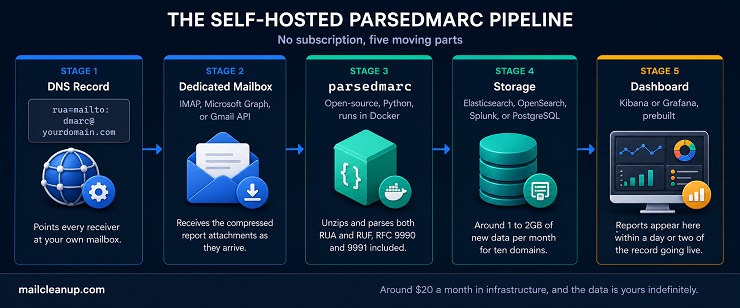
A real, minimal setup looks like this: point your rua and ruf tags at a dedicated mailbox, rua=mailto:[email protected]. Then run parsedmarc against that mailbox through a small Docker stack, typically parsedmarc itself paired with Elasticsearch and Kibana. A basic config file just needs your IMAP host, port, and credentials, plus where to send the parsed output. Reports start appearing in your dashboard within a day or two of the record going live.
The honest cost isn’t zero, it’s just not a subscription. A small server capable of running this stack comfortably, four cores and 8GB of memory, runs around $20 a month at a budget provider. For ten domains, expect roughly 1 to 2GB of new data a month. That means a modest server holds years of history before storage becomes a concern again. What you get in exchange is full ownership of the data and no per-domain or per-email pricing tier to outgrow.
Why Am I Not Receiving Any DMARC Reports? Understanding DMARC Reports Before They Even Arrive
A domain can publish a flawless DMARC record and still receive nothing. Knowing how to read DMARC reports doesn’t help if none ever show up. Before assuming something is broken, work through these six causes in order.
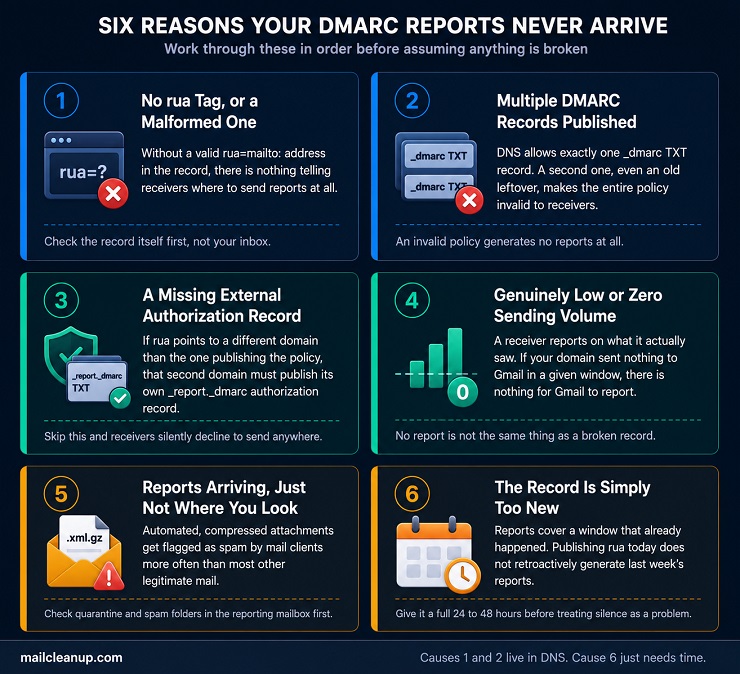
- No rua tag, or a malformed one: Without a valid rua=mailto: address in the record, there’s nothing telling receivers where to send reports at all. Check the record itself first, not your inbox.
- Multiple DMARC records published at once: DNS allows exactly one _dmarc TXT record. A second one, even an old leftover, makes the entire policy invalid to receivers, and an invalid policy generates no reports.
- A missing external authorization record: If your rua address points to a different domain than the one publishing the policy, that second domain must publish its own authorization record. It’s a _report._dmarc TXT record naming the redirect. Skip this step and receivers silently decline to send anywhere.
- Genuinely low or zero sending volume: A receiver reports on what it saw. If your domain sent nothing to Gmail during a given window, Gmail has nothing to report and simply doesn’t generate one for that window.
- Reports arriving, just not where you’re looking: Automated, compressed attachments get flagged as spam by mail clients more often than most other legitimate mail. Check quarantine and spam folders in the reporting mailbox itself before assuming nothing arrived.
- The record is simply too new: Reports cover a window that already happened. Publishing a rua tag today doesn’t retroactively generate reports for last week, it only starts the clock. Give it a full 24 to 48 hours before treating silence as a problem.
Your Next Report Just Landed: How to Read DMARC Reports in Under a Minute
Everything in this guide compresses into one short sequence. The next time a report lands in that mailbox, run it in this order.
Start with policy_published. Confirm it shows the domain and policy you actually expect, since a report evaluated against the wrong policy makes everything after it meaningless. From there, sort every record into the Source Grid, known versus unknown, passing versus failing. Fix every known, failing source before touching anything else. These are your own tools misconfigured, and they’re the fastest wins available.
Once the known sources are clean, confirm every unknown, passing source is something you actually recognize, even though it isn’t causing harm today. Watch unknown, failing sources across more than one report before reacting to a single appearance. Through all of it, remember what the report can’t tell you. A clean report is a green light on identity, not on reputation or inbox placement. That’s how to read DMARC reports in the time it takes to drink a coffee, not an afternoon.
FAQs on Reading a DMARC Report
Why am I getting emails from [email protected]?
That’s Google sending your domain’s aggregate DMARC report, not spam. It happens because your DMARC record includes a rua tag naming your address as the destination. The email contains a compressed XML attachment summarizing authentication results for mail Google received claiming to be from your domain.
How often do DMARC reports get sent?
Aggregate reports arrive roughly once every 24 hours, per reporting organization. Google, Microsoft, and Yahoo all follow this daily cadence. A domain sending to recipients across several major providers should expect that many separate reports landing each day, not just one.
Why am I not receiving any DMARC reports?
The most common causes are a missing or malformed rua tag, or a second conflicting DMARC record that invalidates the whole policy. Genuinely low sending volume is a third, leaving a receiver with nothing to report on. A record published in the last day or two also hasn’t had time to generate its first report yet.
What’s the difference between an aggregate and a forensic DMARC report?
Aggregate reports (RUA) are daily XML summaries covering every source and whether it passed. Forensic reports (RUF) cover individual failing messages in near real time, including headers and sometimes content. Most large providers, including Gmail, no longer send forensic reports over privacy concerns.
What does disposition mean in a DMARC report?
Disposition is the action the receiving server actually took on a message: none, quarantine, or reject. It reflects your published policy applied to that specific record. A disposition of quarantine means your policy, not a spam filter, routed that mail away from the inbox.
Do I need a paid tool to read DMARC reports?
No. A single report can be opened with any free one-off XML analyzer, or read manually using the field structure this guide covers. A subscription tool earns its cost once you’re tracking patterns across many reports and domains over time. Reading one report in isolation doesn’t need one.
What should I do if I find an unknown source in my DMARC report?
Run its source_ip through a reverse DNS or ASN lookup before reacting. Many unknown sources turn out to be forwarding rules or undocumented legitimate tools. If it’s genuinely unrecognized and failing, treat repeated appearances across multiple reports as the signal, not a single low-volume instance.
How do I know when it’s safe to move my DMARC policy from none to reject?
When your aggregate reports show every known, legitimate source passing consistently across multiple reporting windows, with no unexplained known-source failures left to fix. Moving through quarantine first, rather than jumping straight to reject, gives you a safety net while you confirm nothing was missed.