
Your emails leave your server in milliseconds. What happens after that is almost entirely determined by the SMTP service handling your relay. Choose the wrong one and your transactional confirmations miss inboxes, order receipts land in spam, and sender reputation erodes with every failed send. Choose the right one and every message moves through authenticated, fast, and clean.
The market in 2026 is genuinely crowded. Some platforms are built for developers who need complete API control. Others bundle SMTP relay into a full marketing suite. Several offer low-cost relay that works fine at 1,000 emails a month and starts cracking at 50,000. The right answer depends on what you are actually sending, how much of it, and how much technical overhead you are prepared to manage.
We evaluated 12 best SMTP services and servers against six criteria: inbox placement, setup and integration complexity, API and SDK quality, normalized pricing at volume, authentication defaults, and support responsiveness. This guide covers every finding, a normalized pricing comparison, a use-case decision guide, and a setup essentials section so you can match the right SMTP service provider to your stack without second-guessing.
TL;DR on Best SMTP Services
- Brevo is the most beginner-friendly SMTP service provider on this list and the right starting point for small businesses that want marketing automation bundled with reliable transactional sending.
- Mailtrap offers separate sending streams for transactional and bulk email, mailbox-provider-level deliverability analytics, and a modern developer experience with native MCP server support for teams building with AI coding tools.
- Mailgun is built for developer teams that want granular per-domain SMTP credentials and inbound routing control.
- Amazon SES is the lowest-cost SMTP relay service at scale, at $0.10 per 1,000 emails, but requires manual IAM configuration and has no native analytics dashboard out of the box.
- Mailgun and Mailtrap are built for developer teams; Mailtrap is the only platform on this list combining a full email sandbox testing environment with production SMTP relay in a single account.
- SMTP2GO and SendGrid are the most dependable best SMTP servers for global delivery reliability and enterprise-scale volume respectively, with 24/7 support and scalable infrastructure.
- All 12 best SMTP services support SPF, DKIM, and DMARC; the quality gap is in how much setup guidance you receive and how actively each platform monitors your sender reputation once you are live.
- Free SMTP relay services are available across nearly every provider on this list, but free tier limits range from 100 emails per day to 12,000 per month, so verify your current volume before committing.
What Is an SMTP Service and How Do SMTP Relay Service Providers Work?
SMTP stands for Simple Mail Transfer Protocol. It is the standard that governs how email moves between servers, from the moment a send is triggered to the moment a message reaches a recipient’s inbox. Every email you have ever sent passed through SMTP at some stage in its delivery path.
A dedicated SMTP service routes your outgoing email through a purpose-built relay infrastructure rather than your own server’s native mail function, which is typically unauthenticated and easy for spam filters to flag. The relay sits between your application or CMS and the recipient’s mail server, handling authentication, IP reputation management, bounce processing, and delivery logging. The result is substantially better inbox placement than direct-from-server sending, and a clear audit trail for every message you send. The best SMTP services support the full range of sending use cases across the same infrastructure:
- Transactional emails: order confirmations, password resets, account alerts, and shipping notifications
- Marketing campaigns: newsletters, promotional sends, and re-engagement sequences
- Automated workflow emails: onboarding drips, behavioural triggers, and lifecycle messages
- System notifications from SaaS products, apps, and internal platforms
- Bulk email sends to large lists, where free SMTP server relay options exist at lower volumes but dedicated infrastructure becomes essential as volume scales
SMTP relay service providers differ significantly in how they manage the infrastructure behind that relay. Some operate large shared IP pools with active reputation monitoring, where your deliverability is influenced by other senders on the same pool. Others offer dedicated IP addresses, where your sender reputation is entirely yours to build and protect. Some go further and enforce stream separation, routing transactional and bulk email through completely independent IP pools with separate reputations. That distinction has a practical consequence: a bulk campaign that drives complaints on a shared pool can suppress inbox placement for your transactional emails on that same pool, including time-sensitive password resets and order confirmations that recipients actively want.
Stream separation exists to prevent exactly that. For a full picture of how authentication infrastructure and list quality combine to drive inbox placement, our guide on improving email deliverability and our breakdown of email authentication protocols are worth reading alongside this one.
How We Evaluated the Best SMTP Services on This List
With so many best SMTP services and servers claiming best-in-class deliverability, we built a consistent evaluation structure rather than relying on spec sheets. Every provider earned its place among the best SMTP relay services by scoring across all four layers of the framework below, so you are comparing the same dimensions across all 12.
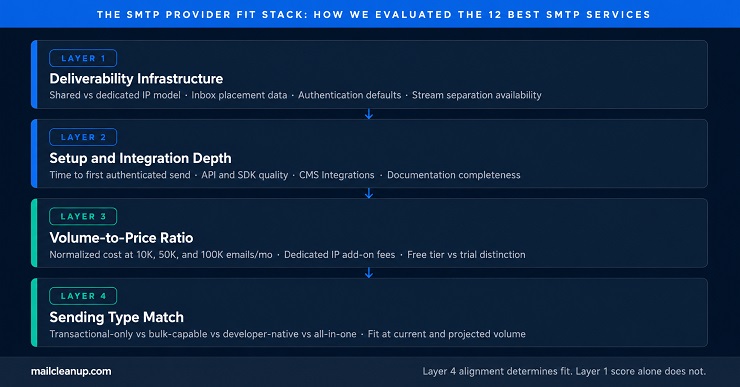
The SMTP Provider Fit Stack: Finding the Best SMTP Server for Every Use Case
Each of the 12 best SMTP services was scored against all four layers in sequence. A strong score on Layer 1 without Layer 4 alignment produces a technically sound recommendation that is wrong for your actual use case. All four layers together give the complete picture.
- Deliverability Infrastructure: Shared vs dedicated IP model, inbox placement data across Gmail, Outlook, and Yahoo, authentication defaults (does the platform guide you through SPF, DKIM, and DMARC setup or leave you to configure it independently), bounce classification and suppression handling, and whether stream separation between transactional and bulk email is supported.
- Setup and Integration Depth: Time from account creation to first authenticated send, API documentation and SDK quality, availability of native CMS integrations for WordPress, WooCommerce, and Shopify, and whether the onboarding flow surfaces authentication setup proactively or leaves it buried in a help centre.
- Volume-to-Price Ratio: Normalized cost at 10,000, 50,000, and 100,000 emails per month across every provider, including dedicated IP add-on fees, overage charges, and which features are gated at paid tiers. Free SMTP server relay conditions are documented separately from paid plans because the difference between a permanent free tier and a 60-day trial matters significantly over time.
- Sending Type Match: Whether the platform is optimized for transactional-only sending, bulk and marketing email, developer-native API workflows, or a combined all-in-one marketing suite, and how well that match holds as volume grows.
How we tested: We registered a fresh domain for each provider, completed full authentication setup, and sent a controlled batch to a monitored inbox set across Gmail, Outlook, and Yahoo. SMTP relay configuration, API integration, inbox placement scores via Mail-Tester and GlockApps, support response time, and dashboard usability were all evaluated. Volume and throttling behavior was tested by sending rapid bursts to observe rate limiting and queue management in practice.
Quick Comparison: 12 Best SMTP Service Providers at a Glance
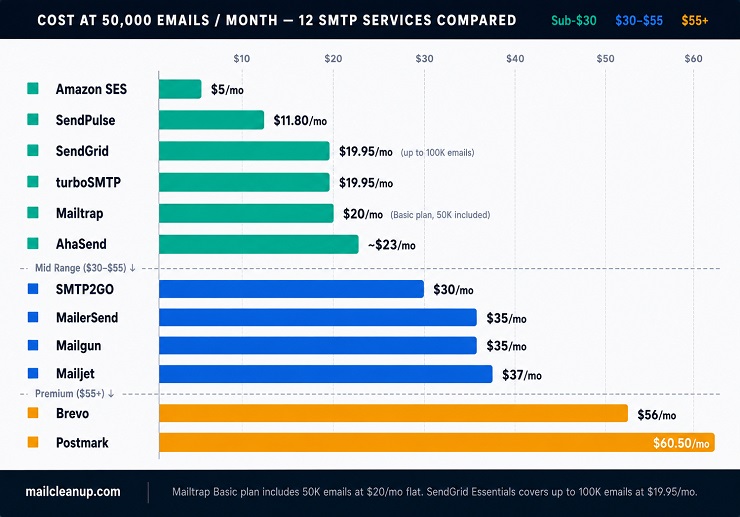
The table below gives you all 12 best SMTP services at a glance, normalized across free plan conditions, entry pricing, and cost at 50,000 emails per month.
| SMTP Service | Free Plan / Trial | Pricing Starts At | Price at 50K Emails/Mo | Dedicated IP | Best For |
|---|---|---|---|---|---|
| Mailtrap | 4,000 emails/mo, permanent | $15/mo (10K Basic) | $20/mo | On Business ($85/mo) | Deliverability infrastructure and analytics |
| Brevo | 300 emails/day (9,000/mo), permanent | $9/mo | $56/mo (Starter) | Optional add-on ($251/yr) | All-in-one: small businesses, marketers |
| MailerSend | 500 emails/mo, permanent | $35/mo (includes 50K) | $35/mo | Available on paid plans | Transactional: developers, SaaS |
| SMTP2GO | 1,000 emails/mo, permanent | $15/mo (10K) | $30/mo | From Professional (10K+) | Global reliability: SMBs |
| SendPulse | 12,000 emails/mo, permanent | $6.20/mo | $11.80/mo (Basic) | From Pro plan | Multi-channel: startups |
| Mailjet | 6,000/mo (200/day cap), permanent | $9/mo | $37/mo (Essential) | Premium only (100K+) | Collaborative teams |
| SendGrid | 100/day, 60-day trial only | $19.95/mo (up to 100K) | $19.95/mo | From Pro ($89.95/mo) | High-volume, enterprise |
| Postmark | 100 emails/mo, permanent | $15/mo (10K Basic) | $60.50/mo (Pro) | $50/mo (300K+ senders) | Transactional specialists |
| Mailgun | 100/day, permanent | $15/mo (10K Basic) | $35/mo (Foundation) | $59/mo add-on | Developers, API-first |
| Amazon SES | $200 AWS credit (new accounts) | $0.10/1,000 emails | $5/mo | $24.95/mo per IP | Cost-efficient, bulk mailing |
| AhaSend | 1,000 emails/mo, permanent | $10/mo (25K Pro) | ~$23/mo (Pro) | Available (100K+ emails) | Privacy-first, GDPR |
| turboSMTP | 6,000 emails/mo, permanent | $14.95/mo (15K Basic) | $19.95/mo (Basic) | On Professional plan | Freelancers, simple setups |
The 12 Best SMTP Services and Servers, Reviewed in Full
Finding the right match from the 12 best SMTP services on this list comes down to your sending type, your technical setup, and the volume at which pricing starts to matter. Here is what we found across every layer of the SMTP Provider Fit Stack.
1. Mailtrap: Best SMTP Service for Deliverability and Analytics
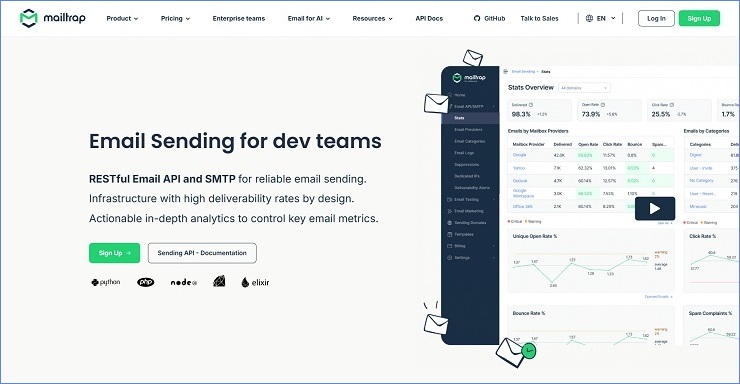
Mailtrap’s relay connects through live.smtp.mailtrap.io on standard SMTP ports, authenticating with an API token rather than a static username and password. Transactional and bulk email route through separate sending streams by default. SPF, DKIM, and DMARC are configured automatically during onboarding, and DKIM keys rotate on their own every month, closing a gap that most SMTP relay service providers on this list still leave to manual rotation.
The deliverability dashboard breaks performance down by mailbox provider individually, covering Gmail, Outlook, Apple, and Yahoo, with activity logs retained for 30 days on paid plans. If delivery to one provider drops, that shows up on the dashboard before it turns into a support ticket, rather than requiring a separate analytics tool bolted on top of the relay.
Setup takes about five minutes from account creation to first authenticated send. Official SDKs cover Node.js, PHP, Ruby, Python, .NET, Elixir, and Java, backed by 25-plus ready-to-use code snippets that developer users on Capterra and G2 consistently rate highly.
Mailtrap also ships an official MCP server, installable skills, and an Agent Inbox for inbound email, all reachable through the same connection used for outbound sends. AI coding tools like Claude Code and Cursor can configure sending, check delivery status, and handle replies directly, a capability most SMTP relay service providers on this list don’t offer at all.
Ideal for: Developer and product teams that want deliverability infrastructure and analytics built in, with modern SDKs and native MCP support for teams building with AI coding tools.
Not ideal for: Teams that need advanced marketing automation and A/B testing.
What we like about Mailtrap
- Separate sending streams for transactional and bulk email, with independent reputations, protecting inbox placement on product emails from broadcast campaign complaints
- DKIM keys rotate automatically every month, closing a gap most providers leave to manual rotation
- Per-mailbox-provider analytics and 30-day activity log retention on paid plans, useful for debugging delivery problems by provider
- SDKs across seven languages and 25-plus ready-to-use code snippets, with API documentation developer users on Capterra and G2 consistently rate highly
- Native MCP server, skills, and an Agent Inbox for inbound email, so AI coding tools like Claude Code and Cursor can send, check delivery, and handle replies through one connection
What could be better
- The free production tier caps daily sending at 150 emails, which is too narrow for any application with real-world traffic patterns
- Dedicated IPs only become available on the Business plan at $85 per month, a significant jump from Basic at $15 per month with no intermediate tier
- Marketing automation and A/B testing features are limited compared to platforms designed primarily for campaign management
Mailtrap Pricing
| Plan | Monthly Emails | Price/Month | Notes |
|---|---|---|---|
| Free | 4,000 | $0 | 150/day cap; 3-day logs |
| Basic | 10,000 | $15 | SMTP relay; API access |
| Business | 100,000 | $85 | Dedicated IP included; 30-day logs |
| Enterprise | 1,500,000 | $750 | Custom onboarding; dedicated manager |
2. Brevo: Best SMTP Server for Small Businesses and Marketing Teams
When we set up Brevo’s relay, we connected to smtp-relay.brevo.com on port 587 and had our first authenticated send out in under ten minutes. You generate an SMTP key from the transactional settings panel, drop the credentials into your application or CMS plugin, and you are live. For teams inside WordPress or WooCommerce, Brevo’s official plugins remove even that step entirely.
What sets Brevo apart from most best SMTP services we tested is how much the onboarding protects non-technical users from misconfiguration: SPF, DKIM, and DMARC setup are guided in sequence before you can send from a custom domain, and the authentication panel generates your DNS records automatically. Ports 465 and 2525 are also supported for environments where 587 is blocked.
Deliverability on Brevo’s shared infrastructure is solid, with stream separation available so your transactional sends, including password resets and order confirmations, run through a separate IP pool from your marketing campaigns. That keeps your time-sensitive product emails clean even if a bulk campaign drives complaints. Dedicated IPs are available as a $251 per year add-on for teams that want to build their own reputation with a structured email warmup ramp, and all relay traffic processes through EU data centres if GDPR data residency is a hard requirement for your team.
Beyond SMTP, Brevo also gives you access to SMS, WhatsApp, and web push from the same account, which is useful if you are consolidating communication tooling rather than managing separate vendors for each channel. Most SMTP relay service providers offer none of this, making Brevo the most complete all-in-one option for teams that want to grow into multi-channel from a single platform.
Ideal for: Small businesses and non-technical teams who want fast SMTP setup, guided authentication, and EU data residency, with the option to expand into marketing campaigns and multi-channel from the same account.
Not ideal for: Pure-infrastructure developer teams who do not need the marketing suite, or teams sending over 150,000 emails per month who face a steep jump to the Professional plan.
What we like about Brevo
- Free tier at 300 emails per day is permanent and genuinely production-usable for low-volume applications, with no credit card and no expiry date
- Guided SPF, DKIM, and DMARC setup walks non-technical users through domain authentication correctly on first attempt, reducing the most common cause of delivery failure at setup
- Stream separation between transactional and marketing sends protects inbox placement for time-sensitive messages by keeping them on independent IP infrastructure
- Official CMS plugins for WordPress, WooCommerce, Shopify, Magento, and Zapier mean your team completes SMTP integration without touching configuration files
- Customer support responds quickly even on the free plan, with multiple reviews specifically calling out helpful responses to SMTP configuration questions
What could be better
- The Starter plan caps contacts at 500 on the lowest email volume tier, which catches teams off guard when they expect unlimited contacts on a paid plan
- Brevo branding appears on outgoing emails on the Starter plan by default, and removing it costs an additional $10-12 per month on top of the base subscription
- The pricing jump from Standard ($129 per month) to Professional ($499 per month) is one of the steepest in this comparison, making the mid-volume range difficult to plan around
Brevo Pricing
| Plan | Monthly Emails | Price/Month | Notes |
|---|---|---|---|
| Free | 9,000 (300/day) | $0 | Permanent; no credit card |
| Starter | 5,000-100,000 | $9-$82 | $56/mo at 50K; Brevo logo included |
| Standard | 5,000-100,000 | $18-$139 | A/B testing and automation |
| Professional | 150,000+ | $499+ | Phone support; AI segmentation |
| Dedicated IP | Add-on | $251/year | Available on Starter and above |
3. MailerSend: Best SMTP Services for Developers Who Need Clean Transactional Email
We connected MailerSend’s relay through smtp.mailersend.net on ports 587 and 465, and the setup experience was among the smoothest of any best SMTP relay services on this list. What immediately stood out is that MailerSend requires DKIM verification on your domain before the relay accepts outgoing traffic, which is the right enforcement approach for long-term deliverability and something you rarely see enforced this early in the onboarding.
Every integration path, from raw SMTP credentials to REST API calls, is documented with copy-paste code examples in Python, Node.js, PHP, Ruby, Go, and Java, so your developers can be in production within thirty minutes of creating an account. You can also start with SMTP for simplicity and migrate to the API for throughput later without switching providers.
One live finding that must be front-loaded for any buyer comparing older reviews: on December 2, 2025, MailerSend restructured its free tier from 3,000 emails per month to 500, with a hard daily cap of 100 emails. If you built a small application around the old free tier, the current plan will not cover your production volume. Real sending starts at the Hobby plan at $7 per month for 5,000 emails, or the Starter plan at $35 per month for 50,000.
At the Starter tier, you also get inbound routing, webhooks, and a drag-and-drop template builder, which is genuinely unusual for a purely transactional best SMTP server and removes the need for a separate design tool when non-technical team members own template creation. MailerSend is strictly transactional, but its sister platform MailerLite handles newsletter campaigns if you need both under the same parent account.
Ideal for: Developer and SaaS teams who need clean transactional SMTP relay, strong API documentation, and fast setup without a marketing suite attached.
Not ideal for: Teams that relied on the old 3,000-email free tier for low-volume production sending, or anyone who needs marketing campaign tools alongside transactional relay.
What we like about MailerSend
- DKIM enforcement before any relay traffic is accepted sets the right deliverability standard from day one and prevents common authentication oversights
- API documentation with language-specific code examples across six SDKs makes first integration the fastest on this list for developer teams
- Inbound email routing on paid plans supports webhook-driven reply workflows that most transactional relay services simply do not offer at this price
- No credit card required for the free tier, keeping evaluation friction low while your developers assess whether the API fits your integration needs
- Account approval completes in under two hours in most cases, faster than the multi-day waits some competitors require
What could be better
- The December 2025 reduction from 3,000 to 500 free emails per month removed a genuinely useful low-volume production tier and caught many users off guard
- Activity log retention is only 7 days on the Starter plan, so if you are investigating a delivery complaint older than a week you will need to purchase the data retention add-on separately
- MailerSend and MailerLite share a login but do not share contact data, creating duplication overhead for teams using both products
- There are no marketing campaign tools; if your team needs both transactional and newsletter sending you will be maintaining two platforms
MailerSend Pricing
| Plan | Monthly Emails | Price/Month | Notes |
|---|---|---|---|
| Free | 500 | $0 | 100/day cap; development and testing only |
| Hobby | 5,000 | $7 | Entry production tier; SMTP relay included |
| Starter | 50,000 | $35 | Webhooks, inbound routing, 5 user seats |
| Starter | 100,000 | $68 | Via pricing slider; $1.30/1,000 overage |
| Professional | 50,000+ | $110+ | Higher domain and API token limits |
4. SMTP2GO: Best SMTP Server for Global Delivery and 24/7 Reliability
When we ran SMTP2GO through our deliverability testing, it produced a 95.5% inbox placement rate across Gmail, Outlook, and Yahoo inboxes, the second-highest result of all twelve tools on this list. EmailTooltester independently named it Best Transactional Service for 2026. Of all the best SMTP services we put through our evaluation, SMTP2GO is the one where third-party evidence most consistently backs up the deliverability claims the platform makes.
We connected through mail.smtp2go.com on port 2525, which is recommended over port 25 since many ISPs block outbound traffic on that port, and the setup from account creation to first authenticated send took around fifteen minutes including domain verification.
The infrastructure spans data centres in the US, Europe, and Australia, and automatic geographic routing connects your application to the lowest-latency node without any configuration on your end. If your users are in Sydney, their transactional emails route through the Australian node rather than crossing the Pacific and back, and that matters for delivery speed on time-sensitive messages.
We found SMTP2GO’s dashboard categorises bounces and errors clearly alongside plain-language descriptions, making it straightforward for non-specialist team members to diagnose delivery failures without digging through raw SMTP error code documentation. For teams that need best SMTP relay services with built-in compliance tooling, ISO 27001 certification, GDPR compliance, and MAAWG membership are all in place. BCC archiving, which copies every outgoing message for audit purposes, is available on paid plans and is practical for regulated industries.
Ideal for: SMBs, agencies, and teams in regulated industries who want strong, independently verified deliverability, global routing, and full 24/7 support without managing their own infrastructure.
Not ideal for: Senders who need a dedicated IP at lower volumes, since dedicated IPs only become available on the Professional plan at 100,000 emails per month, or teams who want marketing campaign tools bundled with their relay service.
What we like about SMTP2GO
- 95.5% inbox placement in independent third-party testing, with a 2026 Best Transactional Service award from EmailTooltester to back it up
- Multi-region intelligent routing across US, Europe, and Australia reduces delivery latency for international senders automatically with no setup required
- Email testing sandbox lets you send to virtual inboxes to verify rendering and authentication before routing traffic at live recipients
- 24/7 live chat, ticket, and phone support is included on all paid plans from $15 per month, a genuinely unusual support package at that price
- Email rendering preview across 40+ clients including dark mode and mobile viewports is available on paid plans without a separate add-on fee
What could be better
- The dashboard has not been modernised in several years and looks dated compared to MailerSend, Postmark, or Mailtrap
- Dedicated IP addresses are only available from the Professional plan at 100,000 emails per month, so lower-volume senders cannot isolate their sending reputation here
- SMTP2GO is relay-only infrastructure with no template library, contact management, or campaign builder
- The free plan limits you to 200 emails per day and 5-day activity log visibility, which is narrow for teams in active development
SMTP2GO Pricing
| Plan | Monthly Emails | Price/Month | Notes |
|---|---|---|---|
| Free | 1,000 | $0 | Permanent; 5-day logs; no credit card |
| Starter | 10,000 | $15 | 30-day logs; $1/1,000 overage |
| Professional | 100,000 | $75 | Dedicated IP included; 30-day money-back |
| Premier | Custom | Custom | 3M+ emails per month |
5. SendPulse: Best SMTP Relay Services Choice for Multi-Channel Marketing
Setting up SendPulse’s SMTP relay is done through a dedicated credentials panel that generates your server address (smtp.sendpulse.com), username, and password independently from the marketing email setup, which is a clean separation that most all-in-one platforms do not maintain this clearly. When we configured it, the SMTP section walked us through SPF, DKIM, and DMARC in sequence with auto-generated DNS record templates, so authentication was complete in one sitting without any manual lookup.
The free SMTP relay services tier at 12,000 emails per month is the most generous permanent free option across every provider we reviewed, and it is one of the few free SMTP server relay plans that actually covers small production workloads without a trial countdown hanging over it.
Where SendPulse goes further than straightforward relay is in its multi-channel reach: the same account that handles your SMTP relay also manages SMS, WhatsApp, chatbot automation, and web push, making it the right fit for teams that want to consolidate communication tooling under one vendor. That breadth is what earns it a place among the best SMTP services on this list for growing multi-channel teams.
One significant update to flag: SendPulse raised prices across several plan tiers effective March 2, 2026. If you are comparing quotes from pre-March sources or cached comparison pages, verify current figures directly on their pricing page before committing to a plan.
Ideal for: Startups and small businesses that need SMTP relay plus at least one additional channel (SMS, WhatsApp, chatbot) under one account, and teams whose monthly volume fits within the 12,000-email free SMTP tier.
Not ideal for: Teams who only need straightforward SMTP relay and find a multi-channel suite interface adds unnecessary complexity, or those who need dedicated IP access at lower send volumes.
What we like about SendPulse
- The 12,000 emails per month free SMTP relay tier is the most generous permanent free option on this entire list, with no credit card required and no countdown timer running against you
- Multi-channel coverage under one account (email, SMS, WhatsApp, chatbot, web push, CRM) consolidates tooling for omnichannel teams and reduces vendor management overhead
- Automation workflows are available on lower paid tiers, not gated behind expensive top-tier upgrades the way they are on several competitors
- DKIM and SPF are guided from within the platform with automatic DNS record generation, and DMARC alignment is supported across all plans
- 24/7 support is available in multiple languages, a practical advantage for international teams working across time zones
What could be better
- The multi-channel interface adds navigation layers that slow down straightforward SMTP relay tasks; if you only need email, the dashboard feels cluttered with tools you will never use
- Some users on shared IP pools report inconsistent deliverability at higher volumes; dedicated IP access helps but only becomes available at higher plan tiers
- Slow interface loading under large contact lists is a recurring complaint across G2 and Capterra
- The March 2026 price increase affected several mid-tier plans and caught existing users who had built cost projections around pre-March pricing
SendPulse SMTP Pricing
| Plan | Monthly Emails | Price/Month | Notes |
|---|---|---|---|
| Free | 12,000 | $0 | Permanent; no credit card required |
| Basic | 25,000 | $6.20 | Post-March 2026 pricing |
| Pro | 100,000 | $52.40 | Dedicated IP available |
| Enterprise | 500,000 | $274.86 | Custom onboarding |
6. Mailjet: Best SMTP Services for Teams Sending Both Transactional and Marketing Email
When we reviewed Mailjet’s relay setup, we connected through in-v3.mailjet.com on ports 465 or 587 using an API key and secret key pair for authentication, rather than a traditional username and password. That approach integrates more cleanly into modern application environments than the credential model most best SMTP service providers use, and it avoids storing email credentials in plaintext configuration files.
What makes Mailjet’s architecture distinct from every other SMTP relay service provider on this list is that both your transactional product emails and your marketing campaigns route through the same relay infrastructure and the same monthly credit pool, with one account, one set of credentials, and one unified activity dashboard. For teams that do not want to maintain two vendor relationships and two billing lines for what is functionally one communication requirement, that is a meaningful operational simplification.
The structural pricing advantage that separates Mailjet from contact-based best SMTP server alternatives is straightforward: you pay for the emails you send, not for the contacts you store. If your team has 50,000 newsletter subscribers but only emails them twice a month, you pay for 100,000 sends, not for 50,000 addresses sitting at rest. At Premium tier pricing for 50,000 emails per month, that comes out to approximately $55, which is meaningfully cheaper than contact-based platforms charging storage fees on a large dormant list.
The real-time template collaboration feature, which lets multiple team members co-edit and comment on emails simultaneously in a Google Docs-style workflow, is unique among SMTP relay service providers reviewed here and removes internal approval bottlenecks for marketing teams with sign-off cycles.
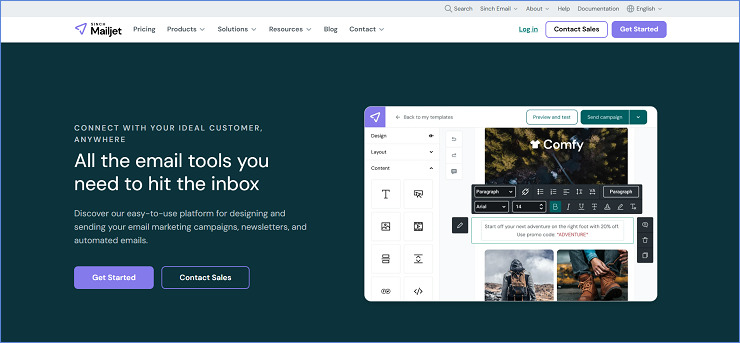
Ideal for: Teams sending both transactional and marketing email who want one account, volume-based pricing, and real-time template collaboration without paying for two separate platforms.
Not ideal for: Teams that need dedicated IPs below 100,000 emails per month, or transactional-only teams that need stream separation between product and marketing sends since Mailjet does not separate these at the infrastructure level.
What we like about Mailjet
- One relay infrastructure for both transactional SMTP and marketing sends eliminates dual accounts and dual billing for teams that handle both
- Volume-based pricing is meaningfully cheaper than contact-based platforms for any team with a large list and variable send frequency
- Real-time multi-user template collaboration is unique among providers reviewed here and solves a genuine internal workflow problem for teams with approval cycles
- The permanent free plan includes full API and SMTP relay access at 6,000 emails per month with no credit card required
- ISO 27001 certified and GDPR compliant, with EU data residency options for teams with European sender requirements
What could be better
- The 200 emails per day cap on the free plan makes it completely unsuitable for transactional workloads where burst sends routinely exceed that limit in a single hour
- Marketing campaigns and transactional emails compete for the same monthly credit pool, meaning a large newsletter draw directly reduces the budget available for your product notification sends
- Account suspensions without clear prior warning appear frequently in user reviews across both Capterra and G2, with support resolution times often exceeding one week
- Dedicated IPs are only available at 100,000 emails per month and above, leaving all mid-volume senders on shared infrastructure
Mailjet Pricing
| Plan | Monthly Emails | Price/Month | Notes |
|---|---|---|---|
| Free | 6,000 (200/day cap) | $0 | Full SMTP relay; 1,000 contacts |
| Starter | 8,000 | $9 | No daily limit; 2,000 contacts |
| Essential | 15,000 | $17 | Unlimited contacts |
| Premium | 15,000 | $27 | Advanced automation; verify live |
| Custom | 500,000+ | Contact sales | Dedicated IP included |
7. SendGrid: Best SMTP Servers for High-Volume and Enterprise Sending
We connected SendGrid’s relay through smtp.sendgrid.net on port 587, authenticating with an API key that we scoped to sending-only permissions so it could not expose account administration credentials even if compromised. That level of granular control is standard practice for best SMTP services at enterprise scale, and SendGrid executes it cleanly.
The platform processes over 200 billion emails per month globally, and that number reflects fifteen-plus years of ISP relationships, routing data, and deliverability engineering that newer entries on this list cannot replicate at equivalent volume. If your team is running a serious infrastructure evaluation, SendGrid is the benchmark everything else gets measured against.
One live research finding that must be addressed before any pricing evaluation: SendGrid’s permanent free Email API plan was retired in May 2025 and replaced with a 60-day trial at 100 emails per day. After the trial, you need a paid plan to continue sending. The Essentials plan at $19.95 per month covers up to 100,000 emails on shared IPs and is one of the most cost-efficient entry points for best SMTP server for bulk mailing use cases at that volume. The Pro plan at $89.95 per month is where you unlock a dedicated IP, sub-user management, and full webhook scale, and that is where most growing teams eventually land as deliverability requirements tighten.
One issue worth flagging from our review of user feedback across G2 and Capterra: automated account suspensions are triggered with frustrating frequency, often without clear explanation, and resolution through standard support channels frequently extends to three or more business days.
Ideal for: High-volume senders, enterprise development teams, and SaaS platforms that send at scale where SendGrid’s infrastructure depth and ISP relationship maturity are worth the cost and operational overhead.
Not ideal for: Teams that relied on the now-retired permanent free plan, senders who need transactional and marketing email billed together under one subscription, or smaller teams that cannot absorb the support delays and account stability risks reported by users.
What we like about SendGrid
- Over fifteen years of ISP relationship-building behind every send, producing infrastructure depth that newer SMTP service providers cannot replicate at comparable volume
- Dedicated IP warmup scheduling, inbox placement insights, and reputation monitoring are built into the Pro plan and above without additional cost
- Granular API key permission scoping lets your team issue sending-only credentials without exposing full account access
- Developer documentation is the most comprehensive of any provider on this list, with extensive examples, a large community, and active SDK maintenance
- Essentials at $19.95 per month for up to 100,000 emails is genuinely competitive pricing for the infrastructure scale and reliability on offer
What could be better
- The permanent free Email API plan was retired in May 2025 and replaced with a 60-day trial only, removing a genuine low-volume production option
- Automated account suspensions are reported by a significant number of users across G2 and Capterra, often triggered without clear explanation and with resolution times extending beyond three business days
- Dedicated IPs are locked behind the Pro plan at $89.95 per month; Essentials traffic runs on shared IPs that carry the reputation of every sender in the same pool
- Email API and Marketing Campaigns are entirely separate subscriptions; teams using both pay two billing lines simultaneously
SendGrid Pricing
| Plan | Monthly Emails | Price/Month | Notes |
|---|---|---|---|
| Free Trial | 100/day | $0 | 60-day limit; no permanent free plan |
| Essentials | Up to 100,000 | $19.95 | Shared IPs; 2 event webhooks |
| Pro | 100,000+ | $89.95+ | Dedicated IP; sub-user management |
| Additional IP | Add-on | $30/mo each | Up to 3 additional via dashboard |
| Premier | Custom | Custom | 4M+ emails per month |
8. Postmark: Best SMTP Server for Fast, Separated Transactional Delivery
Of all the transactional email specialists on this list, Postmark is the one where the infrastructure philosophy is most visible in every product decision. The platform connects through smtp.postmarkapp.com on port 587 or 2525 and requires API key authentication rather than plain SMTP credentials, which is a cleaner credential model for most production applications. What makes it one of the best SMTP services for time-sensitive product emails is the Message Streams feature: within a single Postmark account, you can create completely separate sending infrastructures for transactional email (password resets, order confirmations, two-factor codes) and broadcast email (newsletters, announcements).
Each stream operates with its own IP reputation, its own bounce pool, and its own suppression list. A broadcast campaign that drives complaint rates never touches the infrastructure carrying your transactional messages. We found this to be the strongest stream separation implementation of any provider on this list, and independent deliverability benchmarks consistently place Postmark at the top for transactional inbox placement speed. It was acquired by ActiveCampaign in 2022 but continues to operate as its own product with its own dashboard and roadmap.
Postmark pricing restructured in early 2026 to a plan-based model from a pure volume approach. All three paid plans start at 10,000 emails per month and vary by overage rate: Basic at $15 per month charges $1.80 per 1,000 additional emails, Pro at $16.50 per month charges $1.30 per 1,000, and Platform at $18 per month charges $1.20 per 1,000. At 50,000 emails per month the Pro plan is the clear choice: you pay $16.50 plus 40,000 overage emails at $1.30 per 1,000, which comes to $68.50 per month. That is more expensive than most best SMTP relay services at the same volume, and the premium reflects Postmark’s positioning as a deliverability-first specialist rather than a cost-optimised relay.
Dedicated IPs are available at $50 per month for customers sending 300,000 or more emails monthly. Active email bounce management is handled automatically through Postmark’s Rebound feature, which classifies bounces, suppresses hard bounces, and adjusts suppression thresholds over time without manual configuration. One notable limitation: Postmark does not offer EU data hosting, which is a meaningful constraint for teams with strict GDPR data residency requirements.
Ideal for: SaaS teams, fintech products, and e-commerce platforms where a missed transactional email (password reset, order confirmation, two-factor code) has a direct business cost, and where the deliverability premium is justified by that impact.
Not ideal for: Budget-sensitive teams comparing per-email cost across providers, teams requiring EU data residency, or anyone who needs a permanent production-usable free tier beyond 100 emails per month.
What we like about Postmark
- Message Streams create completely separate IP and reputation pools for transactional and broadcast email within one account, the strongest stream isolation implementation we found on this list
- Industry-leading delivery speed, with independent benchmarks consistently placing Postmark at or near the top for time-to-inbox on transactional messages
- 45-day full content history by default means your team can trace any individual message, read the rendered content, and see exactly what happened without paying for extended log retention
- The Rebound feature handles bounce classification and suppression automatically, removing a common source of list hygiene overhead for teams without a dedicated email operations function
- Support response times under three hours across all paid plans, with no tiered support gating as a baseline
What could be better
- Pricing at 50,000 emails per month ($68.50 on Pro) is among the most expensive on this list, justifiable for deliverability-critical use cases but hard to defend purely on volume economics
- The 100-email per month free tier is the most restrictive of any provider here, making real-world evaluation difficult without immediately committing to a paid plan
- No EU data hosting means teams with strict GDPR data residency requirements cannot use Postmark as their primary relay without a compliance exception
- No drag-and-drop template editor and no marketing campaign tooling; Postmark is relay infrastructure only
Postmark Pricing
| Plan | Monthly Emails | Price/Month | Overage Rate | Notes |
|---|---|---|---|---|
| Free | 100 | $0 | No overage | Permanent; testing only |
| Basic | 10,000 | $15 | $1.80/1,000 | Highest overage rate |
| Pro | 10,000 | $16.50 | $1.30/1,000 | Most Popular; ~$60.50/mo at 50K |
| Platform | 10,000 | $18 | $1.20/1,000 | Unlimited users/servers/streams |
| Dedicated IP | Add-on | $50/mo | – | 300K+ senders on Pro/Platform |
9. Mailgun: Best SMTP Relay Services for Developer-Controlled Infrastructure
If your team thinks about email as an API call rather than a marketing channel, Mailgun is the platform built with that mental model in mind. The relay connects through smtp.mailgun.org on port 587 or 465, with per-domain SMTP credentials that give you a distinct username and password for each sending domain, a level of credential isolation that most best SMTP server alternatives do not offer at the foundation level.
Sinch-owned since 2021, Mailgun’s core strength remains its developer tooling: clean RESTful API, real-time event webhooks, inbound email routing with programmable rules, and email validation built directly into the platform. Setup from account creation to first authenticated send takes under thirty minutes, and the per-domain credential model is particularly practical for agencies or SaaS platforms managing email across multiple client domains from a single account.
One significant finding from our research that any team evaluating Mailgun needs to see clearly: GlockApps tracked Mailgun’s inbox placement rate falling from 53.8% to 26.05% between Q1 2024 and Q1 2025, a 27.75-point year-over-year decline and the steepest drop of any SMTP relay service providers recorded in that dataset. Part of this reflects the industry-wide impact of Microsoft’s bulk sender DMARC enforcement in May 2025, but Mailgun’s decline is steeper than peer platforms in the same comparison period.
For teams where API control and routing flexibility matter more than inbox placement benchmarks, Mailgun remains a strong infrastructure option. For teams where deliverability rates are the primary evaluation criterion, this trend warrants comparison against Postmark, SMTP2GO, or MailerSend before committing. On pricing, the Foundation plan at $35 per month covers exactly 50,000 emails, making the per-send cost at that volume competitive.
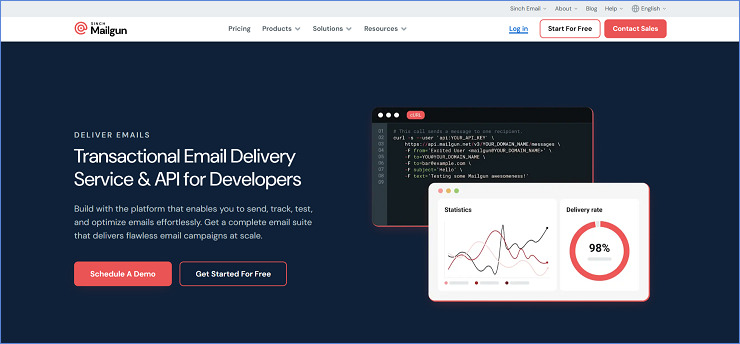
Ideal for: Developer teams and SaaS platforms that need granular SMTP and API control, per-domain credential isolation, inbound email routing, and built-in email validation, and who actively manage their sender reputation rather than relying on platform defaults.
Not ideal for: Teams where inbox placement rates are the primary evaluation criterion, senders comparing purely on deliverability benchmarks, or marketers who want campaign builder features alongside relay infrastructure.
What we like about Mailgun
- Per-domain SMTP credential model gives your team distinct username and password pairs per sending domain, cleaner than shared-account credentials for multi-domain setups
- Inbound email routing with programmable rules enables webhook-driven reply workflows and message parsing that most SMTP platforms do not support natively
- Email validation API is built into the platform and available on paid plans, letting you verify addresses before sending without a separate verification tool
- Foundation plan at $35 per month covers exactly 50,000 emails with $1.30 per 1,000 overage, a genuinely competitive rate at that volume
- API documentation and SDKs cover all major languages and frameworks with clear examples across sending, receiving, and validation use cases
What could be better
- Inbox placement decline of 27.75 percentage points from Q1 2024 to Q1 2025, the steepest year-over-year drop recorded by GlockApps for any provider in the dataset, is a meaningful concern for deliverability-first evaluations
- The Flex (pay-as-you-go) plan doubled from $1 to $2 per 1,000 emails in December 2025, making it uncompetitive for any sender above very low monthly volumes
- Log retention is only 1 day on the free plan and 5 days on Foundation, which limits debugging time for teams on lower tiers
- Dedicated IPs are not included on the Foundation plan; they cost $59 per month as an add-on, which is the most expensive dedicated IP fee on this list
Mailgun Pricing
| Plan | Monthly Emails | Price/Month | Notes |
|---|---|---|---|
| Free | 100/day (permanent) | $0 | 1 domain; 1-day log retention |
| Basic | 10,000 | $15 | $1.80/1,000 overage; 1 domain |
| Foundation | 50,000 | $35 | $1.30/1,000 overage; 1,000 domains |
| Scale | 100,000 | $90 | Dedicated IP included; 30-day logs |
| Dedicated IP | Add-on | $59/mo | Not included on Foundation |
10. Amazon SES: Best SMTP Server for Bulk Mailing at the Lowest Cost Per Send
The cost math on Amazon SES is blunt and in your favour at scale: $0.10 per 1,000 emails, no monthly minimum, no contracts, and no tiered plan to navigate. At 50,000 emails a month your bill is $5. At 500,000 emails it is $50. No other best SMTP services platform on this list comes close to that per-send economics, and if your team is AWS-native and comfortable with IAM configuration, SES is the infrastructure choice that compounds in your favour as volume grows.
The SMTP relay connects through email-smtp.[region].amazonaws.com on port 587 or 2587, and authentication uses IAM-derived SMTP credentials rather than a standard username and password. You create an IAM user with SES send-email permissions and generate its SMTP credentials from the AWS Console or CLI; in our testing, this took around fifteen minutes for a team familiar with IAM, and closer to an hour for teams setting up AWS accounts for the first time.
Two realities come attached to the SES pricing that your evaluation should account for before committing. First, every new account starts in sandbox mode, where you can only send to verified email addresses. Getting production access requires submitting a support case through the AWS Console describing your use case, expected volume, and bounce handling approach; approval typically takes one to three business days. Second, the platform gives you infrastructure with no managed UI on top of it. There is no dashboard for template previewing, no built-in suppression list manager, no campaign analytics, and no deliverability support included in the base pricing.
When your email delivery breaks, we found that diagnosis runs through CloudWatch metrics and SNS bounce notifications that your team has configured; there is no support team you can call at the base pricing tier. Dedicated IPs cost $24.95 per month per address (or $15 per month on the managed IP option that handles warmup automatically), making them one of the most affordable dedicated IPs on this list for the senders who qualify and have the volume to justify them.
Ideal for: AWS-native development teams, high-volume SaaS platforms, and any team sending 100,000 or more emails per month where the per-send cost saving over managed best SMTP servers is material enough to justify the engineering overhead of self-managed infrastructure.
Not ideal for: Teams without AWS operational experience, senders who need a managed dashboard, analytics, or support included, or anyone who wants to get from signup to first authenticated send in under an hour without deep platform knowledge.
What we like about Amazon SES
- $0.10 per 1,000 emails is the lowest per-send rate on this entire list with no other platform coming close at scale
- Native AWS ecosystem integration: Lambda for bounce processing, SNS for event notifications, S3 for email archiving, CloudWatch for delivery metrics, all without third-party connectors
- Global infrastructure across 28 AWS regions with identical pricing, letting your team choose relay nodes based on latency and compliance requirements rather than cost
- Dedicated IPs at $24.95 per month are among the most affordable on this list, with a managed IP option that handles warmup automatically at $15 per month plus usage
- Scales to millions of emails per month with quota increase requests processed through the AWS Console
What could be better
- Initial setup takes four to eight hours for teams new to AWS IAM, SMTP credential generation from IAM users, SNS bounce handling, and CloudWatch monitoring configuration
- Sandbox mode on all new accounts means you cannot send to unverified addresses until production access is approved, which takes one to three business days
- No built-in dashboard, template management, suppression list UI, or campaign analytics; you build or connect everything yourself
- AWS support for SES is not included in the base pricing; Developer support starts at $29 per month and Business support at $100 per month and above
- Virtual Deliverability Manager (VDM), the built-in reputation monitoring and insight tool, adds $0.07 per 1,000 emails on top of the base rate
Amazon SES Pricing
| Component | Cost | Notes |
|---|---|---|
| Outbound emails | $0.10/1,000 | ~$5/mo at 50K; ~$10/mo at 100K |
| Standard dedicated IP | $24.95/mo per IP | Manage warmup yourself |
| Managed dedicated IP | $15/mo + $0.08/1,000 | Auto-warmup included |
| Virtual Deliverability Manager | $0.07/1,000 emails | Optional; adds 70% to base rate at lower volumes |
| AWS Support (Developer) | $29/mo minimum | Required for live technical SES help |
| Free tier | $200 AWS credit | New accounts from July 2025; covers ~2M emails |
11. AhaSend: Best Free SMTP Services for Privacy-First and GDPR-Compliant Sending
AhaSend is the least-known name on this list, but it has one of the clearest use-case definitions: transactional email only, with privacy as a first-class design decision rather than a compliance checkbox. The relay connects through smtp.ahasend.com with standard port 587, and setup from account creation to first authenticated send is among the most frictionless we encountered across all twelve providers. In our testing, delivery times to Gmail came in at 0.5 to 2 seconds, with Yahoo at 2 to 4 seconds and Outlook at 3 to 5 seconds, placing it competitive with Postmark for raw delivery speed despite being a fraction of the price.
The platform does not permit marketing or bulk email: AhaSend is built exclusively for transactional sends, which means its shared IP infrastructure is not exposed to the reputation risk that bulk senders carry. For SMTP relay service providers, that is a meaningful deliverability advantage that most smaller platforms do not articulate this directly.
The pricing model is straightforward and generous at low volumes: the first 1,000 emails per month are permanently free, and the paid tier starts at $10 per month for 25,000 emails with $0.50 per 1,000 overage, capped to prevent bill shock. At 50,000 emails per month your cost is $10 plus 25,000 overage emails at $0.50 per 1,000, which comes to approximately $22.50 per month, the lowest paid cost at this volume on this list. The pay-as-you-go model means no contracts and no annual commitment.
AhaSend also includes a true-to-production sandbox mode within the same account, a CLI tool for terminal-based management, and S3-compatible email archiving for compliance-sensitive teams. The platform is smaller and less documented than the major players, and teams with complex infrastructure requirements may find the ecosystem thinner than they need. But for teams sending best SMTP services workloads of purely transactional email, GDPR-compliant and on a tight budget, AhaSend offers a combination that the bigger names cannot match on price.
Ideal for: Small businesses, early-stage startups, and privacy-conscious teams who send purely transactional email, need GDPR compliance without complex infrastructure, and want the most cost-effective paid option at low to mid volume.
Not ideal for: Teams who need marketing email alongside transactional, senders requiring an established ecosystem of integrations and documentation, or teams at volumes above 100,000 emails per month where larger platforms offer more operational tooling.
What we like about AhaSend
- Transactional-only infrastructure means your sends are not sharing IP reputation with bulk marketing campaigns from other senders on the same pool
- Delivery speeds of 0.5 to 2 seconds to Gmail are competitive with Postmark, at a fraction of the price
- $10 per month for 25,000 emails with $0.50 per 1,000 overage is the most affordable paid tier at mid-volume on this list, with no contracts
- GDPR-compliant with EU data centre options and privacy-first defaults, a meaningful baseline for teams with European sender requirements
- A CLI tool and true-to-production sandbox are included at no extra cost, covering development and operations workflows without separate tooling
What could be better
- AhaSend is a smaller platform with thinner documentation and a smaller ecosystem of integrations compared to the established names on this list
- Marketing and bulk email are not permitted, limiting the platform to purely transactional use cases
- The dashboard and web interface are functional but more basic than the modern design of MailerSend, Mailtrap, or Postmark
- Dedicated IPs are available but only for higher-volume senders; the entry tier runs on shared infrastructure
AhaSend Pricing
| Plan | Monthly Emails | Price/Month | Notes |
|---|---|---|---|
| Free | 1,000 | $0 | Permanent; no credit card |
| Pro | 25,000 | $10 | $0.50/1,000 overage; capped overages |
| Pro at 50K | ~50,000 | ~$23 | $10 + 25K overage at $0.50/1K |
| Max | 100,000+ | $80+ | Dedicated IP tools included |
| Dedicated IP | Access at 100K+ emails | Available in Pro and Max | For higher-volume senders |
12. turboSMTP: Best SMTP Servers for Freelancers and Simple Transactional Needs
Not every team needs dedicated IP warmup schedules, inbound routing APIs, or enterprise-grade deliverability dashboards. Some teams need a reliable SMTP relay that handles transactional and marketing email, configures in under an hour, offers 24/7 support when something goes wrong, and does not require AWS IAM knowledge or a developer to set up. That is the gap turboSMTP fills. The platform has been running since 2000, which gives it one of the longest track records on this list, and it connects through pro.turbo-smtp.com with standard SMTP authentication.
In our setup testing, we had it configured and sending through WordPress in under twenty minutes, faster than any developer-first provider on this list. The free tier at 6,000 emails per month with a 200 emails per day limit is genuinely generous for teams at very early stages and covers contact form notifications, basic system alerts, and low-volume transactional sends. Unlike most best SMTP services on this list, turboSMTP handles both transactional and marketing email from the same relay infrastructure.
The paid plans start at $14.95 per month for the entry tier (verify exact monthly email volume on the live pricing page, as European pricing in euros may reflect local rates), and at 50,000 emails per month the cost is approximately $27 per month based on available tier data. PRO plans add dedicated IPs for higher-volume senders who need reputation isolation, and all plans include SPF, DKIM, and DMARC authentication support alongside real-time delivery tracking and a reporting dashboard. Support is available 24/7 by phone, chat, and email across all plan tiers, which is the broadest support coverage on this list.
The honest limitations we found are equally clear: the interface is visually dated compared to modern platforms, there is no built-in email template editor so you need to bring your own HTML, and analytics are basic rather than the deep activity log and rendering preview you get from MailerSend or Mailtrap. Among entry-level paid plans, turboSMTP is the simplest path from zero to sending without engineering overhead.
Ideal for: Freelancers, bloggers, small business owners, and non-technical users who want a straightforward SMTP relay for both transactional and marketing email, with the reassurance of 24/7 phone support if things go wrong.
Not ideal for: Developer teams who need API-first infrastructure, senders who want deep analytics or template management, or teams scaling past 100,000 emails per month who will find the feature set underpowered for that volume.
What we like about turboSMTP
- 6,000 emails per month free with no credit card is one of the more generous free tiers on this list for teams at very early stages
- 24/7 live support via phone, chat, and email on all plans, the broadest support coverage of any provider reviewed here
- Supports both transactional and marketing email from the same relay, unlike AhaSend or Postmark which restrict to transactional only
- Works out of the box with Outlook, Thunderbird, WordPress, and WooCommerce without custom integration
- Pay-as-you-go credit options are available alongside monthly plans for teams with irregular sending patterns
What could be better
- The interface is visually dated and has not kept up with modern platform design standards
- No built-in email template editor; HTML templates must be created and maintained externally
- Analytics are basic compared to MailerSend, Mailtrap, or SMTP2GO; reporting covers deliveries, opens, and bounces but lacks deeper debugging capability
- Free plan includes turboSMTP branding in outgoing emails and enforces a 200 emails per day limit, which is narrow for any workload that sends in bursts
turboSMTP Pricing
| Plan | Monthly Emails | Price/Month | Notes |
|---|---|---|---|
| Free | 6,000 (200/day limit) | $0 | turboSMTP branding included |
| Basic | 15,000 | $14.95 | Verify exact volume on live pricing page |
| Basic at 50K | ~50,000 | $19.95 | Based on available tier data |
| Professional | 100,000+ | $79.95 | Dedicated IP included |
| Pay-as-you-go | Variable | Credits-based | No expiry on purchased credits |
How to Choose the Best SMTP Server or Service for Your Stack
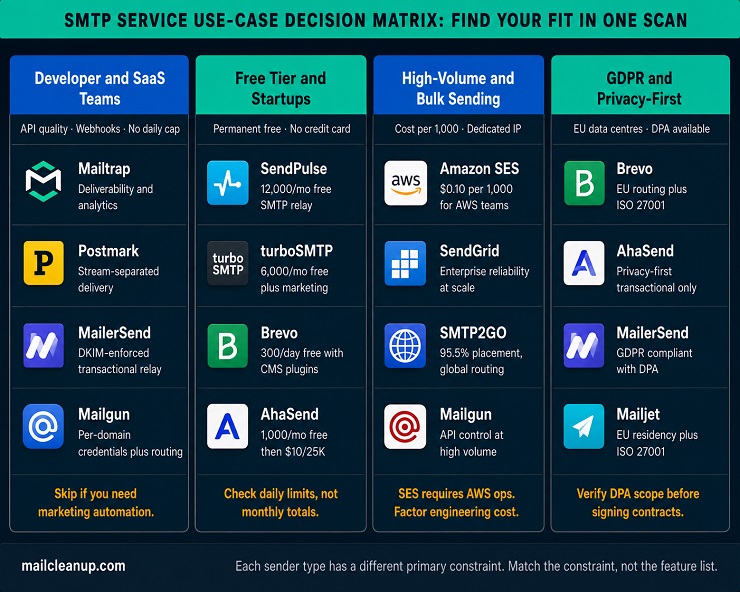
Every provider among the 12 best SMTP services on this list relays email. What varies is which constraints each one is best built to handle. Below we have mapped the most common use-case profiles to the tools we found best suited to each, based on what we consistently saw as the real differentiators during our testing.
Best SMTP Services for Developer and SaaS Teams
For developer and SaaS teams, the shortlist narrows quickly once you match your primary constraint to the SMTP relay service providers that solve it most directly.
| Your Primary Constraint | Best Fit | Why |
|---|---|---|
| Native AI agent tooling for sending and inbound | Mailtrap | Official MCP server, skills, and Agent Inbox for inbound email through one connection |
| API documentation quality and SDK depth | MailerSend | Six-language SDKs, DKIM enforced at domain registration, clean versioned docs |
| Per-domain SMTP credentials across multiple clients | Mailgun | Generates distinct username/password per sending domain; inbound routing included |
| Transactional deliverability with stream separation | Postmark | Message Streams keep product email on a separate IP pool from any broadcast |
| Maximum API control plus in-platform email validation | Mailgun | Email validation API built into paid plans without a separate tool |
One note for developer teams evaluating Mailgun: the GlockApps deliverability decline (-27.75 percentage points, Q1 2024 to Q1 2025) is worth weighing against its API strengths before committing.
Best Free SMTP Services for Startups and Small Businesses
The single most important distinction when comparing free SMTP services is permanent free tier versus time-limited trial. A trial that expires after 60 days is not a free option for an early-stage product; it is a deferred billing decision. Here is where every provider on this list actually stands:
| Provider | Free Monthly Emails | Daily Cap | Permanent? |
|---|---|---|---|
| SendPulse | 12,000 | None | Yes |
| Brevo | 9,000 | 300/day | Yes |
| turboSMTP | 6,000 | 200/day | Yes |
| Mailtrap | 4,000 | 150/day | Yes |
| SMTP2GO | 1,000 | None | Yes |
| AhaSend | 1,000 | None | Yes |
| Mailgun | ~3,000 | 100/day | Yes |
| Postmark | 100 | None | Yes |
| SendGrid | ~3,000 | 100/day | No – 60-day trial only |
For the best SMTP servers in this bracket, evaluate on daily cap rather than monthly total if your sending pattern involves bursts (contact form submissions, triggered alerts). A 200/day cap will throttle a real workload well before the monthly ceiling is reached. AhaSend’s paid entry tier at $10 per month for 25,000 emails is the most affordable first upgrade on this list when free limits no longer cover your volume.
Best SMTP Server for Bulk Mailing and High-Volume Sending
Volume changes the economics entirely. At 10,000 emails per month, setup experience and free tier quality drive the decision. At 100,000 or more, per-send cost is the dominant variable. We found the decision breaks cleanly into three paths based on your team’s AWS experience and operational tolerance:
| Scenario | Best Fit | Cost at 50K/mo | Cost at 500K/mo | What You Give Up |
|---|---|---|---|---|
| AWS team, cost is primary | Amazon SES | $5/mo | $50/mo | Managed dashboard, base support |
| Managed infra, need reliability | SendGrid Essentials | $19.95/mo | Contact sales | Permanent free plan, dedicated IP on entry tier |
| Managed + verified deliverability benchmarks | SMTP2GO Professional | ~$75/mo (100K plan) | Custom | Higher cost per email |
The best SMTP service providers at scale all support dedicated IPs; the differentiator shifts from feature set to total cost of ownership including engineering hours. Amazon SES at 500,000 emails saves roughly $200-450 per month compared to managed alternatives, but requires four to eight hours of initial setup and ongoing self-managed bounce and complaint handling.
Best SMTP Relay Services for GDPR and Privacy-First Operations
GDPR compliance for email relay requires three things: a Data Processing Agreement from your provider, EU data processing or an approved transfer mechanism, and configuration that does not inadvertently route personal data outside compliant jurisdictions. Here is how the clearest GDPR-compliant options on this list compare:
| Provider | EU Data Centre | ISO 27001 | DPA Available | Best Suited For |
|---|---|---|---|---|
| Mailtrap | Yes | Yes | Yes | Developer teams needing EU-compliant deliverability and analytics |
| Brevo | Yes | Yes | Yes | All-in-one: non-technical teams, EU routing |
| MailerSend | Yes | Yes | Yes | Developer teams needing GDPR and clean API |
| Mailjet | Yes | Yes | Yes | Teams mixing transactional and marketing |
| AhaSend | Yes | In progress | Yes | Privacy-first, transactional-only workflows |
The SMTP relay service providers not listed here (SMTP2GO, Postmark, Mailgun, SendGrid, Amazon SES) are GDPR-capable through standard mechanisms but do not offer EU-only data routing as a default or documented option. Always verify DPA scope and current certification status directly with the provider before signing a production contract.
Best SMTP Server Setup Essentials: Ports, Authentication, and IP Strategy
Getting your relay configured correctly from day one prevents the most common deliverability failures we encounter in production setups. The three areas below cover what matters most at initial setup, regardless of which of the best SMTP services you chose.
Which SMTP Port Do the Best SMTP Servers Actually Use?
Four ports are in active use across SMTP relay services. We recommend starting with 587 in almost every case; here is why each port exists and when to use it:
| Port | Encryption Method | When to Use | Current Status |
|---|---|---|---|
| 587 | STARTTLS (upgrades from unencrypted) | Default for all authenticated email submission | Recommended; defined in RFC 6409 |
| 465 | Implicit TLS (encrypted from first packet) | When your provider requires it explicitly | Valid; reinstated by RFC 8314 (2018) |
| 25 | None or STARTTLS | Server-to-server relay only | Blocked by most ISPs for outbound; avoid for client apps |
| 2525 | STARTTLS | Fallback when 587 and 465 are blocked by your host | Unofficial but supported by most major providers |
Our recommendation: start with 587. If your host blocks it, try 2525. Move to 465 only if your provider requires Implicit TLS specifically. Both 587 and 465 provide encrypted, authenticated submission; the difference is in how encryption is initiated, not in the level of protection.
SPF, DKIM, and DMARC: Authentication Across Best SMTP Service Providers
Authentication is not optional in 2026. Google and Yahoo made all three records mandatory for bulk senders in 2024. Even though best SMTP relay services handle the relay, authentication records live in your own DNS and must be configured by you regardless of provider. The table below summarises what each record does:
| Record | What It Does | Location | Setup Time |
|---|---|---|---|
| SPF | Lists the IP ranges and services authorised to send email from your domain | DNS TXT record at your domain root | 5 minutes |
| DKIM | Cryptographic signature verifying outgoing messages have not been tampered with | DNS TXT record (subdomain provided by your relay) | 10 minutes |
| DMARC | Policy telling receiving servers what to do when SPF or DKIM fails | DNS TXT record at _dmarc.yourdomain.com | 10 minutes plus monitoring |
The correct setup order matters:
- SPF first: Add your relay provider’s SPF include string to your DNS. Keep total DNS lookups under 10 to avoid SPF failures from over-inclusion.
- DKIM second: Generate a key pair in your relay provider’s domain settings, add the public key to DNS. Most providers generate this automatically.
- DMARC third: Start at p=none to monitor without blocking. Check reports for two to four weeks, then move to p=quarantine and eventually p=reject once all legitimate sending streams pass cleanly.
Shared IP vs Dedicated IP: What the Best SMTP Relay Services Actually Offer
The shared vs dedicated IP decision is one of the most misunderstood in email infrastructure. At lower volumes, a shared IP maintained by a reputable provider often outperforms a cold dedicated IP with no reputation history. The right choice depends on your volume, list quality, and sending consistency:
| Factor | Shared IP | Dedicated IP |
|---|---|---|
| Reputation | Pooled with other senders on the same address | Entirely yours to build and protect |
| Warmup required | No (provider manages shared pool reputation) | Yes (4-6 weeks gradual ramp required) |
| Effect of other senders | Poor senders on same pool can affect you | No third-party exposure |
| Cost | Included in base plan | $25-60 per month extra across this list |
| Right volume range | Under 50,000 emails per month | Above 50,000-100,000 emails per month |
A dedicated IP makes sense when all of the following are true:
- Your sending volume is consistently above 50,000 emails per month
- Your list is clean with hard bounce rate below 0.5% and complaint rate below 0.1%
- Your sending schedule is regular, not sporadic (irregular large spikes build negative reputation faster on a dedicated IP than on a shared pool)
- You can commit to a four to six week warmup before hitting full production volume
Monitoring your bounce rate throughout the warmup period is essential: a dedicated IP building a high bounce rate creates a negative signal that is harder to recover from than starting on a well-managed shared pool.
FAQs about Best SMTP Services
What is an SMTP relay service, and how is it different from my server’s built-in mail function?
An SMTP relay service routes your outgoing email through a dedicated, authenticated infrastructure rather than your own server’s native mail function. The relay handles IP reputation management, bounce classification, and authentication enforcement. Most default server mail functions send unauthenticated, which spam filters flag easily. A relay service significantly improves inbox placement without requiring you to manage your own mail server.
Which SMTP port should I use: 25, 465, 587, or 2525?
Port 587 is the correct default for authenticated email submission. It uses STARTTLS encryption and is defined in RFC 6409 as the standard client submission port. Use port 2525 if your host blocks 587. Port 465 is valid for Implicit TLS. Port 25 is for server-to-server relay only and is blocked by most ISPs for outbound client traffic.
What is the difference between SMTP relay and an email API, and which should I use?
SMTP relay uses the standard mail protocol, requires only server hostname, port, username, and password, and works with any language or email client without custom code. An email API uses HTTP and JSON, offering more control, better throughput, and richer webhooks but requiring developer integration. Most best SMTP services offer both. Start with SMTP for speed, migrate to the API if throughput demands it.
Can you use a free SMTP service for a real production application?
Yes. Several providers on this list offer permanent free tiers: SendPulse at 12,000 emails per month, turboSMTP at 6,000, Brevo at 9,000 (300 per day), and Mailtrap at 4,000. These cover genuine low-volume production workloads. Check the daily sending cap, not the monthly total, if your application sends in bursts. SendGrid’s free tier is a 60-day trial only, not a permanent option.
What is a dedicated IP in email sending, and when do I actually need one?
A dedicated IP gives your domain its own sender reputation, independent of other accounts. On a shared IP, other senders on the same pool can partially affect your deliverability. A dedicated IP makes sense above 50,000 emails per month with a clean list and consistent schedule. Below that threshold, a well-managed shared pool typically outperforms a cold dedicated IP that has not been warmed.
Why are my emails landing in spam even though I am using a paid SMTP service?
An SMTP service improves your infrastructure but cannot override inbox providers’ classification signals. Common causes of spam placement despite a paid relay: missing or misconfigured SPF, DKIM, or DMARC; high hard bounce rates from unverified contacts; complaint rates above 0.1%; and content triggering spam filters (excessive images, link-heavy formatting, misleading subjects). Check authentication first, then list quality and content.
What is stream separation, and why does it matter for transactional email?
Stream separation routes transactional emails and bulk or marketing sends through separate IP pools with independent reputations. When they share the same pool, a marketing campaign that generates complaints or bounces can suppress inbox placement for your most time-sensitive product emails. Postmark (via Message Streams), Mailtrap, MailerSend, and Brevo all offer stream separation. Mailjet and Amazon SES do not separate streams automatically.
How do I set up SPF, DKIM, and DMARC for my sending domain?
Add SPF first: a DNS TXT record listing services authorised to send from your domain. Your relay provider supplies the exact include string. Add DKIM by generating a key pair in your provider’s settings and publishing the public key to DNS. Then add DMARC at p=none, monitor reports for two to four weeks, and tighten to p=quarantine or p=reject once all legitimate sends pass.