
If you have set up your sending tools, written your emails carefully, and followed the standard advice, yet your campaigns are still landing in the junk folder, the problem is almost certainly not what you fixed. It is what you fixed first.
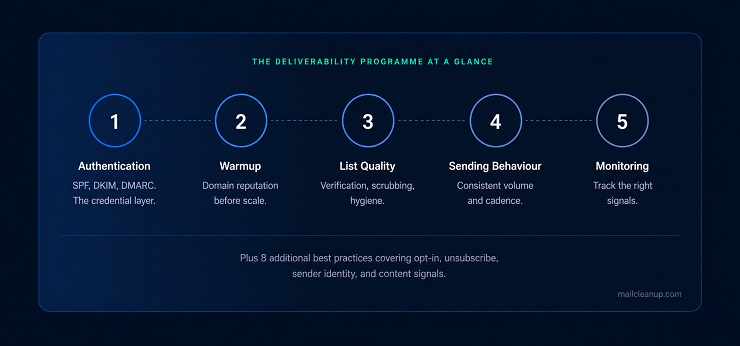
Email deliverability responds to improvements in a specific order. Authentication has to be in place before warmup produces reliable results. Warmup has to be complete before list quality can do its full job. Every layer in the programme either enables or depends on what sits below it.
Treating the ways to improve email deliverability as a flat checklist where any item can be tackled in any sequence is the single most common mistake senders make, and it explains why so many improvement efforts produce inconsistent results.
TL;DR on Improving Email Deliverability
- Email deliverability measures whether your emails reach the inbox, not just whether the receiving server accepted them.
- The ways to improve email deliverability work best when applied as a layered programme in sequence, not as a flat checklist of unrelated fixes.
- Authentication (SPF, DKIM, DMARC) must be correctly configured before any other improvement can be reliably attributed to your domain’s reputation.
- Domain and IP warmup builds the sending history inbox providers use to evaluate whether your emails belong in the inbox before you scale volume.
- List quality covers three dimensions: removing invalid addresses through verification, removing unengaged subscribers through scrubbing, and maintaining ongoing hygiene.
- Sending behaviour signals including volume consistency and frequency are evaluated by inbox providers before they evaluate your content.
- Open rates are an unreliable deliverability monitoring signal in the MPP era. Spam complaint rate, bounce rate, inbox placement rate, and click rate are the metrics that matter.
- Email deliverability best practices outside the five-layer framework, including confirmed opt-in, unsubscribe accessibility, and avoiding purchased lists, still carry real weight.
What Is Email Deliverability?
Email deliverability is the measure of whether your emails reach the inbox. Not whether they were sent, and not whether the receiving server accepted them. Those are delivery metrics. Deliverability is specifically about inbox placement: did the message land where the recipient will actually see it, or did it end up in the spam folder, a filtered tab, or nowhere at all?
The distinction matters because both outcomes look identical in basic sending reports. An email that bounces is clearly not delivered. But an email that lands in the spam folder shows as delivered in most ESP dashboards. If you are measuring campaign success by delivery rate alone, you can be losing a significant share of your audience without your numbers ever flagging it.
Email deliverability is shaped by a combination of technical, behavioural, and content signals. Inbox providers like Gmail, Outlook, and Yahoo evaluate all three when deciding where your email lands. They are asking two questions simultaneously: is this sender verified and trustworthy, and does their sending history suggest their recipients want this mail? The ways to improve email deliverability that produce lasting results are the ones that answer yes to both.
A detailed explanation of what is email deliverability, its best practices and important factors that affect is discussed in a dedicated post.
Why the Order of Email Deliverability Improvements Matters
Most guides present ways to improve email deliverability as a list of independent best practices: set up authentication, clean your list, warm up your domain, monitor your metrics. The individual items are correct. The framing is not. These are not parallel tasks you can work through in any order. They are interdependent layers, and applying them out of sequence either wastes effort or actively creates new problems.
Consider two common mistakes. A sender cleans their email list thoroughly, removing invalid addresses and inactive contacts, then sends a campaign from a domain with no warmup history and finds inbox placement is still poor. The list was clean but the domain had no established reputation to send from. The second sender fully warms their domain, then fires a campaign to a list that has never been verified, hitting spam traps and generating hard bounces that damage the reputation they just spent weeks building. Neither sender did nothing. Both did things in the wrong order.
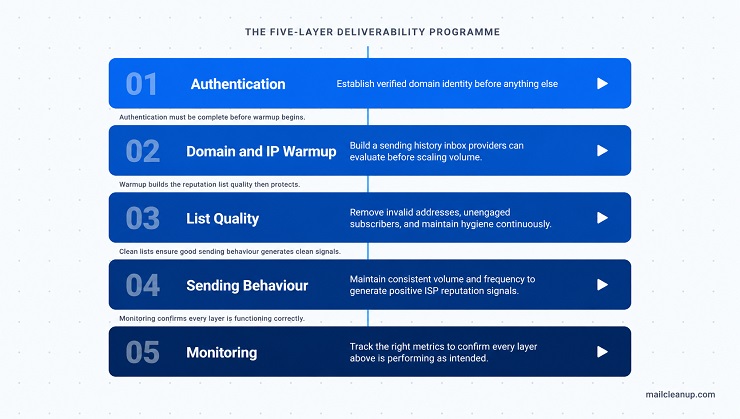
The table below shows the five layers, what each one covers, and why it sits where it does in the sequence.
| Layer | What It Covers | Why It Comes Here |
|---|---|---|
| 1: Authentication | SPF, DKIM, DMARC | Without it, ISPs cannot attribute sending behaviour to your domain |
| 2: Warmup | Domain and IP reputation building | Without a sending history, even clean authenticated mail is treated with suspicion |
| 3: List Quality | Verification, scrubbing, hygiene | A clean list protects the reputation built in Layers 1 and 2 |
| 4: Sending Behaviour | Volume, frequency, consistency | Good behaviour reinforces reputation and generates positive engagement signals |
| 5: Monitoring | Metrics, tools, diagnostics | Without accurate monitoring, you cannot confirm whether any of the above is working |
Email deliverability best practices that fall outside this framework are covered after Layer 5. They are not less important. They simply do not fit into a single dependency layer and are worth addressing at any stage of the programme.
Layer 1: Set Up Email Authentication Before Anything Else
Authentication is the process by which inbox providers verify that an email claiming to come from your domain was actually sent by you. Without it, there is no mechanism for ISPs to distinguish your legitimate emails from spoofed mail using your domain name. More critically for deliverability: without authentication, the reputation signals your emails generate cannot be reliably tied back to your domain. Any warmup work, any list cleaning, any engagement you earn accrues to an unverified identity rather than building lasting domain authority.
There are three protocols every sender needs to have correctly in place. Each one addresses a different layer of identity verification.
- SPF (Sender Policy Framework) specifies which mail servers are authorised to send email on behalf of your domain. It is published as a DNS TXT record. When a receiving server checks an inbound email, it looks up your SPF record to confirm the sending server is on your approved list. If it is not, the email fails the SPF check.
- DKIM (DomainKeys Identified Mail) adds a cryptographic signature to every email you send. The receiving server uses a public key published in your DNS records to verify the signature has not been altered in transit. DKIM proves both sender identity and message integrity simultaneously.
- DMARC (Domain-based Message Authentication, Reporting, and Conformance) ties SPF and DKIM together and tells receiving servers what to do when an email fails one or both checks: monitor only, quarantine to spam, or reject outright. It also generates reporting data showing you whether your domain is being spoofed and how your authentication performs across major inbox providers.
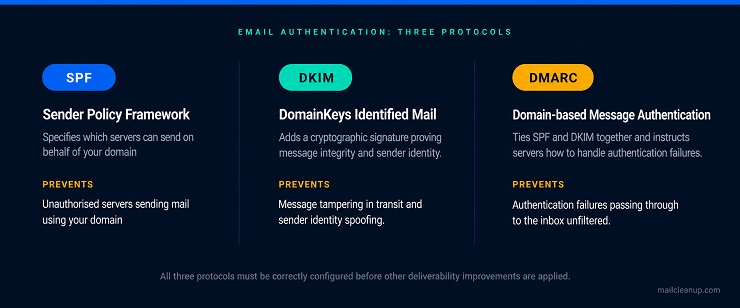
None of these protocols directly push your emails into the inbox. What they do is establish your domain as a verified, trustworthy sender. Without this foundation, any attempt to improve email deliverability through list quality, warmup, or sending behaviour produces results that are either unreliable or unattributable. You cannot build a domain reputation that inbox providers recognise if they cannot confirm who you are.
Ways to improve email deliverability must start at Layer 1 because authentication carries no dependencies. It does not require a sending history, a warmed domain, or an existing reputation. It requires correctly configured DNS records, and it needs to be in place before anything else in this programme is touched. For full setup guidance on SPF, DKIM, DMARC, and the additional protocols BIMI and ARC, see the complete guide to email authentication.
Layer 2: Warm Up Your Domain & IP Before Sending at Volume
A domain with no sending history is an unknown quantity to inbox providers. When that domain suddenly begins sending thousands of emails, inbox providers have no behavioural data to evaluate it against. They cannot distinguish a legitimate new sender from a freshly registered spam domain preparing a blast. The default response is aggressive filtering, regardless of how well authentication is configured and regardless of how clean the list is.
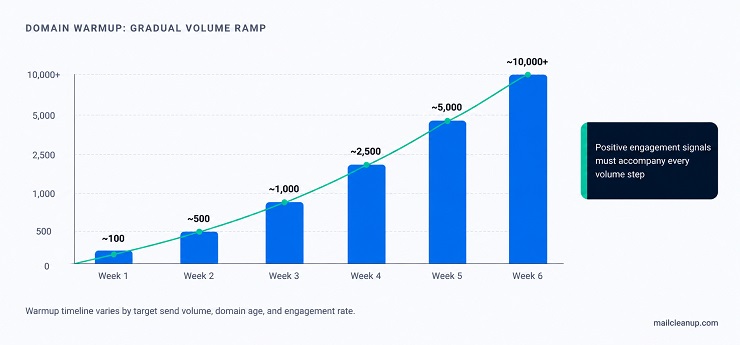
Warmup solves this by building a sending history before you scale. The process starts with low volumes sent to your most engaged contacts, then increases that volume gradually over several weeks. This ramp generates positive engagement signals, replies, clicks, and manual inbox moves, that tell inbox providers this domain sends mail its recipients want. By the time you are sending at full campaign volume, your domain has an established reputation that inbox providers evaluate favourably rather than with suspicion.
The same logic applies to dedicated IP addresses. A shared IP inherits the cumulative reputation of every other sender using it, which is entirely outside your control. A dedicated IP starts with no reputation at all and must be warmed up following the same gradual ramp. Both processes share the same principle: consistent low-volume sending tied to genuine engagement, scaled upward at a pace that inbox providers recognise as normal human sending behaviour.
It is also worth understanding what warmup does not fix. Warming a domain does not compensate for missing authentication. Warmup generates reputation signals, but those signals are only attributed to your domain if DKIM is signing your outbound mail and DMARC is in place. A warmed domain without authentication is warming an unverified identity, and the reputation built cannot be cleanly owned. Layer 1 must be complete before Layer 2 begins.
The ways to improve email deliverability at this layer depend on following a structured week-by-week volume schedule and monitoring engagement signals closely during the ramp. For the full warmup schedule, the signals to watch, the daily volume benchmarks by domain age, and the mistakes that reset warmup progress, see the complete email warmup guide.
Layer 3: Clean Your Email List and Keep It That Way
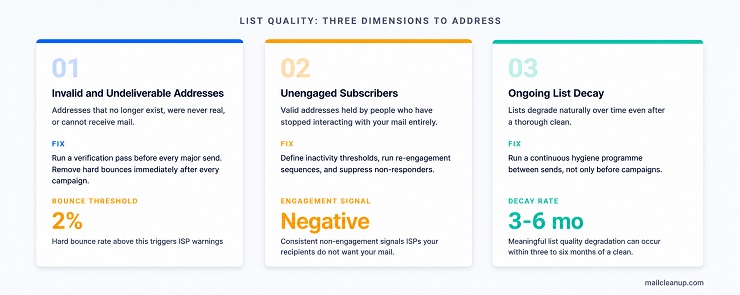
List quality is one of the most direct ways to improve email deliverability, but it operates across three separate dimensions. Most guides treat list cleaning as a single pre-send step. That framing misses two of the three dimensions entirely and leaves significant deliverability risk in place regardless of how well authentication and warmup have been handled.
The three dimensions are:
- Invalid and undeliverable addresses: These are addresses that no longer exist, were never real, or cannot receive mail. Sending to them generates hard bounces. A sustained hard bounce rate above 2% is a significant warning signal to inbox providers that your list is not being maintained. Hard bounces must be removed immediately after every send and must never be re-attempted. For a full explanation of how bounce types differ and what each one means for your sending programme, see soft bounce vs hard bounce.
- Unengaged subscribers: Valid addresses held by real people who have stopped interacting with your mail entirely. These contacts do not generate hard bounces, so they create no visible technical problem. But their consistent non-engagement is an active negative signal to inbox providers. A large proportion of unengaged subscribers drags down your overall engagement rate and signals to ISPs that your recipients do not want your emails.
- Ongoing decay: Lists degrade naturally over time. Addresses become invalid, people change jobs or providers, dormant contacts accumulate, and previously engaged subscribers go cold between sends. Without a continuous process for identifying and removing these contacts, list quality deteriorates between campaigns even if a thorough clean was run recently.
Each dimension has a corresponding fix. Invalid addresses are addressed by running your list through a verification service before each major send and removing hard bounces immediately after every campaign. For a full step-by-step guide to the verification pass and how to act on each result category, see how to clean email lists.
Unengaged subscribers are addressed through engagement-based scrubbing: defining inactivity thresholds, running re-engagement sequences, and suppressing contacts who do not respond. For the full scrubbing methodology including threshold frameworks by send frequency and sunset policy construction, see email list scrubbing. Ongoing decay is addressed through a structured hygiene programme running continuously between sends, not only before campaigns. For the full ongoing discipline and the specific triggers that should prompt a hygiene action, see email list hygiene.
One specific risk deserves its own note: spam traps. Spam traps are addresses maintained by inbox providers and anti-spam organisations to identify senders who are not managing their lists responsibly. They do not click, reply, or generate any positive engagement. Hitting one signals that your list contains purchased or scraped addresses, unremoved hard bounces, or contacts dormant long enough to have had their addresses converted into traps.
Email verification alone cannot protect you from spam traps because many trap addresses are technically valid and pass standard checks. The only reliable protection is addressing all three list quality dimensions consistently. For a full breakdown of every spam trap type and what each one signals about your sending programme, see what are spam traps.
The ways to improve email deliverability at this layer require treating list quality as a continuous programme rather than a pre-send preparation task. A list cleaned once and left untouched will have decayed meaningfully within three to six months, hence a regular process of cleaning your email lists must be followed.
Layer 4: Send at a Consistent Volume and Frequency
Inbox providers evaluate your sending behaviour as a pattern before they evaluate anything else. Before any spam filter analyses your content, subject line, or HTML structure, ISPs have already formed an assessment of your domain based on how you send: the volume, the frequency, the consistency of that volume over time, and whether any of it resembles the behaviour of a compromised account or a domain activated purely to send a bulk blast.
The table below shows the most common sending behaviour mistakes, what ISPs infer from each one, and the deliverability consequence.
| Sending Behaviour | What ISPs Infer | Deliverability Impact |
|---|---|---|
| Sudden volume spike from a low baseline | Compromised account or bulk blast | Aggressive filtering, potential blocklisting |
| Long silence followed by a large send | Dormant domain reactivated for a campaign | Treated with suspicion, high spam placement rate |
| Sending to all subscribers regardless of engagement level | Low-relevance targeting, indiscriminate sending | Weak engagement signals drag down sender reputation |
| Inconsistent send days and times with no predictable cadence | Unreliable sender pattern | Difficult for ISPs to build a positive behavioural baseline |
| Gradual, consistent volume growth tied to genuine engagement | Legitimate sender scaling naturally | Positive reputation signal, improved inbox placement over time |
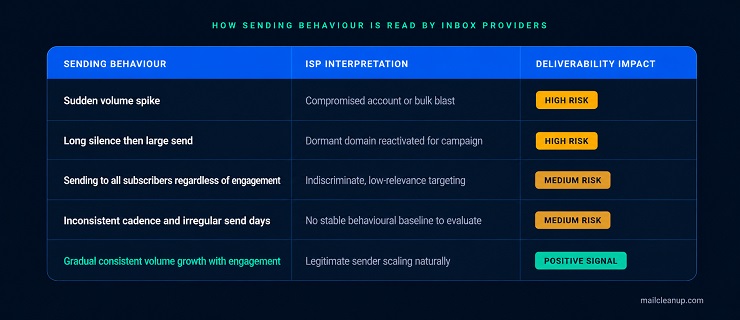
Consistency is the signal you are building toward. A domain that sends a predictable volume on a regular cadence, and receives consistent engagement from its recipients, is a domain inbox providers learn to trust over time. That trust does not build through a single clean send. It builds through repeated sends that confirm the same behavioural pattern.
Segmentation is the most effective way to improve email deliverability at this layer because it ensures your highest-engagement contacts form the core of every send. Sending first to your most active subscribers and using their engagement signals to reinforce your sender score, before extending to less active segments, is standard practice for senders managing large lists. For contacts who have not engaged within a defined inactivity window, suppression is the correct action before any re-engagement sequence is attempted. The full framework for defining those thresholds and building a suppression policy that protects deliverability is covered in the email list scrubbing guide.
Layer 5: Monitor the Right Email Deliverability Metrics
Monitoring is the layer that tells you whether everything above is working. Without it, you can follow every improvement in this programme and still miss a deliverability problem developing quietly behind misleading numbers. How to improve email deliverability is a question that cannot be answered reliably if the signals you are monitoring do not reflect what inbox providers are actually doing with your emails.
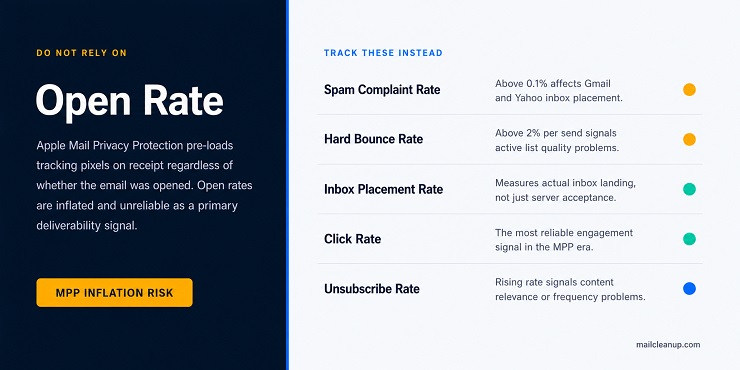
The most misleading number in deliverability monitoring today is the open rate. Since Apple Mail Privacy Protection was introduced, Apple devices pre-load email tracking pixels upon receipt, regardless of whether the recipient actually opened the email. This inflates open rates for any list with a significant share of Apple Mail users. A sender whose inbox placement is declining can still see a flat or rising open rate and have no idea their emails are landing increasingly in spam. Open rate is not a signal to ignore entirely, but it cannot be your primary deliverability health metric. It is no longer reliable enough for that role.
The metrics that give you accurate insight into your email deliverability are:
- Spam complaint rate: The most critical single metric to monitor. Gmail and Yahoo have both publicly confirmed that a complaint rate above 0.1% will affect inbox placement, and a rate above 0.3% triggers aggressive filtering. Monitor this after every campaign send, not on a monthly review cycle.
- Hard bounce rate: A sustained hard bounce rate above 2% signals active list quality problems to inbox providers. Track this per send and act on it immediately. Waiting for a quarterly review is too slow.
- Inbox placement rate: Different from delivery rate. Inbox placement measures how many of your delivered emails landed in the primary inbox rather than the spam folder or promotional tab. This requires a dedicated tool such as Google Postmaster Tools or a third-party inbox placement testing service.
- Click rate: In the MPP era, click rate has replaced open rate as the primary engagement signal worth tracking for deliverability purposes. A subscriber who clicks has genuinely interacted with your email. Declining click rates are an early warning of engagement deterioration before it becomes a visible deliverability problem.
- Unsubscribe rate: A content relevance signal rather than a direct deliverability metric. A rising unsubscribe rate signals that your content relevance or sending frequency is declining, which will show up in complaint rates and engagement signals if left unaddressed.
One tool every sender should have connected is Google Postmaster Tools. It provides domain and IP reputation scores directly from Gmail, spam rate data from Google’s perspective, and authentication status reporting, all at no cost. It is the clearest direct window into how the largest inbox provider evaluates your domain. Yahoo Postmaster provides equivalent data for Yahoo and AOL inboxes.
Improving email deliverability requires that the signals you track reflect the reality of where your emails are landing. Sender reputation as a composite measure of all of the above, how it builds, what damages it, and how to recover it after a problem, is covered in full in the email sender reputation guide. For the specific process of checking whether your domain or IP has been blocklisted and working through the delisting steps, see email blacklist check and removal.
Other Email Deliverability Best Practices Worth Following
The five-layer programme addresses the structural and operational improvements with the most direct impact on email deliverability. But several email deliverability best practices sit outside the layered framework and are worth following regardless of where you are in the programme. Leaving any of these unaddressed simply because they do not fit a single layer would be a mistake.
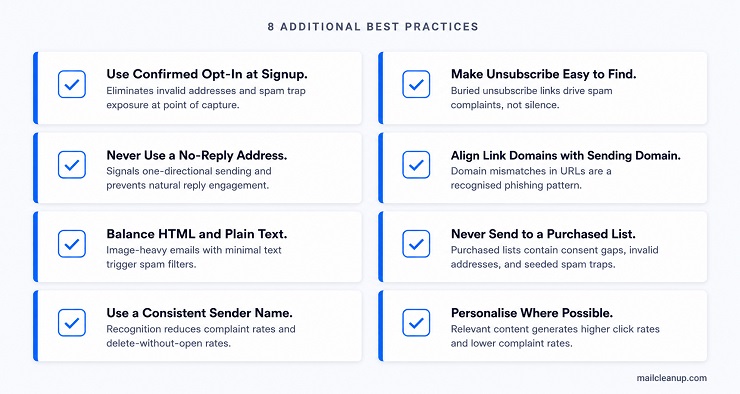
- Use confirmed opt-in at signup: A double opt-in process requires every new subscriber to confirm their address before being added to your list. This eliminates invalid and mistyped addresses at the point of capture, reduces spam trap exposure from the moment a contact enters your list, and ensures every address belongs to someone who actively chose to receive your emails. The cumulative benefit to engagement rates and complaint rates compounds over time.
- Make your unsubscribe option clear and accessible: A subscriber who cannot find or use your unsubscribe link does not stay quietly on your list. They mark your email as spam. That complaint is significantly more damaging to your sender reputation than a clean unsubscribe. One-click unsubscribe positioned clearly in the footer is a basic operational requirement. Gmail and Yahoo now mandate it for bulk senders.
- Do not send from a no-reply address: Sending from a no-reply address signals to inbox providers that the email is one-directional and that recipients have no channel to respond, reply, or request removal. It also prevents the natural reply engagement that generates positive sender signals with ISPs. Use a monitored sending address instead.
- Keep your link domains aligned with your sending domain: Links in your emails pointing to a different domain from the one you are sending from are a pattern closely associated with phishing emails. Inbox providers notice domain mismatches in URL structure. Where possible, all URLs in your emails should resolve to your sending domain or a recognised subdomain of it.
- Maintain a balanced HTML-to-text ratio: Emails built almost entirely of images with minimal readable text are a recognised spam filter trigger. Every email should include a plain text version alongside the HTML version, and your HTML content should contain enough readable text that spam filters can evaluate what the email is about rather than defaulting to suspicion. Heavy image-to-text ratios are a common issue in promotional email templates.
- Never send to a purchased list: Purchased lists contain addresses collected without consent, invalid and expired addresses, and seeded spam traps. No verification pass recovers a sender reputation damaged by a blast to a purchased list. The damage operates at the domain level and can be permanent. If you have inherited a list whose acquisition origin you cannot confirm, treat it as a purchased list and do not send to any segment of it without a full audit first.
- Use a sender name your subscribers will recognise: From name recognition directly affects whether recipients open, ignore, or mark your email as spam. A consistent, recognisable sender name reduces delete-without-open rates and complaint rates, both of which feed into your sender reputation. Changing your sender name frequently creates confusion and erodes the recognition signals that deliverability depends on.
- Personalise your emails where possible: Inbox providers use engagement signals as part of their filtering decisions. Relevant, personalised content generates higher click rates and lower complaint rates than generic broadcast emails sent identically to everyone on a list. Even basic personalisation improves the engagement signals that feed directly into your sender reputation over time.
Deliverability Is Not a One-Time Fix. It Is a Programme You Run Continuously.
The five-layer programme gives you a clear sequence to work through, but completing it once does not mean your email deliverability is permanently resolved. Every layer requires ongoing maintenance. Authentication records can break when DNS configurations are updated. Domain reputation built through warmup can erode if sending behaviour becomes inconsistent or complaint rates rise. List quality degrades between campaigns regardless of how thorough the last clean was. Sending behaviour patterns shift when teams change their campaign cadence. Monitoring catches problems, but only if you are actually reviewing the signals regularly.
The senders who sustain strong inbox placement over time are not the ones who ran a one-off deliverability audit and moved on. They are the ones who treat the programme as operational infrastructure rather than a remediation project. Authentication is reviewed whenever DNS records are touched. List quality is maintained on a rolling basis, not triggered only by a deliverability dip. Complaint rates and bounce rates are reviewed after every campaign send, not monthly. The email deliverability best practices covered in this post, both the layered framework and the miscellaneous items outside it, only produce compounding results when applied with that level of consistency.
The other thing worth understanding is that inbox provider behaviour changes. Gmail, Outlook, and Yahoo adjust their filtering criteria, announce new sender requirements, and tighten thresholds without always giving advance notice. The Google and Yahoo bulk sender requirements that came into effect in 2024 and made authentication mandatory for high-volume senders are the most recent major example. Staying current with inbox provider policy changes is part of the programme. Improve email deliverability once and maintain it indefinitely requires treating it as a living system, not a completed task.
FAQs on How To Improve Email Deliverability
What does email deliverability mean?
Email deliverability is the measure of whether your emails reach the inbox rather than the spam folder. It is distinct from email delivery, which measures whether the receiving server accepted the email at all. An email can be delivered to a server and still land in spam. Deliverability is specifically about inbox placement, which is the outcome that determines whether your recipients actually see your emails.
What is a good email deliverability rate?
A delivery rate of 95% or above is generally considered acceptable, but delivery rate alone is not the most meaningful benchmark. Inbox placement rate is more important and harder to achieve. Validity’s 2025 benchmark puts the global average inbox placement rate at 83.5%, meaning roughly one in six emails sent globally never reaches the inbox. Aiming for an inbox placement rate above 90% is a more useful target than delivery rate alone.
Why are my emails going to spam even though my list is clean?
A clean list is Layer 3 of a five-layer programme. If authentication is not correctly configured, inbox providers cannot verify your domain identity, and your emails may be filtered regardless of list quality. If your domain has no warmup history or your sending behaviour has been inconsistent, inbox providers may have assigned your domain a low reputation score that a clean list alone cannot override. List quality is necessary but not sufficient.
Does email authentication actually improve deliverability?
Authentication is the prerequisite for deliverability improvement rather than a direct deliverability lever on its own. SPF, DKIM, and DMARC do not push your emails into the inbox. What they do is establish your domain as a verified sender, which allows inbox providers to attribute your sending behaviour and reputation signals to your domain. Without authentication, no other improvement to your email deliverability programme can be reliably recognised or rewarded.
How long does it take to improve email deliverability?
Technical fixes like authentication can be confirmed within hours of DNS propagation. Domain warmup typically takes four to eight weeks depending on target send volume and engagement signal quality. Reputation recovery after a deliverability problem, such as a blacklisting or a spike in complaint rates, generally takes four to six weeks of consistent good sending behaviour to resolve. There is no shortcut to reputation building. The timeline is set by inbox providers, not by the sender.
What is the difference between email delivery and email deliverability?
Email delivery measures whether the receiving mail server accepted your email. Email deliverability measures whether it reached the inbox. Both are distinct outcomes. An email that is delivered has been accepted by the server. An email that is deliverable has made it past spam filters and landed where the recipient will see it. Most ESP dashboards report delivery rate, not inbox placement rate, which is why deliverability problems can go undetected for extended periods.
Does list size affect email deliverability?
List size on its own does not determine email deliverability. What matters is the quality and engagement level of the addresses on your list relative to its total size. A list of 500,000 addresses with a low engagement rate and a high proportion of inactive contacts will produce worse deliverability outcomes than a list of 50,000 highly engaged subscribers. Inbox providers evaluate engagement signals as a proportion of your total sends, so a large but unengaged list actively damages deliverability in a way that a smaller, healthier list does not.
What is the maximum spam complaint rate before deliverability is damaged?
Gmail and Yahoo have both confirmed that a spam complaint rate above 0.1% will begin to affect inbox placement. A rate above 0.3% triggers aggressive filtering that can suppress the majority of your emails into spam. These thresholds apply per sending domain and are monitored on a rolling basis, not a monthly average. A single campaign generating a complaint rate above 0.1% should prompt an immediate review of list quality, segmentation, and content relevance.